How to use AI Visibility in SEO Stack
Learn how to use the AI visibility tool in SEO Stack, the features and functions.
Which questions bring your competitors into AI answers, and which pages do those answers cite? Open Insights → AI Visibility to investigate. This walkthrough follows a UK retail SEO question from a seven-day project comparison through to the editorial source cited in an individual Google AI Mode response.
Set the scope before comparing results
Select the website in the sidebar and open Insights → AI Visibility. Choose the date range, model and prompts at the top. Start with Last 7 days, All models and All prompts. To investigate a change on ChatGPT, keep the dates and prompts fixed, then change only the model. The selector also offers Gemini and Google AI Mode. Check which platforms actually returned runs for the prompt.
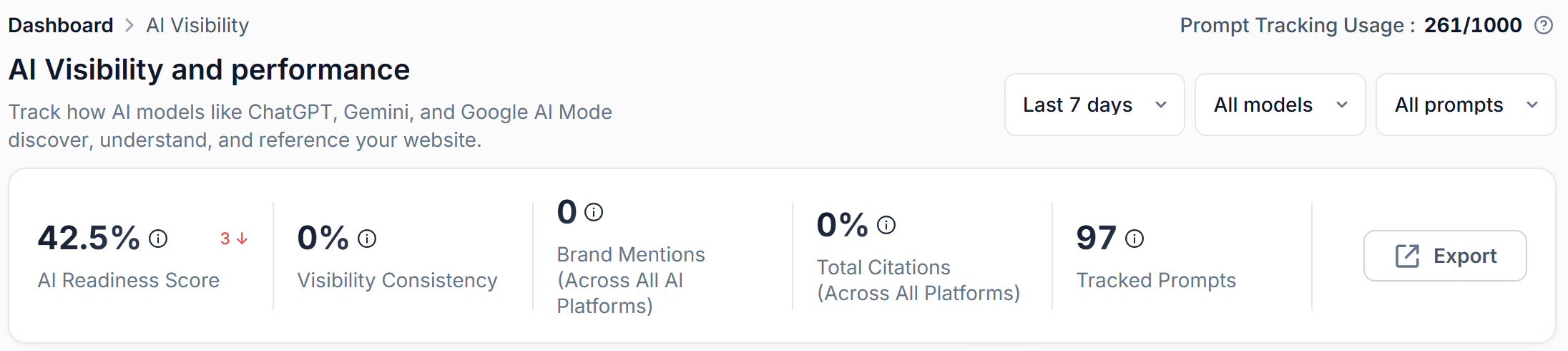
Prompt Tracking Usage shows allowance use. Tracked Prompts counts the questions in the project report. Here the usage indicator reads 261/1,000 while the report shows 97 tracked prompts. If you see Track prompts to see AI Visibility, open Go to Prompt Research, check the topics and competitors, and select relevant questions for tracking. A question marked Untracked can be in the research list before daily tracking starts.
 image
Date, model and prompt selectors above the five summary cards.
Read the scorecards together
| Metric | How to use it |
|---|---|
| AI Readiness Score | A summary indicator for the site. The example scores 42.5% while brand mentions are zero. Use the mention and citation measures to check actual exposure. |
| Visibility Consistency | Check how regularly the brand appears across the tracked results. Open a prompt’s run history to see whether appearances repeat. |
| Brand Mentions | Counts detected mentions across the platforms in scope. Open the underlying response to see how the brand was described. |
| Total Citations | The headline card displays a percentage. For individual source links, use the Sources tab of a recorded response. |
| Tracked Prompts | The number of tracked questions in scope. One question can generate multiple runs on different dates and platforms. |
In this seven-day example, the insights panel reported 97 prompts and 581 runs. The site recorded zero brand mentions. There was enough recorded activity to investigate where competitors appeared.
Compare visibility, position and share of voice
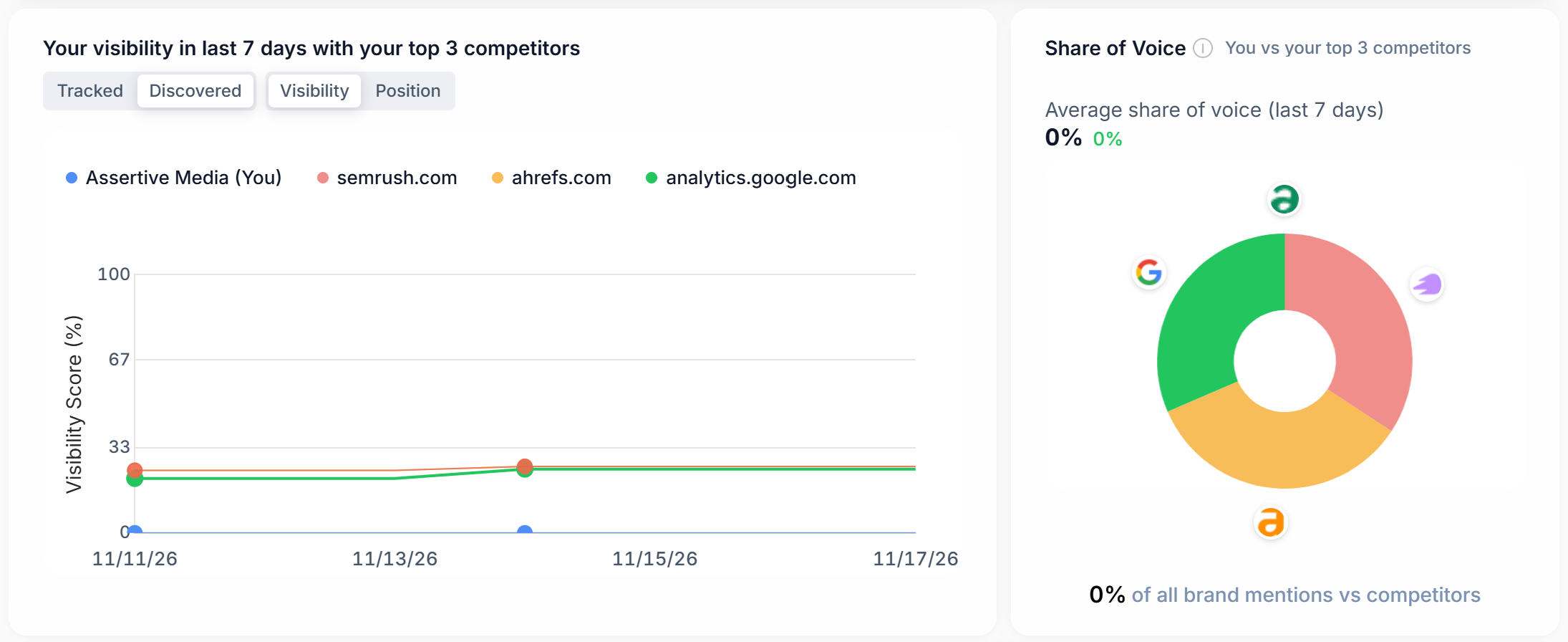
Start with Tracked → Visibility to compare the brand and its tracked competitors over time. Switch to Discovered to inspect competitors found in the answers. Use Position to see where brands appeared in responses that named them. When a brand is absent, a missing rank is a different result from a low rank.
Share of Voice measures the brand’s share of mentions in the comparison. In the competitor table, Ahrefs had 26% visibility, 3.57% share of voice and 97 mentions. The first percentage describes coverage across the sample. The second describes its share of the mentions counted. Use the trend and selected date range when reporting either figure.
 image
Use the toggles above the trend chart and read share of voice alongside it.
Check whether AI platforms sent visitors
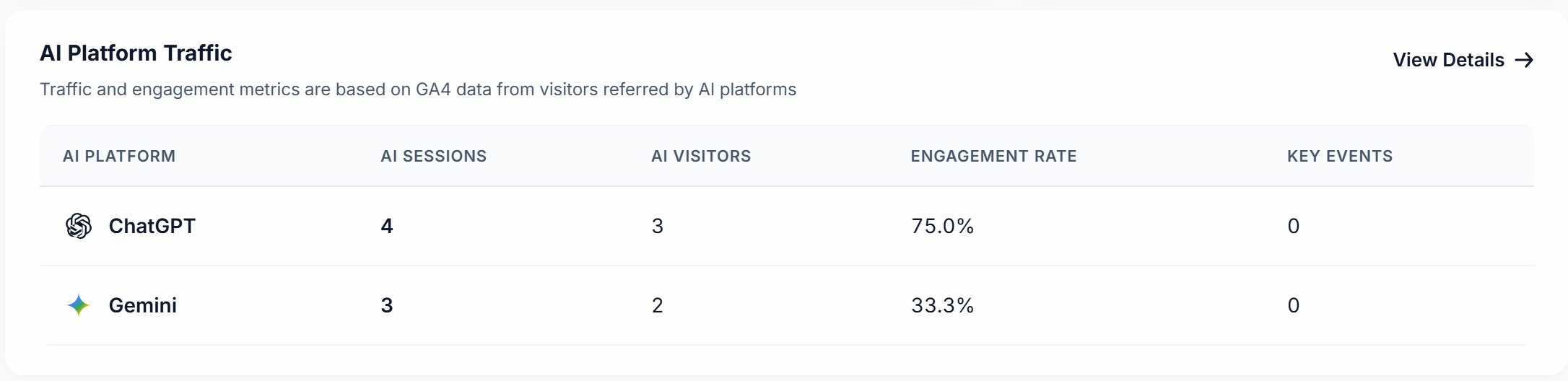
AI Platform Traffic uses GA4 referral data. Read sessions and visitors alongside engagement rate and key events. In this project, ChatGPT and Gemini each sent three sessions from two visitors. ChatGPT had a 66.7% engagement rate and Gemini had 33.3%. Both recorded zero key events. With three sessions per platform, one engaged session accounts for roughly 33 percentage points.
Those referrals can coexist with zero brand mentions in the tracked prompts. Visitors can arrive from conversations outside your monitored question set. Choose View Details to investigate the traffic. If the panel displays Connect GA4, connect the relevant analytics property first.
 image
GA4 referrals by AI platform, including sessions, visitors, engagement and key events.
Expand a brand and find the topics behind its results
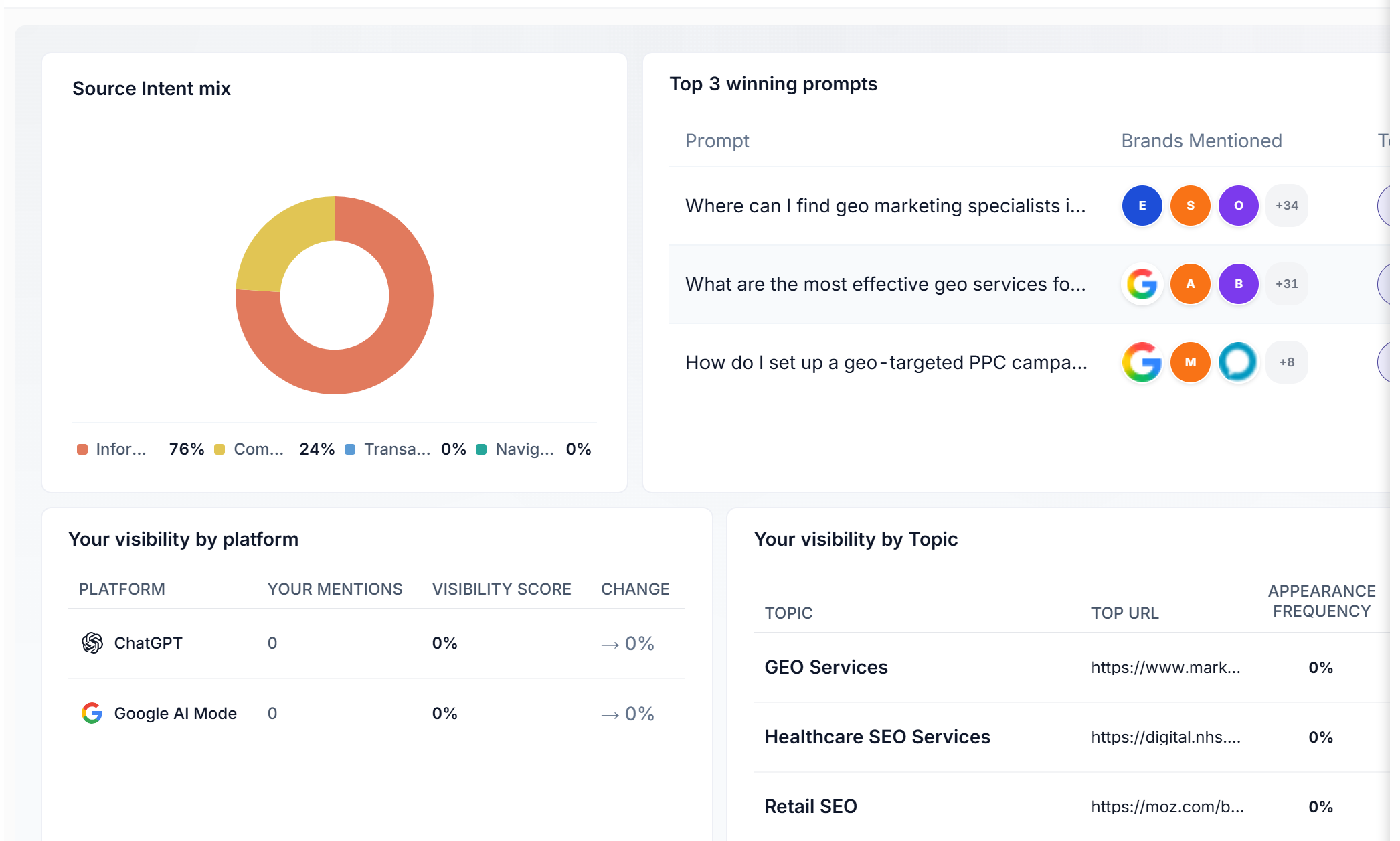
Scroll to Your brand along with top competitors in LLM’s. The row contains the top prompt, visibility, share of voice, mentions, citation rate, sentiment and trend. Select Know more to see the detail. Source Intent mix breaks down the prompt set. Here it was 76% informational and 24% commercial. That split helps explain what kinds of question the project is measuring.
Top 3 winning prompts identifies questions to open in Prompt Research. Check the brands actually mentioned. Your visibility by platform separates the model results. Your visibility by Topic groups the top URL, appearance frequency, prompt coverage, prompt count and citations. Retail SEO showed ten prompts, 137 citations and 0% brand appearance. Open an individual run to identify who received those citations.
 image
Intent mix and the platform breakdown for the selected brand.
Open a competitor gap
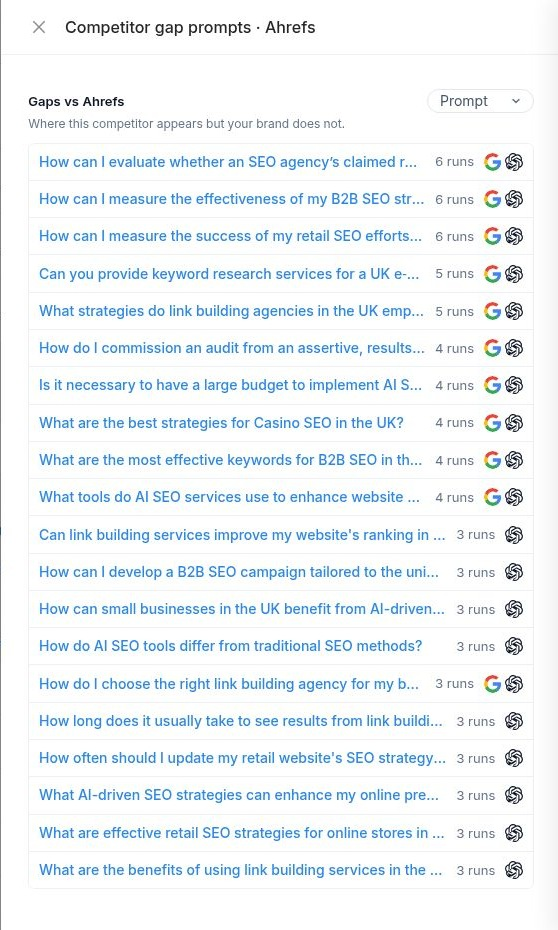
Under AI Insights & Recommendations, look for Coverage opportunity and choose Review gap prompts. The drawer lists questions where the selected competitor appeared and your brand was absent. Use the run count and platform icons to distinguish a one-off mention from a repeated pattern.
In Gaps vs Ahrefs, we opened “How can I measure the success of my retail SEO efforts in the UK market?” The row showed six runs across Google AI Mode and ChatGPT. It is a useful question for a retail SEO agency because it reveals which sources models use when buyers ask how to measure results.
 image
The competitor gap drawer lists the questions, observed runs and platforms.
Read the prompt report and the actual answer
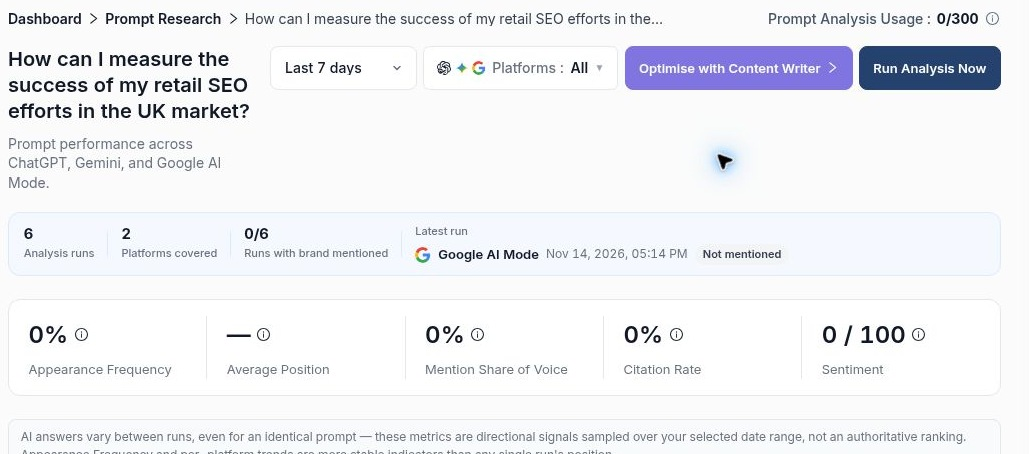
Check Analysis runs, Platforms covered and Runs with brand mentioned. For this retail SEO question, the project appeared in 0 of 6 runs across two platforms. In the brand comparison farther down, Ahrefs appeared in all six, with an average rank of 4 and a latest rank of 7. Keep the prompt-level 100% visibility separate from its 26% across the broader report.
In Prompt Run History Across Platforms, find the date and platform you want and select Response Breakdown. Read Response for the wording, Competitors for the named alternatives, Sources for referenced links and Actions for suggestions tied to that run.
 image
The prompt report confirms six runs, two platforms and zero appearances for the project.
Check what earned the citation
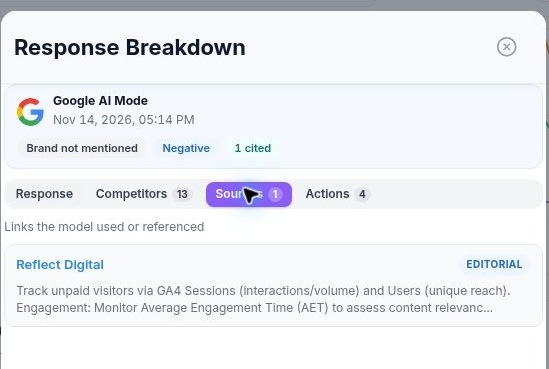
The Google AI Mode response on 14 November listed 13 competitors and one source. Open Sources and follow the editorial reference to Reflect Digital. The excerpt discusses GA4 sessions, users and engagement. A named tool such as Ahrefs and a cited publisher such as Reflect Digital play different roles in this answer. Record both when briefing a writer.
 image
The Sources tab identifies the publisher and the passage associated with the citation.
Use the finding to brief and measure a change
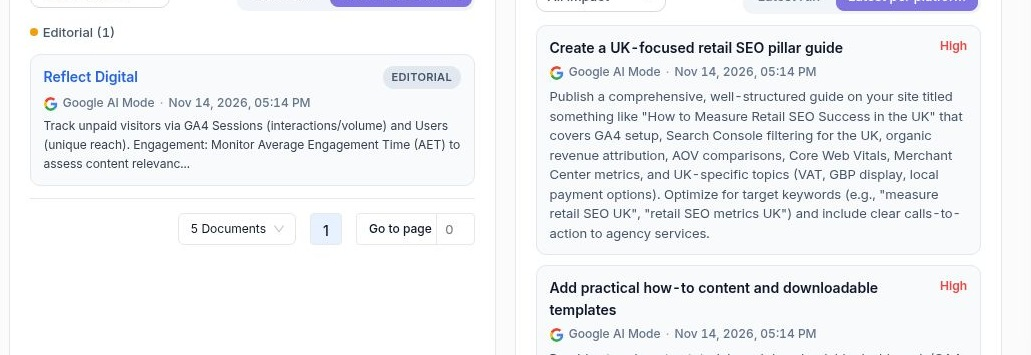
In Sources & Citation Categories, choose Latest run to inspect one answer or Latest per platform to compare the latest available answers. Use the category selector to narrow the sources. AI Recommendations has its own run scope and impact filter. The report suggested a UK retail measurement guide and practical reporting templates.
For this prompt, first check whether your existing retail SEO page already explains how to segment UK organic traffic and connect it to revenue. If it does, inspect the examples. Could a retail manager follow them in GA4 and repeat the calculation? A worked example covering organic revenue, conversion rate and average order value gives the reader something concrete to use.
Log the publication date in Annotations. On the next review, open the same prompt with the same platform filters and compare appearance frequency, mentions and cited pages across several runs. Use Export for the reporting snapshot or Ask AI for a follow-up question about a particular platform, topic or competitor.
 image
More in Getting started
Website Overview: review your SEO and AI visibility performance
Use Website Overview to review search performance, AI visibility and SEO health, then choose the right report for your next action.
ReadWebsites and Dashboard: choose a project and review your portfolio
ReadWhat is SEO Stack?
What the platform does, what it sits on top of, and what it is not.
ReadHow data warehousing works
Why Google's 16-month window exists, and what SEO Stack does about it.
Read