AI Assistant: ask questions about your SEO data
AI Assistant provides a conversational way to request SEO analysis and reports. You can start from a prompt library or ask a specific question about an authorised website. Use it to summarise data, explore a change and request a more detailed breakdown without manually assembling every view.
Start a focused question
- Open AI Assistant in the sidebar and confirm the intended website.
- Choose a Quick Action or use Ask about your SEO data.
- Specify the website, data source, exact dates, metric and breakdown you need.
- Select Ask AI and allow the data query to complete.
- Check the returned scope and data before drawing a conclusion or requesting follow-up analysis.
The screen shows tool activity while a response is being prepared, offers Stop during processing and suggests follow-up questions after an answer. New Chat starts a new conversation, and Recent Chat opens available conversation history. A voice-input control is present but was not tested.
Choose a prompt category
| Quick Action | Intended use described in the interface |
|---|---|
| SEO Analysis | Search-performance investigation using analysis prompts. |
| GA4 Analysis | Google Analytics analysis. |
| Hybrid GSC & GA4 SEO Analysis | Analysis combining Search Console and Analytics. |
| Reporting | Performance, work and client reporting prompts. |
| AI SEO | AI-related analysis and data extraction prompts. |
The SEO Analysis library included prompts for declines, cannibalisation, opportunities, content gaps, CTR and page/query breakdowns. Review the question and its assumptions before running it. The availability of a category does not establish that the selected website has the necessary data connected.
A verified example
The walkthrough submitted:
For https://sravskitchen.co.uk/ show total Google Search Console clicks and impressions from 2026-08-17 to 2026-09-15. State the exact dates and data source. If the data is unavailable, say so rather than estimate it. Do not change any data or settings.
The assistant showed a get overall metrics activity and returned 232 clicks and 6,399 impressions, explicitly identifying Google Search Console and the requested dates. These are the assistant's returned results for that scope, not permanent benchmark figures.
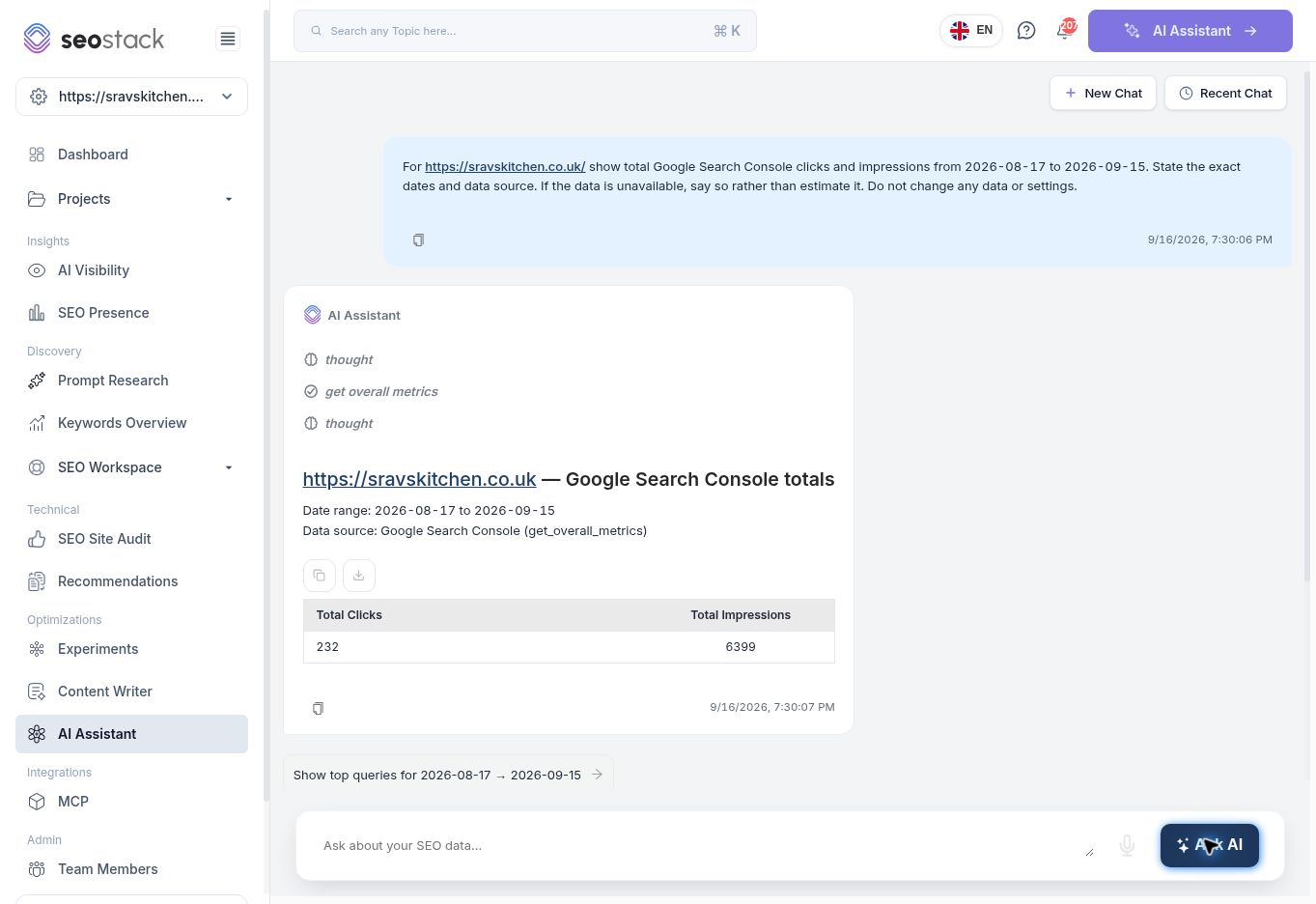 Completed AI Assistant response showing exact dates, source and metrics.
Suggested follow-ups included top queries, page-level clicks and impressions, and a previous-period comparison. The walkthrough verified this completed totals query. An earlier broader comparison request was still processing when navigation occurred; its completed answer and persistence were not verified.
Completed AI Assistant response showing exact dates, source and metrics.
Suggested follow-ups included top queries, page-level clicks and impressions, and a previous-period comparison. The walkthrough verified this completed totals query. An earlier broader comparison request was still processing when navigation occurred; its completed answer and persistence were not verified.
Make questions reproducible
Prefer:
Compare the last 28 complete days with the preceding 28 for this website. List the five pages with the largest absolute click loss. Show both periods' clicks, impressions, CTR and average position, exact dates and filters. Separate observations from possible explanations.
A useful follow-up is:
For the highest-loss page, show its queries with the same dates and filters. State any missing data or row limits.
This is more useful than “Why is my SEO bad?” because another person can reproduce and check the result.
Interpret the answer
Check the website and whether the answer uses GSC, GA4, stored AI visibility results or an estimate. A result describing search clicks does not establish sessions, conversions or revenue. Ask for the date range and grouping if they are omitted.
Treat explanations of causes as hypotheses unless supported by further evidence. A decline occurring near an algorithm update or content edit does not prove that event caused it. Compare the result with the relevant report using the same scope before making a significant decision.
Troubleshooting
For a slow or unclear response, first let the query finish and inspect its activity. If necessary, stop and narrow the request to one website, one source and one date range. Do not repeatedly submit the same broad request without checking whether it is already running.
For GA4 or hybrid questions, verify the website's Analytics connection. The example website did not have GA4 connected, so GA4 and hybrid outputs were not tested. Missing data must not be replaced with invented numbers.
Use a completed answer to define a task or investigation. Do not assume that the assistant's recommendation has changed the public website or completed the work for you.