Search Console, GA4 & AI visibility
New in V3Know whether the changes you make are actually working
Tell SEO Stack when you made a change and which metrics you want to measure, and it will benchmark your performance before and after across Google Search Console, GA4 and AI visibility, then give you a written AI analysis of what did and did not work.
Experiments across




- 100% data privacy
- 99.99% uptime
- Nothing to configure
- Export anytime, no limits
Trusted by leading companies
The problem
Most website changes are deployed without a meaningful way of tracking impact, whether you have redesigned a homepage, changed your navigation, rebuilt a checkout or deployed visual changes to your landing pages, knowing what is and is not working is key. Usually the numbers look different a few months later and nobody can say with any confidence which change was responsible, so the same conversations get repeated with very little evidence behind them. SEO Stack provides AI Experiments that allow you to define your experiment and to see the outcome.
You record the date you made the change and the metrics you want to measure, then SEO Stack compares everything afterwards against the same length of time before it.
Outcome: your hypothesis was correct
Clicks are up 34% and conversion rate is up 36.8% against the same length of time before the redesign, so the changes you made are working.
What you can test
Five types of experiment you can run in SEO Stack
Every experiment is set up in the same way, you tell SEO Stack when the change happened, which metrics you want to benchmark and how long the comparison should run for. What changes from experiment to experiment is simply which metrics matter to you.
AI Visibility experiments
Are your changes increasing AI visibility and traffic?
You can set up annotations for website changes designed to improve your AI visibility, whether that is increased citations, more brand mentions in LLMs or better positioning in AI answers. SEO Stack allows you to select the sources you want to include, including GA4 traffic sources, so you can look directly at the impact your experiment has had on clicks coming from LLMs rather than trying to infer it from elsewhere.
- Benchmark citations and brand mentions before and after you make a change designed to improve AI visibility
- Include GA4 traffic sources so clicks arriving from LLMs are measured on the same chart as everything else
- Understand whether growth is coming from AI visibility or from ordinary organic search
Conversion experiments
Did your changes improve conversions and revenue?
Benchmark a change against GA4 conversion rate, revenue, transactions and bounce rate. Landing page redesigns, full site rebuilds, funnel changes, checkout changes: pick the metrics that define success and let the AI analysis in SEO Stack show you whether you achieved your desired outcome, what did and did not work.
- Track conversion rate, revenue, transactions, average order value and bounce rate against your change date
- Works for checkout changes and funnel changes just as well as it does for individual pages
- The AI analysis explains what is and is not working, along with what you should do about it
GA4 experiments
You can run an experiment against any GA4 metric
You can literally run any GA4 experiment you want to benchmark any metric, from bounce rate to conversion rate, from exit rate through to average session duration, revenue per user or cart-to-view rate. The metric picker gives you the full GA4 catalogue rather than a shortlist, so you can choose whatever is relevant to the change you have made.
- Search and select from the full set of GA4 metrics available on your property
- Combine as many metrics as you need within a single experiment
- Your GA4 metrics are benchmarked alongside your Search Console data rather than in a separate tool
Design experiments
See which version of your landing page performs best
You can make landing page or website design changes and measure the impact on conversions and engagement, so rather than debating internally about which version of a page looks or feels better, you end up with a clear view of which design actually performed. This works equally well for a single landing page change or a full website redesign.
- Measure your design changes against real engagement and conversion data rather than opinion
- Target only the pages you actually changed so unrelated traffic does not distort the result
- Every experiment is kept on record, so your next redesign starts from what you already know
SEO experiments
Are your SEO changes moving rankings in the right direction?
You can run SEO experiments to track rankings for specific keywords and pages, with average position, clicks and impressions used as the output comparison. The AI analysis will give you insights on the changes you have made and whether they are working and achieving the outcome you wanted, and it will also flag when the pattern in your data points to something else entirely, such as a technical or indexing problem.
- Target the specific queries, pages, countries and devices you want to measure
- Benchmark clicks, impressions, CTR and average position from before and after your change
- Google algorithm updates are shown in the same view so you can rule them in or out as a cause
Setting one up
Setting up an experiment takes about a minute
There are three steps to setting up an AI experiment and most of the settings are filled in for you already, so unless you want to change something specific you can get an experiment running in under a minute.
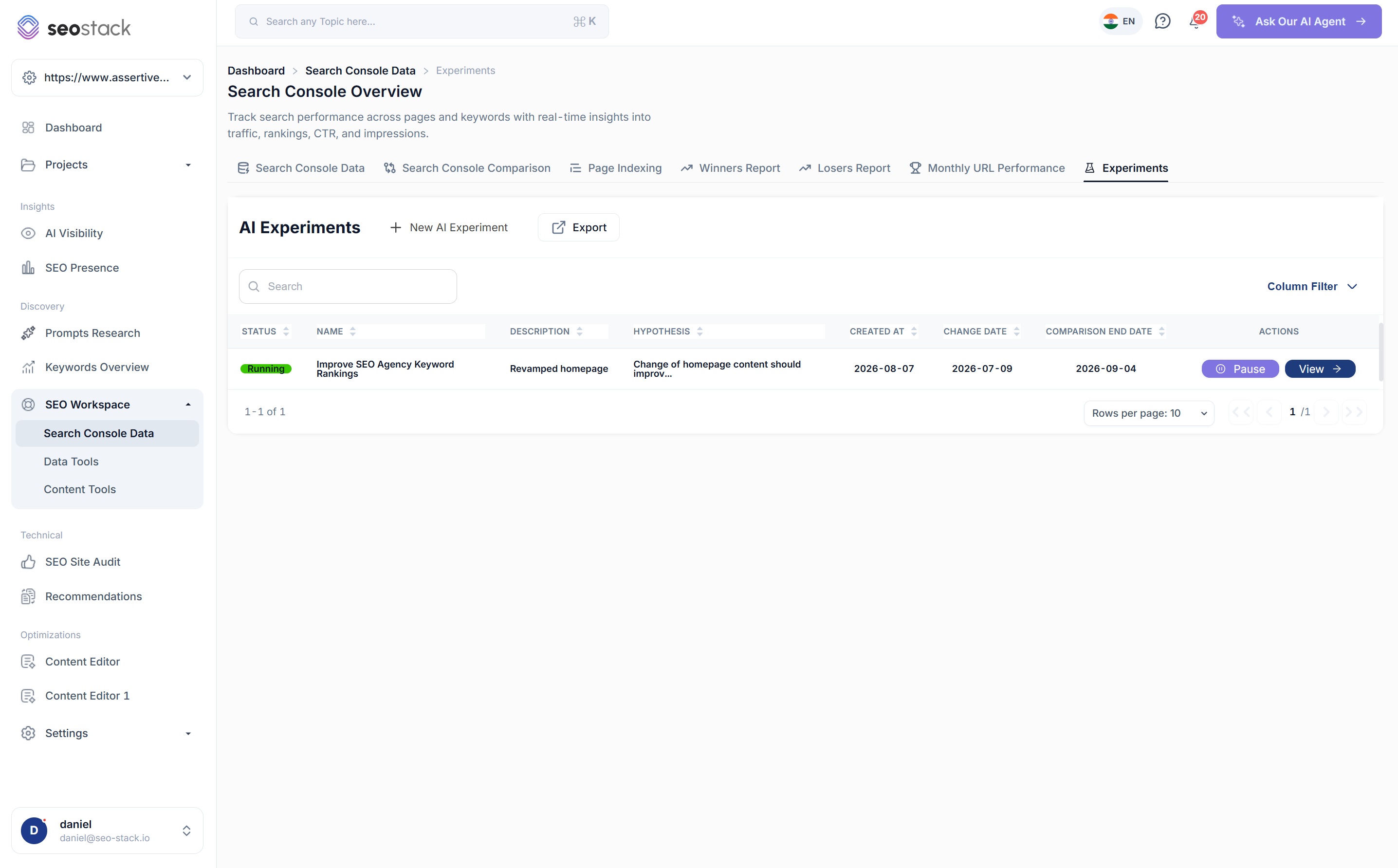
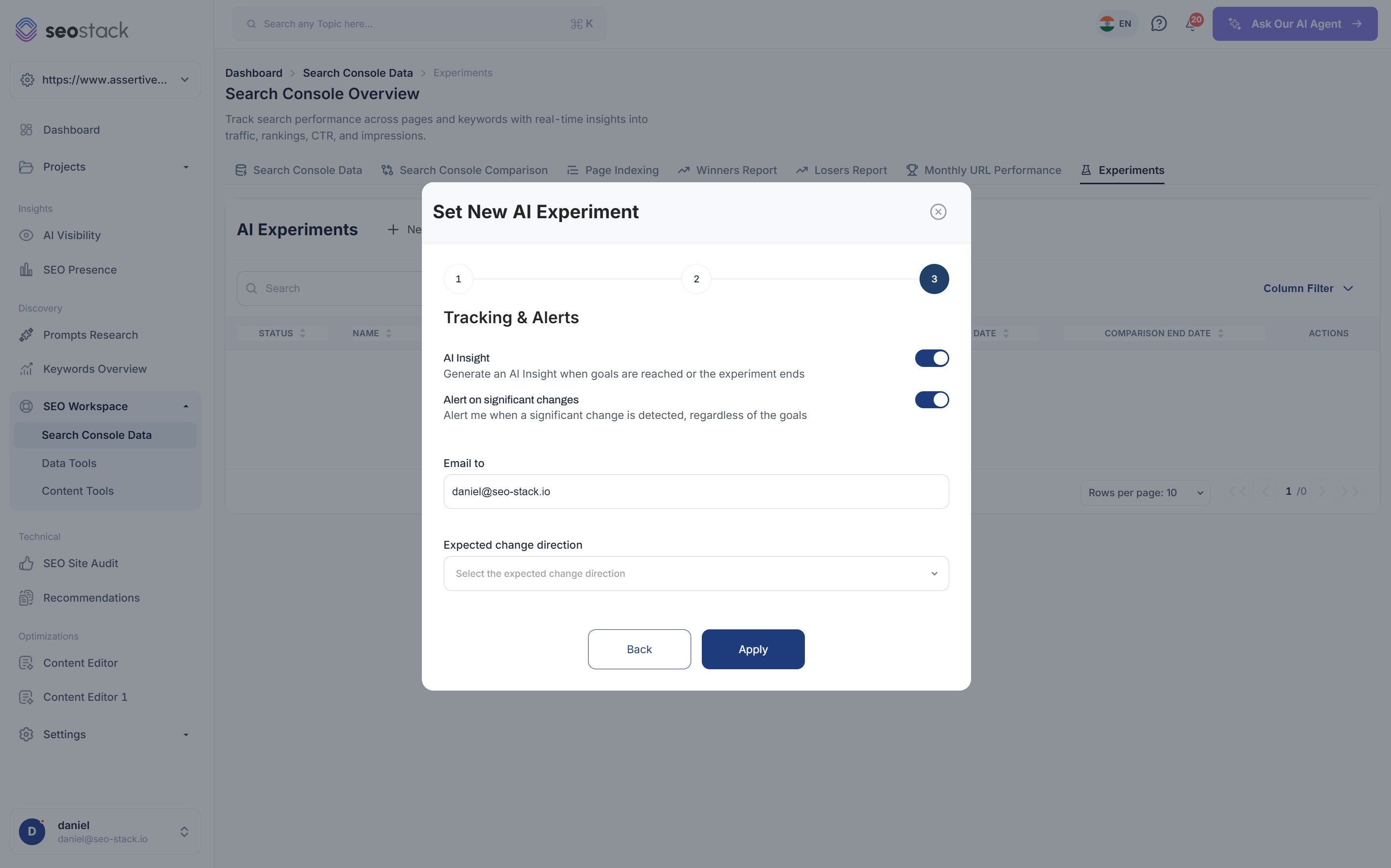
Name your experiment and tell SEO Stack what you expect to happen
- Attach the experiment to an annotation you have already created, so the change logged on your charts is the one being measured
- Set the change date, this is the point that everything before and after is compared against
- Target specific pages, queries, countries and devices, or leave the experiment running across the whole site
- Write down your hypothesis so the AI analysis has something to measure the outcome against
Why the hypothesis matters
Writing down what you expected to happen before you look at the data is what separates an experiment from an explanation made up after the event, and the AI analysis will tell you directly whether your hypothesis held up.
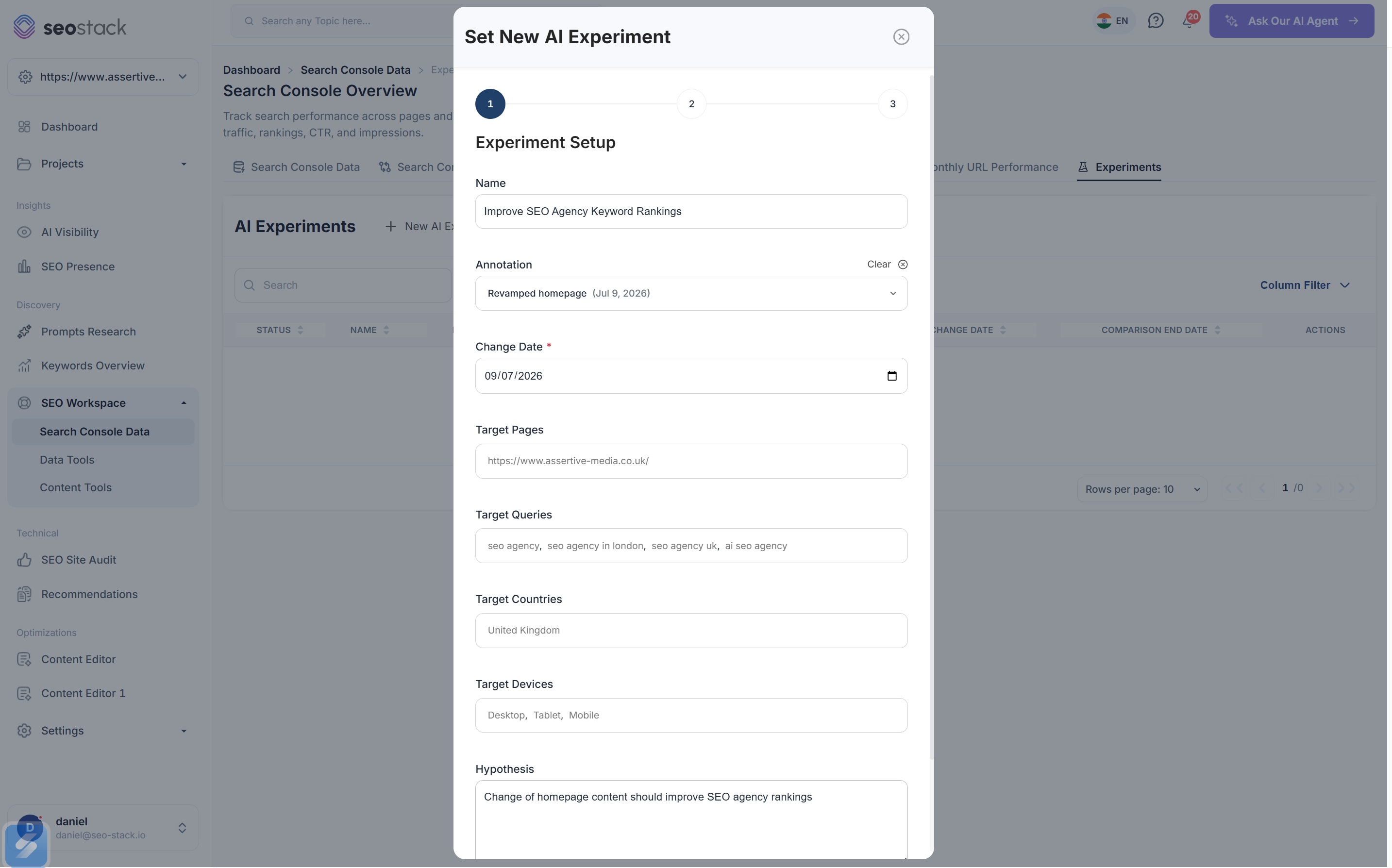
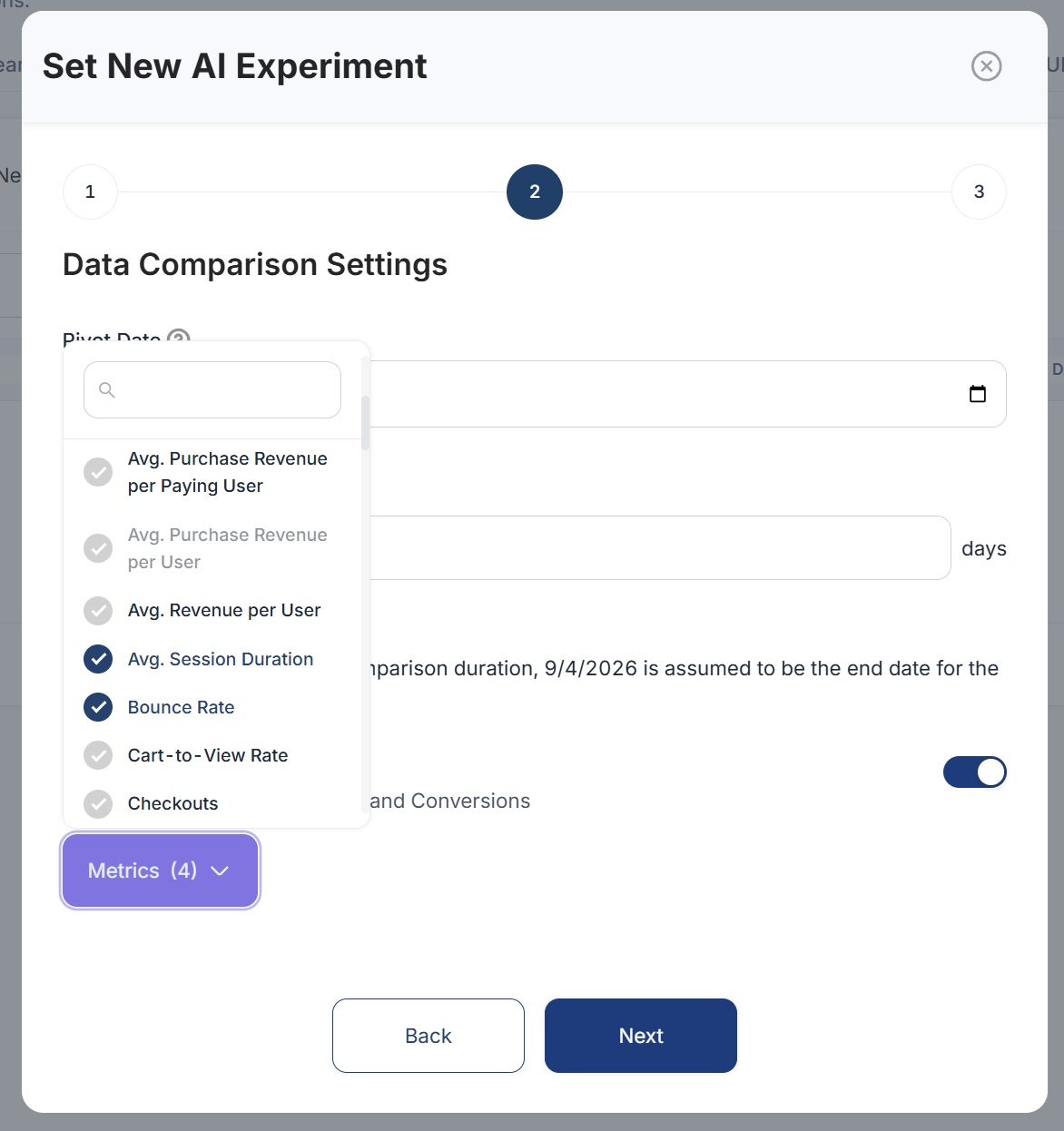
Choose your comparison period and the metrics you want to measure
- Set a pivot date and a comparison duration in days, and SEO Stack works out the end date for you
- Turn GA4 metrics on to add pageviews, bounce rate and conversions into the experiment
- Open the metric picker to search the full GA4 catalogue, from average session duration through to cart-to-view rate
- Select as many metrics as your experiment needs, there is no limit on how many you can benchmark
Decide how and when you want to be told about the results
- Generate an AI Insight automatically when your goals are reached or when the experiment finishes
- Get alerted on significant changes whether or not they relate to the goal you set
- Send notifications to whoever needs to receive them
- Set the expected change direction so that movement in the wrong direction is flagged to you as a problem
Alerts you did not ask for are often the most valuable
Significant change alerts are triggered regardless of the goal you set, so if a change you have made has broken something unrelated you will find out about it early rather than months later.
What comes back
You get the numbers and an explanation of what they mean
Every metric you selected is benchmarked before and after your change date, and the AI analysis in SEO Stack will show you whether you achieved your desired outcome, what did and did not work and what you should do next.
- GSCClicks4,1805,602+34.0%
- GSCImpressions112k141k+25.9%
- GSCAvg. position8.45.9-2.5
- GA4Conversion rate1.9%2.6%+36.8%
- GA4Bounce rate58.2%49.1%-15.6%
- GA4Avg. session1m 12s1m 41s+40.3%
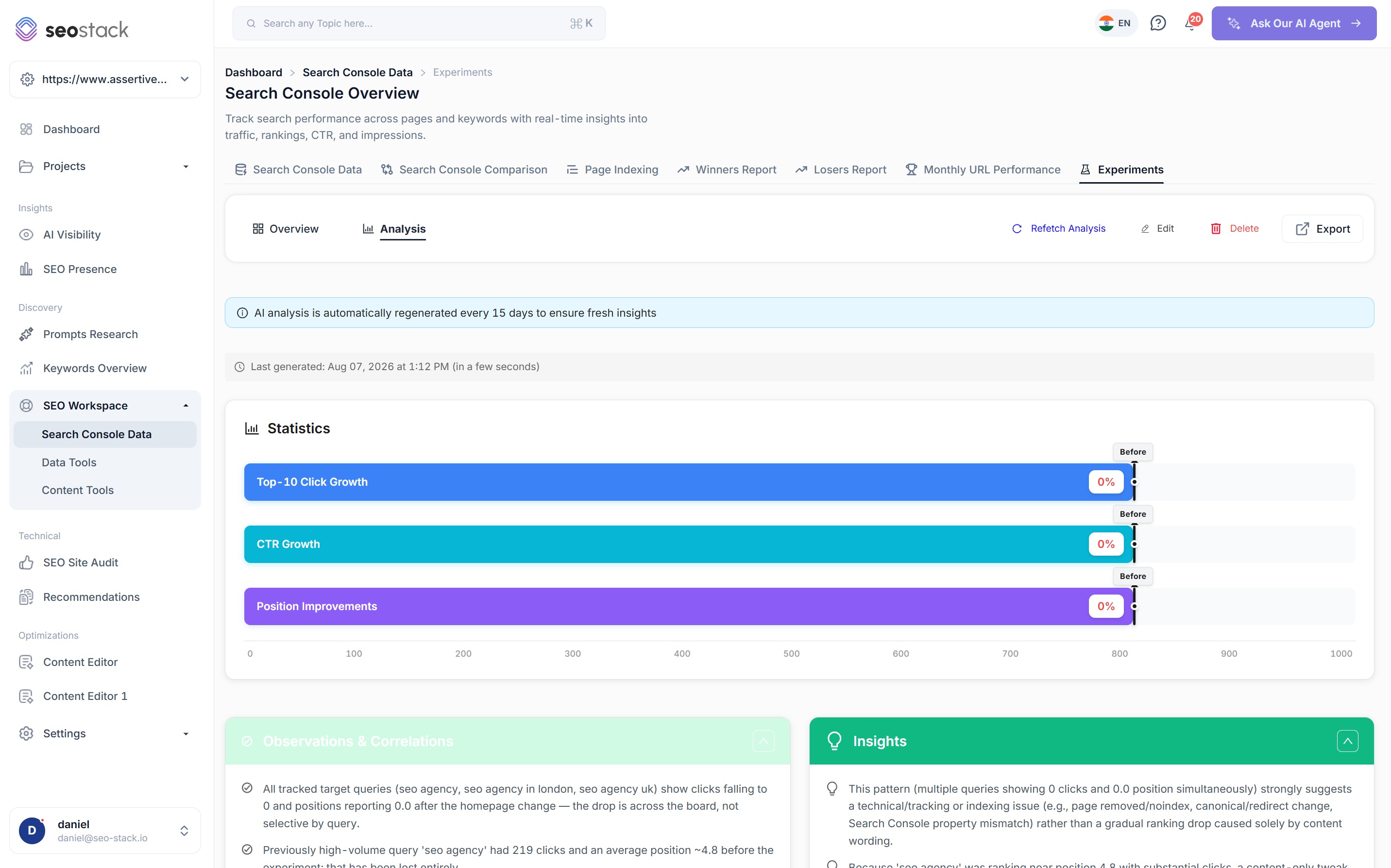
AI analysis
The homepage rewrite is working well, both clicks and conversion rate have moved significantly further than normal week to week variance would account for. The drop in bounce rate suggests your new above the fold content is matching what people are actually searching for, rather than simply bringing in more traffic that does not convert.
Observations & correlations
A plain explanation of what actually happened in your data, covering which queries moved, by how much, and whether the change has affected everything or only certain pages and queries.
Insights
What the pattern in your data actually means. If a drop looks technical rather than content related it will tell you, which is the difference between spending a week rewriting content and finding a noindex tag that should not be there.
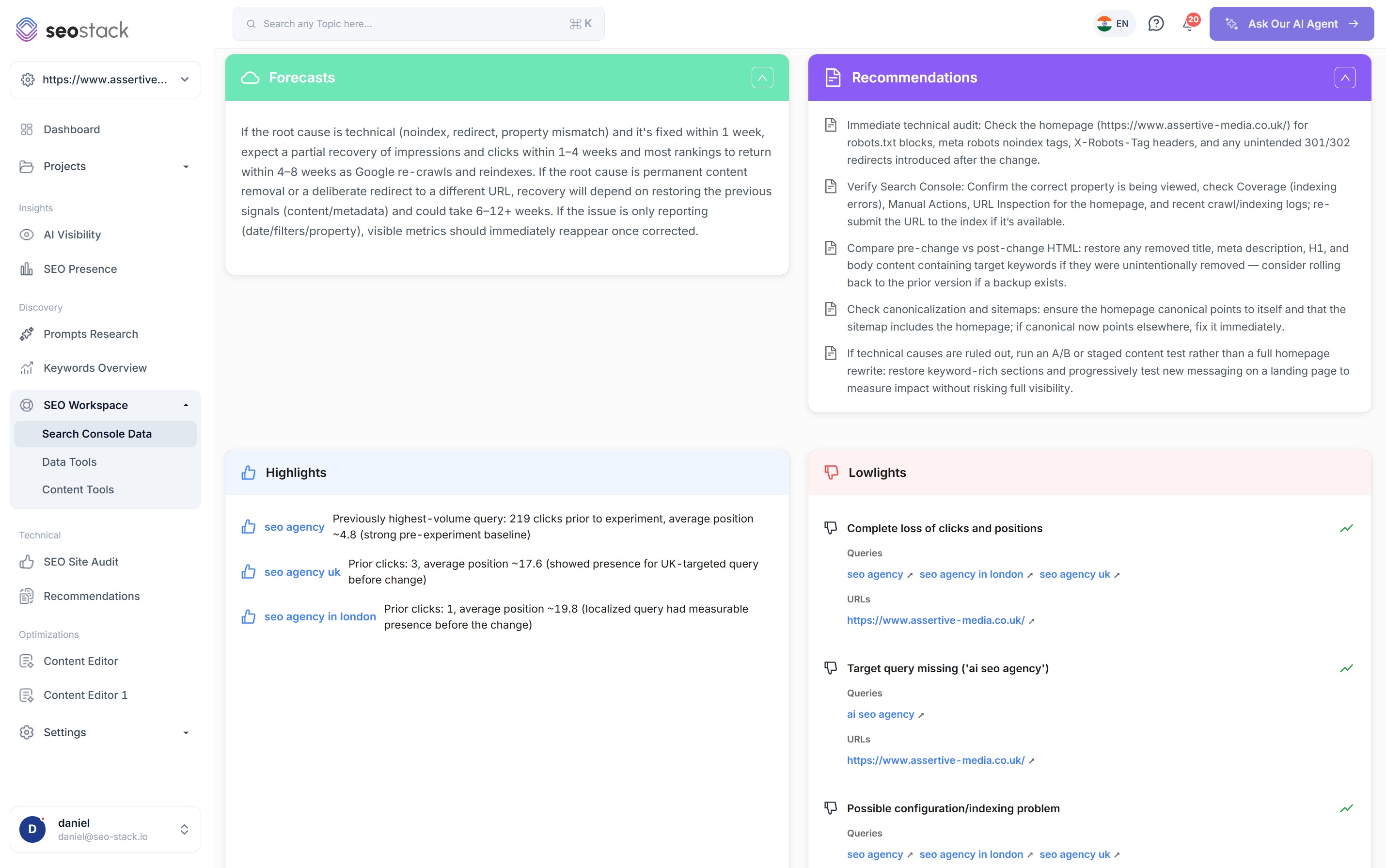
Forecasts
What you can expect to happen next under each possible explanation, along with realistic timescales, because a technical issue resolved quickly will recover very differently to content that has been removed permanently.
Recommendations
The specific actions you should take next in priority order, such as checking your response headers, verifying the correct Search Console property, comparing your HTML from before and after the change, or rolling back if you have a backup available.
Highlights & lowlights
The queries and URLs that have gained alongside the ones that have lost, each with the numbers behind them so you can prioritise whichever is costing you the most.
Kept fresh automatically
The AI analysis is regenerated automatically every 15 days while your experiment is running, so any conclusion you drew in the first week is updated as more data comes in.
Why it works
A realistic way to test changes on a live website
Your change date acts as the control
You cannot run a true A/B test across an entire website, but you can record the exact day something changed and compare like for like either side of it, which is what an experiment backed by an annotation and a change date gives you.
Targeting keeps the results accurate
Restricting your experiment to the pages and queries you actually changed stops unrelated movement elsewhere on the site from being misread as a result of your work.
You find out within days rather than months
Because you get alerted to significant changes, anything that has broken as a result of your work is picked up while it is still quick and cheap to fix rather than at the next quarterly review.
You build up a body of evidence over time
Every experiment stays on record along with its hypothesis and its outcome, so over the course of a year you build up a body of evidence you can show clients or stakeholders rather than relying on opinion.
What you get out of it
The outcome, not the feature list
Build up a body of evidence about what works on your website rather than relying on opinion
Find out within days if a change has broken something, rather than at the next quarterly review
Identify and reverse changes that look good but are measurably damaging performance
Connect a property. Watch the data start stacking.
Warehousing begins the moment you connect your Search Console property, there is no Google Cloud project to set up, no BigQuery and no schema to design. You simply connect your property and SEO Stack starts storing every row of your data from that day onwards.
- Credit card required
- Cancel within the trial and you won't be billed
- No contracts