Content & Optimisation
New in V3See what your index performance really looks like
Sorts every indexed URL into six performance bands based on the clicks and impressions it earns in Google, then charts how that composition moves over time. So instead of a page count you get a picture of how much of your site is working, how much is invisible, and whether the clean-up you did last quarter actually changed anything.
- 100% data privacy
- 99.99% uptime
- Nothing to configure
- Export anytime, no limits
Trusted by leading companies
The problem
Most sites are carrying hundreds of pages that earn nothing at all, and because nobody counts them the assumption is that more content is always better, right up until someone asks why the whole domain feels slower to rank than it used to.
The tool
Your whole index, sorted by what it earns
Index Performance takes every URL Google has indexed and files it by how it performs, using your own warehoused Search Console data. What comes out is a picture of the site rather than a page count, and for most people it is an uncomfortable one the first time they look at it.
Every indexed URL, in one of six bands
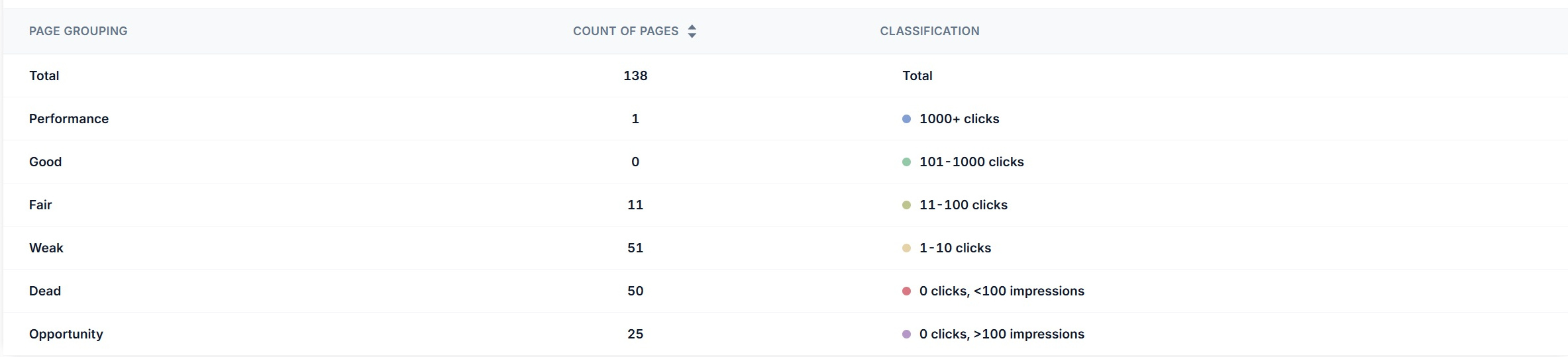
Rather than a list of pages, you get a composition. Six bands built from the clicks and impressions each URL actually earns in Google, so the question stops being how many pages do we have and becomes how many of them are doing anything.
The rules are published, not inferred
Every band has a stated threshold, i.e. dead means zero clicks and under a hundred impressions, so you can always explain to a client or a developer exactly why a URL landed where it did rather than asking them to trust a score.
Tracked over time, which is the whole point
A single reading tells you where you are. The trend tells you whether the work is doing anything, so when you cull two hundred thin posts you can watch the dead band fall rather than hoping it did.
Index performance
101 of 138 URLs need review
Performance
1,000+ clicks
The pages carrying the site. On most domains this is a very small number, and you want to know exactly which pages they are before anybody touches a template.
What to do about it
Protect these. Watch them for decay, keep them internally linked, and never let a redesign change what they say without anybody noticing.
- URLs in this band
- 1
- Share of index
- 1%
Good
101 to 1,000 clicks
Pages doing real work without being the homepage. A healthy site has a decent band here, and an empty one usually means everything depends on a handful of URLs.
What to do about it
These are the pages most likely to move into the top band, so they are usually where a content refresh earns the most.
- URLs in this band
- 0
- Share of index
- 0%
Fair
11 to 100 clicks
Pages Google is happy to serve but only for a narrow set of queries. They work, they are just not working hard.
What to do about it
Look at what they are being served for against what they cover. Fair pages usually have a coverage gap rather than a technical problem.
- URLs in this band
- 11
- Share of index
- 8%
Weak
1 to 10 clicks
Indexed, occasionally served, essentially invisible. This band is where most sites keep the majority of their content without realising it.
What to do about it
Decide page by page whether to improve, consolidate or remove. Doing nothing is also a decision and it is usually the wrong one.
- URLs in this band
- 51
- Share of index
- 37%
Dead
0 clicks, under 100 impressions
Google has indexed these and then found almost no reason to serve them for anything. Not a ranking problem, a relevance problem.
What to do about it
Prune, redirect or rewrite. A large dead band is the single clearest argument there is for a content clean-up.
- URLs in this band
- 50
- Share of index
- 36%
Opportunity
0 clicks, over 100 impressions
The most interesting band on the chart. Google is serving these pages regularly and nobody is clicking, which means the relevance is there and something else is wrong.
What to do about it
Titles, meta descriptions and the match between the query and what the page promises. These are the cheapest wins on the whole list.
- URLs in this band
- 25
- Share of index
- 18%
Illustrative, from a real 138 page audit. Select a band to see the rule that put pages in it. Current band: Dead.
The classification
Six bands, and a rule behind every one of them
There is no black box here. Each band has a published threshold based on clicks and impressions, which matters because the entire value of the tool is being able to point at a page and say precisely why it is in the group it is in.
Performance
1,000+ clicks
The pages carrying the site. On most domains this is a very small number, and you want to know exactly which pages they are before anybody touches a template.
Good
101 to 1,000 clicks
Pages doing real work without being the homepage. A healthy site has a decent band here, and an empty one usually means everything depends on a handful of URLs.
Fair
11 to 100 clicks
Pages Google is happy to serve but only for a narrow set of queries. They work, they are just not working hard.
Weak
1 to 10 clicks
Indexed, occasionally served, essentially invisible. This band is where most sites keep the majority of their content without realising it.
Dead
0 clicks, under 100 impressions
Google has indexed these and then found almost no reason to serve them for anything. Not a ranking problem, a relevance problem.
Opportunity
0 clicks, over 100 impressions
The most interesting band on the chart. Google is serving these pages regularly and nobody is clicking, which means the relevance is there and something else is wrong.
The one worth staring at
Opportunity is the band most people have never had a name for. Zero clicks but over a hundred impressions means Google is serving the page regularly and nobody is picking it, so unlike a dead page the relevance is already established and the problem is somewhere between the title, the description and what the page promises. Those are usually the cheapest wins on the entire site, and they are invisible in any report that only counts clicks.
The trend
Watch the composition move, not just the total
Counting your dead pages once is mildly depressing. Watching the number fall after you did something about it is the part that makes the work defensible, so every band is plotted over time with your annotations and Google's algorithm updates on the same timeline.
Index performance trends
Last 12 months
Annotation, May:content clean-up, 40 thin posts consolidated or removed
- Dead at peak
- 61
- Dead now
- 22
- Reduction
- 64%
Illustrative. Toggle a band to isolate it, and notice the fair and good lines only start climbing once the dead band turns.
This is how you prove a content clean-up worked
Say you have four hundred dead URLs and you spend a month consolidating, redirecting and deleting. Traffic will barely move at first, because dead pages were not earning anything to begin with, which makes the work very hard to justify in a monthly report. What does move, and quickly, is the composition, so you can show the dead band falling and the fair and good bands picking up as the remaining pages start earning more.
Annotate the clean-up on the chart and the before and after sit either side of a dated marker, which is a far better answer to did that work than an opinion three months later.
More on annotations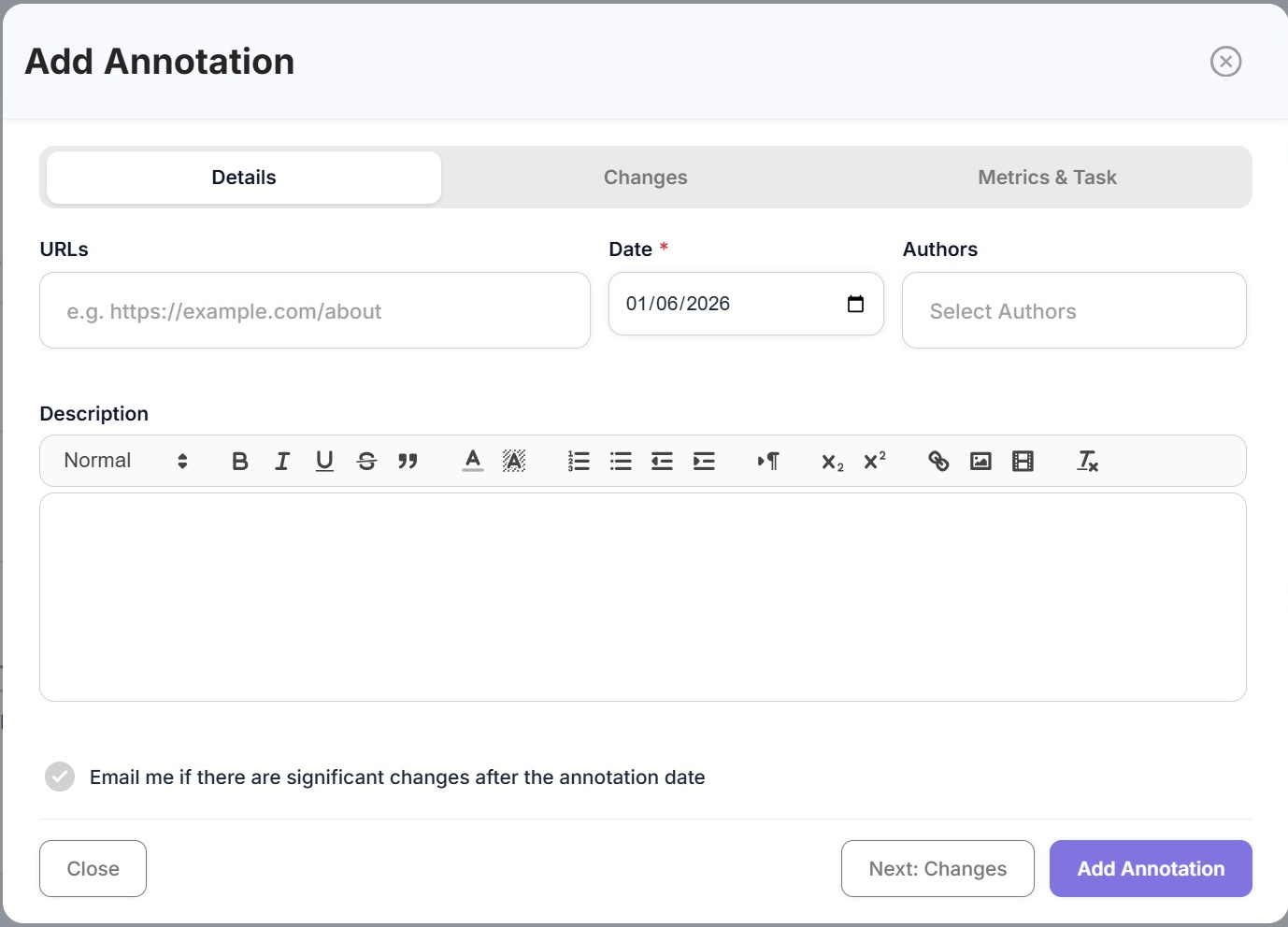
Inside the tool
From the whole index down to a single URL
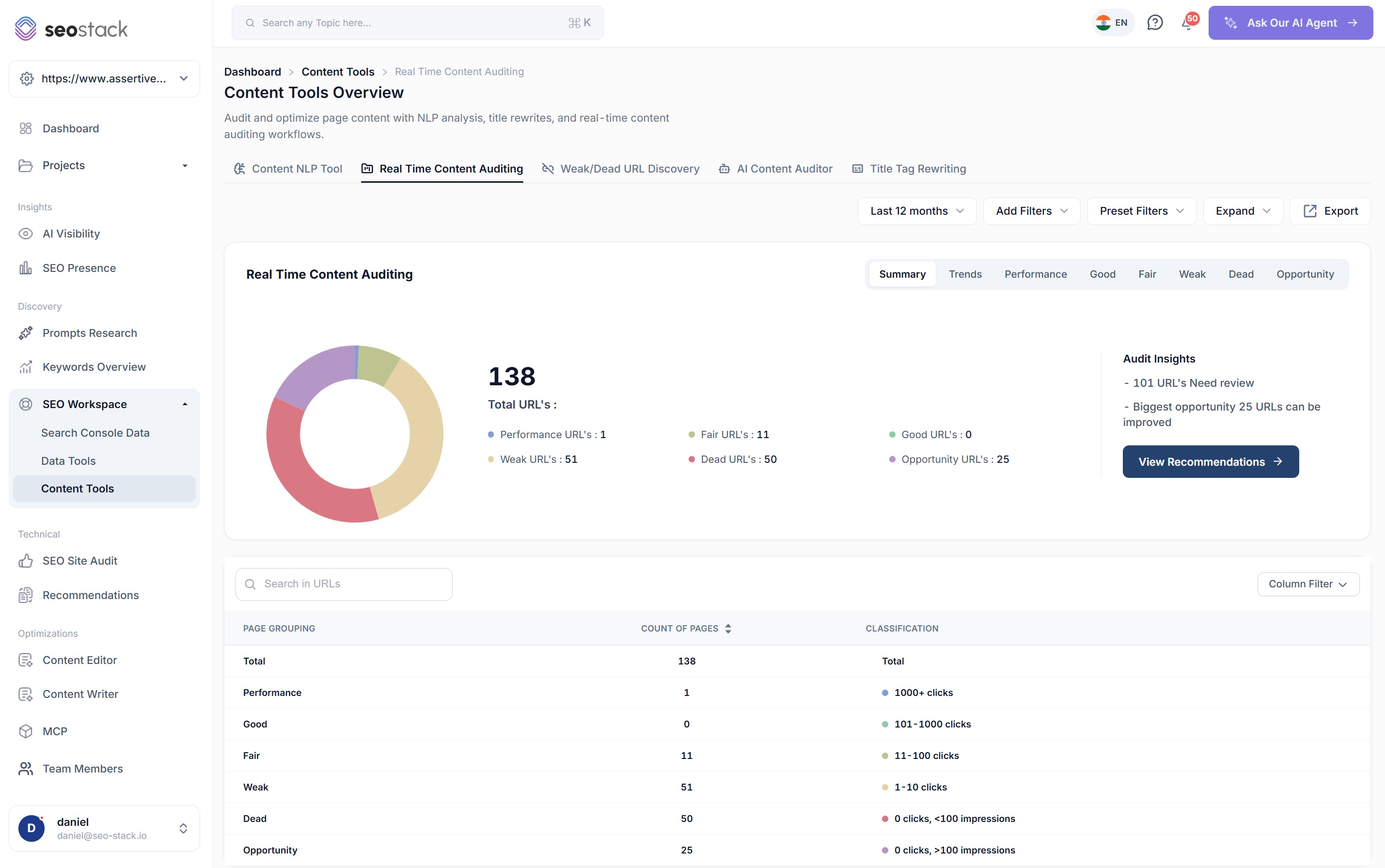
The composition, and what needs looking at
- A donut of every indexed URL with the count and share against each band
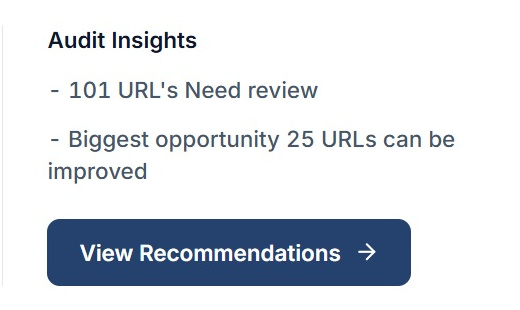
- Audit insights calling out how many URLs need review and where the biggest opportunity sits
- A route straight through to the recommendations built from it
- The page grouping table underneath with the classification rules printed
- Filters, presets and a date range across the top, and an export on everything
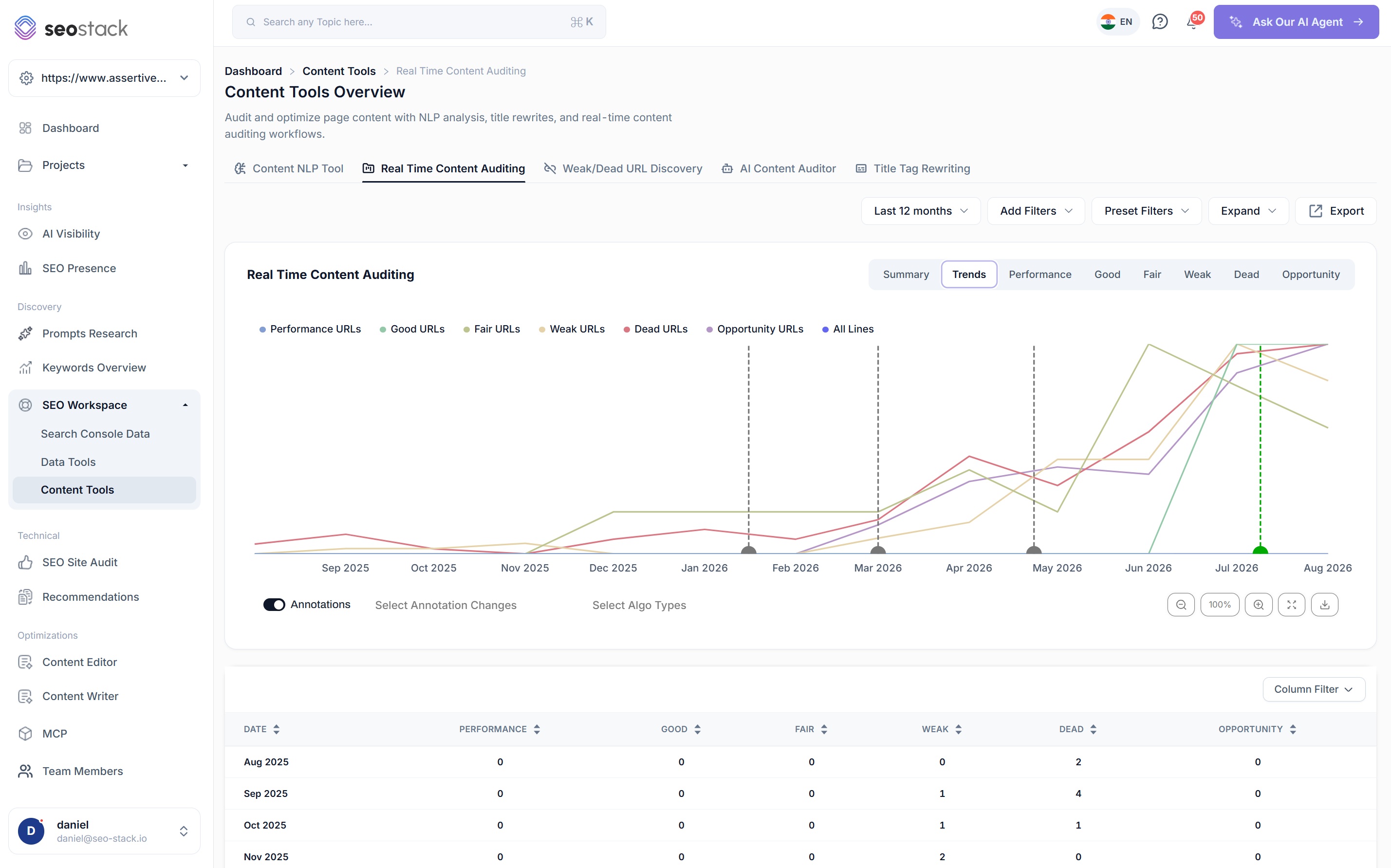
All six bands over time
- Every band plotted together, each one toggleable so you can isolate the story
- Annotations and Google algorithm updates marked on the same timeline
- Zoom, expand to full screen and download the chart
- A month by month table underneath with the count in each band
- Because the data is warehoused, the long view keeps reaching back
Watch the lines cross
On a site that is genuinely improving, the dead line turns down before the good line turns up. Seeing that gap is what stops people abandoning a clean-up two months in.
Drill into a band and get the URLs
- A dedicated view per band, with its own line on its own axis
- The full URL list with clicks, impressions, CTR and average position
- Trend arrows on every metric, so a recovering page is distinguishable from a falling one
- Search within URLs and choose which columns you want
- Export the band when the list needs to go to somebody else
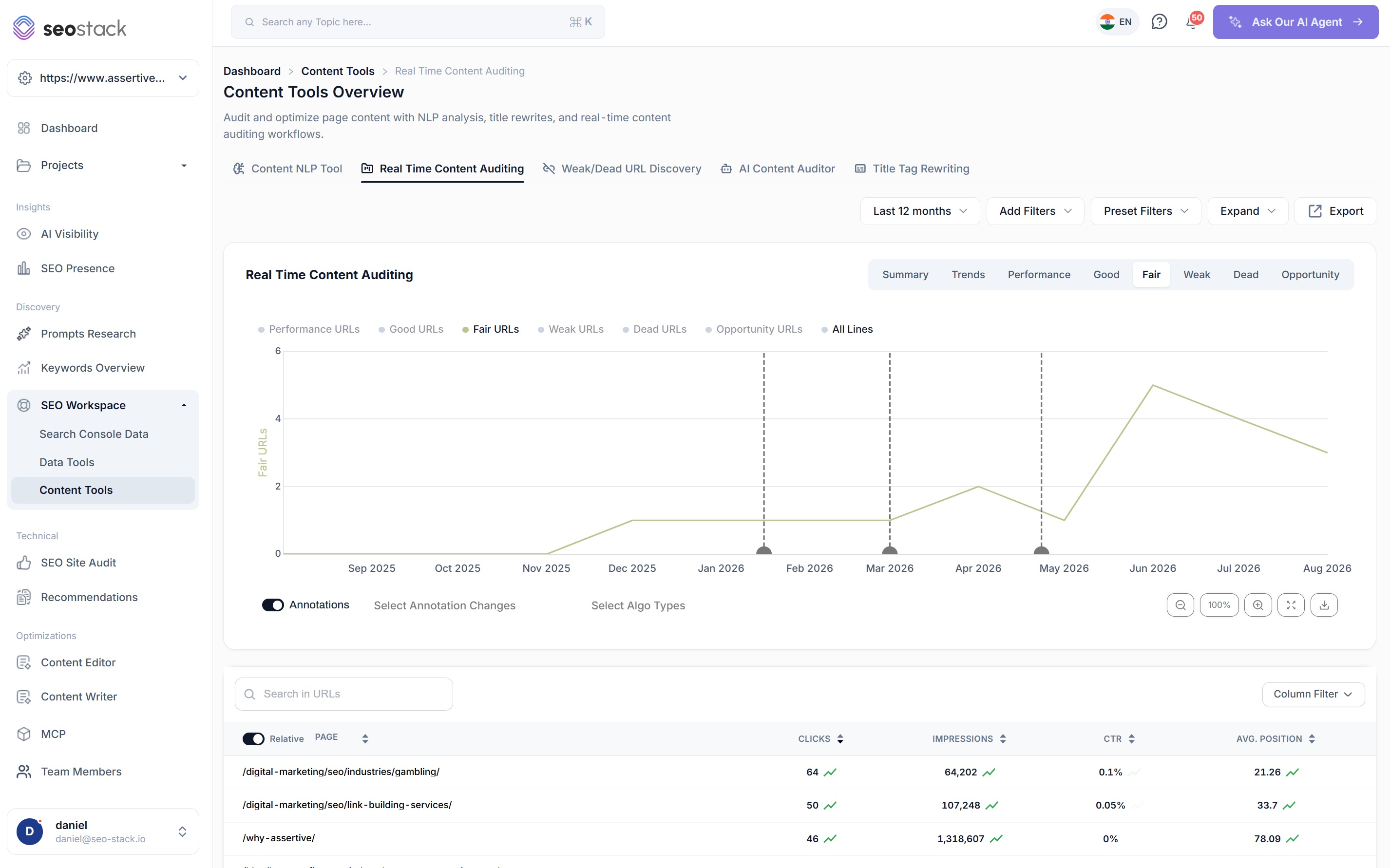
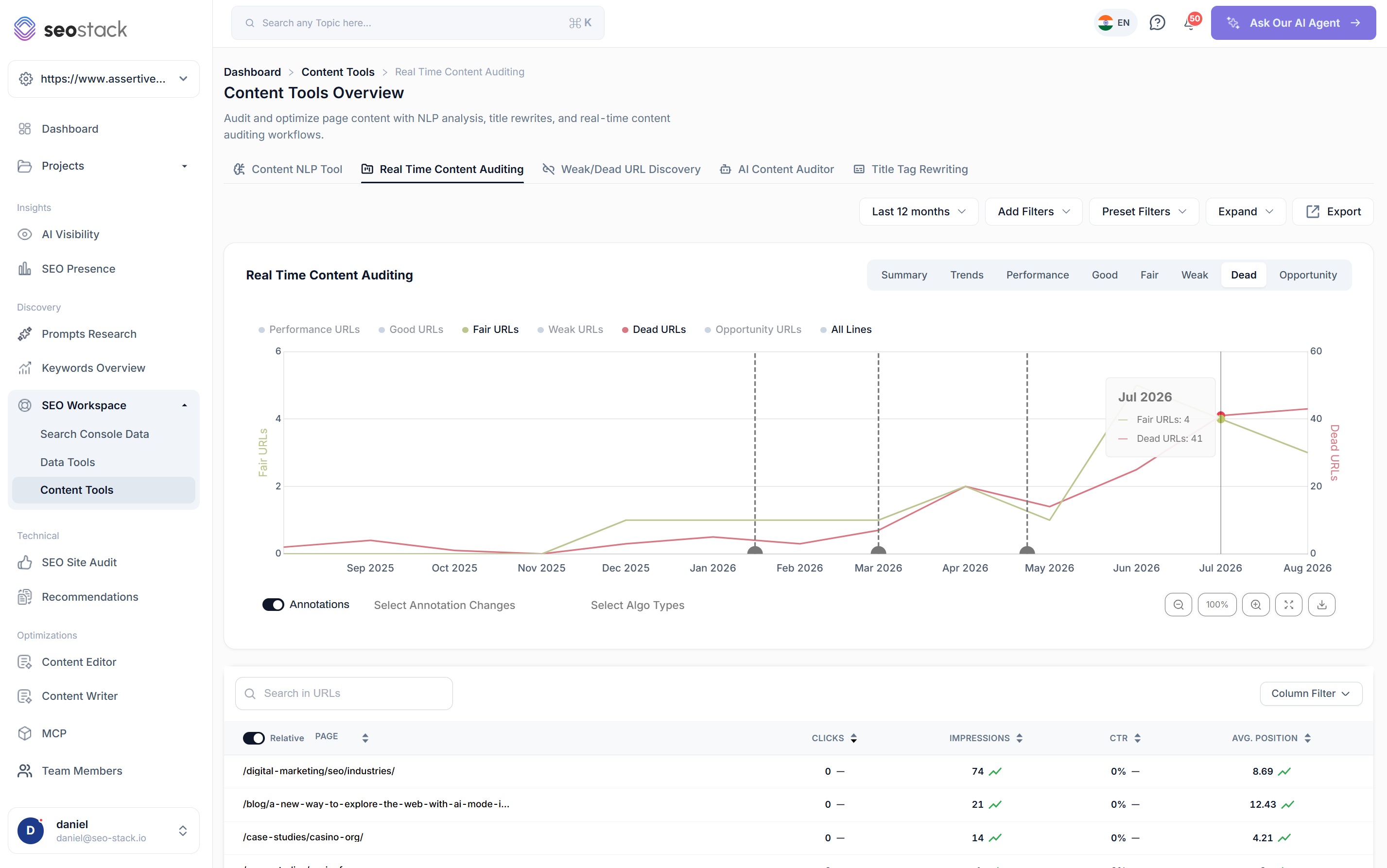
Two bands, two axes, one chart
- Bring a second band onto the chart with its own axis, so a band of four and a band of forty can still be compared
- Hover any month for the exact count in each
- Useful for the pairs that matter, i.e. dead against fair, or opportunity against good
- The pattern you are looking for is one line falling as the other climbs
How you work with it
Narrow it down until it is somebody's job
A sitewide number is a talking point rather than a task, so the controls exist to get from the whole index to a specific list of pages that one person can pick up.
Filter to a section
Audit just the blog, just the product pages or just one folder, because a dead band that is entirely made up of old news posts is a completely different problem to one spread across your service pages.
Search within URLs
Find a specific page or a pattern inside a band without exporting the whole thing first.
Annotations and algorithm updates
Your own changes and Google's updates on the same timeline, so when a band moves you can see whether it was you or an update that moved it.
Preset filters
Save the views you keep rebuilding, so the audit you run every month takes a click rather than five minutes of setup.
Export any band
One band or all of them, with no row limits on the way out, for when the list has to live in a spreadsheet or a ticket.
Straight into recommendations
The audit insights link through to the recommendations board, so a finding here becomes a piece of work over there rather than a note somebody writes down.


Why this matters
What a large dead band is actually costing you
Dead pages feel harmless because they are not doing anything, and that is exactly why they get left alone for years. The cost is not the pages themselves, it is what carrying them does to everything else on the domain.
It changes how the whole site is assessed
Quality is not judged purely page by page. A domain where most of the indexed pages are thin, near duplicate or serving nobody gives a search engine a reasonable basis for treating new pages from that domain with less confidence, and that penalty lands on the pages you care about rather than the ones causing it.
It sprays internal link equity across pages that do nothing
Every internal link divides the authority a page can pass on. When a third of your index is dead, a meaningful share of the equity flowing through your navigation, related posts and footers is being handed to URLs that will never return anything for it.
It wastes crawl budget you may need
On a small site this matters very little. On a large one it matters a great deal, because a crawler spending its time on hundreds of pages nobody has ever clicked is a crawler not fetching the pages you have just updated.
It dilutes your topical focus
A site with two hundred pages spread thinly across a subject looks less like an authority on it than a site with forty pages that cover it properly. Dead pages are usually the ones pulling a domain in directions it never meant to go.
Decaying pages are a slower version of the same problem
A page falling from fair into weak is telling you Google is narrowing what it considers that page relevant for, and left alone it usually keeps going. Catching the movement is much easier than reviving a page eighteen months after it stopped earning anything.
It hides the pages that deserve attention
The practical cost is often the simplest one. When a report contains four hundred URLs and three hundred of them are dead, nobody reads it, so the twenty five opportunity pages sitting in there with real impressions and no clicks never get touched.
Worth being clear about
Deleting pages is not automatically good for SEO and plenty of sites have made things worse by pruning aggressively without checking what they were pruning. A page with no clicks might have external links, might convert from a channel that is not organic, or might simply be three weeks old and never have had a chance. So treat the dead band as a review list rather than a delete list, check the age and the links before anything goes, and redirect where there is a sensible destination rather than removing by default.
The clean-up loop
From an uncomfortable donut to a measurable improvement
Content pruning has a reputation for being risky mostly because it is usually done without a baseline and without a way of measuring the outcome, so nobody can tell afterwards whether it helped, hurt or did nothing at all.
- 01
Take the baseline
Run the audit and record the composition before you touch anything, because without that number the improvement is unprovable no matter how much work you do.
- 02
Sort dead from merely young
Filter by section and check the age of index before deciding anything. A page published last month with no clicks is not the same as a page published two years ago with no clicks.
- 03
Improve, consolidate, redirect or remove
Four options rather than one. Opportunity pages get better titles, weak pages get better coverage, near duplicates get consolidated, and genuinely dead pages get redirected or removed.
- 04
Annotate the change
Date it, describe it and attach the URLs, so the before and after has a marker on the chart rather than being reconstructed from memory later.
- 05
Watch the bands move
Dead falling and fair and good rising over the following months is the evidence. It arrives well before the traffic does, which is what makes it worth tracking.
The Weak and Dead URL Discovery tool factors in how long a page has been indexed, which is the check that stops a clean-up killing pages that never had a chance.
Weak & Dead URL Discovery
How SEOs use it
What Index Performance is actually good for
Open a client conversation properly
A donut showing that 101 of their 138 pages need review is a far more effective first slide than a list of technical issues, and it makes the case for a content budget without you having to argue for one.
Find the opportunity band and work it
Pages with real impressions and no clicks are the fastest wins on the site, and this is the only view that isolates them as a group rather than leaving them scattered through a keyword report.
Judge a content programme honestly
Six months of publishing should be visible as growth in the fair and good bands. If it only shows up as growth in the dead band, that is a finding worth having early rather than at the annual review.
Audit one section at a time
Filter to the blog, the product pages or a single folder and the composition of that section on its own often looks very different to the sitewide picture.
Catch a decay pattern across a template
When a whole band shifts at once it is rarely a coincidence, and with annotations and algorithm updates on the same chart you can usually tell whether it was a change you made or one Google made.
Ask the AI assistant why
The bands tell you what the composition is, and the assistant is reading the same warehoused data underneath, so you can ask it what the dead pages have in common before deciding what to do with them.
What you get out of it
The outcome, not the feature list
Show the dead band shrinking and the fair and good bands growing
Build a prune, redirect or renovate list you can actually defend
Prove a content clean-up worked instead of assuming it did
Connect a property. Watch the data start stacking.
Warehousing begins the moment you connect your Search Console property, there is no Google Cloud project to set up, no BigQuery and no schema to design. You simply connect your property and SEO Stack starts storing every row of your data from that day onwards.
- Credit card required
- Cancel within the trial and you won't be billed
- No contracts