Workflow & Delivery
New in V3Give people access to the right properties, and nothing else
Invite SEOs, developers, content writers and clients into your account and choose exactly what each of them can see and do. Grant access to every property or to a single one, with read or write permissions per workspace, and because SEO Stack warehouses your Search Console data they get the data without ever being added to Google Search Console.
- 100% data privacy
- 99.99% uptime
- Nothing to configure
- Export anytime, no limits
Trusted by leading companies
The problem
Giving a contractor or a client access to one property's data usually means adding them as a user on the client's Search Console, which is a conversation nobody wants to have and a change that stays visible on the account afterwards.
The tool
A permission model that fits how agencies actually work
Most access control is a role dropdown with three options, none of which describe what you want. This is deliberately simpler and more flexible: pick the properties, pick read or write on each, and that is the whole model.
Invite anybody who touches the work
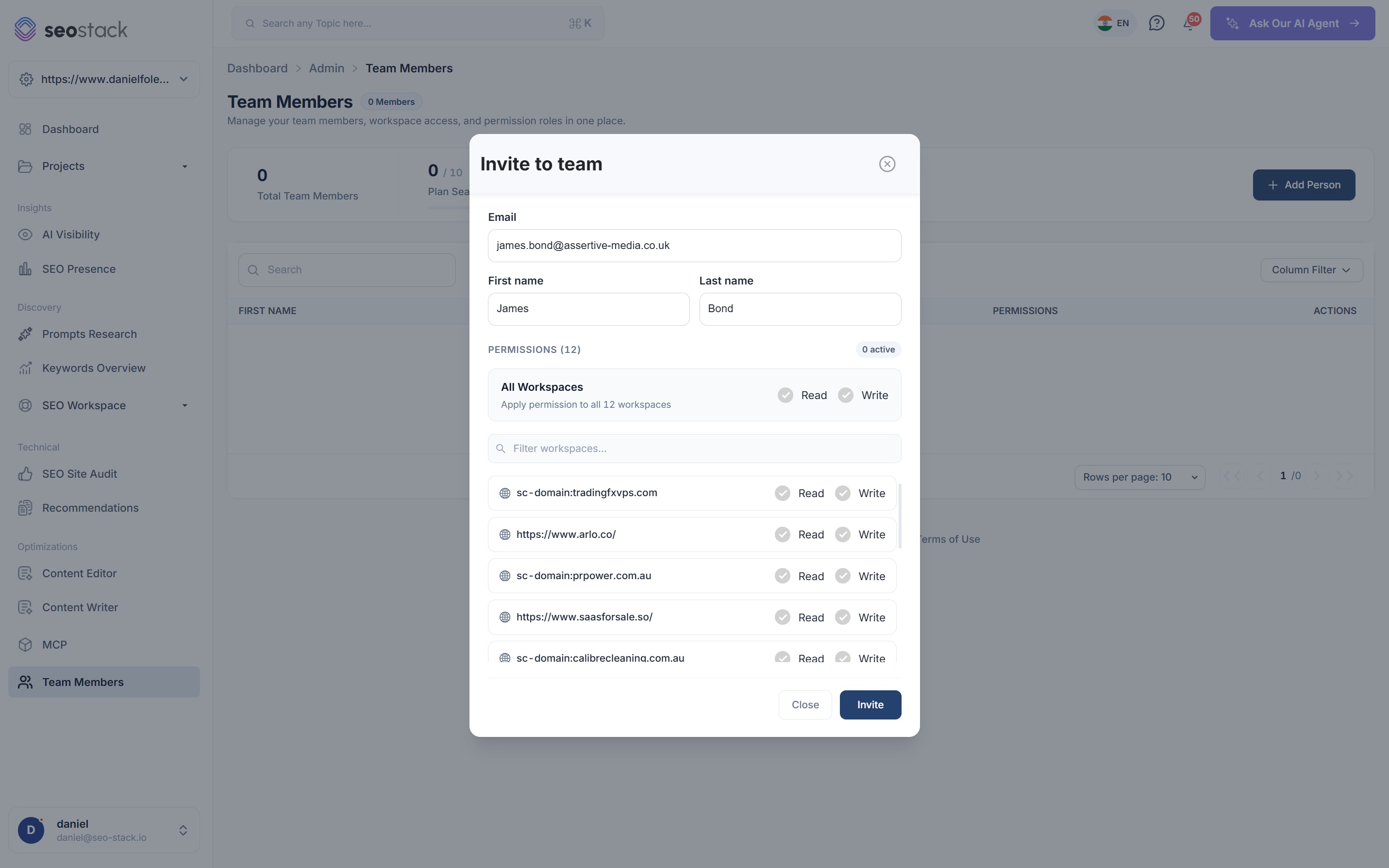
SEOs, developers, content writers, analysts and clients. An invitation goes out by email and they arrive in an account that already contains exactly what you decided they should see.
All workspaces, or one
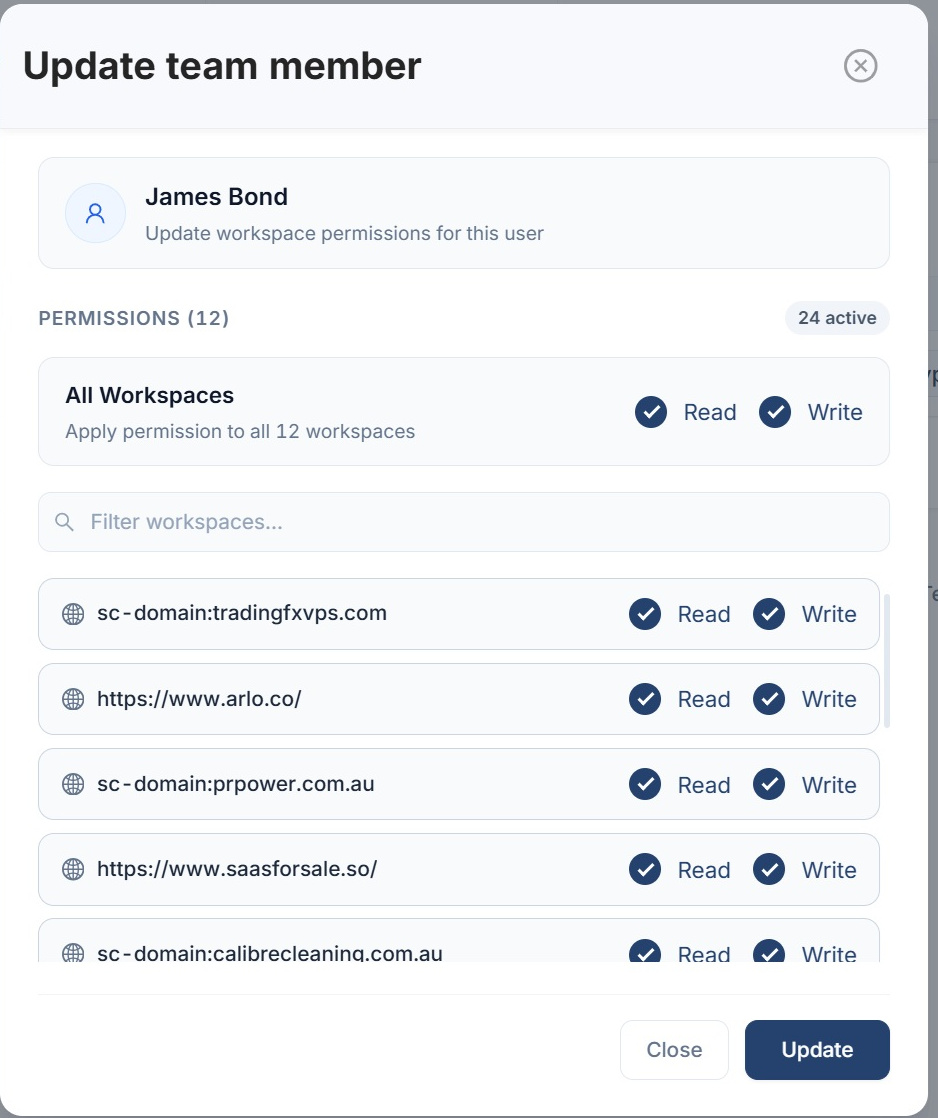
Grant access to every property in the account with a single toggle, or pick them individually. Properties somebody has not been granted are not listed anywhere in their account.
Read and write, per workspace
Read lets somebody look at the data. Write lets them change things, i.e. add tasks, log annotations and edit project settings. Both are set per property rather than as one blanket role.
Workspace permissions
1 of 6 visible · 0 editable
- sc-domain:tradingfxvps.com
- https://www.arlo.co/
- sc-domain:prpower.com.au
- https://www.saasforsale.so/
- sc-domain:calibrecleaning.com.au
- https://www.assertive-media.co.uk/
SEO lead: Read and write on every property, because they are the person doing the work across all of them.
Developer: Read and write on the two properties they are actually building on, and no visibility at all of the rest.
Content writer: Write access on the properties they publish to, so they can be assigned tasks and log annotations against their own changes.
Client: Read only, on their property alone. They can see the data and the reporting, and they cannot change anything or see anybody else's account.
Properties without read access do not appear anywhere in this person's account. They are not greyed out, they are not listed, they simply are not there.
Illustrative. Pick a role, or set the toggles yourself. Granting write implies read, because being able to change something you cannot see would be an odd arrangement.
The part that matters most
Share the Search Console data without sharing Search Console
Because SEO Stack warehouses your Search Console data rather than querying it live every time somebody opens a chart, giving a colleague or a client access to that data does not require adding them as a user on the Google Search Console property. Nothing about the origin account changes, no new user appears on it, and nobody has to ask a client for permission to add a contractor to their search data.
Naturally that matters a great deal for agencies. It means you can sub-delegate access down through your own team without touching the client's setup, and it means the tools you present the data through are yours rather than Google's, which is the whole basis of white labelling a reporting relationship.
The data is already yours
It has been warehoused as it arrived, so serving it to somebody else is a permission decision rather than a Google API one.
The origin account is untouched
No new users on the client's Search Console, no changes to their property, no awkward request.
Sub-delegation for agencies
Add your own team to a client property without the client having to do anything at all.
White labelling
Clients look at their data through your account rather than through a Google interface with somebody else's branding on it.
Worth being clear about
This delegates access to the data SEO Stack holds, it does not give anybody access to Google Search Console itself. If somebody genuinely needs to be in the Google interface, i.e. to submit a sitemap or file a reconsideration request, they still need to be added there in the normal way. For everything else, which is most of what people actually do with the data, this is the cleaner route.
What the permissions control
Two levels, and the difference is whether they can change anything
Keeping it to read and write is a deliberate choice. A model with eleven granular permissions sounds thorough and mostly results in everybody being given the highest one because nobody wants to work out which is correct.
Read
See the property and everything reported against it: Search Console data, GA4, AI visibility, audits, keywords, content tools and the reporting built on top of them. Look at all of it, change none of it.
- Open every dashboard and report for that property
- Read the task board, the notes and the annotation log
- Export data for their own analysis
Write
Everything read allows, plus the ability to change things. This is the permission you give somebody who is doing the work rather than watching it.
- Create and update tasks, and be assigned to them
- Log annotations against changes they have made
- Edit project settings and run the tools that generate data
Who you invite
Four kinds of person, four different answers
The reason permissions are set per workspace rather than per role is that the same job title needs completely different access depending on the account, and a fixed role list never survives contact with how agencies actually staff things.
SEOs
Usually read and write across everything, because they are the people working on all of it. Their annotations and tasks then carry their name, which is what makes the delivery record useful later.
Developers
Write access on the properties they are building, so they can pick up technical tasks and mark them done, without a list of client accounts they have no business seeing.
Content writers
Write on the sites they publish to, so they can be tagged into tasks, work from the NLP briefs and log an annotation when a piece goes live. That last part is what connects their work to an outcome.
Clients
Read on their own property alone. They see their data, their reporting and the work being done on their account, and they see nothing of anybody else's.

This is what makes the rest of the platform collaborative
Team access is not really a feature on its own, it is what turns everything else into something a team can use. A content writer with write access can be assigned tasks in the project manager, work from a content brief, and log an annotation when the piece goes live, at which point their work becomes measurable rather than just complete.
Managing access
Four things, and none of them take longer than a minute
Invite by email
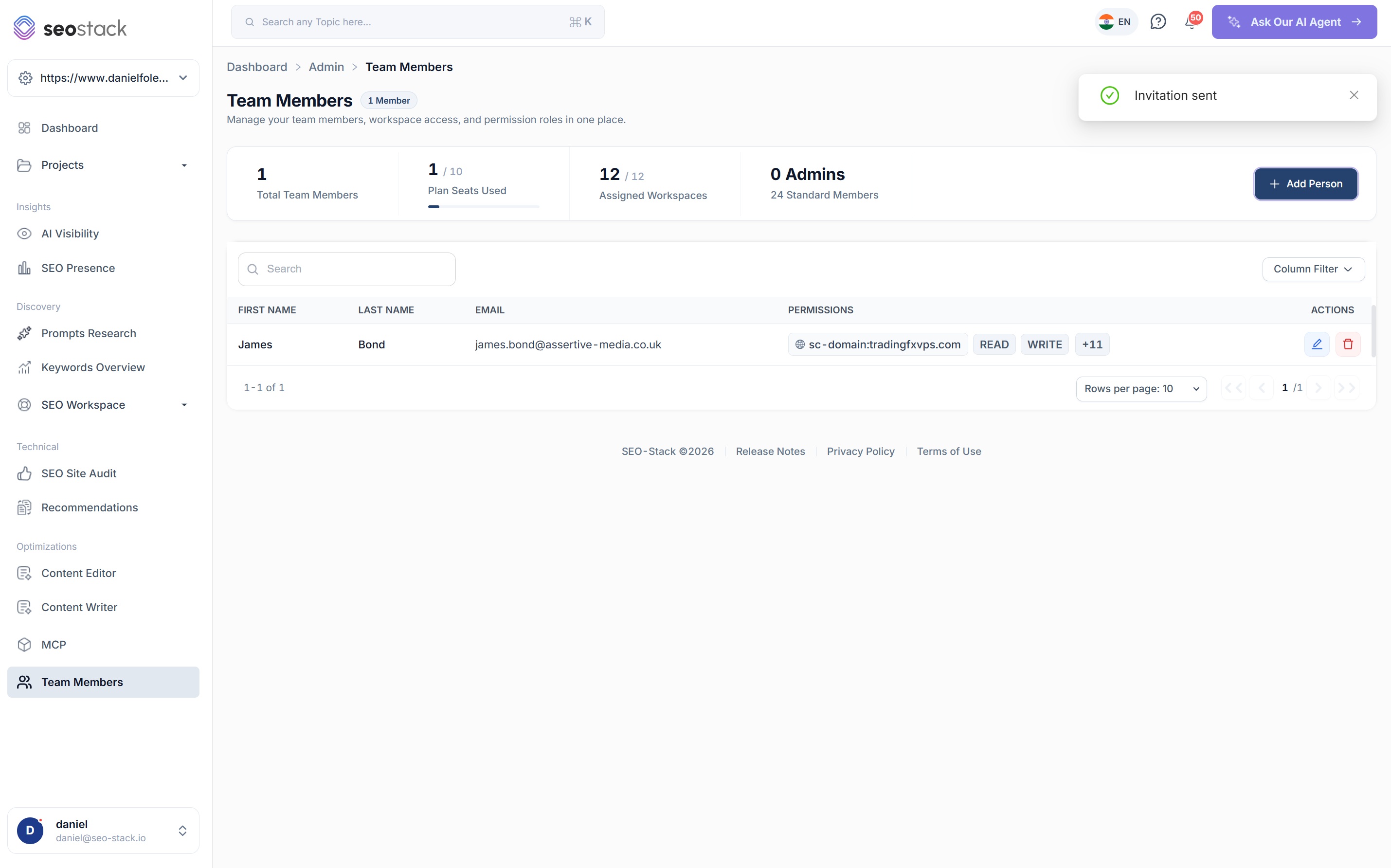
Add a person, set their permissions and the invitation goes out. They accept and land in an account already scoped to what you decided.
Seats against your plan
Seat usage is shown against your allowance on the team screen, so you know where you stand before adding somebody rather than afterwards.
Filter the workspace list
On an account with dozens of properties, setting permissions one at a time needs a search box, so there is one.
Edit or revoke at any point
Permissions are changed from the same panel they were set in, and removing access is immediate rather than a support request.

How agencies use it
What team access is actually good for
Onboard a contractor in minutes
Two properties, write access, invitation sent. No conversation with the client, no changes to their Search Console, and no risk of somebody seeing an account they should not.
Give a client their own login
Read access on their property alone, so they can look at their data whenever they want instead of waiting for a monthly PDF, and they cannot break anything doing it.
White label the reporting relationship
Clients see their search data through your platform rather than through Google's, which is very difficult to do any other way without rebuilding the reporting yourself.
Offboard cleanly
When a contract ends, revoke the access. There is nothing to unpick on the client's Search Console because nothing was ever added to it.
What you get out of it
The outcome, not the feature list
Onboard a contractor or a client in minutes, safely
Keep client Search Console accounts untouched and unchanged
Collaborate on tasks and annotations across the whole team
Connect a property. Watch the data start stacking.
Warehousing begins the moment you connect your Search Console property, there is no Google Cloud project to set up, no BigQuery and no schema to design. You simply connect your property and SEO Stack starts storing every row of your data from that day onwards.
- Credit card required
- Cancel within the trial and you won't be billed
- No contracts