Search Console & GA4 Data
Compare any two time periods, at full data depth
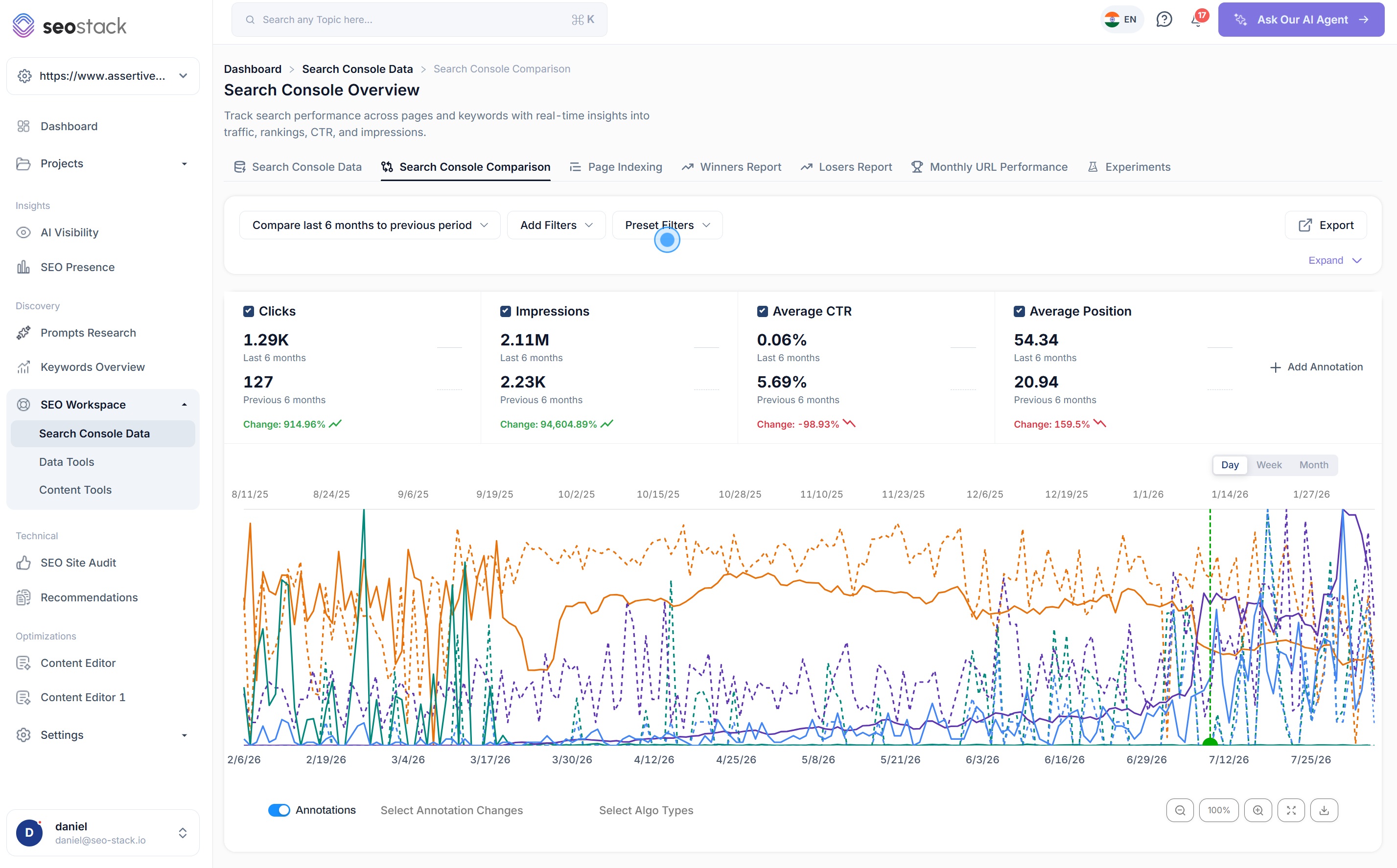
Search Console's date comparison, broken out into its own tool and stripped of every limitation. Compare last quarter to the same quarter three years ago and see every single query that moved.
- 100% data privacy
- 99.99% uptime
- Nothing to configure
- Export anytime, no limits
The problem
GSC comparison is buried in the UI, capped at 16 months, and truncated to 1,000 rows, so you only ever see the movement at the very top.
SEO Stack vs Search Console
The same comparison, with the ceiling taken off
Search Console has date comparison built in. It is the limits around it that make it hard to answer anything real.
| Capability |  Search Console Search Console | SEO Stack |
|---|---|---|
| Comparison window | Both periods have to sit inside the rolling 16 months, so a true year on year comparison collapses to roughly a four month overlap and a three year look back is impossible. | Compare any two periods your plan retains, up to 10+ years apart once your warehouse has built that far. Last quarter against the same quarter three years ago is a two click job. |
| Rows returned | 1,000 per period, ordered by clicks, so you only ever see movement at the head of the table. | Every query, page, country, device and search appearance in both periods, with no cap anywhere in the interface. |
| Google core updates | Not shown at all, so you are cross referencing a separate timeline by hand. | Core update overlays render across the full comparison span, so you can see which update sits between your two periods. |
| Annotations | Annotations disappear the moment you switch comparison mode on, which is precisely when you need them. | Your annotations overlay both periods, filterable by type, so the work your team shipped between the two dates stays on screen. |
| Filtering | One filter per dimension, with no way to save what you build or layer conditions. | Unlimited layered filters with MUST and SHOULD logic, applied identically across both periods and reusable from your saved library. |
| Exports | Capped at 1,000 rows, so the export is as truncated as the view. | No row cap on any export. Sheets, CSV or PDF, including month by month and two dimension exports of the full comparison. |
What you get
Six things the built in comparison will not do
Compare beyond the 16 month wall
Search Console can only compare two windows that both fall inside its rolling sixteen months, which means a genuine year on year comparison has about a four month overlap and anything older simply is not there. SEO Stack compares any two periods it has warehoused for you, so you can put last quarter next to the same quarter three years ago and still have every row behind it.
- No requirement for both periods to sit inside 16 months
- Look back as far as your plan retains, up to 10+ years
- Custom or preset ranges on either side of the comparison
Every query and page that moved, not the top thousand
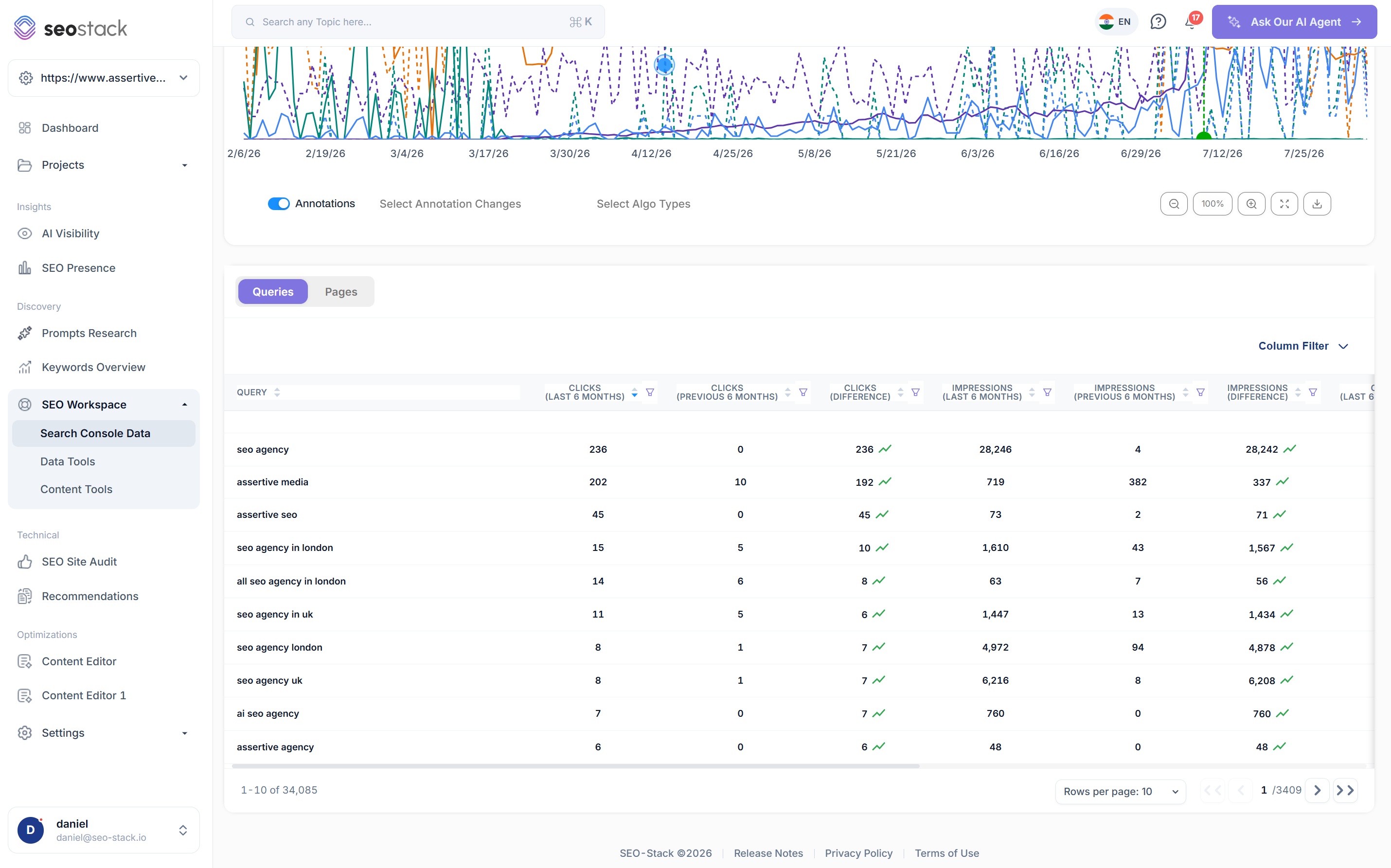
A 1,000 row cap on each period means you are comparing the head of your table against the head of your table. The long tail, where most of the movement actually happens, never enters the comparison at all. Here both periods return in full, so a query that went from nothing to something is visible rather than inferred.
- No row cap on queries, pages, countries, devices or search appearance
- Clicks, impressions, CTR and position differences on every row
- Sort and filter the difference columns to find what moved most
Google core updates overlaid across both periods
Comparing two periods is only half the question. The other half is what happened in between. Core update overlays render across the whole comparison span, so when a set of queries drops between period A and period B you can see immediately whether an update landed in the gap, instead of cross referencing a separate timeline by hand.
- Update markers across the full comparison span
- Filter which update types are shown
- Separates algorithm movement from your own changes
Your annotations stay visible in comparison mode
Search Console hides annotations the moment you switch comparison on, which is the exact moment they matter most. In SEO Stack your annotations overlay both periods, so the migration, the template change or the content cull your team shipped between the two dates sits right there against the movement it caused.
- Annotations from both periods rendered on the same chart
- Filterable by annotation type
- Scoped to a URL, a page group or the whole site
Unlimited filtering, applied to both sides
Filters carry across the whole comparison, so you can narrow to a sub folder, a brand term set, or everything except your brand, and still see both periods at full depth. Layer up to a thousand conditions with MUST and SHOULD logic, then save the segment and reapply it next time in one click.
- Layer contains, not contains, exact, regex, starts with and ends with
- Combinations Search Console refuses, such as contains plus not contains
- Save any segment to your filter library with groups and folders
Export the whole comparison, not the first thousand rows
An export capped at a thousand rows is as truncated as the view that produced it. Every comparison here exports in full, including the difference columns, so the spreadsheet you hand a client or paste into a deck contains the entire data set rather than a sample of the top performers.
- No row limit on any export
- Google Sheets, CSV or PDF
- Month by month and two dimension exports of the comparison
What you get out of it
The outcome, not the feature list
Show a client exactly what changed year over year, at query level
Separate seasonal movement from genuine decline
Attribute changes to a specific Google update with the overlay
Works well with
More in Search Console & GA4 Data
Connect a property. Watch the data start stacking.
Warehousing begins the moment you connect your Search Console property, there is no Google Cloud project to set up, no BigQuery and no schema to design. You simply connect your property and SEO Stack starts storing every row of your data from that day onwards.
- Credit card required
- Cancel within the trial and you won't be billed
- No contracts