Technical & Auditing
New in V3Audit your whole site, one section of it, or a single URL
Crawl your website and get an SEO health score with every issue behind it, indexing analysis joined to Google's own URL Inspection data, schema validation, Core Web Vitals, AI crawler access and an AI generated action plan telling you what to work on first.
- 100% data privacy
- 99.99% uptime
- Nothing to configure
- Export anytime, no limits
Trusted by leading companies
The problem
Most site audits hand you a spreadsheet of four hundred issues with no sense of which ones Google actually cares about, so it gets opened once, nobody prioritises it and nobody finishes it.
The tool
Crawl the site, score it, then work down the list
The SEO Site Audit crawls your website, runs every page through the same technical, indexability, schema and content detectors, then gives you a single health score with all of the evidence behind it, so what you get out of it is a prioritised list of work rather than four hundred rows nobody reads.
Run SEO audit
Internal links from the homepage, then the sitemap
Crawling
29 / 29 pages
- /200
- /about/200
- /blog/200
- /case-studies/200
- /clients/200
- /local-seo-services/200
- /seo-results/200
- /locations.kml200
- Issues
- 15
- Indexed
- 26 / 29
- Duration
- 20s
Illustrative. Choose an audit type to run it again, the SEO health score out of 100 is the same score you get in the product.
Crawl as much or as little as you need
You can crawl a whole website, cap it at a page limit, or point it at a single URL, so whether you have just taken on a 40,000 page ecommerce site or you are checking one landing page before it goes live, it is the same set of checks either way.
One score, and the reasons behind it
Every audit produces an SEO health score out of 100 with a rating, and because each run is stored you get the trend as well, which is usually how you demonstrate that the technical work you have done actually changed something.
A list you can hand to a developer
Issues are grouped by family and severity with the number of pages affected against each one, and the AI generated action plan tells you which to work on first & why, so nobody has to interpret a spreadsheet before anything gets fixed.
How you run it
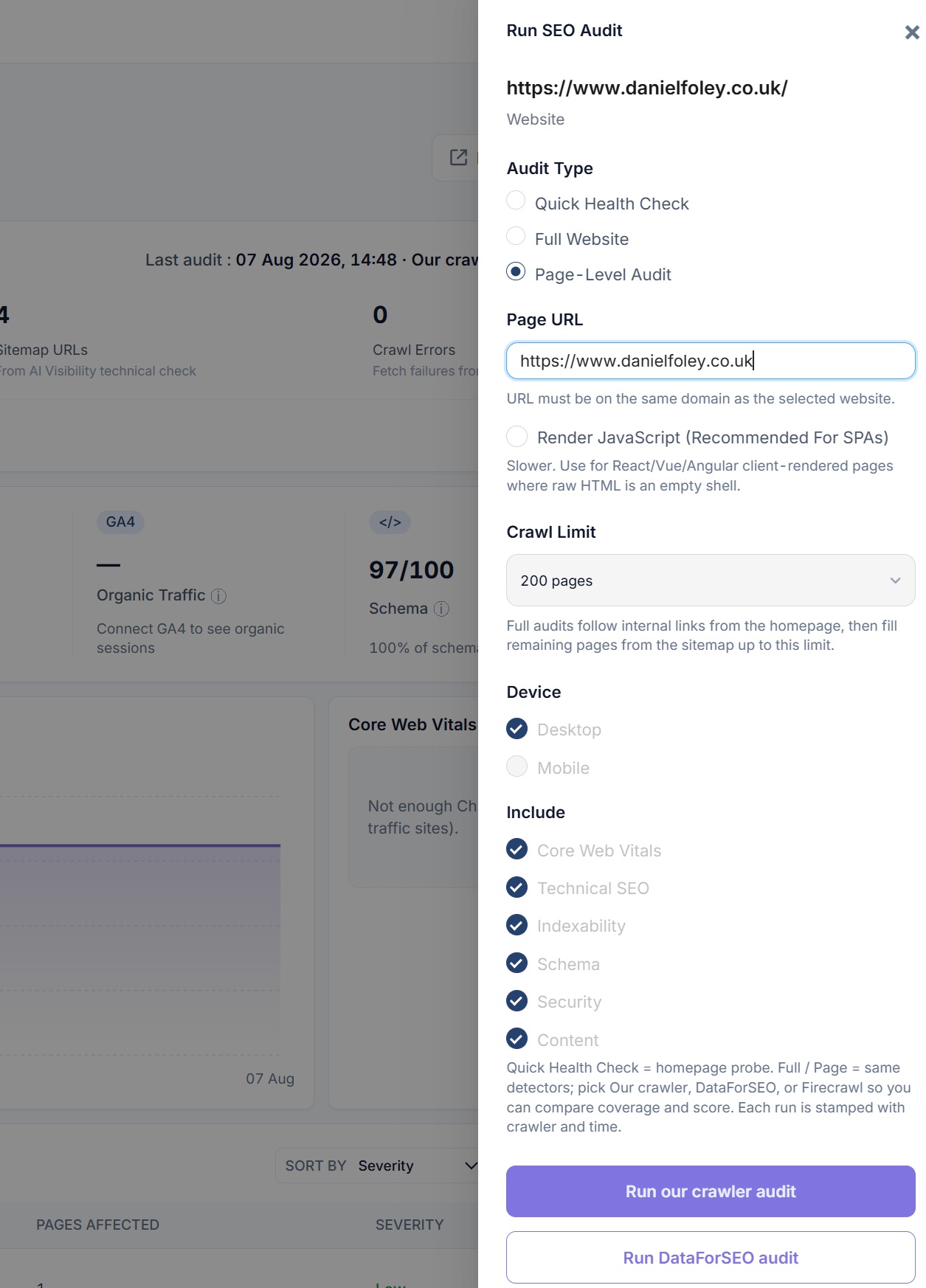
Three ways to audit, depending on what you are actually asking
Most audit tools give you one mode and expect you to work around it, whereas the question you have is usually either how healthy is this site overall, what is wrong with this section, or why is this one page underperforming.
Quick Health Check
A homepage probe that still runs every detector, so it takes seconds rather than minutes. Typically what you want when you are pitching for a site, taking one on, or you just need a read on whether something obvious is broken.
Full Website
Follows internal links out from the homepage and then fills the remaining pages from your sitemap up to whatever crawl limit you set, which gives you proper coverage of the site instead of a sample of it.
Page-Level Audit
One URL inspected properly, with optional JavaScript rendering for React, Vue and Angular pages where the raw HTML is an empty shell. Useful before a page goes live and useful again when a page is not performing.
Crawl limit
Set how many pages the audit is allowed to fetch, so a large site can be audited in sections rather than all at once.
Device
Audit as desktop or as mobile, because plenty of issues only exist on one of them.
What to include
Core Web Vitals, technical SEO, indexability, schema, security and content are all individually switchable.
Which crawler
Run it with our crawler, DataForSEO or Firecrawl, and because every run is stamped with the crawler and the time, you can compare coverage and score between them.
Inside the tool
From the overview down to a single line of source
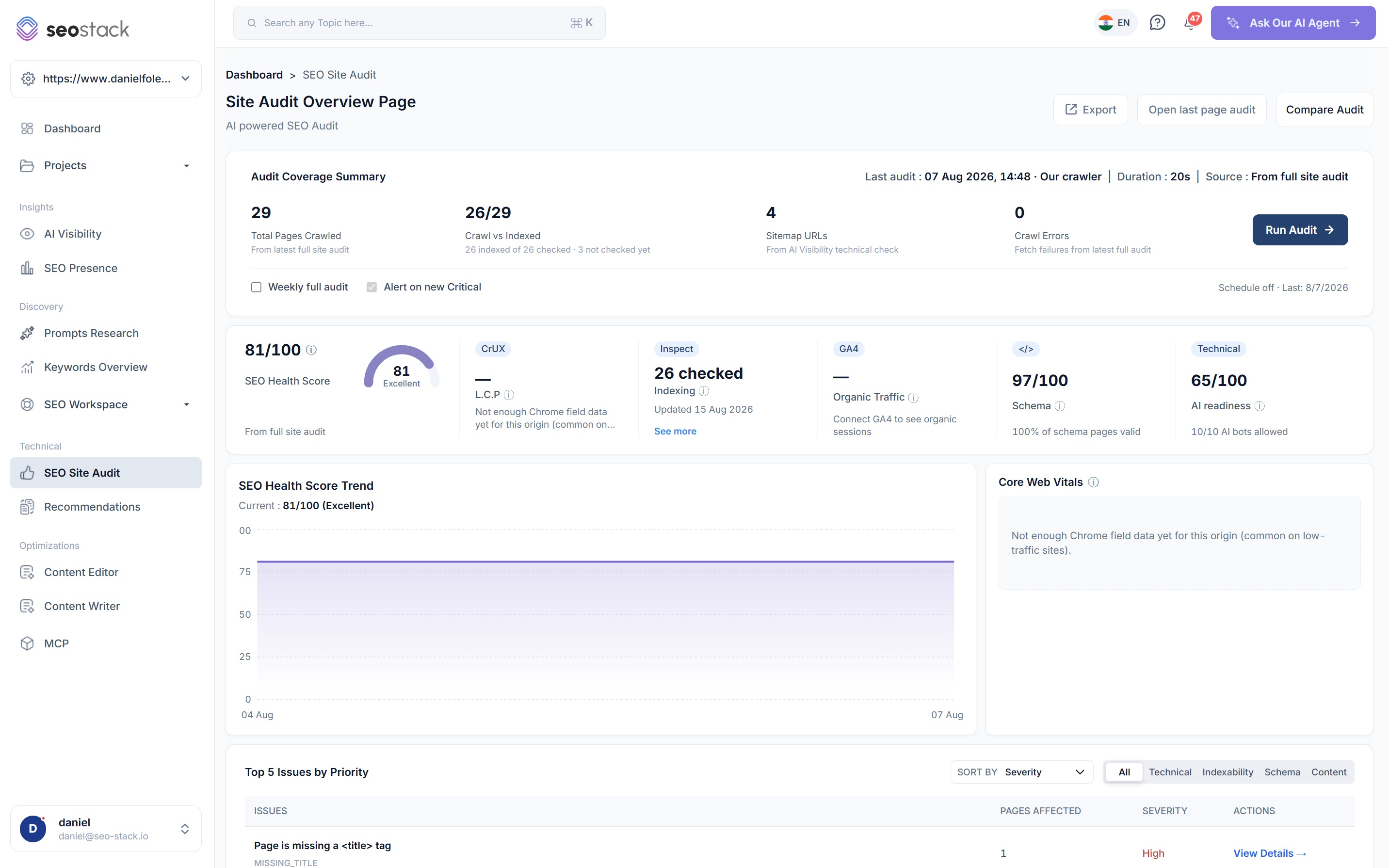
Coverage, score and priorities on one screen
- Audit coverage summary with pages crawled, crawl vs indexed, sitemap URLs and crawl errors
- SEO health score with its rating, plus the trend since your earlier audits
- CrUX field data, Google indexing, GA4 organic traffic, schema validity and AI readiness side by side
- Top issues by priority, filterable by technical, indexability, schema or content
- Weekly full audits on a schedule, and an alert when a new critical issue appears
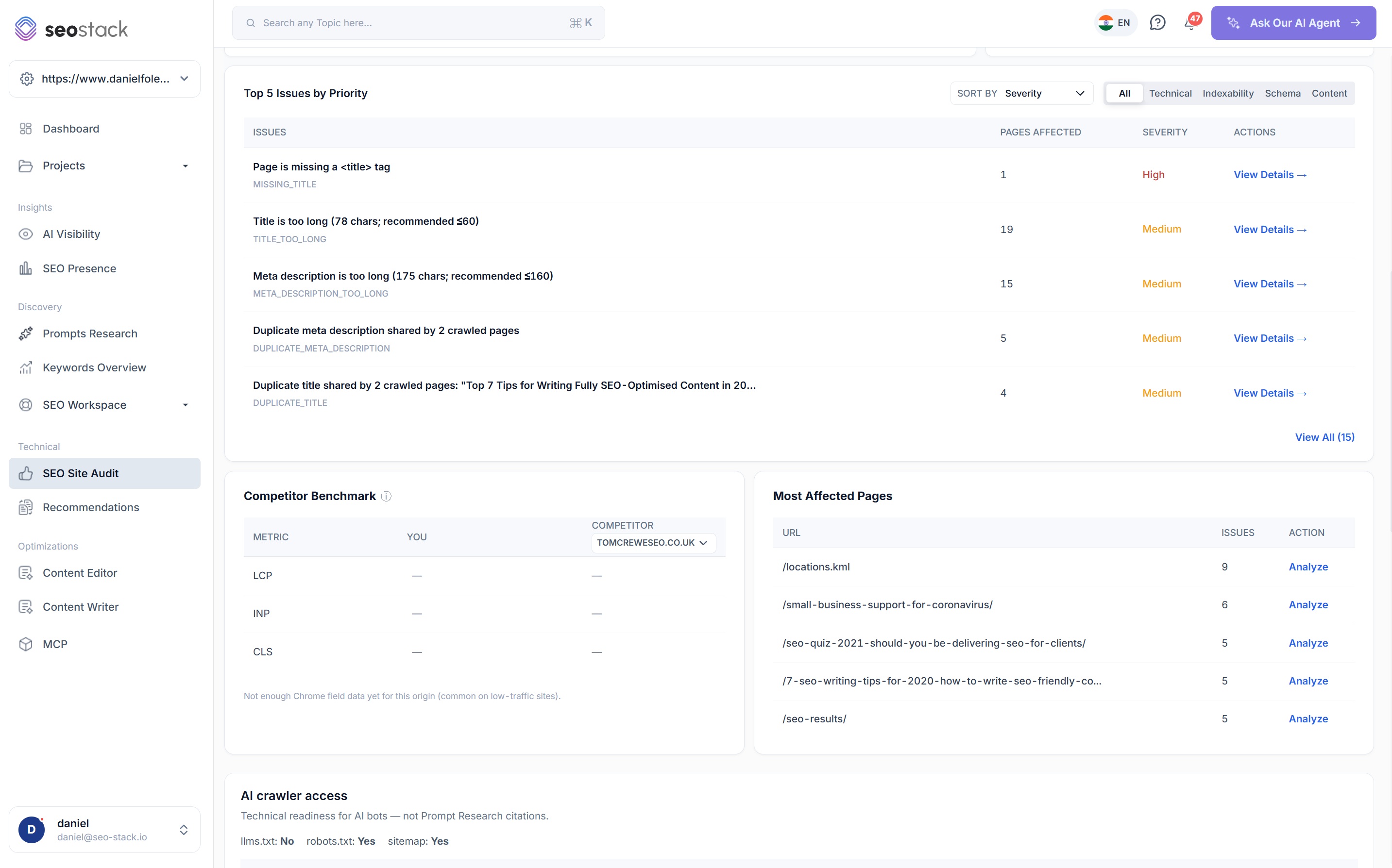
What is wrong, how bad it is, and which pages have it
- Every issue carries a detector code, a plain description, a severity and a count of pages affected
- Sort by severity or by pages affected, depending on whether you are chasing risk or volume
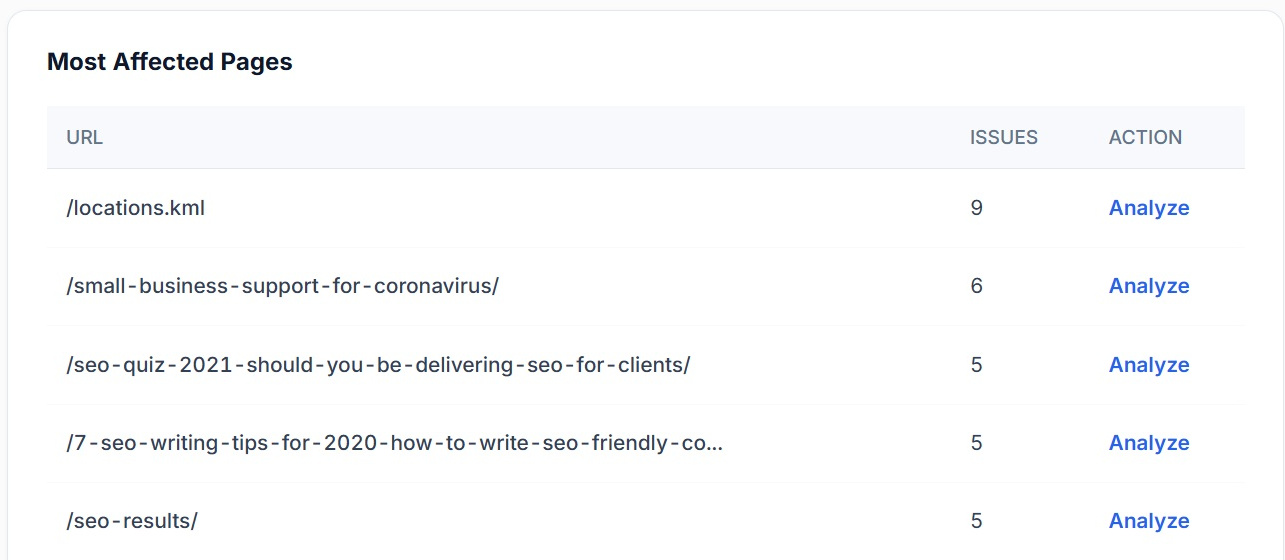
- Most affected pages ranks your URLs by how many issues each one is carrying
- Analyse any URL from the list to open its own page audit
- Competitor benchmark puts your Core Web Vitals against a competitor domain
Start with the pages, not the issues
A page carrying nine issues is usually one template problem rather than nine separate jobs, so the affected pages list often gets you to the cause faster than the issue list does.
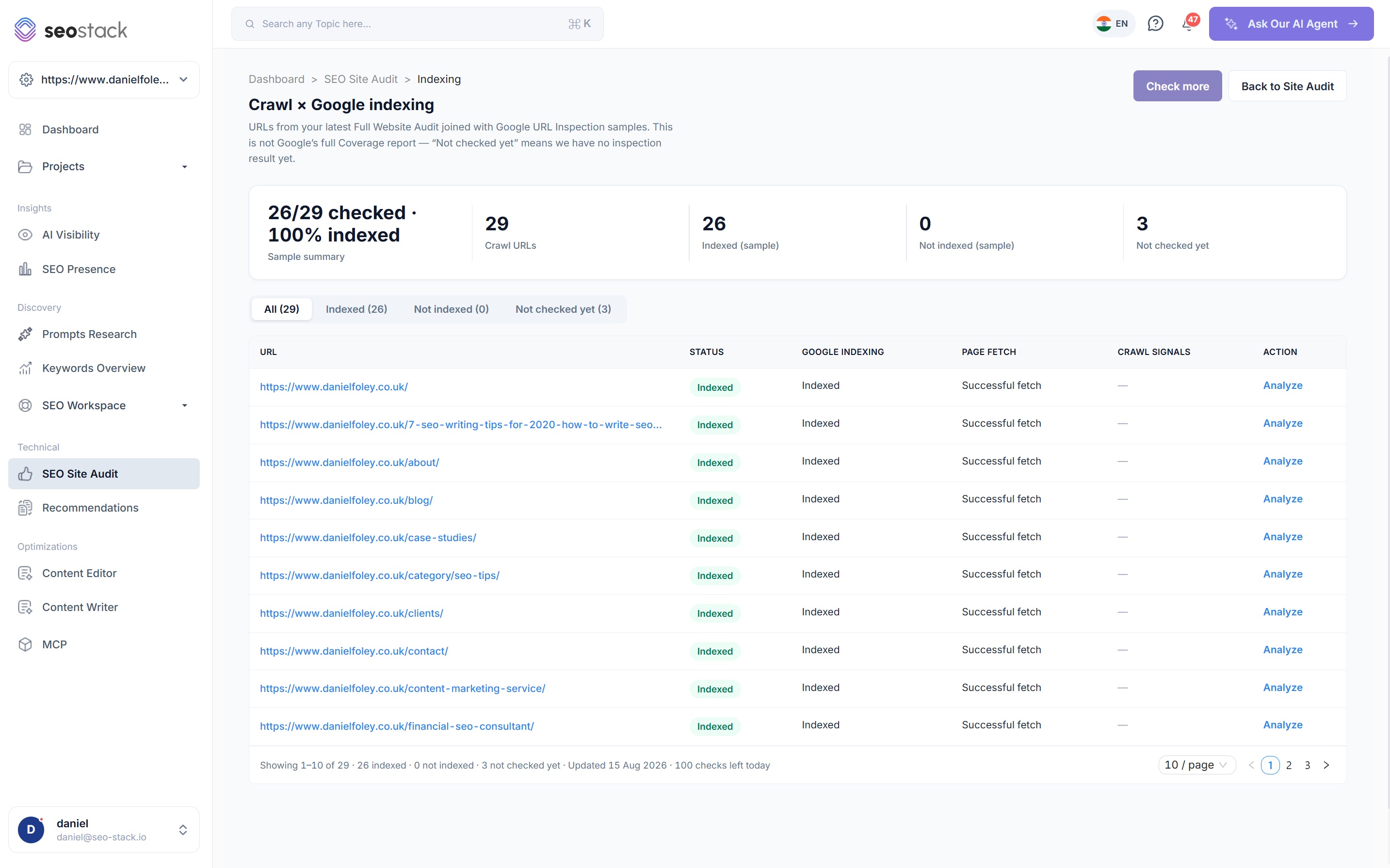
Your crawl joined to Google's own inspection results
- Every crawled URL with its Google indexing status, page fetch result and crawl signals
- Filter to indexed, not indexed, or not checked yet
- Analyse any URL to see the reason Google gave for not indexing it
- Inspection results are sampled and stored, so you build a picture over time rather than checking one URL at a time
A single URL, inspected properly
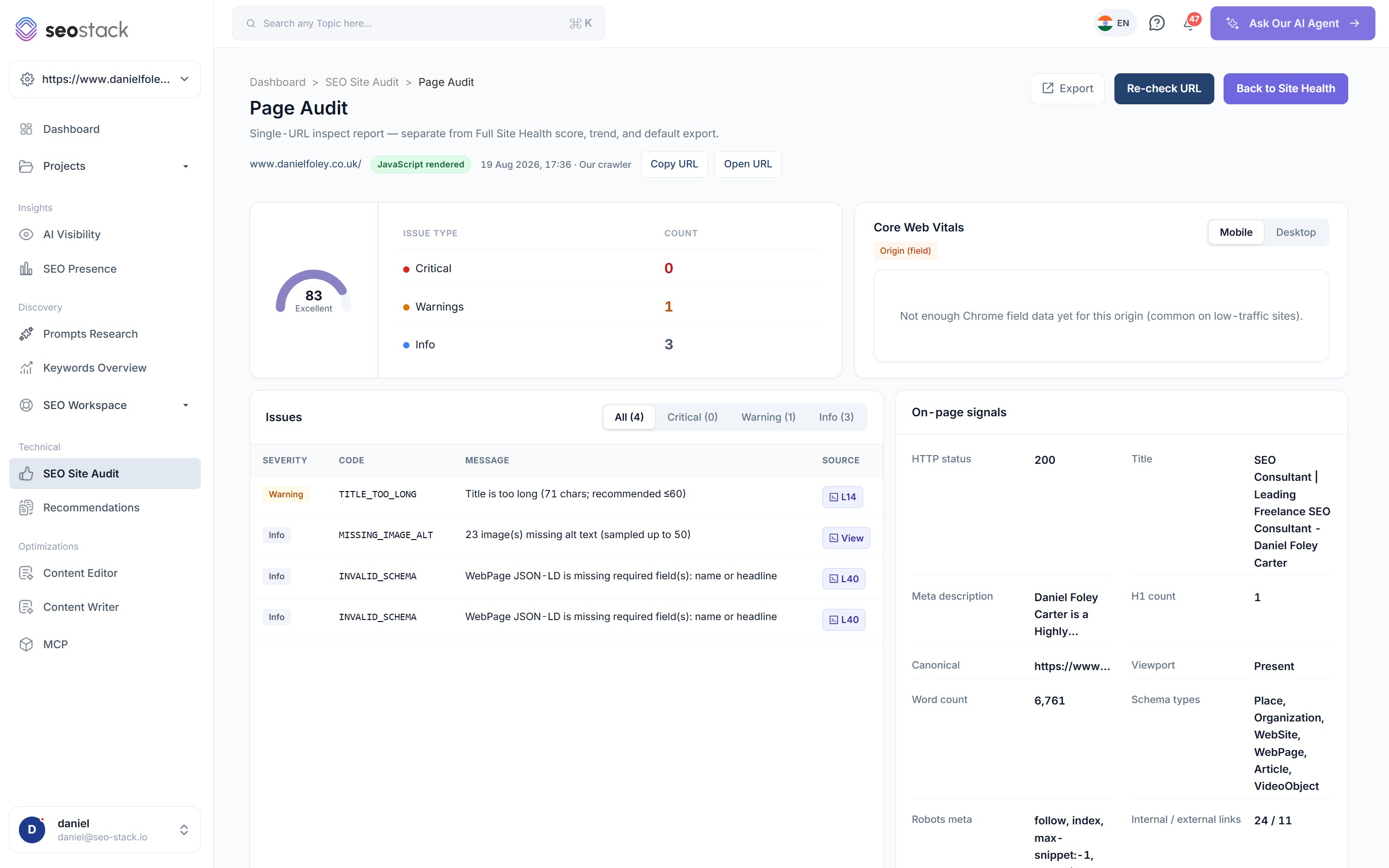
- Its own score, with critical, warning and info counts
- Every issue with the exact line of source it came from
- On page signals including HTTP status, title, meta description, H1 count, canonical, word count, robots meta, viewport, schema types and internal versus external links
- Core Web Vitals for mobile and desktop from CrUX field data
- Google index status for that URL, with last crawl date and page fetch result
The order to do the work in
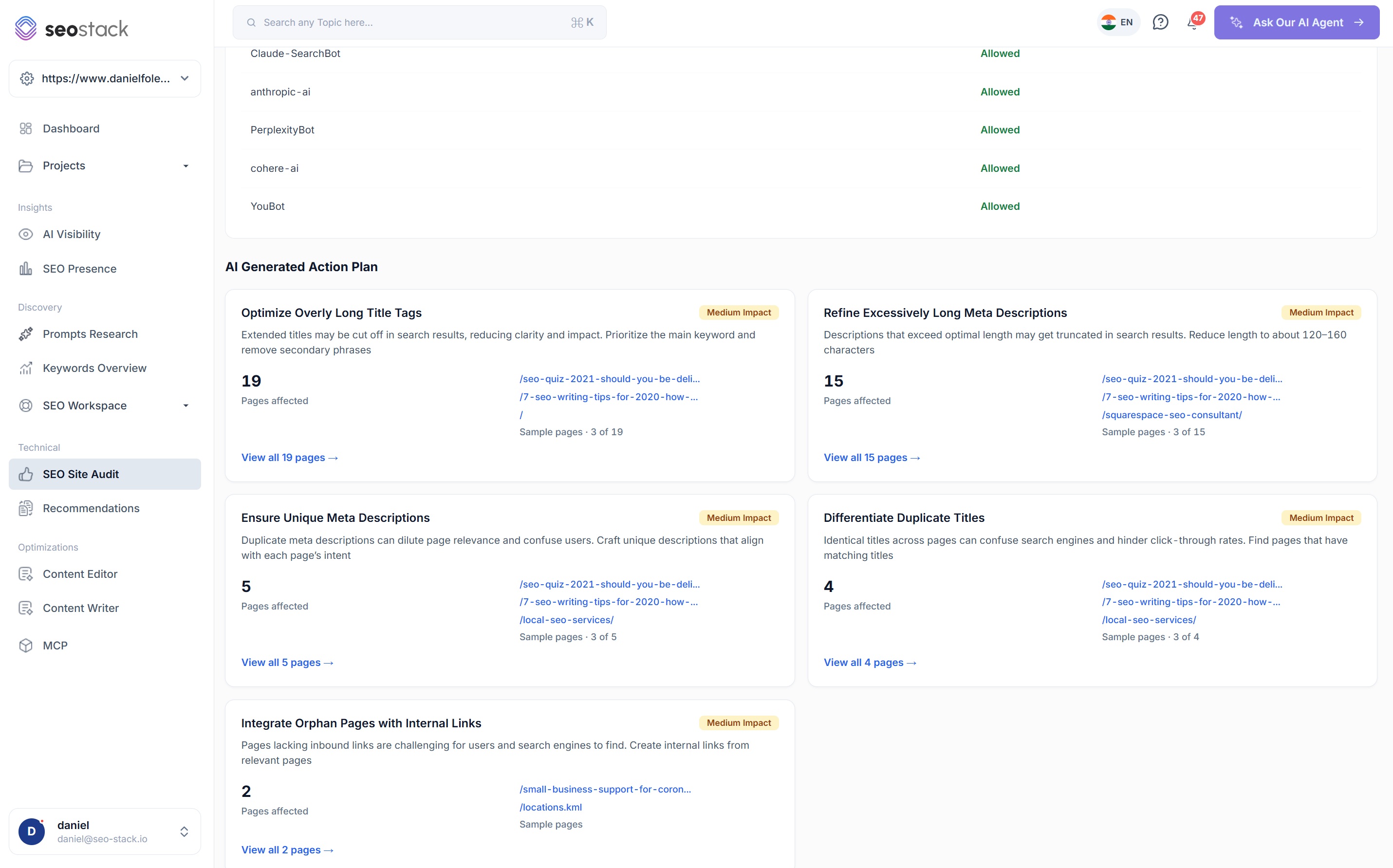
- Each action explains the problem in a sentence and tells you what to change
- An impact rating so you can argue for developer time with something behind it
- The number of pages affected, with sample URLs you can open immediately
- Generated from your audit, not from a generic checklist of best practice
What the score covers
Six readings, not one number in isolation
A health score on its own is not much use to anybody, so the audit shows you the readings that make it up, and each one links through to the detail behind it.

SEO health score
Your overall score out of 100 with a rating against it, calculated from the full site audit rather than from the homepage alone.
CrUX
Core Web Vitals from Chrome field data, so LCP, INP and CLS are what real visitors experienced rather than a lab test. Low traffic origins will not have enough data yet, and we say so instead of inventing a number.
Inspect
How many of your crawled URLs have been checked against Google URL Inspection, and when that data was last updated.
GA4
Organic sessions pulled through from your connected GA4 property, so technical health and actual traffic are in the same view.
Schema
The percentage of your crawled pages with valid structured data, along with the pages where a required field is missing.
AI readiness
How many of the AI crawlers we check for are allowed to reach your site, which matters a great deal more now than it did two years ago.
The issues
Four families, every one with the pages behind it
Issues are only useful if you can tell which are serious, which are cosmetic and which pages carry them, so everything the audit finds is filed by family, rated by severity and counted by pages affected.
Issues by priority
- High
- 2
- Medium
- 6
- Low
- 3
- Pages affected
- 81
- 3High
Page is set to noindex but is linked from navigation
NOINDEX
- 1High
Page is missing a <title> tag
MISSING_TITLE
- 19Medium
Title is too long (78 chars; recommended 60 or fewer)
TITLE_TOO_LONG
- 15Medium
Meta description is too long (175 chars; recommended 160)
META_DESCRIPTION_TOO_LONG
- 6Medium
WebPage JSON-LD is missing required field(s): name or headline
INVALID_SCHEMA
- 5Medium
Duplicate meta description shared by 2 crawled pages
DUPLICATE_META_DESCRIPTION
- 4Medium
Canonical points at a different URL to the one crawled
CANONICAL_MISMATCH
- 2Medium
Page has no internal links pointing at it
ORPHAN_PAGE
- 11Low
23 image(s) missing alt text
MISSING_IMAGE_ALT
- 8Low
Page has no JSON-LD @type structured data
MISSING_SCHEMA
- 7Low
Server responded in over 1,200ms
SLOW_RESPONSE
Illustrative. Filter by family, sort by severity or pages affected, then open any issue to see every URL it applies to.
Technical
Response codes, redirect chains, slow server responses, orphan pages, broken internal links and the things that stop a crawler getting round your site properly.
Indexability
Noindex directives, canonical mismatches, robots.txt blocks and pages Google is being told to ignore, whether you meant it or not.
Schema
Missing JSON-LD, invalid structured data and required fields left empty, checked per page rather than as a single sitewide pass or fail.
Content
Missing or duplicated titles and meta descriptions, titles beyond the length Google will show, thin pages and images with no alt text.
The pages carrying the most problems are usually the fastest win
Most affected pages ranks your URLs by how many issues each one has, and when a single page is carrying nine of them it is very often one template or one plugin causing all nine, so you fix it once and the count drops across everything built the same way. Analysing any URL from that list opens its own page audit, so you go from a sitewide number to the specific line of source in two clicks.
Indexing analysis
Which of your pages Google has actually indexed
Crawling a page yourself only tells you the page exists, it tells you nothing about whether Google has it, so the audit joins your crawl to Google's own URL Inspection data and shows you both together.
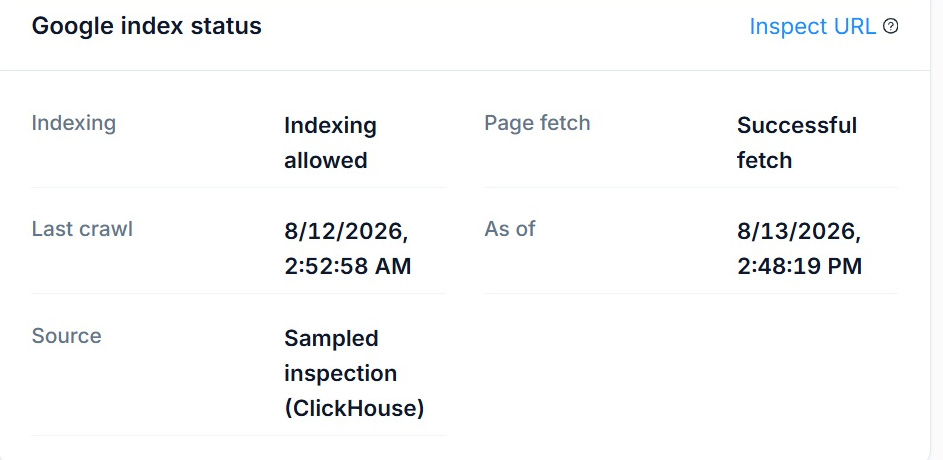
- Every URL from your latest full audit, joined to Google URL Inspection results for the same URL
- Indexing allowed or blocked, the page fetch result, the date Google last crawled it and where the inspection came from
- Filter to indexed, not indexed, or not checked yet, then analyse any URL to see the reason Google gave
- Results are stored as they are collected, so coverage builds up across runs instead of resetting each time
Worth being clear about
This is a sample joined to URL Inspection, it is not Google's full Coverage report, and Google limits how many inspections any property can run in a day. So when a URL shows as not checked yet, it means we do not have an inspection result for it yet rather than that anything is wrong with the page, and the tool says exactly that instead of guessing.

AI readiness
Whether AI crawlers can reach your content at all
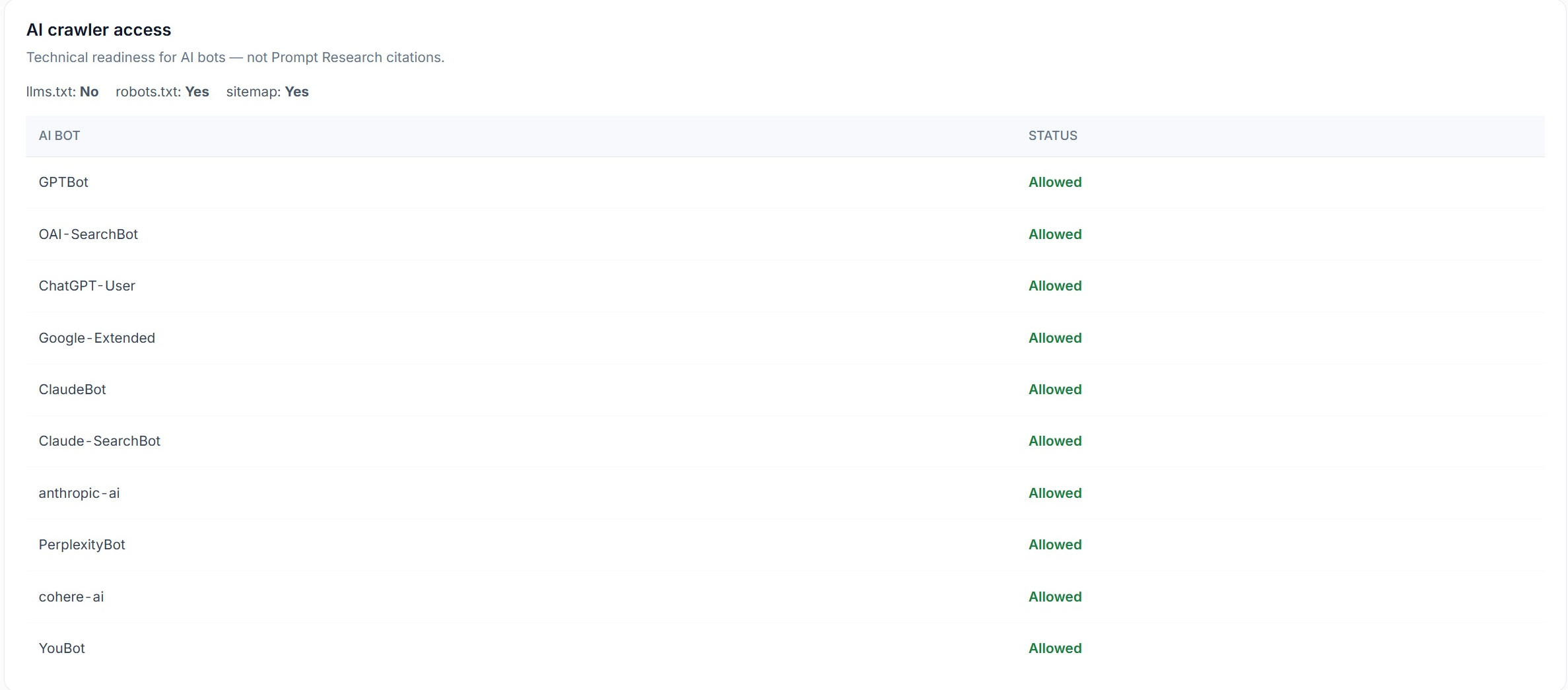
Before you worry about how often you are cited in ChatGPT or Gemini, it is worth checking that the crawlers behind them are allowed to fetch your pages, because a robots.txt rule written years ago will happily block the lot.
The bots we check
GPTBot, OAI-SearchBot, ChatGPT-User, Google-Extended, ClaudeBot, Claude-SearchBot, anthropic-ai, PerplexityBot, cohere-ai and YouBot, each shown as allowed or blocked against your live robots.txt.
llms.txt, robots.txt and your sitemap
All three are detected and reported, so you can see at a glance what is in place and what is missing.
This is access, not citations
Technical readiness tells you whether a model can fetch you, it does not tell you whether it mentions you, and those are two genuinely different problems. AI Visibility covers the second one.
Render analysis
What the server sent, against what the crawler ended up with
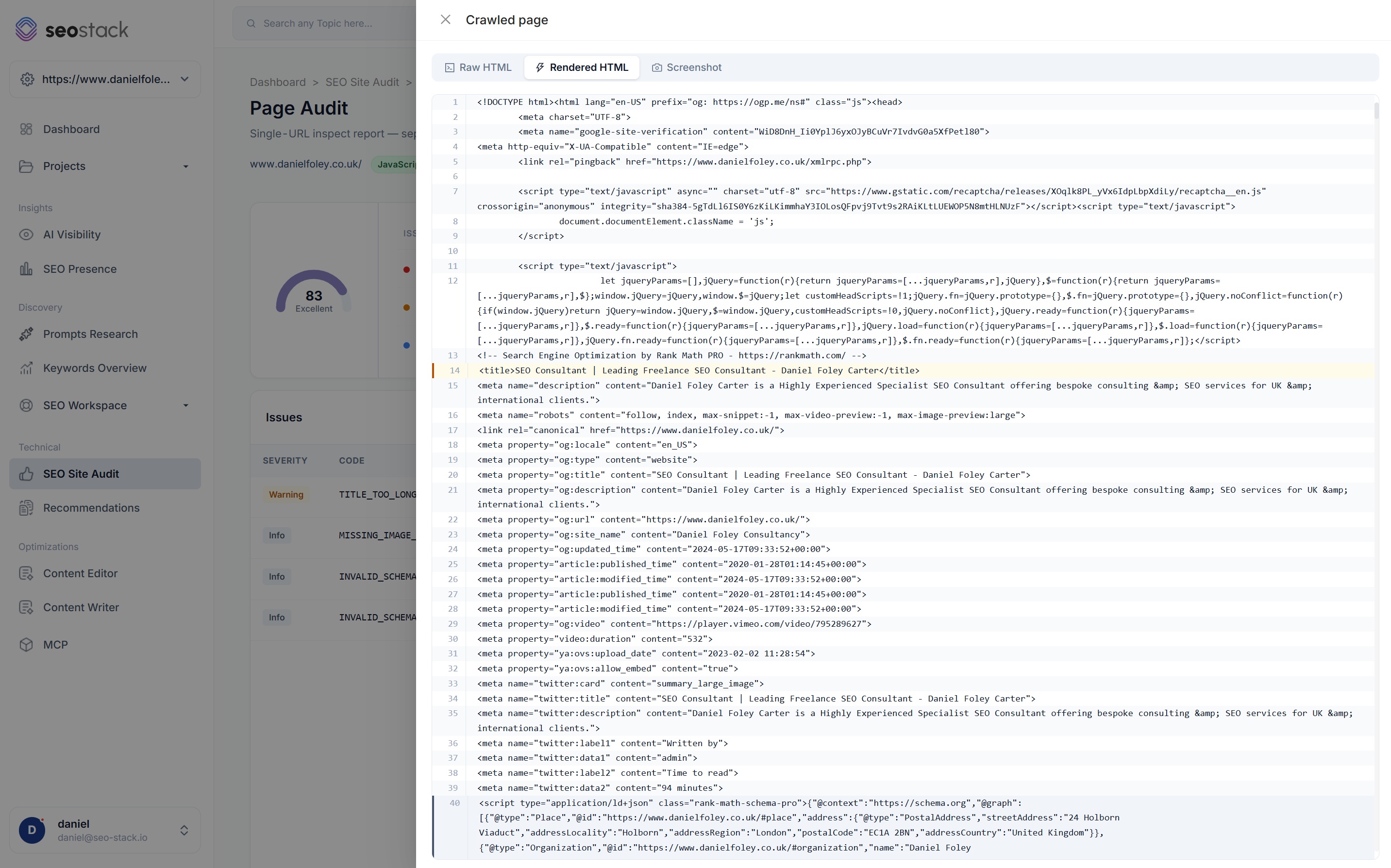
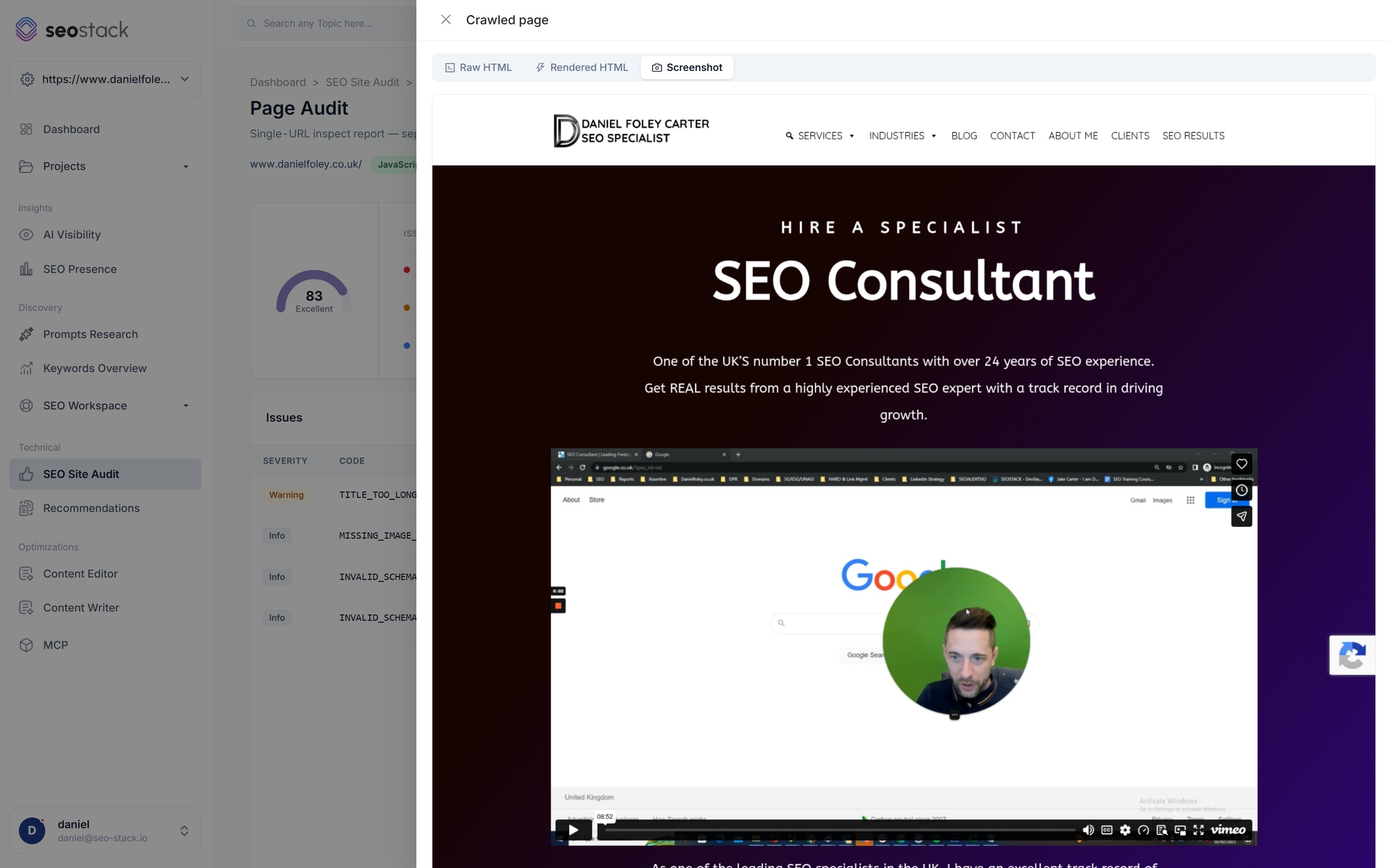
Rendering problems are some of the most expensive issues in SEO because everything looks correct in a browser, so every crawled page keeps its raw HTML, its rendered HTML and a full page screenshot as evidence.
Crawled page
1<!DOCTYPE html>2<html lang="en-GB">3 <head>4 <title>Commercial Roofing Contractors | Northwest</title>5 <meta name="robots" content="index, follow">6 </head>7 <body>8 <h1>Commercial roofing contractors</h1>9 <p>We install and maintain flat roofing…</p>10 <a href="/services/">Our services</a>11 </body>- Word count
- 1,240
- H1 count
- 1
- Internal links
- 24
- Schema types
- Organization, Service
Illustrative, based on a client rendered site. Every on page signal an auditor reads only exists once the page has been rendered.
Raw HTML
Exactly what the server returned, before any JavaScript has run. On a client rendered site this is often an empty shell with no headings, no body copy and no internal links in it at all.
Rendered HTML
The same page after JavaScript has executed, which is what the on page signals are read from. Comparing the two is the quickest way to prove that your content only exists after rendering.
Full page screenshot
A capture of the page as the crawler saw it, so when a client tells you the page looks fine you have the version the crawler got rather than the version their browser shows them.
What to do about it
An action plan, and the evidence underneath every line of it
Knowing what is wrong is the easy half. The AI generated action plan reads your audit and puts the work in an order, and every recommendation links back into the crawled source so whoever picks it up can verify it before changing anything.

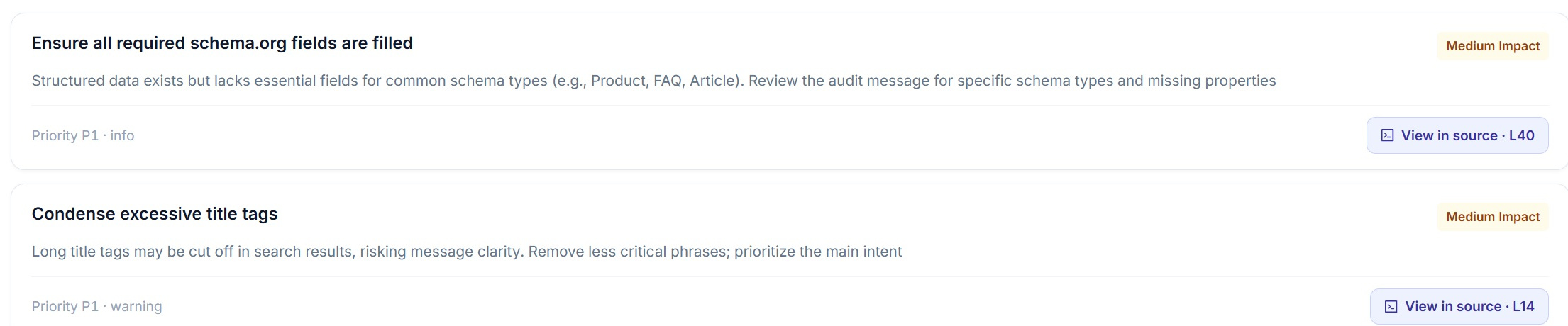
Every fix points at the line it came from
On a page audit each recommendation carries a priority and an impact rating, and the button next to it opens the crawled source at the exact line, i.e. L14 for a title that is too long or L40 for a JSON-LD block missing a required field. Naturally that makes the handover to a developer a lot shorter, because you are giving them the problem, the page and the line rather than a description of something they then have to go and find.
More on recommendations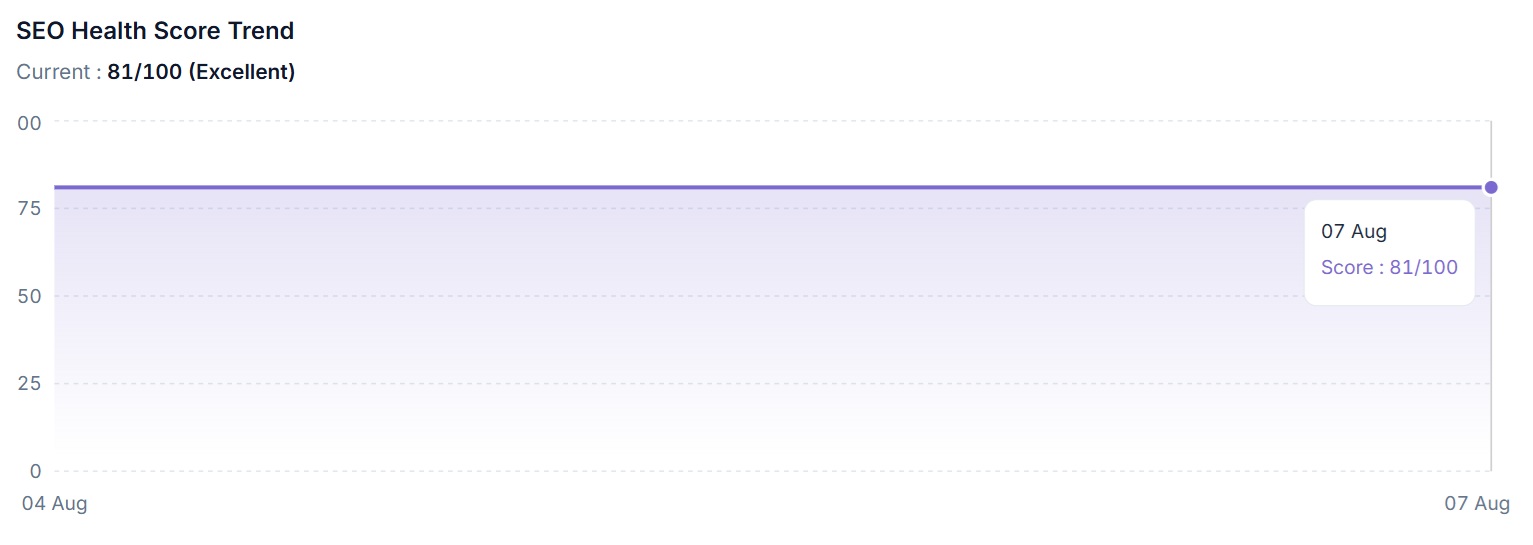
Proving it worked
A score you can watch move, and a competitor to measure it against
Technical SEO is difficult to report on because the work is invisible to everybody outside the team doing it, so keeping every audit and charting the score gives you something concrete to show for a month of fixes. You can also schedule a weekly full audit and have it alert you when a new critical issue appears, which is usually how you catch a deployment that has added a noindex or broken a template without anybody noticing.
The competitor benchmark sits alongside it and puts your Core Web Vitals against a competitor domain of your choosing, because a score in isolation does not tell you whether you are ahead or behind in the market you are actually competing in.
How SEOs use it
What the SEO Site Audit is actually good for
Onboard a new client properly
Run a quick health check while you are still on the call, then a full crawl afterwards, and you have a scoped list of technical work and an idea of the state of the site before you have committed to anything.
Catch a bad deployment
Schedule a weekly full audit with alerting on new critical issues, and a template change that adds a noindex or drops your canonical gets found in days rather than when the traffic falls off.
Work out why one page will not rank
A page level audit gives you the score, the issues with line numbers, the on page signals and Google's own index status for that URL, which between them usually answer it.
Check you are visible to AI crawlers
If GPTBot or ClaudeBot are blocked then nothing you do about prompts or content is going to help, so the AI crawler access check is worth running before any of that work starts.
Prove technical work paid off
Audit before, do the work, audit after, and you have the score, the issue counts and the trend line to put in front of whoever signed off the time.
Turn an audit into a plan people follow
The AI action plan converts the issue list into a prioritised set of tasks with impact ratings and affected pages, which is the difference between an audit that gets implemented and one that gets filed.
What you get out of it
The outcome, not the feature list
Hand developers a prioritised list with line numbers, not a data dump
Prove which of your pages Google has indexed, and which it has skipped entirely
See whether AI crawlers can reach your content before you worry about citations
Works well with
More in Technical & Auditing
Connect a property. Watch the data start stacking.
Warehousing begins the moment you connect your Search Console property, there is no Google Cloud project to set up, no BigQuery and no schema to design. You simply connect your property and SEO Stack starts storing every row of your data from that day onwards.
- Credit card required
- Cancel within the trial and you won't be billed
- No contracts