Discovery & Opportunity
Find out whether Google reads your page the way you intended
See the intent composition of the queries a URL, a URL group or your whole domain is being served for, broken into commercial, informational, transactional and navigational, and watch how that mix moves over time.
- 100% data privacy
- 99.99% uptime
- Nothing to configure
- Export anytime, no limits
Trusted by leading companies
The problem
A product or category page that has been padded out with content starts getting served for informational queries instead of commercial ones. The rankings look perfectly healthy, the revenue does not, and nothing in a normal report will tell you why.
The basics
What query intent is, and why the mix matters
Query intent is simply what somebody was trying to do when they typed a search. Two queries can be about the same product and want completely different things, and Google treats them completely differently, which is why the same page will rank brilliantly for one and not at all for the other.
Every URL on your site is served for a mixture of intents, and that mixture tells you what Google has decided the page is for. That is often not the same as what you built it for, and the gap between the two is where a surprising amount of lost revenue sits.
Informational
Somebody is trying to learn something. How to choose trail shoes, what causes a slow website, why a rate changed. They are not looking to buy yet and often are not looking for a brand at all.
“how to clean running shoes”
Commercial
Somebody is researching a purchase they intend to make. They are comparing, shortlisting and reading reviews, so they are much closer to buying than an informational searcher.
“best trail running shoes for wide feet”
Transactional
Somebody wants to do the thing now, whether that is buy, sign up, book or download. These are the queries that convert, and they are usually the smallest group by volume.
“buy salomon speedcross 6”
Navigational
Somebody is trying to reach a specific brand or page. Largely brand searches, and useful to separate out because they otherwise flatter every other number on the page.
“salomon uk store”
SEO Stack also groups anything that does not fall cleanly into one of the four as Others, so the totals always add up.
Why it is useful
A page can rank well and still be the wrong page
The most common version of this is a product or category page that has been padded out with helpful content until Google decides it is a guide. The rankings hold up, sometimes they improve, and the conversions quietly go somewhere else.
Query intent composition
A page built to sell, being served almost entirely for informational queries. Rankings will look healthy while revenue does not.
Illustrative. Select a page type to compare how the intent mix differs.
Three things the intent mix tells you
Whether a URL has the wrong saturation
An ecommerce product page carrying far more informational queries than commercial ones is being read as an article. That is a content problem, not a ranking problem, and chasing positions will not fix it.
What the whole domain is weighted towards
Roll it up to the full domain and you can see what Google thinks your site is mostly about. A commerce business finding that three quarters of its queries are informational has a structural issue worth knowing about.
Where pages are diluting each other
Compare product pages against their category pages. If both are picking up the same informational queries, you are competing with yourself and neither is being read as the commercial page it should be.
Inside the tool
Chart it, compare it, then read the numbers
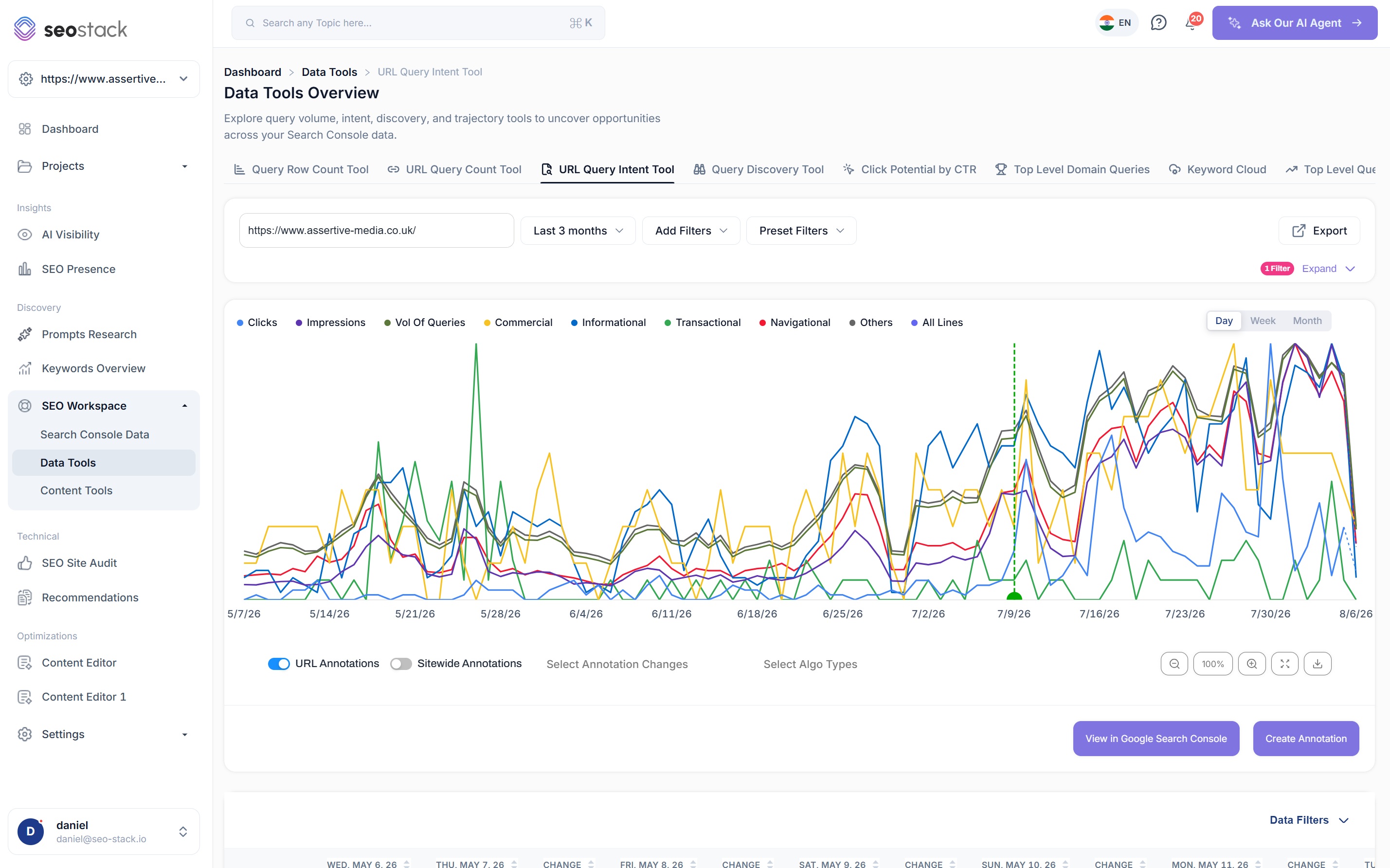
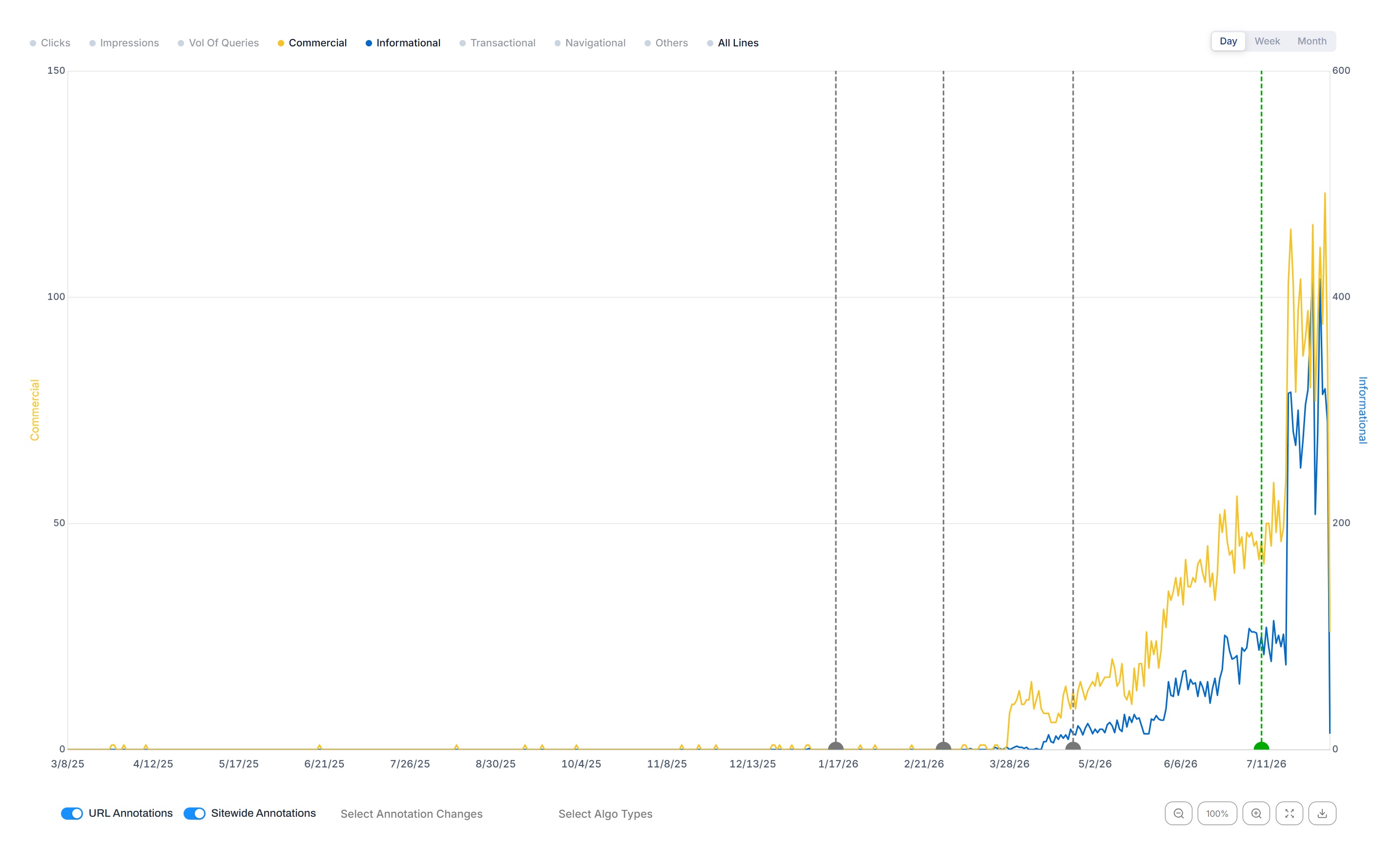
Every intent plotted over your reporting period
- Commercial, informational, transactional, navigational and others, each as its own line
- Clicks, impressions and total volume of queries available alongside them
- Day, week and month views, so you can look at a specific fortnight or a full year
- Zoom, expand to full screen and download the chart as an image
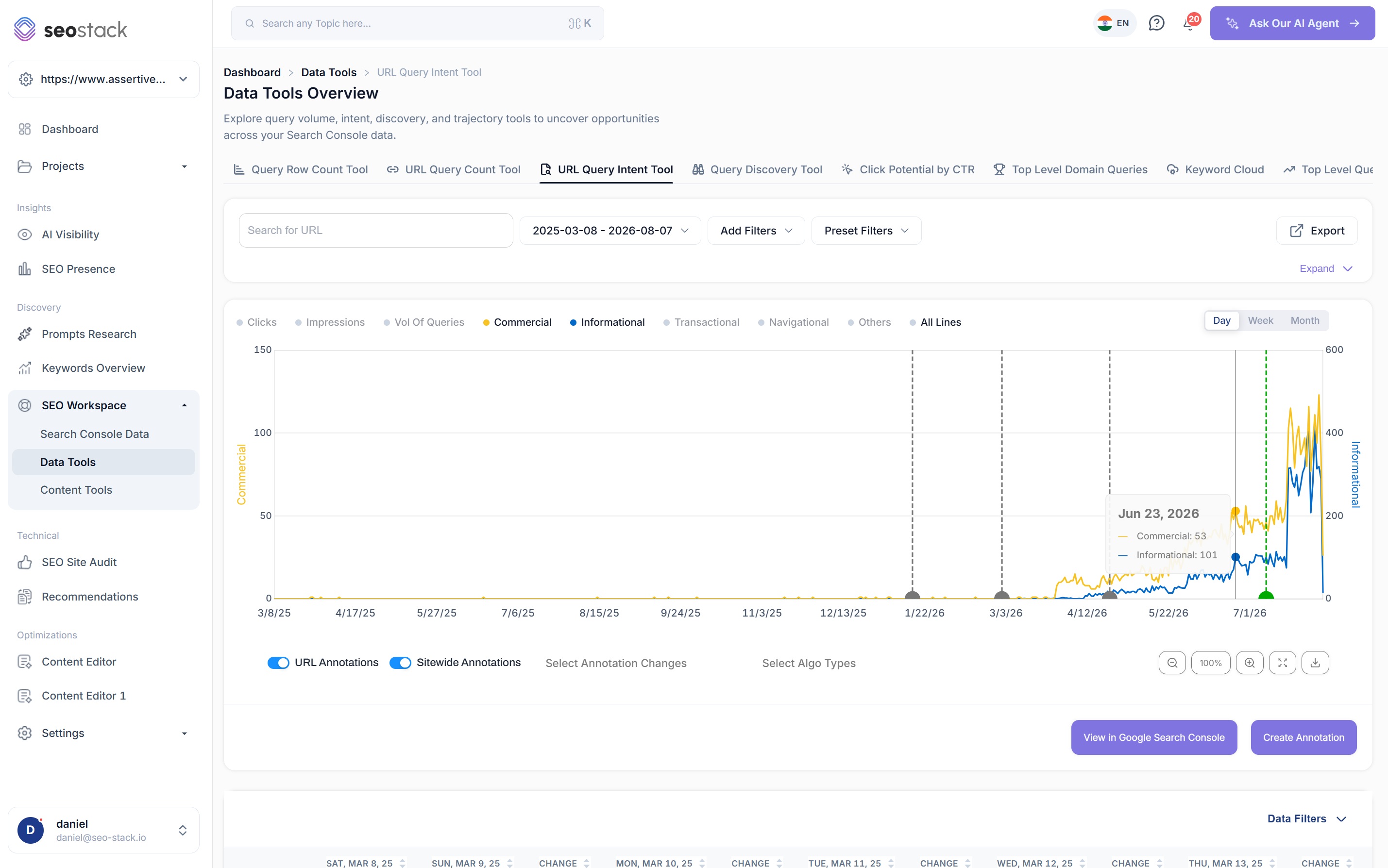
Turn everything off except the two you care about
- Isolate commercial against informational to see which one is actually growing
- A dual axis means two very differently sized intents can still share a chart usefully
- Hover any date for the exact figures on both lines
- This is usually how a drift becomes obvious, because one line climbs while the other does not
Growth is not always the growth you wanted
Informational queries climbing steeply on a commercial page looks like progress on a traffic chart and is often the opposite.
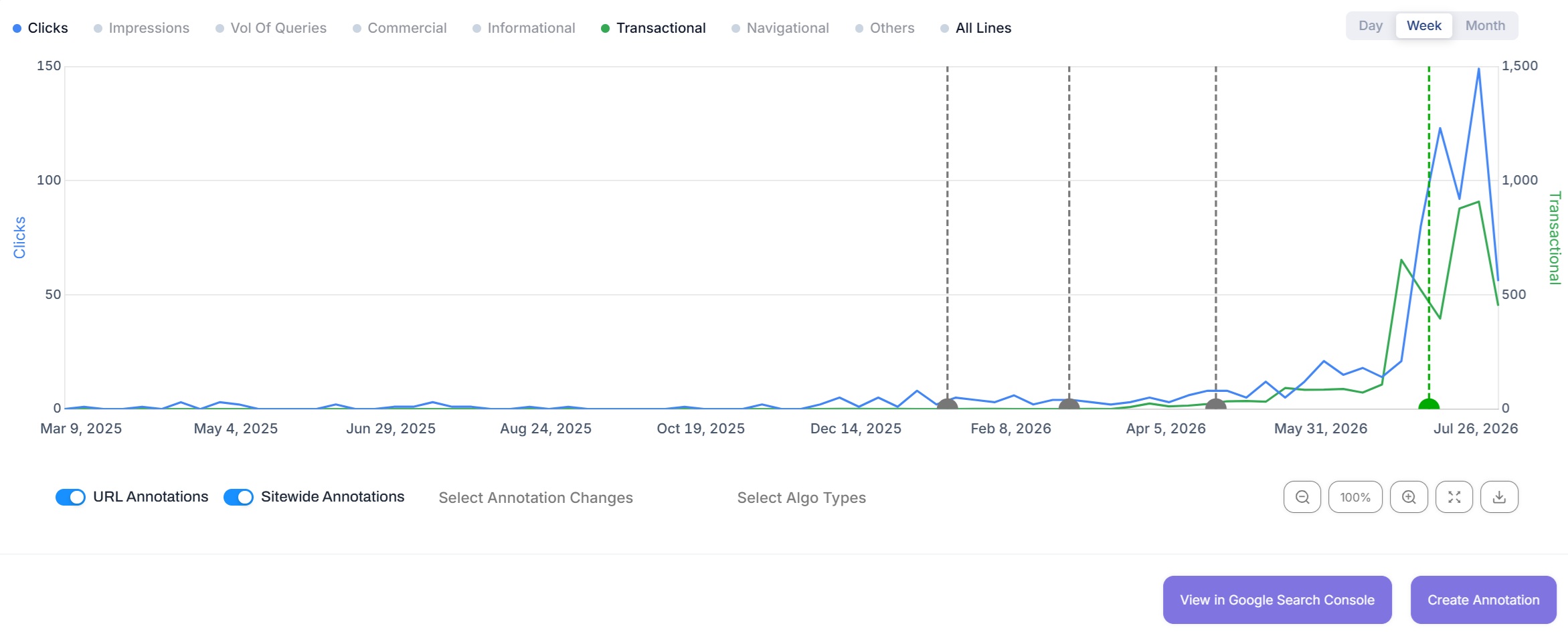
Check whether an intent is actually earning anything
- Put clicks on the chart against a single intent to see whether the two move together
- Transactional volume rising with clicks flat is a very different problem to both rising
- Annotations and core updates stay visible while you do it
- Week view smooths the noise without hiding the shape
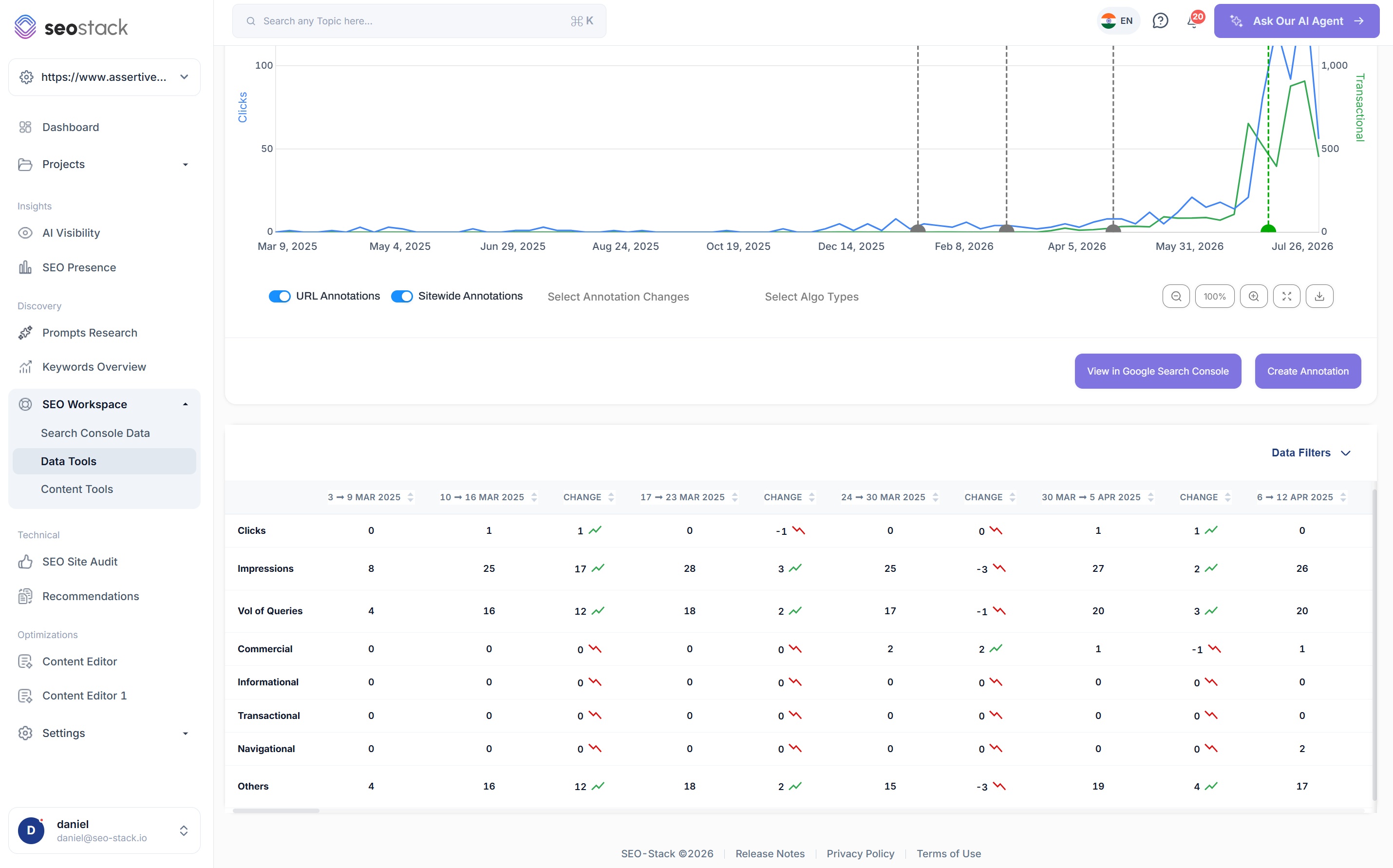
The numbers underneath the chart
- Clicks, impressions and volume of queries as rows, then every intent broken out below them
- A change column between each period, so movement is stated rather than inferred
- Scroll back through as many periods as your warehoused history covers
- Export the whole table when you need to work on it elsewhere
What you can analyse
One page, a group of them, or everything
A single URL
Paste a URL in and see exactly what Google is serving it for. This is the level most misalignment gets found at, because a single page is where the mismatch between what you built and what ranks is sharpest.
A URL group
Look at all your product pages together, or a whole category tree, which is how you find out that an entire template has drifted rather than one page having an unusual month.
The full domain
Leave the URL field empty for the site wide view. This is the weighting picture, and it is usually the one that surprises people most.
Day, week or month
Daily for investigating something specific, weekly for reading a trend without the noise, monthly for the long arc. Your warehoused history means the long view keeps going back.
Annotations & core updates
See what caused the mix to change
An intent mix rarely shifts on its own. Either you changed something or Google did, and both are plotted directly onto the chart so you are not left guessing which it was.
- URL level annotations for changes made to the specific page you are looking at
- Sitewide annotations for template, navigation or platform changes, toggled separately
- Google core updates shown across the whole reporting timeframe
- Filter to specific annotation changes or algorithm update types when a period gets busy
- Create an annotation without leaving the chart
How SEOs use it
What the intent data is actually good for
Diagnose a commerce page that stopped converting
When a product or category page holds its rankings but stops selling, the intent mix is usually where the answer is. If informational queries have taken over, the page has been read as a guide.
Find content dilution
Adding a long explainer to a category page to help it rank often works, and then keeps working in the wrong direction. Watching the commercial share fall as the informational share climbs is how you catch it.
Decide where content should actually live
If a commercial page is picking up a lot of informational queries, that is usually a signal to move the content to its own guide and link back, rather than removing it entirely.
Confirm a rewrite worked
Log an annotation when you make the change, then watch whether the intent composition actually moves. It is a far more direct measure of a content rewrite than a click chart.
Understand a domain you have just taken on
For an agency picking up a new client, the domain level intent weighting is one of the fastest ways to understand what the site is genuinely known for before you plan anything.
Separate brand from everything else
Navigational queries are largely brand searches, and pulling them out stops them flattering the rest of your numbers when you are trying to judge non brand performance.
What you get out of it
The outcome, not the feature list
Catch commercial pages drifting informational before revenue follows
See the intent weighting of your whole domain, not just a page
Confirm a rewrite actually changed how Google reads the page
Connect a property. Watch the data start stacking.
Warehousing begins the moment you connect your Search Console property, there is no Google Cloud project to set up, no BigQuery and no schema to design. You simply connect your property and SEO Stack starts storing every row of your data from that day onwards.
- Credit card required
- Cancel within the trial and you won't be billed
- No contracts