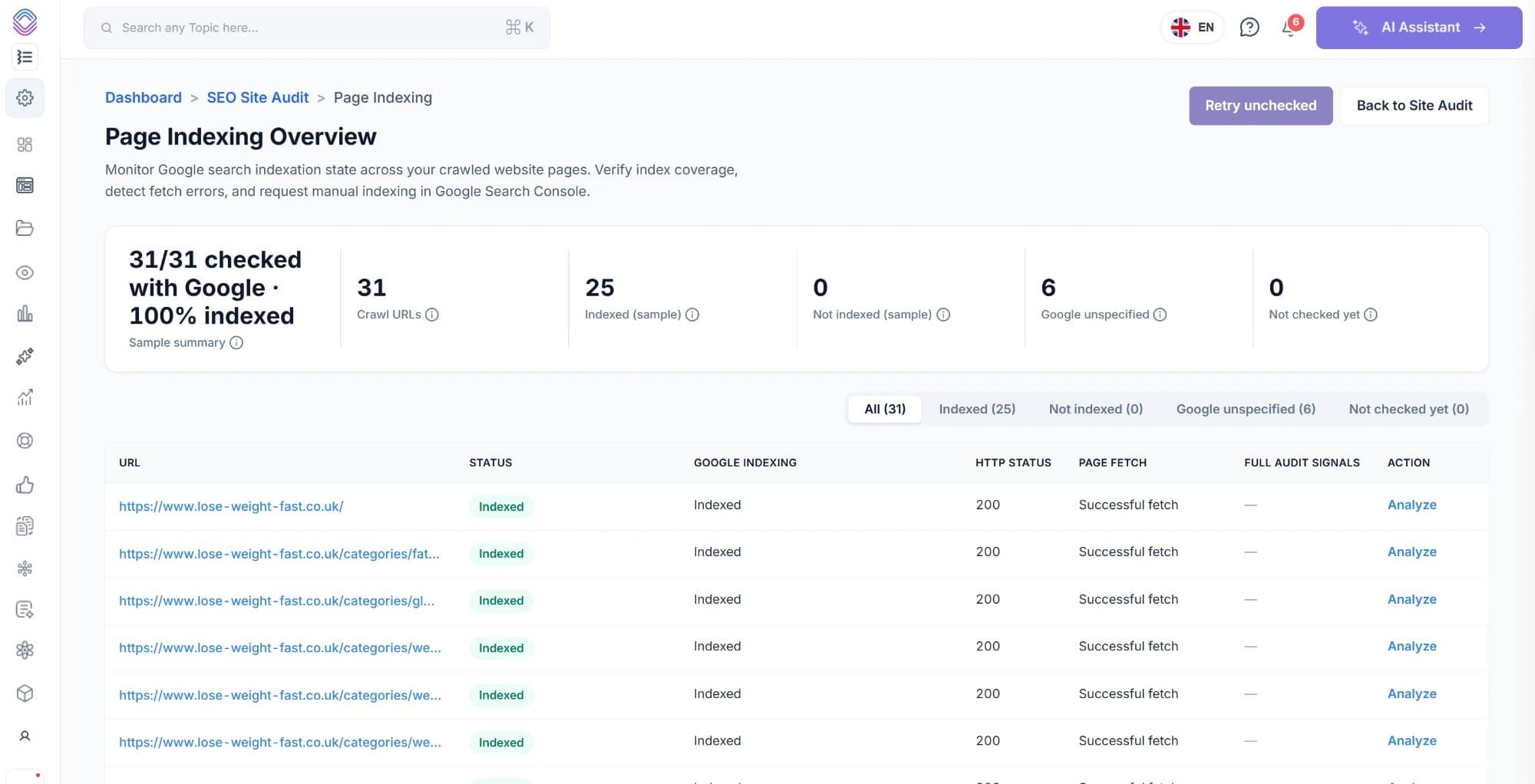
Page Indexing
See what Google indexed, and what it quietly skipped
SEO Stack crawls your website, checks every URL against Google and files it by indexing state. You get the pages behind each number, the reason a page was not indexed, and the ability to analyse it or request indexing without leaving the report.
- Credit card required
- No Google Cloud project
- Runs on your own crawl
Trusted by over 5000 Users + Brands:
Why this exists
A count is not a list of pages
Search Console will tell you that four hundred URLs are crawled and currently not indexed. Getting from that number to the specific pages, in an order you can work through, is where the report stops being useful.
The examples are a sample
Search Console shows a selection of URLs per state rather than all of them, so the pages you most need to see are often not the ones on screen.
No way to work the list
There is no filtering across your own crawl, no record of what you checked, and no way to tell a page you already fixed from one you have not looked at.
The verdict sits on its own
An indexing state means something different when the page returned a 200 than when it returned nothing at all, and the two are reported separately.
The report
Every crawled URL, with Google's verdict beside it
The summary counts across the top are the filters underneath, so a number is never more than one click away from the pages it came from.
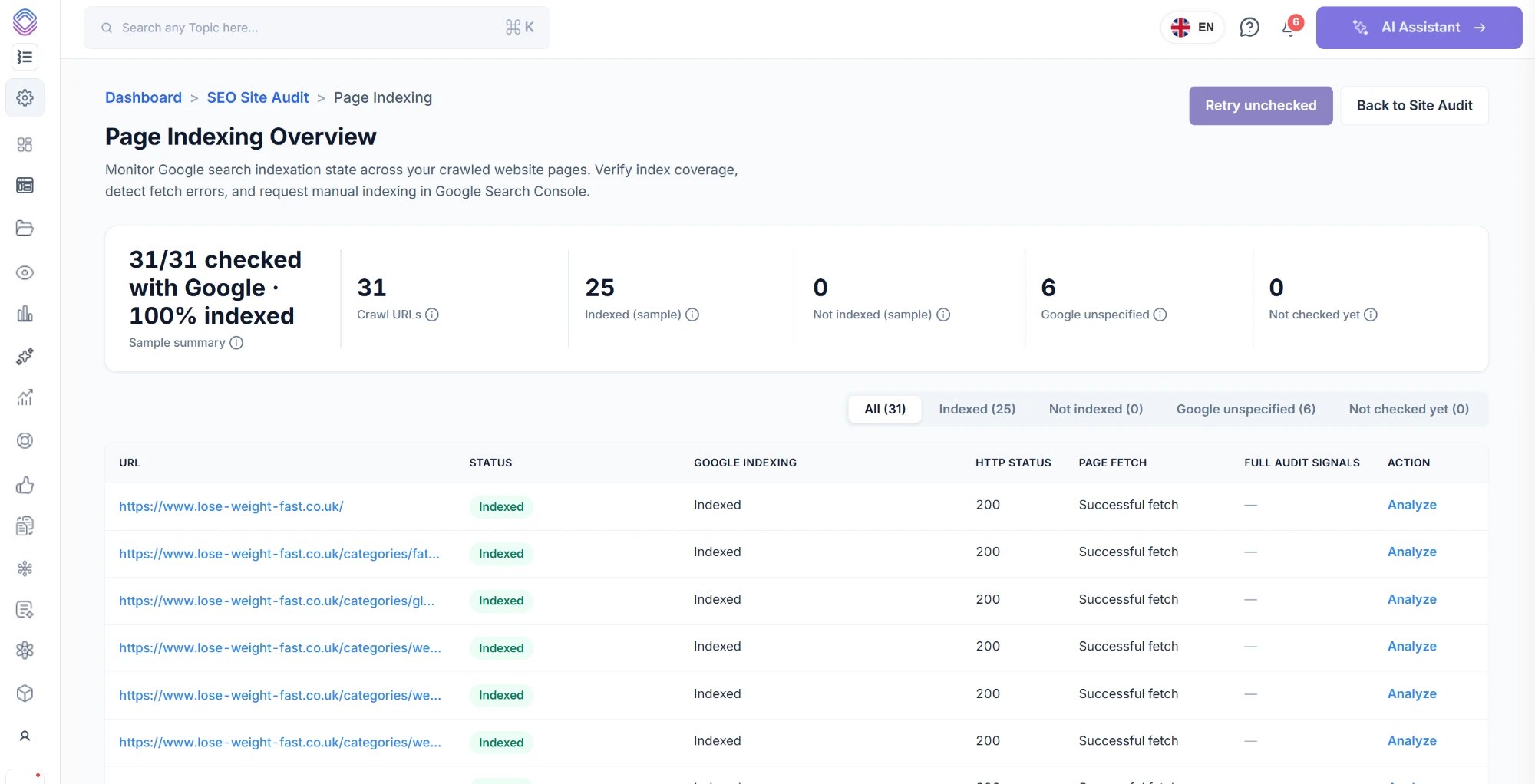
Indexed
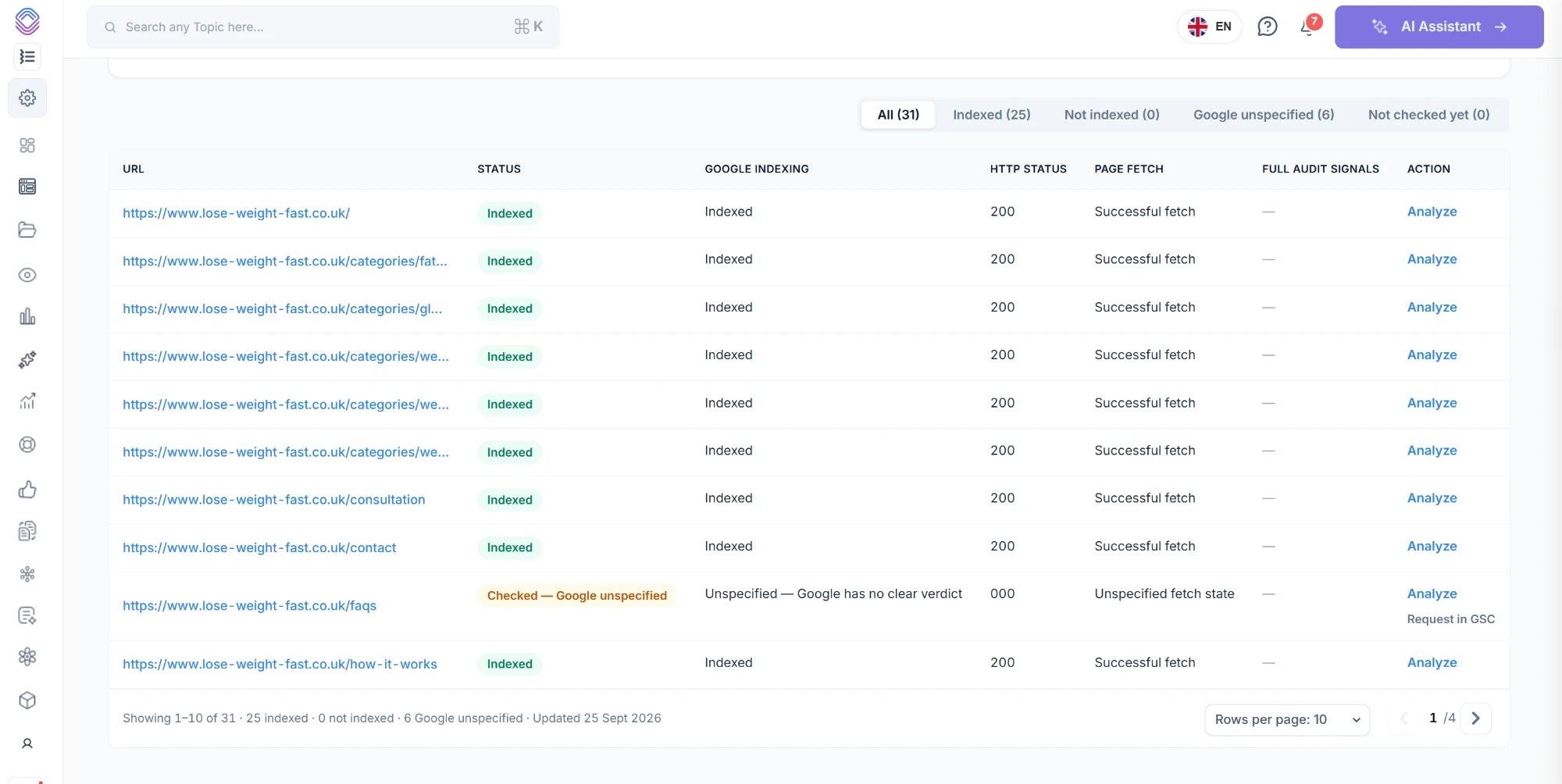
Google has the page in its index. The HTTP status and page fetch state sit alongside it, so you can see the response Google actually got.
Not indexed
Google knows about the page and has chosen not to index it, with the reason attached so you know whether it was crawled, discovered, duplicated or excluded.
Google unspecified
Checked, but Google returned no clear verdict. Worth separating from a genuine rejection, because the two need very different responses.
Not checked yet
Crawled on your side but not yet checked against Google. Retry the unchecked pages rather than running the whole crawl again.
Non-indexed reasons
Why a page was not indexed, against the page itself
The reason matters because the fix is completely different in each case, and several of them are not faults at all.
Crawled, currently not indexed
Google fetched the page, looked at it and decided not to index it. Usually a quality or duplication judgement rather than a technical fault, which is why it is the hardest one to act on from a count alone.
Discovered, currently not indexed
Google knows the URL exists but has not fetched it. Often a crawl budget or internal linking problem, and it tends to cluster on sections of a site rather than single pages.
Duplicate, Google chose a different canonical
Google indexed a different URL in place of this one. Seeing the pages behind it is how you find out which version it preferred.
Excluded by noindex
The page asks not to be indexed. Correct for a thank-you page, a problem when it lands on a template that serves hundreds of URLs.
Blocked by robots.txt
Google was not allowed to fetch it, so there is no indexing decision to read. A blocked URL and a rejected URL look similar in a summary and are not the same thing.
Soft 404 and redirect states
The page returned something Google treated as missing or as a redirect. The HTTP status column is what tells you whether that matches what your server actually sent.
Which reasons appear depends on what Google returns for your pages. A URL that has not been checked yet has no reason attached, because there is no verdict to explain.
Managing it
Find the page, understand it, act on it
Filter to the pages that need you
Switch the report to Not indexed, Google unspecified or Not checked yet and work only that list. The counts in the summary are the tabs, so a number is always one click from the pages behind it.
Analyse a page in place
Open any URL to see the signals behind the verdict, without opening Search Console in another tab and inspecting it one at a time.
Request indexing in Search Console
Submit a URL to Google from the row you are already looking at, so finding a page and asking for it to be recrawled is one action rather than two tools.
Retry the unchecked
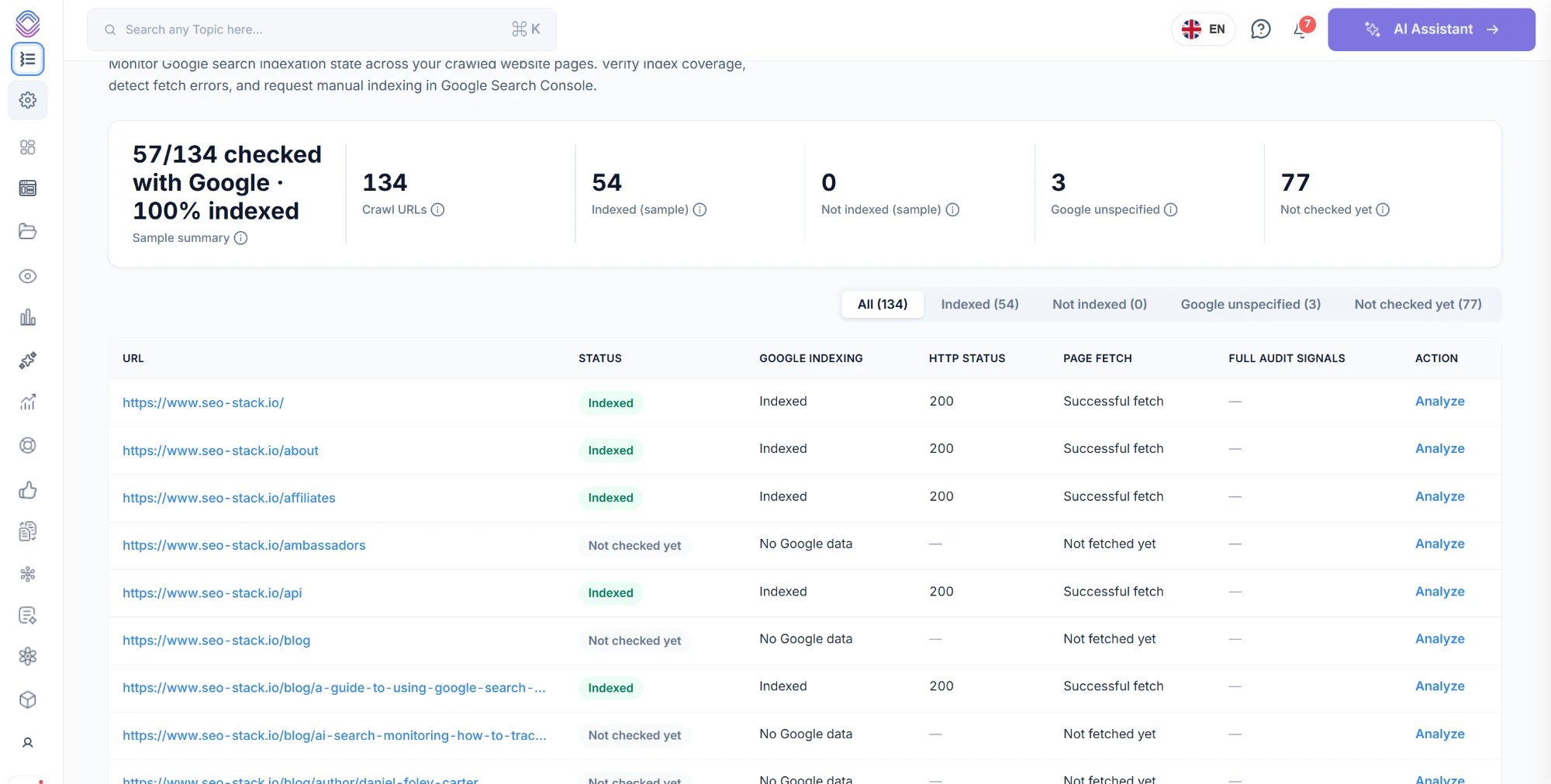
A large site is checked progressively, so some URLs will sit in Not checked yet. Retry those rather than recrawling pages that already have a verdict.
On a larger site
Checked progressively, so a big crawl still starts working
Checking a URL against Google is rate limited, so on a site of any size the crawl finishes before every page has a verdict. The report says how many have been checked rather than pretending the picture is complete.
- The summary shows how many of your crawled URLs have been checked so far
- Pages still waiting sit in their own state rather than being counted as not indexed
- Retry unchecked picks up where it left off instead of recrawling the site
- Rows per page and filtering make a few hundred URLs workable rather than a wall
Where it sits
Indexing state is only half the question
Knowing a page is not indexed is useful. Knowing whether it ever earned anything, and what else on the site looks like it, is what tells you whether to fix it or remove it.
URL Inspection
Inspect a single URL in full, with the verdict, coverage state, canonicals and referring URLs Google holds for it.
Indexing & URL InspectionIndex Performance
File every indexed URL by how it actually performs, so you can see which indexed pages are earning nothing at all.
Index PerformanceAI Assistant
Ask across your warehoused Search Console and GA4 data, including what changed around the pages that fell out of the index.
AI AssistantQuestions
Before you run it
How is this different from the Page Indexing report in Search Console?
Search Console tells you how many URLs are in each state and shows a sample of examples. This runs against your own crawl, so the list is the pages on your site rather than a sample, every row carries the HTTP status and fetch state next to Google's verdict, and you can filter, analyse and request indexing from the same screen.
Does it show why a page is not indexed?
Yes. Non-indexed reasons such as crawled currently not indexed and discovered currently not indexed are shown against the pages they apply to, so you are working from a list of URLs rather than a count.
What does Google unspecified mean?
The URL was checked but Google did not return a clear verdict for it. It is kept separate from Not indexed deliberately, because a missing answer and a decision not to index call for different work.
Why are some pages not checked yet?
Checking happens against Google and is rate limited, so on a larger site the crawl completes before every URL has a verdict. The summary shows how many have been checked, and Retry unchecked picks up the rest without starting again.
Can it request indexing for me?
You can submit a URL to Google Search Console from the report. Google decides whether and when to index it, as it does with any request made through Search Console.
Find out what Google is actually doing with your pages
Connect a Search Console property during your 14-day free trial, run a crawl, and see which of your pages are indexed, which were skipped and why.
- Credit card required
- Cancel within the trial and you won't be billed
- No contracts