Skip to content
seostack

AI & LLM Visibility

New in V3

Find the prompts your buyers actually ask

Research, add and track prompts at scale, then analyse performance at prompt level: success rate, competitor visibility gap, sentiment and appearance frequency.

  • 100% data privacy
  • 99.99% uptime
  • Nothing to configure
  • Export anytime, no limits

Trusted by leading companies

The problem

Tracking AI visibility is meaningless if you are tracking prompts nobody asks. Most brands start by guessing a handful of questions that sound right, get a comfortable score back, and never find out that the questions actually driving purchases in their category are answered entirely by somebody else.

What prompt research is

Prompts are the new keywords, and they behave nothing like keywords

A prompt is the question someone actually types into ChatGPT, Gemini or AI Mode. Prompt research is the work of finding the ones your buyers ask, tracking who gets named in the answers, and closing the gap where somebody else does.

How a keyword differs from a prompt
ConsiderationA keywordA prompt
The unitA short string typed into a box. "seo agency"A full question, often with context and constraints. "What services should an effective SEO agency offer?"
The resultTen blue links. You either rank or you don't.One synthesised answer naming a handful of brands. You are either in it or you are not mentioned at all.
ConsistencyBroadly stable. The same query returns roughly the same results.Answers vary between runs on an identical prompt, so a single result proves nothing and frequency is the real signal.
Volume dataPublished search volume you can plan against.No volume figures exist. Relevance and competitor presence are what tell you a prompt is worth tracking.
Who else is thereCompetitors occupy separate results below you.Competitors are named inside the same answer as you, in an order the model chose.

Why it matters

Everything downstream depends on the prompt set

01

A visibility score is worthless without the right prompts

Track prompts nobody asks and you get a flattering number that means nothing. Track the questions that precede a purchase in your category and the same number becomes a forecast.

02

It is the only place the competitor gap is concrete

Competitor Visibility Gap tells you what share of your tracked prompts a rival appears on where you do not. That is not a vanity metric, it is a list of specific answers you are absent from.

03

One prompt can name five brands at once

Classic search puts you above or below a competitor. An AI answer puts you beside them, in an order the model decided, which makes the running order itself something to work on.

04

Answers move, so frequency beats snapshots

Run the same prompt twice and you can get two different answers. Tracking over time and across platforms is what separates a real slip from ordinary variance.

Inside the tool

From the whole set, to one prompt, to the fix

Three levels, each answering the next question. Which prompts matter, how am I doing on this one, and what specifically should I change.

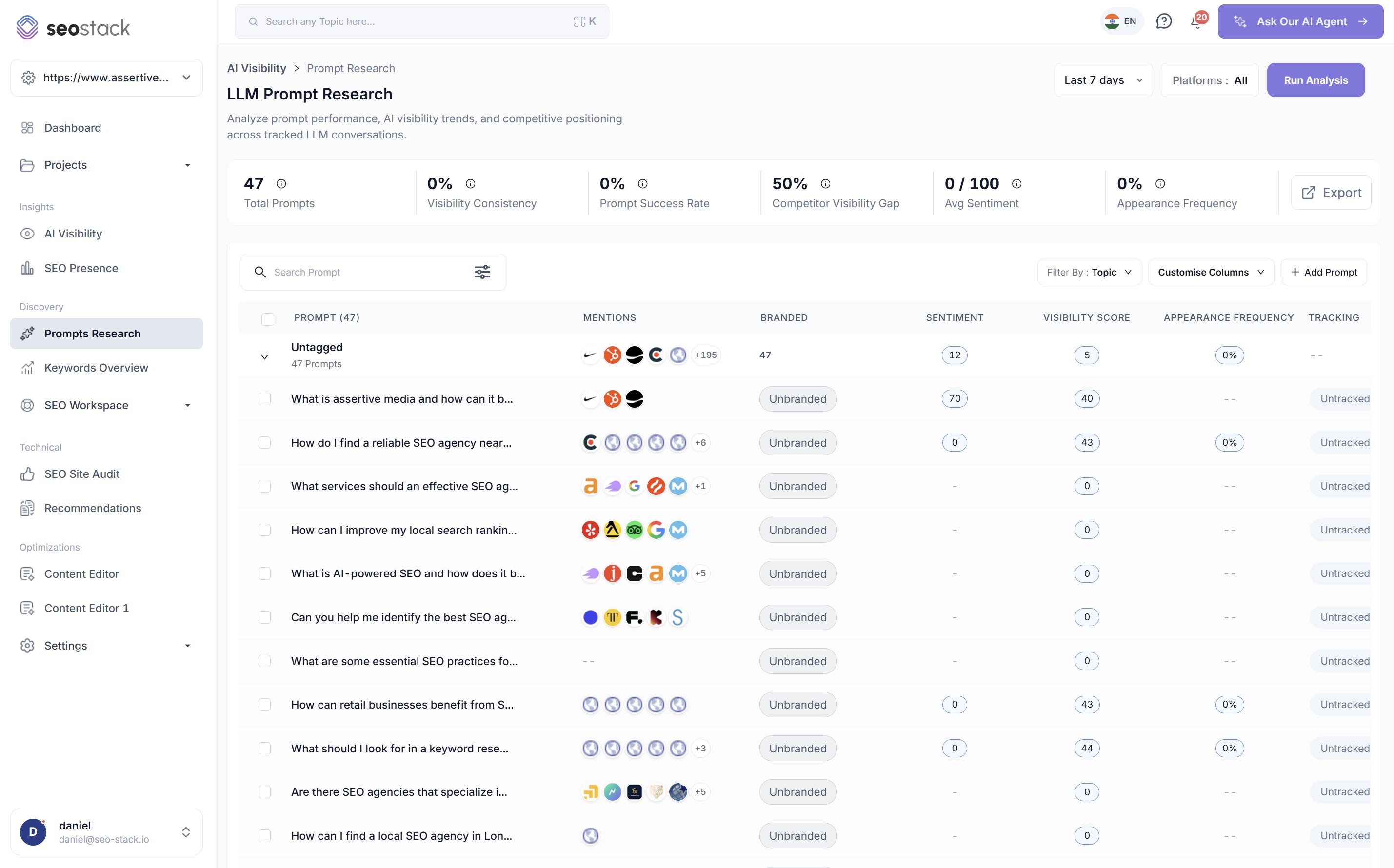
Every prompt you track, with the answer to who owns it

  • Six headline metrics: total prompts, visibility consistency, prompt success rate, competitor visibility gap, average sentiment and appearance frequency
  • Per prompt: which brands got mentioned, whether it is branded or unbranded, sentiment, visibility score, appearance frequency and tracking state
  • Group prompts by topic, search the set, and customise which columns you see
  • Add prompts one at a time or in bulk, and select many at once to act on them together
  • Filter to a platform and date range, then run analysis on demand

The mentions column is the fastest read on the page

A row of competitor favicons next to a prompt tells you instantly whether that answer belongs to somebody else, before you have opened anything.

LLM Prompt Research in SEO Stack listing tracked prompts with mentions, branded state, sentiment, visibility score and appearance frequency

Sources & citation categories

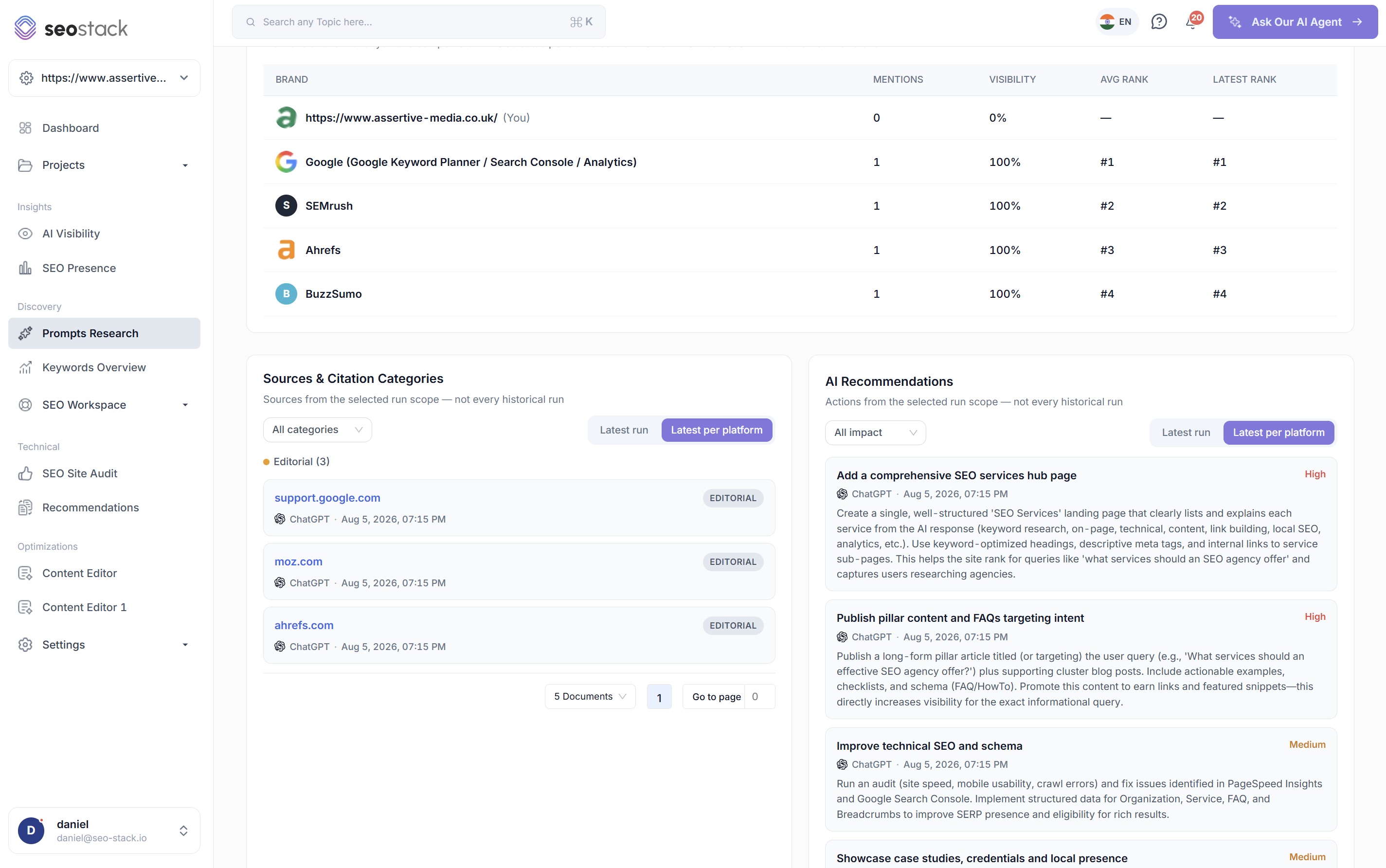
See which sources the answer was actually built from

Every run records the domains the model drew on and sorts them into categories. This is the difference between knowing you were left out and knowing who was let in instead.

Why the source list is the most actionable panel in the tool

A visibility score tells you the outcome. The source list tells you the cause. If a model answers "what services should an SEO agency offer" using three editorial sources, you now know that winning that prompt is a coverage problem, not a landing page problem.

And when your own domain does appear, you can see which page earned it, on which platform, and at what time, so you can make more of whatever that page is doing right.

  • Every cited domain, with the platform and timestamp of the run
  • Grouped into categories and filterable to one at a time
  • Scoped to the latest run or the latest run per platform
  • Paginated, so a busy prompt with dozens of sources stays readable

Editorial

Publications, blogs and industry press. Usually the largest bucket, and the one you influence with coverage and digital PR rather than your own site.

Documentation

Official docs and support content. Heavily trusted for how-to and definitional prompts, which is why a good docs site quietly wins citations.

Commercial

Vendor and product pages, including your competitors'. If theirs are cited on a prompt and yours are not, that is a page problem you can fix.

Reference

Encyclopaedic and aggregator sources. Often where a model grounds a definition before it names any brand at all.

Categories reflect what each run actually cited, so the mix shifts by prompt. A definitional question leans on reference and documentation; a "best supplier" question leans on editorial.

AI Recommendations

Clear, specific actions for the prompt in front of you

Not 'improve your content'. A written brief for this exact question, ranked by impact, generated from the answer the model actually gave and the sources it actually used.

  • Ranked by impact

    Each action carries a High or Medium rating, so a prompt with eight suggestions still has an obvious place to start.

  • Grounded in the actual response

    Recommendations reference the services, entities and phrasing the model used in its answer, which is why they read like a brief rather than a checklist.

  • Scoped and filterable

    Filter by impact, and switch between the latest run and the latest run per platform so you are never comparing a ChatGPT answer against a Gemini one by accident.

  • One click into the work

    Optimise with content editor takes the prompt straight into the Content Editor, so the recommendation and the draft live in the same place.

Content Editor
AI Recommendations

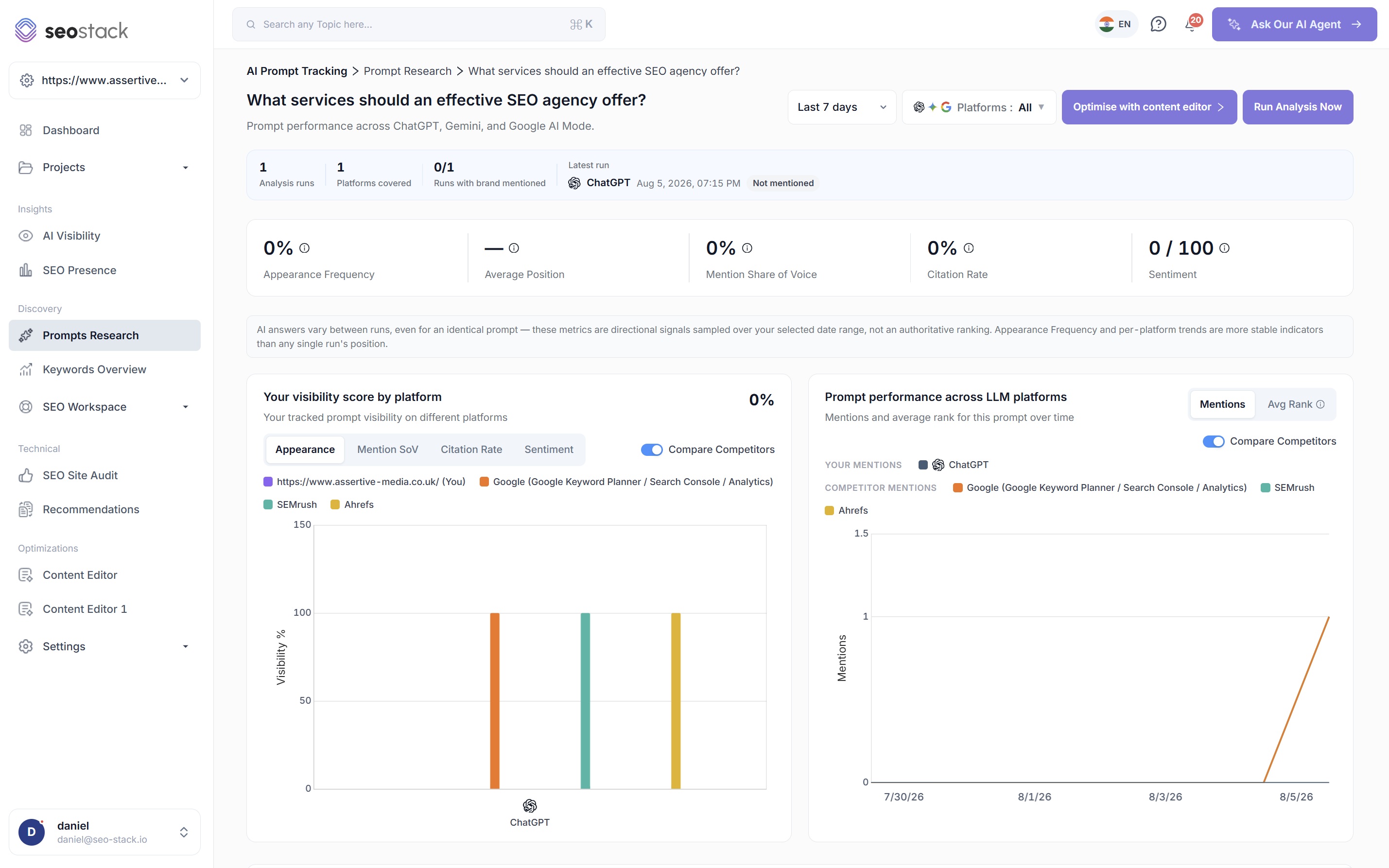
Actions for What services should an effective SEO agency offer?

Add a comprehensive SEO services hub page

High

ChatGPT · Aug 5, 2026

Create a single, well structured 'SEO Services' landing page that clearly lists and explains each service from the AI response (keyword research, on-page, technical, content, link building, local SEO, analytics). Use keyword-optimised headings, descriptive meta tags, and internal links to service sub-pages.

Publish pillar content and FAQs targeting intent

High

ChatGPT · Aug 5, 2026

Publish a long-form pillar article targeting the user query plus supporting cluster blog posts. Include actionable examples, checklists, and schema (FAQ/HowTo). This directly increases visibility for the exact informational query.

Improve technical SEO and schema

Medium

ChatGPT · Aug 5, 2026

Run an audit (site speed, mobile usability, crawl errors) and fix issues identified in PageSpeed Insights and Google Search Console. Implement structured data for Organization, Service, FAQ, and Breadcrumbs.

Showcase case studies, credentials and local presence

Medium

ChatGPT · Aug 5, 2026

Add short case studies with goals, scope and outcomes, plus visible credentials. Real examples build the trust signals models look for when deciding which agency to name.

Building the set

How a prompt library actually gets built

01

Research

Start from the questions you already know your buyers ask, then widen using the prompts your competitors are winning that you have never tracked.

02

Add in bulk

Paste a whole set at once rather than adding them one at a time. A prompt library worth trusting is dozens of prompts, not five.

03

Group by topic

Tag prompts into topics so you can read performance by theme, and spot that you are strong on definitions and absent from comparisons.

04

Track and re-run

Mark the ones that matter as tracked, run analysis after you ship a change, and watch appearance frequency rather than any single run.

05

Export the lot

Take the full prompt set and its metrics out to Sheets, CSV or PDF with no row caps, for the deck or for your own modelling.

What you get out of it

The outcome, not the feature list

01

Build a prompt set that reflects real buying questions

02

Find the prompts where a competitor owns the answer

03

Leave with a specific, written action for the prompts that matter

Connect a property. Watch the data start stacking.

Warehousing begins the moment you connect your Search Console property, there is no Google Cloud project to set up, no BigQuery and no schema to design. You simply connect your property and SEO Stack starts storing every row of your data from that day onwards.

  • Credit card required
  • Cancel within the trial and you won't be billed
  • No contracts