Discovery & Opportunity
See what Google actually thinks your page is about
The Keyword Cloud takes every query Google served a URL, a URL group or your whole domain for, works out the saturation of each term across all of them, and renders the result as a weighted cloud, so you can see at a glance what Google has decided your content is really for.
- 100% data privacy
- 99.99% uptime
- Nothing to configure
- Export anytime, no limits
Trusted by leading companies
The problem
You know what you wrote the page to rank for. You have very little idea what Google decided it was about, and those two things being different is one of the most common reasons a page underperforms without any obvious fault.
The idea behind it
What serve rate is, and why it beats counting clicks
The Keyword Cloud takes every single query Google served your page for, then works out how saturated each term is across the whole set. Serve rate is the aggregate of all the queries served that contain the term you are looking at, so a serve rate of 7.89% for “seo agency” means that term runs through a large share of everything Google returned the page for.
That is a very different measure to clicks or impressions, and it is a much better one for this particular question. Clicks tell you what people did, whereas serve rate tells you what Google associates with the page in the first place, and a page can be served for thousands of queries about a topic while earning almost no clicks from any of them.
What you end up with is the closest thing available to Google telling you directly what it has decided your content is about, built from your own Search Console data rather than inferred from a crawl or a content score.
Reading a row
seo agency shows a total of 89, which is the number of distinct queries containing that term, a combined 27,383 clicks and impressions behind them, and a serve rate of 7.89%. The term leading your cloud by serve rate is what Google most strongly associates with the page.
What the cloud tells you
Whether Google has genuinely understood the page
There are really only two outcomes worth looking for, and you can tell them apart in a couple of seconds once the cloud has rendered.
/services/seo-agency/
Built to rank for “seo agency”
- seo agency
- 7.89%
- seo agency uk
- 1.91%
- seo agency london
- 1.83%
- seo company uk
- 1.12%
The focal term leads by a wide margin and everything under it is a close variant. Google has understood what this page is for, so the work now is ranking better rather than being understood better.
Illustrative. Purple terms are the ones this page was written to rank for, sized by serve rate.
Focal terms at the top, with a high serve rate
If the queries you wrote the page for are leading the cloud and everything beneath them is a close variant, Google has understood the page properly. Your remaining work is about ranking better rather than being understood better, and those are very different jobs.
Lead terms irrelevant, mixed or scattered
If the biggest terms in the cloud are not what the page is for, or the cloud has no clear centre at all, Google has not grasped the context of the content. Chasing rankings in that situation rarely works, because the page is competing for the wrong thing.
The shape matters more than any single number
A tight cloud with one dominant term and a family of variants around it is healthy. A flat cloud where a dozen unrelated terms are all roughly the same size usually means the page is trying to be several things at once.
Inside the tool
The cloud, how to read it, and the numbers underneath
Every served query, sized by how saturated it is
- Type in a URL, or leave it empty for the whole domain
- Terms are sized by serve rate rather than by clicks, so weighting reflects what Google associates with the page
- Colour by intent to see commercial, informational and transactional skew inside the cloud itself
- Date range, filters and preset filters all apply to what gets computed
- Export the whole thing when you need it elsewhere
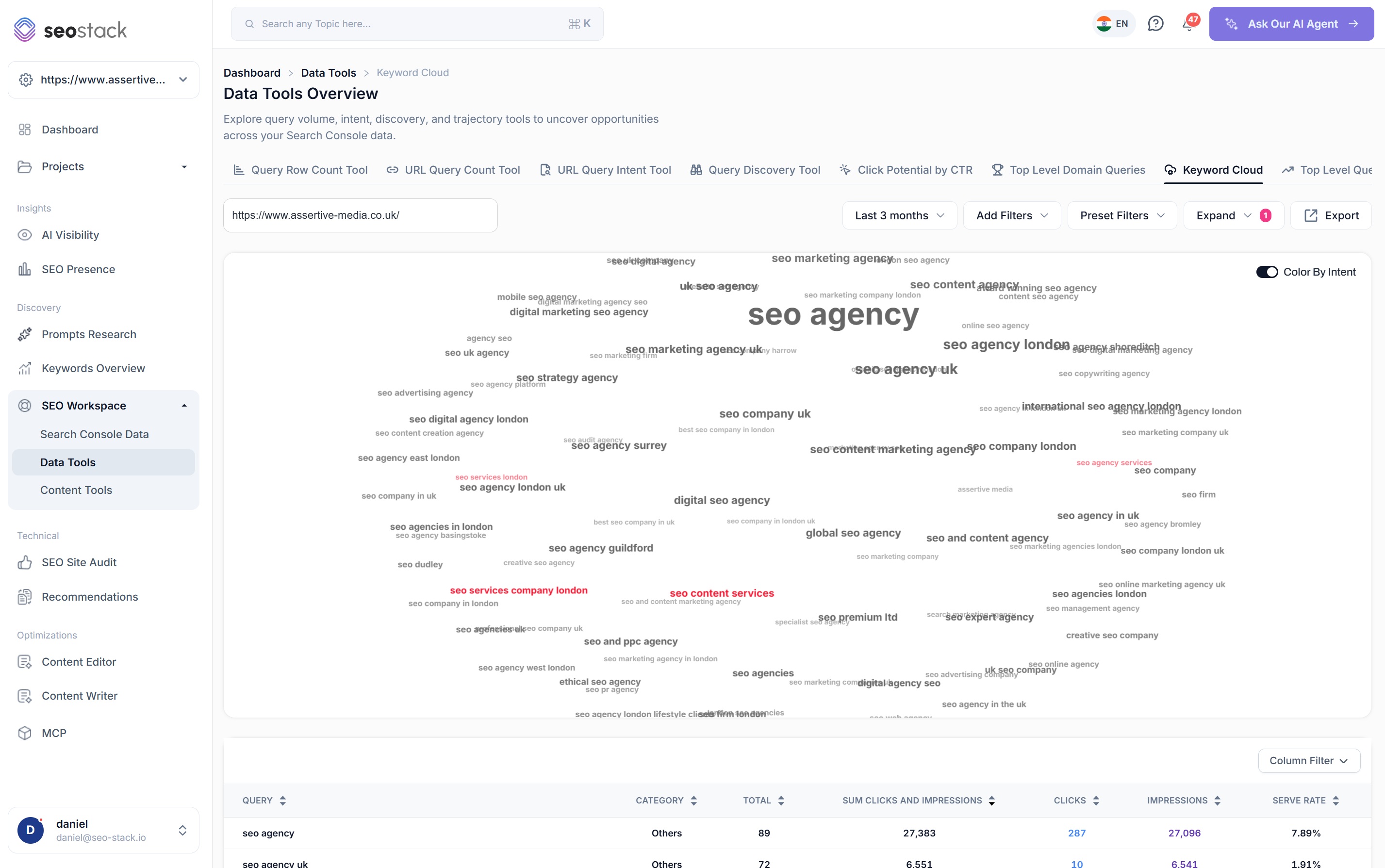
The dominant term is the answer
- One term should be clearly larger than everything else on a well understood page
- The terms immediately around it tell you which variants Google groups with it
- Colour by intent highlights anything commercially valuable sitting in the cloud
- Anything large and unrelated is the thing worth investigating first
This is the fastest content audit there is
You can look at a cloud and know within a few seconds whether a page has a clear identity, which is a judgement that would otherwise take reading the page and cross referencing a query export.
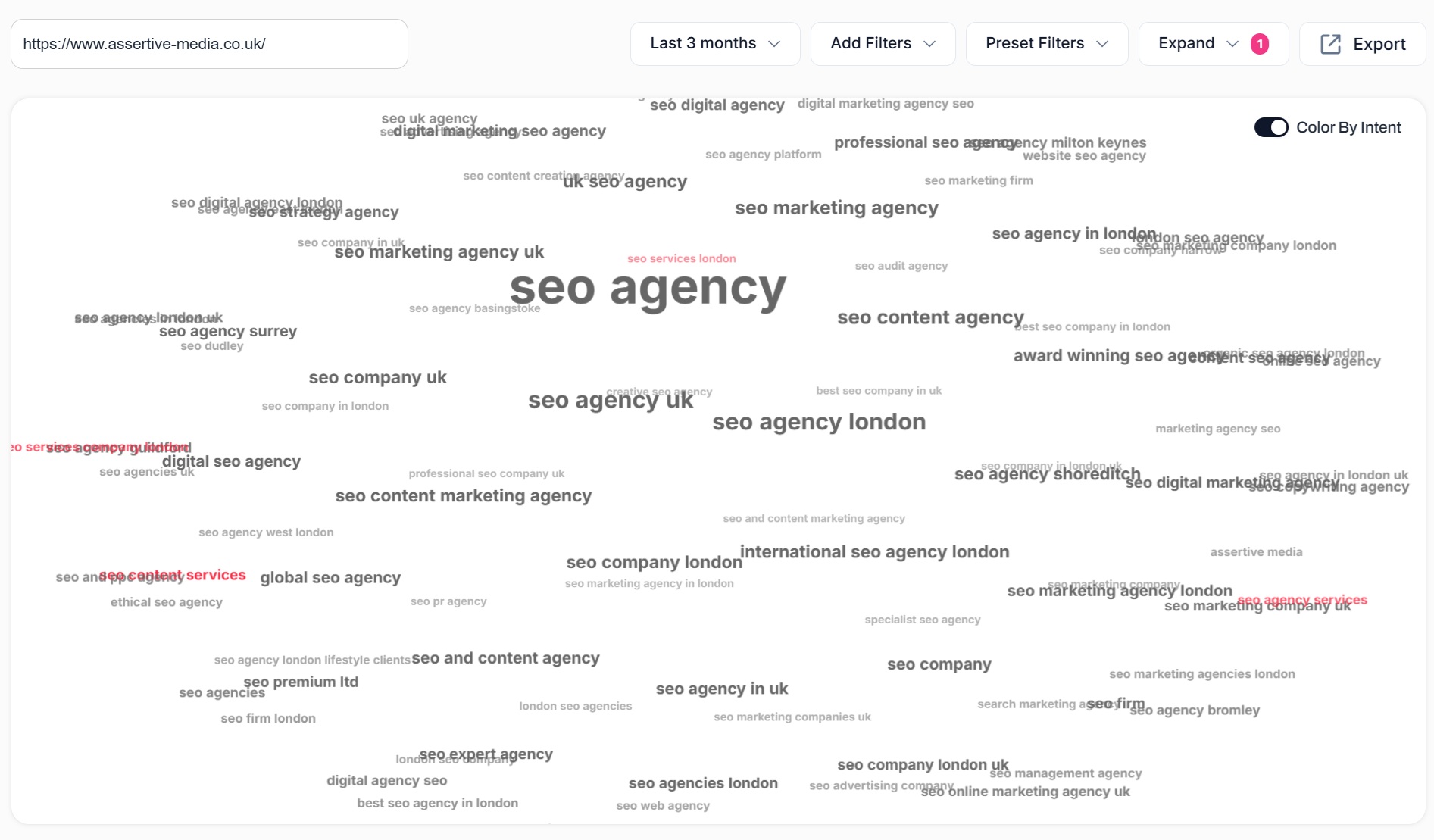
Serve rate, clicks and impressions on every term
- Query, category, total, combined clicks and impressions, clicks, impressions and serve rate as columns
- Total is the number of distinct queries containing that term
- Sort by any column to move between the visual and the numbers
- Column filter to show only what you are reporting on
- Paginated across the full set rather than a truncated sample
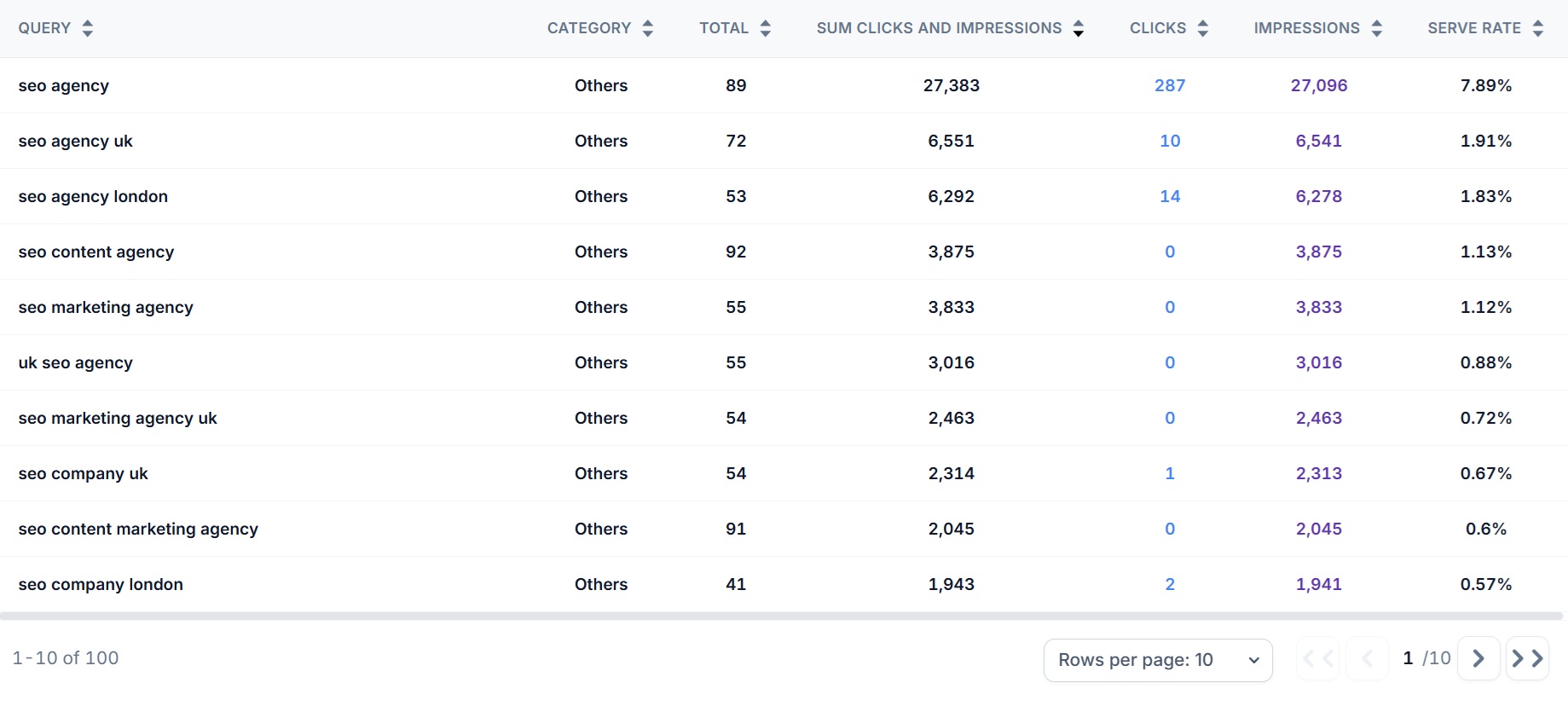
One page, a group of them, or the whole domain
- A single URL for auditing one page, which is where most misunderstanding gets found
- A URL group to see whether a whole template or section shares the same identity
- The full domain for the weighting picture across everything Google serves you for
- Add filters and preset filters to narrow the set before the cloud is computed
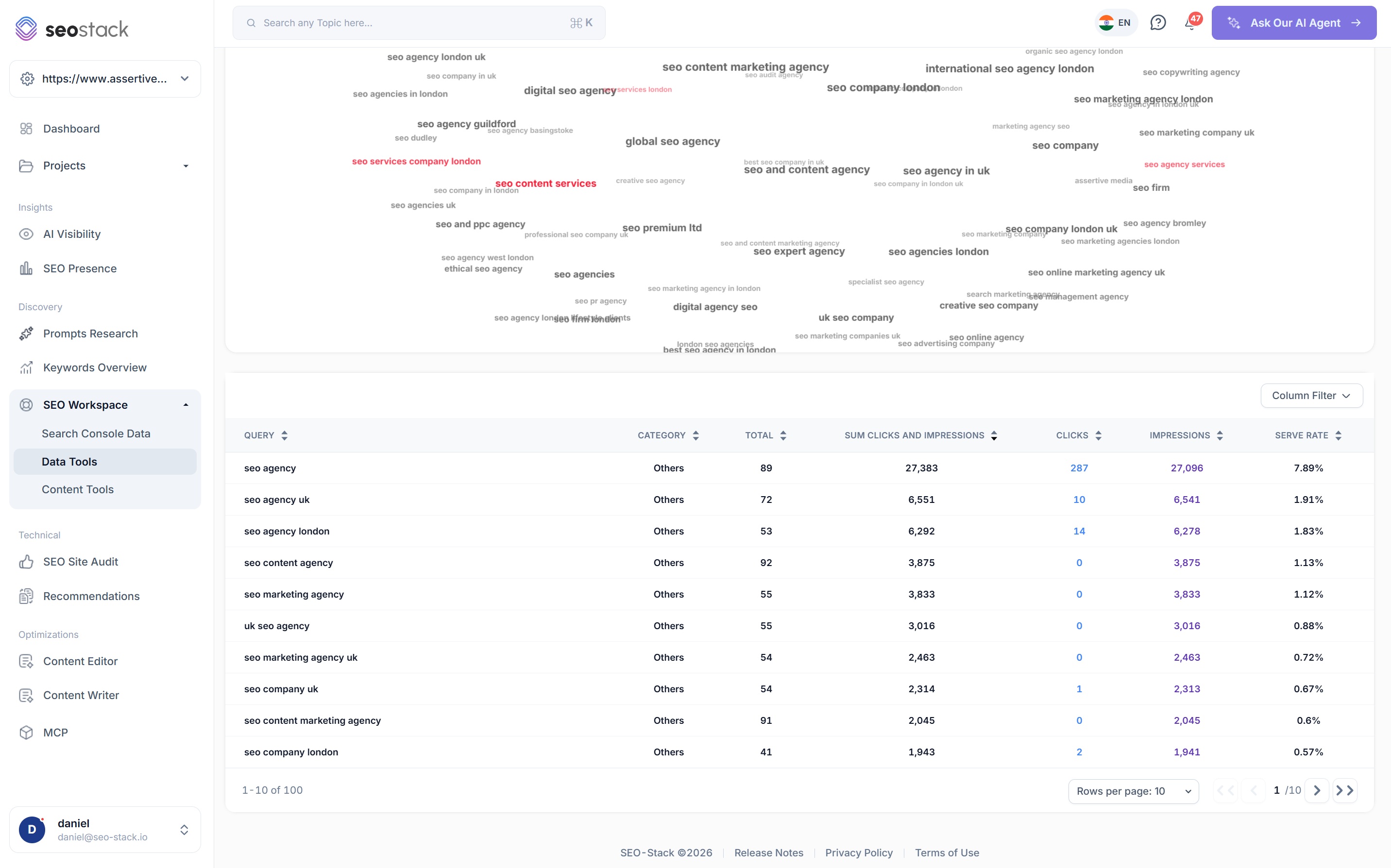
What you can analyse
Run it on a page, a section or everything
A single URL
The level most misunderstanding is found at, because a page either has a clear identity or it does not, and the cloud makes that obvious immediately.
A URL group
Run it across a template or a section to see whether every page in it shares the same identity, or whether they are all being served for slightly different things.
The full domain
The weighting picture for everything Google serves you for, which is the fastest way to understand what a site is genuinely known for.
Controls
- Colour by intent
- Filters and preset filters
- Sort by serve rate
- Export to Sheets, Excel or PDF
How SEOs use it
What the keyword cloud is actually good for
Check a page is understood before optimising it
There is no point rewriting titles and chasing positions on a page Google has misread. Running the cloud first tells you whether you have a ranking problem or an identity problem, and they need completely different work.
Find dilution on commercial pages
Category and product pages that have been padded out with helpful content often end up serving mostly definitional queries. The cloud shows that immediately, because the focal term stops leading it.
Prove a rewrite changed Google's understanding
Run the cloud before and after a content change. If the focal term has climbed and the unrelated terms have thinned out, the rewrite did what you wanted at the level that matters.
Understand a domain you have just taken on
For an agency picking up a new client, the domain level cloud is one of the quickest ways to see what the site is actually known for, which is often not what the client believes it is known for.
Spot cannibalisation between similar pages
Run the cloud on two pages that cover related topics. If both are dominated by the same term, they are competing for the same identity and one of them is going to lose.
Find topics you already have weight for
Terms with a healthy serve rate that you never targeted deliberately are usually the cheapest opportunities available, because Google already associates the page with them.
What you get out of it
The outcome, not the feature list
Confirm your focal keyword is genuinely at the top by serve rate
Spot dilution where the leading terms are scattered or irrelevant
Prove a rewrite tightened how Google understands the page
Connect a property. Watch the data start stacking.
Warehousing begins the moment you connect your Search Console property, there is no Google Cloud project to set up, no BigQuery and no schema to design. You simply connect your property and SEO Stack starts storing every row of your data from that day onwards.
- Credit card required
- Cancel within the trial and you won't be billed
- No contracts