Workflow & Delivery
New in V3Run SEO delivery in the same place as the data
A full project and task manager built into the platform, with boards, a calendar, notes, activity logs, time tracking, task groups and team permissions. What makes it different from a general project tool is that a task can be tied to an annotation, so when the work is done you can see what it did to your organic performance and your AI visibility rather than only that it was finished.
- 100% data privacy
- 99.99% uptime
- Nothing to configure
- Export anytime, no limits
Trusted by leading companies
The problem
SEO work is planned in one tool, executed in another and measured in a third, so the thread between what somebody did and what happened afterwards gets lost, and the same debates come round again every quarter.
The tool
Project management that knows what your SEO actually did
Most SEO teams plan the work in one tool and measure it in another, which is why so few can say with any confidence which of the things they did last quarter were worth doing. This is a full task manager built inside the platform, so the work and the data it moves are in the same place.
Everything a task manager should do
Boards, a calendar, notes, an activity log, assignees, priorities, statuses, deadlines, groups, attachments and time tracking. Nothing here is unfamiliar, and that is deliberate, because a delivery tool people have to learn is a delivery tool people stop using.
Tasks that carry an outcome
Link a task to an annotation and the task stops being a to-do and becomes a piece of evidence. Rewrote the homepage becomes rewrote the homepage on 15 August and clicks went from 612 to 914 in the thirty days afterwards.
It sits on your own data
This is the reason to run delivery here rather than in a general project tool. Your Search Console, GA4 and AI visibility data are already in the platform, so attributing a task to an outcome does not need an export, a spreadsheet or anybody's memory.
Task board
6 of 6 tasks · 3 linked to an annotation
Task details
Rewrite the homepage content
- Assignee
- Alex Smith, SEO specialist
- Status
- Completed
- Priority
- High
- Group
- Phase 1 release
- Deadline
- 15 Aug 2026
Linked annotation
Content NLP Improvements
/ · 15 Aug 2026
Organic clicks, 30 days after
612914
Positive impact
Task details
Core Web Vitals audit & remediation
- Assignee
- John Deo, Developer
- Status
- In progress
- Priority
- High
- Group
- Phase 1 release
- Deadline
- 30 Aug 2026
No annotation linked yet. Once this task is done, tie it to an annotation and the impact appears here without anybody having to go and work it out.
Task details
Restructure the main navigation
- Assignee
- John Deo, Designer
- Status
- Completed
- Priority
- High
- Group
- Phase 1 release
- Deadline
- 22 Jul 2026
Linked annotation
Navigation Changes
Entire website · 22 Jul 2026
Organic clicks, 30 days after
1,2401,198
No measurable impact
Task details
Keyword position tracking optimisation
- Assignee
- Rajesh, Developer
- Status
- Pending review
- Priority
- Medium
- Group
- Phase 2 release
- Deadline
- 28 Aug 2026
No annotation linked yet. Once this task is done, tie it to an annotation and the impact appears here without anybody having to go and work it out.
Task details
Add Service and FAQ schema
- Assignee
- Surya, Marketing executive
- Status
- Yet to start
- Priority
- Medium
- Group
- Phase 2 release
- Deadline
- 4 Sep 2026
No annotation linked yet. Once this task is done, tie it to an annotation and the impact appears here without anybody having to go and work it out.
Task details
Internal linking sweep on the blog
- Assignee
- Alex Smith, SEO specialist
- Status
- Completed
- Priority
- High
- Group
- Phase 1 release
- Deadline
- 1 Aug 2026
Linked annotation
Internal Link Improvements
URL group: /digital-marketing/ · 1 Aug 2026
Organic clicks, 30 days after
318587
Positive impact
Illustrative. Select a task to see its detail, and notice that the ones with an annotation behind them carry an outcome rather than just a status.
Tasks to outcomes
The bit that makes this different from every other task tool
A task manager tells you whether work got done. Connecting a task to an annotation tells you whether the work was worth doing, and over a year that turns a delivery record into a body of evidence about what actually moves your site.
- 01
Do the work as a task
Assign it, set the priority and the deadline, put it in a group, attach the brief. Ordinary project management, and nothing about this step is unusual.
- 02
Link it to an annotation
When the change goes live, tie the task to an annotation with the date, the URLs and the change types on it. This is the step that turns a completed task into a measurable one.
- 03
Let the data catch up
The annotation sits on your Search Console and GA4 charts from that day forward, with Google's algorithm updates plotted alongside it for context.
- 04
Read the outcome on the task
Open the task later and the impact is against it. Not a status, an outcome, and the same applies to AI visibility as it does to organic clicks.
This is SEO testing with a project plan attached
Say somebody rewrites the homepage. As a task that is a line item that gets ticked off and forgotten. Linked to an annotation it becomes a dated change on a specific URL with a change type, and thirty days later you can see what happened to the clicks, the impressions and the AI visibility for that page. Do that fifty times and you know what works on your site rather than what works in general.
The overview
Where the work is, and where the time went
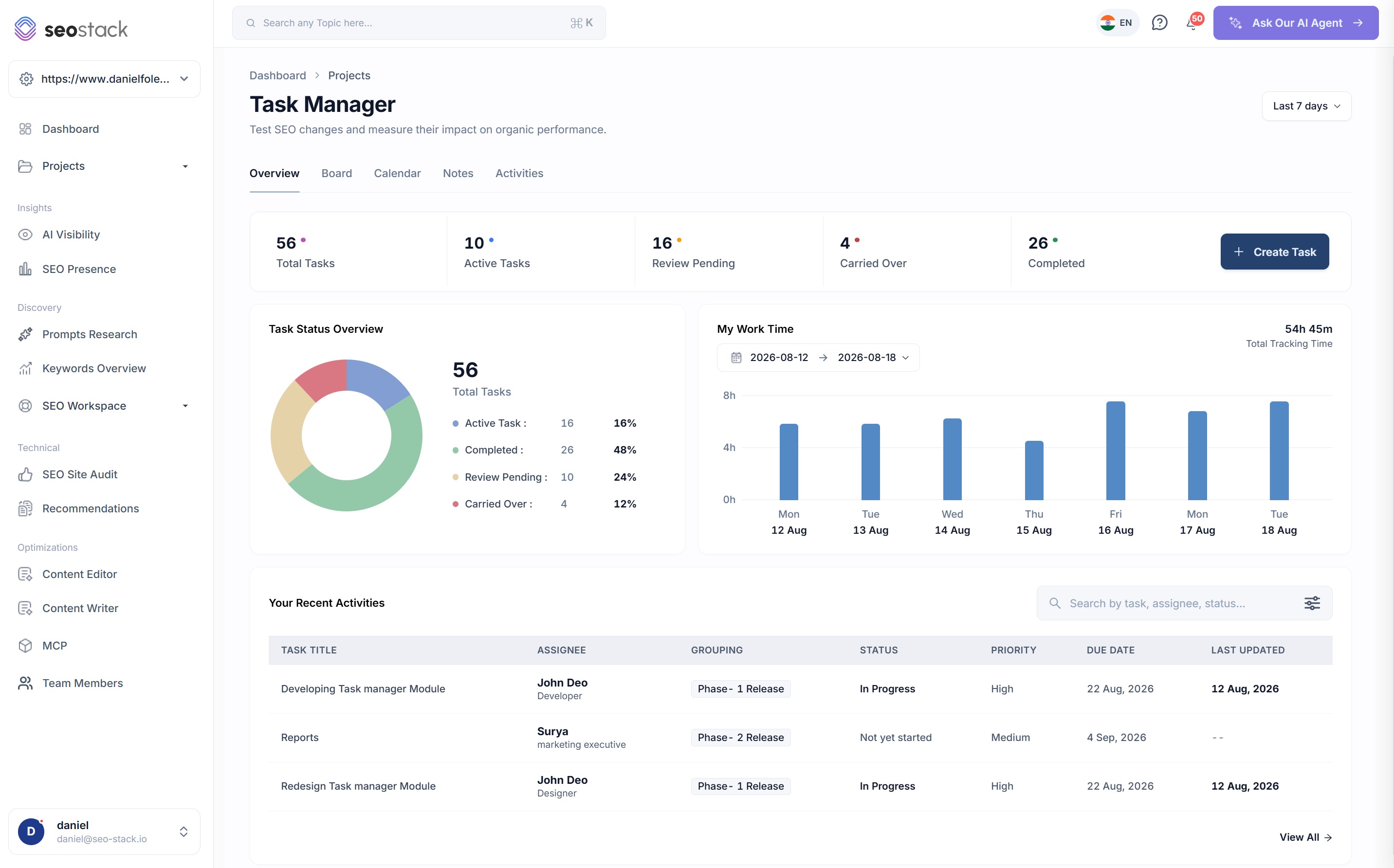
The first tab is the one you open in a stand-up: how many tasks are open, how many are waiting on review, how many carried over from last week and how much time actually went into it.
Project overview
Last 7 days
- 56
- Total tasks
- 26
- Completed
- 16
- Active
- 10
- Review pending
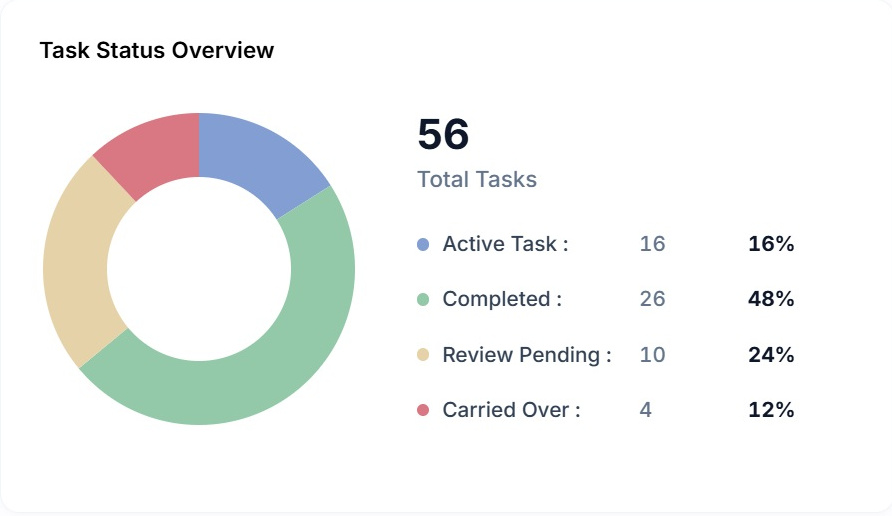
Task status overview
- Completed2646%
- Active1629%
- Review pending1018%
- Carried over47%
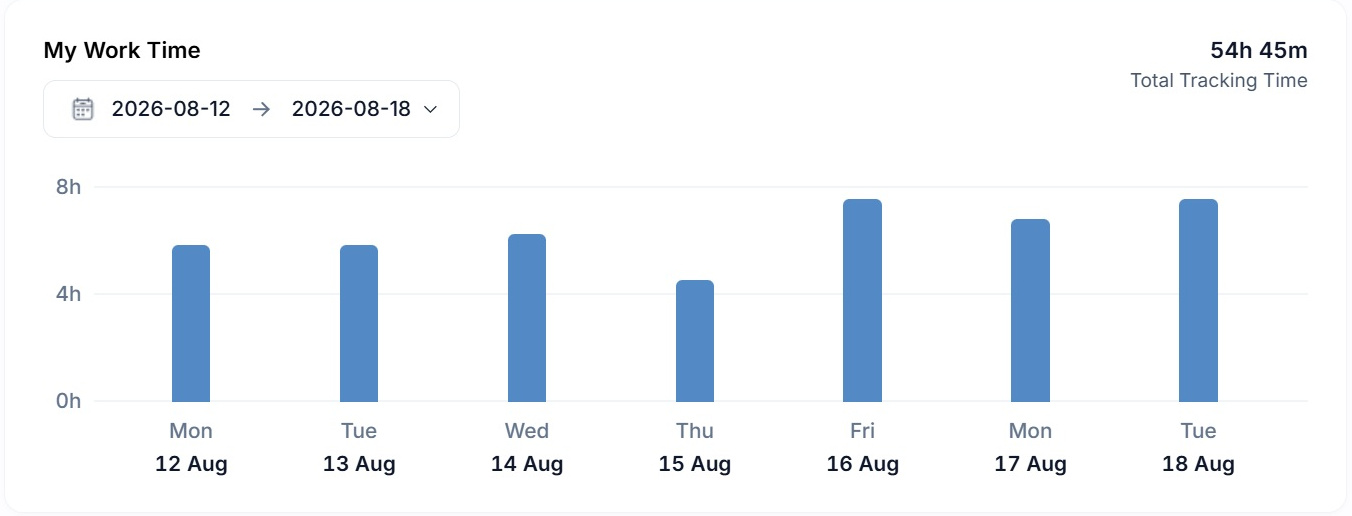
Work time tracked
47h 45m
Illustrative. The percentages and the total tracked time are summed from the tasks rather than set separately.

Inside the tool
Five views, and you will live in two of them
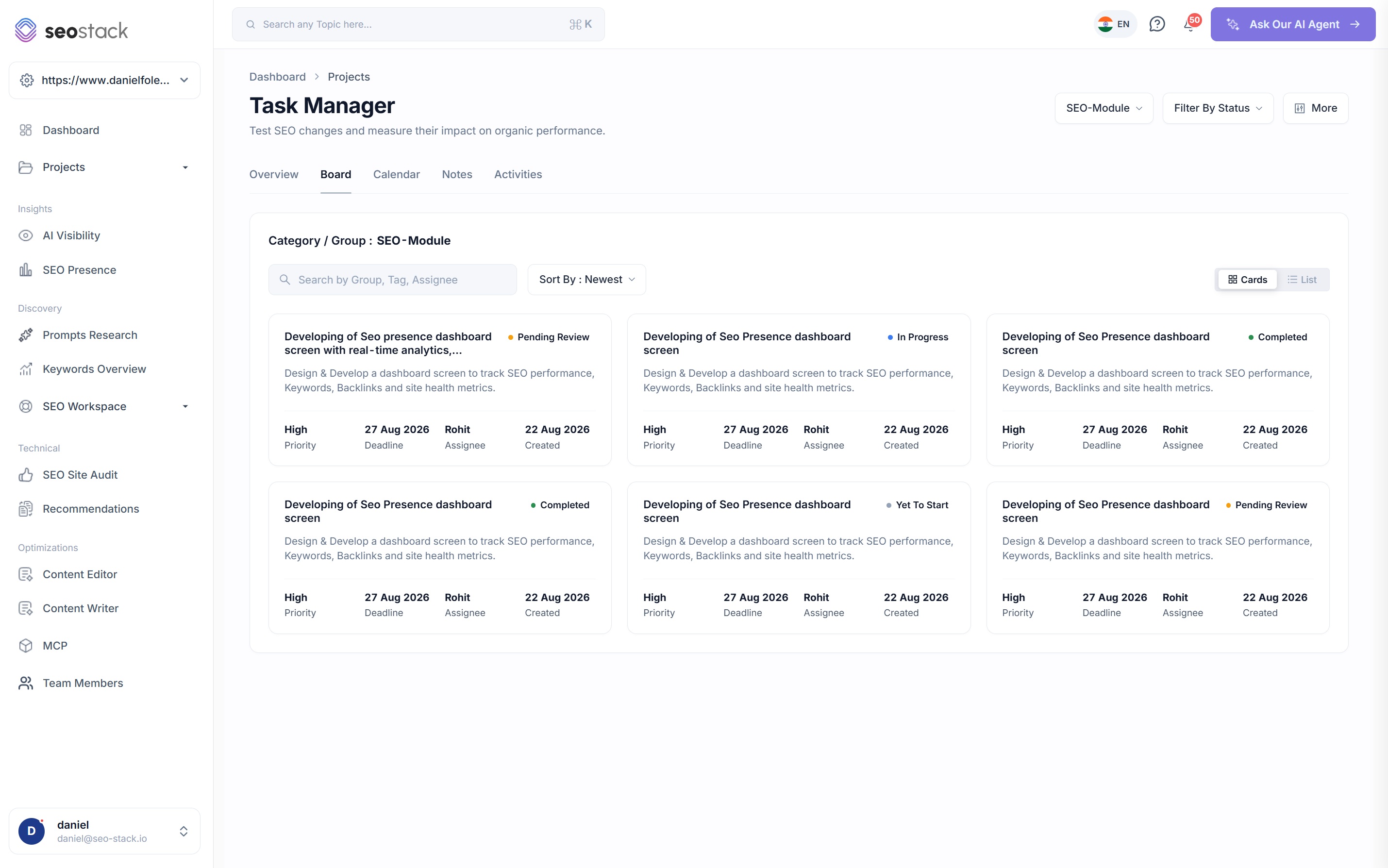
The work, grouped the way you work
- Cards or a list, whichever suits the size of the board
- Category and group selector, so a phase, a sprint or a campaign can be looked at on its own
- Filter by status and sort however you like
- Search by group, tag or assignee
- Every card carries the priority, the deadline, the assignee and the created date
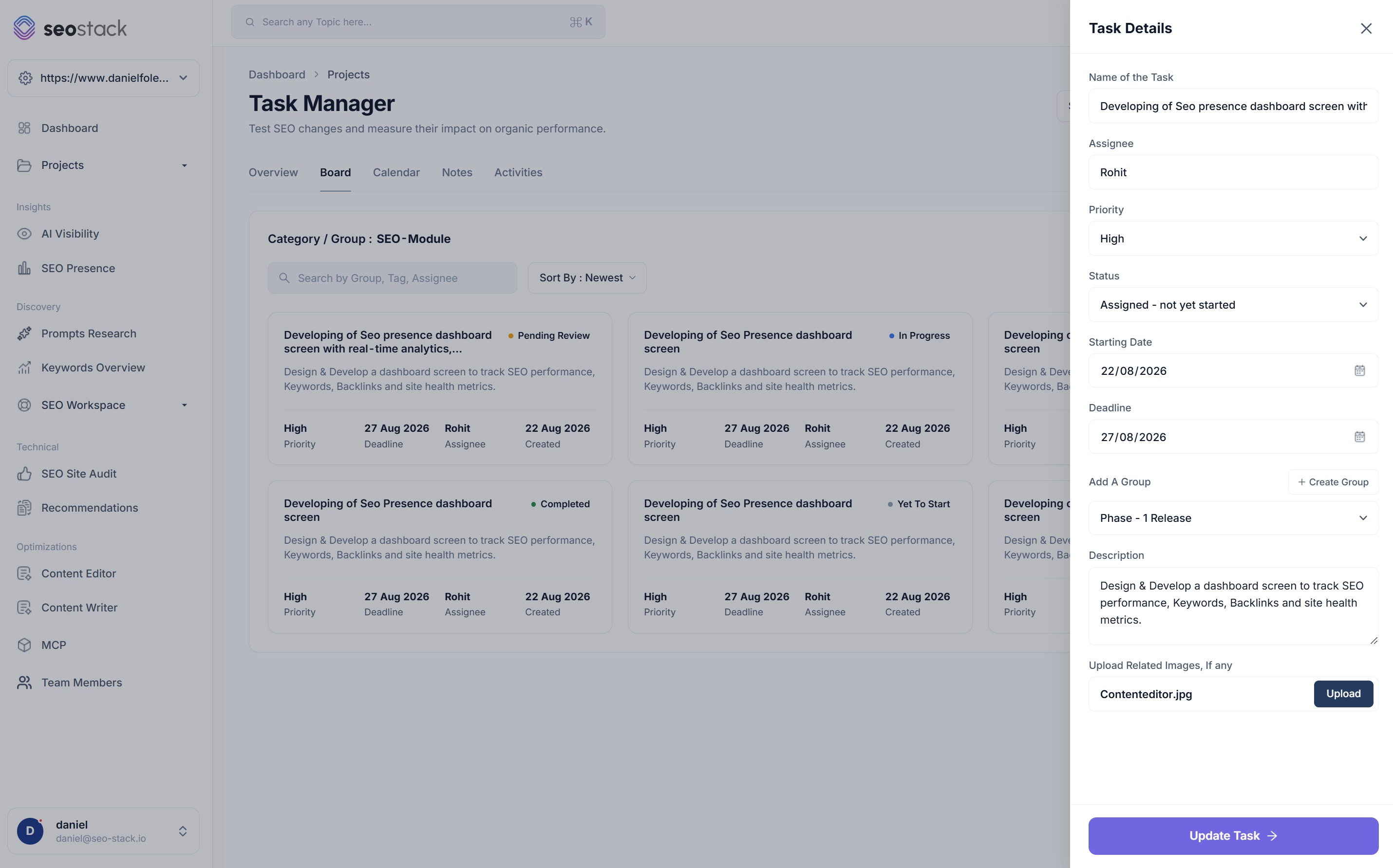
Everything a piece of work needs on it
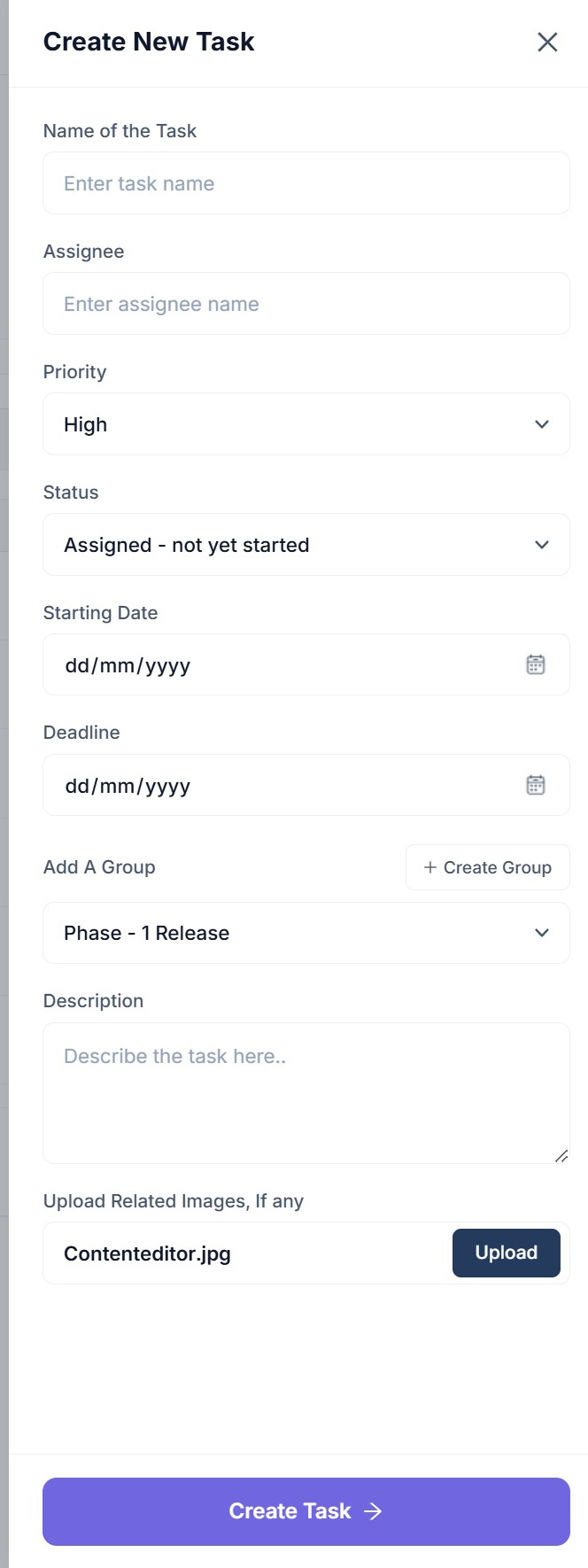
- Name, assignee, priority and status, with statuses from yet to start through to completed
- A starting date and a deadline, because the gap between them is where planning happens
- A group, or create a new one on the spot without leaving the task
- A full description, so the brief lives with the work rather than in a message somewhere
- Image and file attachments for the mockup, the spec or the before and after
Create a group as you go
Groups are made when you need them rather than configured up front, which is the difference between a structure that gets used and one that gets abandoned in week three.
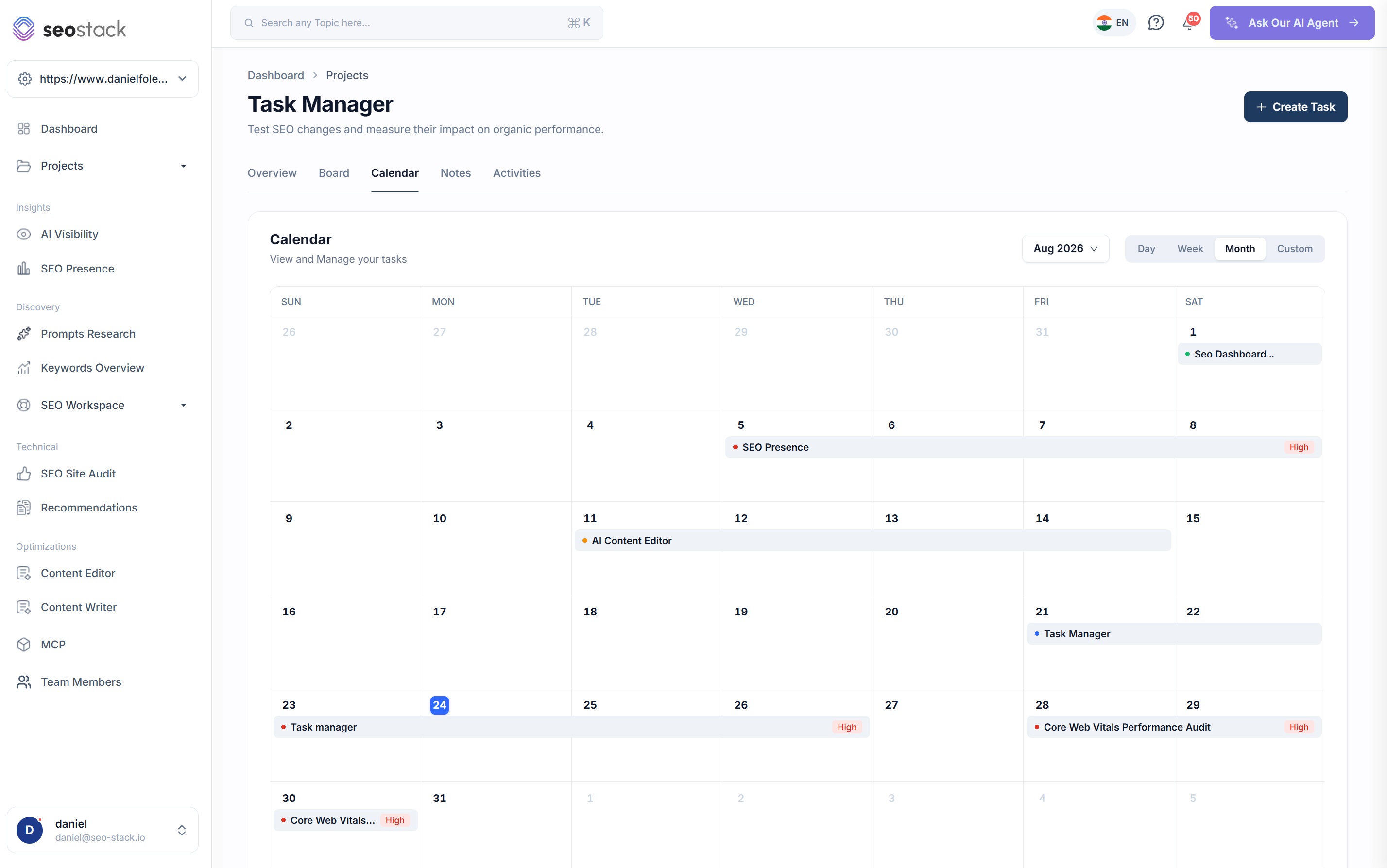
Deadlines on a calendar, not in a list
- Month, week, day or a custom range
- Tasks span from their start date to their deadline rather than sitting on a single day
- Priority shown against each, so a busy week is readable at a glance
- The obvious view for spotting three high priority deadlines landing on the same afternoon
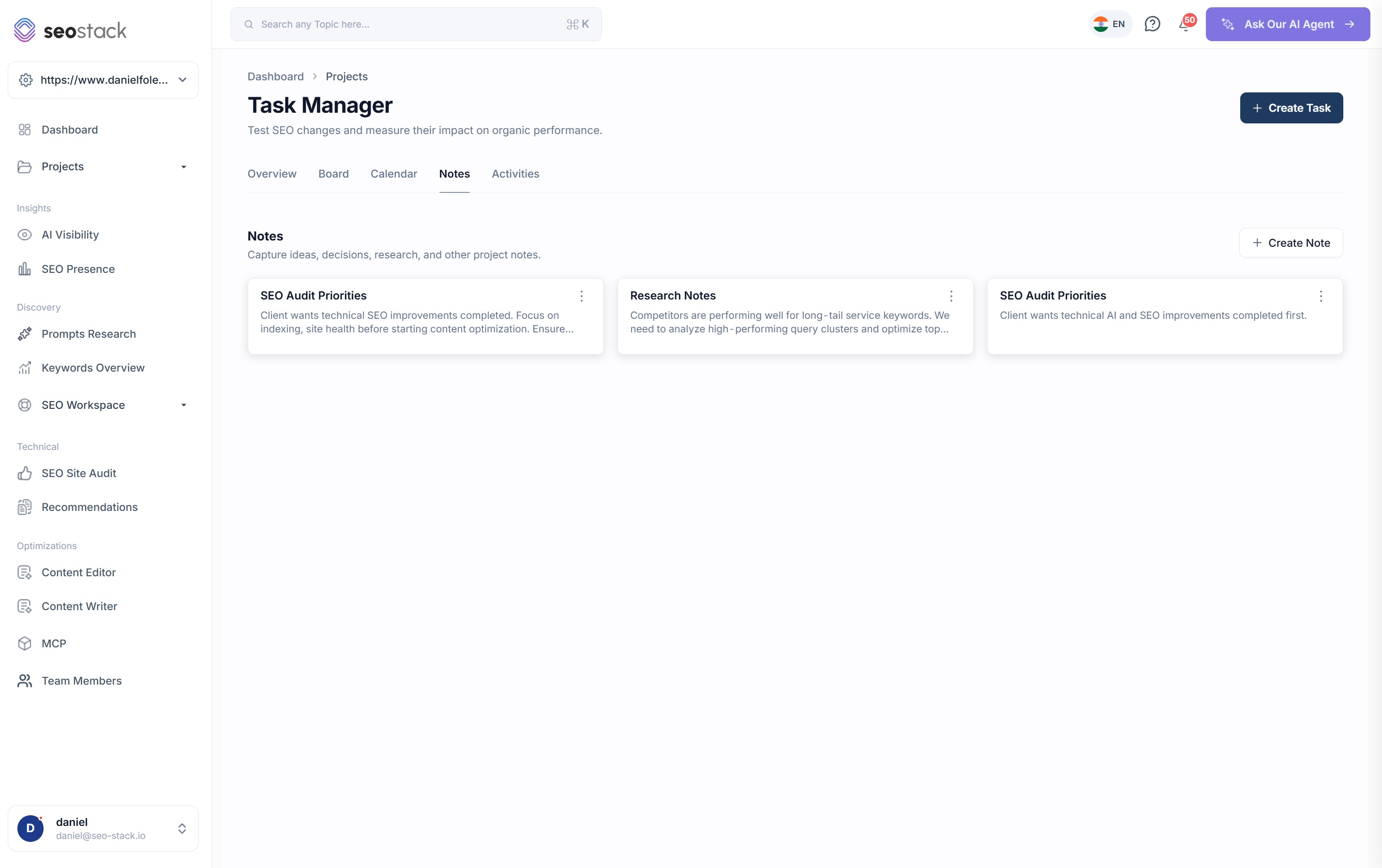
For the things that are not tasks
- Capture research, decisions, client priorities and context
- Kept with the project rather than in a document nobody can find
- The place for why we decided this, which is the thing that always gets lost
- Create, edit and manage them alongside the board
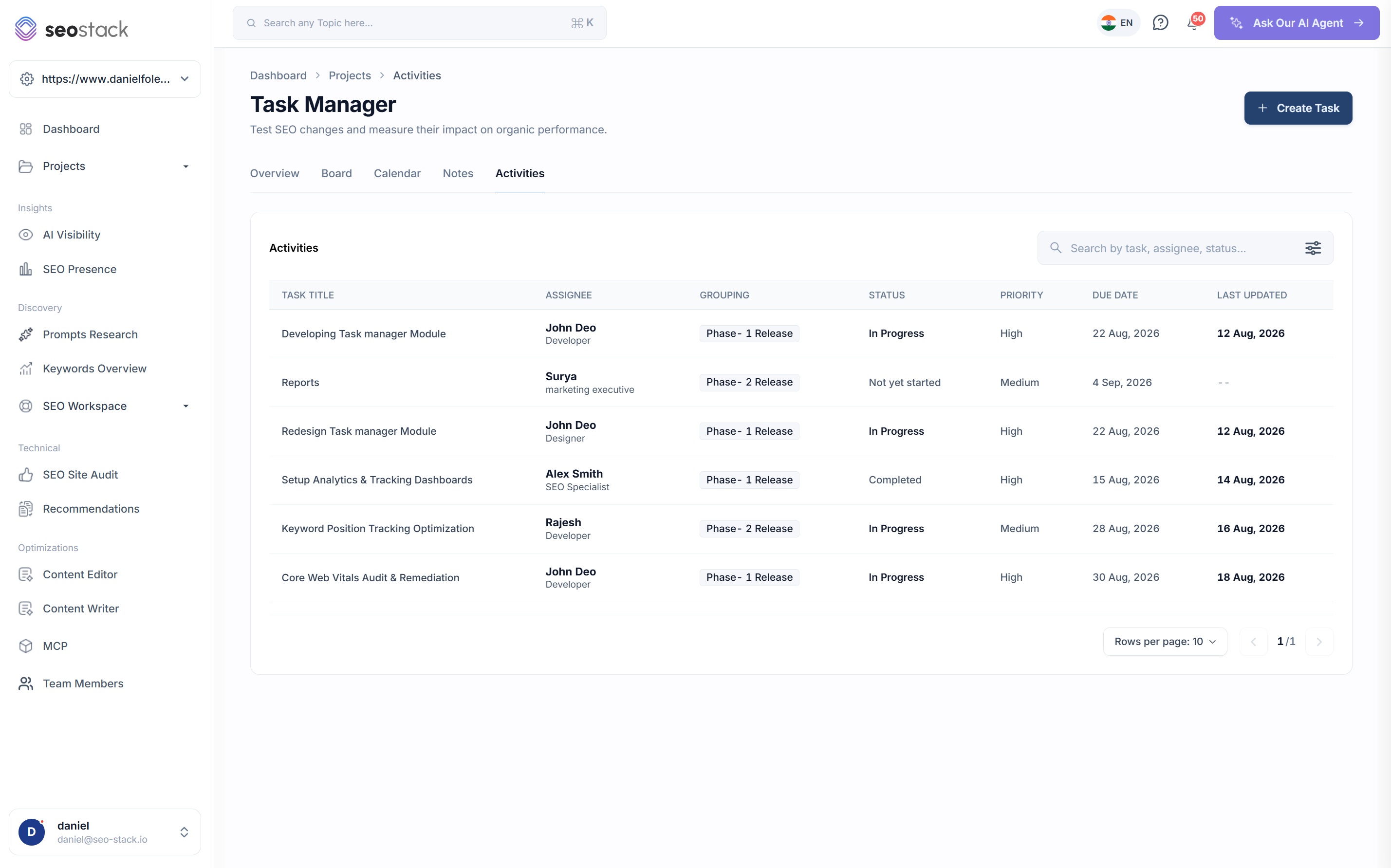
One table of everything, searchable
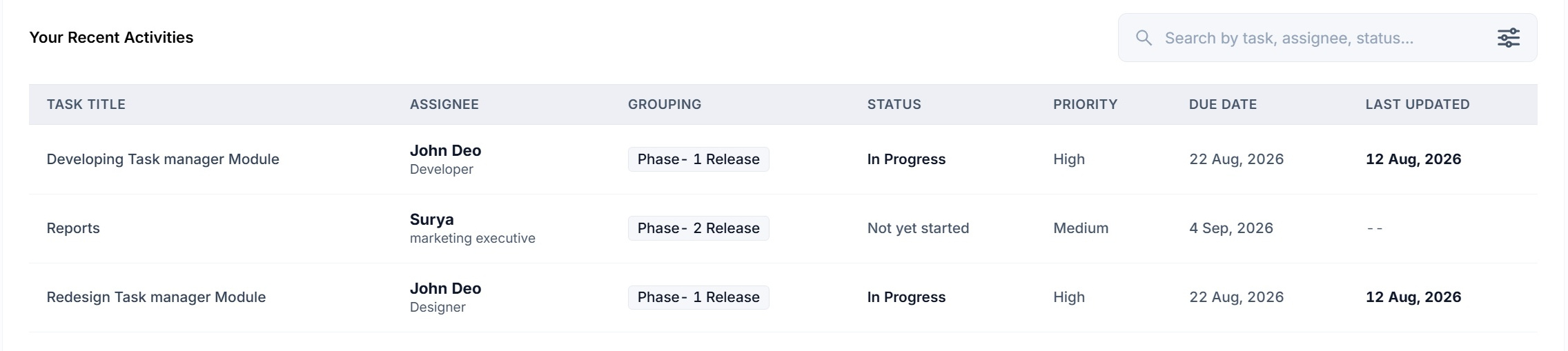
- Every task with its assignee and their role, group, status, priority, due date and last updated
- Search by task, assignee or status
- The view for a weekly review or a client update rather than for doing the work
- Sortable, so the overdue and the recently touched are both a click away
What a task holds
Eight fields, and one of them does not exist anywhere else
Seven of these are what you would expect from any competent task manager. The eighth is what makes this worth running instead of the tool you already have.
Assignee and role
Who is doing it and what they do, so a board with a developer, a writer and an SEO on it is readable without anybody having to ask.
Priority
High, medium or low, shown on the card and on the calendar, which is what makes a crowded week legible.
Status
Yet to start, assigned and not yet started, in progress, pending review and completed. Enough states to be honest about where something is without being a process.
Start date and deadline
Both, rather than just a due date, so a task appears on the calendar for the period it is actually being worked on.
Groups
Phases, sprints, campaigns or clients, created as you need them. The board filters by group, so a big project stays navigable.
Description and attachments
A full description plus images and files, so the brief, the mockup and the before and after all live on the task rather than in three different places.
Time tracking
Log time against tasks and get a weekly total, which matters for agencies reporting effort and for anybody trying to work out whether a piece of work paid for itself.
Linked annotation
The field that connects delivery to performance, and the reason this is a task manager inside an SEO platform rather than a task manager next to one.
Working as a team
Built for more than one person
Task management on your own is a list. Task management across a team is roles, permissions, handovers and an honest record of who did what, and all four of those are here.
Team members and roles
Add the people who work on the account, with their role against them, so an assignee on a card tells you something rather than just being a name.
Permission delegation
Give people access to the properties and the areas they need without handing over the keys to everything, which matters a great deal when the account has client data in it.
Filter to a person
Search the board or the activity log by assignee, so a one to one about somebody's workload takes thirty seconds of preparation.
An activity record that survives
When somebody leaves or an agency changes, the record of what was done, when and by whom stays with the account rather than walking out of the door.
How SEOs use it
What the task manager is actually good for
Turn a quarter into an experiment log
Every task that changes something on the site gets an annotation, and by the end of the quarter you have a list of changes with outcomes attached rather than a list of things that got done.
Report to a client with evidence
Here is the work, here is when it went live, here is what happened afterwards. That is a very different meeting to reading out a list of completed tickets.
Keep the brief with the work
Description, attachments and notes all live on the task, so the person picking it up in three weeks has what they need without going through a chat history.
Plan a month properly
The calendar shows tasks across their whole duration rather than on their due date, which is the only way to see whether a month is actually deliverable.
Know what the work costs
Time tracked against tasks, with a weekly total, so effort sits next to outcome rather than being a thing agencies estimate afterwards.
Ask the assistant what worked
Because the tasks, the annotations and the performance data are all in one platform, you can ask which kinds of work have had a positive impact rather than working it out yourself.
What you get out of it
The outcome, not the feature list
Keep the link between what was done and what happened afterwards
Attribute organic and AI visibility outcomes to specific pieces of work
Stop running delivery in one tool and reporting in another
Connect a property. Watch the data start stacking.
Warehousing begins the moment you connect your Search Console property, there is no Google Cloud project to set up, no BigQuery and no schema to design. You simply connect your property and SEO Stack starts storing every row of your data from that day onwards.
- Credit card required
- Cancel within the trial and you won't be billed
- No contracts