Client Reporting
Build the client report once, then let it send itself
SEO Stack pulls your search performance, your site health, your AI visibility and your GA4 conversions into a single report, you choose which sections go into it and how the period is compared, then you put your own logo, colours and fonts on the whole thing and schedule it to arrive in your client’s inbox as a PDF every week or every month.
- Credit card required
- White label PDF
- Scheduled by email
Trusted by over 5000 Users + Brands:
Why this exists
Reporting is rarely the analysis, it is the assembly
Most of the time that goes into a monthly report is not spent thinking about the data at all, it goes on exporting Search Console into a spreadsheet, pasting charts into a deck, screenshotting GA4 and rewriting roughly the same commentary you wrote last month, then doing the whole thing again for the next client.
The data is in four places
Search performance is in Search Console, conversions are in GA4, technical issues are in whatever audit tool you use and AI visibility is usually nowhere at all, so the report becomes a copy and paste job across four logins.
It is the same work every month
Very little about a monthly report changes from one month to the next other than the numbers, yet it typically gets rebuilt by hand each time because there is nothing holding the structure between reports.
Clients see somebody else's branding
If you are reporting to clients then a PDF with a vendor logo on it is a problem, which is why most agencies end up rebuilding the whole report inside their own deck template, and that is where the real time goes.
Getting started
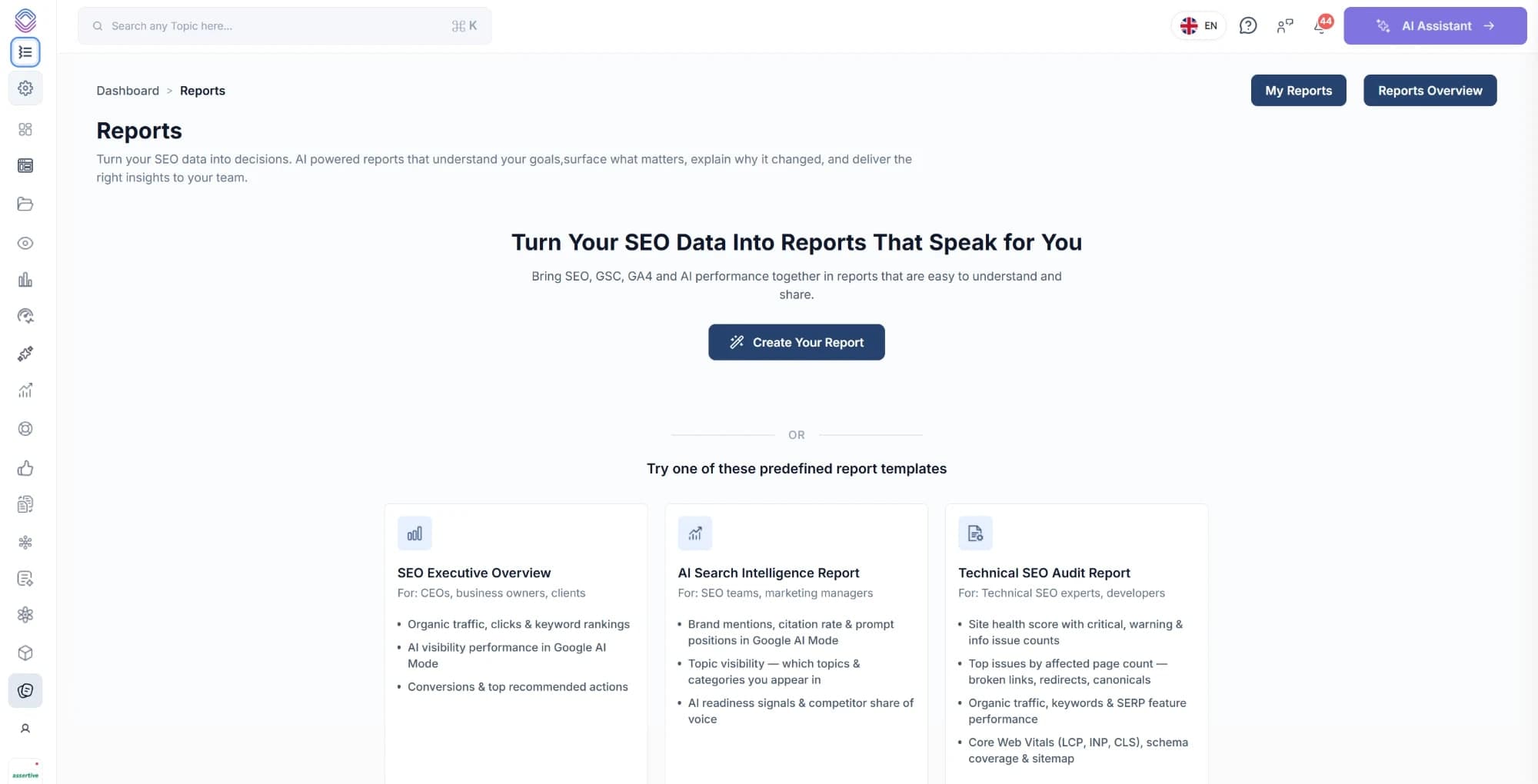
Start from a template built for whoever is reading it
A founder and a technical SEO want very different documents out of the same data, so each template is written for a particular audience rather than being one report with a few sections switched off.
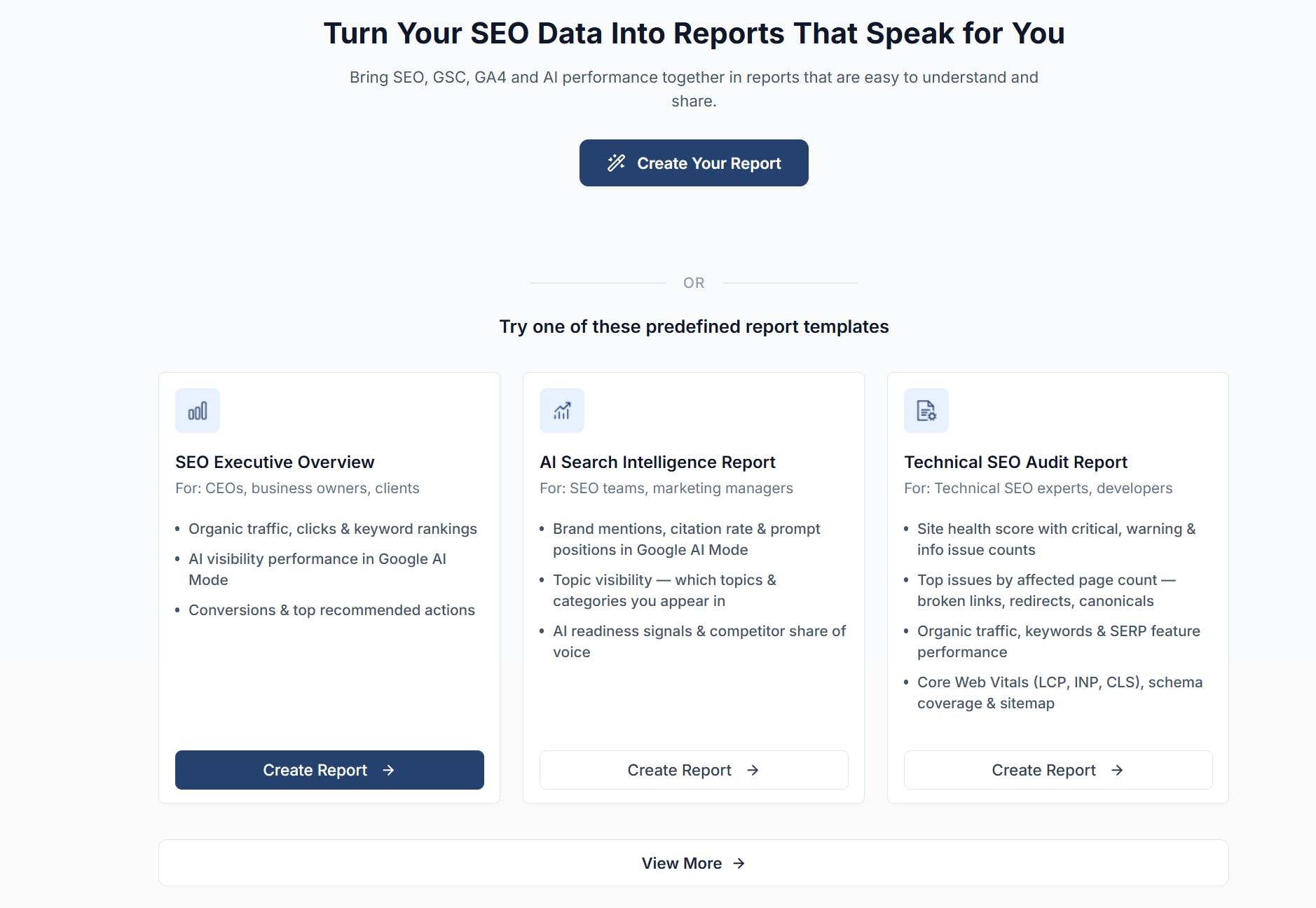
SEO Executive Overview
For: CEOs, business owners, clients
- Organic traffic, clicks & keyword rankings
- AI visibility performance in Google AI Mode
- Conversions & top recommended actions
AI Search Intelligence Report
For: SEO teams, marketing managers
- Brand mentions, citation rate & prompt positions in Google AI Mode
- Topic visibility, i.e. which topics & categories you appear in
- AI readiness signals & competitor share of voice
Technical SEO Audit Report
For: Technical SEO experts, developers
- Site health score with critical, warning & info issue counts
- Top issues by affected page count
- Organic traffic, keywords & SERP feature performance
- Core Web Vitals (LCP, INP, CLS), schema coverage & sitemap
Naturally none of them are compulsory, so if the report you send your clients does not look like any of these, you can build your own from nothing and keep it.
Building it
Build it section by section, then never build it again
Manual creation walks through five steps, and because the result is saved as a report rather than as a one-off document, next month's version is the same report with new numbers in it.
Basics
Name the report, say who it is for, whether that is your marketing team, your executive team, your SEO & content team, a client or your product team, then choose whether it is about overall growth, traffic, revenue, ranking or AI visibility.
Metrics & sections
Tick exactly what goes in, across SEO, site health, AI search and GA4. Nothing is added automatically, so a report for a developer does not arrive carrying revenue charts nobody asked for.
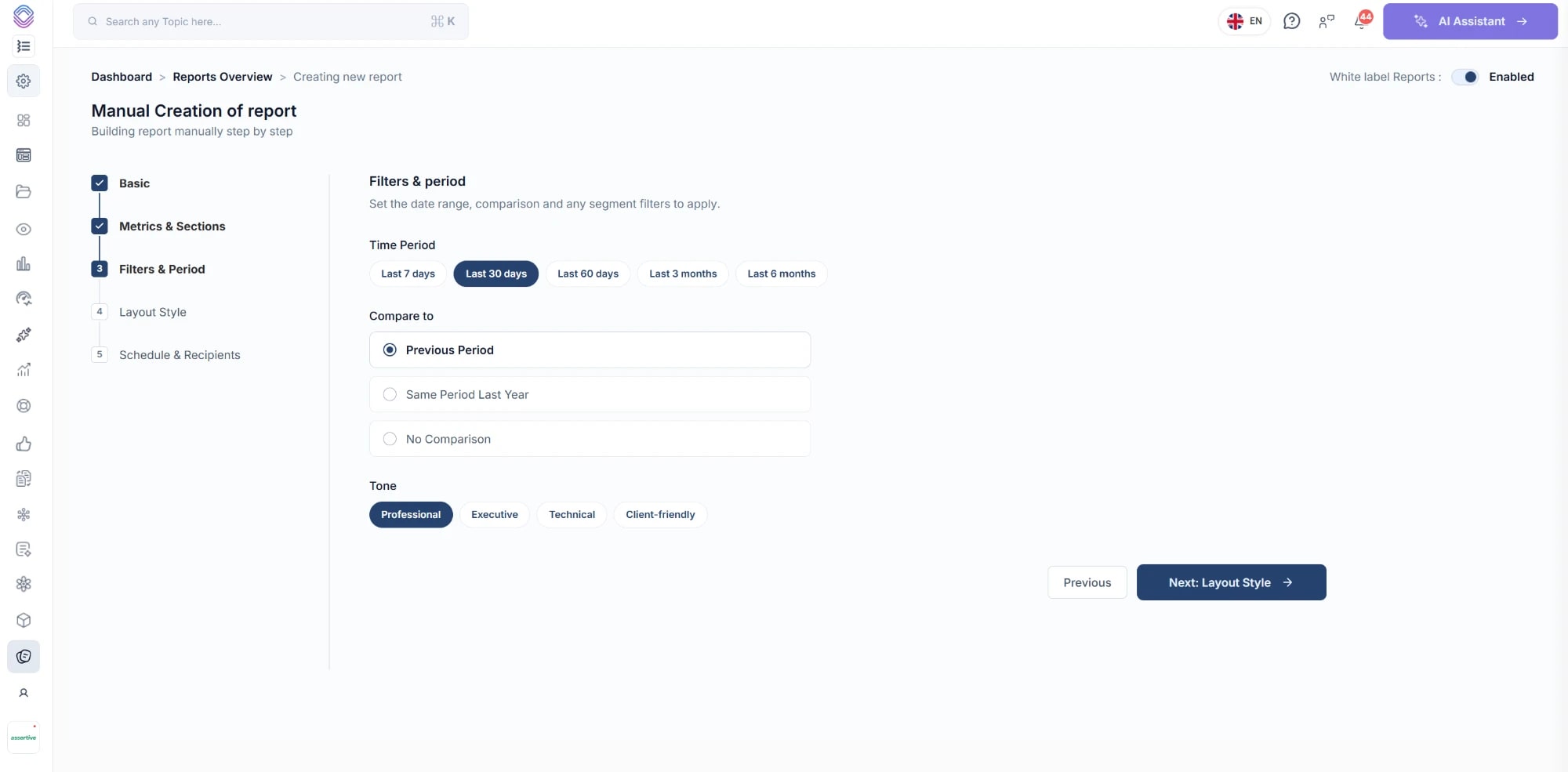
Filters & period
Pick the window, anything from the last 7 days to the last 6 months, decide whether it compares against the previous period or the same period last year, and set the tone the report is written in.
Layout & branding
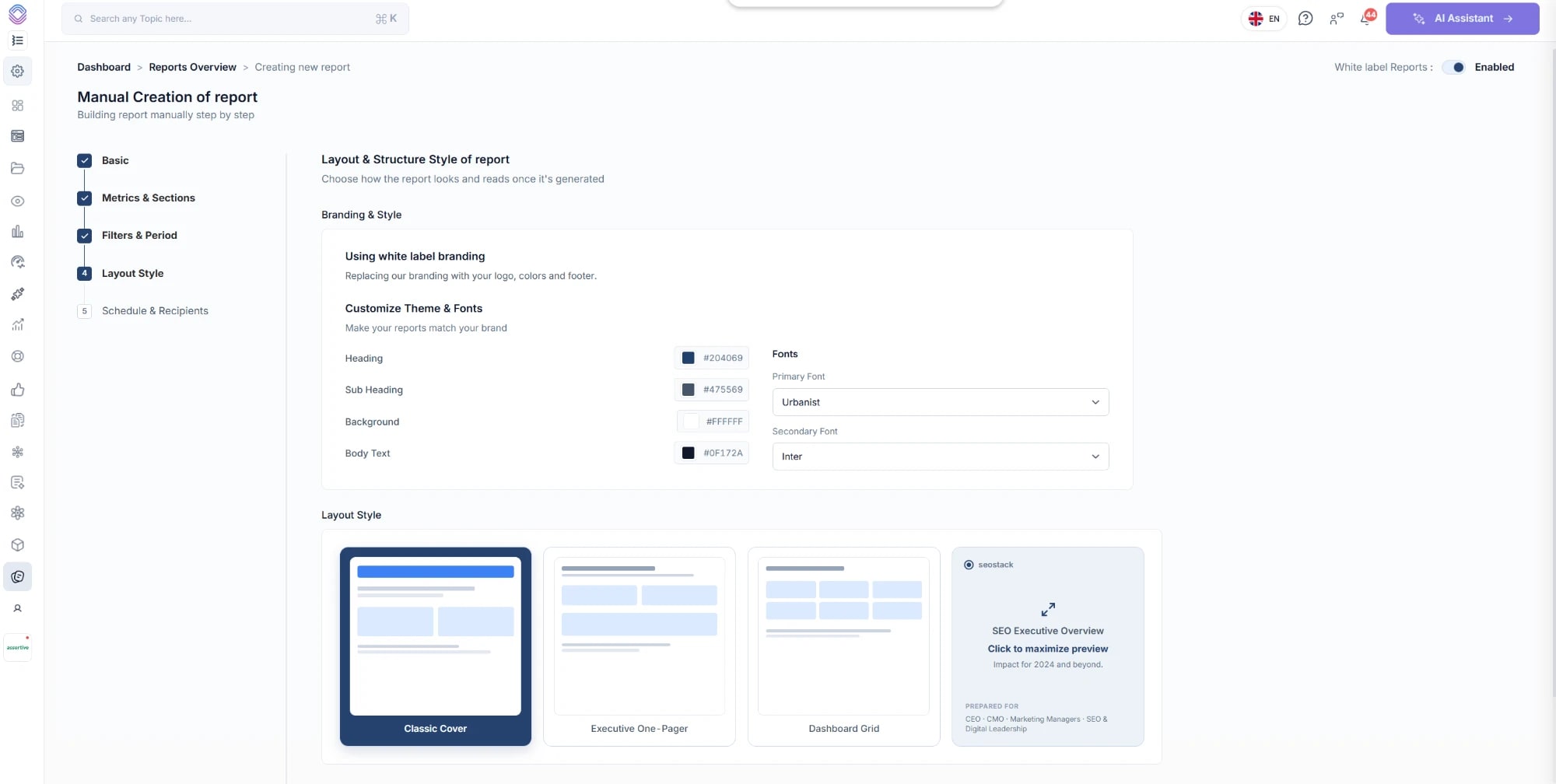
Turn on white label branding, set your heading, sub heading, background and body colours, choose your primary and secondary fonts, and pick between a classic cover, an executive one-pager and a dashboard grid.
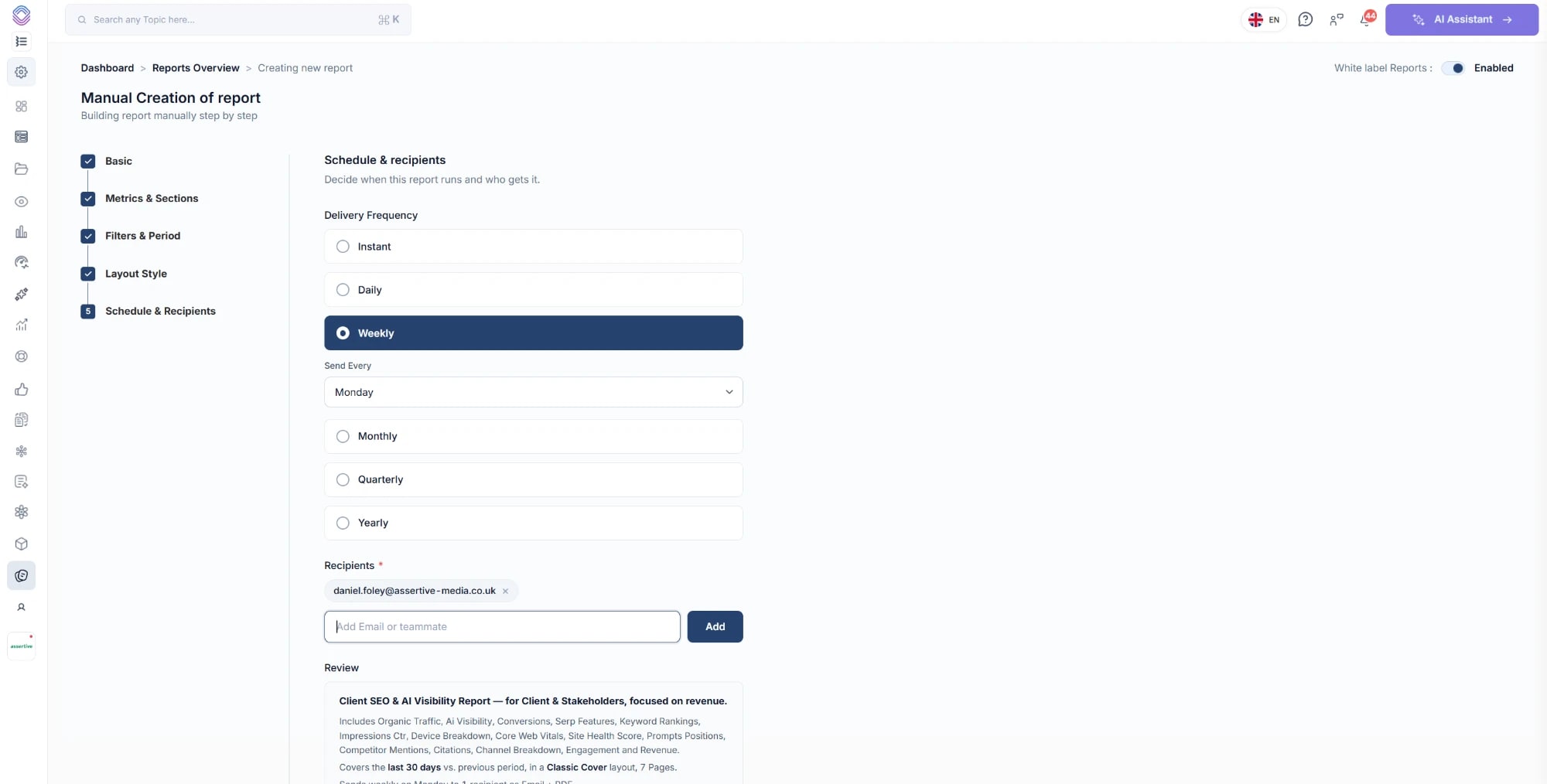
Schedule & recipients
Choose how often it goes out and who receives it, then read the review summary, which tells you in plain English what will be sent, how often and to how many people before you commit to it.
You can preview the PDF from inside the builder, so you always know what the report contains and how it looks before anybody else sees it.
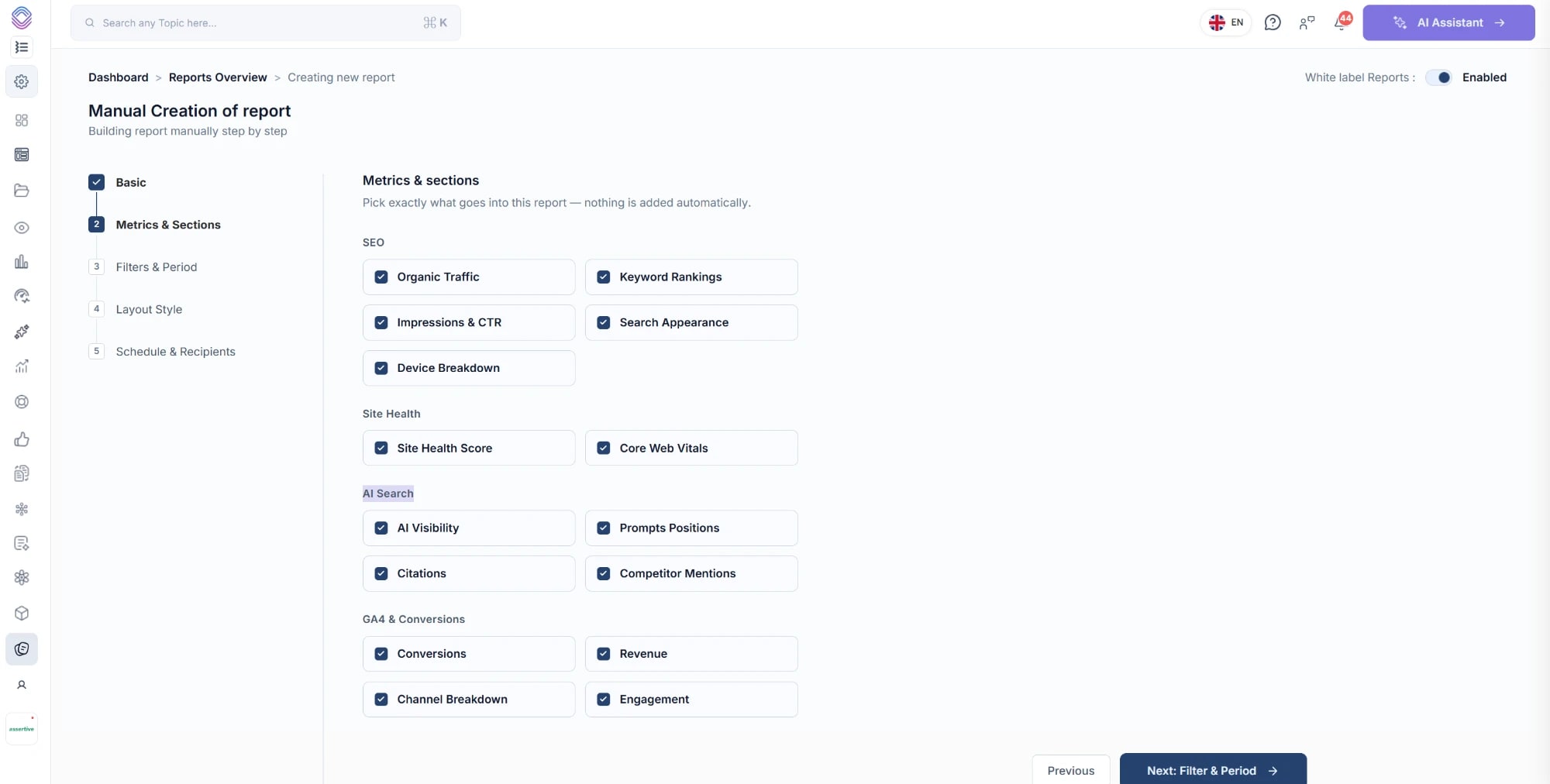
Pick exactly what goes into the report, because nothing is added automatically.
Period & tone
The same numbers, written for the person reading them
A report for a client and a report for your own team cover the same period and the same metrics, they just need to be written very differently, so the tone is a setting on the report rather than something you rewrite by hand afterwards.
- Time period - the last 7 days, 30 days, 60 days, 3 months or 6 months
- Compare to - the previous period, the same period last year, or no comparison at all
- Tone - professional, executive, technical or client-friendly
- Every headline metric carries its movement against the comparison period, so a drop is never reported as a bare number
White label
Your logo, your colours, your fonts
Turning white label branding on replaces our branding with yours throughout the document, footer included, so what your client receives looks like it came from you, because as far as they are concerned it did.
- Set the heading, sub heading, background and body text colours individually
- Choose a primary and a secondary font rather than being stuck with ours
- Three layouts to pick from - a classic cover, an executive one-pager and a dashboard grid
- A live preview of the cover updates as you change the theme, so there are no surprises in the export
- White-label reports are part of the Agency plan, so check the pricing comparison if you are on Basic or Pro
The sections
Search, site health, AI visibility and GA4 in one document
Because all of it is already warehoused in the same account, a single report can cover the things that normally take four tools and four exports to put in front of a client.
SEO
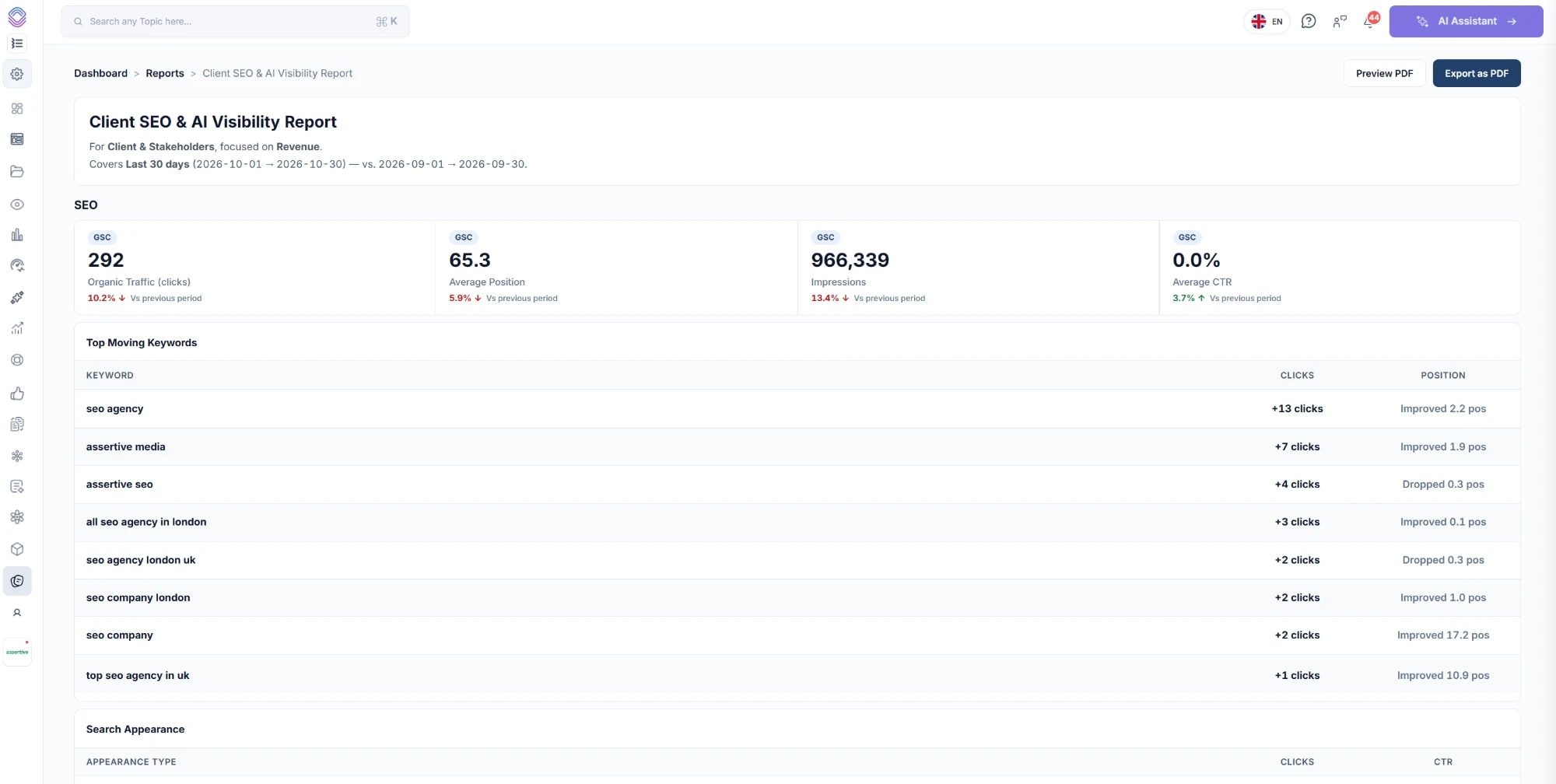
Organic traffic, average position, impressions and average CTR, each against the previous period, with your top moving keywords and how far they moved, search appearance, device breakdown, your top pages by organic traffic and the quick win keywords currently in positions 4 to 10.
Site Health
Your site health score from the latest completed audit, plus Core Web Vitals split across mobile and desktop, so LCP, INP and CLS each arrive with a figure and a rating rather than a number the client has to interpret on their own.
AI Search
AI visibility score, visibility consistency, cross-engine overlap, brand mentions, prompt success rate, average visibility rank, citation score, coverage stability and responsive inclusion rate, then your top tracked prompts with the visibility and sentiment of each, your competitors by share of voice, topic visibility and your AI readiness signals.
GA4 & Conversions
Sessions, active users, conversions, revenue and engagement rate against the previous period, with a channel breakdown showing where the sessions came from and your top landing pages by sessions and engagement.
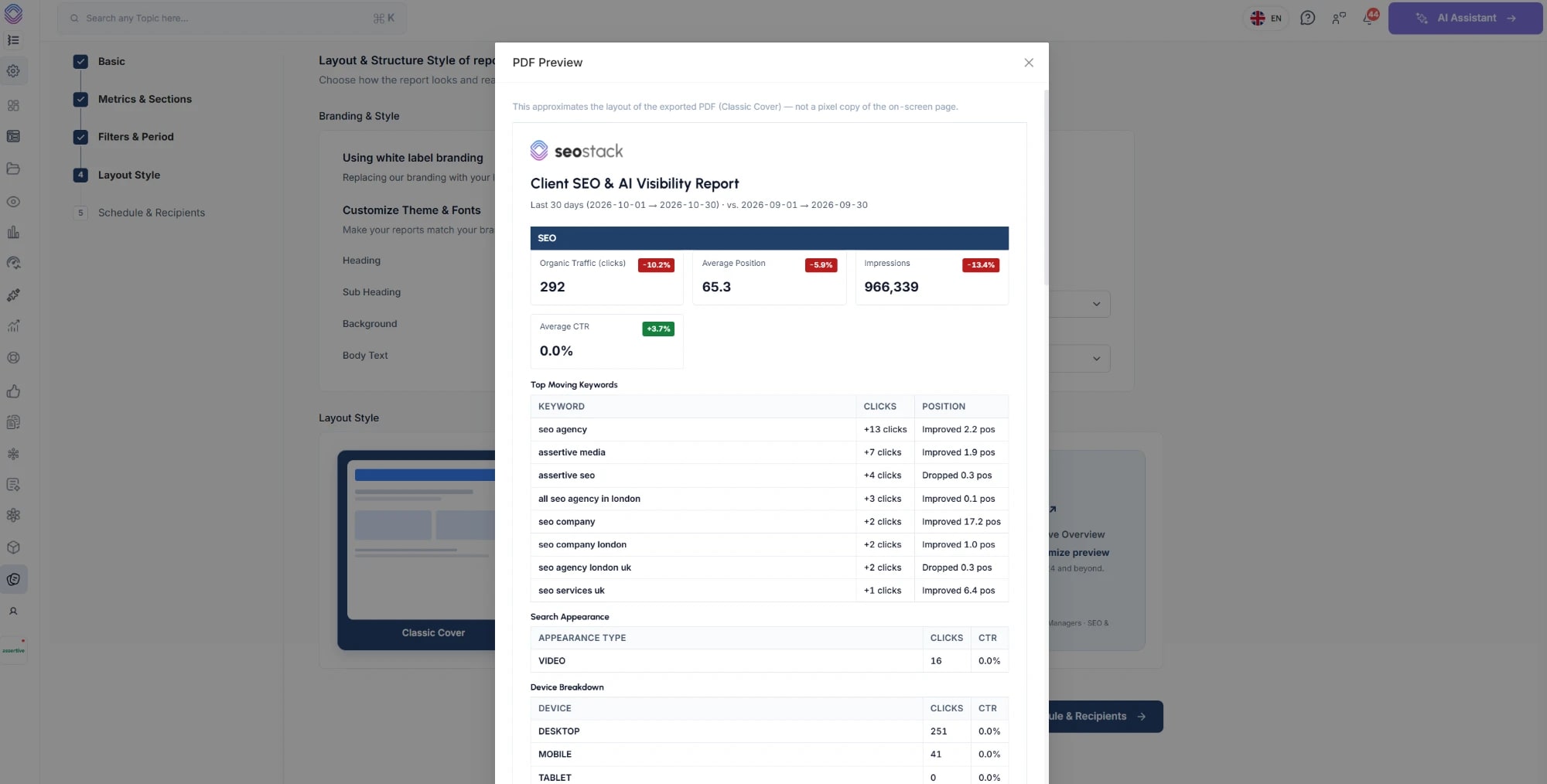
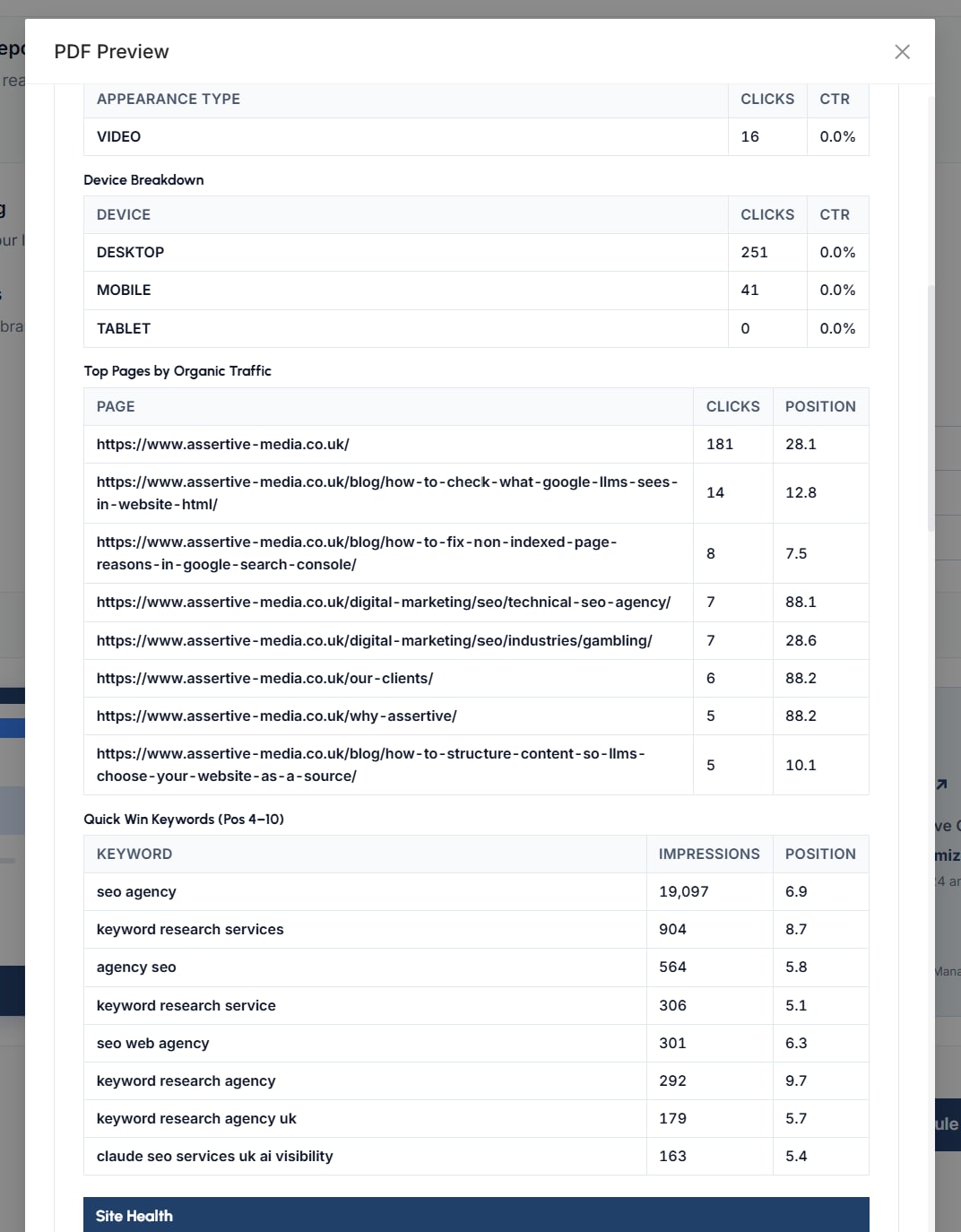
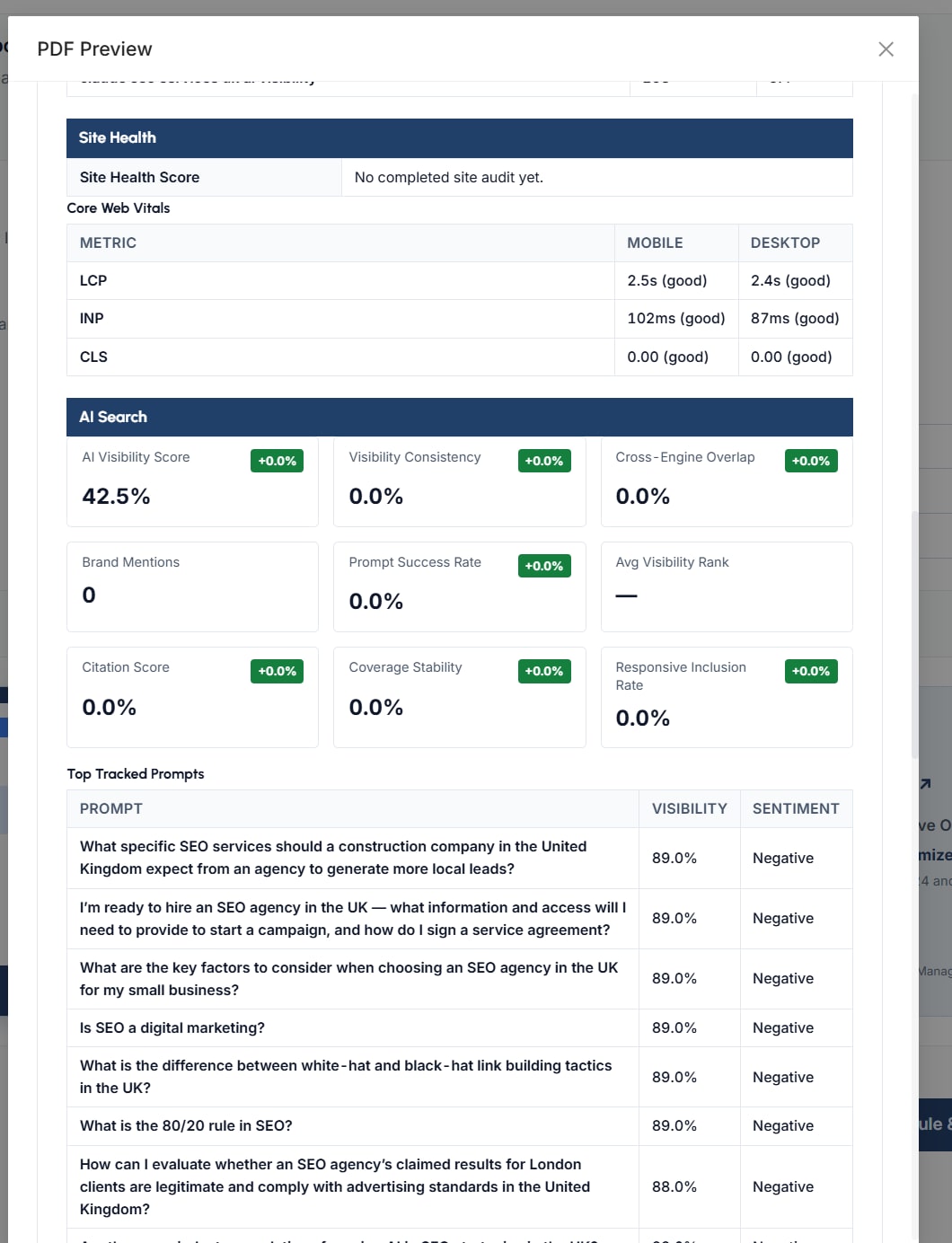
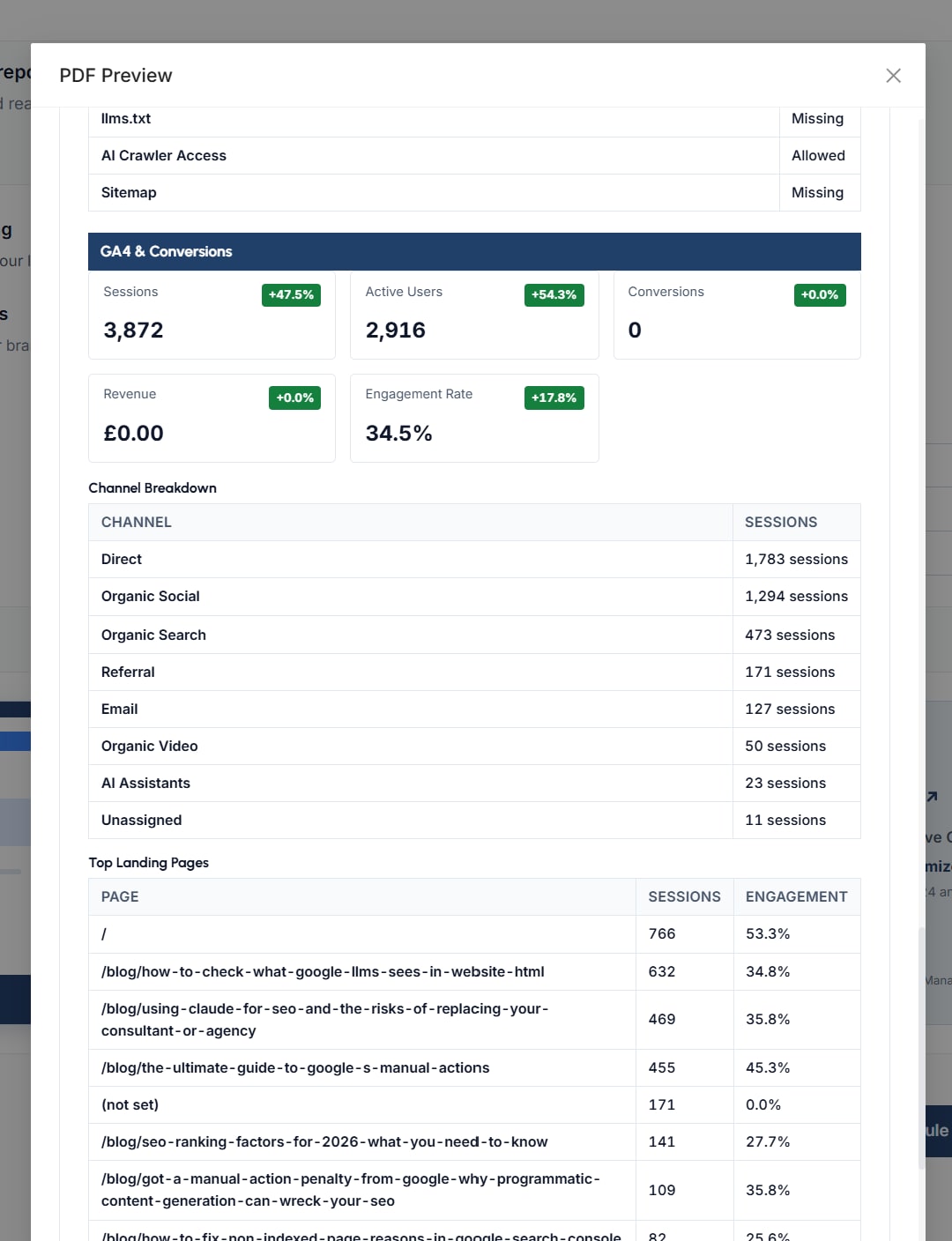
Which sections appear is entirely down to what you ticked when you built it, so a report with no AI visibility tracking behind it will not arrive carrying an empty AI search section.
Delivery
Set the schedule once and it keeps going out
Ultimately this is the part that gives you the month back, because once the report is built and the recipients are set, the reporting you used to do by hand happens whether or not you remember it is due.
- Instant, daily, weekly on a day you choose, monthly, quarterly or yearly
- Add recipients by email address or pick a teammate, with as many on a report as you need
- Recipients do not need an account of their own, the report arrives as a PDF by email
- The review summary tells you what is being sent, how often and to how many people before you commit to it
In the platform
It is a live report as well as a PDF
Everything that goes into the export is readable on screen too, so you can open the report before a client call, read through it, preview the PDF and export it there and then rather than waiting for the next scheduled send.
Works with
A report is only as good as what went into it
Reporting is the last step of a month's work, so the parts of the platform that record what you changed and track how you are being cited are what give the report something to say.
Annotations
Record what you changed and when, so a movement in the report can be explained by the work that caused it rather than guessed at.
See AnnotationsAI Visibility
Track how ChatGPT, Gemini and Claude cite your brand, which is where the AI search section of every report comes from.
Explore AI VisibilityTeam & Delegation
Give a client their own access to the platform, with permissions set per workspace, for when a monthly PDF is not enough for them.
Team & DelegationQuestions
Before you build one
Can I put my own branding on the report?
Yes. White label branding replaces our branding with yours throughout the document, including the footer, and you set the heading, sub heading, background and body text colours along with your primary and secondary fonts, so the PDF a client receives is yours rather than ours.
Where does the data come from?
From the properties you have already connected. Search performance comes from your warehoused Search Console data, conversions and channels come from GA4, the health score and Core Web Vitals come from your SEO site audit, and the AI section comes from your AI visibility tracking, so there is nothing to export and nothing to paste in.
Do I have to start from a template?
No. The templates exist because they cover the three reports most people end up building anyway, but manual creation walks you through the same five steps and lets you choose every section yourself.
Can I send it to a client who doesn't have a SEO Stack account?
Yes, recipients are email addresses, so anybody can receive the report as a PDF without logging in to anything. If you would rather give somebody access to the platform itself then team and delegation handles that separately, with permissions set per workspace.
How often can a report go out?
Instantly, daily, weekly on a day you choose, monthly, quarterly or yearly. You can also open the report in the platform at any point and export the PDF yourself without waiting for the next scheduled send.
Is white labelling on every plan?
No, white-label reports are part of the Agency plan, which is the plan most people reporting to clients are on anyway. The comparison table on the pricing page shows exactly what each plan includes, so it is worth checking there before you commit to anything.
Does the tone setting change the numbers?
No, it changes how the report is written around them. The same period reported professionally, for an executive, for a technical audience or for a client reads very differently even though the underlying figures are identical.
Get your month back
Connect your Search Console and GA4 properties during your 14-day free trial, build a report in a few minutes, put your own branding on it and schedule it to go out on its own.
- Credit card required
- Cancel within the trial and you won't be billed
- No contracts