Comparison
SEO Stack vs Google Search Console: A Comparison
I’ve used Google Search Console every working day since it was still called Webmaster Tools, so let me say this upfront before anyone accuses me of bias - GSC is a genuinely useful free product and I’m not going to pretend otherwise.
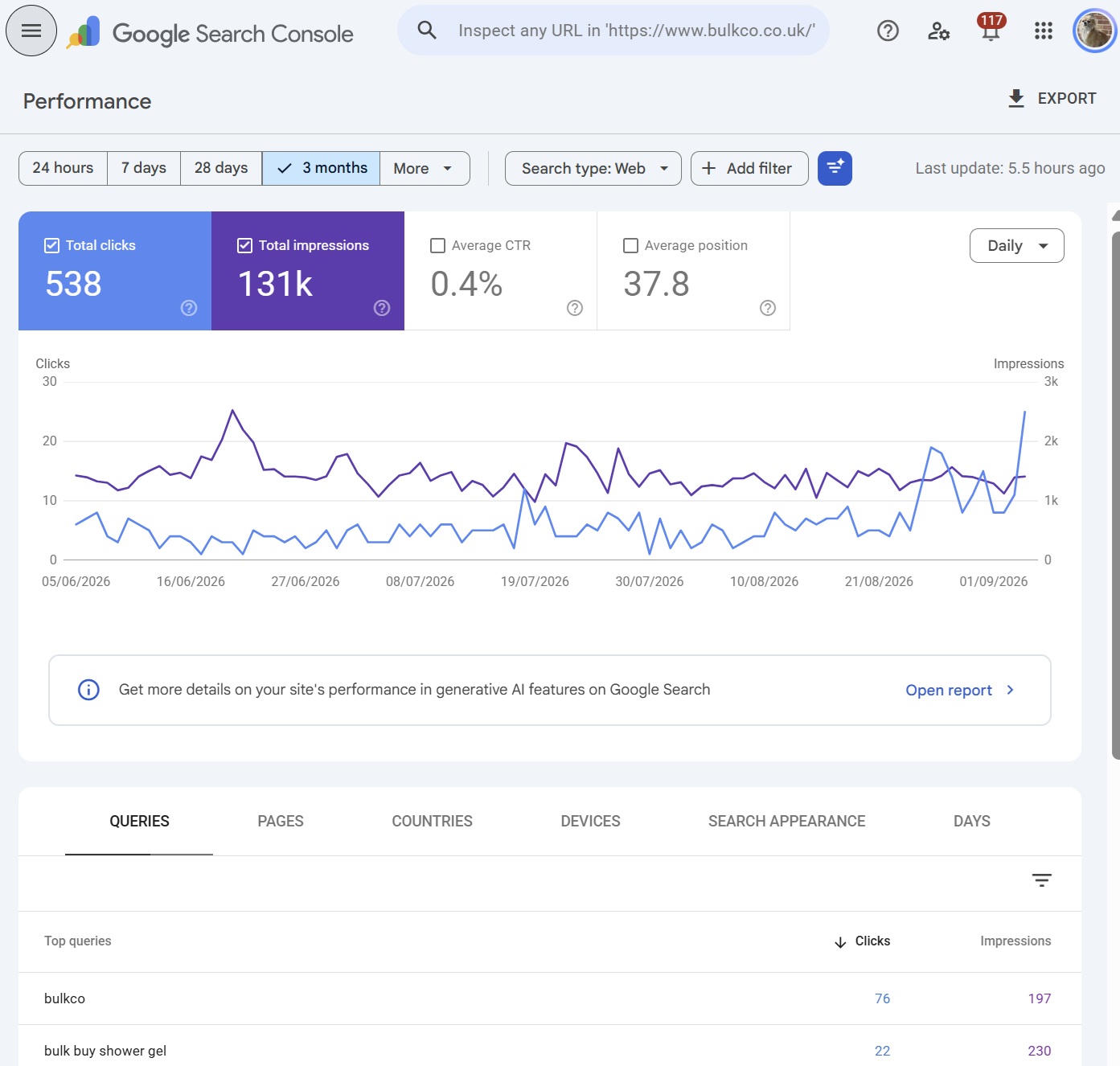

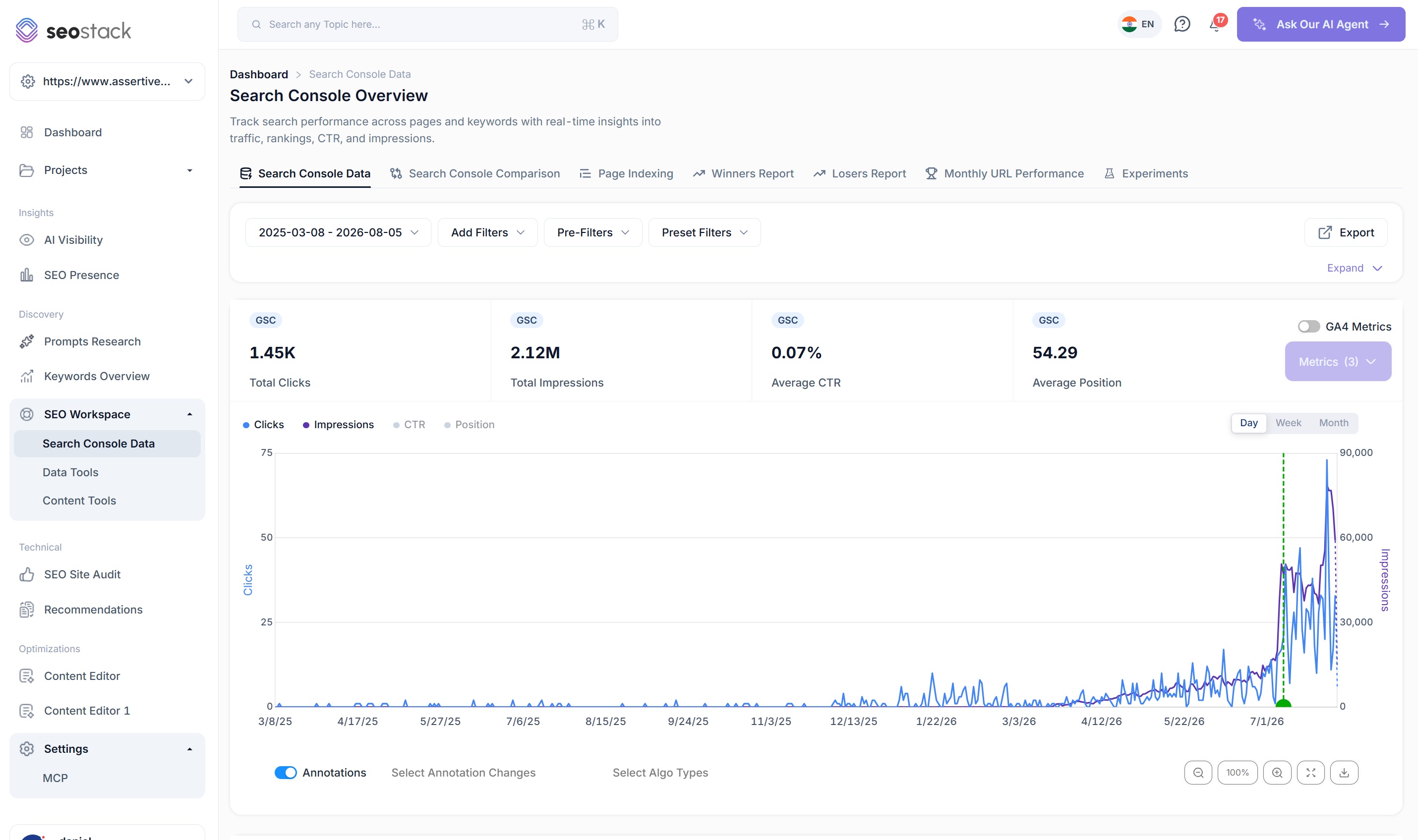
Google search console itself is useful and obviously it being free is a more attractive prospect than paying for a tool that gives you GSC data - but, the limitations with GSC quickly become apparent when you are a regular user of it.
Here are some of my personal bug-bears with search console.
Timeframe limits on data
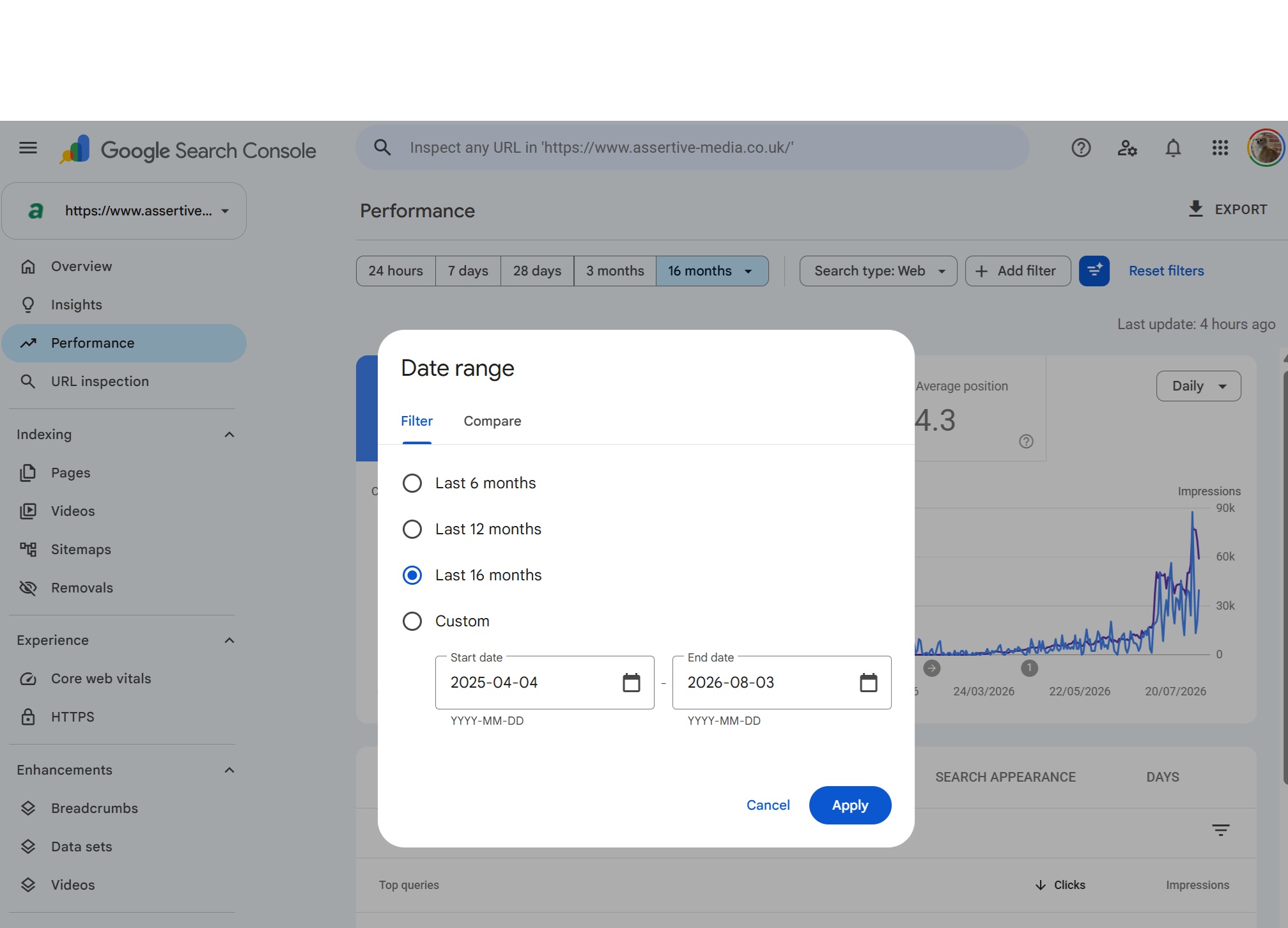
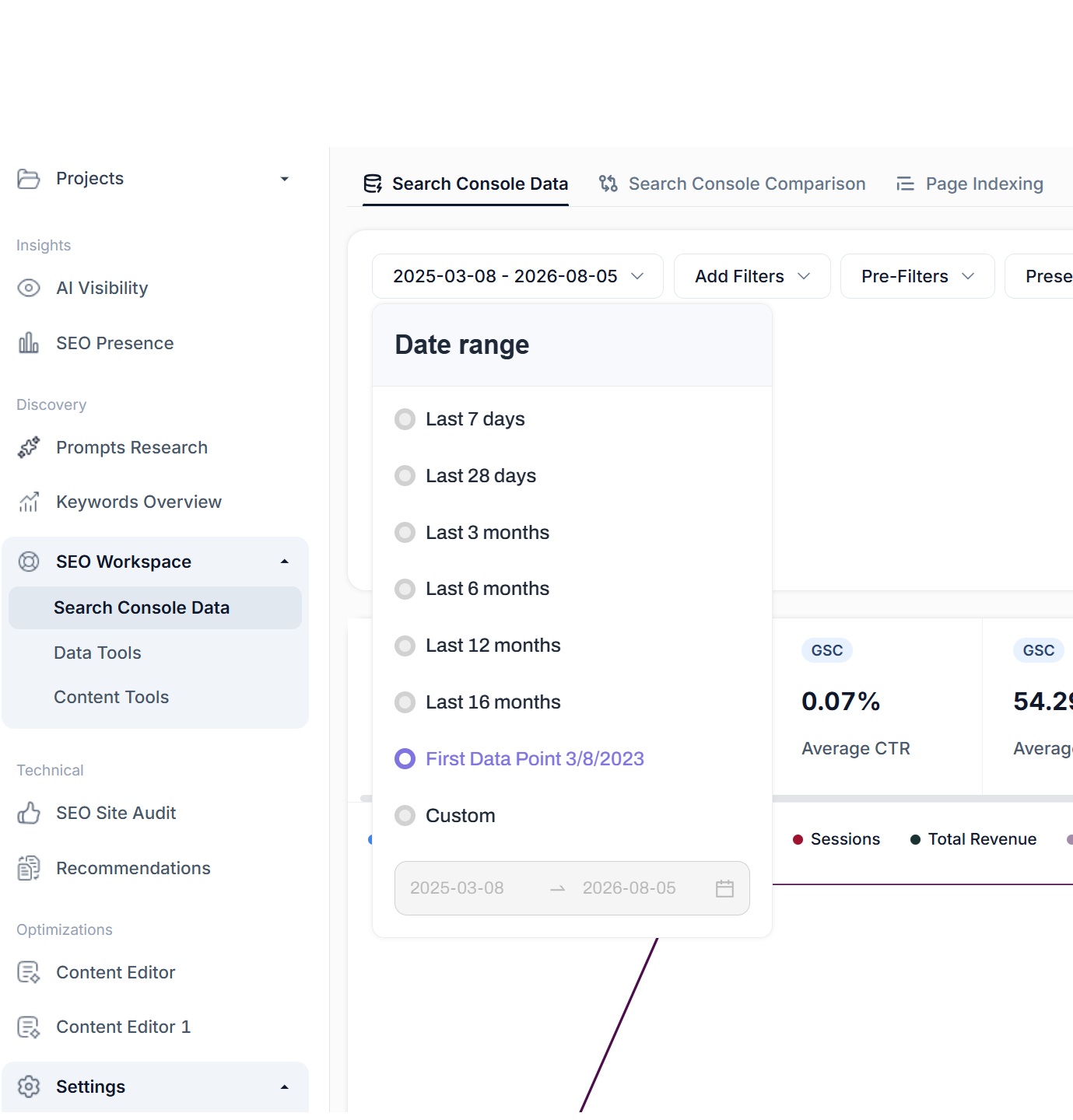
Firstly, the timeframe limits on data, with Google Search Console you get a rolling 16 month window on your data, which means for every new days worth of data you get, you lose a days worth of your oldest data - not a problem for everyone, but, wouldn’t it be nice if you could keep that data indefinitely in the same consistent interface? Well, SEO Stack gives you up to 10+ years of data warehousing, depending on your plan. Worth being clear about what that means: the retention allowance is how much history your warehouse can hold going forward, not ten years of history appearing on day one. When you connect, SEO Stack imports whatever Google still holds, normally its own 16 month window, and your warehouse builds from there.
Row count limits
Google search console is a free product, it costs Google money to store and process data, as GSC is a free product, there’s no need for them to give you beyond the top 1000 rows of data, however as any SEO will tell you, getting access to only 1000 rows of data be it keywords or pages is limiting & frustrating & can make the whole approach to SEO less efficient.
In search console there are 1000 row limits, so if you have a website that’s been served for 100,000 queries over 16 months, you’ll only get access to 1% of all of those queries - that’s nuts right?
What about a website with 10,000 pages? The same thing, you can only access the top 1000 rows / filtered rows.
What about exporting data? It’s the same thing again, a 1000 row limit.
Search console places a strict 1000 row limit on everything from keywords to pages, exports to non indexed page reasons - this is where SEO Stack shines! We give you ALL of the data, no restrictions - whether your website has 1000 pages or 10 million, you can access ALL of your search console data through SEO stack.
Filtering
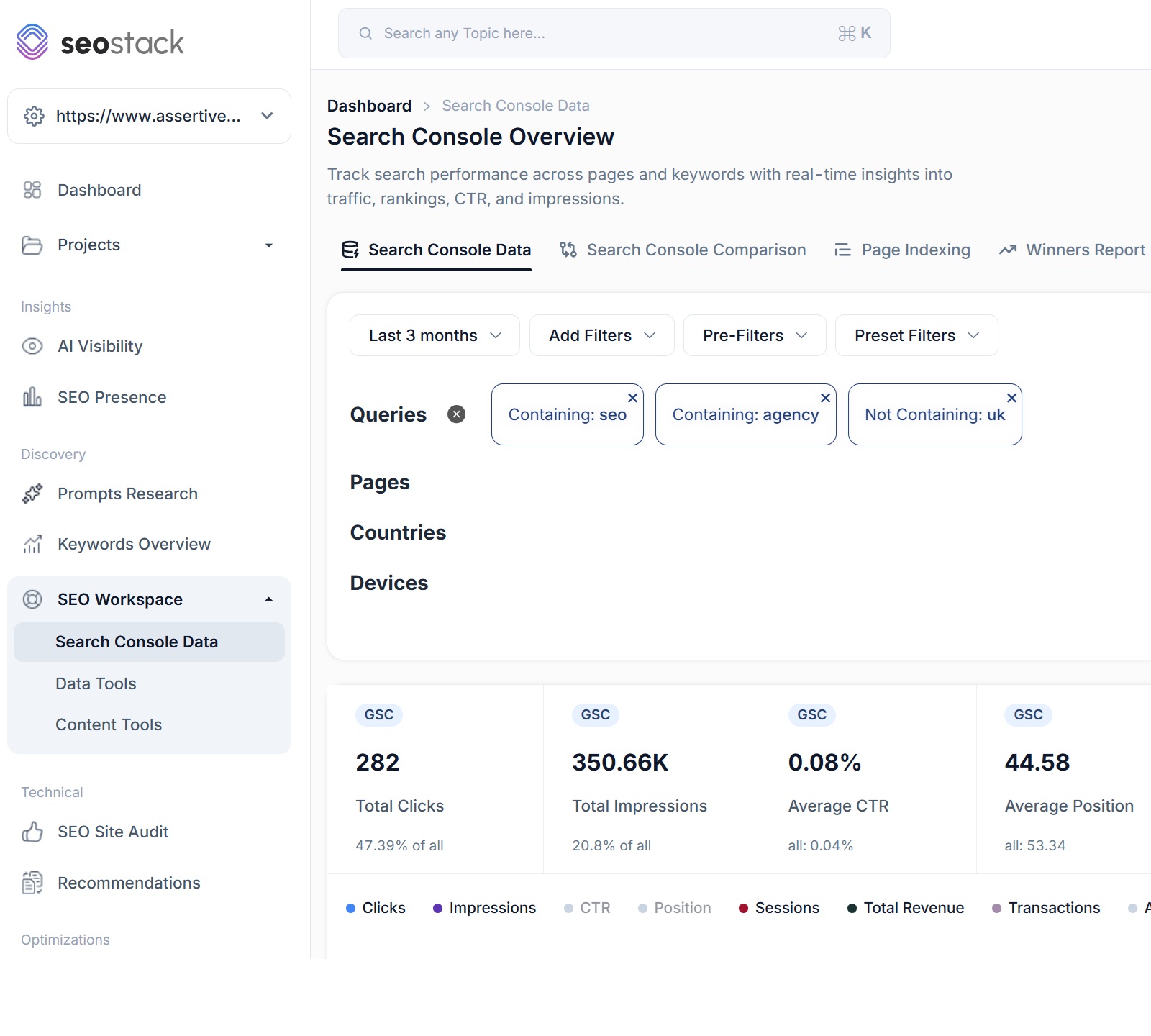
Don’t get me started on the filtering in Google Search Console - it’s an abomination, you can technically ONLY use 1 set of filter conditions at once, you cannot layer your filtering. So if you want to see all keywords in your search console data containing FREE but you want to exclude the words CHEAP, BUY, SHOP at the same time you can’t.
You can look for queries/pages containing or use regex but you CANNOT layer your filters - which is just crazy!
It means if you want to do ANY type of filtering for your SEO auditing or analysis, you have to bulk export the data and even then you have no consistent UI, you can’t see traffic or which pages generated traffic for your layered filtering - that’s where SEO stack comes in - you can LAYER as many filters as you like with varying conditions! Perform query/page contains and not contains at the same time! Plus we offer explicit or loose filtering i.e .MUST or SHOULD contains / not contains.
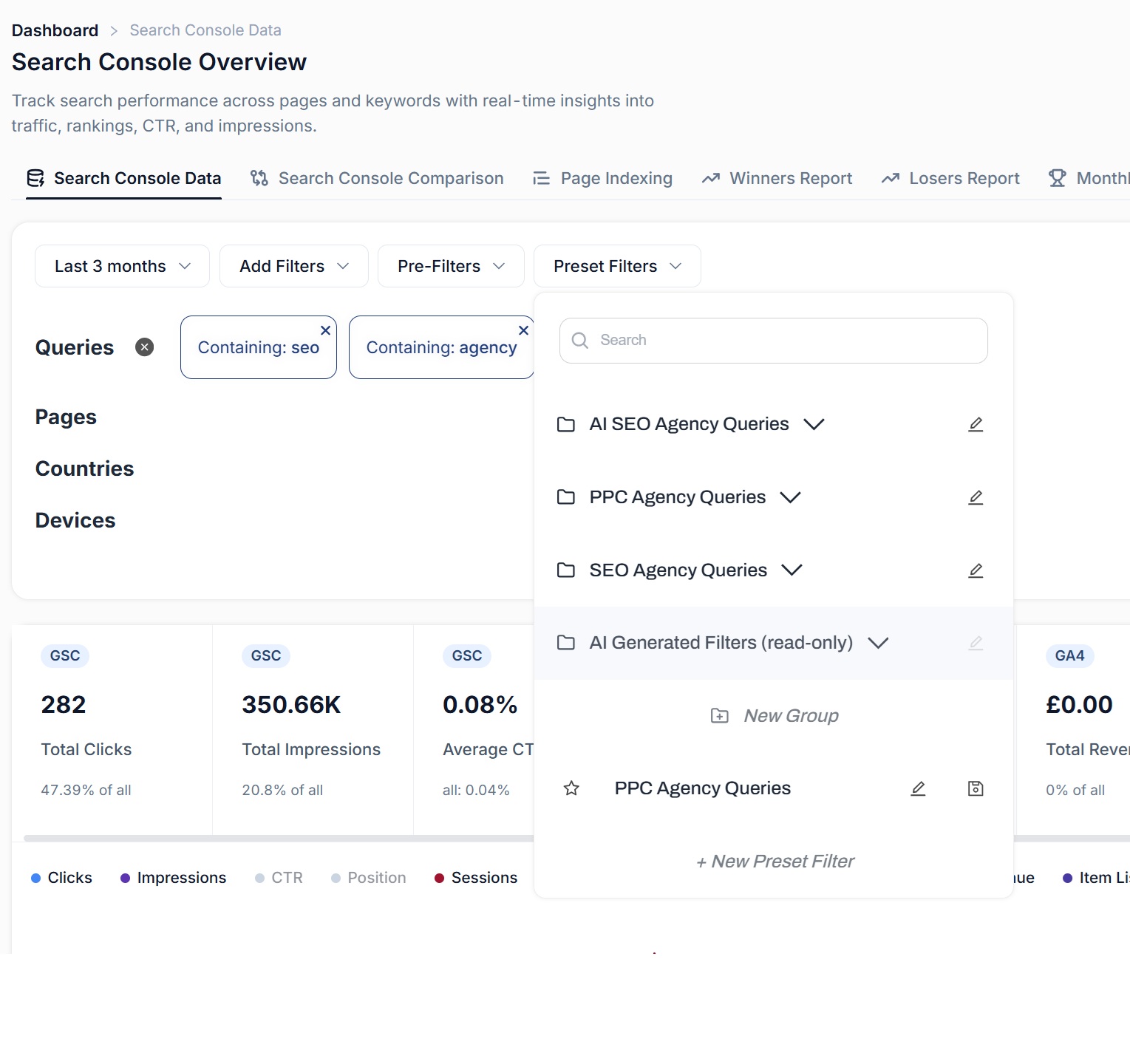
And - in search console you cannot save your filters, in SEO stack you can. This makes 1 click applications of complex filter conditions a doddle!
Why the limits?
None of these limits exist because Google thinks they’re good for SEOs, they exist because Search Console does not generate revenue from storing or processing the data and storing per-query, per-page, per-country, per-device data for every verified property on the web is expensive to do. We know this first hand because we store exactly that - one website in SEO Stack can run to hundreds of millions of rows. Google made a sensible commercial decision to cap it, but, that doesn’t mean YOU have to live with the cap.
So this is a straight comparison. First, SEO Stack’s Search Console Data tool against GSC’s performance report, like for like. Then everything SEO Stack offers on top of that same data which search console does not offer, has not offered and is unlikely to offer in the future.
The Like for Like Comparison
Google Search ConsoleGSCAbove is the summary comparison table, now let’s look into each in more detail.
Data Retention: 16 Months vs 10+ Years
This is a big one and it’s the reason SEO Stack exists in the first place - primarily because we got fed up of using AHREFS and other tools to look back at historic “traffic projections” rather than having the actual data to hand.
By default, GSC holds 16 months of performance data on a rolling basis, every single day, the oldest day rolls off and is deleted. Unless you export to Google BigQuery, that data is gone and non-retrievable.
16 months sounds reasonable until it comes to you trying to do anything with it, a proper year on year comparison needs 24 months minimum. Trying to work out whether a site recovered from a core update two years ago, or whether a seasonal dip is normal for that site, or whether a category has been in slow decline for three years rather than one - none of that is possible inside GSC.
I see this constantly with new clients at Assertive, a client lost 40% of their traffic over 2 years and they want to know why, and the honest answer is that the data which would tell us has already been deleted by Google. So we’re piecing it together from Ahrefs estimates and whatever screenshots someone happened to save - which is grossly inefficient and isn’t how we like to do business, especially when it comes to SEO audits.
SEO Stack warehouses your GSC data from the moment you connect a property, and, it does it with NO setup required, it is plug and play making it suitable even for amateurs or newbie SEOs. Depending on your plan that’s 60 months up to 120+ months+, we store every query, every page, every country, every device, every day - stored and queryable in the same interface you’d use for last week’s data. We made it our prerogative to ensure clients could warehouse/store and access their data whilst retaining the same common interface - unlike Google’s BigQuery solution, which, requires you to understand how to use BigQuery and how to use Python/SQL to access your data - just a headache and overkill for a lot of site owners/SEOs.
We give users the ability to warehouse, store + access ALL of their data quickly and easily - no setup required, simply create an account, import a website and SEO stack will take it from there. We automatically provide warehousing - we backfill the last 16 months and then add to that data every single day.
Rows: 1,000 vs Unlimited
The GSC performance report shows you 1,000 rows across the platform from queries to pages, exports to non indexed page reasons - it’s Google’s lucky number in regards to a cap on data accessibility.
For a small site that’s fine, but for an eCommerce site with say 40,000 URLs or a publisher ranking for 1 million+ queries it’s not fit for purpose - you are looking at a fraction of a percent of your actual search footprint and being asked to make strategy decisions on it.
The interesting thing - there aren’t many solutions out there, a LOT of SEOs rely on:
- Search console data with limited data accessibility
- Third party data which is often inaccurate
We wanted to give SEOs access to ALL of their 1st party data - because it helps to improve SEO outcomes and is crucial when plugging AI models in for analysis (so they get full context).
Where does the long tail live? Below the 1,000th row, Where do the striking distance queries live?, the ones sitting at position 8 to 20 that are the cheapest ranking wins on the site? Below the 1,000th row. Where do the cannibalisation problems live?, the ones where 5 URLs are competing for the same query and none of them are ranking properly? You guessed it.
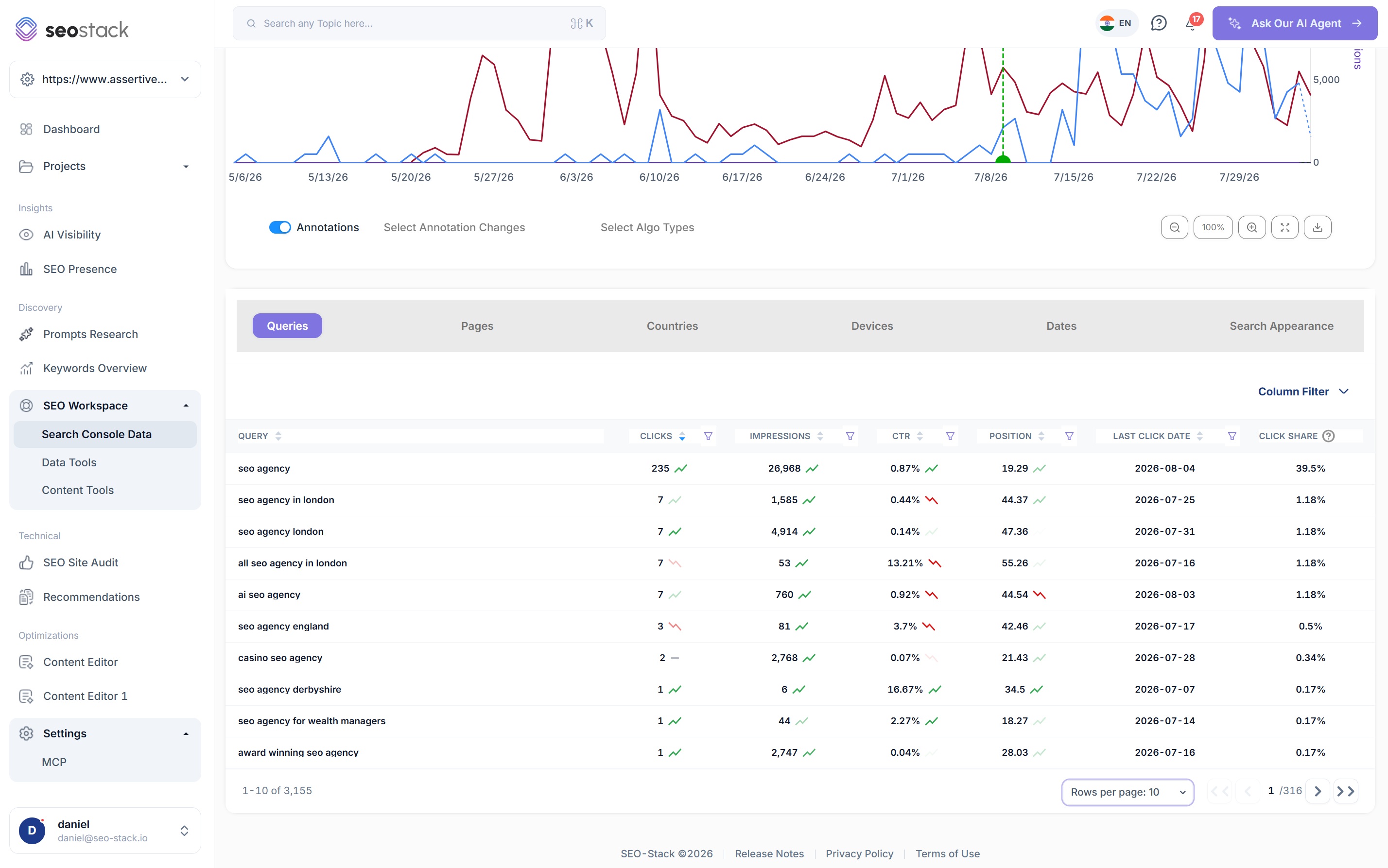
SEO Stack has no row limit on any dimension. Queries, pages, countries, devices, dates, search appearance - all of it, sorted and filtered across the full dataset rather than a sampled top slice. No 50k API limits either because we’re not hitting the API on every request, we’re querying warehoused data.
Filtering: One Condition vs Layered Logic
This is where I lose my patience with search console the most.
You can filter queries in GSC, You can filter pages, But you get 1 filter per dimension which means you cannot say “queries containing ‘board’ but NOT containing ‘jupiter’” because that’s two query filters and GSC won’t let you stack them. So what do you do? You export 1,000 rows and filter in a spreadsheet, which defeats the object of having a reporting interface.
In SEO Stack you can layer up to 1,000 filters with MUST and SHOULD logic. Contains, doesn’t contain, starts with, ends with, exact match, regex, bulk lists of terms, case sensitive or not. That “containing board, not containing jupiter” example above is literally two clicks in SEO Stack and it applies to the chart, the KPI cards and every table at once - with the KPI cards showing you what share of the total each filtered view represents.
Then you can SAVE it. GSC has no concept of a saved filter. Every time you open a property you rebuild your brand vs non brand view from scratch. SEO Stack gives you a preset filter library with groups and folders, so your branded, non branded, product, blog and question query segments are one click away on every property, and the AI Assistant can generate filters for you as well.
For agencies this is huge. The segmentation work gets done once per client, not once per report.
Exports
GSC exports the table you can see. 1,000 rows, That’s it, whether you export to Google Sheets or CSV - doesn’t matter, you are limited to the top 1000 rows only. SEO Stack exports the full dataset with whatever filters you’ve applied, to CSV, Google Sheets or PDF, with no row limit. If your filtered view is 240,000 queries then your export is 240,000 queries.
We wanted to make exporting seamless with SEO Stack which is why not only did we remove all the row limits that GSC imposes, but we also improved export options.
In SEO Stack you can create custom exports - exports that are simply not possible in search console, such as:
- Export month by month in 1 click - so, if you were looking at the last 12 months of search console data, exporting month by month will create 12 tabs in the sheet for each month - so you can get a month by month export for queries/pages by month effortlessly
- Multi-dimension exports - this is a big one, you can literally export PAGES + QUERIES at the same time, so you can see the queries for each page, this can save SIGNIFICANT amounts of time for SEO
- PDF Exports - we also offer the ability to export to PDF, something which GSC does not offer
Date Comparison
GSC lets you compare two date ranges, which is useful albeit quite limited, but both ranges have to sit inside the 16 month timeframe window. So you can compare this quarter to last quarter, you cannot compare this quarter to the same quarter 3 years ago at full query depth, because that data is outside the scope of what GSC offers.
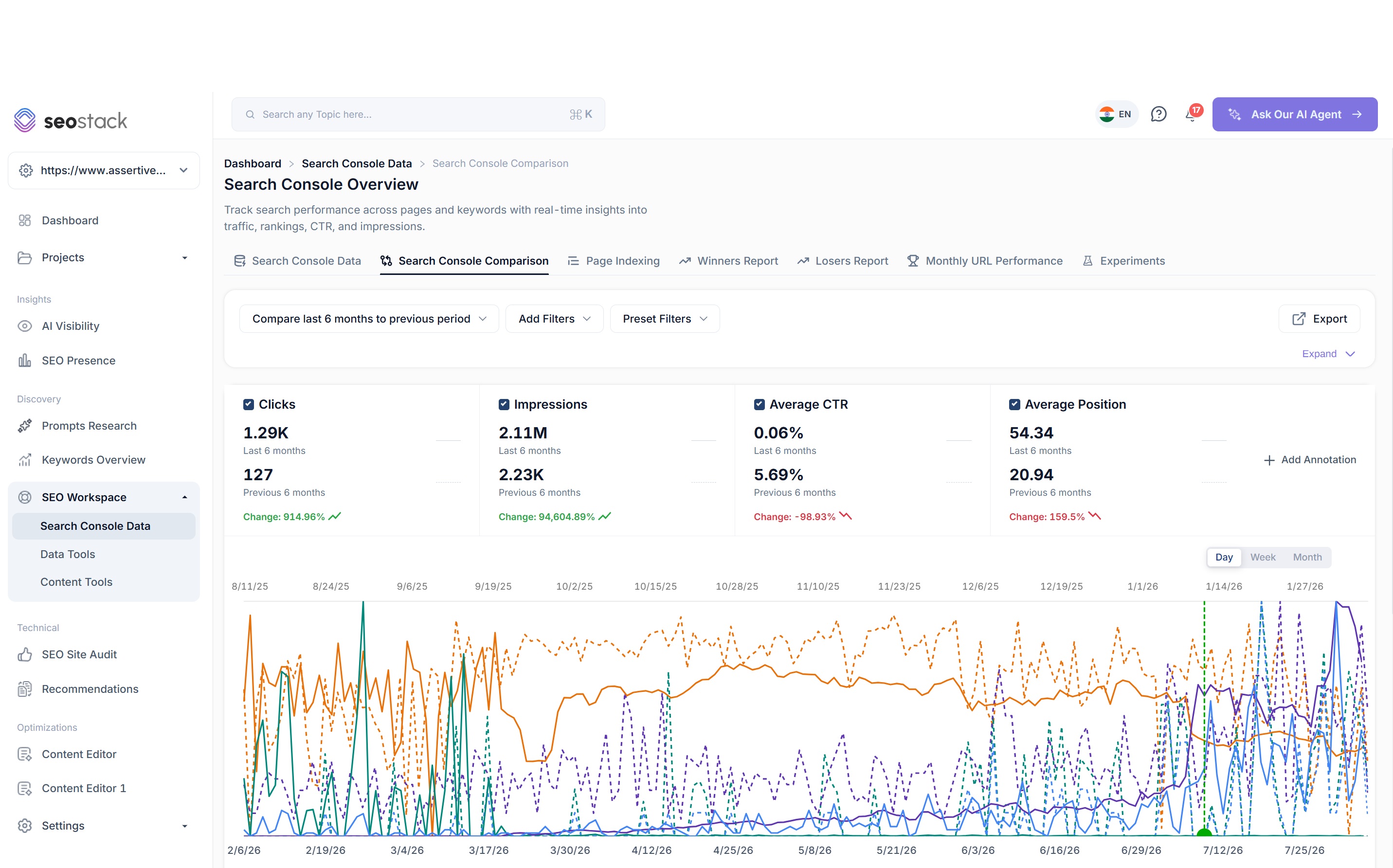
However, SEO Stack’s Search Console Comparison tab lets you compare any two periods in your warehouse. Last 6 months vs previous 6 months, this March vs March 2023, whatever you need - with core updates overlaid on both periods so you can see what Google was doing at the time rather than making assumptions.
For example - if you had 36 months of data warehoused in SEO Stack, you could compare last 3 months YoY for 3 years.
GA4 Data in the Same Interface
Google doesn’t offer native GA4 integration into Google Search Console, however you can link GA4 to Search Console - but you need to use the GA4 interface for that, and, as most GA4 users will tell you, it’s slow and convoluted to build reports.
GSC itself does not show GA4 data - so, we thought why don’t we solve that problem, so we did.
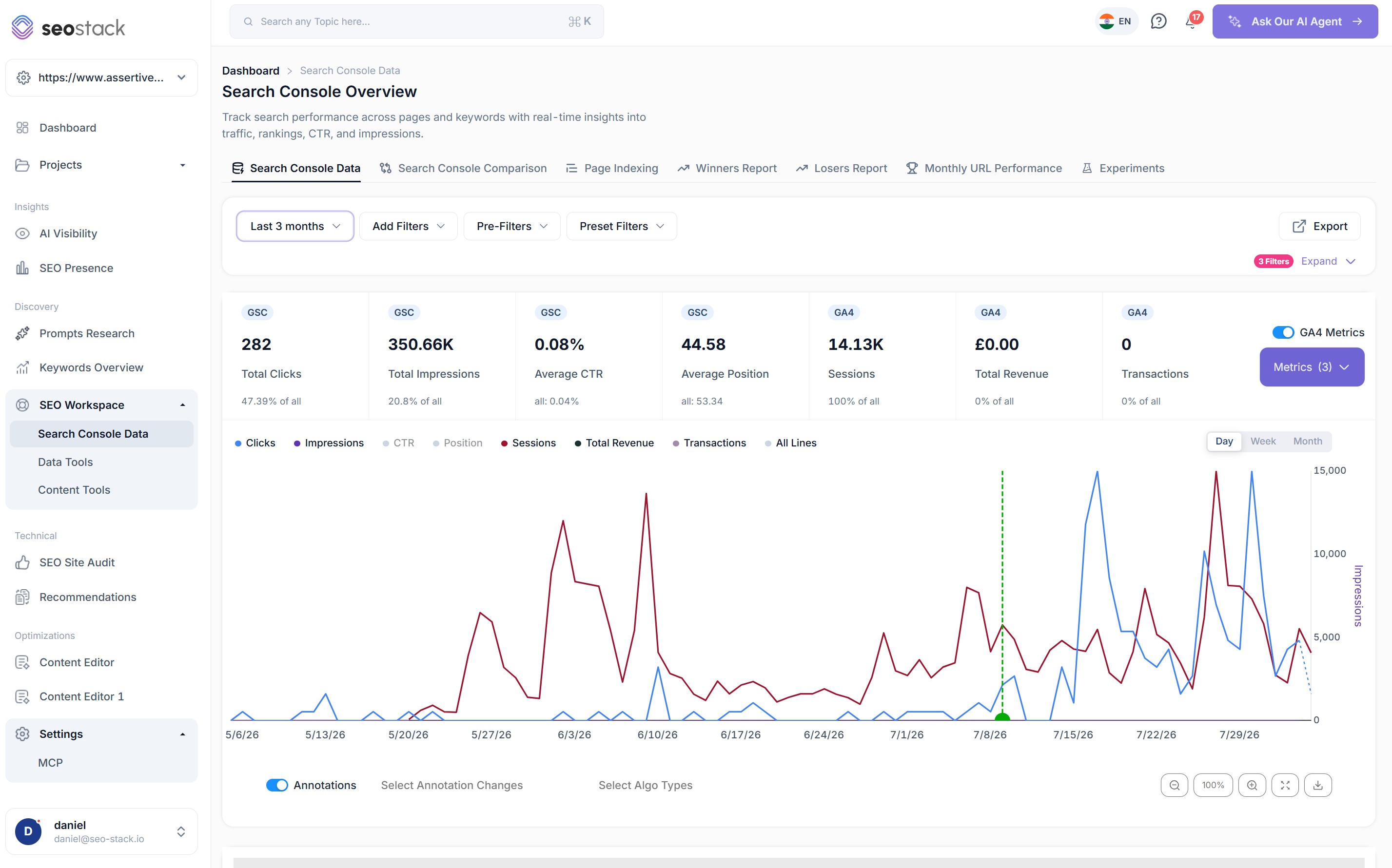
In SEO Stack there’s a GA4 Metrics toggle on the Search Console Data interface, select it and sessions, engagement rate, bounce rate, transactions and revenue sit on the same chart and the same tables as your clicks and impressions. You can select ANY GA4 dimension/s and view them directly next to your google search console data.
This makes analysis so much more powerful, imagine seeing your GSC clicks against your conversions and transactions? We made that possible.
So when clicks are flat but sessions are down you can see that immediately, wen impressions are up 50% and revenue hasn’t moved (which, post AI Overviews, is most sites) you can see that immediately too.
Annotations and Core Update Overlays
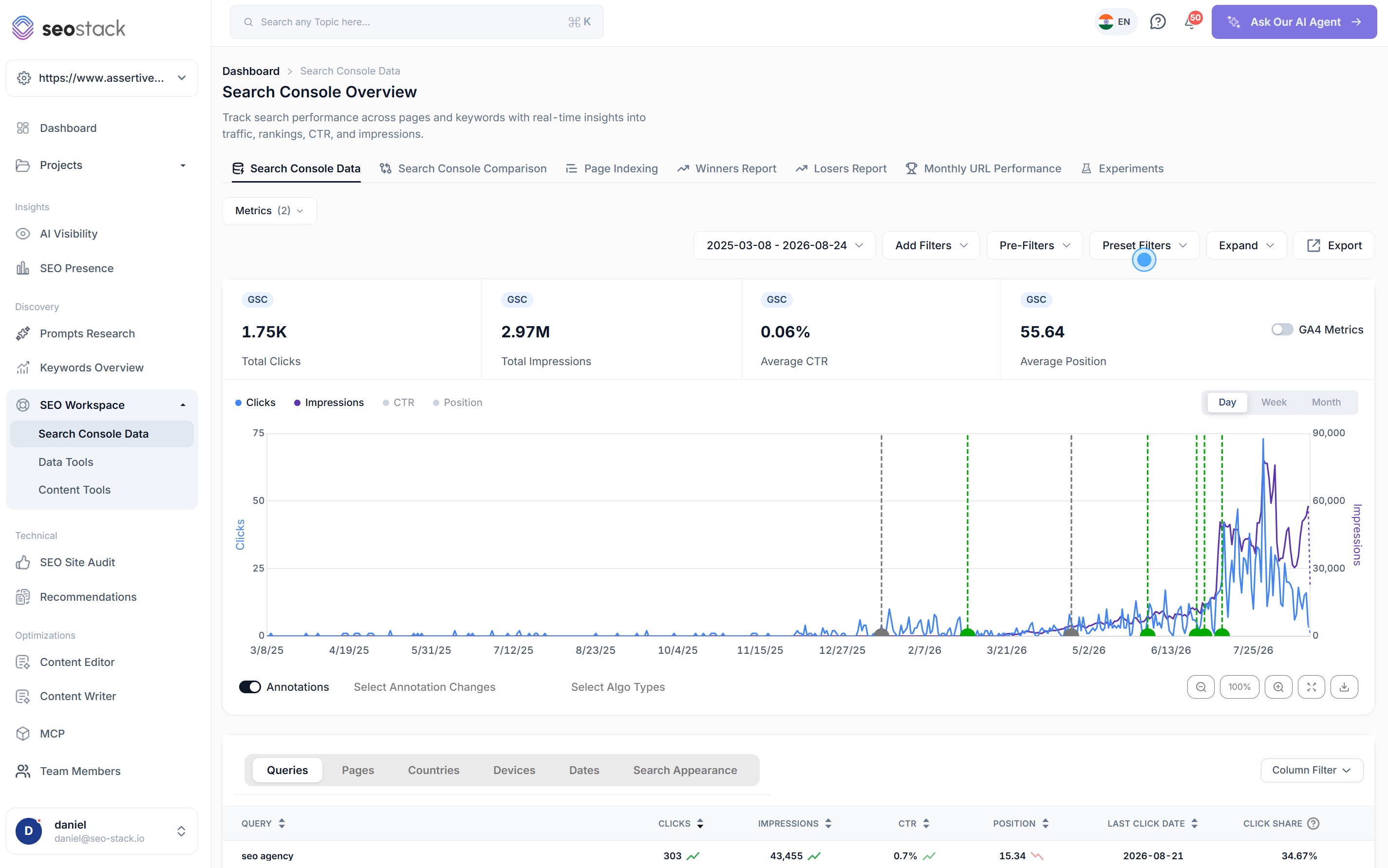
Google search console offers extremely basic annotations - you can add a comment against a date and that’s it, you cannot mark the day you migrated the site, changed the nav, rewrote the category pages or noindexed 3,000 thin URLs, so 6 months later when someone asks why traffic changed in March, you’re digging through Slack and Jira trying to remember.
We decided to make annotations what they should be and that’s AI driven and detailed - log annotations against URLs + URL groups, specify authors, dates, changes made and more - and let AI track your work.
SEO Stack has a full annotation system, every annotation is categorised (canonical changes, content consolidation, content cull, indexability changes, navigation changes, rendering fixes, link building, digital PR and so on), can be attached to specific URLs, authored, imported and exported, and shows as a marker on every chart. Google core updates, spam updates and other confirmed algorithm changes are overlaid automatically and you can filter which algo types to show.
Annotation marker, algo update marker, click line. All on one chart. That’s how you actually answer “what happened in March”.
Index Status and HTTP Status on the Pages Report
This one is simple but I use it every day.
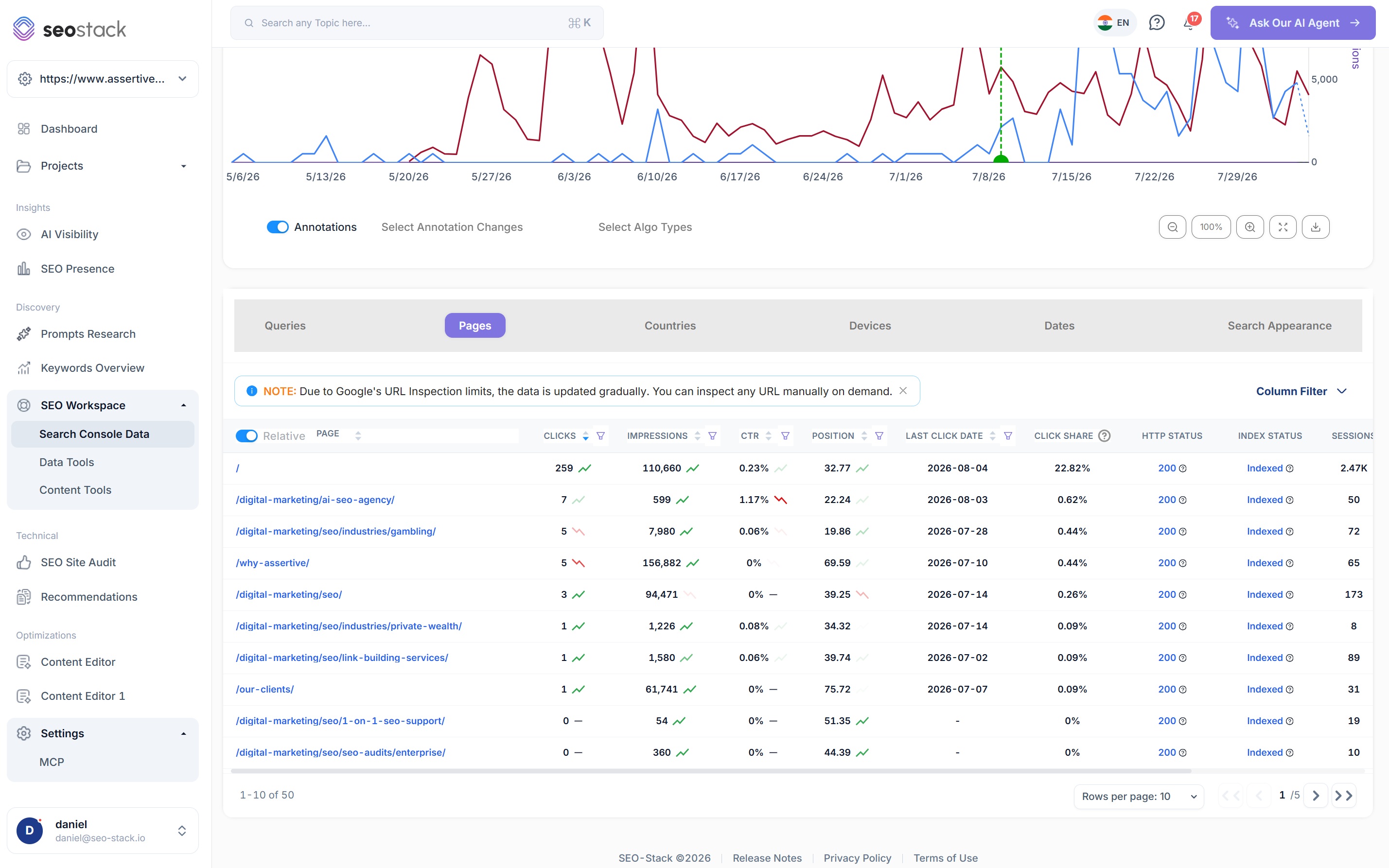
In GSC, the performance report can show you that a page had 0 clicks, the indexing report, in a completely different part of the product, tells you the page isn’t indexed, joining those two facts is manual process - which is inefficient for SEOs.
In SEO Stack the Pages report has an HTTP status column and an Index status column sitting right next to clicks, impressions, CTR and position. So you can sort by pages losing clicks and instantly see that half of them are returning 404s or have dropped out of the index without switching between reports.
Click Share and Last Click Date
Two columns GSC doesn’t have and should, but it’s okay, for every feature they leave out is an advantage for us.
Click share helps you to understand what percentage of the site’s total clicks each query or page is responsible for, that’s how you spot dependency - the 3 pages driving 60% of your organic traffic that nobody’s made changes to in 2 years.
Last click date tells you the last day a query or page earned a click. Sort by it ascending and you have your dead content list. Pages with impressions and no clicks for 8 months are not pages worth keeping in their current form.
URL Inspection Without the Quota
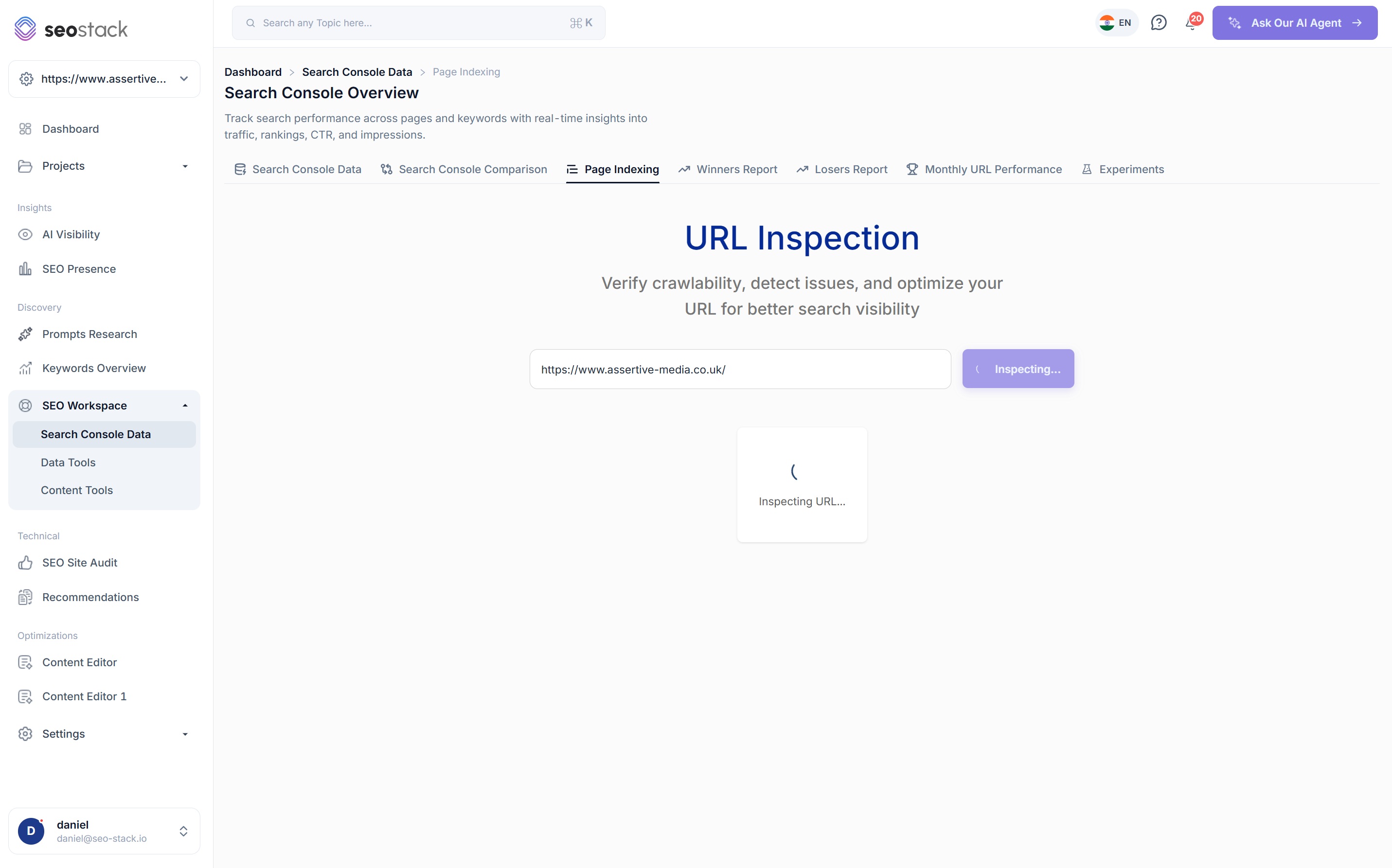
GSC’s URL inspection is a good tool that Google has limited with quotas - with GSC you get 2,000 inspections per property per day via the API, and in the UI you’ll hit a quota exceeded message well before you’ve finished your auditing / SEO work.
SEO Stack runs URL inspection through Google on your behalf and stores the result against your Pages data, so verdict, coverage state, indexability, robots state, Google canonical vs user canonical, referring URLs, last crawl date and rich result validation all sit next to the traffic that page receives. You can inspect any single URL on demand or check indexing states across the whole crawled site - indexed, not indexed, Google unspecified - and request indexing in GSC directly from the row.
I wrote a full guide on GSC URL inspection a while back because I think it’s one of the most underused tools in SEO. This is that tool with the handbrake off.
Winners, Losers and Monthly URL Performance
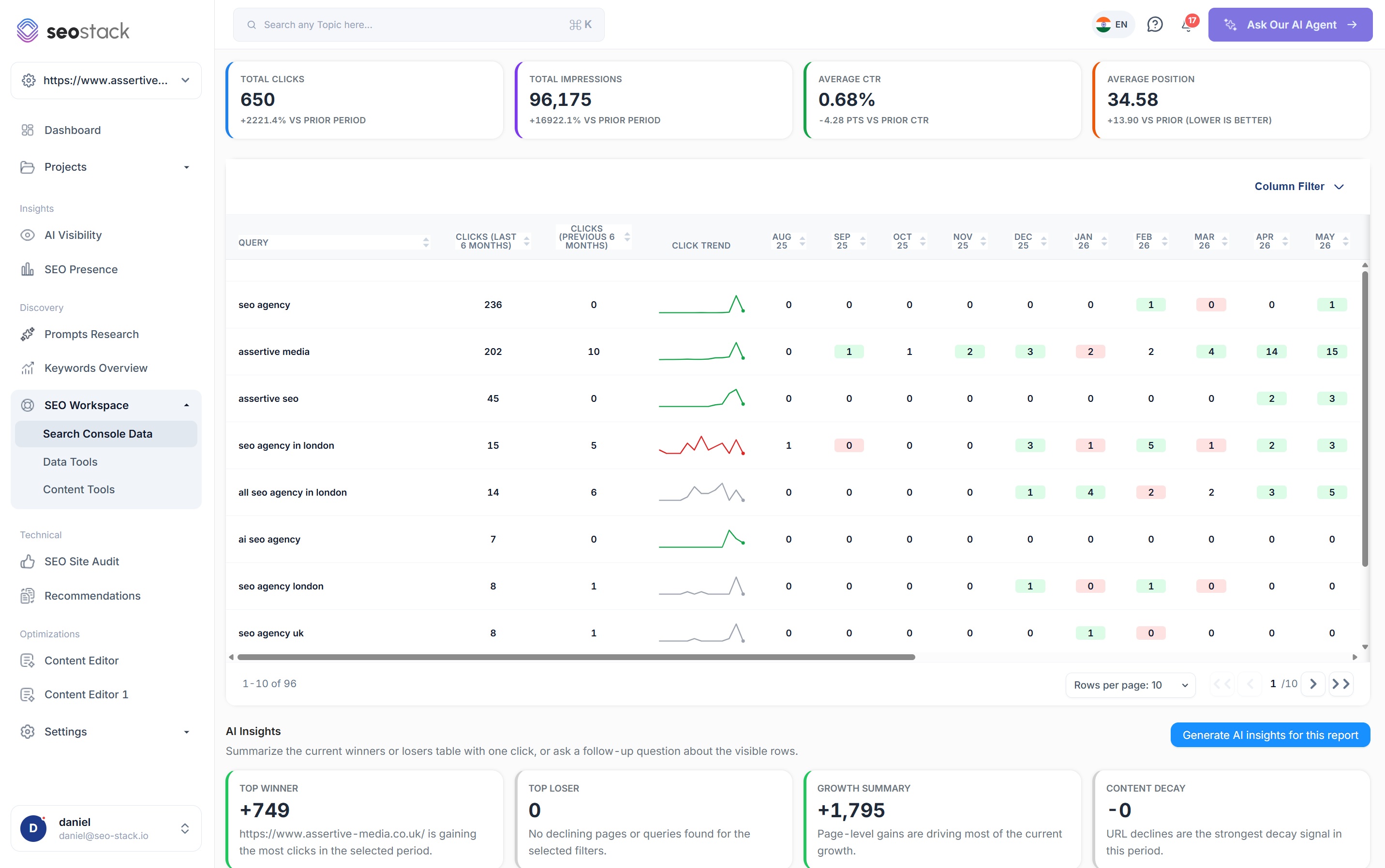
GSC will show you a chart going up or down. It will not tell you WHICH queries grew and which decayed, because that requires comparing two periods across the full query set and GSC can only do 1,000 rows.
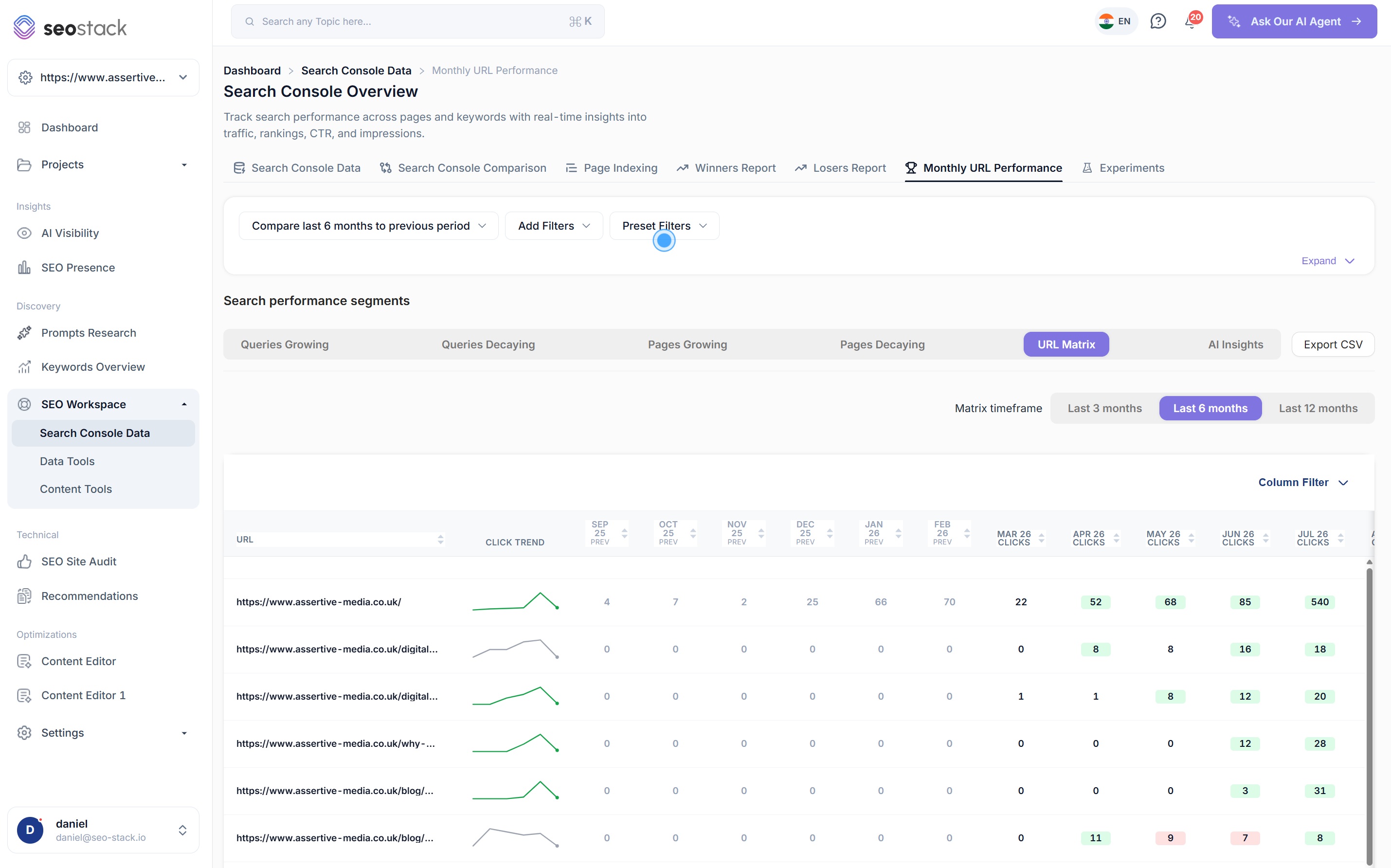
SEO Stack has dedicated Winners and Losers reports - queries growing, queries decaying, pages growing, pages decaying - each with clicks this period vs last, a sparkline per row, and month by month click columns so you can see the shape of the change rather than just the delta. There’s also a URL matrix showing every URL’s clicks by month over 3, 6 or 12 months, colour coded for gains and losses.
This is the report I open before every client call. It answers the first question I’m going to be asked before I’ve been asked it.
What SEO Stack Has That GSC Has Never Had
Everything above is GSC data with the walls removed. This section is the stuff GSC doesn’t do at all.
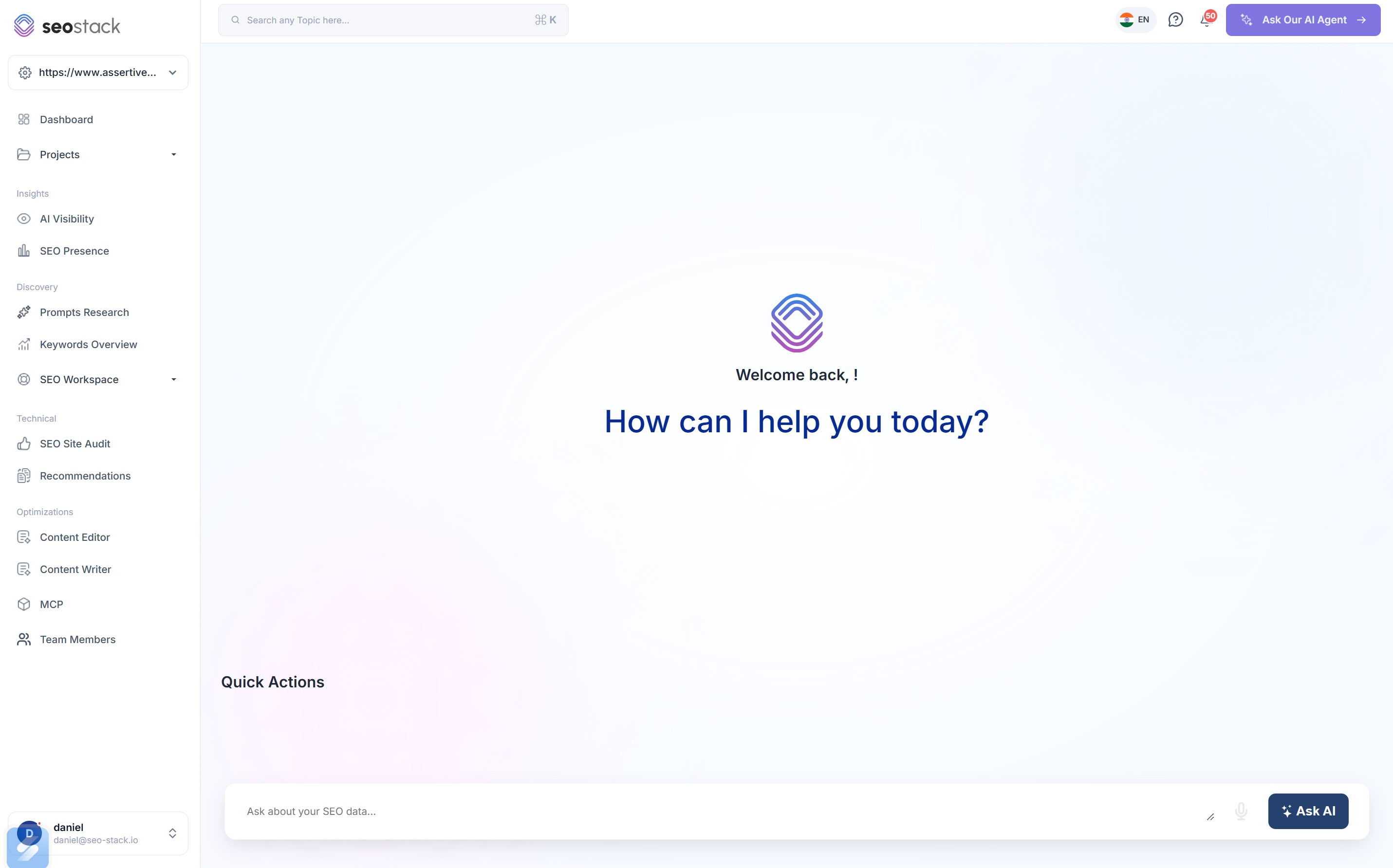
AI Assistant across GSC and GA4 - connected by default, nothing to configure. Ask it to find cannibalisation across your whole query set, draw a click chart with one line per sub folder (which GSC cannot do), forecast clicks from historic trajectory, audit content for intent alignment, work out which annotations helped and which hurt, or report LLM referral traffic and revenue by AI source. It has read all of your data already. You don't need to upload anything.
Learn moreMCP endpoint for your warehoused data - point Claude, ChatGPT, Hermes, OpenClaw or your own agent at your entire GSC + GA4 warehouse via a single MCP URL and an API key. No Google Cloud project, no service accounts, no API quota. I run two Slack agents on this at Assertive that monitor every client property daily and report changes to me. GSC has no equivalent and no plans for one.
Learn moreAI Experiments - record the date you made a change, pick the metrics that define success across GSC, GA4 and AI visibility, write down your hypothesis, and SEO Stack benchmarks before vs after and writes up whether it worked. Rankings experiments, conversion experiments, design experiments, AI visibility experiments. Analysis regenerates every 15 days while the experiment runs and it will flag when the pattern looks technical rather than content related.
Learn moreSEO Site Audit - quick health check, full website crawl or page level audit, with optional JavaScript rendering via Chromium and screenshot capture. For every crawled page you get raw HTML, rendered HTML and a screenshot side by side, which if you've read anything I've written about vibe coded React shells you'll know is exactly how you find out what Google can and can't see. Core Web Vitals field data, on page signals, schema detection, prioritised fix guidance and a health score trend over time.
Learn morePage Indexing at scale - every crawled URL checked against Google's index with status, HTTP code and page fetch result, not one URL at a time.
Learn moreKeywords Overview - your total ranking keywords, position distribution across top 3, top 10, top 50 and below 100, ranking trend by position band, traffic by topic, top gainers, top losers, and per keyword analysis straight into the Content Editor. This is what GSC's performance report should look like.
Learn moreSEO Presence - a top level view combining GSC clicks, CTR, GA4 sessions and conversion rate, top impacting URLs winning and losing, ranking opportunities by position bucket with reachable demand, and AI SEO opportunities covering lost visibility, CTR gaps, cannibalisation and internal linking.
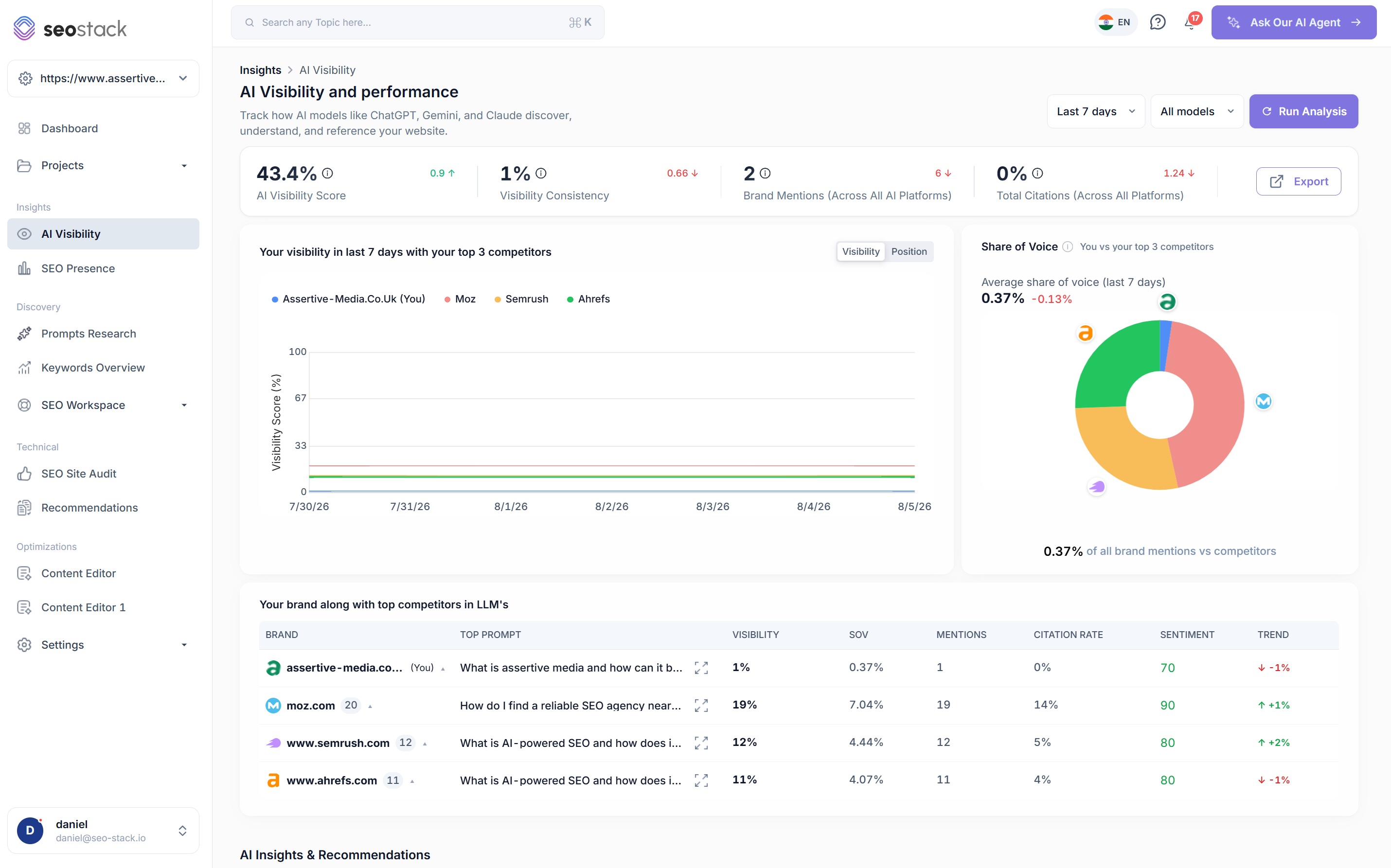
Learn moreAI Visibility and Prompt Research - visibility score, citations, share of voice and sentiment across ChatGPT, Gemini and Google AI Mode, benchmarked against named competitors, with prompt level data showing which prompts trigger a mention and which ones competitors own. Whatever you think of GEO as a term (I've made my views clear), knowing whether an LLM cites you or your competitor is worth tracking, and GSC's upcoming generative AI reporting doesn't even include clicks.
Learn moreQuery counting, intent analysis, click forecasting, keyword clouds, query trajectory - all built on the warehoused data. Query counting in particular separates “fewer queries served” from “ranking dropped” from “AI Overview ate the click”, which need three completely different fixes and which GSC lumps into one downward line.
Learn moreContent NLP, AI content auditor, content editor, title rewriter, weak and dead URL discovery - content tooling driven by what your GSC data says is and isn't earning clicks, not by a third party's search volume estimate.
Learn moreAnnotations, projects, tasks and team access - log the work, assign it, connect tasks to annotations, log time and cost, and see the annotation on the chart when the task ships. GSC has user permissions and nothing else.
Learn more
Where GSC Still Wins (Because I'm Not Going to Pretend It Doesn't)
GSC is free. SEO Stack isn’t. That matters for a lot of people and I’m not going to argue otherwise.
GSC is also the source of truth. SEO Stack pulls from it, warehouses it and extends it - it doesn’t replace the connection. You still need a verified GSC property, you still go to GSC for manual actions, security issues, sitemap submission, removals, the Core Web Vitals report at property level and the structured data enhancement reports. Those aren’t things we’re trying to rebuild.
And if your site has 200 pages and ranks for 900 queries, the 1,000 row cap genuinely doesn’t affect you and 16 months might be enough.
But if you’re an agency managing 30+ properties, an in house team that has to prove SEO’s contribution to the business, an eCommerce site with tens of thousands of URLs, or a publisher trying to work out where 3 years of clicks went - GSC on its own isn’t giving you the data to do your job. It’s giving you a sample of it and deleting the rest.
Long Story Short
Google Search Console is a great product with limits designed around Google’s costs, not your needs.
SEO Stack is the same data, in an interface you already know how to use, with those limits removed - and then an AI analyst, an MCP endpoint, a site auditor, an experiments framework and AI visibility tracking bolted onto the top of it.
Connect a property and the warehousing starts that day. Wait, and every day you wait is a day Google will eventually delete.
Show me the clicks. All of them.
14 day trial · Cancel anytime · No contracts · Nothing to configure