SEO Stack
SEO Stack vs Google BigQuery: Which Is Better for Warehousing Google Search Console Data?
A practical comparison of setup, usability, cost, flexibility and what happens after the data has been stored.
BigQuery gives you an extremely capable data warehouse. SEO Stack gives you a purpose-built SEO platform sitting on top of a data warehouse. Both can preserve Search Console data for the long term. The biggest difference is what happens after the data has been stored.
Whenever I talk about warehousing Google Search Console data, BigQuery quite rightly comes up.
Google provides its own bulk export from Search Console into BigQuery, so why would somebody use a platform such as SEO Stack instead?
The answer is that these are actually two quite different approaches to solving the same underlying problem.
BigQuery gives you a highly capable general-purpose data warehouse. SEO Stack gives you a purpose-built SEO platform sitting on top of a data warehouse.
Both can preserve Search Console data for the long term. Both can get around many of the restrictions associated with working directly inside Search Console. The real difference is what happens after the data has been stored.
That distinction is important.
The short version
Where the two approaches actually differ
If you already have a data team and a warehouse, BigQuery is a reasonable choice. If you want the outcome without the project, this is faster.
Why warehouse Search Console data in the first place?
Google Search Console is one of the most valuable first-party datasets available to an SEO. It tells us what queries Google is serving our pages for, how frequently they are appearing, where they are ranking, how many clicks they are generating and how performance is changing over time.
The problem is that the standard Search Console interface is intentionally limited. For example, standard report exports are restricted to a relatively small representative set of rows, which becomes a problem on larger sites where the underlying query and page combinations can run into the hundreds of thousands or millions.
Warehousing changes that. Instead of treating Search Console as a temporary reporting interface, you start treating GSC as a source of first-party search data which you retain and analyse yourself.
That is the principle SEO Stack was originally built around. The platform warehouses GSC and GA4 data and then provides SEO tools, filtering, analysis, AI and reporting on top of it.
BigQuery is a warehouse. SEO Stack is an application.
I think this is probably the most important distinction between the two.
BigQuery stores the data. SEO Stack stores the data and provides the interface, tools and workflows for doing something with it.
If I export Search Console data into BigQuery, I don’t suddenly have a better version of Search Console. I have tables.
To reproduce something resembling the Search Console experience, somebody has to query those tables, understand Google’s schema and either work directly inside BigQuery or build another visualisation layer using something such as Looker Studio.
That isn’t necessarily a bad thing. If you have a data engineering team, it is incredibly powerful because you can build almost anything you want. But most SEOs don’t want to become data engineers just to answer fairly routine SEO questions.
- Which URLs lost the most clicks?
- Which queries dropped from positions 1-3?
- How has /products/ performed against /collections/ over the last three years?
- Which pages gained rankings but lost CTR?
- Which URLs are ranking for overlapping queries?
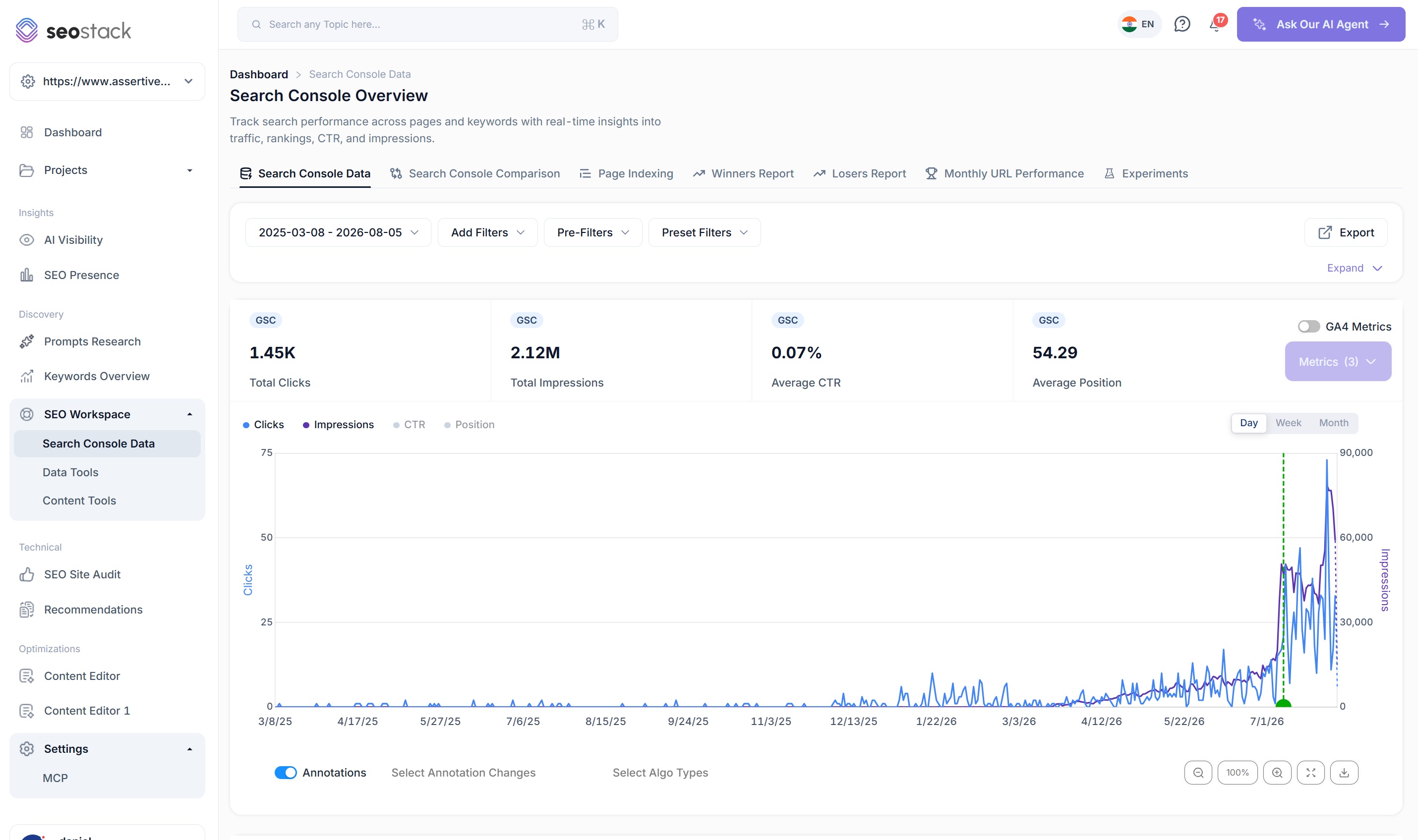
With SEO Stack, the warehouse has already been converted into an SEO interface. The Search Console area retains the familiar queries, pages, countries, devices and search appearance structure, while adding things such as layered filtering, click share, last-click dates, annotation overlays, Google update overlays and GA4 metrics.
A marketer can analyse six months of data, three years of data or potentially ten years of data using the same interface and the same workflow. They don’t have one interface for recent Search Console data and another technical environment for historical data.
The setup difference is substantial
Setting up Google’s BigQuery export isn’t impossibly difficult, but it isn’t quite ‘click a button and forget about it’ either. A normal implementation involves a Google Cloud project, billing, API access, permissions, a BigQuery dataset and the Search Console bulk export configuration.
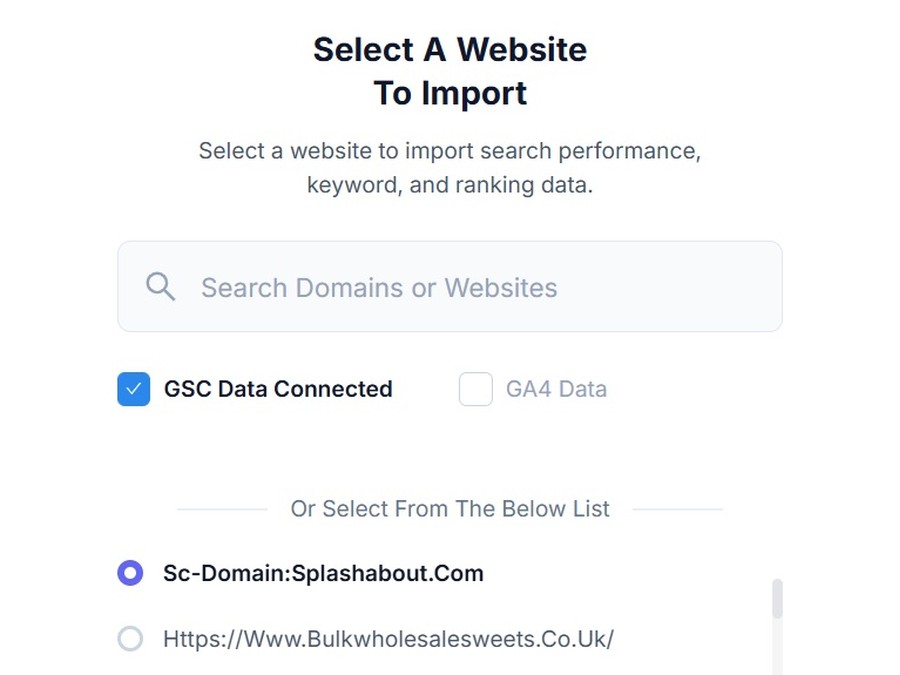
Anyone reasonably comfortable with Google Cloud can do this. But compare that with SEO Stack: connect your Google account, select the property and the warehousing process begins. The underlying infrastructure is already handled for you.
There is no GCP project to maintain, no IAM configuration to manage, no SQL environment to prepare and no separate reporting interface to build.
For me, that is one of the biggest practical differences. I don’t think most SEOs actually want a data warehouse. They want what the data warehouse allows them to do.
There is also an important difference with historical data
Google’s BigQuery bulk export starts collecting data after the export has been configured. If you want to preserve older Search Console data that predates the bulk export, that historical data has to be obtained separately while Google still makes it available.
SEO Stack is designed to bring in the historical data Google still exposes when the property is connected and then continue warehousing new data from that point onwards.
Neither platform can recreate data that Google no longer makes available. Warehousing protects the future; it does not magically recover history that was never stored.
Do you need SQL for BigQuery?
Technically, you do not need to be an SQL expert simply to have data sitting in BigQuery. There are visual tools, integrations and AI assistance available across the Google ecosystem.
But if you want to properly interrogate the data directly, somebody generally needs to understand SQL, the Search Console export schema or an additional BI layer.
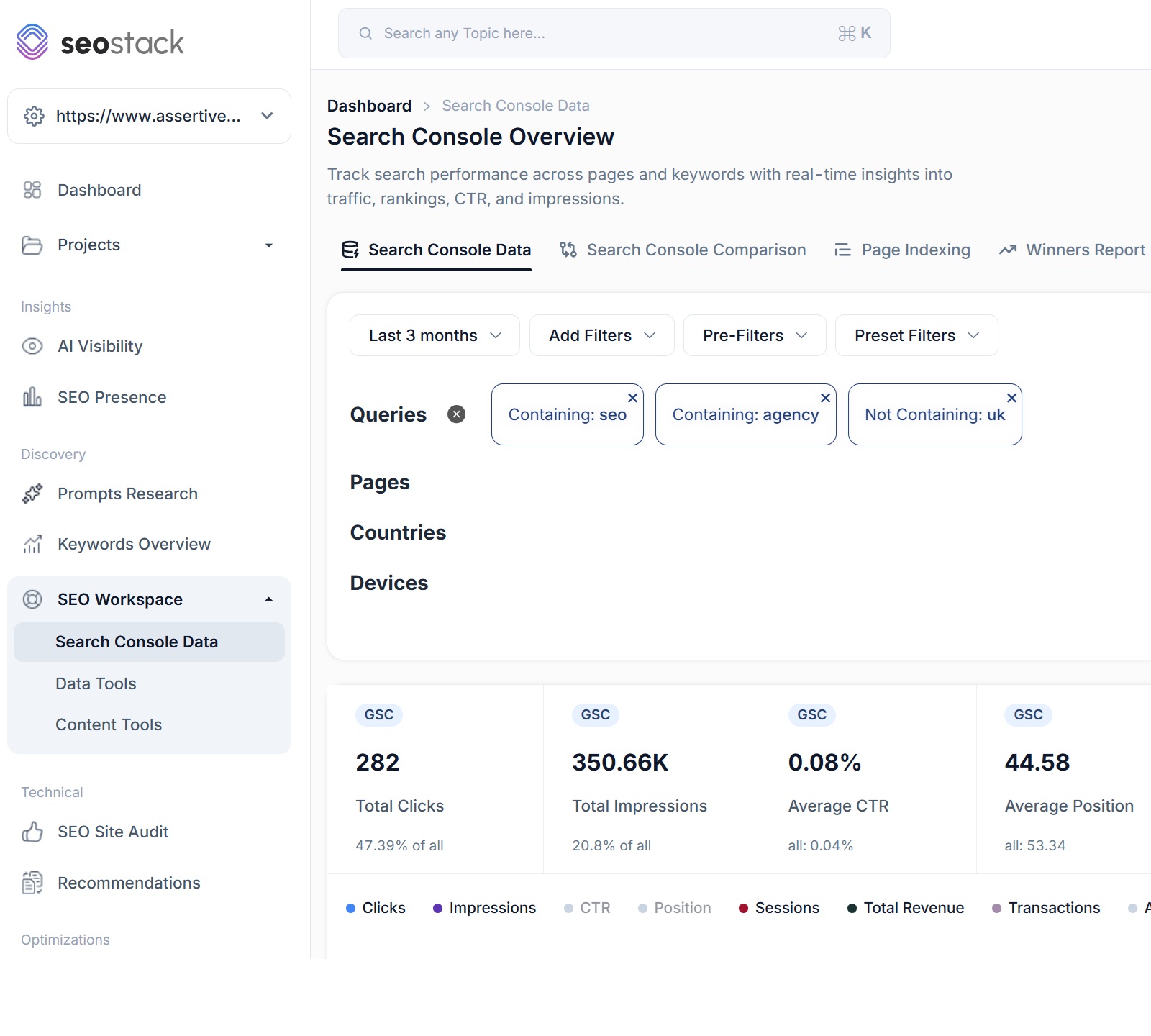
SEO Stack takes the opposite approach. Filtering queries doesn’t require SQL. You select the dimension, choose the logic and apply the filter.
SEO Stack supports MUST and SHOULD logic alongside contains, exact match, regex, starts with, ends with and negative filters. Filters can also be layered and saved into a reusable filter library.
SQL is fantastic when you need complete control. It is less fantastic when you simply want the answer before a client meeting starts in ten minutes.
SEO Stack vs BigQuery at a glance
BigQuery has one major advantage: flexibility
This comparison would be fairly meaningless if I pretended BigQuery didn’t have advantages.
BigQuery is an extraordinarily powerful platform. If I had a company with a mature data team and wanted to combine Search Console with CRM records, product feeds, server logs, advertising data, customer lifetime value, stock information and ten other proprietary datasets, BigQuery would probably be the natural place to do it.
There is essentially no ceiling on what you can build.
SEO Stack is deliberately more opinionated. We’ve built it around the things SEOs and digital marketers repeatedly need to do: query analysis, URL analysis, rank tracking, query counting, intent analysis, search performance comparison, content auditing, annotation tracking, forecasting, GA4 analysis, AI visibility and reporting.
BigQuery gives you the Lego. SEO Stack gives you something already assembled, while still allowing more technical users to work with their warehoused data through MCP and integrations.
What about cost?
This is where comparisons can sometimes become slightly misleading.
BigQuery itself can be incredibly cheap. For modest datasets and sensible query usage, the raw infrastructure bill can be very small, and in some cases usage may sit inside Google’s free allowances.
So for a relatively small website and somebody who knows exactly what they are doing, BigQuery could cost less than SEO Stack at pure infrastructure level.
But raw infrastructure cost isn’t the whole equation. The real comparison is BigQuery + setup + SQL + dashboards + maintenance + GA4 integration + AI integration + SEO tooling versus SEO Stack.
If somebody on £50-£150 an hour spends several hours building queries, fixing dashboards or maintaining a reporting stack, the fact that the underlying database bill is tiny becomes slightly less relevant.
SEO Stack isn’t trying to beat Google on the price of storing a gigabyte. The value is in turning the stored data into something an SEO can actually use immediately.
GA4 is another good example
Let’s say I want to find pages which perform well organically but have poor engagement or poor conversion performance.
With BigQuery, that is completely achievable. But I need the GA4 dataset, the Search Console dataset and logic connecting the two.
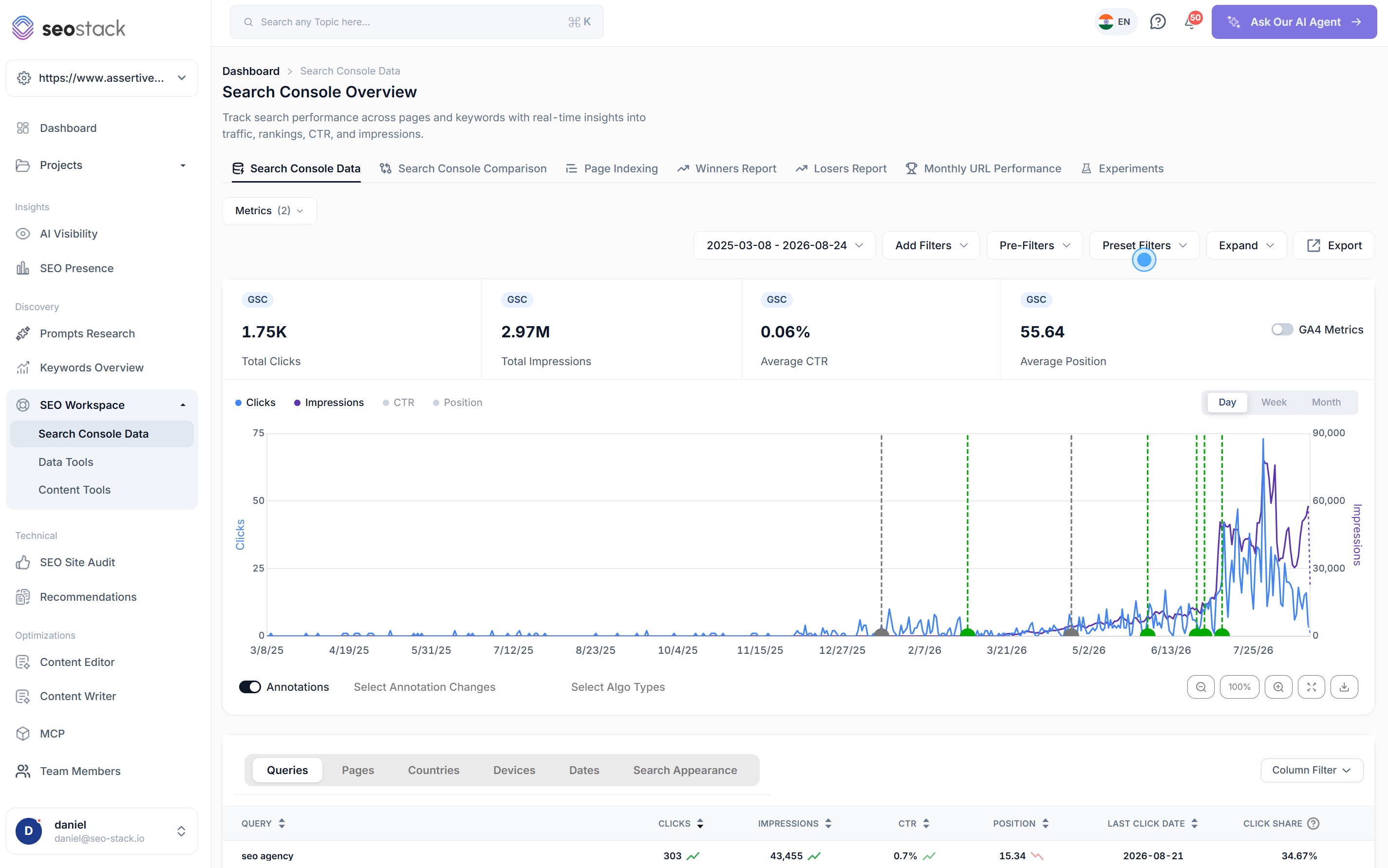
With SEO Stack, GA4 is part of the same environment. Search Console performance and GA4 metrics can be analysed alongside each other, and the AI Assistant can make hybrid requests across both datasets.
Again, BigQuery can do it. SEO Stack has simply already done the plumbing.
AI makes the distinction even bigger
Data warehousing becomes significantly more useful when AI can interrogate the warehouse.
SEO Stack’s AI Assistant is connected directly to the warehoused Search Console and GA4 data, allowing users to ask questions about rankings, traffic losses, cannibalisation, indexing, content performance, Google updates and other SEO issues without configuring a separate connection.
You can absolutely build similar functionality around BigQuery. In fact, for a sufficiently technical organisation, you could build something considerably more customised.
But once again, you have moved from ‘warehouse my GSC data’ to ‘build an internal SEO analytics application’. That is exactly the problem SEO Stack is intended to remove.
So which should you use?
I don’t view BigQuery as a bad alternative to SEO Stack. Quite the opposite.
If you already have Google Cloud infrastructure, SQL capability, data engineers and established BI dashboards, exporting Search Console into BigQuery makes complete sense. You retain ownership and control over the warehouse and can combine the data with almost anything else your organisation stores.
For most SEOs, agencies and in-house marketing teams, however, I think the question is slightly different.
Do you want to build and operate a Search Console data warehouse, or do you simply want the benefits of having one?
SEO Stack is designed around the second group.
You connect the website, the historical GSC data Google still makes available is brought in, new data starts accumulating and you immediately have a consistent interface for querying it.
There is no SQL requirement. There is no separate visualisation project. There is no need to recreate Search Console in Looker Studio. There is no separate GA4 integration project. And there is already an SEO toolset and AI layer sitting on top of the warehouse.
That is fundamentally the difference.
BigQuery gives you the infrastructure to build an extremely powerful SEO data platform. SEO Stack is the SEO data platform.
For some organisations, building it themselves will absolutely be the right decision. For everyone else, I’d rather spend the time analysing the data than building the infrastructure required to analyse it.
Sources and product references
- SEO Stack website
- Google Search Console - Bulk data export to BigQuery
- Google Search Console - Set up a bulk data export
- Google Search Console - Exporting report data
- Google BigQuery
SEO Stack screenshots used in this article are taken from the supplied SEO Stack Overview Document and SEO Stack V3 New UI Overview.
Connect a property. Watch the data start stacking.
Warehousing begins the moment you connect your Search Console property, there is no Google Cloud project to set up, no BigQuery and no schema to design. You simply connect your property and SEO Stack starts storing every row of your data from that day onwards.
- Credit card required
- Cancel within the trial and you won't be billed
- No contracts