Workflow & Delivery
New in V3Log every SEO change, then prove which ones worked
A full annotation system for logging the work you do on a website. Record any change against a single URL, a URL group or the whole domain, tag it with one or more of 44 change types, attach the author, a description and the metric baselines as they stood on the day, then watch it plotted across your Search Console and GA4 charts so you can see what the change actually did.
- 100% data privacy
- 99.99% uptime
- Nothing to configure
- Export anytime, no limits
Trusted by leading companies
The problem
Six months later nobody remembers what was changed, when, on which pages or by whom, so when performance moves the honest answer to why is a shrug, and the same work gets repeated on a hunch.
The tool
A proper record of everything you have done to the site
Annotations exist because SEO has a memory problem. Work gets done, months pass, performance moves, and nobody can connect the two with any confidence. So this is a structured log: what changed, when, on which URLs, by whom, of what type, with the numbers as they stood on the day.
Log anything, at any scope
A content rewrite on one URL, a template change across a folder, a migration across the whole domain, a link building campaign, a navigation change, a technical fix. If it could move the numbers, it can be logged against the pages it touched.
Plotted on the data, not filed away
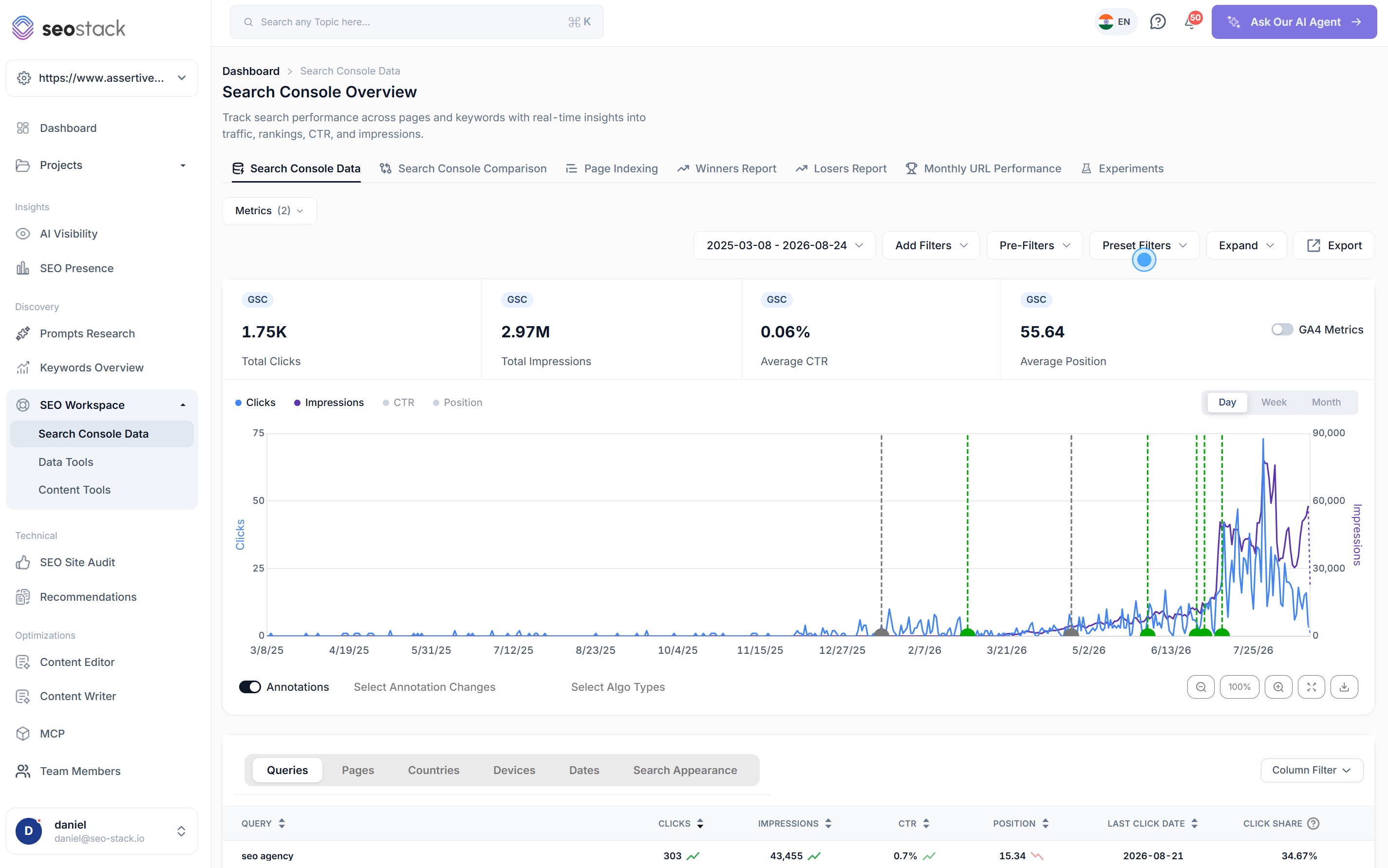
Every annotation appears as a marker on your Search Console and GA4 charts, next to Google's own algorithm updates, so when something moves you can see immediately whether it was you, Google or neither.
It turns work into evidence
This is what makes SEO testable. Log the change, wait, then look at what happened, and over time you build a record of which kinds of change work on your site rather than which kinds of change work in general.
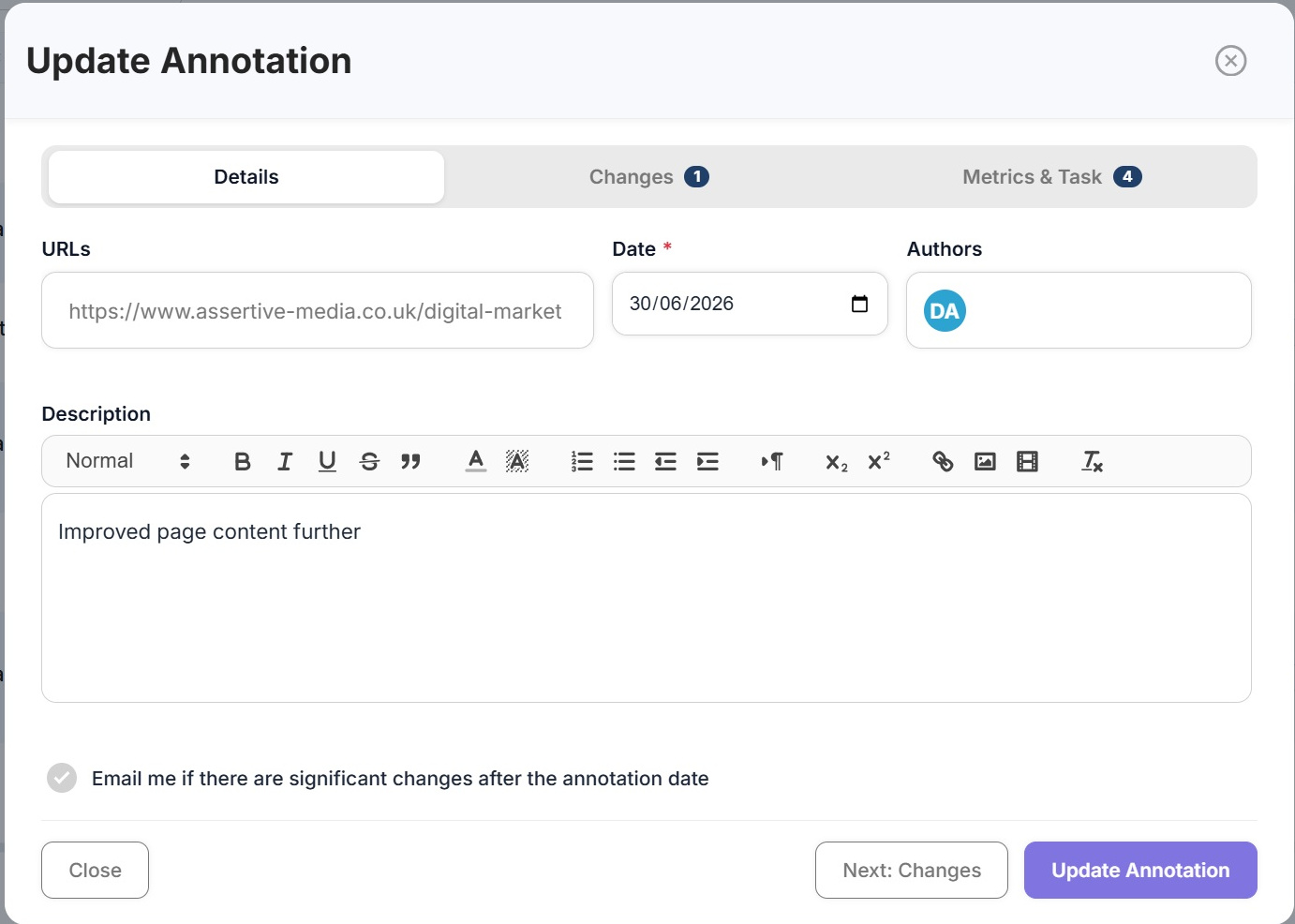
New annotation
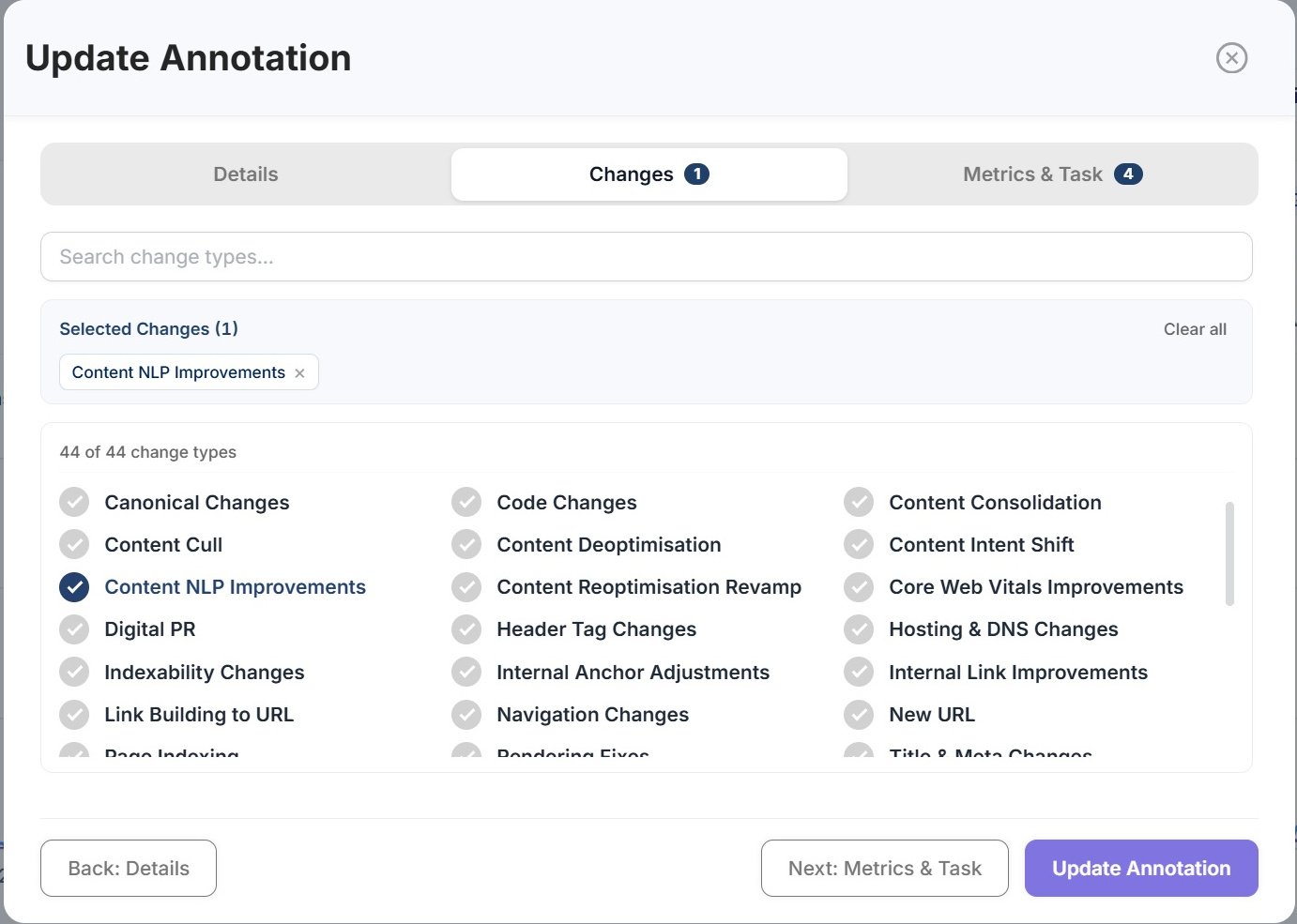
2 change types selected
URLs
/digital-marketing/seo/
Date *
30/06/2026
Authors
DAHO
Description
Rewrote the service page against the NLP brief, added the four missing topics, consolidated two thin sub-pages into it and repointed internal anchors from the blog.
Email me if there are significant changes after the annotation date
Selected changes (2)
Content NLP ImprovementsInternal Link Improvements21 of 44 change types
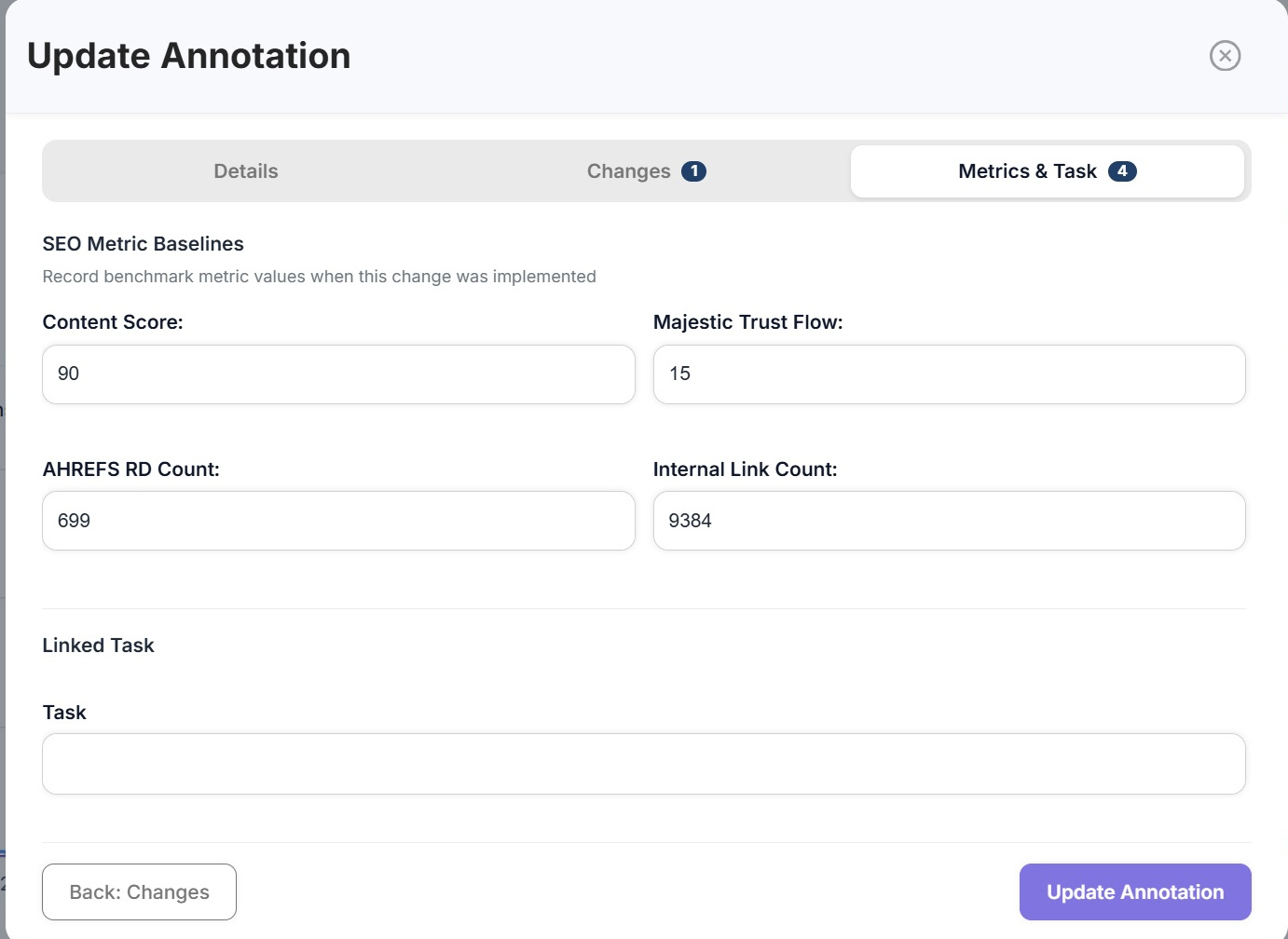
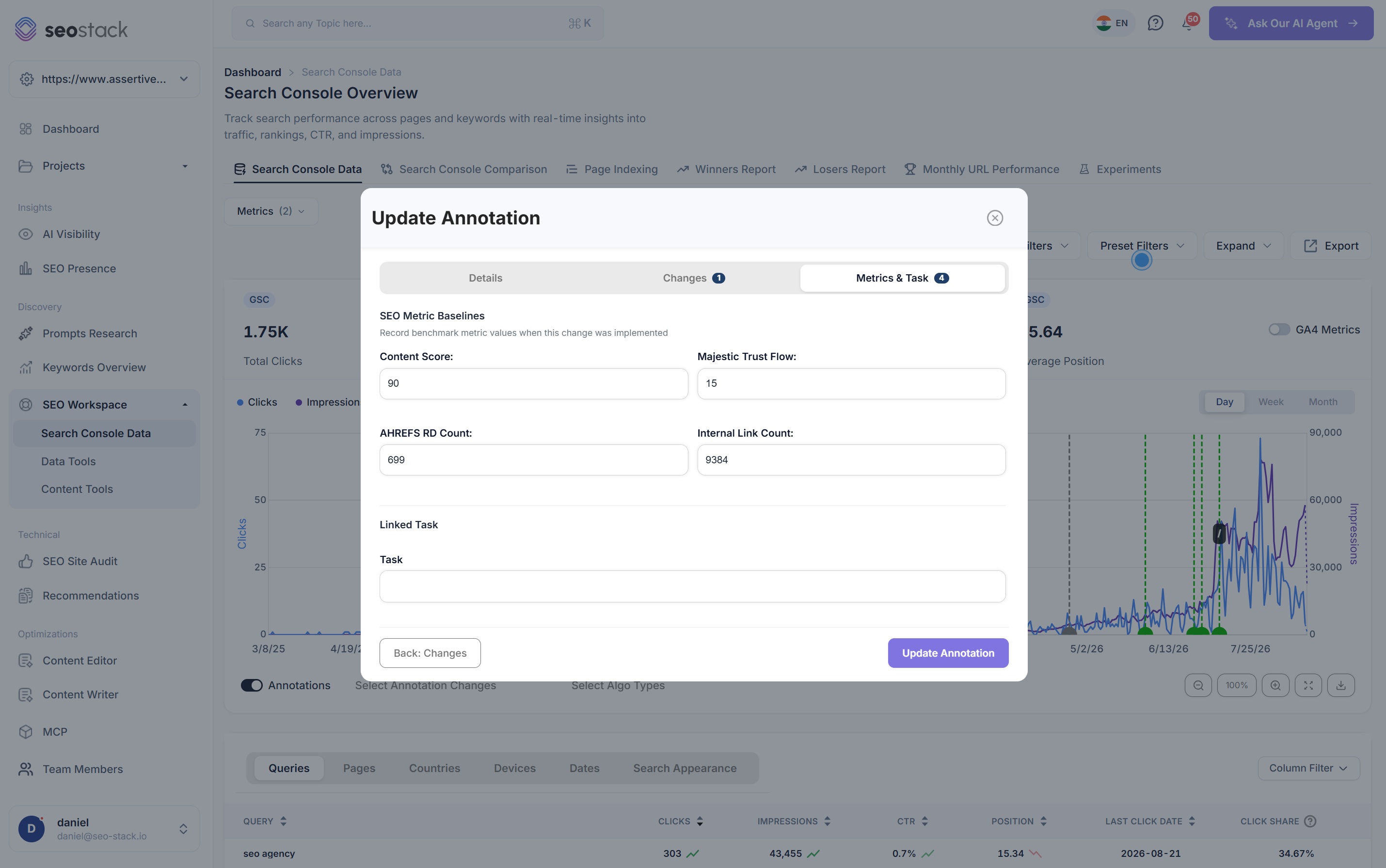
SEO metric baselines
Record benchmark metric values as they were when this change was made
- Content score
- 90
- Majestic trust flow
- 15
- Referring domains
- 699
- Internal link count
- 9,384
Linked task
Q3 service page programme
Baselines are the part people skip and then wish they had not. Six months later, knowing the referring domain count and the content score on the day you made the change is what lets you separate the effect of the change from everything else that happened afterwards.
Illustrative. Move between the tabs, and select or deselect change types to see the count update.
What an annotation holds
Eight fields, and every one of them earns its place
The difference between a note in a spreadsheet and an annotation is that an annotation is structured, which is what makes it possible to filter, compare and analyse the log rather than just read it.
Scope
One URL, a URL group, or the whole domain. Scope matters because a change to a single service page and a change to the site navigation need judging against completely different sets of pages.
Date
The day the change actually went live, which is often not the day somebody remembered to log it. Everything else in the analysis hangs off this one field.
Change types
44 of them, and an annotation can carry several, because a real piece of work is usually a content rewrite and an internal linking change and a title update all at once.
Authors
Assign the annotation to whoever did the work. On a team this turns the log into something you can actually filter and review rather than a shared notebook.
Description
A full rich text field rather than a one line note, because the version of you reading this in eight months will want to know what was actually done, not that something was.
Metric baselines
Content score, referring domains, trust flow and internal link count as they stood on the day. The field people skip and then wish they had not, because it is what separates the effect of your change from everything else that happened since.
Linked task
Tie the annotation to the piece of work it came from, so the plan and the record of what was done stay connected instead of drifting apart.
Change alerts
Opt in and get emailed when something significant moves after the annotation date, so you find out that a change worked without having to remember to go and check.
The impact
Every change, marked on the line it was meant to move
Logging the work is only half of it. Annotations are plotted directly onto your Search Console and GA4 charts, so the question stops being what did we do in June and becomes what happened after we did it.
Annotations on Search Console data
2 of 3 changes moved the number
Daily organic clicks, with every logged change marked on the timeline.
Content NLP Improvements/digital-marketing/seo/Positive impact
Clicks moved well beyond the range they had been sitting in, and no other change was logged in the same window, so this one is worth repeating on similar pages.
Navigation ChangesEntire websiteNeutral impact
No measurable movement either way. Not a failure, but not evidence for doing it again either, and knowing that is what stops the same change being repeated across forty pages on a hunch.
Internal Link ImprovementsURL group: /digital-marketing/Positive impact
Clicks moved well beyond the range they had been sitting in, and no other change was logged in the same window, so this one is worth repeating on similar pages.
Illustrative. Select a marker to see what was changed and what happened afterwards, the verdict is worked out from the before and after figures.
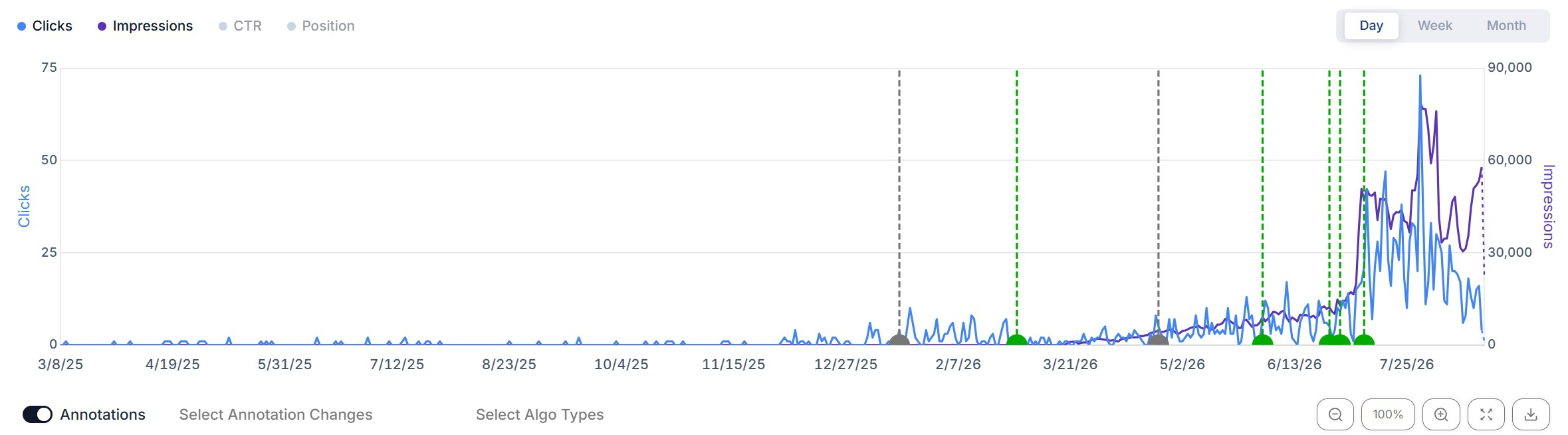
Was it you, or was it Google?
This is the question annotations answer better than anything else, and it is one people get wrong constantly in both directions. Traffic climbs after a rewrite and everybody congratulates the writer, when a core update landed the same week. Traffic falls after a technical fix and the fix gets reverted, when the fix had nothing to do with it.
With your changes and Google's updates plotted on the same chart, and the ability to filter to one annotation type at a time, you can usually tell the two apart in about a minute.
Inside the tool
From the log down to a single change type
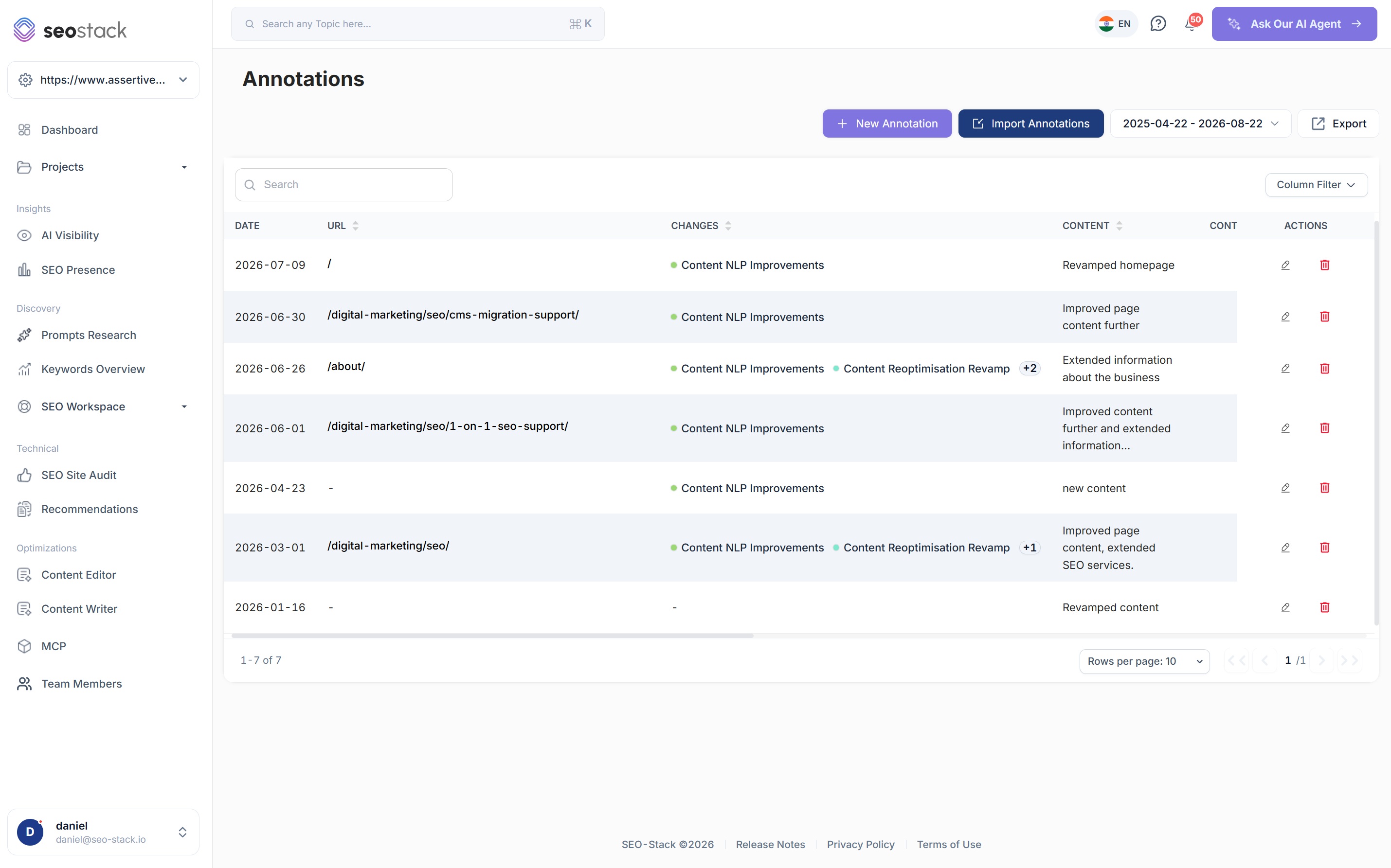
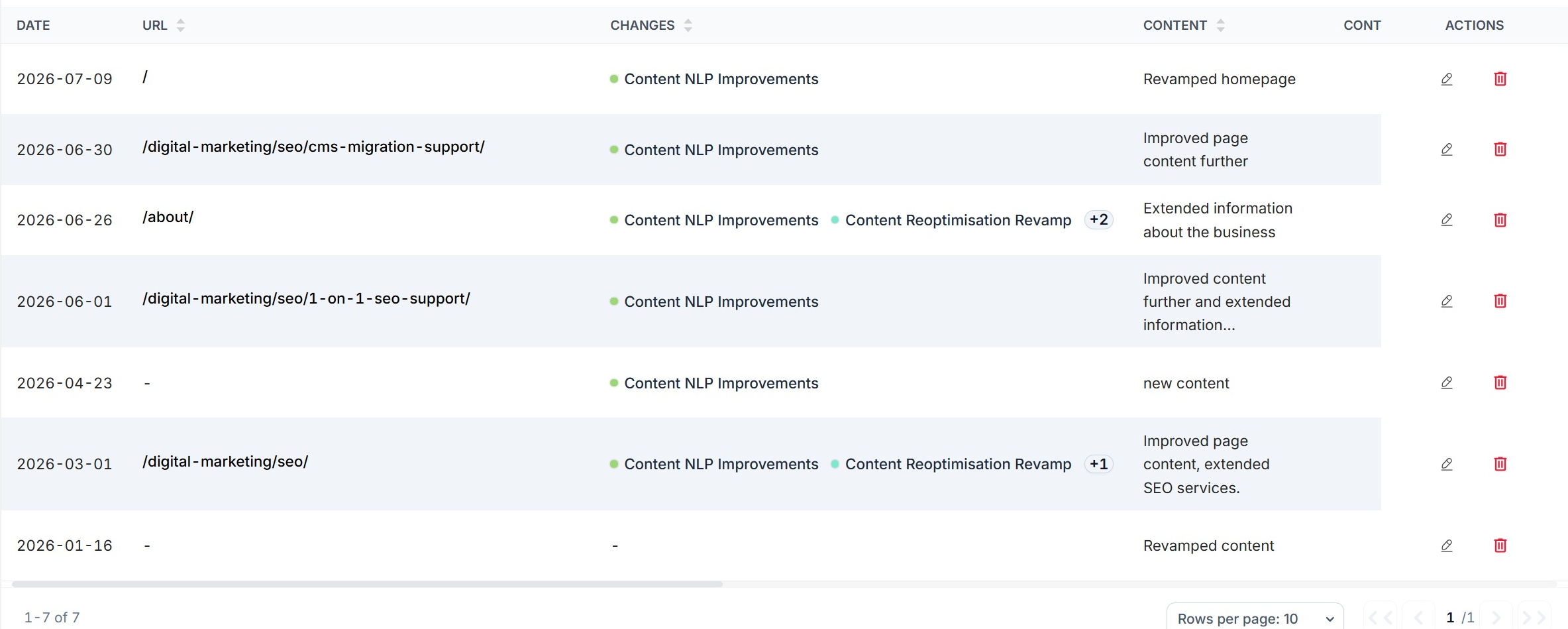
Everything you have changed, in one table
- One row per annotation with the date, the URL, the change types and the description
- Change types shown as chips, with an overflow count when an annotation carries several
- Search the log, filter the columns and set the date range
- Edit or delete any annotation, so a mistyped date is a two second fix
- Import in bulk when you are moving a history in from somewhere else
- Export the whole log for reporting or for a handover
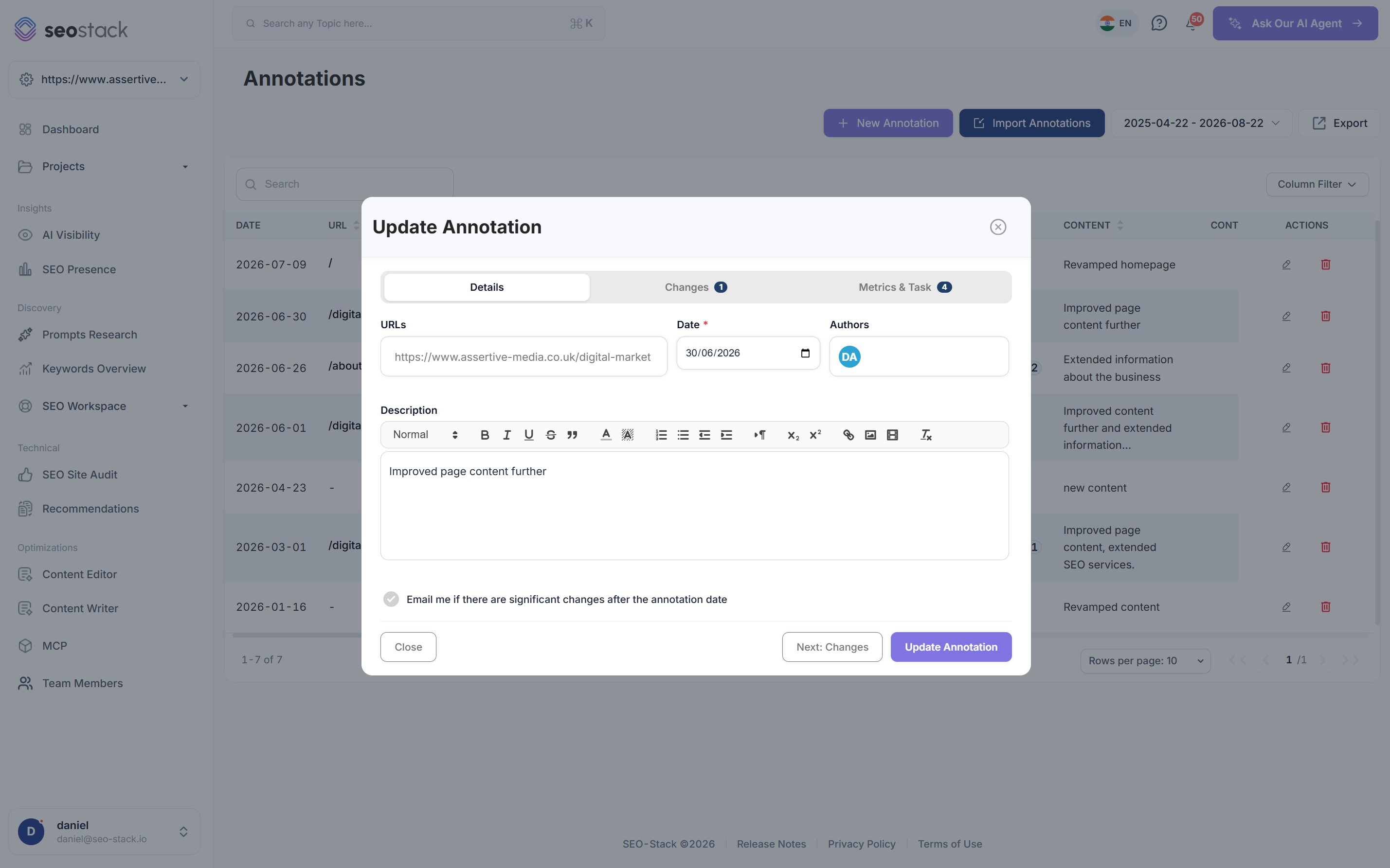
Three tabs, and none of them take long
- Details for the URLs, the date, the authors and the description
- Changes for the types, searchable because there are 44 of them
- Metrics and task for the baselines and the linked piece of work
- The option to be emailed if anything significant moves afterwards
Log it when you do it
The annotations that get skipped are the ones somebody plans to add later, and later never arrives. Two minutes at the point of making the change is worth an hour of reconstruction in six months.
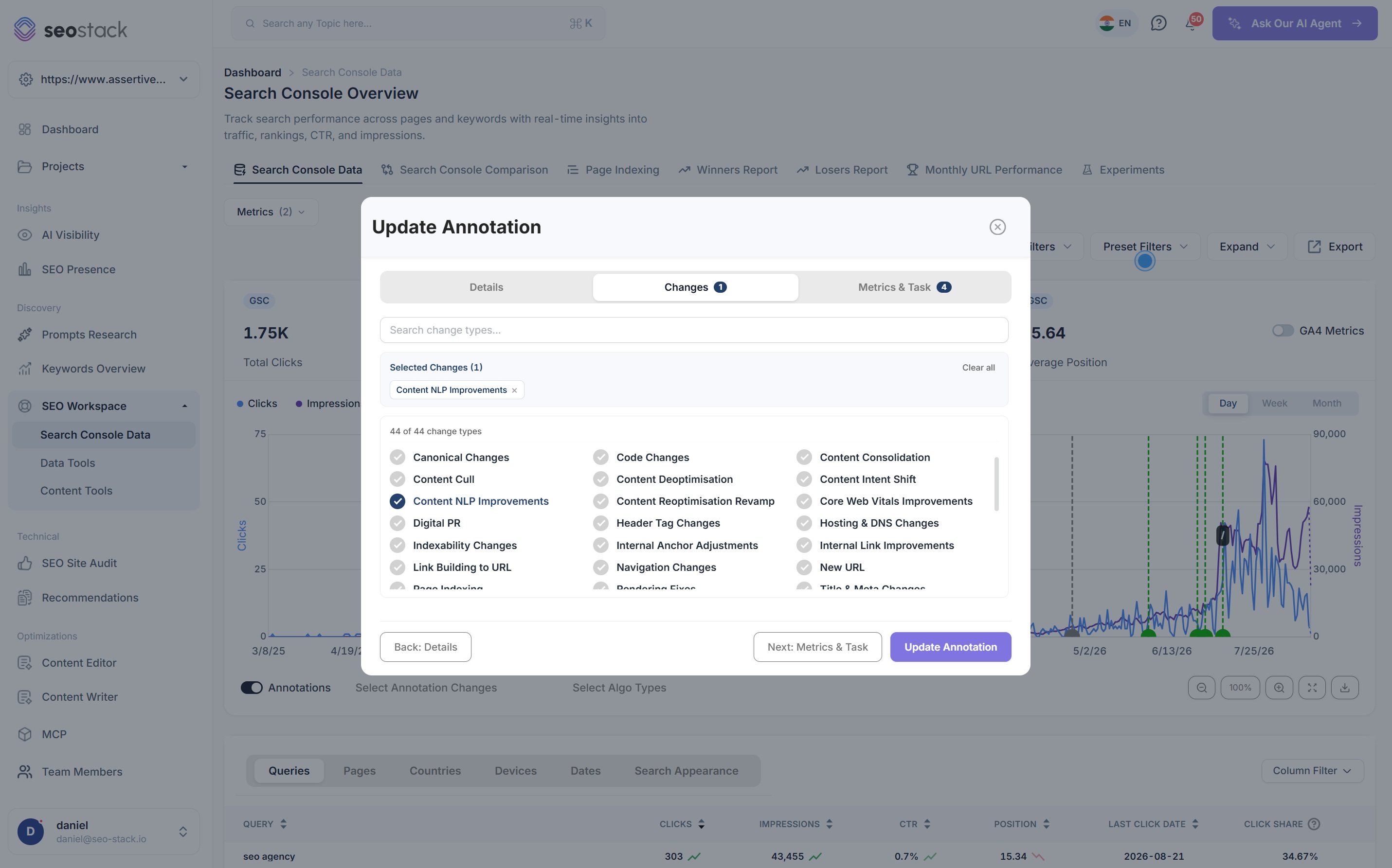
44 types, because the type is what makes it analysable
- Content types, i.e. NLP improvements, reoptimisation, consolidation, culls and intent shifts
- Technical types, i.e. canonical changes, indexability, rendering fixes, Core Web Vitals and hosting
- Link types, i.e. link building to a URL, internal link improvements and anchor adjustments
- Structural types, i.e. new URLs, navigation changes, header tags and title and meta changes
- Off-page types, i.e. digital PR campaigns
The numbers as they were on the day
- Content score, so a rewrite can be judged against how much it actually improved coverage
- Referring domain count and trust flow, so a link campaign has a starting point
- Internal link count, which moves more often than people expect and explains a lot when it does
- A linked task, connecting the record of what was done to the plan it came from
SEO testing
This is what turns SEO work into SEO testing
Most SEO is done without a control and without a record, which is why the industry argues about what works instead of knowing. An annotation is not a controlled experiment, but a dated, typed, scoped record of a change is enough to learn from, and it is enormously more than most teams have.
Define what you changed
The change type and the scope are the definition of the test. Content NLP Improvements on one URL group is a hypothesis, whereas we did some work in June is not.
Fix the date
The whole comparison depends on it. With an accurate date the before and after are unambiguous, and without one you are comparing two arbitrary windows.
Record the starting point
Baselines make the result interpretable. If the content score went from 46 to 90 and clicks doubled, that is a very different finding to clicks doubling after a score moved by three points.
Read the result honestly
Some changes do nothing, and finding that out is genuinely valuable, because it stops the same change being rolled out across two hundred pages on the strength of a feeling.
Ask the AI assistant which changes are working
Because every annotation is structured and sitting on top of your warehoused Search Console and GA4 data, the AI assistant can read the whole log at once and tell you which change types have a positive, neutral or negative pattern behind them on your site. That is a genuinely different question to whether a single change worked, and it is the one that changes what you do next quarter.
Worth being clear about
An annotation shows correlation, not causation. Search moves for dozens of reasons at once, and a change followed by a rise is not proof the change caused the rise. What the log gives you is a dated record with the confounders visible, i.e. the algorithm updates on the same chart and the other annotations in the same window, which is what lets you make a reasonable judgement instead of a guess. Run the same change on more pages and the pattern gets considerably more trustworthy.
Managing the log
Built for a team, not for one person's memory
A change log only stays useful if it stays accurate, so the tooling around it matters as much as the record itself: bulk import, filtering, alerts and the ability to correct things after the fact.
Create, edit and delete
Annotations are records rather than commitments, so a wrong date or a missing change type is a two second fix rather than something you live with.
Import in bulk
Bring an existing change history in from a spreadsheet or another tool, which is usually the first thing a team wants to do rather than starting the record from today.
Filter the charts by type
Show only your content annotations, or only your link building, so the chart tells you about one kind of work rather than about everything at once.
Algorithm updates overlaid
Google's updates are plotted alongside your own markers by default, which is the single most useful piece of context a change log can have next to it.
Alerts after the date
Opt in per annotation and get emailed when something significant moves afterwards, so the follow-up happens whether or not anybody remembers to look.
Automatic change tracking, coming
Automatic detection of changes on your pages is on the way, which will cut out the part of this that depends on somebody remembering to write it down.

How SEOs use it
What annotations are actually good for
Diagnose a drop without guessing
When traffic falls, the first question is what changed, and the log answers it in seconds rather than through a round of emails asking whether anybody touched anything.
Report on work nobody can see
Technical SEO is invisible to everybody outside the team doing it. A dated log with the outcome against each entry is the most convincing report you can put in front of a client.
Run a change across a small group first
Annotate a change on ten pages, wait, read the result, then decide whether to roll it out to the other four hundred. That single habit is worth more than most tooling.
Survive a handover
When somebody leaves or an agency changes, the change history is the thing that usually walks out of the door with them. Here it stays with the account.
Build a picture of what works on your site
Twenty annotations of the same type across a year is a pattern rather than an anecdote, and patterns on your own domain beat general best practice every time.
Ask the assistant for the summary
Rather than reading the log yourself, ask which annotations had a positive, neutral or negative impact and get the answer with the data behind it.
What you get out of it
The outcome, not the feature list
Answer did that work with evidence rather than an opinion
Separate your own impact from a Google algorithm update
Stop repeating changes that never did anything
Connect a property. Watch the data start stacking.
Warehousing begins the moment you connect your Search Console property, there is no Google Cloud project to set up, no BigQuery and no schema to design. You simply connect your property and SEO Stack starts storing every row of your data from that day onwards.
- Credit card required
- Cancel within the trial and you won't be billed
- No contracts