AI Visibility: monitor mentions, citations and competitor gaps
AI Visibility summarises how the selected website appears in the platform's sampled AI responses. It combines brand mentions, citation measures, competitor comparisons, topic coverage and suggested next actions. Use it to identify relevant gaps and monitor changes across a consistent set of prompts and models.
Open and scope the report
- Select AI Visibility in the sidebar.
- Check the website, Date range, Model and branded/unbranded selector.
- Review the usage counters before requesting a fresh analysis.
- Read the summary, competitor table and topic breakdown.
- Open a brand's Know more section or Review gap prompts to investigate the underlying questions.
The observed Model choices were All models, ChatGPT, Gemini and Google AI Mode. The page introduction also mentioned Claude, but that model was not available in the tested selector; use the available controls rather than assuming coverage from the introductory wording.
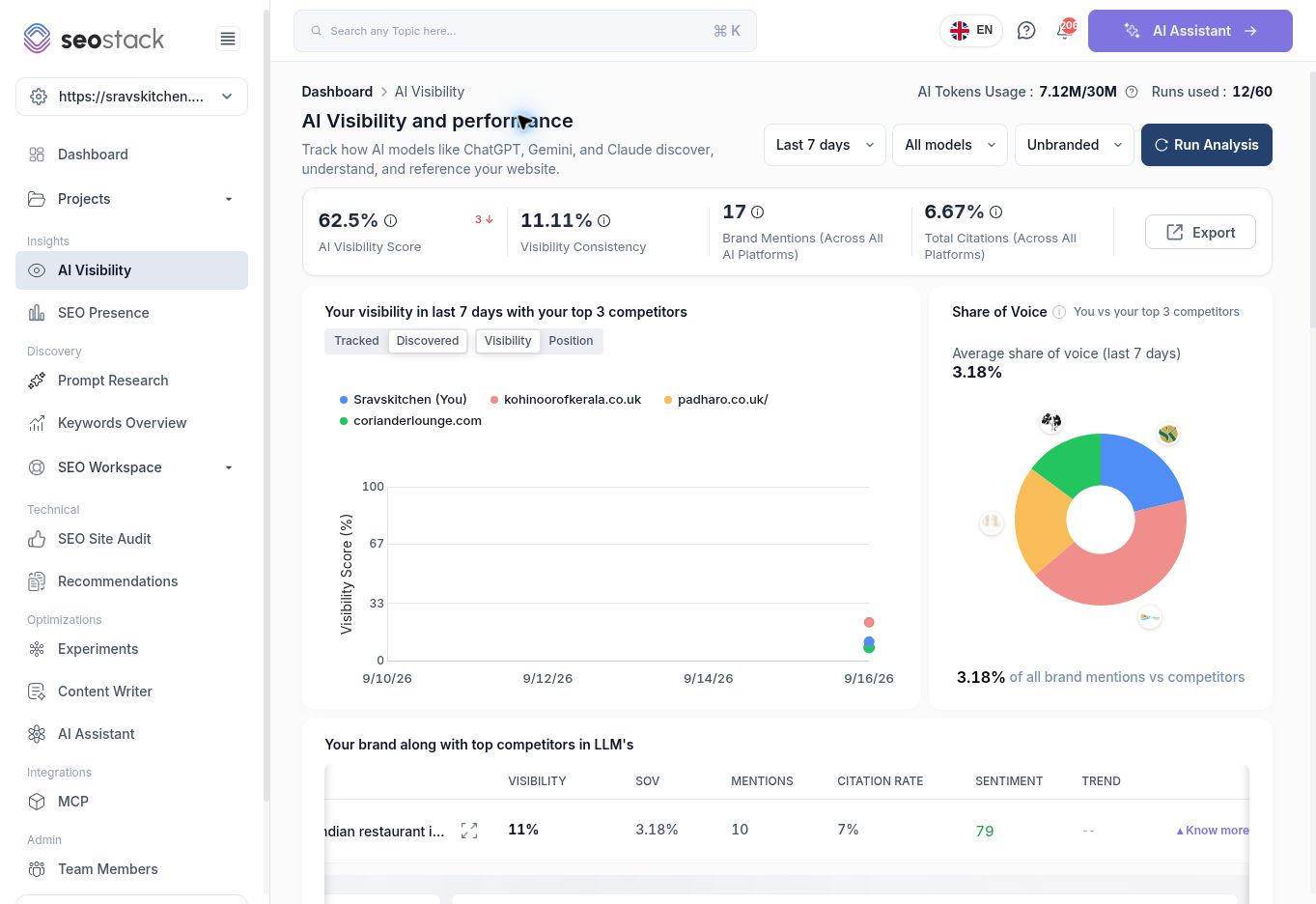 AI Visibility overview with date/model scope and competitor comparisons.
Refresh the analysis
Run Analysis starts a run for the selected model scope. The walkthrough started an All models analysis and received an “Analysis Started” notification. The screen then displayed prompt progress and separate ChatGPT, Gemini and Google AI Mode counts.
Existing metrics can remain visible while the run progresses. Wait for completion before interpreting them as new results. The page exposes both AI token usage and runs used; these are account allowances, not numbers of customer visits. Avoid repeatedly starting analysis simply because older results remain visible.
The All models run completed during the walkthrough. The subsequent Last 7 days view described 90 prompts and 360 accumulated runs, including 180 ChatGPT, 90 Gemini and 90 Google AI Mode runs. The overview then showed 82 Brand Mentions and 8.06% Total Citations. These updated values are a later snapshot than the earlier screenshot and include accumulated runs in the date window; they should not be described as 360 unique prompts.
Keep the metrics separate
| Metric | How to read it |
|---|---|
| AI Visibility Score | A tool-specific summary score. It is not interchangeable with the brand table's visibility percentage. |
| Visibility Consistency | A separate consistency measure; compare it only within a consistent reporting scope. |
| Brand Mentions | Recorded brand references in the analysed outputs, not website sessions or enquiries. |
| Total Citations / Citation Rate | Citation-related measures; the overview's Total Citations was displayed as a percentage, not an absolute citation count. |
| Share of Voice | The report labels this as your share of brand mentions versus competitors. It depends on the comparison set. |
| Sentiment | A model-derived assessment of how the brand is described, not a customer review rating. |
In the captured example, the overview showed 62.5% AI Visibility Score, 11.11% Visibility Consistency, 17 Brand Mentions and 6.67% Total Citations. The brand row showed 11% Visibility, 10 Mentions and 3.18% SOV. These different values must not be collapsed into one definition. The exact score and aggregation formulas need product confirmation.
Explore competitors and topics
The chart provides Tracked and Discovered competitor views and Visibility or Position views. Record which view you use when comparing screenshots over time.
For your brand, Know more reveals intent mix, winning prompts, platform-level visibility and topic-level results. The topic table contains Top URL, Appearance Frequency, Prompt Coverage, prompt count and Citation Count. A Top URL can belong to another website, so inspect the link rather than assuming it is your own best page.
For competitors, expanded details show gaps where that competitor appeared and your brand did not. Review gap prompts opens a list of those questions; selecting a question opens Prompt Research details. During the walkthrough, one such destination had no dedicated run history even though the gap list showed a run. Treat the detail page's scope and history explicitly, rather than interpreting its empty state as proof that the gap never existed.
Example: investigate a local restaurant gap
The example report identified 68 competitor-gap prompts across its stated 90-prompt, 90-run scope. Relevant questions included recommendations for South Indian restaurants in Southampton and dining options in Portswood.
Review the actual questions and remove irrelevant targets from your content priorities. Check whether your site clearly explains location, cuisine, menu and booking information. Use the findings to plan accurate, useful content, then monitor later runs with comparable prompts, models and dates.
A broad question such as “Who owns Indian restaurants?” may be a poor fit for a local restaurant's objectives. A gap is a candidate for review, not an instruction to create a page for every question.
Interpret changes carefully
AI output varies between runs. Sample coverage, prompt wording, model choice and competitor scope can all influence a metric. More mentions do not automatically mean more clicks, and technical bot access does not establish actual citations.
The tested model filter changed its label to Google AI Mode while the expanded platform table still showed ChatGPT and unchanged totals. If you encounter this, verify the run history and platform evidence before reporting a model-specific conclusion. This staging inconsistency is flagged for product review.
The page also includes an Ask AI area and content-creation links. Use explanations as investigation leads and verify them against the underlying prompt responses. A recommendation to add llms.txt or change content is not a guarantee of future inclusion in AI answers.