Prompt Research: organise questions and monitor AI answers
Prompt Research organises the questions used to investigate a brand's visibility in AI answers. It brings together topics, mention information, sentiment, visibility indicators and tracking controls, with a detailed report for an individual question.
Use it to study real customer questions, compare platforms and build a repeatable monitoring set. Adding a prompt measures or configures research; it does not itself make the brand more likely to be recommended by an AI platform.
Review the prompt list
- Open Prompt Research and verify the website.
- Set the date range, branded/unbranded scope and Platforms.
- Search for a question or review the topic groups.
- Use Filter By and Customise Columns to focus the table.
- Select a prompt checkbox to expose Edit, Delete, Track and View Details controls. Clicking the prompt text also opens its individual report.
The walkthrough used Last 7 days, Unbranded and All platforms. The table showed 90 prompts across six topics, with mentions, branded status, sentiment, visibility score, appearance frequency, tracking, topic and source intent. Several questions had results but were labelled Untracked. Presence in the list is therefore not sufficient evidence that recurring tracking is enabled.
A search reduced the table to one question while the headline Total Prompts remained 90. Treat table filtering and dashboard-wide summary scope separately.
Add one prompt
Choose Add Prompt. The single-entry form includes Select Topic, Enter Your Prompt and Location, with Add as the submission control. The explanatory text describes topic and location as optional; use meaningful values where relevant and check validation in your account.
Write a specific customer question. For local discovery, include the intended place: “Can you recommend a Kerala restaurant in Southampton, UK?” is more controlled than “Where should I eat nearby?” Review the website's location profile rather than assuming every model knows what nearby means.
The single-entry form was inspected without adding an artificial prompt to the account.
Import prompts in bulk
The Bulk Prompts tab accepts a CSV file and advertises a 20 MB maximum. Its instructions identify these columns:
| Column | Requirement | Meaning shown in the form |
|---|---|---|
| Prompt | Required | Exact question to evaluate in AI answer engines. |
| Topic | Optional | Category or subject of the question. |
| Country | Optional | Two-letter code such as GB, US or IN. |
| Location | Optional | City or region; the instructions say a blank value uses the website profile location. |
The form also shows Select Topic and Location controls, followed by Update Prompts In Bulk. The precedence between form values and per-row values, duplicate handling and import validation were not tested. Confirm those behaviours before a large upload.
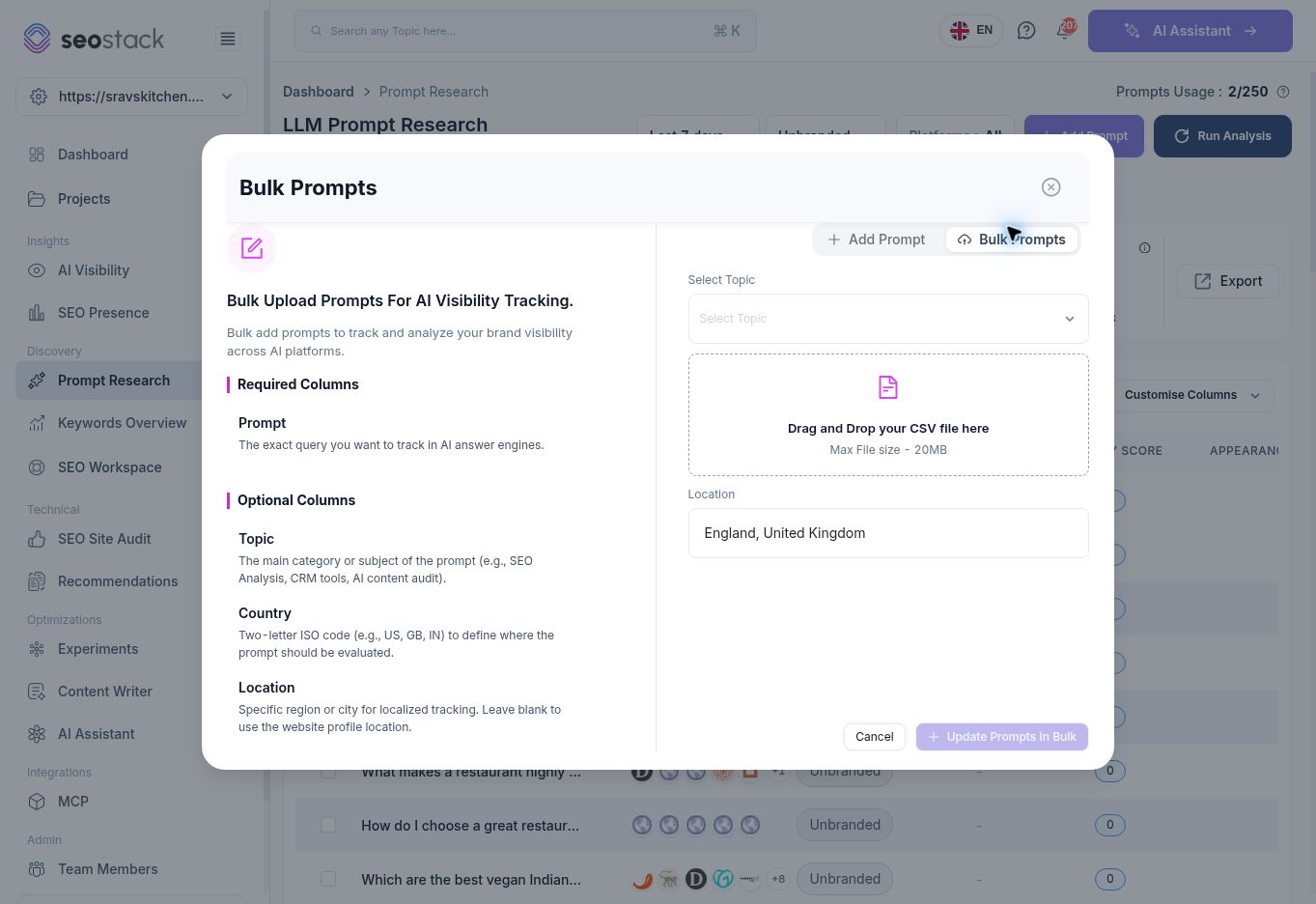 Bulk prompt form and documented CSV columns.
Set up recurring tracking
Select the intended prompt rows and choose Track. The configuration dialog lists selected topics and offers 2x/Week, Weekly and Monthly. Daily was locked behind an add-on in the tested account. It also provides a Rank Change Alerts checkbox, which was checked by default.
Review the frequency, selected questions and alert setting before choosing Confirm & Start Tracking. The walkthrough opened and cancelled this dialog; it did not enable recurring runs, purchase an add-on or send an alert. Scheduling and alert delivery remain unverified.
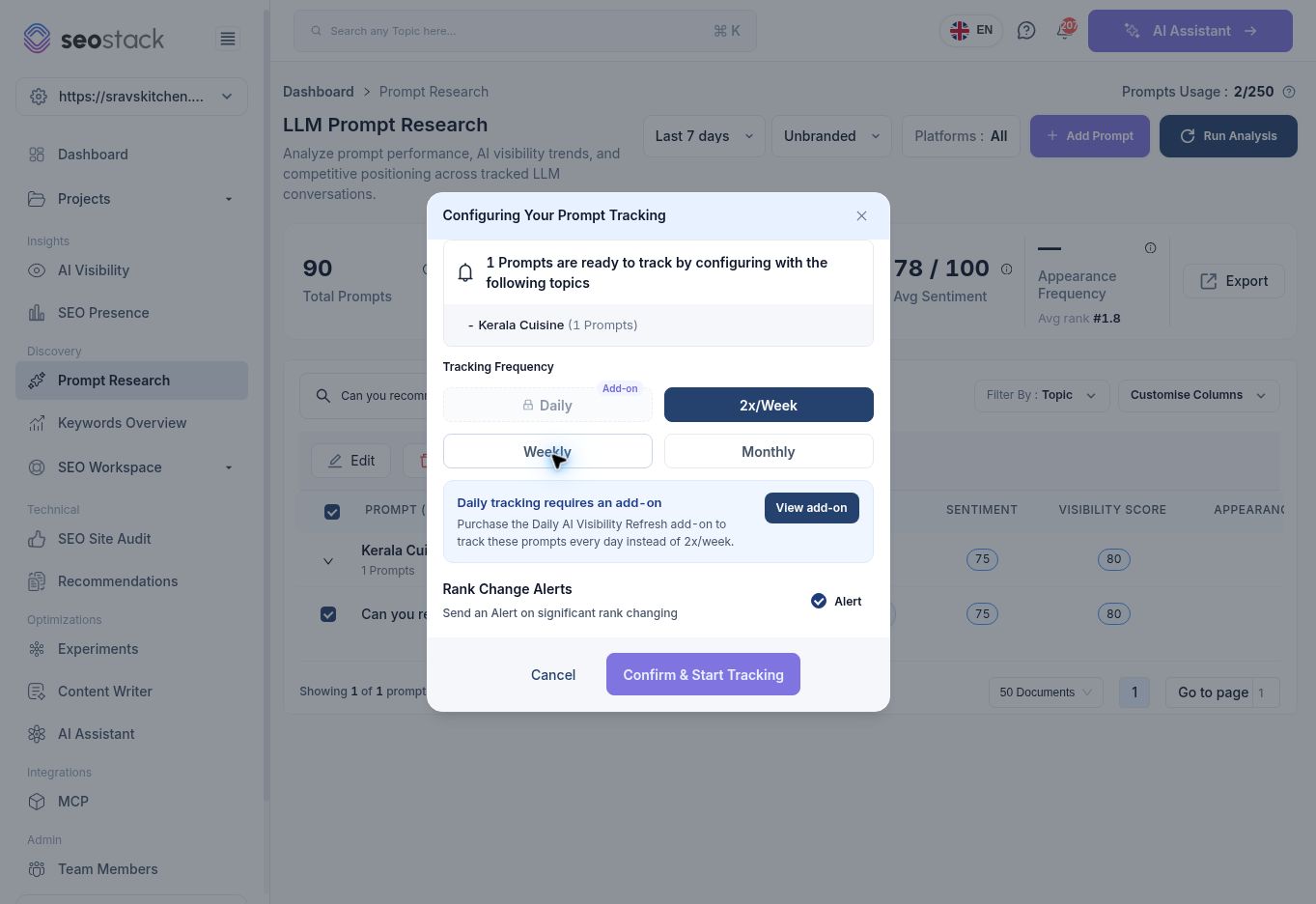 Tracking frequency and rank-change alert settings.
The usage indicator showed 2/250 prompts even though the report contained 90 questions. Its tooltip described a monthly allowance. Do not equate the usage count, list inventory, number of runs and number of tracked questions without confirming how each is counted.
Tracking frequency and rank-change alert settings.
The usage indicator showed 2/250 prompts even though the report contained 90 questions. Its tooltip described a monthly allowance. Do not equate the usage count, list inventory, number of runs and number of tracked questions without confirming how each is counted.
Read the metrics carefully
| Metric or field | Practical interpretation |
|---|---|
| Total Prompts | Question inventory within the report's stated scope, not visits or unique users. |
| Visibility Consistency / Prompt Success Rate | Different platform measures; do not assume they share a denominator or mean the same thing. |
| Competitor Visibility Gap | A gap indicator to investigate using the questions and competitor evidence. |
| Avg Sentiment | Model-derived sentiment, not a customer satisfaction survey. |
| Appearance Frequency | A frequency indicator for observed appearances; a dash is missing/unavailable, not automatically zero. |
| Average Position / Avg rank | A position measure in sampled AI outputs, not a Google organic search ranking. |
| Source Intent | A classification to review against the wording of the actual question. |
Exact formulas for the overview's consistency, success and gap metrics require product confirmation. In the tested overview, Visibility Consistency showed 100% while Prompt Success Rate was 17.78%, so 100% consistency must not be described as appearing in every answer.
Explore an individual question
The detail page shows Analysis runs, Platforms covered, Runs with brand mentioned and Latest run, followed by appearance frequency, average position, mention share of voice, citation rate and sentiment.
Its charts let you inspect Appearance, Mention SoV, Citation Rate and Sentiment, and the time-series area offers Mentions or Avg Rank and competitor comparison. Sources & Citation Categories and AI Recommendations each have Latest run and Latest per platform scopes. Those sections explicitly describe selected-run evidence, not every historical run combined.
Use Run Analysis Now for a fresh individual analysis and wait for platforms to finish before interpreting the results. Optimise with Content Writer is available as a next-step control; drafting does not guarantee a future appearance or citation.
The detail page initially showed no history for a question whose overview row had visibility and sentiment. That is a scope/history discrepancy, not proof of zero actual mentions. Check the run count and date range before interpreting empty charts or zero-looking placeholders.
Inspect the response behind a result
The individual test completed with three runs across three platforms. All three mentioned the brand. The All view showed 100% Appearance Frequency, average position 2, 38% Mention Share of Voice, 67% Citation Rate and sentiment 75/100. Filtering to ChatGPT correctly reduced the report to one run, with position 1 and 100% Citation Rate. A one-run 100% result is not evidence of long-term consistency.
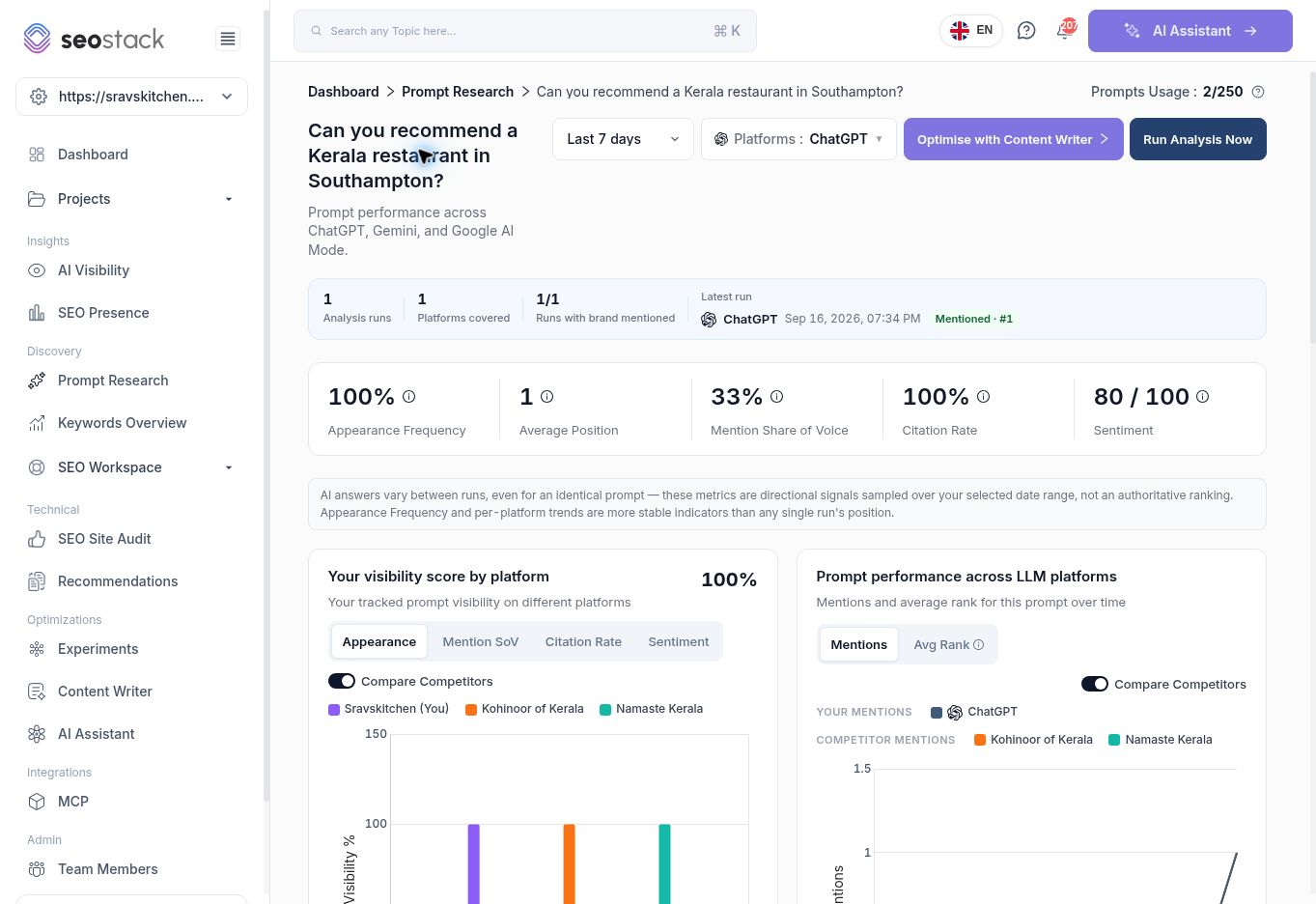 Prompt detail filtered to ChatGPT after a completed run.
The Prompt Run History Across Platforms table shows date/time, platform, mention status, position, search queries, response, citations and region. Open Response Breakdown to inspect four tabs:
Prompt detail filtered to ChatGPT after a completed run.
The Prompt Run History Across Platforms table shows date/time, platform, mention status, position, search queries, response, citations and region. Open Response Breakdown to inspect four tabs:
- Response: what the model answered in that run.
- Competitors: brands named in the answer; the dialog explains that blue indicates a brand also cited as a source.
- Sources: links the model used or referenced.
- Actions: suggested next steps from that analysis.
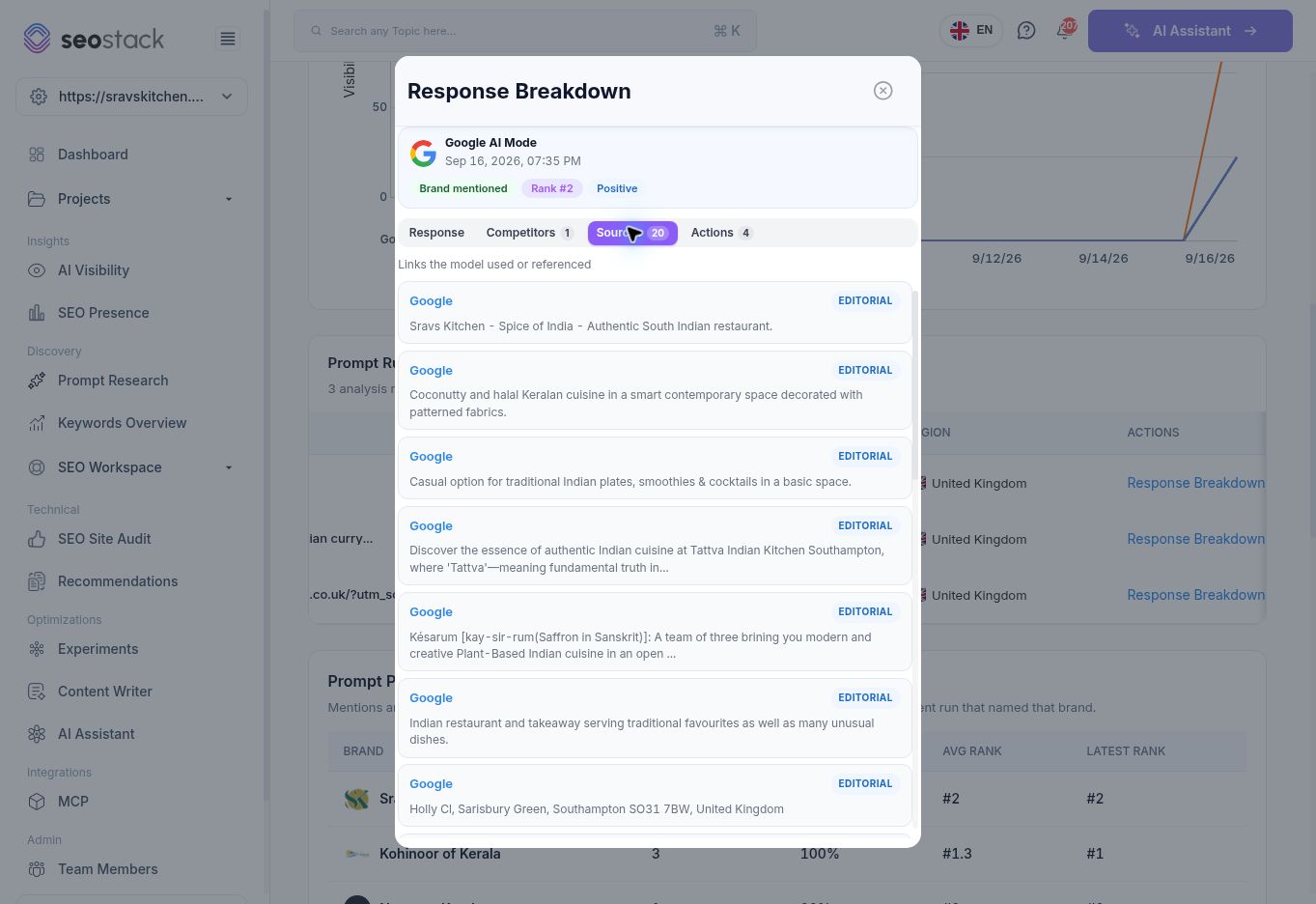 Sources tab inside an individual Response Breakdown.
Source cards can use intermediary domains such as Google rather than the business's own domain. Review the actual destination and context before counting a card as an owned-site citation. Category labels such as Editorial, UGC and Corporate are classifications to inspect, not independently verified quality scores.
Sources tab inside an individual Response Breakdown.
Source cards can use intermediary domains such as Google rather than the business's own domain. Review the actual destination and context before counting a card as an owned-site citation. Category labels such as Editorial, UGC and Corporate are classifications to inspect, not independently verified quality scores.
The brand-comparison table distinguishes Mentions, Visibility, Avg Rank and Latest Rank. Its explanation says Latest Rank comes from the most recent run that named the brand; it is not necessarily a rank from the latest run overall.
Review suggested actions against the business's actual offering. Do not copy model-generated dish, dietary, opening-hour or service claims without checking them, and do not treat a suggested action as proof of a missing feature on the live site.
Example: build a useful local question set
For a restaurant, choose questions about its real cuisine, location, menu and relevant customer needs. Separate brand questions from generic discovery questions. The observed list included a question about Southampton, NY within a UK restaurant's topic set: that is a reason to review relevance, not to create a New York landing page.
Compare repeated results for the same questions and platforms. Inspect sources and factual gaps before planning content. AI answers vary even for identical prompts, and the detail page explicitly describes its measurements as directional sampled signals rather than authoritative rankings.
Troubleshooting and verified scope
During the account-wide AI run, Add Prompt was temporarily disabled; it became available after completion. Wait for the current operation rather than repeatedly starting another.
Single and bulk entry forms, selection actions, tracking configuration and individual report controls were inspected. Import/export files, editing/deleting prompts, recurring delivery and the Content Writer handoff were not executed. Overview results were reviewed before and after a completed all-model analysis. A separate individual analysis completed across three platforms; its history, platform filter and Response Breakdown tabs were verified.