Page Indexing: interpret Google index signals for crawled URLs
Page Indexing compares URLs from a full website crawl with available Google index signals. Use it to identify confirmed indexed pages, investigate non-indexed or uncertain results and open deeper page analysis.
Open the report
Select SEO Workspace → Page Indexing, or Page indexing within SEO Site Audit. If the page asks for a Full Website audit, run one first. An empty report before a crawl does not mean Google has indexed no pages.
Review the summary counts, then select All, Indexed, Not indexed, Google unspecified or Not checked yet to filter the URL table. Use pagination to inspect the rest of the list.
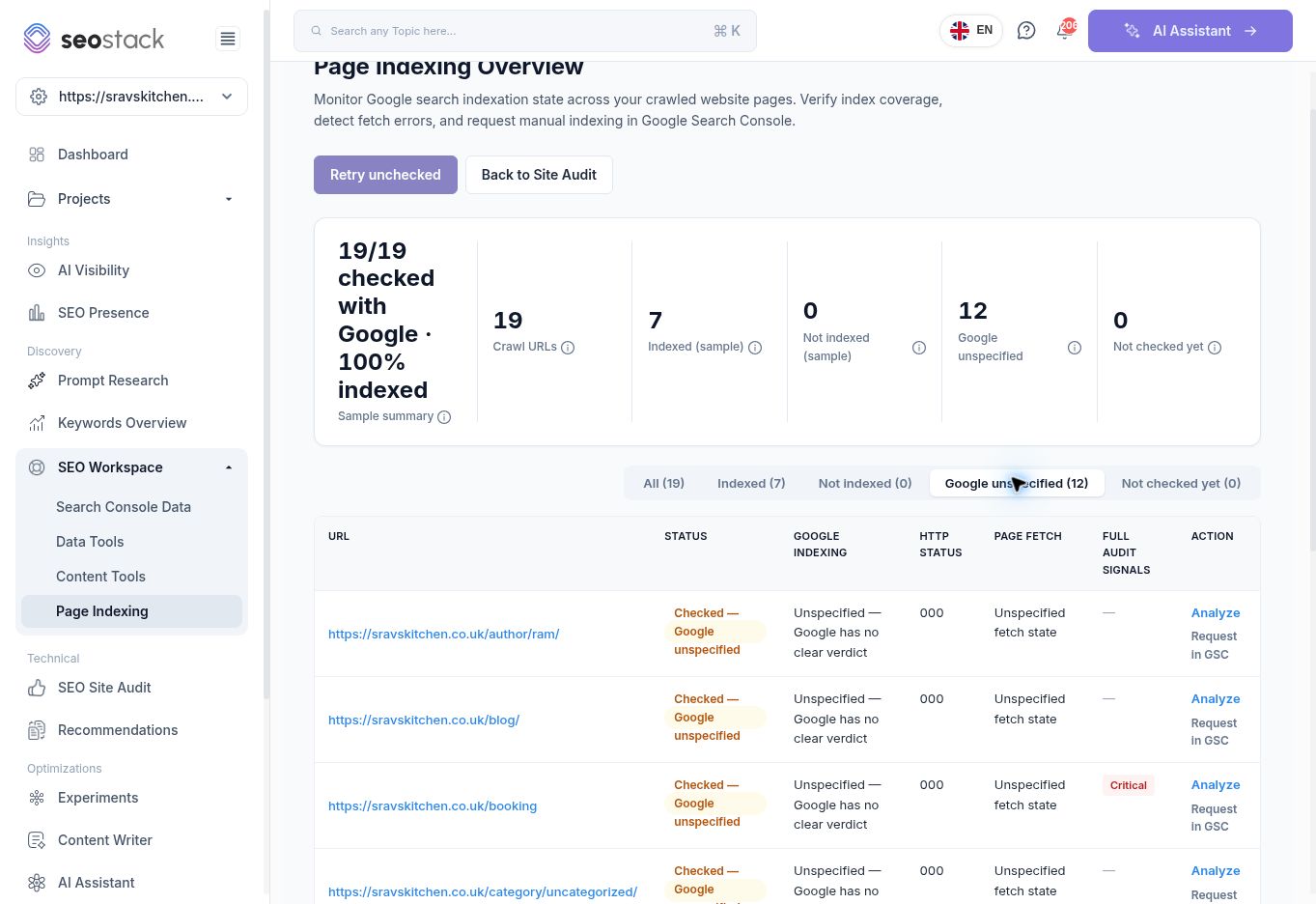 Indexing report filtered to Google-unspecified URLs.
Understand the statuses
| Status | Interpretation |
|---|---|
| Indexed | The available inspection signal identifies the page as indexed. |
| Not indexed | The report has a non-indexed outcome to investigate. Read the page's details before deciding on a fix. |
| Google unspecified | The URL was checked, but Google supplied no clear verdict. It is not a confirmed non-indexed result. |
| Not checked yet | There is no completed check for this URL in the displayed report. |
Read counts as well as percentages. The walkthrough showed 19 crawl URLs, 7 indexed, 0 not indexed, 12 Google unspecified and 0 not checked yet. The summary also displayed “100% indexed”. That percentage must not be interpreted as all 19 URLs being indexed; only seven had the displayed Indexed status. The treatment of uncertain results in this headline requires product clarification.
Read the URL table
The table includes URL, Status, Google Indexing, HTTP Status, Page Fetch, Full Audit Signals and Action.
The HTTP Status tooltip states that the value is mapped from Google's page-fetch state, not a live HTTP check. In the example, unspecified rows displayed 000. This is not a standard HTTP response code and does not independently prove that the website is down.
Use Full Audit Signals to spot associated crawl issues, and Analyze to open a Page Audit. Keep Google's stored inspection signal separate from the fresh page-audit HTTP result. For example, the tested booking URL had an unspecified index signal but an HTTP 200 in its separate Page Audit.
Retry uncertain checks
Retry unchecked is available above the report. Its tooltip indicated it could retry not-checked and Google-unspecified URLs, up to the count shown. The walkthrough inspected this control but did not repeat all inspection requests. Check the latest timestamp before treating a previous result as current.
Request indexing through Search Console
Some rows show Request in GSC. Its tooltip explains that the action opens Google Search Console URL Inspection and copies the URL so it can be pasted there. The manual indexing request is completed in Search Console; SEO Stack does not submit a normal-page indexing request through this button's API workflow.
Investigate the page first and only request indexing when appropriate. A request is not a guarantee of indexing. The external request workflow was not submitted during this walkthrough.
Example: investigate an unexpected booking URL
Filter Google unspecified, locate the booking URL and choose Analyze. Check whether it is intended to appear in search, whether the page is accessible and whether rendering or canonicalisation affects its interpretation. Compare the URL with the business's intended booking landing page before making changes. Do not request indexing for every utility or duplicate URL solely to reduce an uncertain-status count.
For a focused inspection of one URL, also see URL Inspection.