Query Discovery Tool: explore search phrases and intent opportunities
Use the query explorer to review intent segments and shortlist relevant searches.
Query Discovery Tool combines query summary cards, an intent distribution and a searchable Query Explorer. It helps you review the available discovery dataset and find phrases that deserve a closer look.
How to use it
- Open SEO Workspace → Data Tools → Query Discovery Tool.
- Check the period selector. The reviewed screen showed Last 1 month.
- Review the summary cards and Query Intent Distribution.
- In Query Explorer, select All, Informational, Commercial, Transactional or Navigational.
- Use Search Query name, Intent etc.. to narrow the visible results.
- Read impressions, clicks, CTR and average position for relevant phrases.
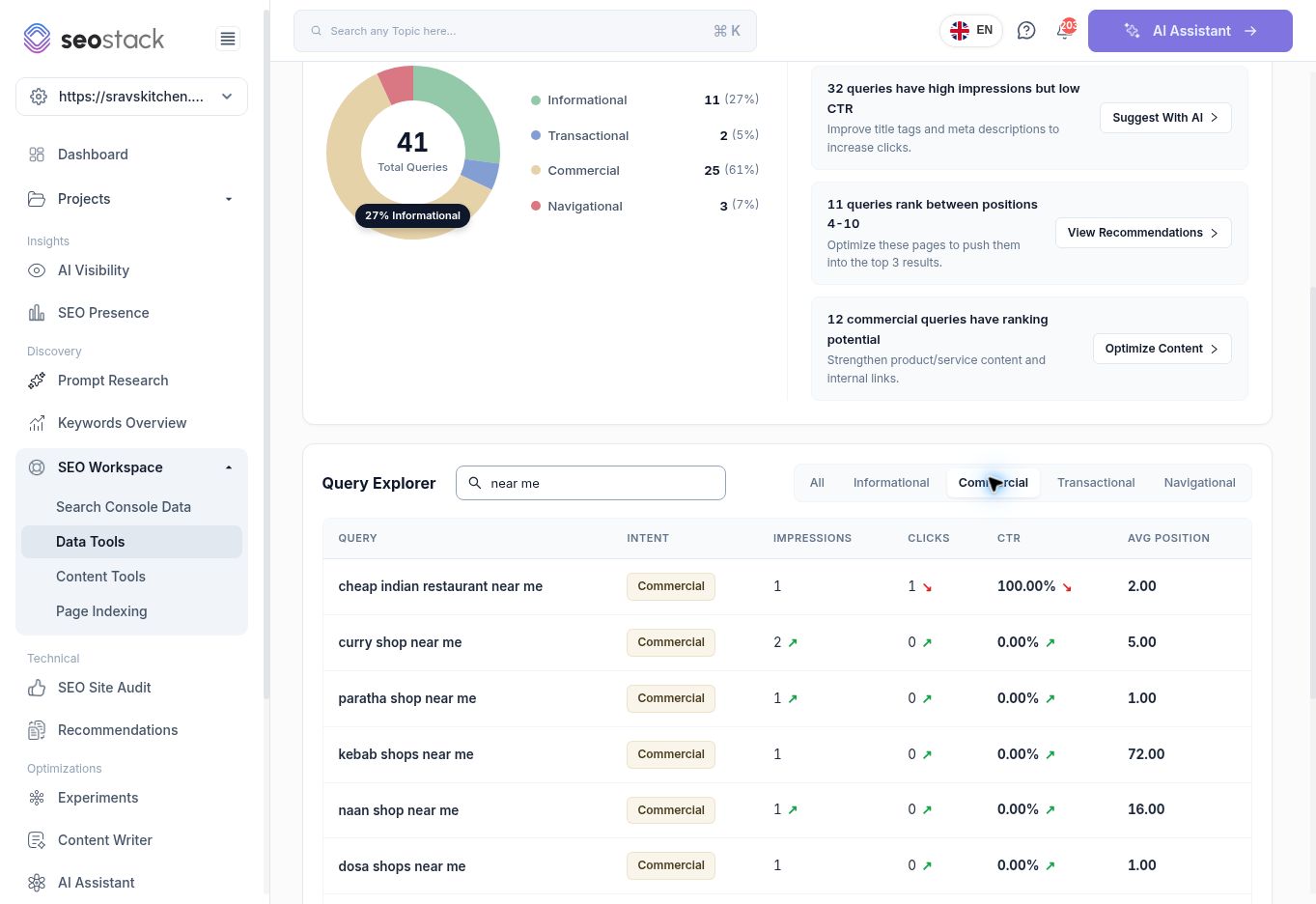 Query Explorer filtered to Commercial searches containing near me.
What the data means
The cards show Total Queries, Queries With Impressions, Queries With Clicks and Queries With CTR. These are query counts, not visitor counts. The intent distribution describes the dataset shown by this tool, which should not be assumed to contain every query in the main Search Console report.
The exact discovery-selection rules were not established in this walkthrough. Do not describe every row as newly appearing in Google, or as a previously unknown market opportunity, solely because it appears here.
Example: shortlist relevant local queries
Selecting Commercial and searching near me produced rows such as curry shop near me and dosa shop near me. Check whether the business actually satisfies each need. A phrase about a different product or business type may not be worth targeting even if the tool classifies it as Commercial.
The query cheap indian restaurant near me had one click from one impression, yielding 100% CTR. That small sample is not a reliable forecast of future CTR. Review a longer period or related phrases before prioritising it.
Use the recommendation links
The screen offers recommendations and routes to other tools:
| Link | Destination shown in the interface |
|---|---|
| Suggest With AI | Title Tag Rewriting Tool |
| View Recommendations | Recommendations |
| Optimize Content | Content Writer |
Treat the recommendations as prompts to investigate. A low CTR does not by itself prove that changing a title or meta description will solve the issue. Check the landing page, query intent, position and relevant search results first.
Common checks
Review actual row counts and values after filtering; do not assume the summary cards or pagination total reflect every local table filter. A query-intent label can be imperfect. Validate the phrase yourself, and avoid creating a separate page for every variation of the same need.
Record the period, selected intent and search text when passing an opportunity to a writer or developer. Include the proposed landing page and the customer need it should address.
More in Data Tools
Query Row Count Tool: compare query coverage across pages
Find pages with broad query coverage and identify where exposure is not producing clicks.
ReadURL Query Count Tool: track a page’s query coverage over time
Inspect a page’s query counts, position bands and traffic trends.
ReadURL Query Intent Tool: understand the intent behind a page’s queries
Review how query intent categories change alongside clicks and impressions.
ReadClick Potential by CTR: model clicks at different click-through rates
Estimate click scenarios using observed impressions and fixed CTR assumptions.
Read