SEO Site Audit: crawl a website and investigate technical issues
SEO Site Audit brings together crawl findings, page checks, Google index signals, field performance data and an AI-generated action plan. Use it to find technical work, check the scope of detected problems and inspect evidence before asking a developer to fix them.
Choose the right audit
Open SEO Site Audit → Run Site Audit.
| Audit type | Scope shown in the tool |
|---|---|
| Quick Health Check | A homepage probe. It does not establish full website coverage. |
| Full Website | Follows internal links from the homepage, then fills remaining pages from the sitemap up to the selected limit. |
| Page-Level Audit | Inspects one URL, separately from the full-site score and trend. |
For a Full Website audit, choose a Crawl limit within your account's per-run allowance and remaining monthly crawl pool, then select Desktop or Mobile and Run Full Website Audit. The walkthrough used Desktop with a 100-page cap. It completed with 19 crawled URLs in approximately three minutes; this is an example, not a promised runtime.
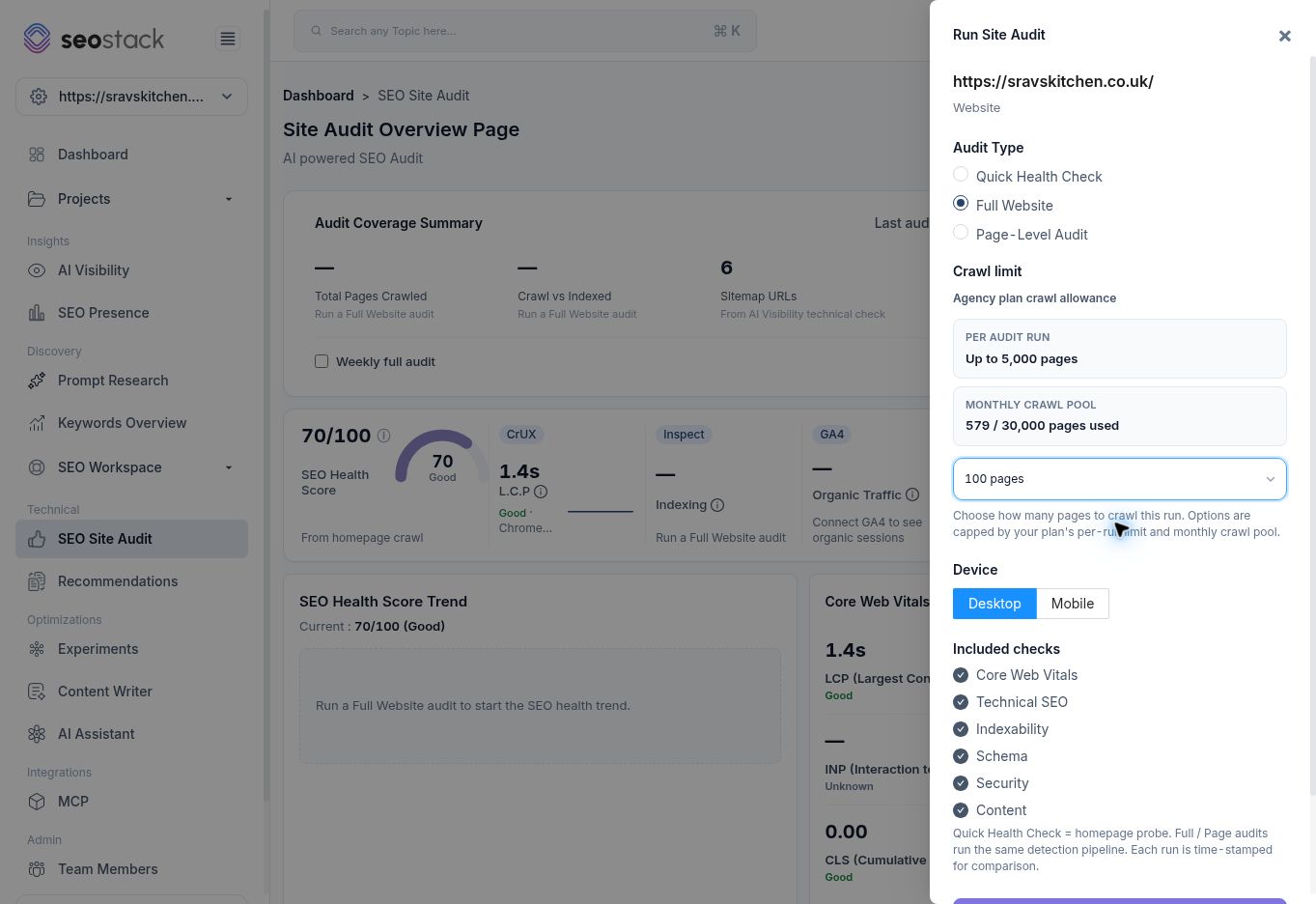 Full website audit configuration.
Use the progress message to see whether a run is queued or crawling. The previous report can remain visible while processing. Do not report its figures as the new audit's result until the timestamp and source update.
Full website audit configuration.
Use the progress message to see whether a run is queued or crawling. The previous report can remain visible while processing. Do not report its figures as the new audit's result until the timestamp and source update.
The screen also provides Weekly full audit with a schedule status. Scheduling was not enabled during the walkthrough.
Read coverage before scores
The coverage summary gives the last audit time, device, duration and source. Review Total Pages Crawled, Crawl vs Indexed, Sitemap URLs and Crawl Errors together.
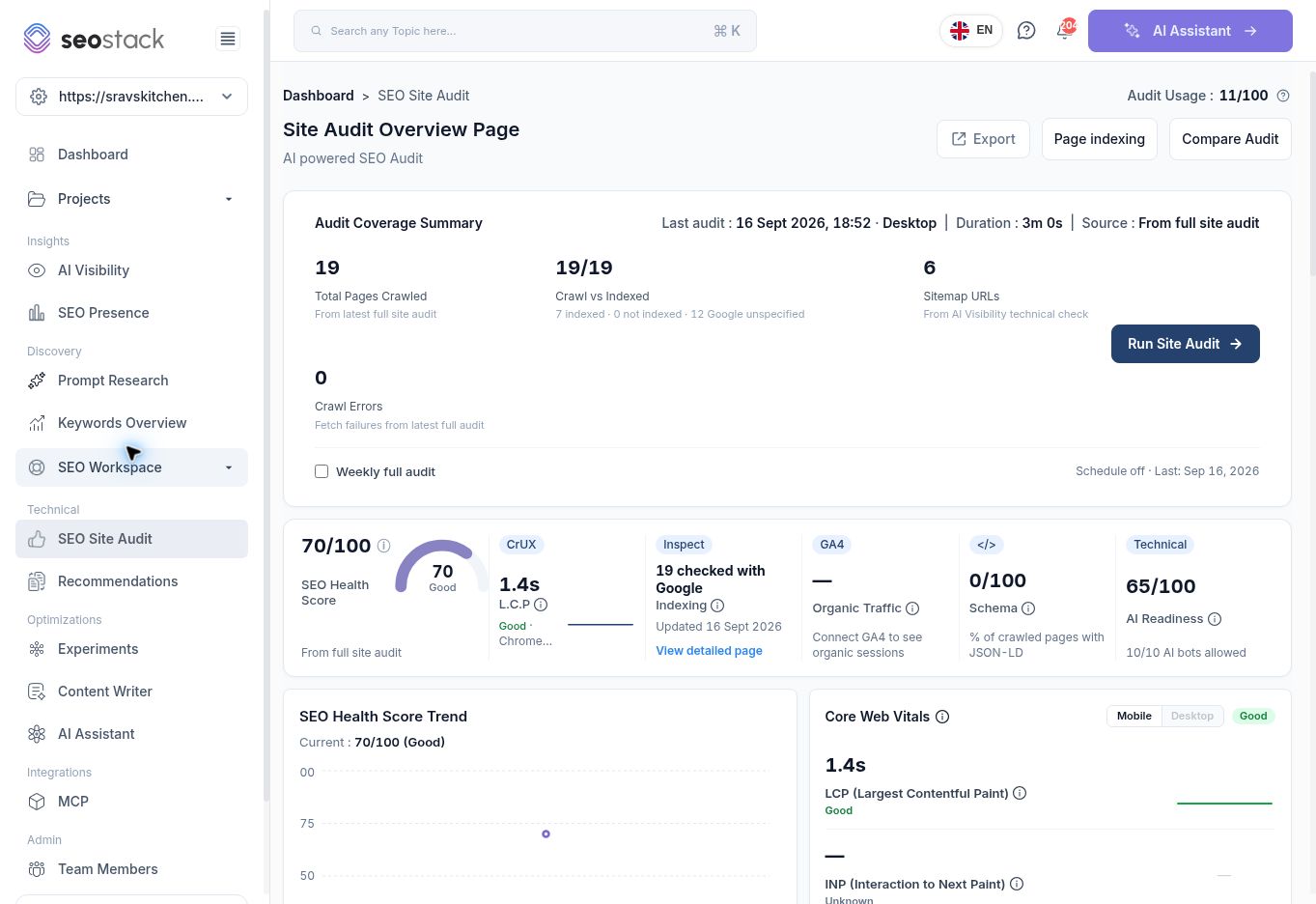 Completed full audit showing coverage and source labels.
The example showed 19 crawled URLs, 6 sitemap URLs and zero crawl fetch failures. Its Crawl vs Indexed display read 19/19, with the explicit breakdown 7 indexed, 0 not indexed and 12 Google unspecified. The headline fraction therefore must not be read as 19 indexed pages. Open Page Indexing to review the individual outcomes.
Completed full audit showing coverage and source labels.
The example showed 19 crawled URLs, 6 sitemap URLs and zero crawl fetch failures. Its Crawl vs Indexed display read 19/19, with the explicit breakdown 7 indexed, 0 not indexed and 12 Google unspecified. The headline fraction therefore must not be read as 19 indexed pages. Open Page Indexing to review the individual outcomes.
Different source labels matter. The sitemap count came from the AI Visibility technical check, while the crawl total came from the latest full audit. They need not match.
Understand the summary metrics
SEO Health Score summarises the tool's checks and displays its source. It is not a Google score. Compare like-for-like audits with similar coverage before attributing changes to fixes.
Schema is labelled as the percentage of crawled pages with JSON-LD. This is a coverage measure, not validation of every structured-data property or eligibility for a rich result.
Organic Traffic requires connected GA4 data. A dash with a connection prompt is missing data, not zero traffic.
Core Web Vitals use Chrome field data. Read the source and device labels. Missing data, such as an unknown INP, is not a measured value of zero. Competitor Benchmark compares available origin field data for the selected competitor; it is not a full technical audit of the competitor.
AI Readiness and AI crawler access describe technical checks. A bot marked Allowed does not prove it has crawled, cited or recommended the website.
Investigate an issue
- Review Top 5 Issues by Priority.
- Sort by Severity or Pages affected, or filter Technical, Indexability, Schema and Content.
- Select View All to inspect more issue types.
- Open View Details on an issue.
- Review the affected URL list, issue code, severity and Open/Fixed filters.
- Select Analyze on the URL to inspect page-level evidence.
Use business importance as well as affected-page count. A problem on a booking or enquiry page can deserve attention even when only one URL is affected. Conversely, an orphan-page finding means no inbound links from the other crawled pages; limited crawl coverage can affect that conclusion.
Read a Page Audit
The Page Audit includes its URL, timestamp and capture mode, a separate score, severity counts, on-page signals, Google index status, source evidence and fix guidance. It provides Re-check URL, Export and Back to Site Health.
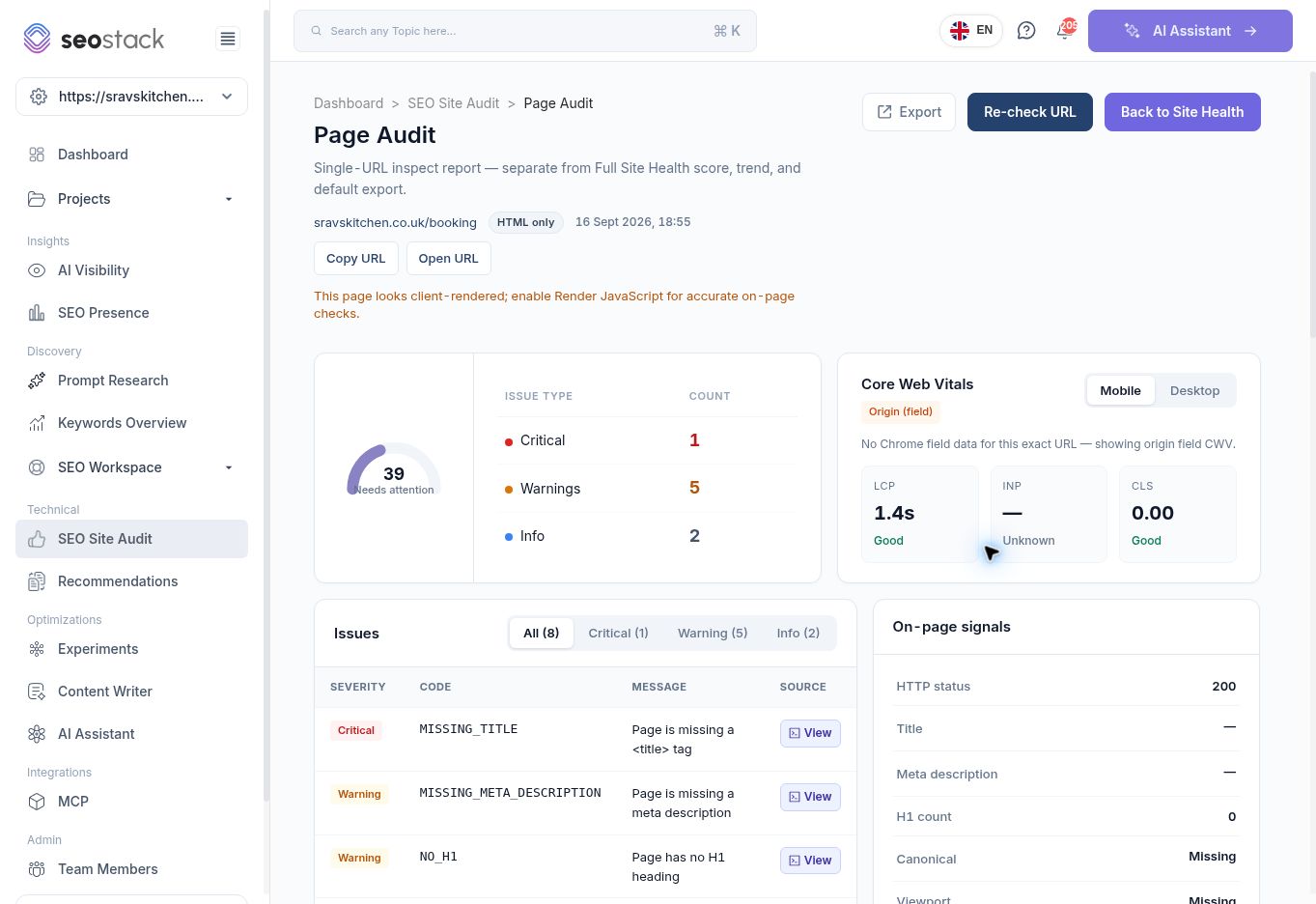 Page Audit with an HTML-only warning and issue details.
The tested
Page Audit with an HTML-only warning and issue details.
The tested /booking page returned HTTP 200 but showed zero words and missing title, headings and metadata in the HTML-only capture. Its source viewer contained an embedded booking widget script. The report also warned that the page looked client-rendered. This is a reason to check rendering and the actual user-facing page before concluding the booking page contains no content.
Use View beside an issue, View source under Crawled page, or View page HTML in fix guidance to inspect the captured source. It is evidence from that audit, not a guarantee that the current live page is unchanged. The walkthrough verified the raw HTML viewer; it did not verify a Render JavaScript control.
Example workflow: resolve a missing-title finding
Open the missing-title issue, identify the affected URL and inspect its captured head section. Confirm the page's intended purpose and whether it is a standalone landing page or an embedded utility page. If a title is genuinely missing, implement an accurate one through the website's code or CMS, then re-check the URL. Record the change date and run a later full audit to check the site-wide result.
Treat recommended character counts and content thresholds as tool heuristics. Do not pad useful text solely to clear a warning.
Compare audits and plan work
Compare Audit opens a comparison area for scores, crawled-page counts and issues. With only one completed full audit, it asks for another Full Website audit. A populated before/after comparison was not available during this walkthrough.
The AI Generated Action Plan groups possible fixes and links to sample or full affected-page lists. Check each action against source evidence and page intent. Sample lists may show only a subset of affected pages, and automated guidance needs editorial or technical review before implementation.