Title Tag Rewriting: generate and review page-title suggestions
Title Tag Rewriting produces suggested titles for pages in the selected website. It places the existing title beside the generated suggestion so you can review possible changes in one table. Use it to prepare a title-review list, refresh unclear titles or explore wording aligned with a page's search intent.
Generate a suggestion
- Open SEO Workspace → Content Tools → Title Tag Rewriting.
- Find the page in the table, using Search if needed.
- Open the row's Intent selector.
- Choose Informational, Navigational, Transactional or Commercial according to the page's purpose.
- Select Run on that row.
- Wait for Title, Suggested Title and AI Tokens Used to populate. Check the Error column if the run does not produce a result.
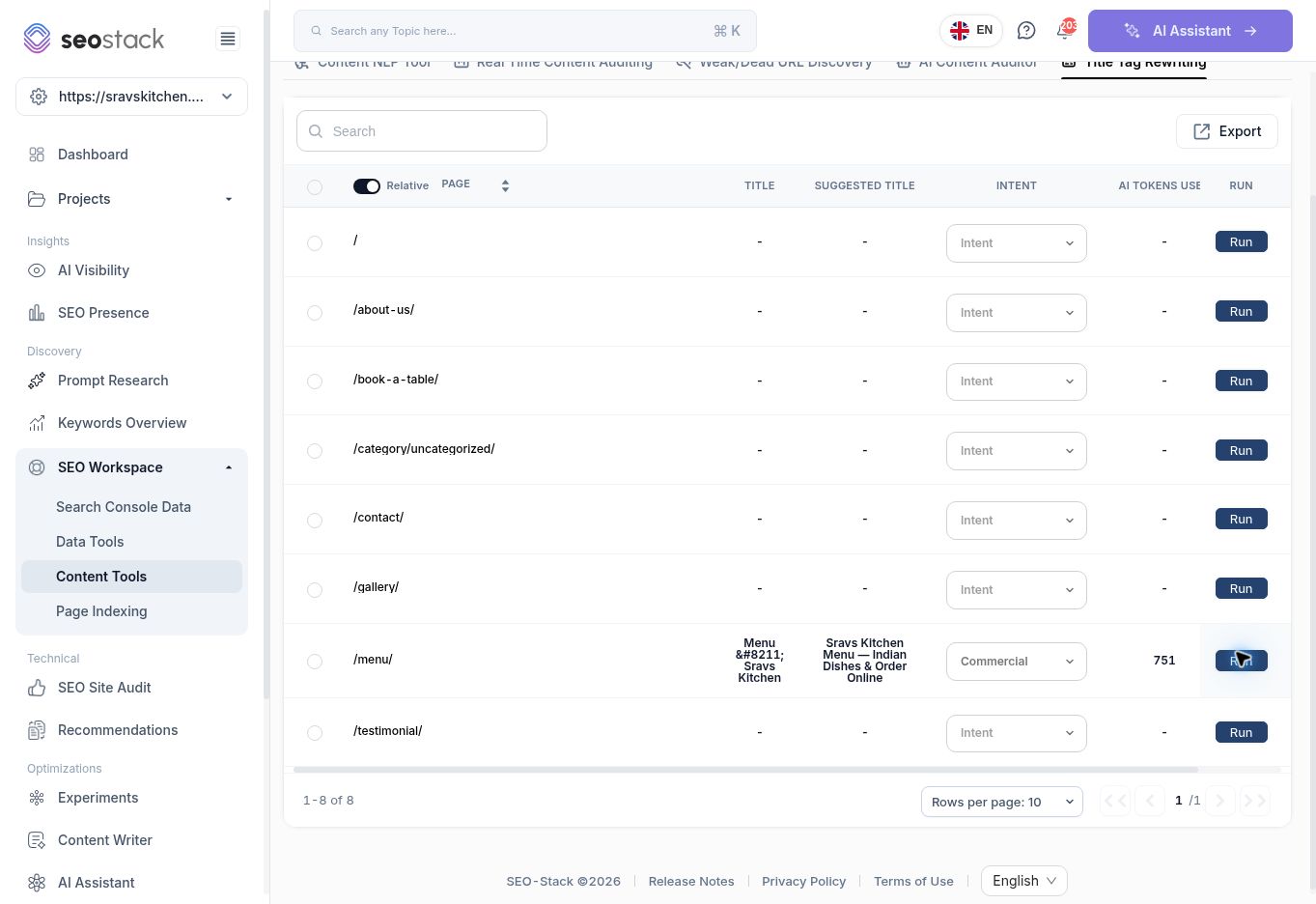 Title rewriting table after generating a suggestion for a menu page.
The Page link opens the URL's Search Console Data, which can help you review the queries attracting impressions and clicks before deciding on a title.
Title rewriting table after generating a suggestion for a menu page.
The Page link opens the URL's Search Console Data, which can help you review the queries attracting impressions and clicks before deciding on a title.
Read the results
| Column | How to use it |
|---|---|
| Page | Identify the exact URL being reviewed. Relative display shortens URLs to their paths. |
| Title | Compare the retrieved existing title with the proposal. A dash before running does not prove the live page has no title. |
| Suggested Title | Treat this as draft wording that needs an accuracy and relevance check. |
| Intent | Review the selected purpose of the page. |
| AI Tokens Used | See the recorded generation usage; this is not a price. |
| Error | Check for a reported problem with the generation. |
| Run | Generate the row's suggestion. |
The screen also provides row selection, pagination and Export. Selecting a row reveals Run Selected Items. This walkthrough verified generation for one page; it did not verify an export file or a bulk generation workflow.
Example: review a restaurant menu title
For the menu URL, the walkthrough selected Commercial intent and generated:
Sravs Kitchen Menu — Indian Dishes & Order Online
The existing title appeared in the table as Menu – Sravs Kitchen, and the run recorded 751 AI tokens. The encoded punctuation is a display observation; check the live title before assuming the literal entity is present in search results.
The suggestion adds more context than a generic menu label, but Order Online must be verified. If the business does not offer online ordering through that page, remove the claim. A possible editorial alternative is South Indian Menu | Sravs Kitchen, Southampton, provided that cuisine and location accurately describe the business. This alternative is an editorial example, not another generated tool result.
Turn a suggestion into a measured change
Check that the title describes the page accurately, uses natural language, remains distinct from other pages and preserves useful brand context. Avoid copying the same phrase across unrelated URLs or adding services the page does not provide.
Once approved, implement the title through your website's normal editing process. The tested SEO Stack workflow generated a suggestion; it did not show a control that publishes a title to the website. Record the change date in an annotation and compare later page/query performance using consistent date ranges in Search Console Data.
Do not attribute every later click change to the title alone. Impressions, position, seasonality and other edits can also change during the comparison period.
Troubleshooting
If a row remains blank, confirm that the correct website and URL are selected, review the intent and check the Error column. Avoid repeatedly running every page while investigating one failure. If a suggestion is generic or inaccurate, revise it using the actual page content and relevant query evidence.