Monthly URL Performance: review page traffic over time
Read the monthly URL matrix to identify sustained gains, declines and pages needing further investigation.
Monthly URL Performance presents page-level clicks in a month-by-month matrix. Use it to look beyond a single comparison total and see how a page's traffic developed over time.
It is useful for identifying sustained declines, checking whether recent performance is recovering, comparing key landing pages and building a content-review shortlist.
Open the matrix
- Open SEO Workspace → Search Console Data.
- Select Monthly URL Performance in the tool navigation.
- Check the comparison-date button and choose the period you need.
- Select URL Matrix.
- Find the URL and read across its monthly columns.
- Scroll horizontally or use Column Filter to review the relevant months and Total Growth.
The report also exposes Add Filters, Preset Filters, Expand, Export and pagination controls.
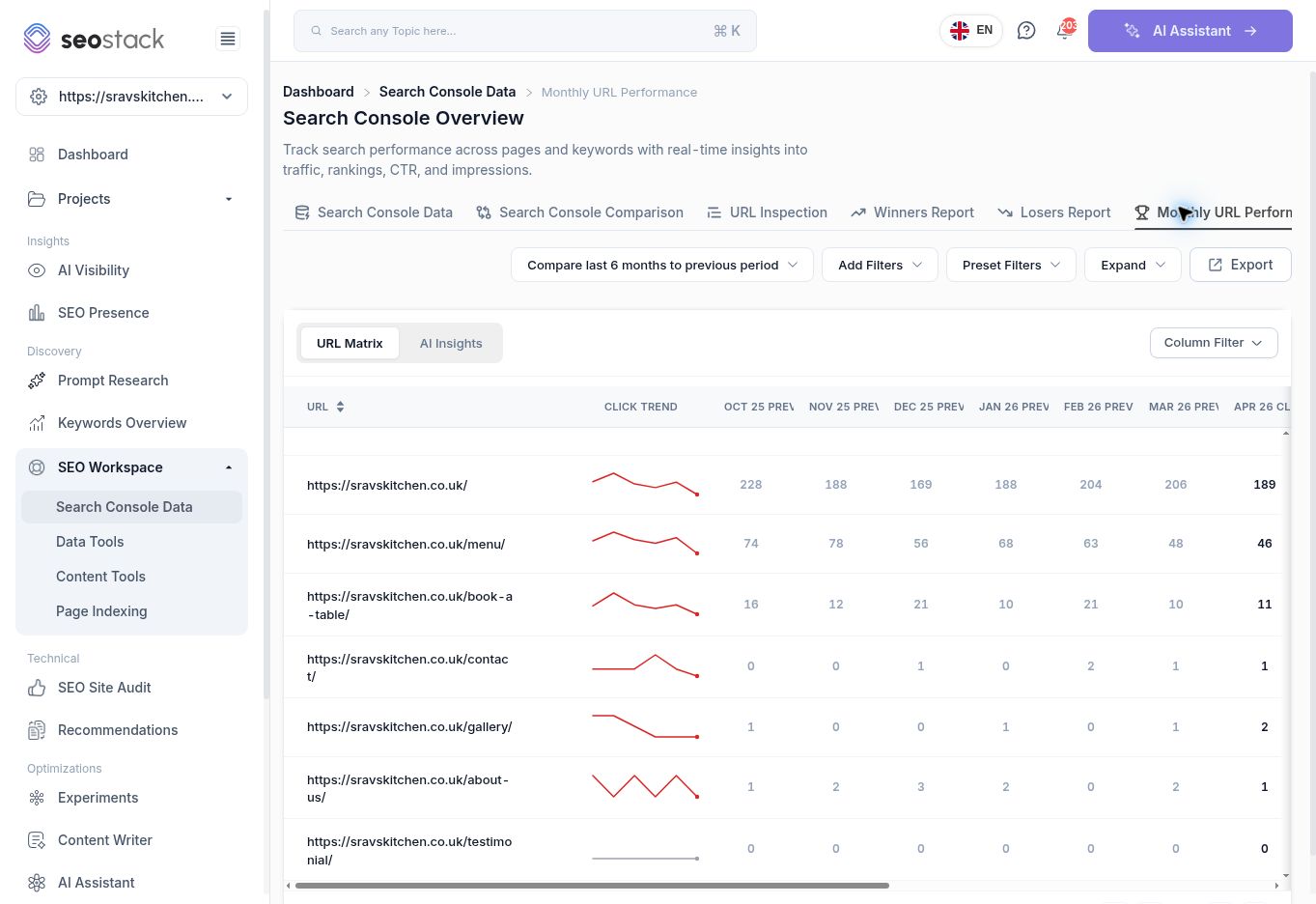 Monthly URL Performance matrix, with one URL per row and month columns.
Read the matrix
| Field | How to use it |
|---|---|
| URL | Identifies the page being measured. |
| Click Trend | Provides a compact visual view of the click pattern. Verify it against the numbers. |
| Month columns labelled PREV | Show monthly context for the comparison side of the report. |
| Month columns labelled CLICKS | Show monthly context for the current side. |
| Total Growth | Gives the reported overall click movement for the comparison. It can be positive, negative or zero. |
Calendar months and rolling date ranges do not always line up. Use the selected period and the report's comparison totals when quoting overall growth; do not assume the visible calendar-month columns sum to the same total.
Example: check whether a page is still declining
The reviewed menu-page row showed 49 clicks in June, 40 in July and 54 in August, while Total Growth for the selected comparison was -93.
This is more useful than reporting only the negative total. The page was lower overall across the comparison but improved from July to August. Investigate what changed and whether that recovery continues before describing it as a continuous monthly decline.
The September column showed 14 clicks during a review performed on 16 September. September was incomplete. Comparing that directly with all of August would overstate the decline.
Example: build a page-review shortlist
- Start with commercially important pages, such as service, product, enquiry or booking pages.
- Review several complete months rather than only the last column.
- Identify pages with a meaningful, sustained reduction in clicks.
- Open Search Console Comparison to examine impressions, CTR and position for those pages.
- Review the underlying queries to establish what changed.
- Assign a specific investigation or update, with the reporting baseline recorded.
A flat zero-click row is not enough to decide that a URL should be deleted. Check the page's purpose, impressions and other sources of value first.
AI Insights
Select AI Insights to access Generate AI summary and Ask AI. Suggested questions include What pages are consistently gaining traffic? and Which content should be updated first?
Use the matrix as the evidence for any generated answer. Verify the dates, named URLs and numbers, and check whether the answer recognises incomplete months. Do not infer revenue or conversions from a click-only matrix.
Troubleshooting
- If the table is too wide, use horizontal scrolling or Column Filter.
- If an expected page is missing, check the website, active filters, pagination and dates.
- If a trend looks abrupt, check whether the month is partial or data is still loading.
- If the overall comparison and monthly pattern seem different, inspect exact period boundaries before concluding that the report is inconsistent.
More in Search Console
A Guide to Using Google Search Console Data Tools
In this KB we show you how to use the google search console data tools.
ReadSearch Console Data: analyse queries, pages and search traffic
Filter Google Search Console data, inspect individual pages and turn search performance into practical SEO actions.
ReadSearch Console Comparison: find what changed between two periods
Compare clicks, impressions, CTR and position across queries and pages, and distinguish absolute changes from percentage changes.
ReadWinners Report: find queries and pages gaining clicks
Identify growing queries and pages, examine their monthly trends and decide which improvements to investigate or extend.
Read