Query Row Count Tool: compare query coverage across pages
Find pages with broad query coverage and identify where exposure is not producing clicks.
Query Row Count Tool lists pages alongside their reported query counts, separating queries with clicks from zero-click queries. Use it to shortlist pages for deeper analysis before deciding what to optimise.
How to use it
- Open SEO Workspace → Data Tools → Query Row Count Tool.
- Check the website and date range. The reviewed default was Last 12 months.
- Use the table search to find a page, or sort the relevant column.
- Compare Queries Count, Queries With Clicks Count and Zero Click Queries Count.
- Review the page's relevance and importance, then select View under Query Count Over Time to open its URL Query Count report.
- Check the destination's dates and page filter. The tested drill-down opened a three-month view even though the source report showed twelve months.
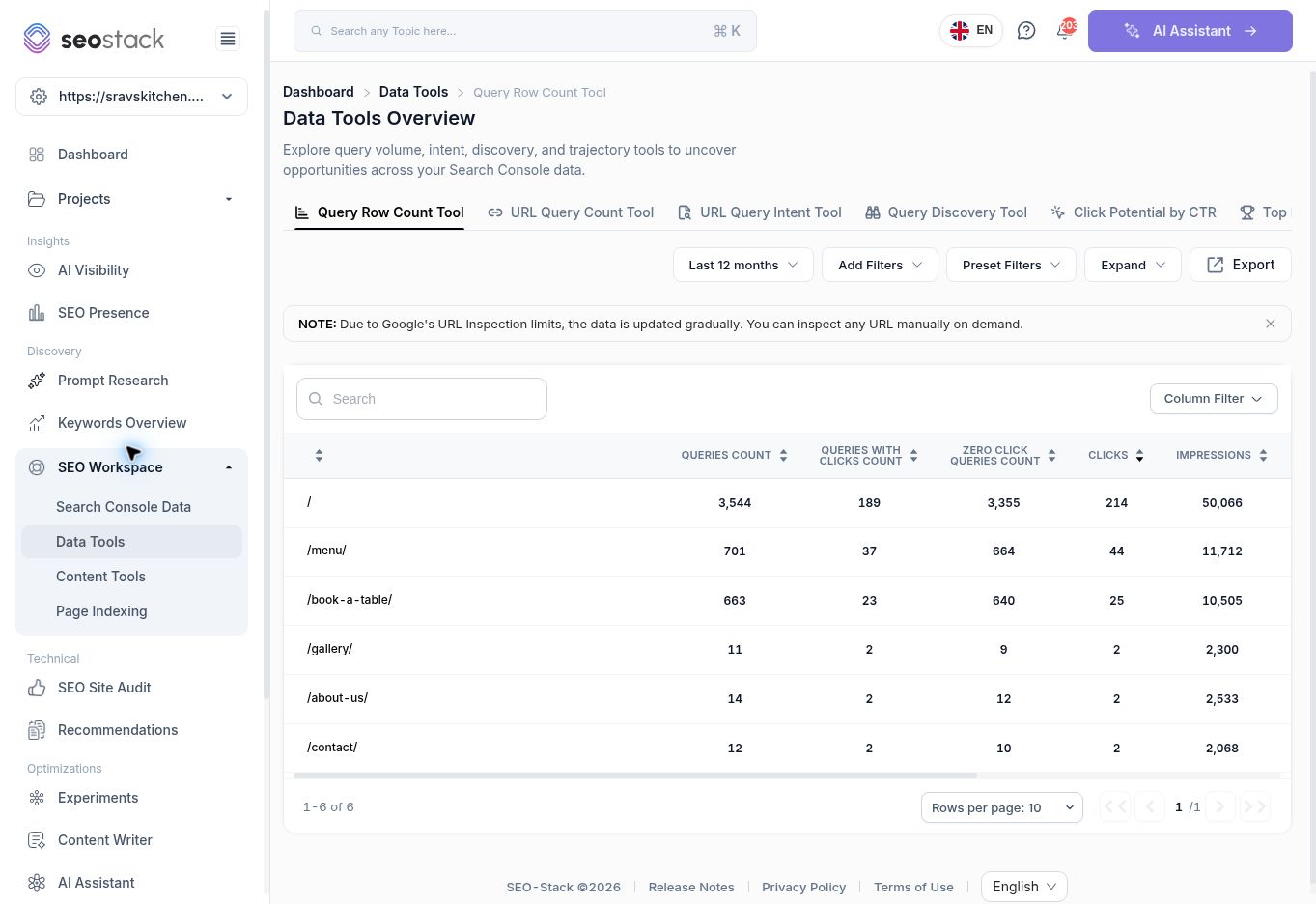 Query Row Count Tool with page-level query counts.
What the columns mean
| Column | How to interpret it |
|---|---|
| Queries Count | The query count reported for the page and selected scope. It is not a search-volume estimate. |
| Queries With Clicks Count | How many reported queries have clicks. This is a count of queries, not the number of visits. |
| Zero Click Queries Count | How many reported queries have no clicks. Review relevance, impressions and position before treating them as opportunities. |
| Clicks / Impressions | Additional measures shown for the row. Check the scope before comparing them with another report. |
| Age Of Page Index | An age field provided by the tool. Do not assume it is the page's publication date or an independently verified first-indexed date. |
| Query Count Over Time | The View control opens a page-specific trend report. |
| HTTP Status / Index Status | Available inspection information. Inspect URL indicates that an inspection result needs to be obtained. |
Example: investigate a page with many zero-click queries
The menu page showed 701 queries, of which 37 had clicks and 664 had none. That is a broad starting list, not a recommendation to create 664 pages.
Open its query-count trend, check the date range, and inspect individual searches in Search Console Data. Prioritise queries that describe what the page actually offers and have enough relevant impressions to warrant investigation. Some zero-click queries may be peripheral or low-volume.
A page with fewer queries can still be highly useful if it serves a focused commercial purpose. Avoid ranking pages solely by query count or deleting a page because its count is low.
Filters and common checks
The toolbar offers dates, Add Filters, Preset Filters, Expand and Export. The table offers Column Filter, a relative-URL display switch and pagination. Keep those selections consistent when comparing pages.
The exact calculation of the page-age field and the scope of the Clicks column were not established in this walkthrough. Use Search Console Data for traffic reporting until those definitions are confirmed.
More in Data Tools
URL Query Count Tool: track a page’s query coverage over time
Inspect a page’s query counts, position bands and traffic trends.
ReadURL Query Intent Tool: understand the intent behind a page’s queries
Review how query intent categories change alongside clicks and impressions.
ReadQuery Discovery Tool: explore search phrases and intent opportunities
Use the query explorer to review intent segments and shortlist relevant searches.
ReadClick Potential by CTR: model clicks at different click-through rates
Estimate click scenarios using observed impressions and fixed CTR assumptions.
Read