Click Potential by CTR: model clicks at different click-through rates
Estimate click scenarios using observed impressions and fixed CTR assumptions.
Click Potential by CTR shows how many clicks the recorded impressions would produce at CTRs from 1% to 5%. Use it to put the possible scale of a CTR improvement into context when deciding which pages to investigate.
It is a scenario tool. It does not predict that your page will achieve a particular CTR, and its potential-click figures are total scenario clicks, not automatically additional clicks.
How to use it
- Open SEO Workspace → Data Tools → Click Potential by CTR.
- Check the URL in Search for URL and the date range.
- Review active filters under Expand.
- Select Day, Week or Month.
- Compare recorded Clicks, Impressions and CTR with the 1%, 2%, 3%, 4% and 5% scenarios.
- Use Column Filter or horizontal scrolling to examine the scenario columns.
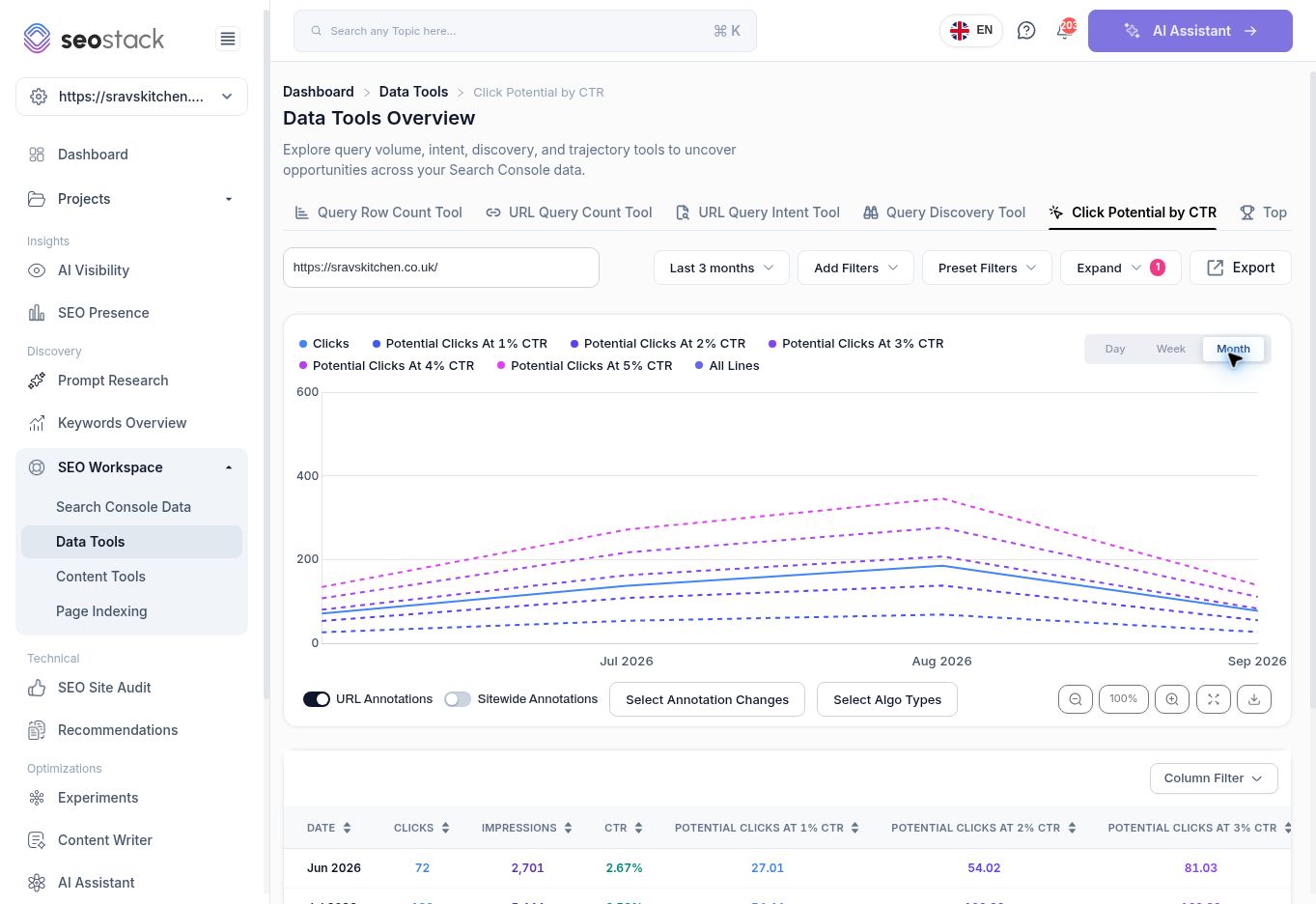 Click Potential by CTR in monthly view.
Understand the calculation
The inspected rows match this calculation:
Scenario clicks = recorded impressions × assumed CTR
For example, 158 impressions at 3% CTR gives 4.74 scenario clicks. Decimal values are arithmetic estimates, not fractional recorded visits.
To estimate the change from current performance, subtract actual clicks from the scenario total. If the scenario is below actual performance, it is a lower-performance scenario, not an opportunity for extra clicks.
Worked example
The reviewed homepage's August row showed 6,927 impressions and 186 clicks, with CTR of 2.69%.
| Scenario | Total scenario clicks | Difference from 186 actual clicks |
|---|---|---|
| 3% CTR | 207.81 | +21.81 |
| 4% CTR | 277.08 | +91.08 |
| 5% CTR | 346.35 | +160.35 |
You could describe the 4% case as approximately 91 more clicks at the same impression count, if that CTR were achieved. Do not describe all 277 scenario clicks as additional traffic.
Turn a scenario into an investigation
Choose a relevant page with meaningful impressions. Inspect its query mix, current positions and search-result context. Decide whether a clearer title, more relevant content or another change is justified, then monitor a comparable period. Record the assumption used in any business case.
A single assumed CTR does not account for device, country, brand familiarity, query intent, position or search-result features. These scenarios also hold impressions fixed, even though exposure can change. They do not estimate conversions or revenue.
Reporting checks
Use a complete period where possible. Preserve the URL and filters in reporting. Do not compare differently scoped rows, and do not treat the highest available CTR scenario as an achievable target simply because it is shown. The tool also provides export, annotation and chart controls for reviewing the selected scope.
More in Data Tools
Query Row Count Tool: compare query coverage across pages
Find pages with broad query coverage and identify where exposure is not producing clicks.
ReadURL Query Count Tool: track a page’s query coverage over time
Inspect a page’s query counts, position bands and traffic trends.
ReadURL Query Intent Tool: understand the intent behind a page’s queries
Review how query intent categories change alongside clicks and impressions.
ReadQuery Discovery Tool: explore search phrases and intent opportunities
Use the query explorer to review intent segments and shortlist relevant searches.
Read