The Ultimate Guide to Diagnosing Click Loss - AI Overviews, CTR Degradation, Content Issues, Spam & Technical SEO
I had to come back and rewrite the beginning of this article, what started out as an article about diagnosing click loss from Google AI overviews (CTR degradation) vs Ranking Slippage / Cont
I had to come back and rewrite the beginning of this article, what started out as an article about diagnosing click loss from Google AI overviews (CTR degradation) vs Ranking Slippage / Content devaluation has morphed into an article about diagnosing click loss and some of the main reasons why click loss happens and what you can do.
So, you'll see the next paragraph kicks off about Google AI Overviews, because let's face it, they are responsible for a lot of click loss across the web - hitting everything from blogs (commodity content) through to products, collections, service pages, wikis, KBs - you name it AI overviews is eating into it.
We've all been there in the SEO space, there's no hiding it, Google's AI overviews have been bad news. Ever since their roll out and progressive expansion we've seen CTR impacted for a lot of brands.
Why?
Well, because AI Overviews answer questions (amongst other things) from within search and subsequently searchers are less inclined to scroll and click a traditional organic result.
There are of course other things too such as Google's expansion of paid ads and constantly shifting SERPS, features and even AI generated PAAs (people also ask). If you ask me, it's a shit show from Google - and, it looks like they're starting to realise.
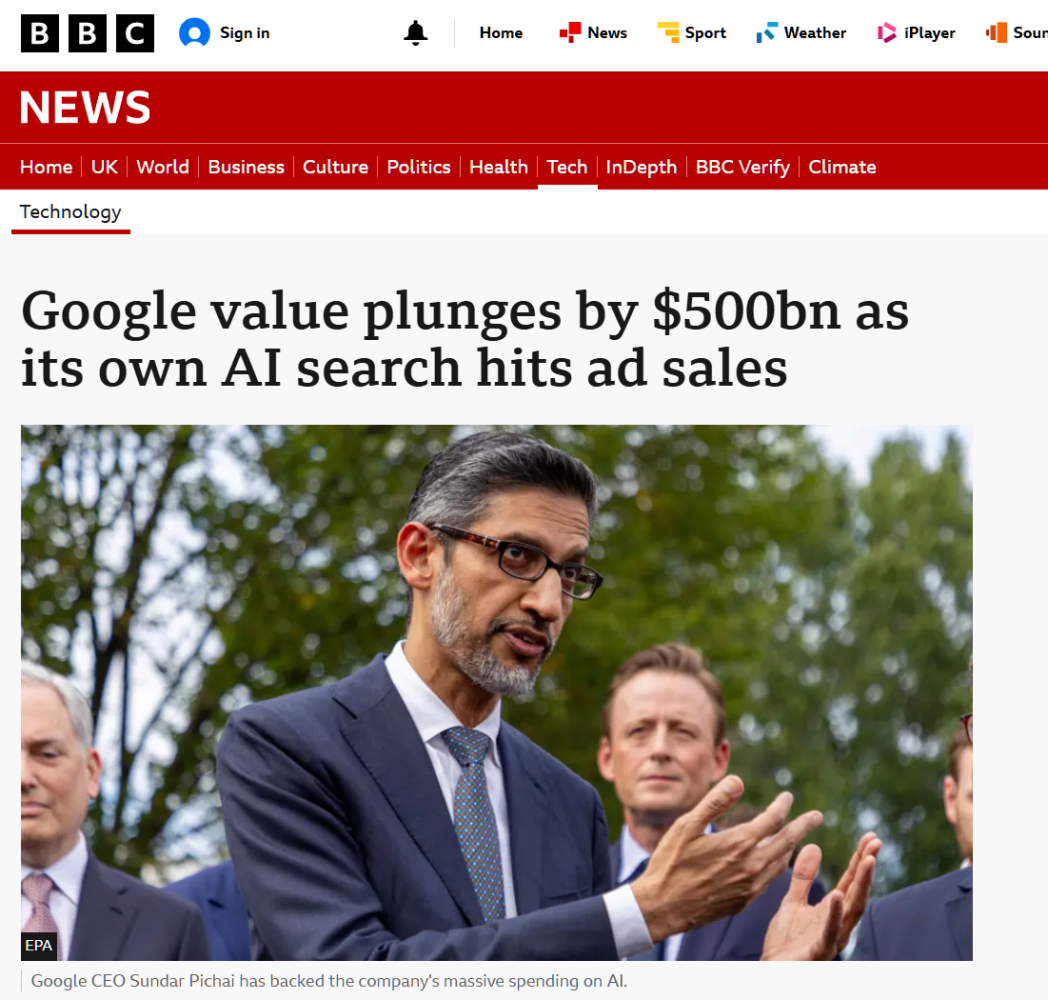

What intrigues me is how people at Google (namely Liz Reid and Sundar) have stated clearly that AI overviews drive MORE CLICKS, but, the reality is, they don't.
Google knows it, that's why they won't give a separate AI overview search appearance data set, it sort of explains why the generative AI report only gives impressions too (because it probably sends very few clicks).
I mean, look at this, written on Google's blog!
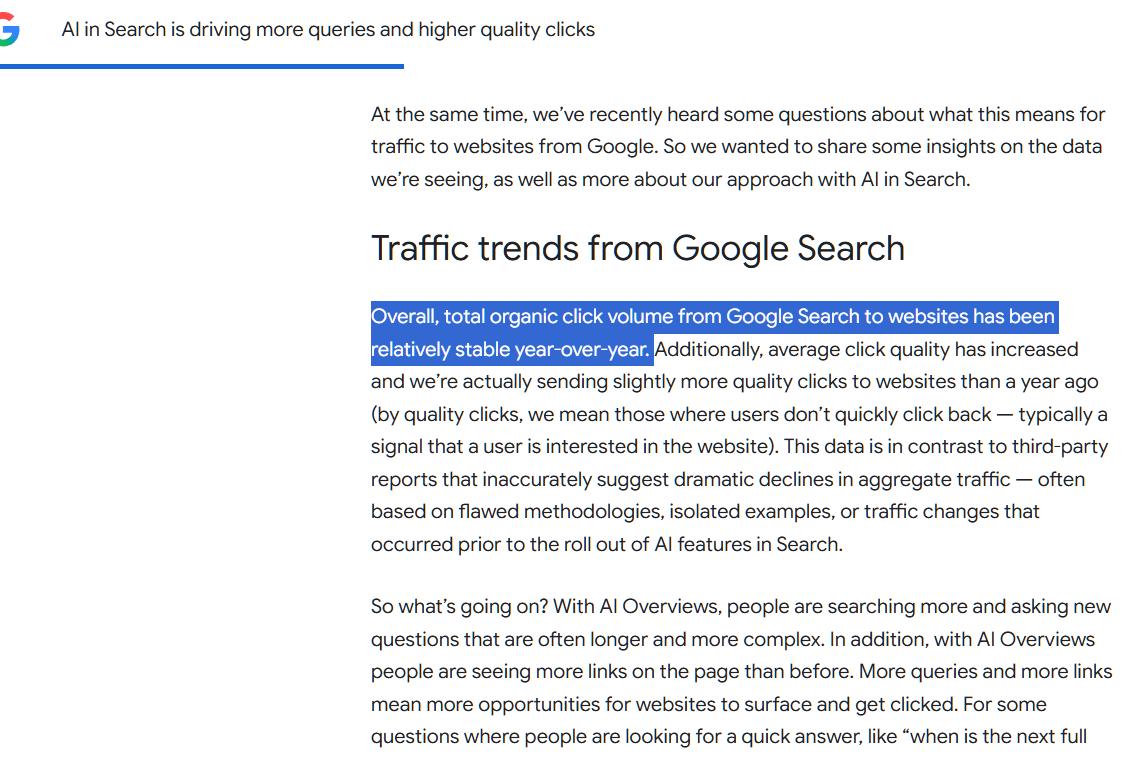
But, I beg to differ, we perform SEO audits for clients and we've seen SO many sites that have been losing clicks (not just to bad / poor SEO) but to AI overviews and their expansion.
Google's stance seems to have gone from AI Overviews send more clicks to "we send higher quality clicks" but the reality is - do they? and is it really helpful for people to get an answer in search as opposed to going to a website where they may potentially engage with the brand / product / service during their consideration phase?
Anyway, let's not digress too much.
So, let's not drift too far off topic here, you are here to learn about CTR and understanding whether your click loss is caused by ranking slippage, overall keyword loss or CTR erosion from AIOs (or a mix of 1 or more).
So, to explain briefly - we know click loss can happen for a number of reasons, so understanding what's driving it is key, because then, you can take strategic action, you can manage client expectations and you can better understand whether your current SEO strategy is as encompassing as it needs to be.
What are the causes of click loss?
So, there are a few key causes for click loss, now whilst it might seem obvious to any forth-coming SEO, it's also key to distinguish between them, simply because the solutions are very different.
The main reasons for click loss are:
Rankings have slipped - as rankings slip, CTR naturally goes down. Depending on the degree of ranking slippage you'll either see impressions remain consistent if rankings have slipped but remain on page 1, or, if impressions go too that's usually a sign of greater ranking slippage i.e. lots of keywords slipping off of page 1
Rankings have been lost altogether - so, this is usually when a URL/URLS on your site see a greater degree of loss to the point where Google stops serving for more and more keywords - this happens usually during google core updates or when a URL has been dropped from the index
Search volume fluctuation or seasonality - so sometimes clicks can just go down as a result of trends or seasonality, you may have news content that gets clicks for a short while before the news article has lost demand and subsquently clicks go down
Rankings remain the same but CTR falls because of Google AI Overviews or changes to what is served above organic results i.e. extended ads, new features, map packs etc so, this is literally because less users are scrolling to engage with positions 1, 2, 3 etc.
Fluctuation within AI Overviews - so, this can and does happen, AI overviews are not always consistent, therefore click loss can happen if your site drops from being cited in responses
So in this article, we're going to look at diagnosing click loss by type and how to segment the losses.
Initial Look at Click Loss
So, the first thing we should look at is the DEGREE of click loss, because a general indicator of what's happening can be found by looking at the degree of click loss within a timeframe.
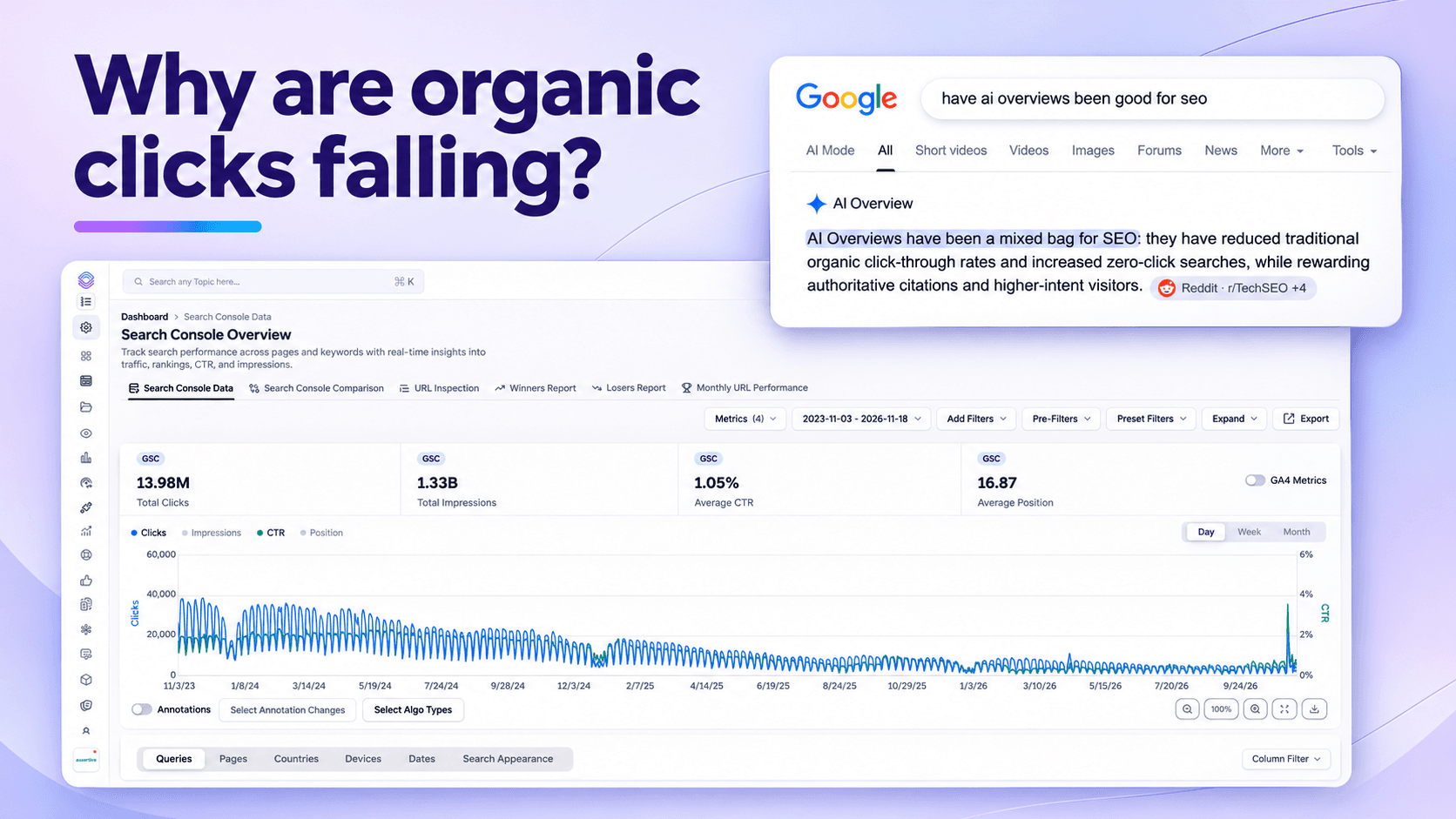
For example - gradual sustained click loss over time looks like this >
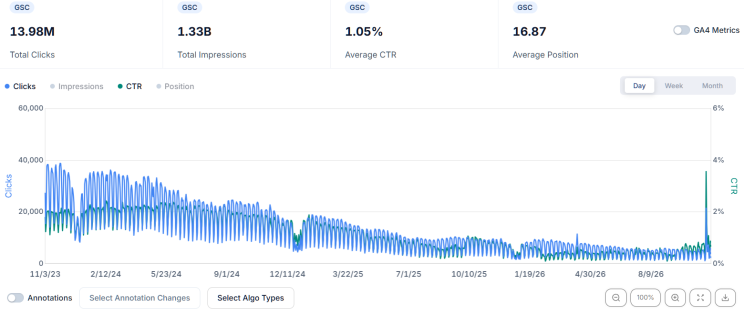

You see that long slow decline over time, well, that's FAR more indicative of clicks being lost to Google AI overviews, if we select AI overview roll out >
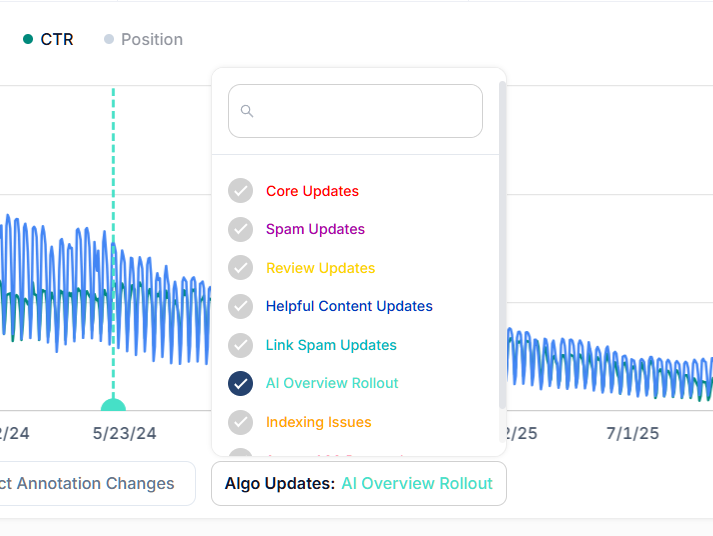

We can look at when the first initial AI overviews rolled out - what's key to know here is that whilst AI overviews rolled out more than 2 years ago, their presence in search has grown over time - typically when Google has released core updates we've seen more and more SERPS showing AI overviews.
When we look at CTR over the AI Overview roll out points we see >
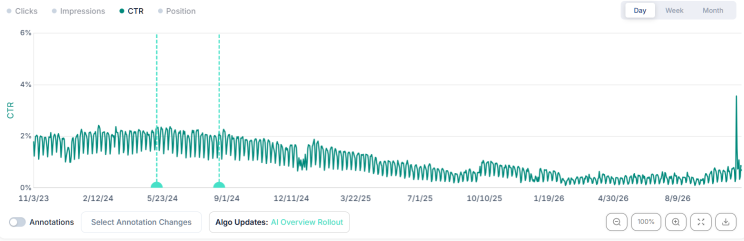

Immediately, we see progressive decline of CTR and sadly, that's lead to this:
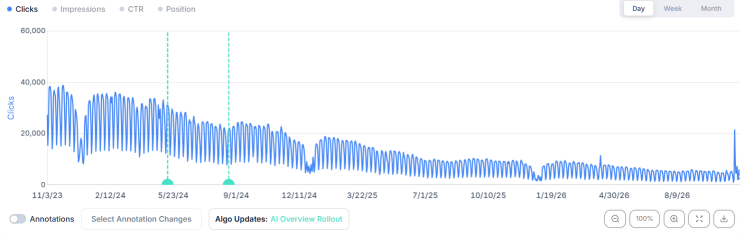

This is FAR more indicative of CTR erosion - and, if you were an SEO for this company, you couldn't nessescarily be blamed for click loss because of something Google rolled out that systemically deprived creators of clicks.
BUT, we can't just blame all click loss here on CTR erosion, there still COULD be ranking slippage or ranking loss.
So, we need to RULE this out, how do we do that?
Well, it's quite simple actually, let me explain a principle to you for you to adopt, and when you do, you can use this in your SEO strategy moving forwards.
To do it we use a process called query counting, it's very simple, everytime a search is performed in Google and a website appears within the users scroll an impression is generated alongside a query.
So, take my agencies website, I googled SEO Agency, we came up 1st, now, that impression will be logged in Google Search Console against the query (we were served for 1 query)
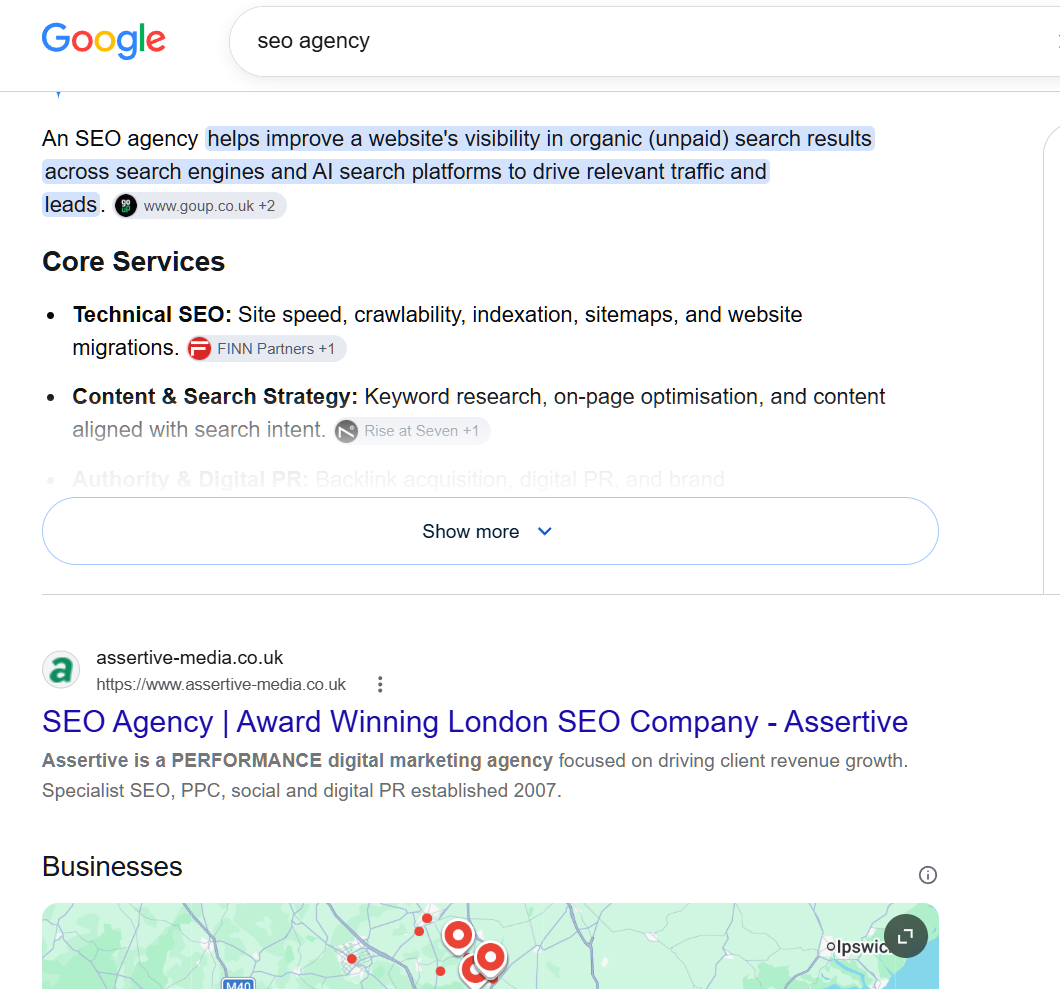

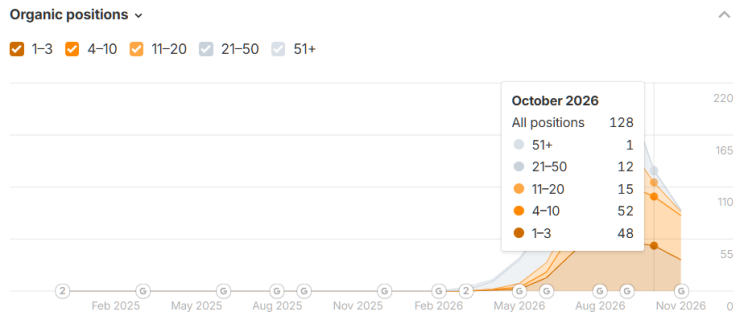
So, IF we look at the number of queries our website is served for daily, weekly, monthly and what positions those queries ranked in, we can get an understanding of whether or not some click loss was tied to rankings slipping or being lost altogether.
FOR EXAMPLE
www.assertive-media.co.uk could be served for 100 queries today where 80 of those queries rank at position 1-3.
If 6 months later the website is being served for 100 queries a day where 10 of those queries rank at position 1-3, this is RANKING SLIPPAGE - because we were still served for 100 queries but less of those ranked position 1-3.
If however, 6 months later the website was being served for 50 queries a day where 8 of those queries rank at position 1-3 then this is RANKING LOSS because the website is being served for less queries.
SO HOW DO WE COUNT QUERIES?
Well, you can do this a number of ways, you can:
Use third party tools like AHREFS / SEMRUSH to show you how may queries a page is being served for - although, as this is 3rd party data it's not as accurate as 1st party data - so, be very cautious with the data, consider it "indicative"

You can export your queries in Google Search Console for any specific URL on your site, set the time frame to 1 month, export, then the following month, export so you can count how many queries are served each month, you could use AI to count how many queries exist by position grouping
You can use SEO Stack's query counting tools, this is the most accurate source of data because we count every single query for every single URL on your domain
So, using query counting, let's look at what is happening with this site >
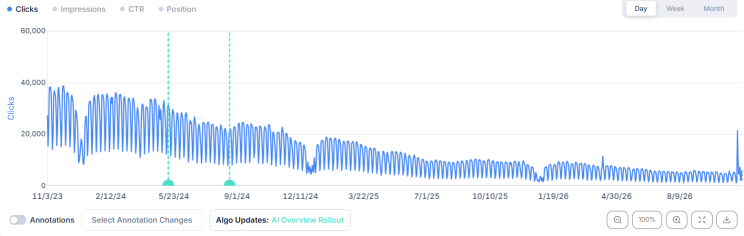

We know 100% that CTR erosion is happening.
Now, looking at the entire domains served query volumes we see >
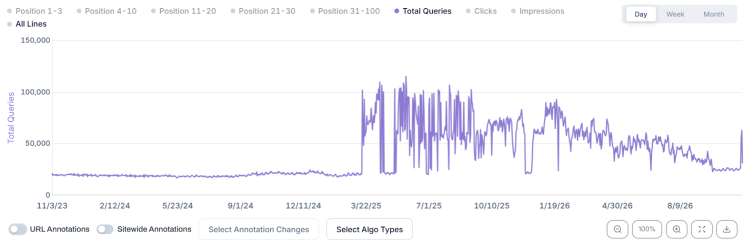

We see a sudden erratic query count after a long period of stability, this means the website started getting served for SIGNIFICANTLY more queries, but, wait a minute, didn't we lose clicks?
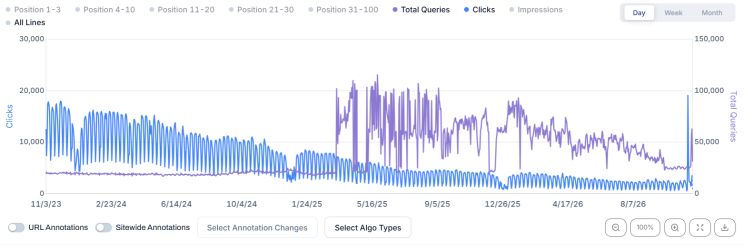

So, the website got served for significantly MORE QUERIES but lost clicks?
Well, immediately, it points to Google's AI Overviews, so what's happening:
Website SEO is good, because its being served for MORE QUERIES - which is generally positive, more content > more queries the website is served for
Clicks have continued to go into decline - therefore, those NEW QUERIES may be ranking anywhere in the top 100 and therefore not contributing clicks yet - so AI overviews is eating into the pre-existing keywords clicks, but new keywords are appearing so they may generate clicks in the future?
Well as we know - POSITIONS 1-3 are where most clicks used to originate, 4-10 still offered fair click opportunities, but realistically, we need keywords to rank to generate clicks.
So, if we select POSITIONS 1-3 we should see what's going on:
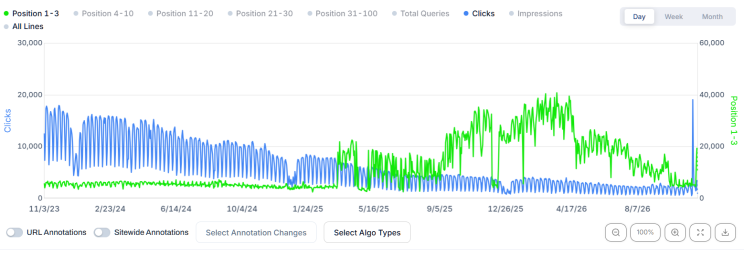

And there we have it ladies and gentlemen!
Look at the growth in positions 1-3, yet look at the click profile........
How can a website see SUCH substantial growth in positions 1-3 and yet continue to see click decline?
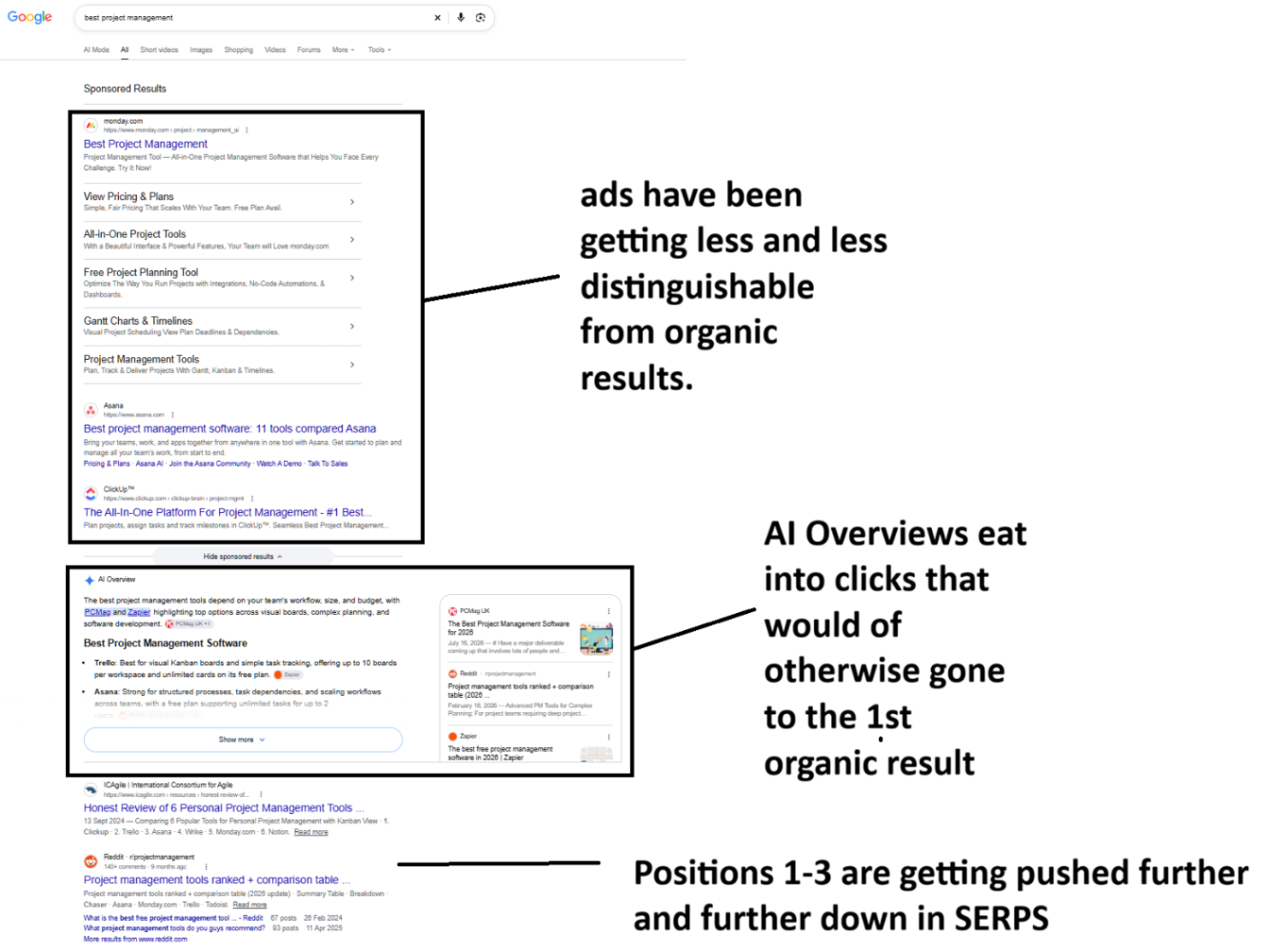

So, there's a DOUBLE WHAMMY going here:
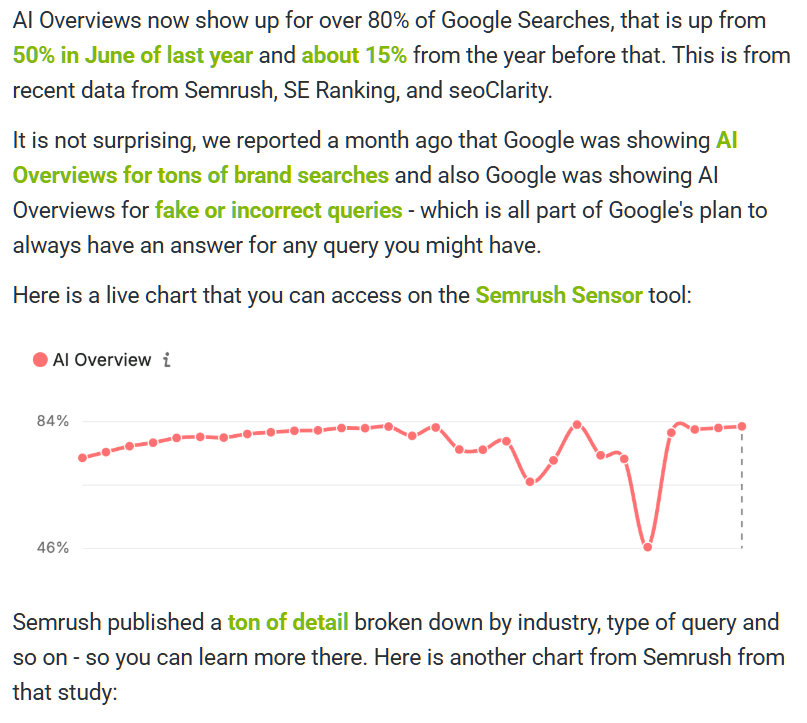
AI Overview expansion has been growing - AI overviews when they rolled out appeared mainly for informational queries and were in less than 40% of searches - according to a recent study by SERoundtable, over 80% of searches now trigger an AI overview - (source: https://www.seroundtable.com/over-80-of-google-searches-have-ai-overviews-42372.html)

2. Googles drive to increase revenue has lead to them blending paid ads so they fit more in with organic results + they run MORE ads in searches (number of results)
The golden rule here is that IF clicks are declining steadily over time, you need to evaluate the domains query counts and look at what's going on, position distribution is important - because SLIPPAGE is easier to recover from than click loss to CTR degredation in SERPS
Going back to SEO Stack's query counting tool - we can look at the ENTIRE DOMAIN as well as specific URLS, but, looking back at position groups we see >
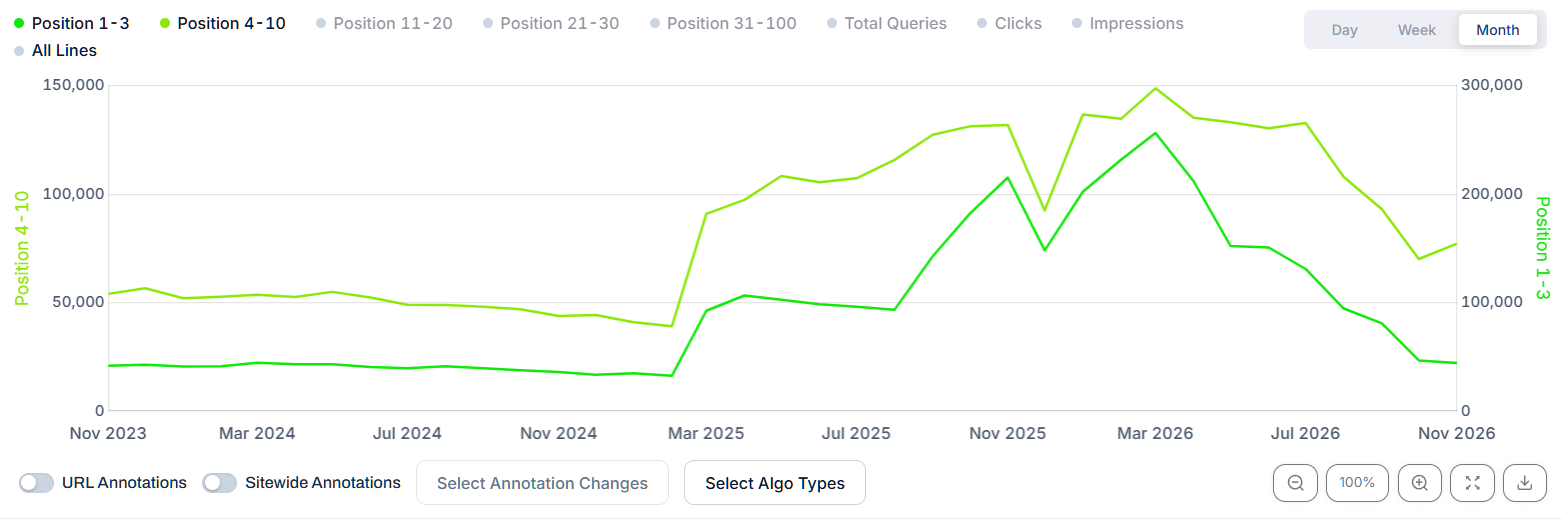
So look at positions 1-3 and 4-10, look at the growth - whilslt they have since gone into decline again, we see a SIGNIFICANT improvement.
This is REALLY IMPORTANT, because of this logic >
Client: Our clicks are continuing to decline, is the SEO even doing anything? this isn't sustainable
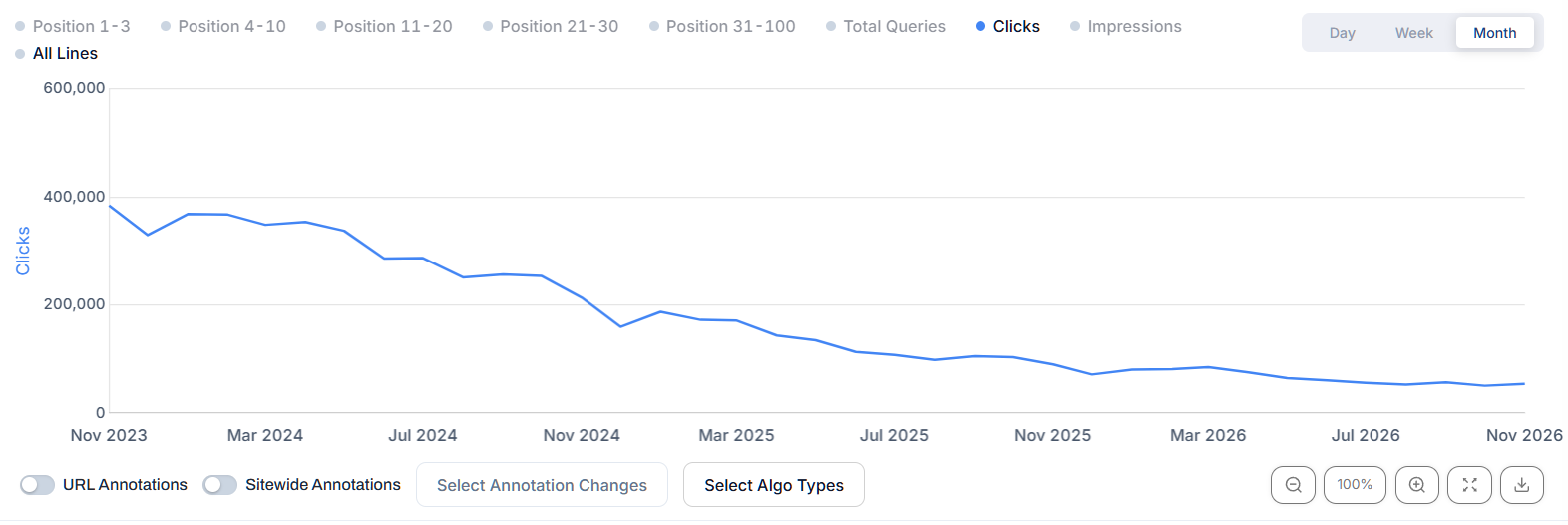
BUT, the reality is, the SEO is working, if positions 1-3 and 4-10 have grown significantly and clicks go into decline that's not an SEO issue per se, it's a Google issue - although it's an SEOs problem, because ultimately, any brand seeing a decline in clicks is likely to panic and wonder if their SEO is actually working.
This paints the perfect picture - look at clicks, look at positions 1-3, 4-10. Even though the positions groups slipped after a while being elevated, we STILL didn't see clicks level out or recover.
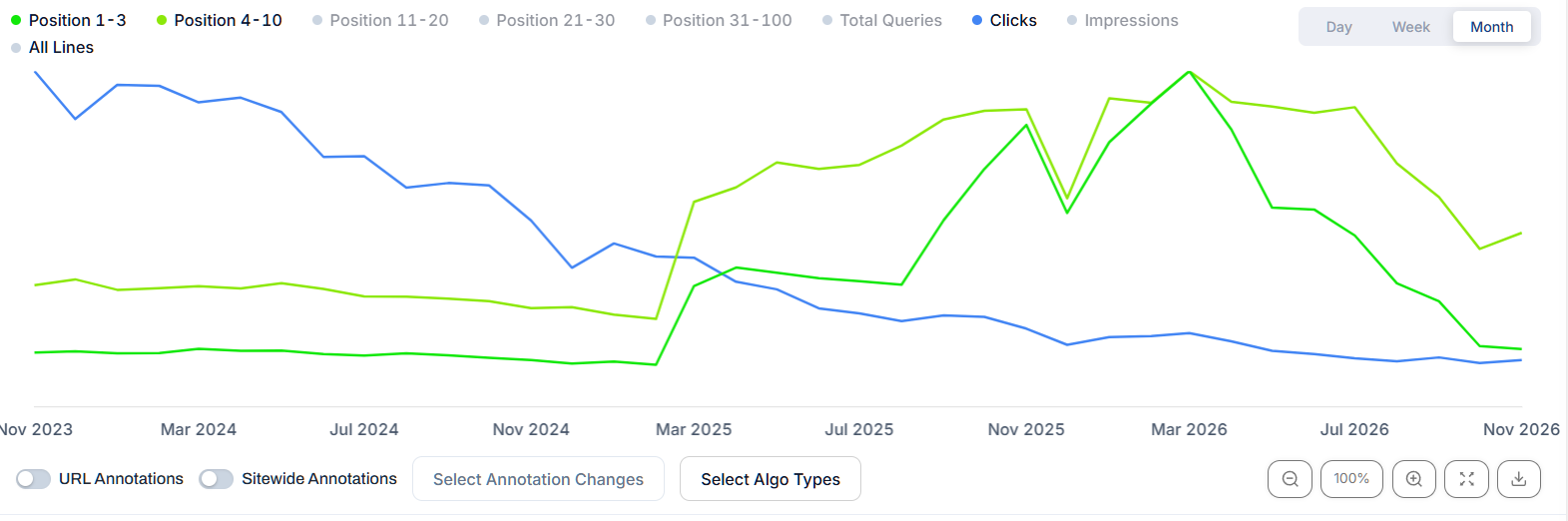
So, looking at this in more detail so you understand the concept and logic before we look at other issues.
RANKING LOSS (DEVALUATION OF CONTENT)
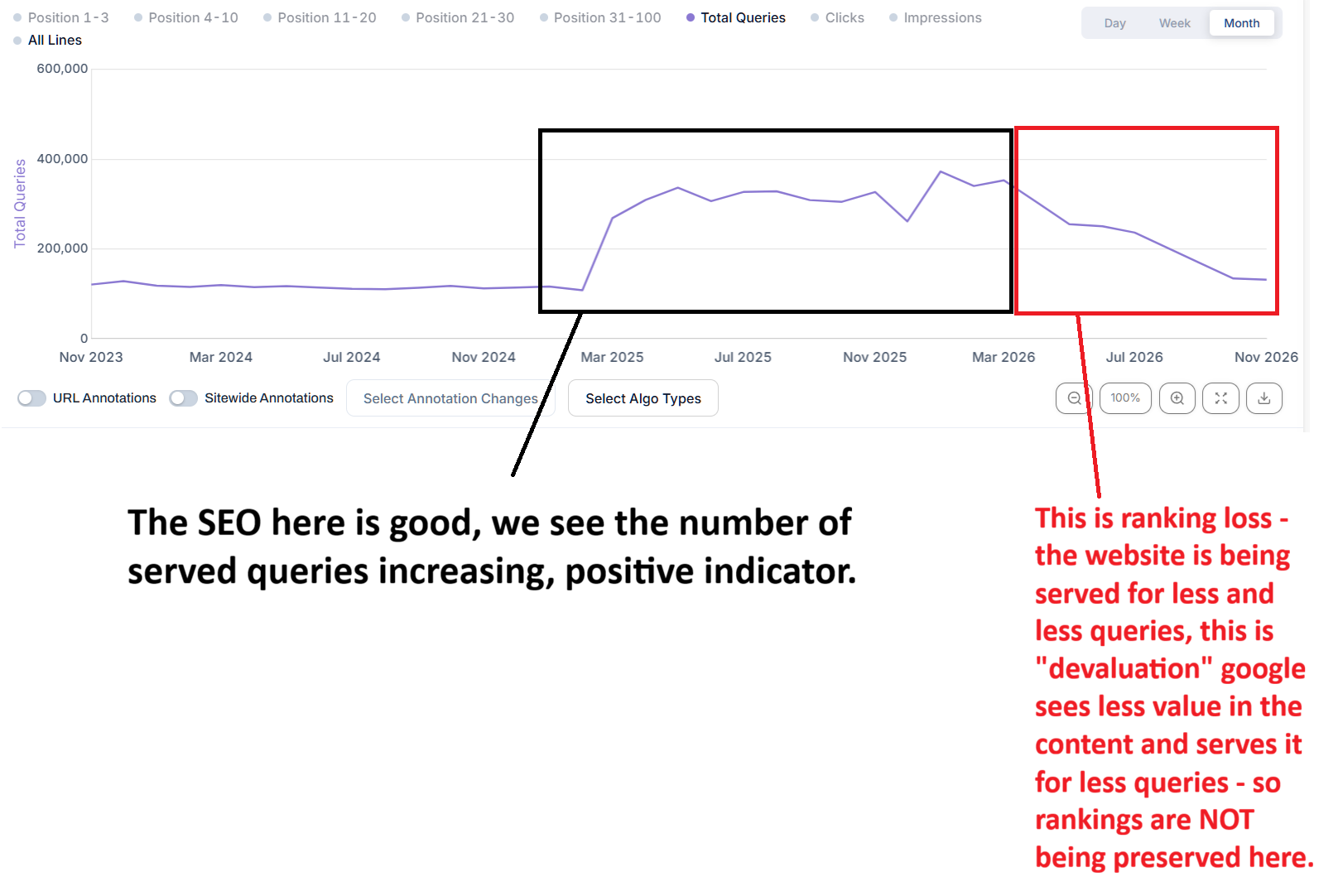
Looking at the above we see the website started getting served for significantly more queries which is a POSITIVE indicator - and remember, click benefit is UNLIKELY to come until enough of those new keywords get to positions 1-3.
So, now looking at the composition of those new queries in terms of position grouping -
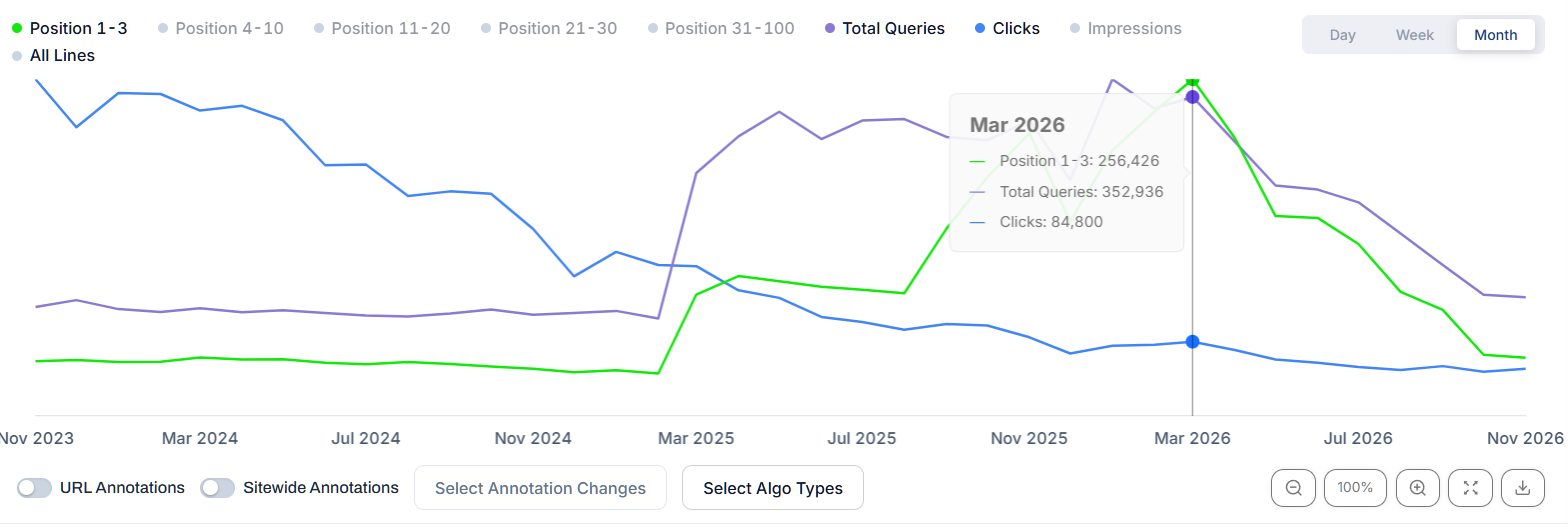
This is where we see positions 1-3 up massively yet, we STILL see clicks in decline.
This is GOOGLE AI OVERVIEWS.
We've now established that.
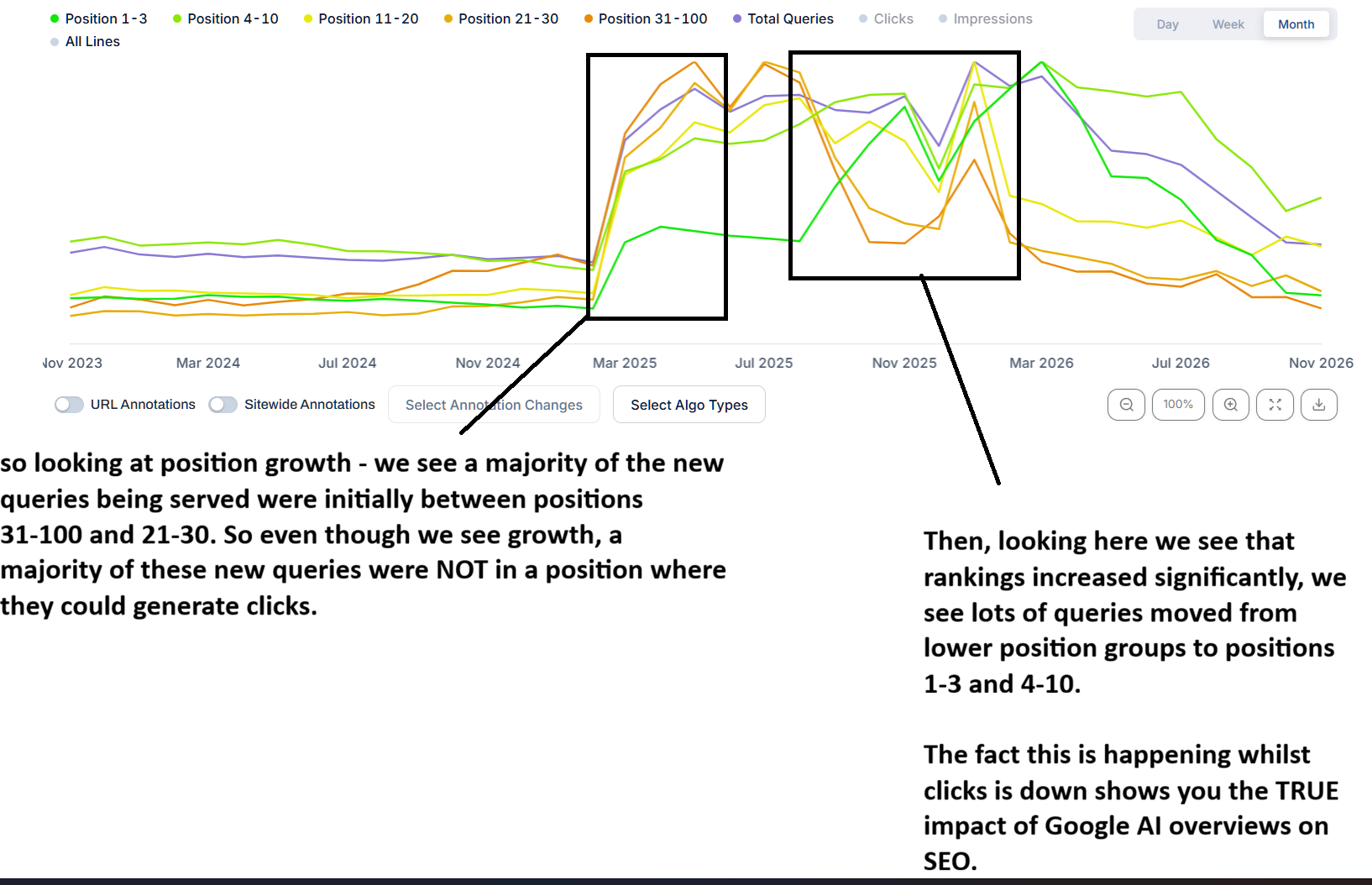
This is HOW BAD Google AI Overviews are - they EAT into click through rate.
When we evaluate click loss, he have to keep in mind that losses are rarely isolated.
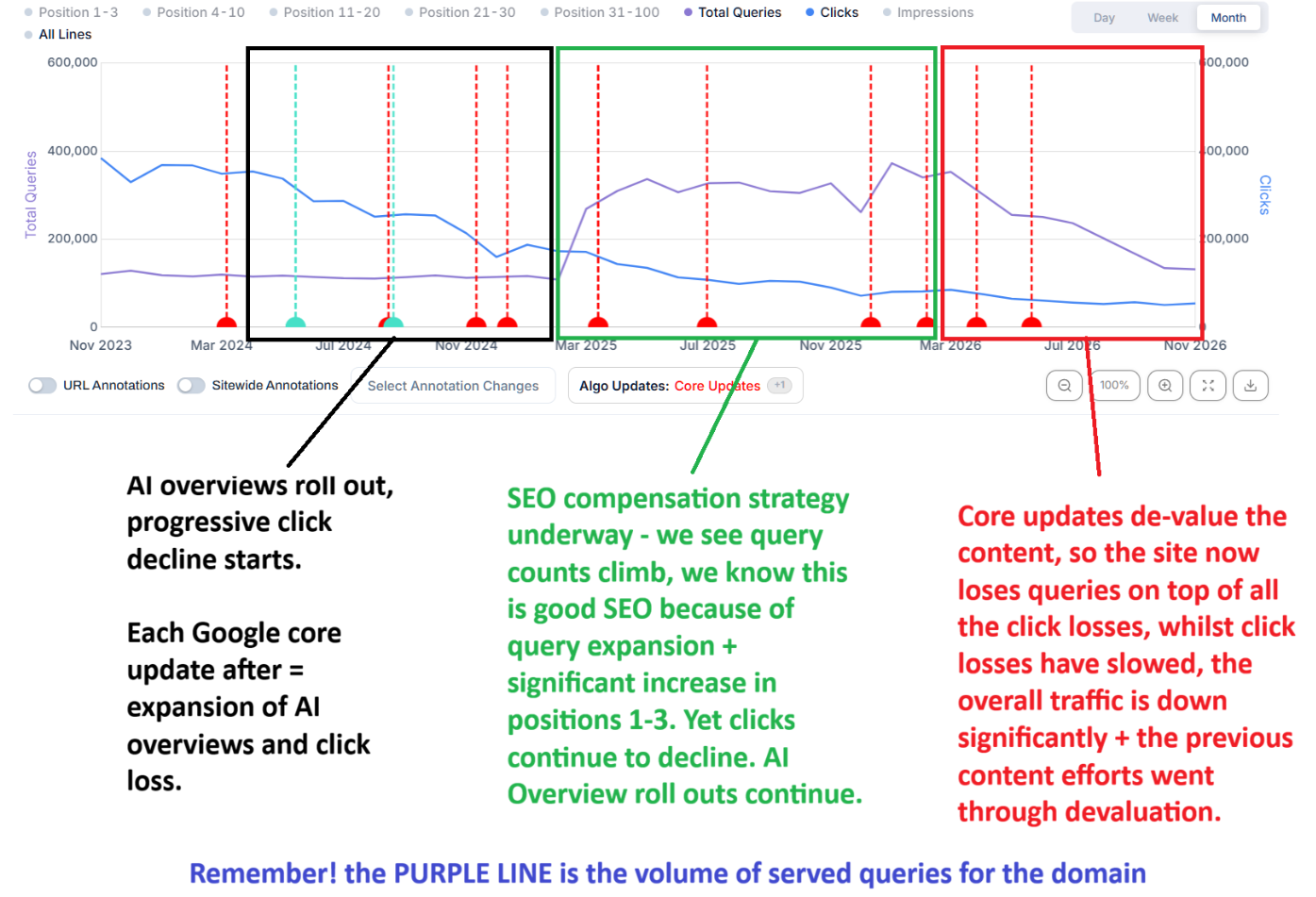
SO, I want you to memorise this:
IF query counts for your website are SUSTAINED and clicks go down progressively over time - if positions 1-3 are stable, it's MORE likely to be CTR degredation
If query counts for your website go UP and positions 1-3 remain stable or go up and clicks go down - again CTR degredation
If query counts for your website go UP and positions 1-3 decline, then that's ranking slippage and usually easier to recover from
If query counts go down, positions 1-3 go down and clicks continue to decline - that's usually content devaluation
What about other SEO Issues behind Click Loss?
Well, as I wrote earlier, not all click loss is attributed to AI Overviews / CTR degredation.
There's also content devaluation, indexing issues, penal issues such as Google manual action penalties, trends etc.
CONTENT DEVALUATION
Content devaluation is exactly what it says on the tin, it's where the content has lost perceived value and starts being served for less and less clicks until the point where it stops being served altogether or gets deindexed.
Content devaluation happens naturally over time, however there are so many factors to it it would take me forever to write it all out, to give you a short explanation:
Content can be devalued if it's deemed to be stale, out of date, no longer current
Content can be devalued if user behaviour depicts content to be unhelpful
Content can be devalued if its time sensitive where demand has gone
Content can be devalued after core updates if criteria shifts
Content can be devalued if the domain loses trust i.e. authority
Content can be devalued if it appears to be mass generated/AI, low effort
You have 2 types of content devaluation, progressive and sudden.
Progressive devaluation
Content typically fatigues over time, this can be aged content, commodity content, non-time specific content like how tos, guides etc.
Here we look at a blog, we see the volume of queries has declined over time:
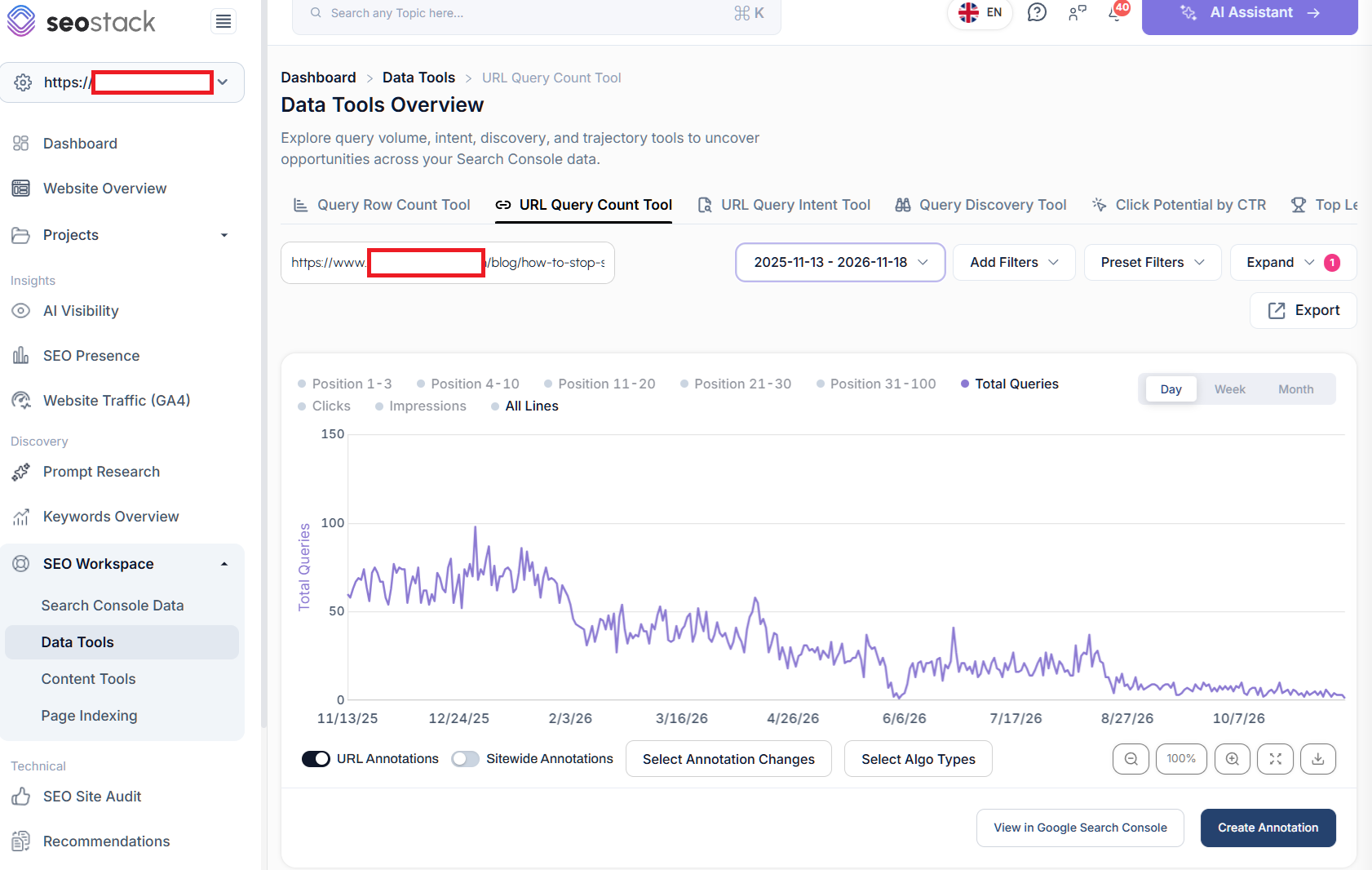
So we can see steady declines in the volume of keywords the blog was served for, looking at it monthly we see (with clicks)
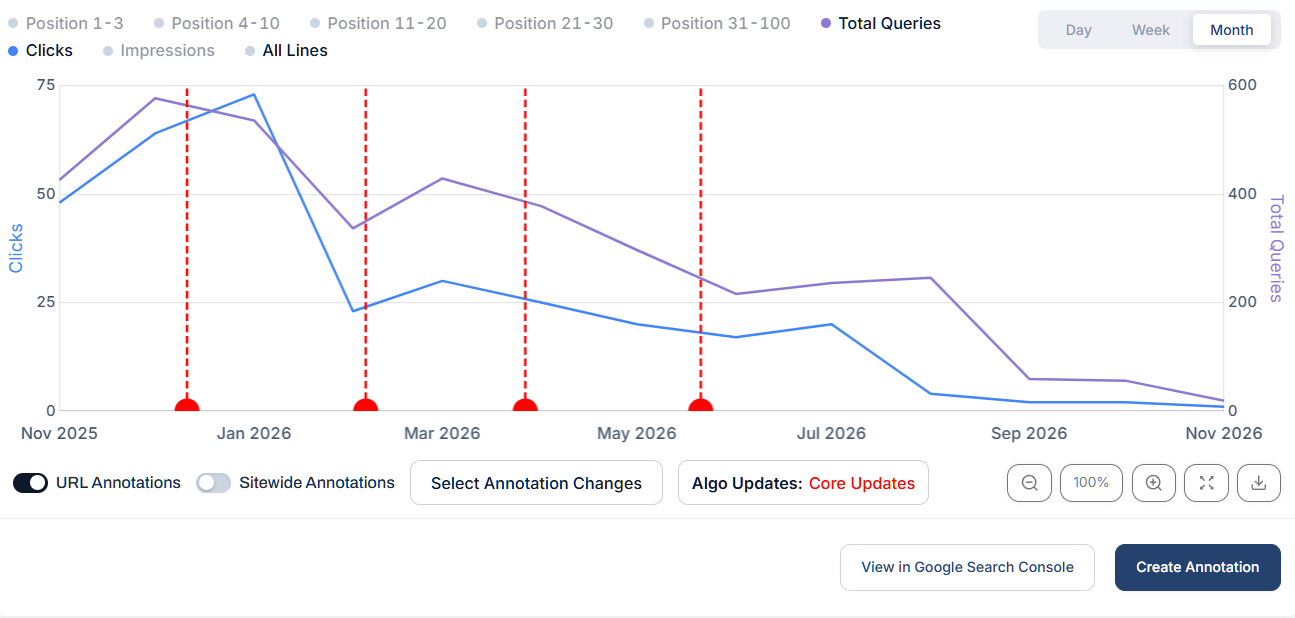
This is the perfect example of content that's just been losing value over time.
For progressive content devaluation - what you need to ascertain is:
- How much of the sites content follows a similar trajectory
- How old is the content, is there any specific pattern of loss across older or newer content?
- What content types are affected? just blogs/guides/articles? or broader losses?
- When was the content last updated
- Does the content do its job? have you looked at engagement? scroll depth? heatmaps?
- Does the content align with best practices around E-E-A-T?
- Is the content actually useful? would it help a person to achieve something or to get sufficient info?
- Has the content LOST queries or just lost clicks? (see above for query count analysis)
- Does the content have any unique or added value?
- Is the content too thin, too long?
Generally if you see a larger proportion of your site seeing decline, it could also be a broader trust issue.
There are other things to consider such as:
- Have you been producing more / a lot more content than usual and not seeing the benefit?
- Is Google actually indexing anything you produce, is it continuing to index older content?
- Site Quality is a broad classification, if your site has lots of low value or low engagement commodity content than the overall site itself can lag even if not all content is bad
What you should do for content that's progressively in decline:
- Segment out content that's impacted by CTR where query counts are healthy - you don't need to work on these URLS
- Segment the URLS where clicks + query counts are in decline
- Rule out a lack of internal links, anchor issues, rendering issues or technical SEO issues
- Evaluate the content AGE - how long ago was it posted? is it still current or accurate?
- Evaluate content engagement - dump GA4 engagement data, pair it up with word counts
- Use 250 words per minute / your article word count to get an estimated consumption time
- Compare estimated consumption time with actual engagement time
- E-E-A-T/YMYL audit where applicable - maximise compliance (not a direct ranking factor)
- Compare SERP changes and shifts, look at typical word counts and compare
- Consider your content UX, presentation, formatting and layout - enough media/images?
- Review content readability, tone of voice, perspective, writing style
- Perform a content NLP audit
- Look at external links to root domain, to upper level pages and direct to URLS
Effectively - you need to ensure your ducks are in a row.
Don't expect recovery to be quick if your content has spent months/years in decline, reversing takes time, this is why with clients I usually suggest:
1. Cull dead content from the domain - get rid of anything not adding value
2. Review content that's very weak but has potential (queries have impressions)
3. Assess viability of content revamps
4. Get links, indexing, technical SEO ruled out - is it just a content issue?
5. Look for key loss points and any algo runs in close proximity ie. core update, spam updates?
Cleaning up, refreshing/revamping content and ensuring maximum compliance will help you on a path to recovery, even if it doesn't happen overnight.
Sudden devaluation
Sudden devaluation is when content gets hit abruptly:
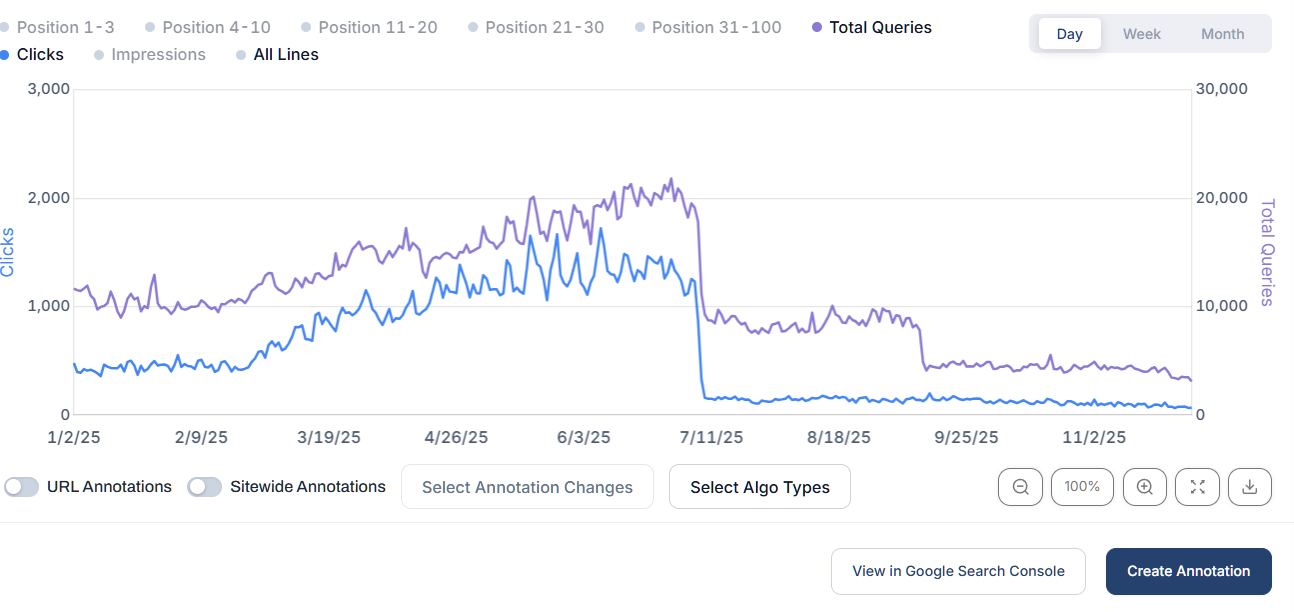
So rather than a slow decline over time, we see a much sharper sudden drop. When we see declines like this they are often either down to a Google core update or a manual action / indexing issue.
If it is core update related, we will usually see the decline within close prxoimity to the core update roll out i.e.
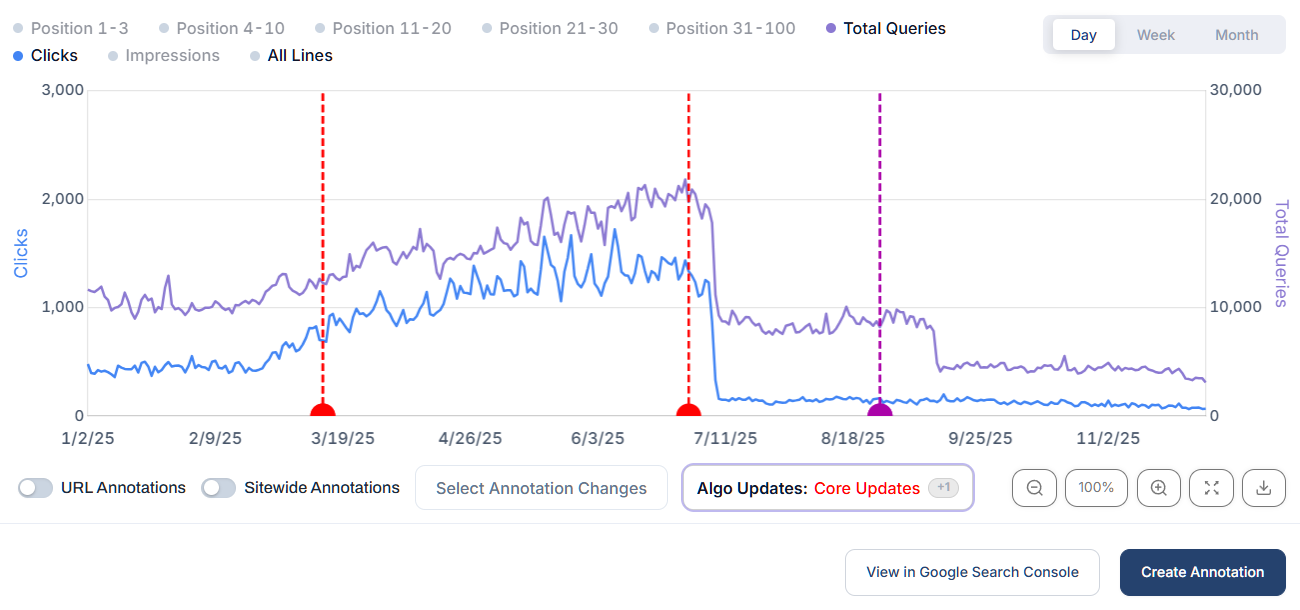
So when something like this happens, it's usually a quaity issue, typically when Google rolls out a core update, that update will take differing weighted ranking factors into account - so Google could shift weight on helpful content factors which could ultimately see your content devalued if it hasn't been exhibiting positive engagement or behavioural factors.
Generally, if a larger part of your site experiences the same drop across lots of URLS, it's more likely to be a site quality issue (which can span across content, UX, behaviour, links/authority etc
Generally with devaluation after a core update you'll want to run an SEO audit to assess:
What proportion of content got hit
Where the losses are - specific sub folders / folder groups
Content quality review
User behavioural analysis
Link audit
Technical review to rule anything out
Page indexing review
Here are some of the things you can do:
Find the pages where rankings and query counts dropped - Compare equivalent periods before and after the loss. Look at which pages are being served for fewer queries and which have lost positions 1–3 and 4–10. If positions have held and CTR has fallen, check what changed in the SERPs before putting those pages on your rewrite list.
Check whether the affected pages are still indexed - If URLs have dropped out altogether, inspect a sample in Search Console. Check canonicals,
noindex, rendering and any recent changes to templates or internal links before deciding the content itself is the problem.Group the losing URLs and compare them with pages that held up - Is it mainly blogs, service pages, location pages, product collections or one particular topic? Check whether the pages share a template, publishing date or content approach. If 80 location pages dropped and most of them say the same thing with a different town name, you’ve got something specific to investigate.
Check what changed around the point of loss - Look at Google update dates alongside your own release history. Did you change a template, remove copy, publish hundreds of new pages or strip out internal links? The date gives you a starting point, then you need to check which URLs were actually affected.
Look at what Google is serving now for the queries you lost - Open the pages that gained ground. Does Google now favour a different page type, i.e. a collection over a buying guide? If the intent is broadly the same, look at what those pages give users that yours doesn’t.
Check whether the page actually does its job- Does it answer the main question early enough? Is the information current? If it’s a comparison, can someone actually make a decision from it? Look for what’s missing, i.e. prices, limitations, first-hand examples, screenshots or details that only someone who knows the subject would include.
Look for repeated content problems across the affected section - Check for near-duplicate pages, generic copy, outdated claims and multiple URLs answering the same question. If the same weakness crops up on dozens of pages, fix the template or publishing process that produced them.
Check trust where it matters - On medical, financial or other YMYL pages, check who wrote or reviewed the advice, what evidence backs up the claims and whether it’s still current. If the underlying advice is weak or out of date, fix that first.
Decide what to improve, merge or remove - Start with pages that lost meaningful rankings or clicks and still have a clear purpose. Merge pages that genuinely cover the same intent. Before removing anything, check its backlinks, conversions and whether it still serves a useful purpose for visitors.
Track what happens to the pages you change - Annotate the edits and watch query counts, position groups and clicks for those URLs. If positions 1–3 start coming back but clicks are still lagging, check CTR and revisit the SERPs for those queries.
What I would advise:
1. Build a click gap (I show you how to do this below) comparing last 3 months year over year
2. Segment out all the URLS that lost clicks
3. Use AI to assess the content types / segment by sub folder / content type
4. Benchmark key page metrics (internal links, external links, anchors, word count, readability, query counts, engagement time, estimated consumption time vs actual consumption time)
5. Assess whether the pages still have demand
6. Assess whether your content aligns with current SERP intent
7. Perform a series of content audits (E-E-A-T, YMYL, NLP)
8. Scrub the website of any dead content, minimise non value content
9. Create a new content strategy - max effort, lower output rather than mass content or with AI automations
10. Review content layout, UX, engagement, media utilisation, structure
Some KEY things you can do to get started:
BUILDING A CLICK GAP
You can do this via Google Search Console or via SEO Stack or another GSC tool that bypasses the 1000 ROW limit (assuming your site has 1000+ pages) if not, using search console will suffice for the initial click gap but not for other metrics.
In GSC you simply go to performance:
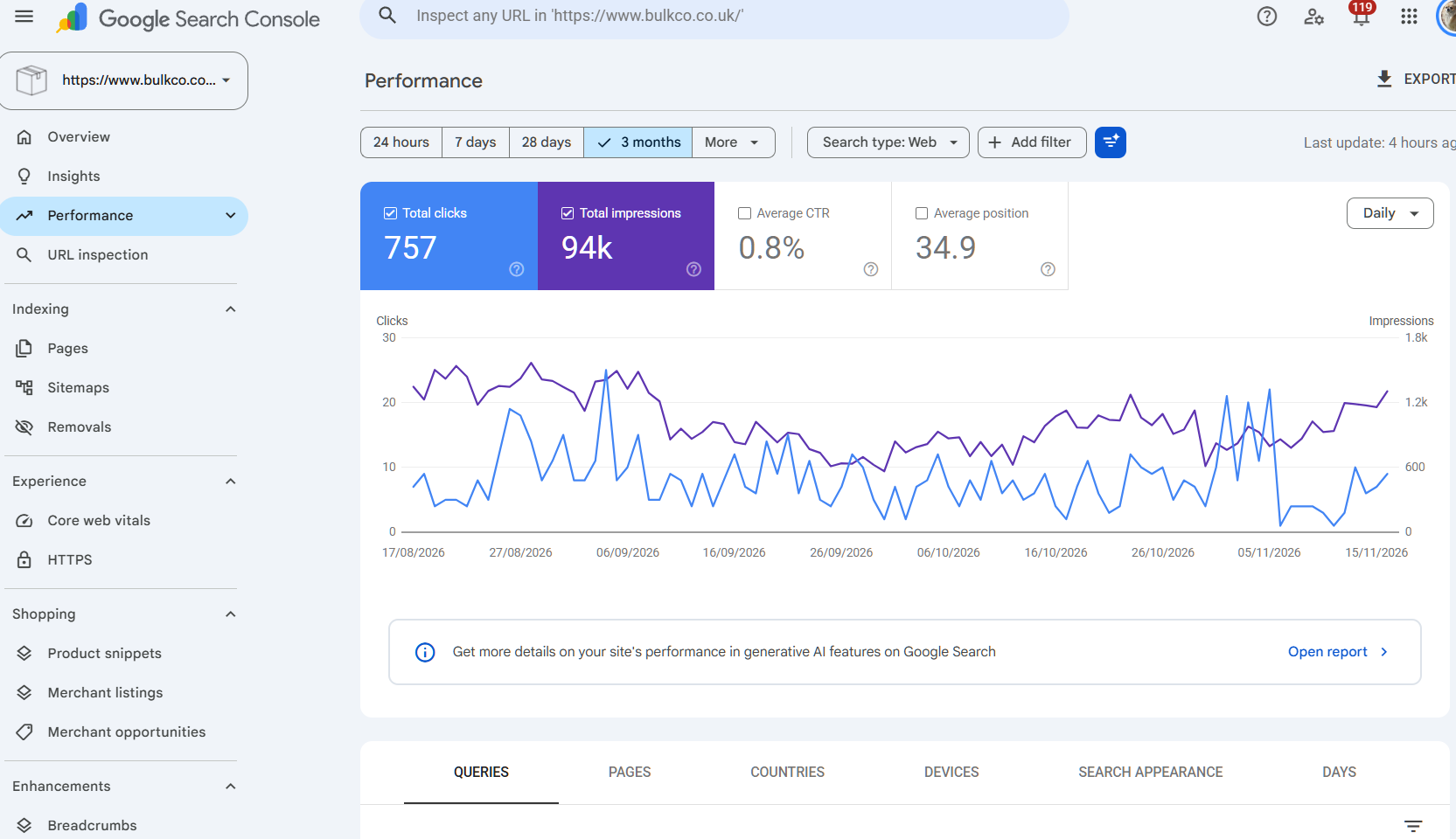
Timeframe - select MORE and then use the COMPARE function > select last 3 months year over year.
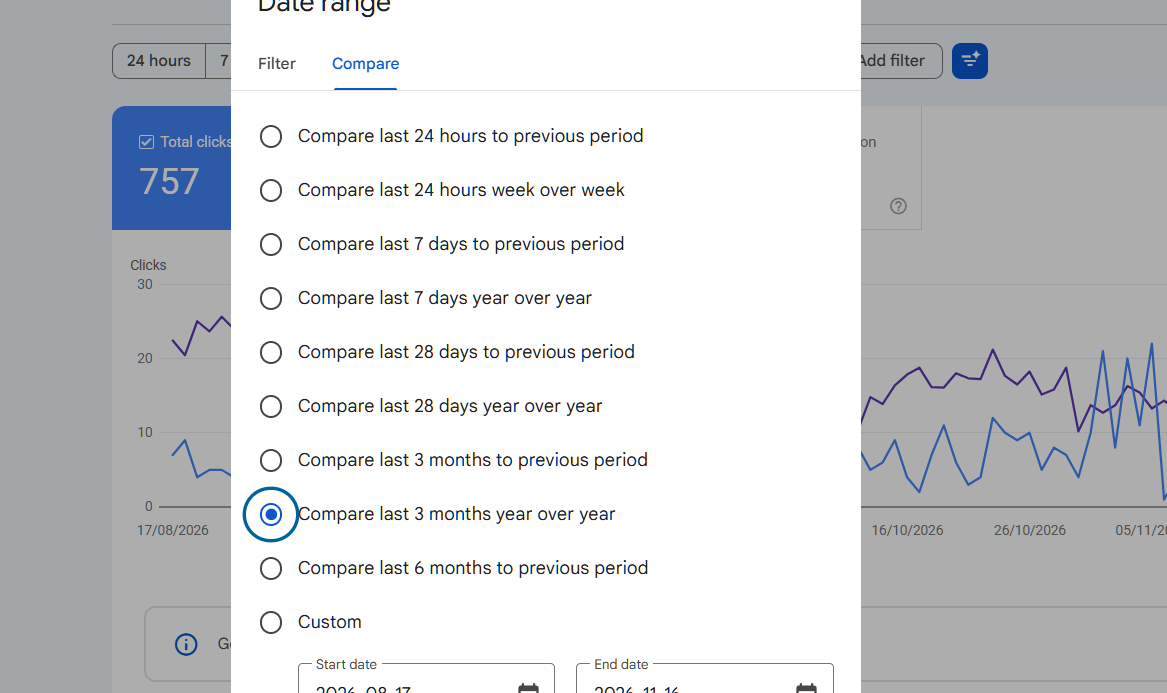
click apply, then click EXPORT
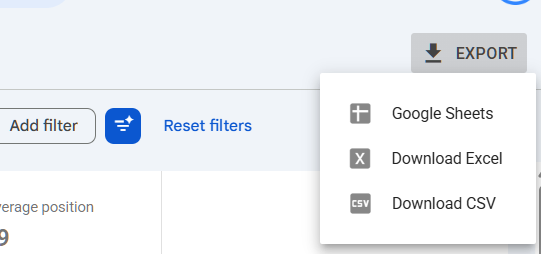
Then, to the left of column D insert a column, this will be where we see the click difference.
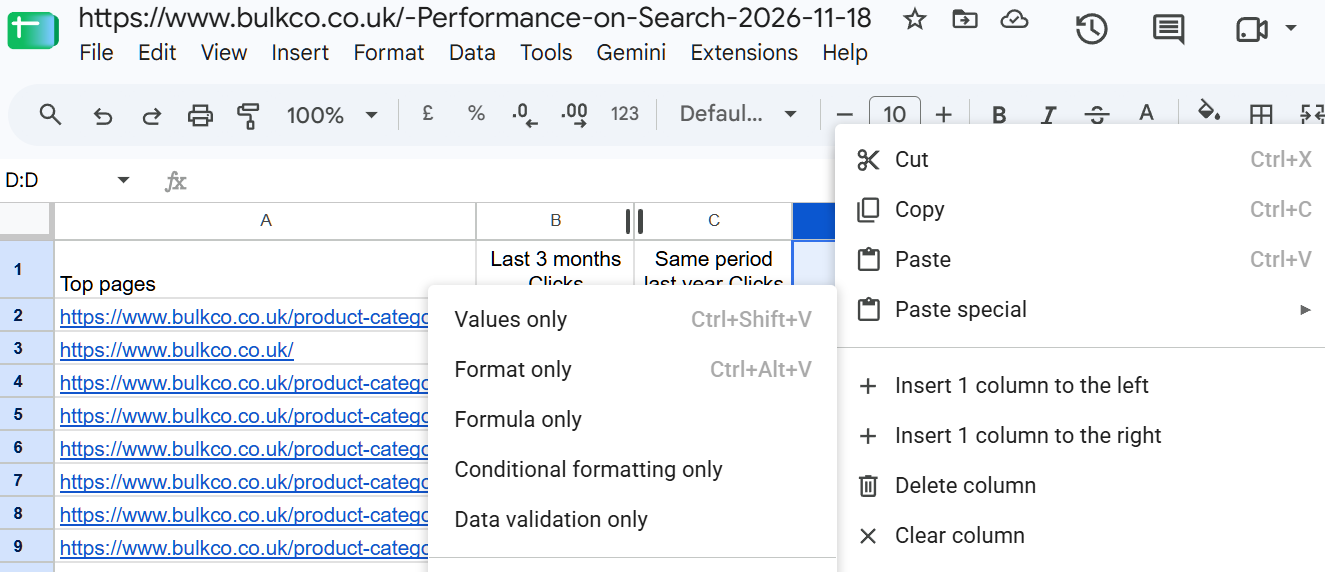
then in the new column, cell D2 use =sum(B2-C2) then cascade down the column.
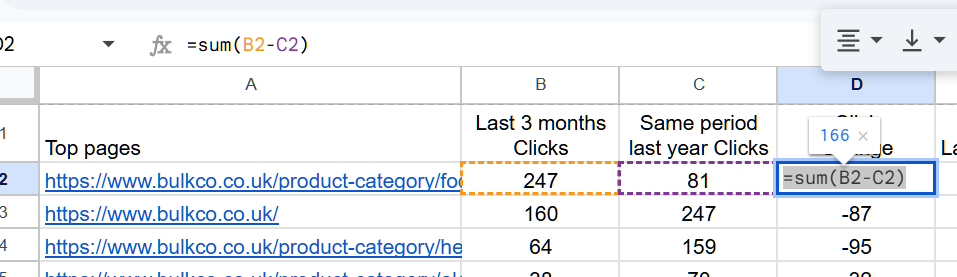
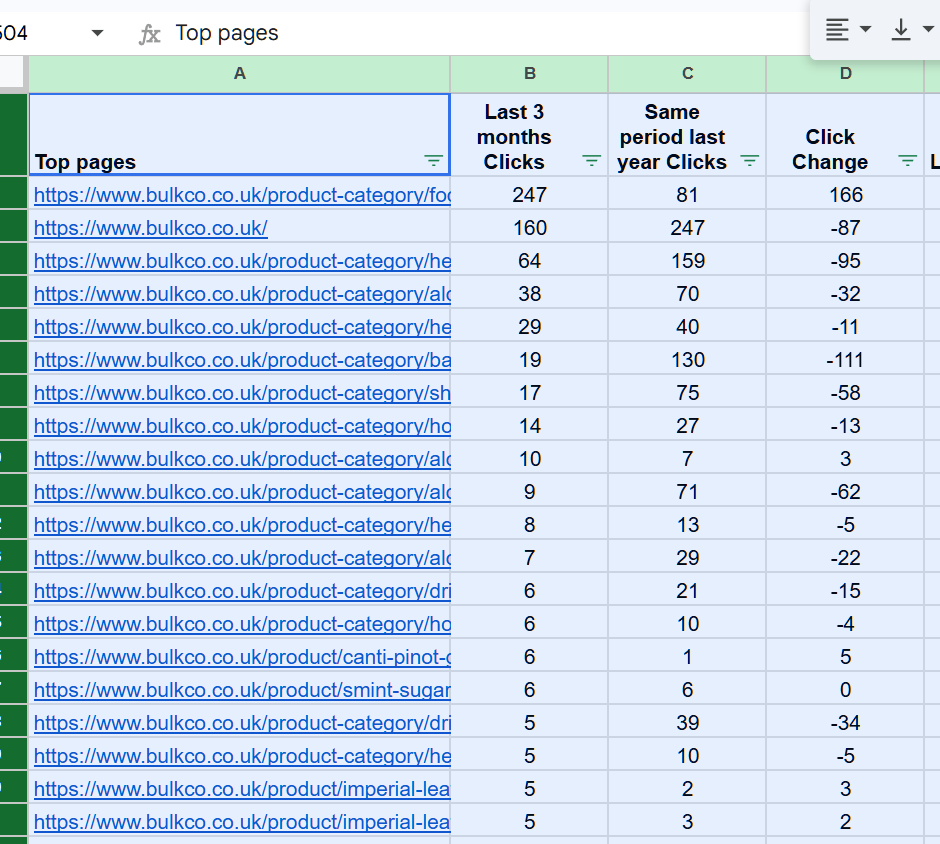
if you create a filter, you can then apply a filter to show all the URLS that had less than 0 clicks.
You can then export this, feed it to AI and get it to give you an overview of the content types / general theme of content. You should also do this for URLs that gained clicks - effectively you want to see if there is any patterns in the content types that lost vs those that gained.
Now, you can do this in SEO Stack much quicker and easier.
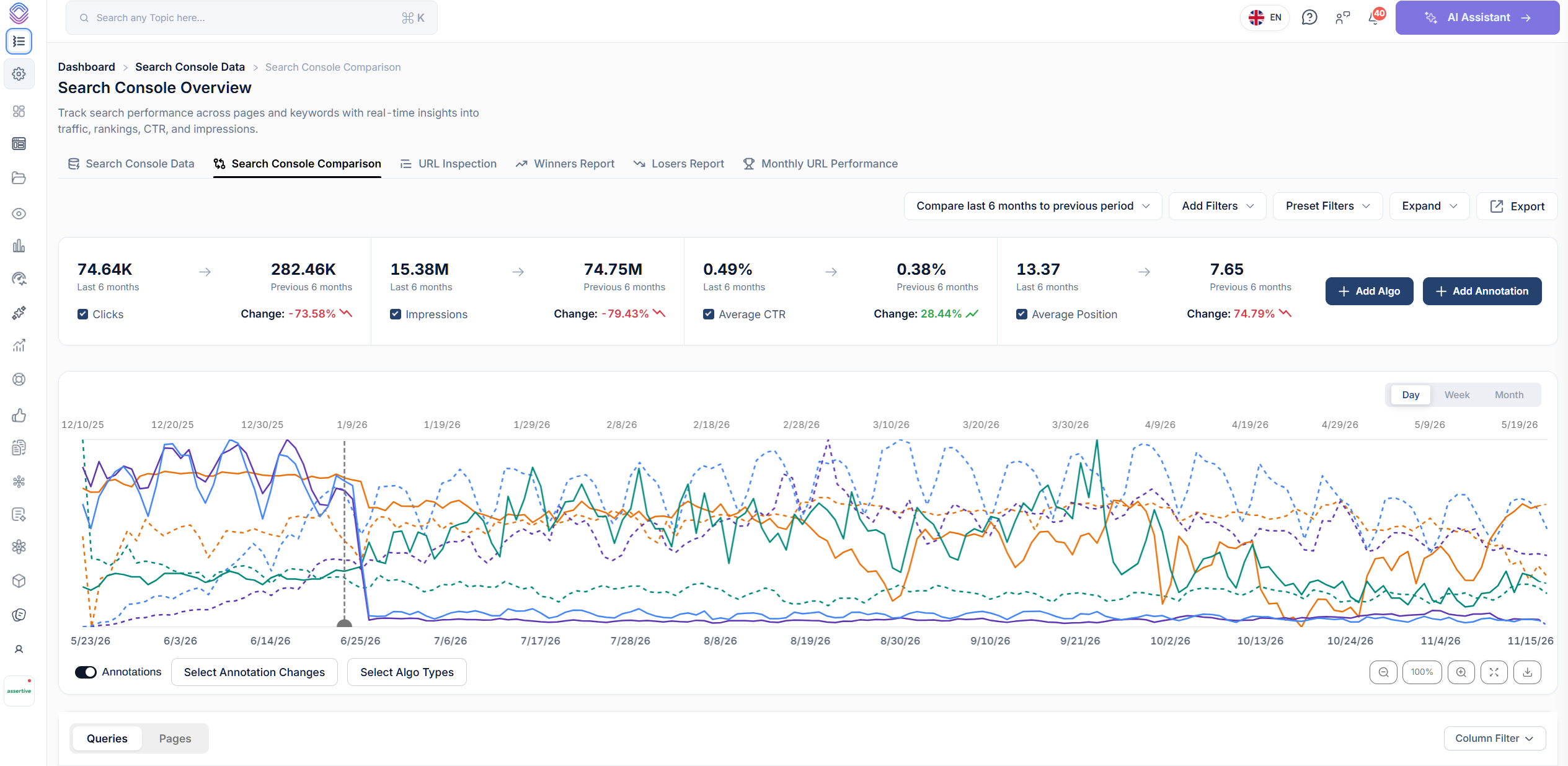
Login to SEO Stack, go to Search Console Data, then click the Search Console Comparison tab.
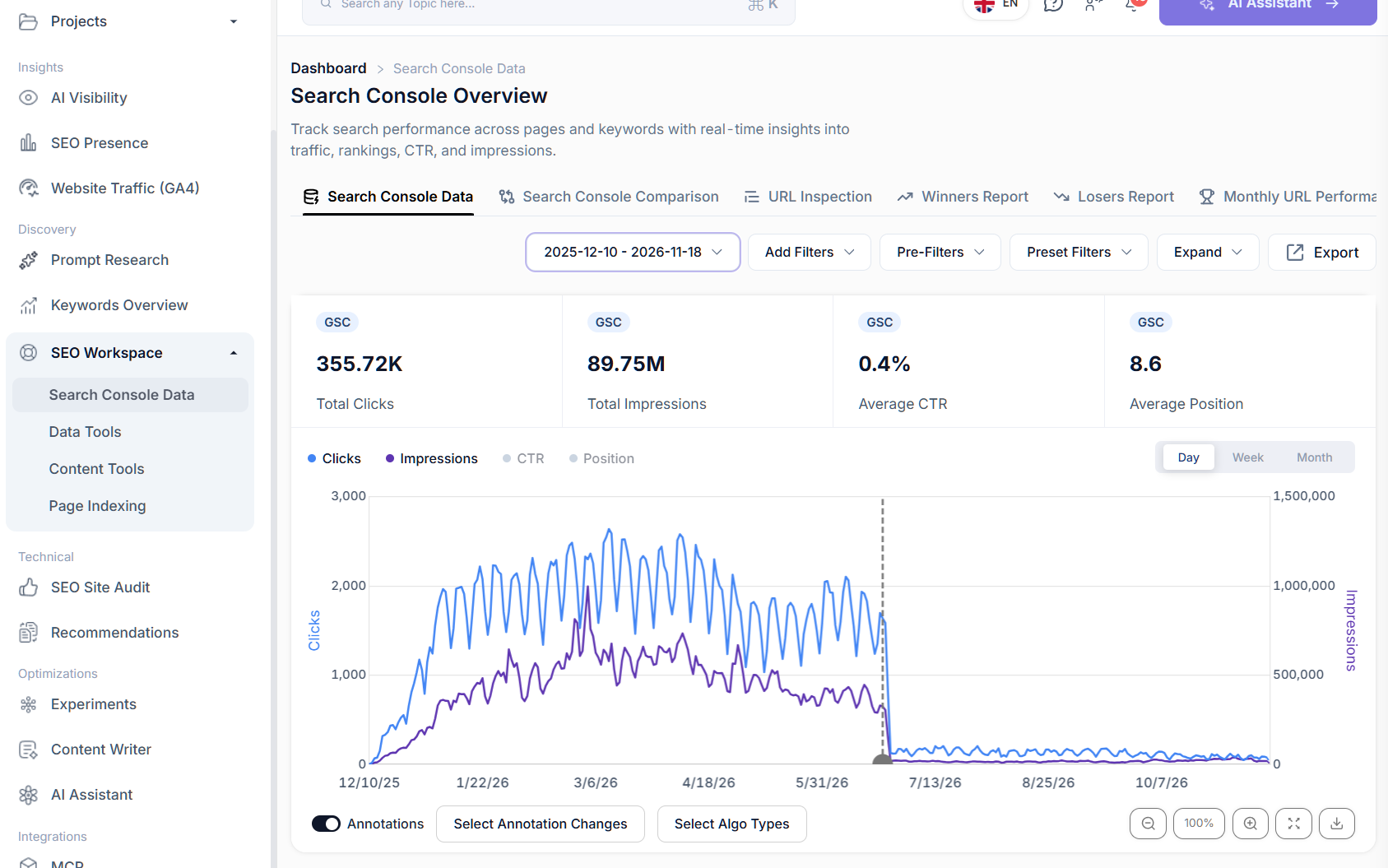
Then, in search console comparison, select the timeframe, and then click export.
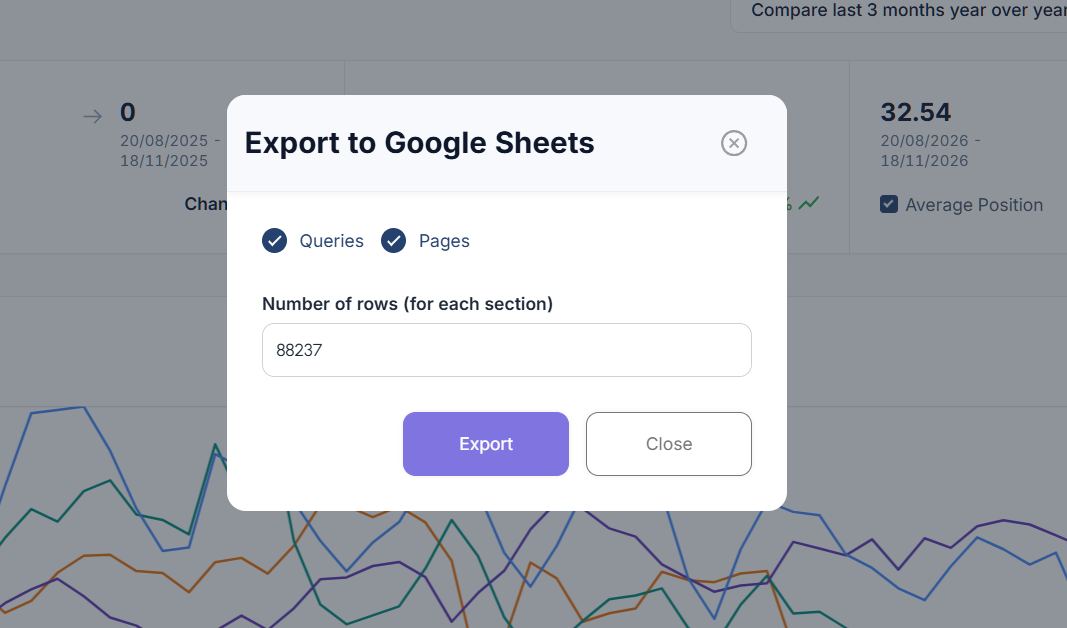
Select the maximum number of rows and click export.
Open your export and you will see the click and impression gap columns are already there for you.
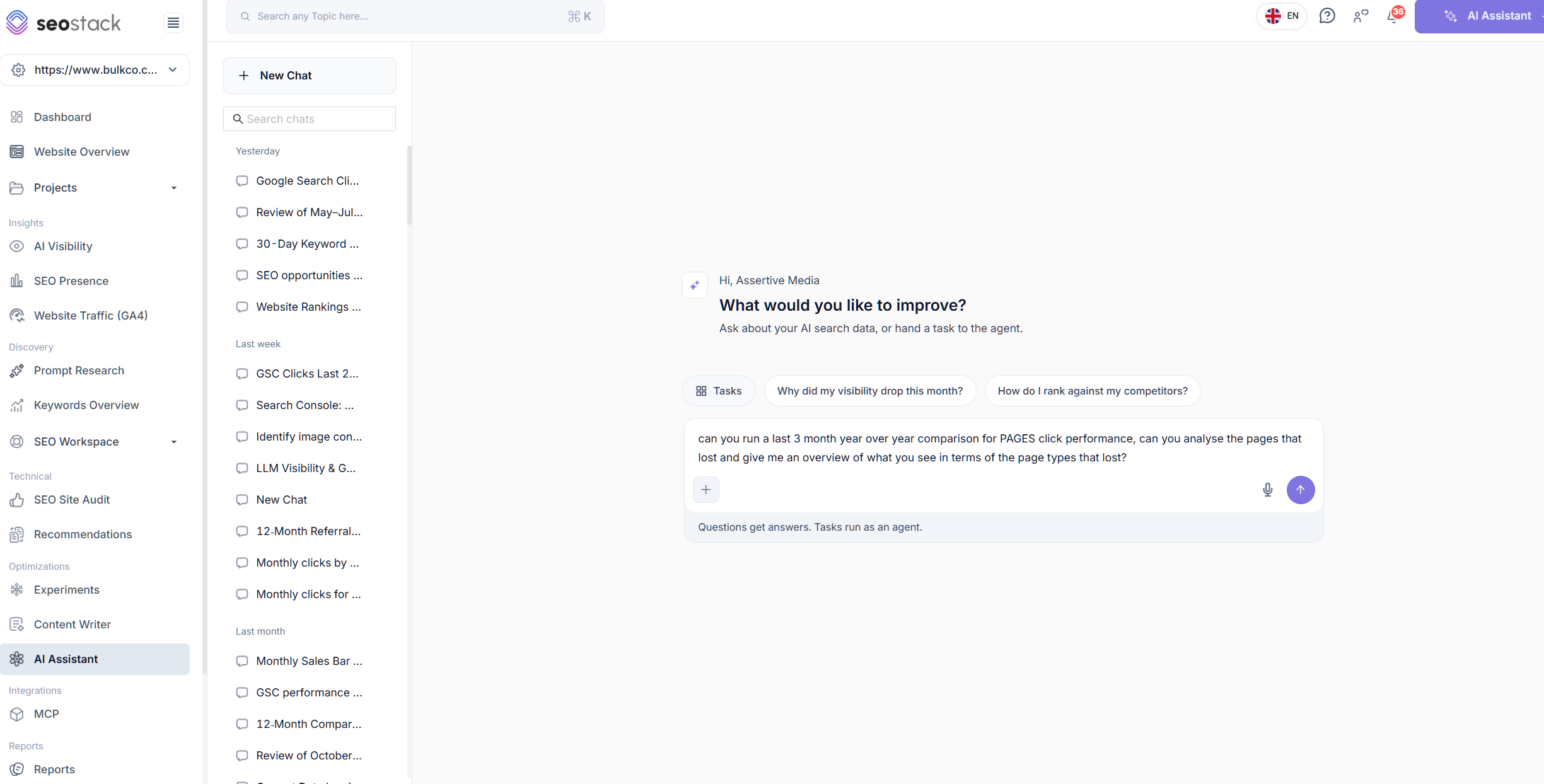
You can feed this to your own choice of AI or use SEO stack's built in AI Assistant to ask it to run the analysis for you.
Because SEO Stack has access to all of the GSC data beyond the API limits, it can analyse the data at scale and perform assessments of the types of URLS that lost along with sub folder analysis and more.
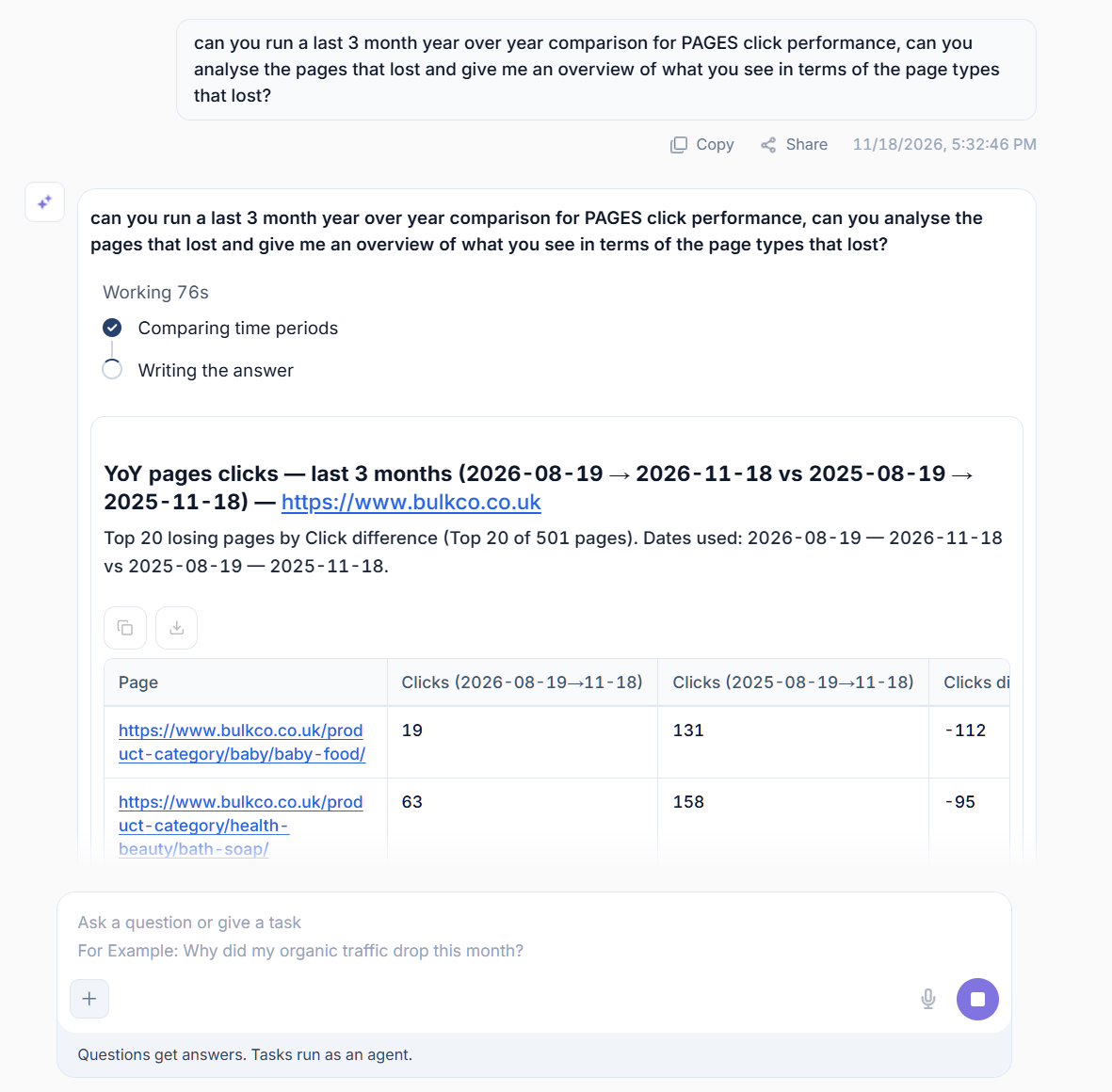
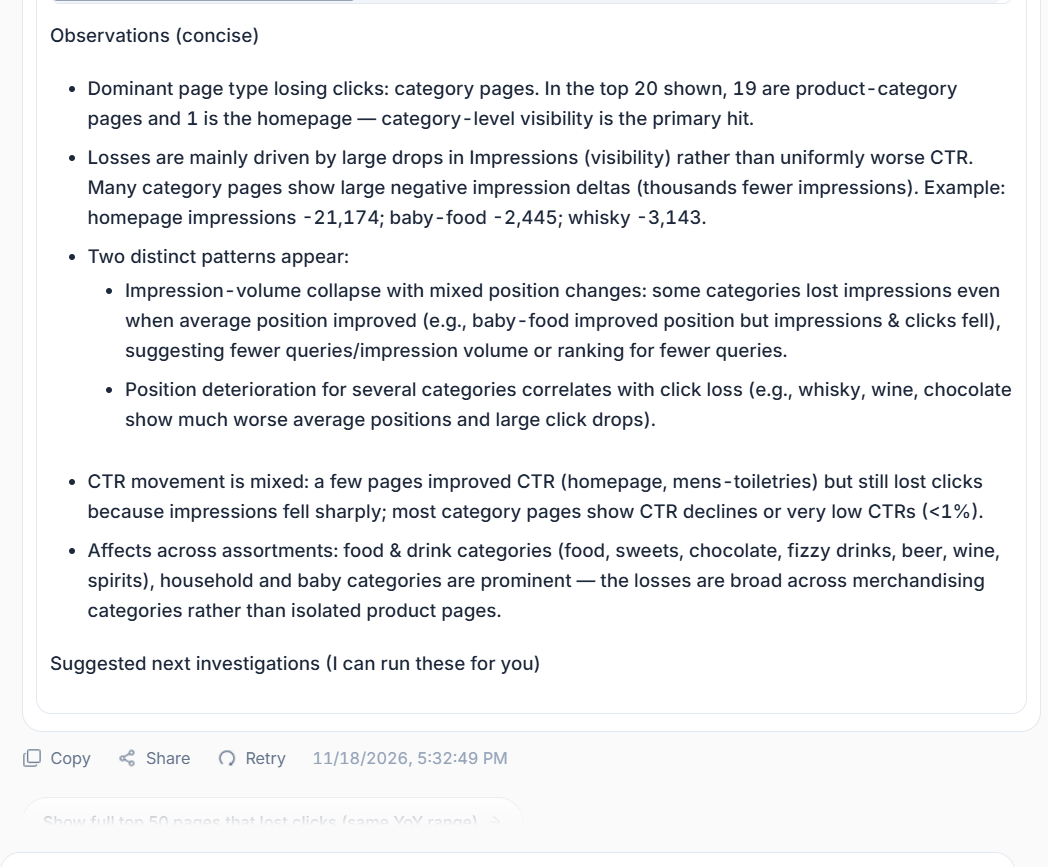
You can get in-depth information as to the type of pages losing clicks, that can help you to spot patterns in data.
How much of your click losses are brand related?
How much are non brand?
Is it blogs losing the most clicks?
What about product pages? category pages?
Spotting patterns in data can help you get a clearer idea of where the losses are and why they might be happening.
It's NOT uncommon for blog/article performance to be down now because of Google AI Overviews - this is why you need to segment your losses so you can understand clearly what content has seen a decline because of value loss vs content that continued to rank but where an AI overview appeared effectively answering the question.
MANUAL ACTIONS
Manual actions are increasingly becoming responsible for fair to fairly substantial click loss. A manual action can have a sudden impact on clicks/impressions at any point.
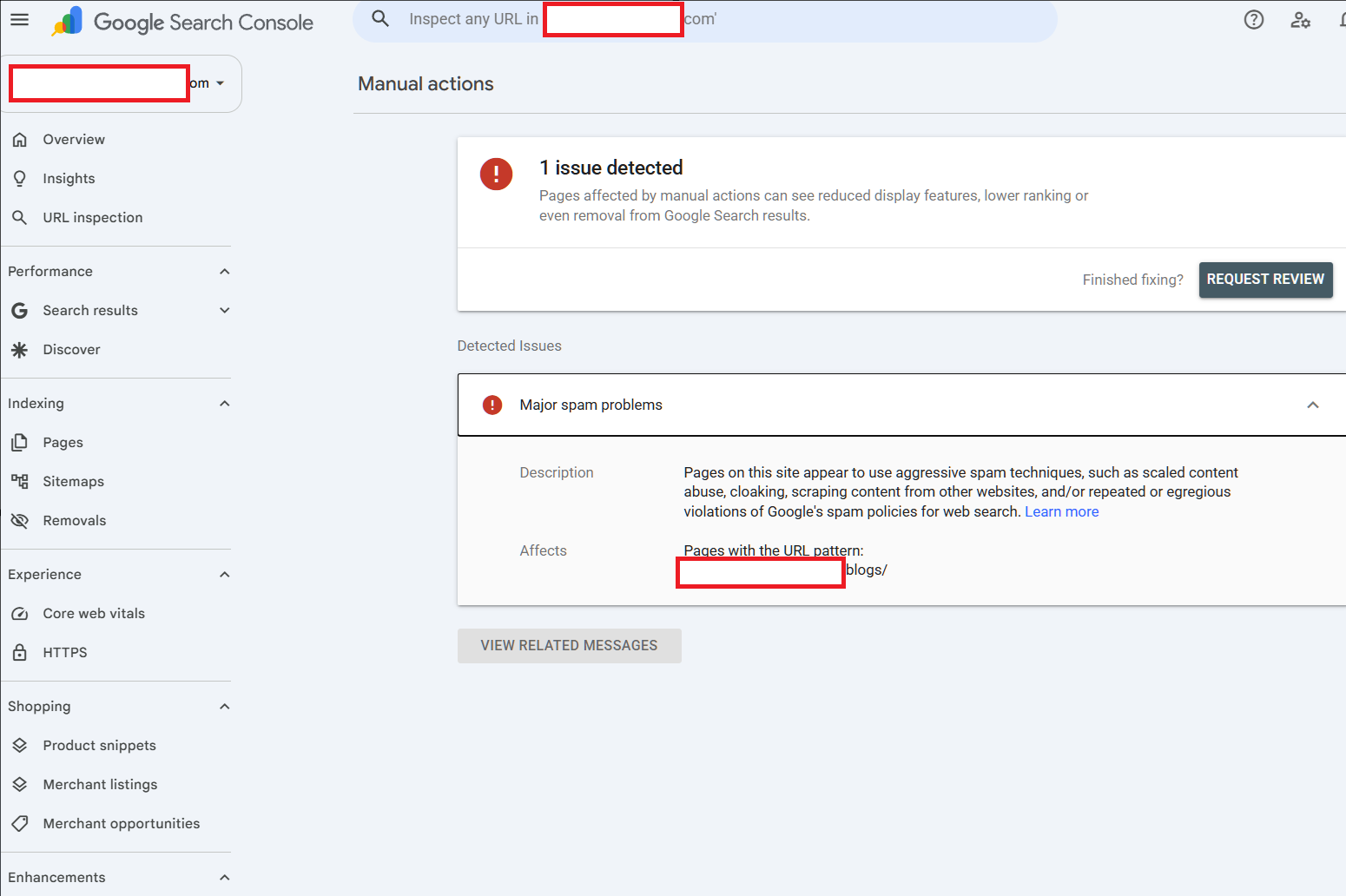
These are easy to rule out, you can just login to Google Search Console and go to Security & Manual actions to see if you have any message like the above.
Manual actions can lead to significant traffic drops like this >
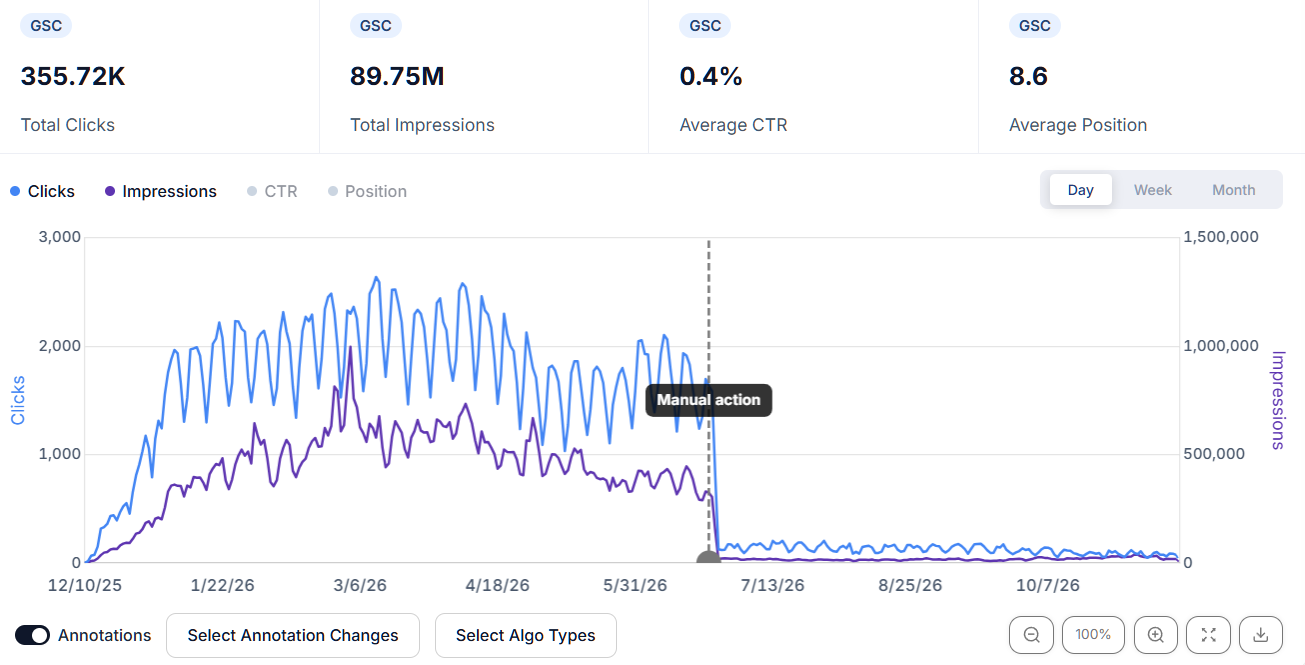
Most manual actions are associated with thin or programmatic content generation / scaled content abuse or link spam.
I could go into MOUNDS of details on manual actions and what causes them, the impact they have on traffic and the difficult recovery journey some sites need to go on, but, I've written a whole article / blog on it which can help you understand manual action types and what to do.
Here is the blog - enjoy, it took me a lot of time!
https://www.assertive-media.co.uk/blog/the-ultimate-guide-to-google-s-manual-actions/
Plus, I made a video, you can watch it here.
To summarise the manual actions for you:
Back button hijacking
Code or a third-party component interferes with the browser’s back button or history.
Site abused with third-party spam
A significant part of the site is being used to publish spam, for example in forums, guestbooks, file uploaders or internal search pages.
User-generated spam
Spam has been added by visitors, commonly through comments, profiles, forums or guestbooks.
Spammy free host
A significant share of sites on a free hosting service is spammy; Google may act on the service as a whole.
Structured data issue
Markup is misleading, irrelevant, hidden from users or otherwise outside Google’s structured data policies.
Unnatural links to your site
Google has detected artificial or manipulative links pointing to your site, such as links created through paid schemes.
Unnatural links from your site
Your site contains outbound links that appear paid, artificial or designed to manipulate ranking signals.
Thin content with little or no added value
Pages such as thin affiliate pages, scraped content or doorway pages offer little unique value.
Cloaking and/or sneaky redirects
Google is shown different content from users, or users are redirected somewhere different from what the search result suggests.
Major spam problems
Google has found aggressive, repeated or particularly serious spam, such as scaled content abuse or cloaking.
Cloaked images
Images shown in Google’s results differ from the images users receive on the page.
Hidden text and keyword stuffing
Text or keywords are hidden from users or repeated unnaturally to manipulate rankings.
AMP content mismatch
The AMP version and its canonical page do not provide essentially the same content and purpose.
Sneaky mobile redirects
Mobile users are redirected to content that search crawlers do not see or that they did not expect.
News and Discover policy violations
A publisher has violated policies for Google News or Discover.
Site reputation policy
Third-party content is hosted mainly to exploit the established ranking signals of the host site.
FIXING MANUAL ACTION ISSUES
If I write every fix in detail, the article would end up far too long, so below is a top level summary. If you are a junior SEO or inexperienced I would advise getting help, some manual actions require specialist intervention to get a reconsideration request through.
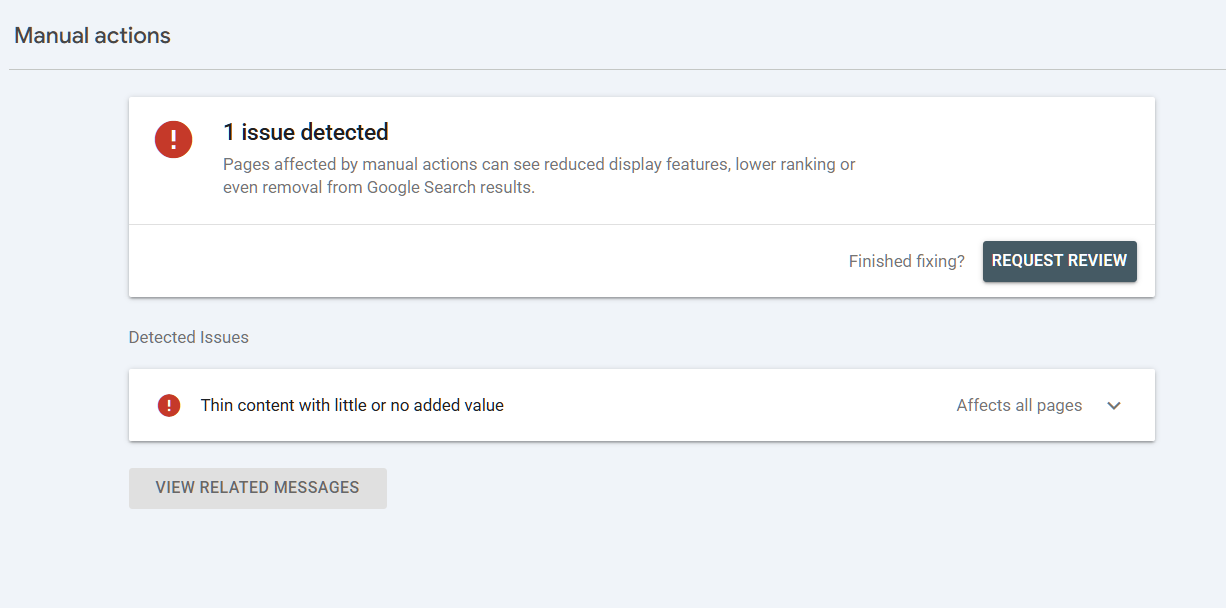
In the manual action, if Google gives you example URLs, use them to work out what’s causing the issue / for auditing, then check where else it’s happening across the site. That’s REALLY important if the issue comes from a template, plugin or link placement that’s used on hundreds of pages.
- Back button hijacking - Remove the script, plugin or third-party tag that interferes with the browser’s back button. Click through from a Google result and check that one press takes you straight back.
- Site abused with third-party spam - Clear out the spam URLs, uploads and accounts, then close off whatever allowed them to be created. Check forums, file uploaders and internal search pages for the same issue.
- User-generated spam - Delete spam comments, forum posts and profiles, then put moderation in place. Mark links added by users with rel="ugc" where appropriate.
- Spammy free host - Consider changing to a new host, avoid free or ultra-cheap hosts, get a host that's reliable and unlikely to host questionable sites, companies like Cloudways and Digital Ocean offer good hosting.
- Structured data issue - Remove or correct the offending markup. If you’re marking up reviews, prices or availability, check that the page actually shows what the schema claims. Fix the template if it’s generating the same issue across multiple URLs.
- Unnatural links to your site - Audit the backlinks and ask site owners to remove or qualify the links you know were built to manipulate rankings. Disavow the offending links you can’t get removed and keep a record of your outreach.
- Unnatural links from your site - Remove the offending outbound links or qualify paid placements with rel="sponsored" or rel="nofollow". Check old guest posts, advertorials and sitewide links as well.
- Thin content with little or no added value - Get rid of scraped pages and doorway pages. Where a page is worth keeping, rebuild it with something useful of your own, i.e. original product testing, comparisons or evidence that helps someone make a decision.
- Cloaking and/or sneaky redirects - Remove whatever serves different content to Google or sends visitors somewhere unexpected. Use URL Inspection to compare what Google sees with what you get when you click through from search.
- Major spam problems - Work through the affected sections and remove the spam at source. If a template or publishing process is churning out scraped pages or doorway pages, switch it off and clean up the URLs it’s already created. Major spam issues usually require intervention to properly diagnose/assess the type and degree of spam - usually scaled content abuse triggers this.
- Cloaked images - Fix the image-serving rules so Google and visitors get the same image, check your CDN or image plugin if the file changes depending on who requests it.
- Hidden text and keyword stuffing - Remove text hidden for rankings and rewrite sections with unnaturally repeated keywords. Check footers, location pages and shared templates for the same pattern. Check to ensure no plugins or scripts are putting content in display:none
- AMP content mismatch - Bring the AMP page into line with the canonical page so both give users the same main content and do the same job. If you’ve retired AMP, remove the old setup properly.
- Sneaky mobile redirects - Remove the rule, ad script or plugin sending mobile visitors to the wrong page, you should test on an actual phone by clicking through from Google.
- News and Discover policy violations - Read the specific policy named in the notice, then correct or remove the offending content. If it’s an editorial issue, show what’s changed in the way you review and publish articles.
- Site reputation policy - Remove the offending third-party pages and/or apply noindex and leave them crawlable so Google can see it. If the topic belongs on your site, you can rebuild it as genuinely first-party content.
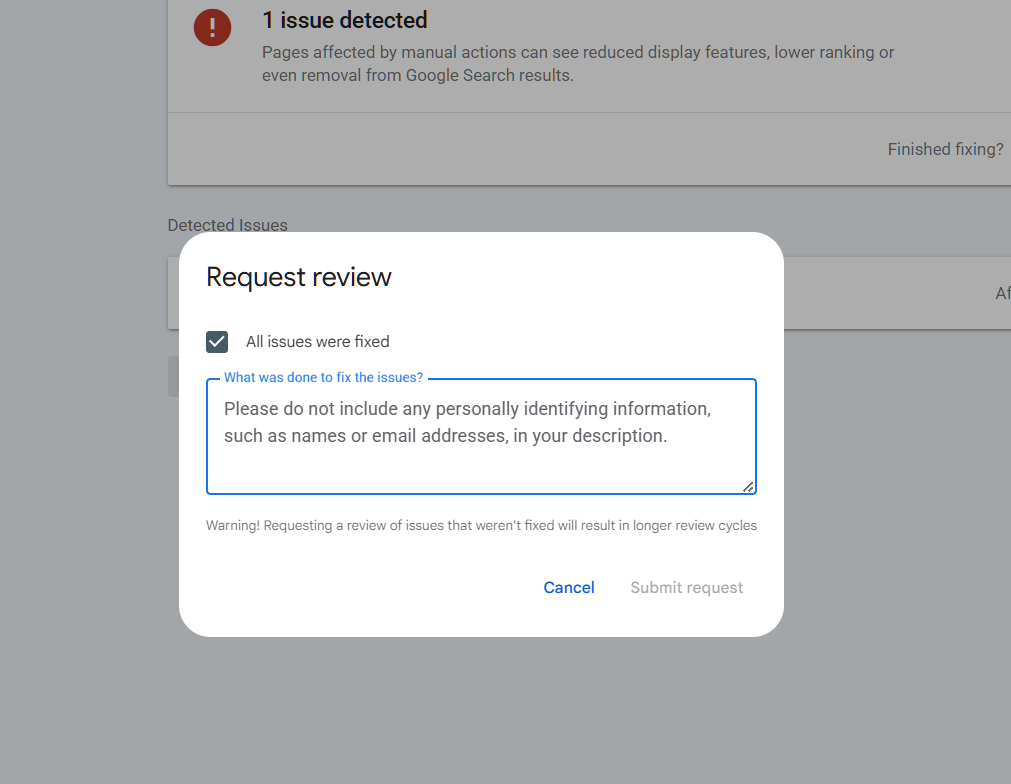
Note!
Do NOT submit a reconsideration request until you are sure the issue has been addressed or addressed to the best of your ability. You will have to explain what you have done to remedy the situation when submitting a reconsideration request.
Reconsideration requests can take days to weeks and in some cases do fail if they do not feel the issues have been addressed.
Generally - manual actions for technical SEO issues relating to abuse or spam are easier to fix and get a reconsideration request through whilst spam (especially link spam) reconsideration requests can take longer.
INDEXING ISSUES OR TECHNICAL SEO ISSUES
So, the other reasons why clicks may have been lost to things outside of CTR degradation can include things like indexing issues. Usually, if a site is losing clicks it will be doing so to URLS that are indexed, however, there are MANY times when sites actually lose traffic to URLS that end up dropping out of the index.
INDEXING ISSUES
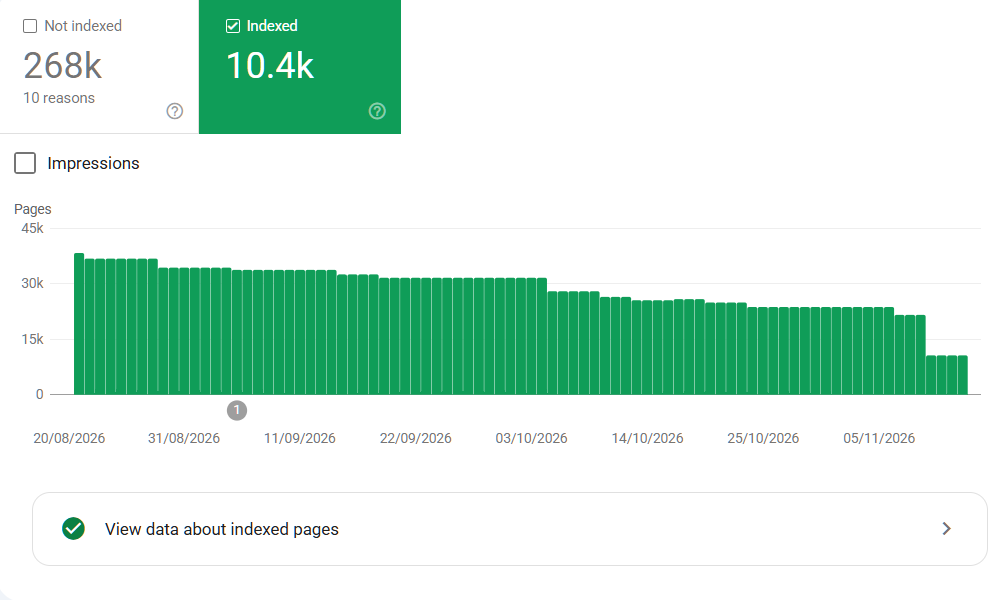
It happens far more than you may think, there has been many times when I've seen URLS vanish from an index where they were once generating clicks. I will show you how to visualise non indexed page click performance over time.
Page indexing issues are generally because of:
- Content that is no longer deemed to be of sufficient quality to retain an indexed state
- Content that is very thin or has content unrelated to anything being searched for
- Content that is mismatched (query to content by intent)
- Stray or unhandled URLS / unmanaged URLS
- Technical SEO issues such as rendering, misconfigured directives/robots, canonical issues
- At the time Google requested the URL it was unavailable (4xx, 5xx)
- Dynamic sites or sites that are parameter driven
- Erroneously blocked content
- Link spam
- Site hacks or exploits, malware, spam injections
and, there are, many cases where a Google core update roll out has seen content dropped from the index simply because it doesn't meet quality criteria or probability of being served anymore.
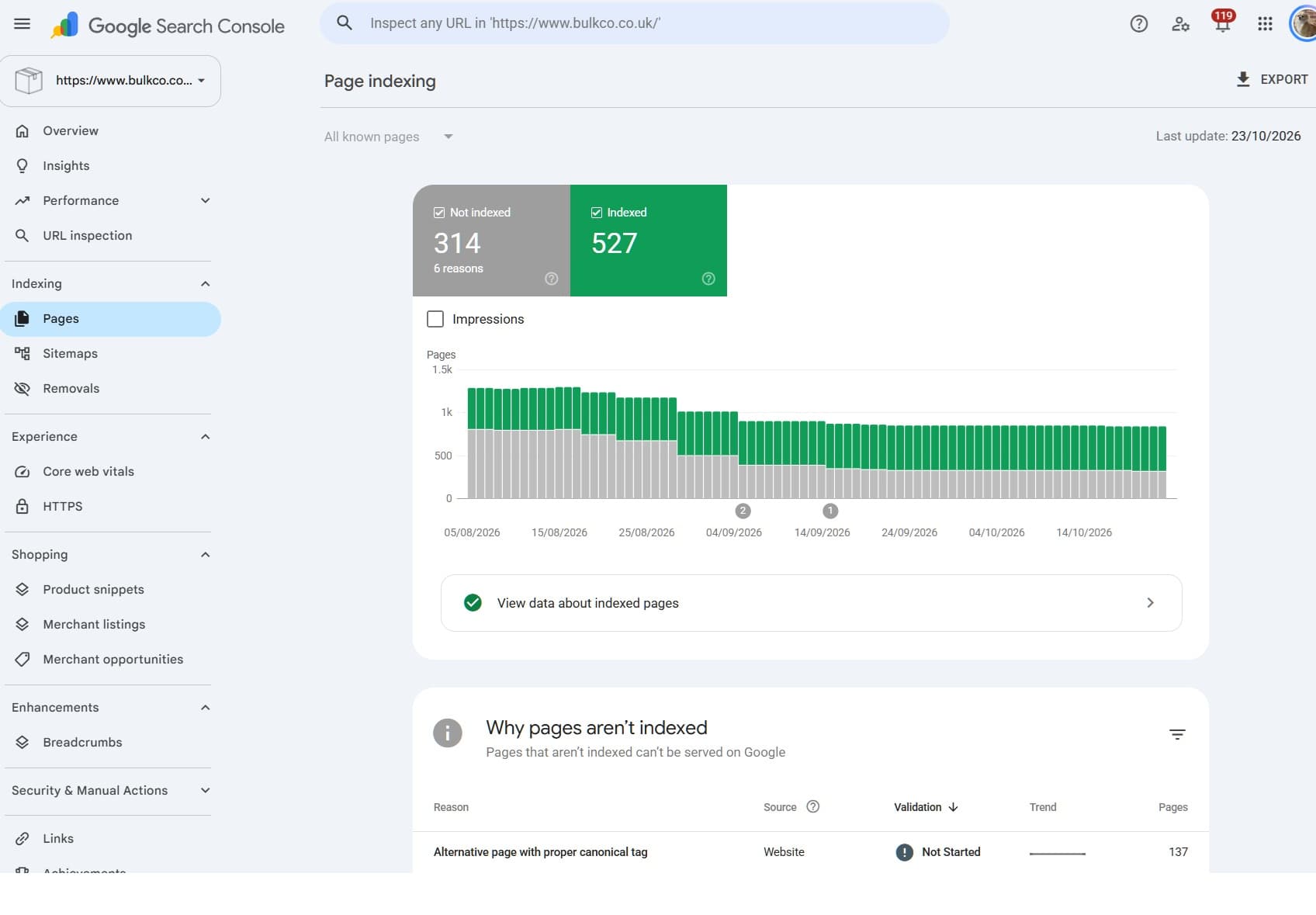
Here is an example of non indexed page reasons - however, there are a few caveats to this.
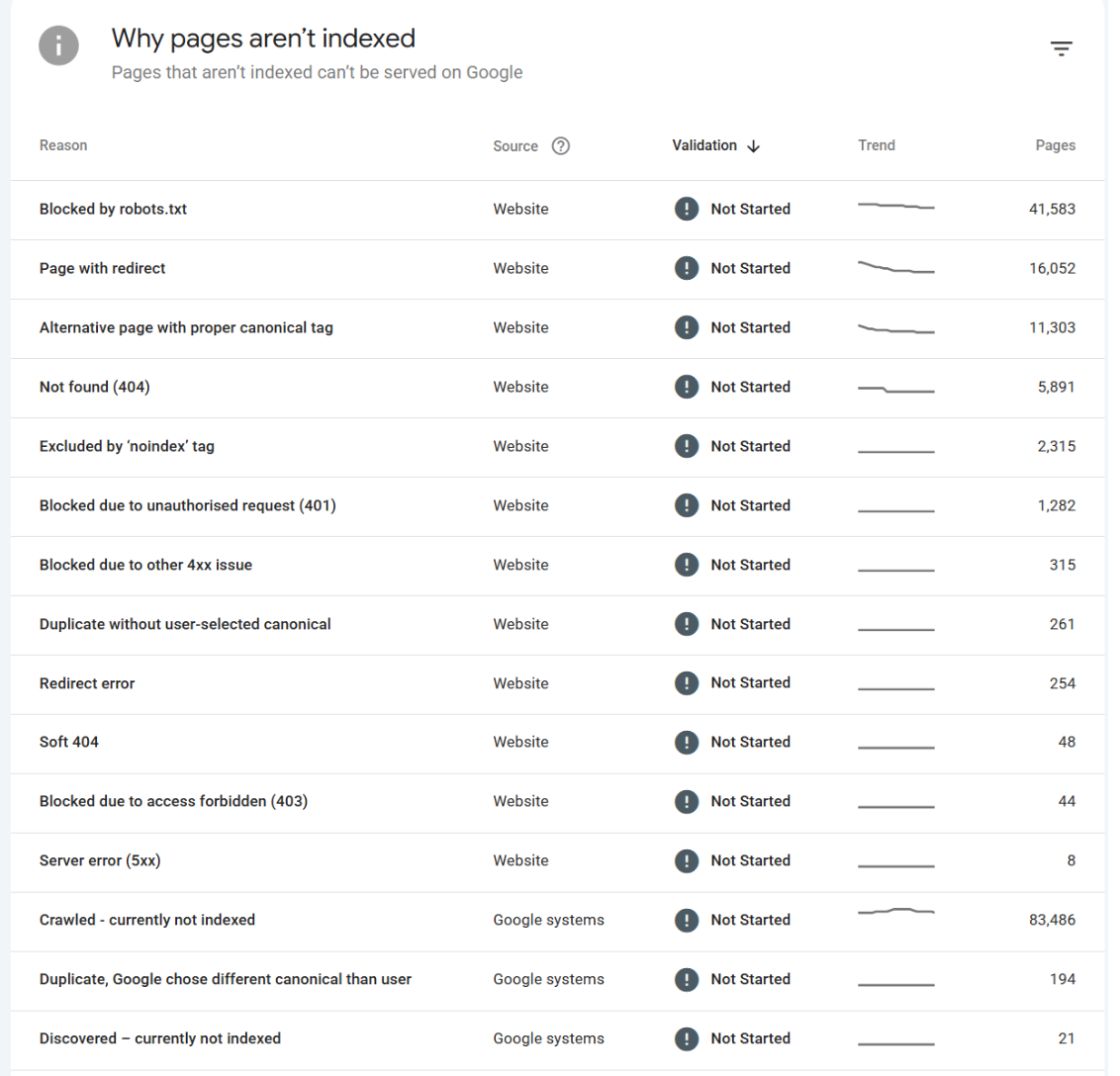
1. Not all non indexed page reasons are valid or current, GSC lags, so somethings can be reported as something they aren't
2. You can only export 1000 of the x number of URLS or obtain 2000 by using the GSC api, so, generally you need to address things sequentially
Now, they KEY THING we want to understand is, from all the pages that are NOT INDEXED, how many of them were traffic bearing URLS?
So, I'll show you a really nifty trick as to what you can do and guidance on resolution.
We'll pick a non indexed page reason and run through the process.
Now, I've actually written an article on running this process and I've made a video, I will summarise here, but I do recommend watching the video and reading the article.
Here is the video:
Here is the article:
This is a nifty process that allows you to identify if any of your traffic loss relates to URLS no longer indexed - so, it can help with recovery and understanding where some click share may have been lost.
STEP 1 – Find the non-indexed URLs in Google Search Console
Open Google Search Console, select the property you’re investigating and go to Indexing → Pages.
Minimize image
Edit image
Delete image
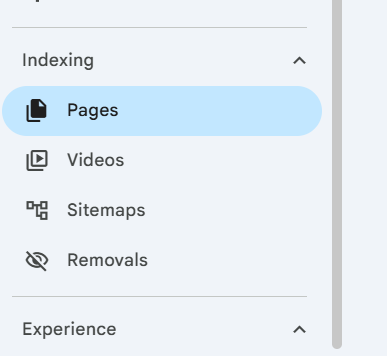
Click into one of the reasons under Why pages aren’t indexed, then scroll down to Examples to see the URLs Google has listed for that reason.
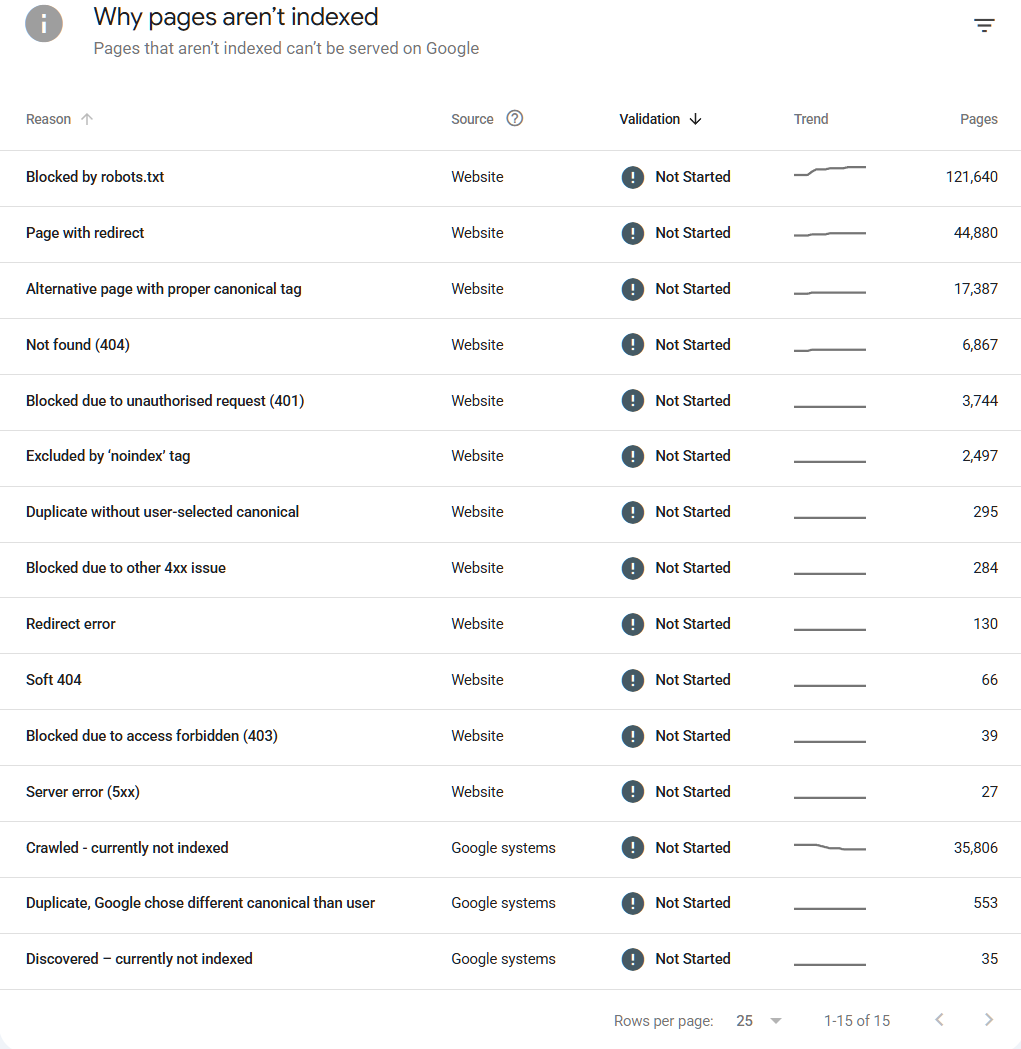
So, which reason should you start with? It depends on what happened, If clicks dropped after a rebuild, I’d start with Not found (404) and Page with redirect. If live pages you still want in Google are disappearing, look at the reason Google has given for those URLs. That could be Crawled – currently not indexed, Excluded by ‘noindex’ tag or Alternate page with proper canonical tag.
One thing to keep in mind here The report might say 10,000 URLs are affected, but the Examples table only gives you a sample. The analysis you’re about to do covers the URLs you can export.
STEP 2 – Export the URLs for that indexing reason
With the reason open, click Export in the top right and choose Google Sheets or CSV.
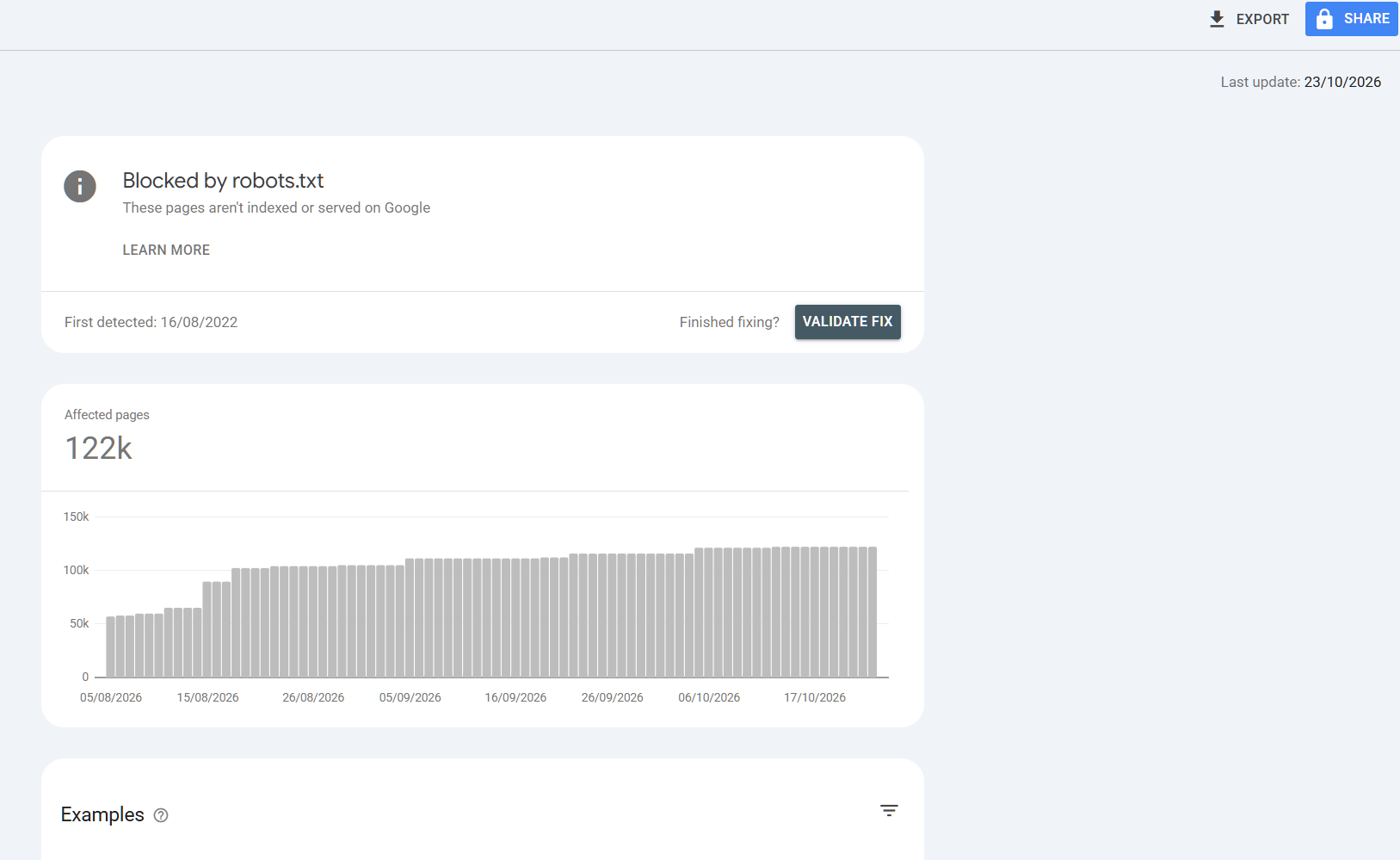
Open the export and copy the URL column, starting from row 2 so you leave out the heading. You can copy up to the 1,000 example URLs if they’re all there. All we need is one full URL per line. Leave the last-crawled dates in the sheet.
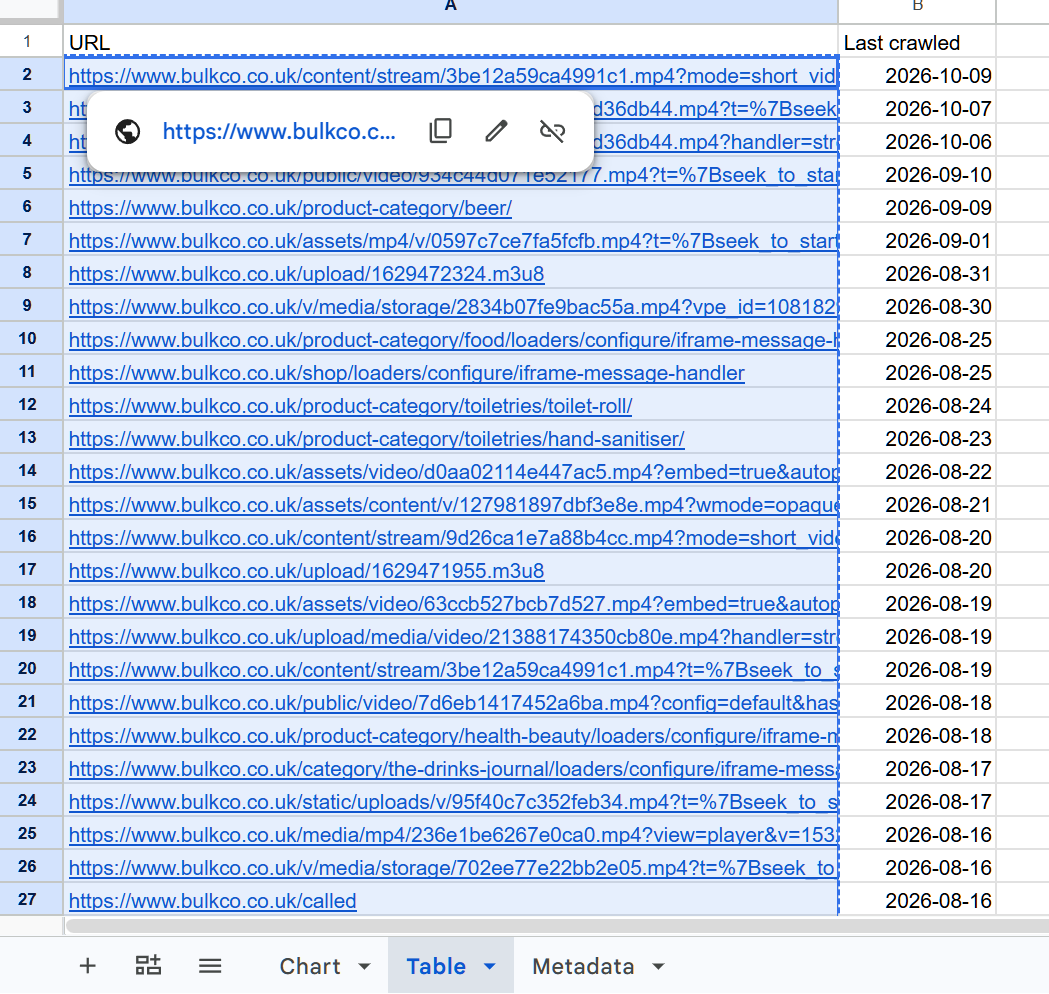
Keep the URLs EXACTLY as Google exported them, including any parameters and trailing slashes. We’re going to match each URL individually, so even removing a slash can change what comes back. It’s worth a quick look down the column too. You might have proper product categories in the same export as image files, filtered URLs and paths the site generated years ago.
STEP 3 – Open Search Console Data in SEO Stack
Go into the same website property in SEO Stack and open Search Console Data.
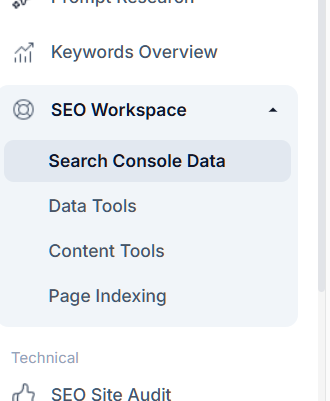
Set your date range. For this, I’d usually select First Data Point, because if a page stopped getting clicks six months ago, the last 28 days will tell you very little about what it used to bring in.
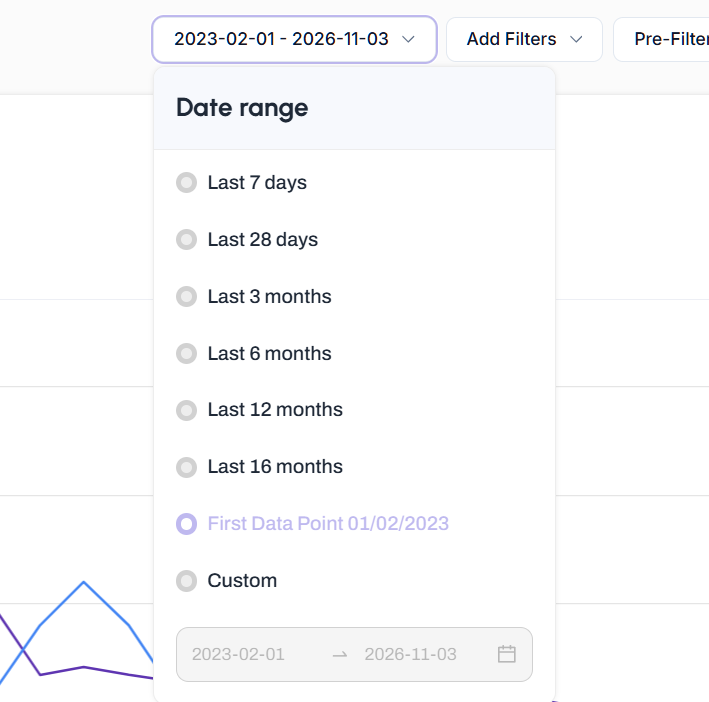
With the longer view, you can see whether those URLs were bringing in clicks consistently, whether they faded over time or whether they all seemed to fall away at around the same point. How far back you can go depends on the data stored for that property.
STEP 4 – Apply a bulk PAGES filter using SHOULD → EXACT
Click Add Filters, then select Page.
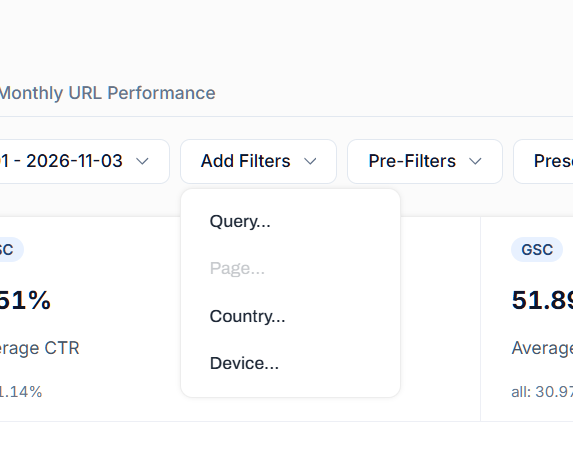
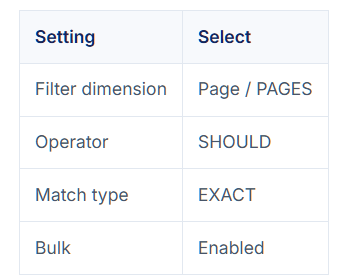
Select the following filter:
Paste the URLs you copied from the export, one per line, and click Apply. If letter case matters on your site, keep case-sensitive matching on. Clear any old query, country or device filters that could be narrowing the results.
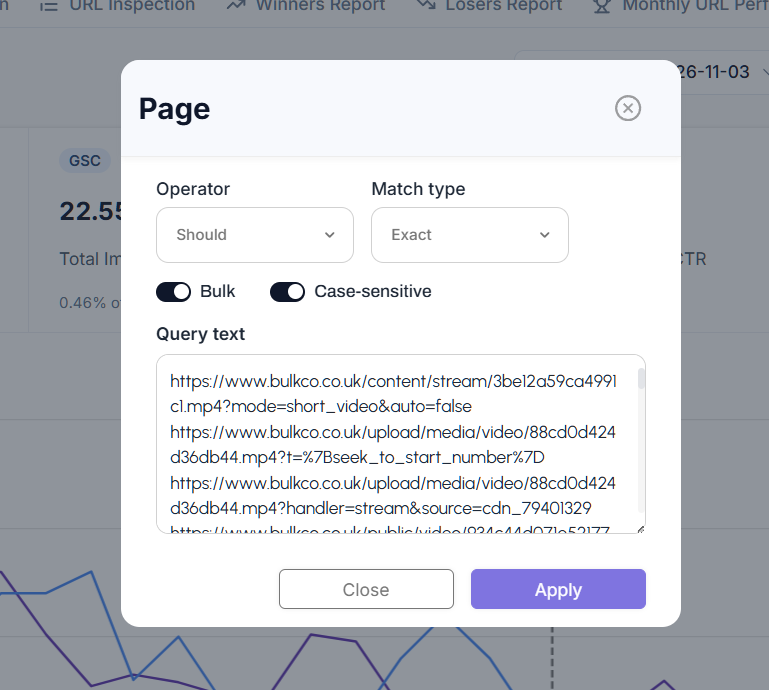
Why SHOULD → EXACT? Well, if you paste 100 URLs, you’re asking SEO Stack to show data for URL 1 OR URL 2 OR any of the other 98. EXACT means each result has to match a full URL in your list, so a page that happens to share part of the same path stays out of the results.
STEP 5 – See what those URLs actually contributed
Once the filter is applied, look at total clicks and impressions, the group’s share of site clicks and where the activity sits on the chart. Then open Pages to see which URLs contributed and Queries to see what they were appearing for.
In this example, the URLs exported from Crawled – currently not indexed generated 115 clicks and around 22,550 impressions. That’s 0.21% of all clicks across the selected period.
Minimize image
Edit image
Delete image
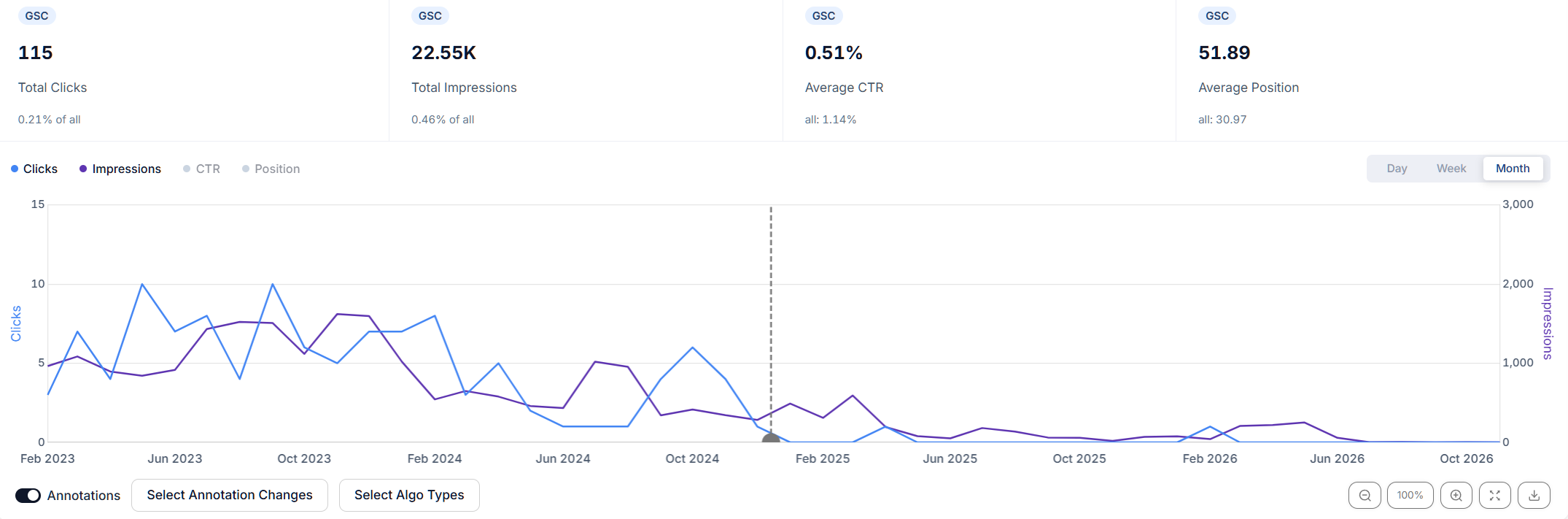
Now, look at WHEN those clicks came in. Most were towards the start of the chart and there was very little activity later on. I’d go into the Pages tab at this point, because even in a group that contributed relatively little overall, there might be one or two URLs worth a closer look.
The 0.21% is what those URLs contributed over the date range you picked. You’re taking a list of URLs from today’s indexing report and looking backwards at their performance. To work out why the clicks fell or how much you could recover, you’d need to investigate the individual pages.
STEP 6 – Save the URLs as a preset filter
Once you’ve got the filter working, create a custom folder called GSC Non Indexed Reasons and save the filter using the name of the reason you exported, i.e. Crawled – currently not indexed.
For the next reason, export its URLs, replace the current Page filter with the new list and save it as its own preset in the same folder.
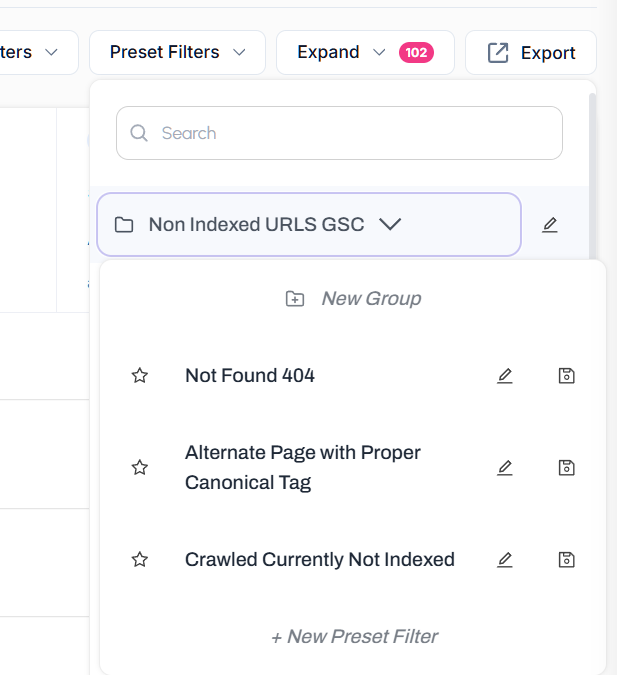
After you’ve worked through a few reasons, your folder might look like this.
Crawled – currently not indexed
Discovered – currently not indexed
Not found (404)
Alternate page with proper canonical tag
Page with redirect
Excluded by ‘noindex’ tag
From there, you can open Preset Filters and jump straight from your 404s to your redirects or noindex URLs without copying everything back in. Each preset keeps the list you exported at the time, so pull a fresh export when you want to analyse the latest exclusions. If you’re going to compare exports from different points in time, put the export date in the preset name.

Founder, SEO Stack
Daniel is the founder of SEO Stack. He has spent over 2 decades working on technical SEO and search data, and built SEO Stack after hitting the same Search Console limits on client work one time too many.
Daniel has extensive SEO experience having built SEO agencies, audit businesses & a thriving consultancy, in his spare time Daniel likes to run SEO experiments & to share findings.
Published 18 November 2026