Are SEOs Nuts? Why aren't you warehousing your search console data? and why you should be........
I know, many of you have seen me over the years repeat the same thing over and over again - SEOs, backup your data, in fact, not just SEOs, ALL BUSINESSES should be warehousing their google
I know, many of you have seen me over the years repeat the same thing over and over again - SEOs, backup your data, in fact, not just SEOs, ALL BUSINESSES should be warehousing their google search console data - it's a NO BRAINER.
So, rather than making this a long convoluted article, I am going to be brief, punchy and a tad bit abrupt!
Here's why you / your business / your agency - anyone who OWNS a website should be backing up their Google Search Console data.
It's a GOLDMINE for usable data for SEO - keywords, performance, rankings, search appearances - all of this data has value.
All of your queries "keywords" have data behind them, those impressions, they are a GREAT indicator for what has demand and what doesn't, this data is useful for SEO, PPC and AI visibility tracking!
Backing up your keyword data means you backup the ENTIRE keyword data set beyond the 1000 rows that Google search console shows you - so if your site has been served for 10,000 keywords or 100,000 keywords, you've got ALL that data to use
You can access all of your long-tail keywords and ZSV queries (zero search volume) - basically keywords that exterrnal tools have no search volume data for where there is search volume
You can get a BETTER picture from an SEO perspective at performance over time - 16 months might feel like enough data but it really isn't, if you could go back and look at 2, 3, 5, 10 years of GSC data imagine how much of a bigger picture you'd have of the websites performance over time
You can see what content does and does not work - again, bypassing 1000 row limits and storing data for every page on your site over time can give you a much better picture of what works over time
Backing the data up in full also makes it easier to use with AI - you aren't reliant on Google Search Console's limiting API which can create all sorts of auditing issues / bad advice because of missing data
You can get a better picture of what updates hit a site over time and what the broader journey looks like - I;ve seen this, especially with sites hit by helpful content updates, they often spent 2+ years struggling to recover, if you have longer running GSC data it's easier to understand whats going on
You can extract conversational searches and queries from backed up search console data where you can use this for AI visibility and prompt tracking - at least with google search console data, queries with impressions are MORE likely to be searched in an LLM
You can deliver BETTER SEO if you have a broader data set for correlative analysis, for example you could look back at historic periods of better SEO performance and look for correlation in content types, SEO tasks or link building
If you backup your google search console data, you can use a front-end UI to access it the way you want to (this is what SEO Stack does - it gives you a consistent GSC experience when accessing your current and warehoused data as opposed to Google's bigquery which does not)
You can spot trends in data such as shifting performance across devices, search appearance, countries etc
OK, so what does backing up Google Search Console data look like?
Well, it depends on how you back the data up, the most COMMON backups are:
Google Search Console to BigQuery >
You can backup your Google Search Console data in Google BigQuery >https://search.google.com/u/5/search-console/settings/bulk-data-export
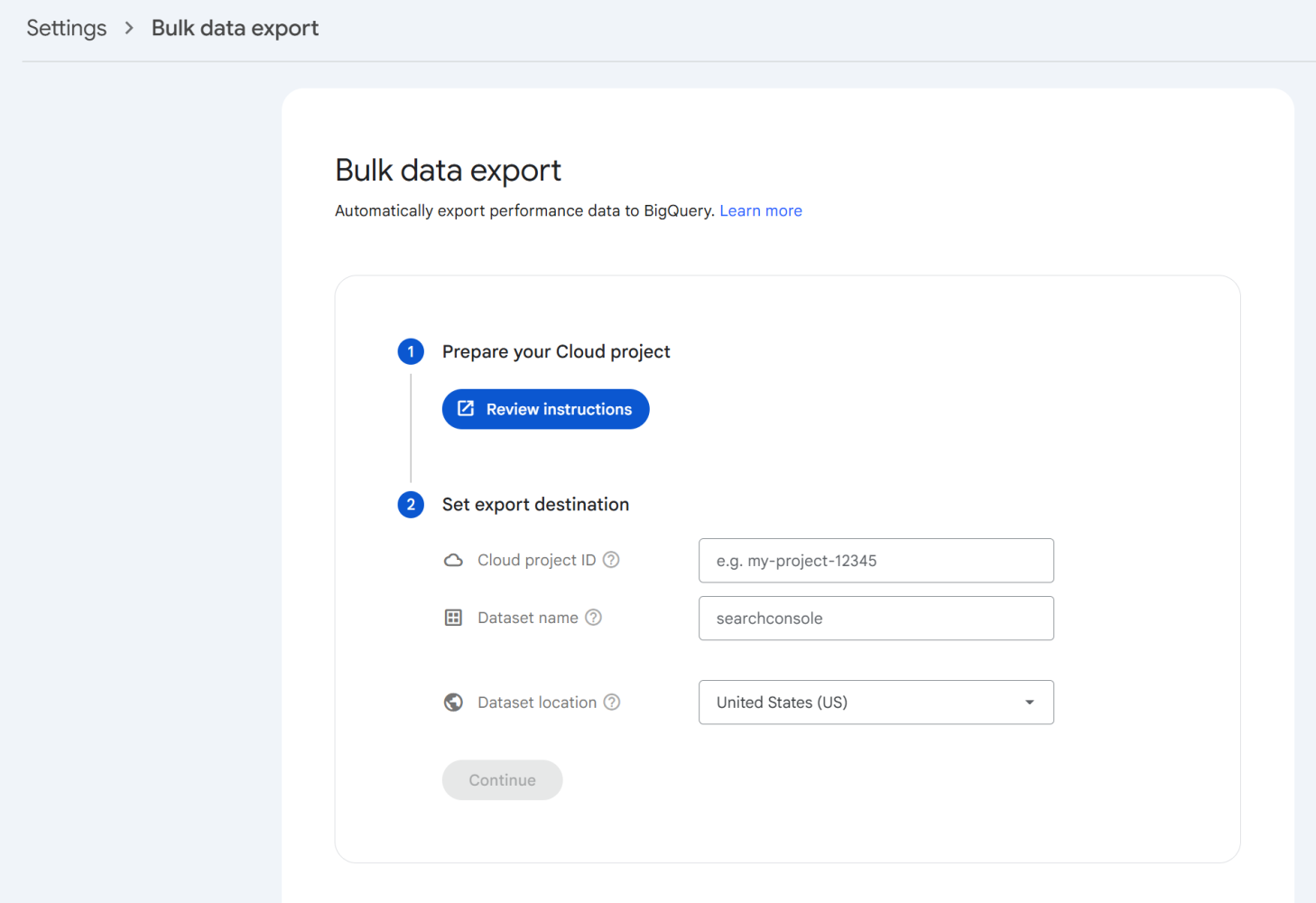

And YES this is FREE and relatively straightforward, BUT theres a HUGE CAVEAT here!
You can back the data up, but, you DON'T get to access it via Google Search Consoles interface - so whilst it is backed up in BigQuery, you CANNOT access the data from within Google Search Console, instead you access the data via Google BigQuery >
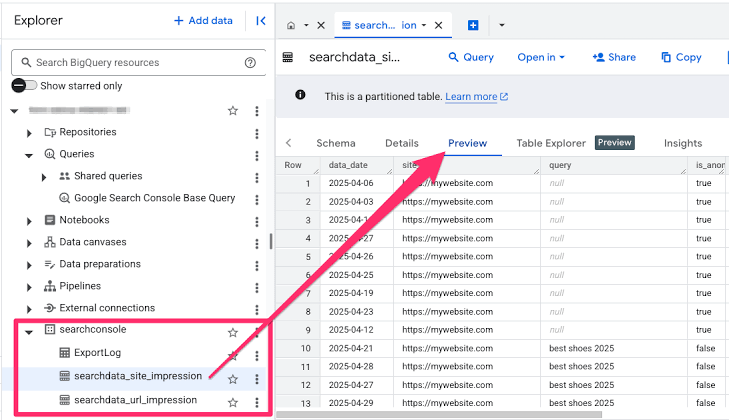

And whilst in reality, it technically HAS all your data within it, you then need to learn and understand BigQuery / SQL / Python to interact with it, you can connect it via an LLM, but again, remember the key thing you are losing here?
CONSISTENCY IN INTERFACE AND ABILITY TO USE THE DATA THE WAY YOU WOULD IN GSC!
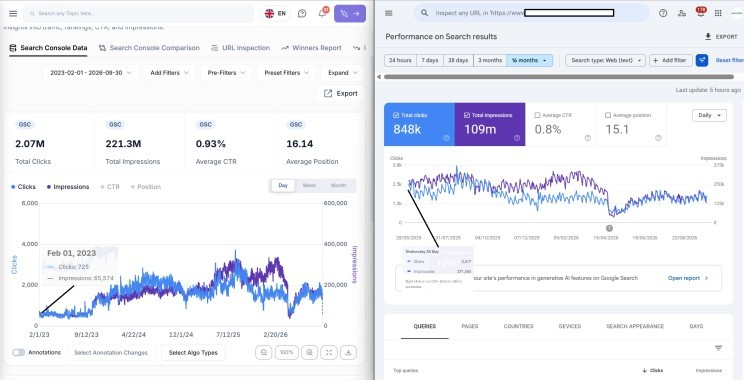

This is just ONE of the many things we built SEO Stack for, to give people the GSC INTERFACE with integrated warehousing + we've fixed lots of the issues that GSC has that SEO Stack does not.
From a practicallity point of view - we've made it so easy to set up that even an SEO Junior with literally no experience could set it up. You simply import a website into SEO Stack from GSC (takes 10 seconds), warehousing begins IMMEDIATELY, we go and backfill the last 16 months of data before appending a new days worth of data every day.
SEO Stack does the following>
Immediate data warehousing with backfills of last 16 months of data
Appends a new days worth of data everyday supporting 10+ years of GSC data warehousing
Allows access to EVERY piece of that data, every query row, every page row, everything
Takes away all of GSCs limitations
Gives you UNLIMITED filtering, saveable filter libraries, built in annotations & core update overlays
Built in AI Assistant
GA4 integration on top of GSC
Page indexing including HTTP state, indexing state
URL inspection
Now - looking at backing the data up, it's good because we can get far more context about a site, what its been through, performance over time.
Let's take this site as an example >
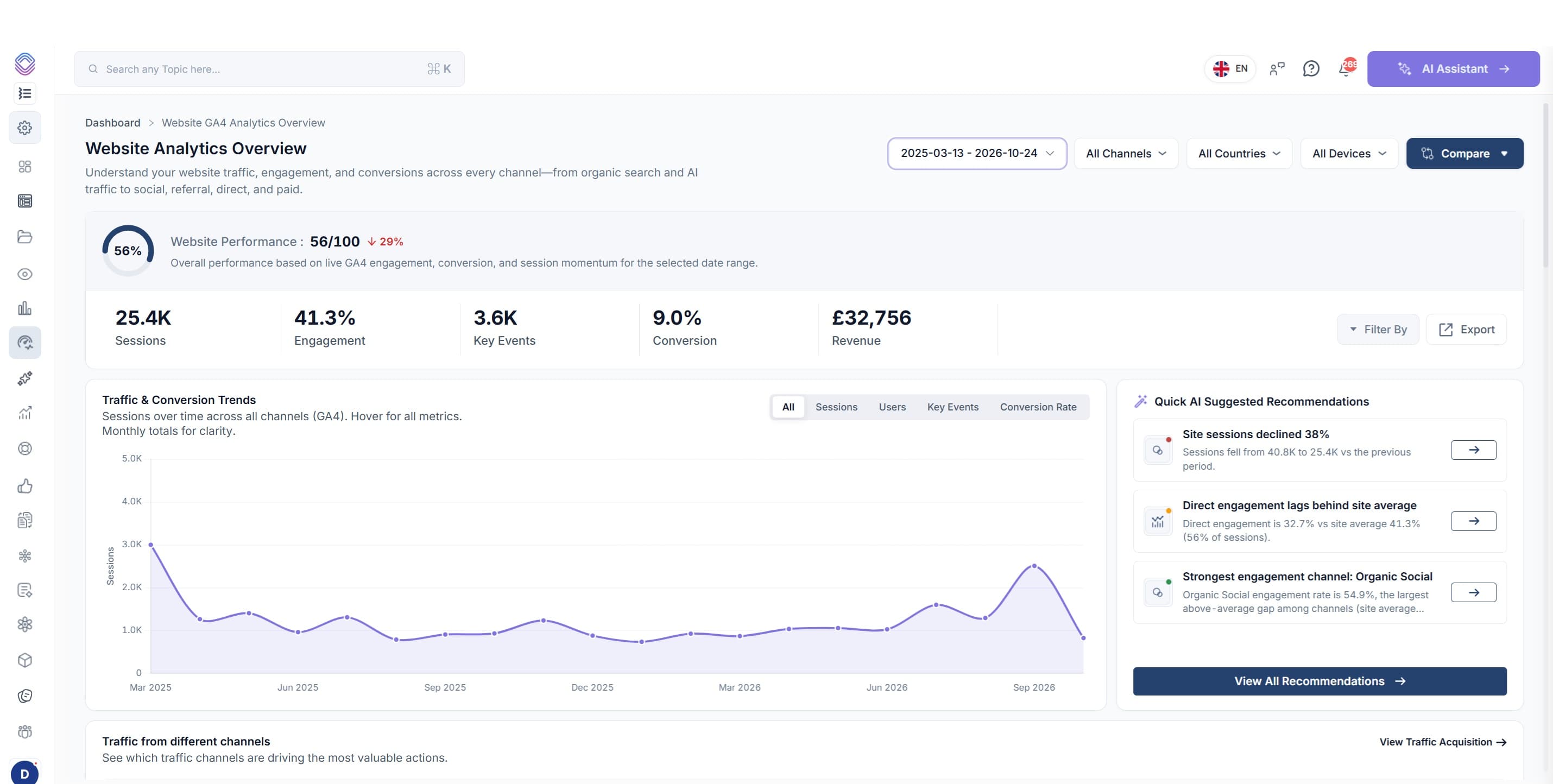
Looking at Performance Over Time (Front-end UI)
In Google Search Console the last 16 months looks like this >
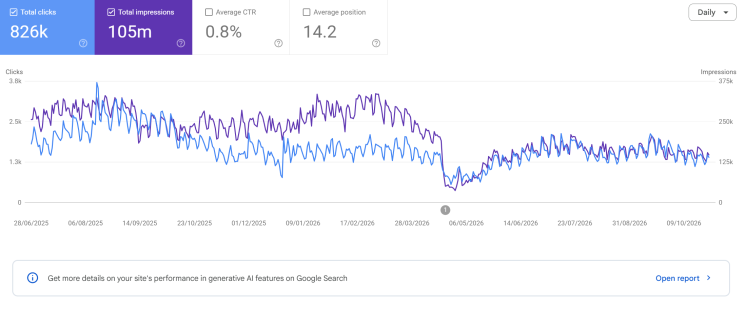

So, above we have data in GSC going back to the 28th June 2025.
But, the same website in SEO Stack we see >
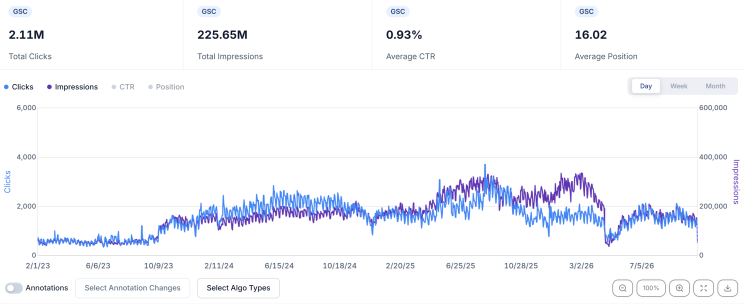

We've got data going back to February 1st 2023, significantly more than GSC and if you look at the context of PERFORMANCE OVER TIME we see website performance over time is actually UP a lot, but the last 16 months shows a slump - it doesn't give the bigger picture.
BUT, if you had your GSC data backed up in BigQuery you DON'T have a front-end UI to work with the data, not unless you vibe code one + go through the rigormoral of integrated AI and managing multiple properties, table configurations etc.
Because of how SEO Stack backs up EVERY SINGLE data piece / dimension, it means you can interact with ALL of your current and legacy GSC data together in 1 unified interface.
So, if we select ANY QUERY or page, we can see all of the data for everything!
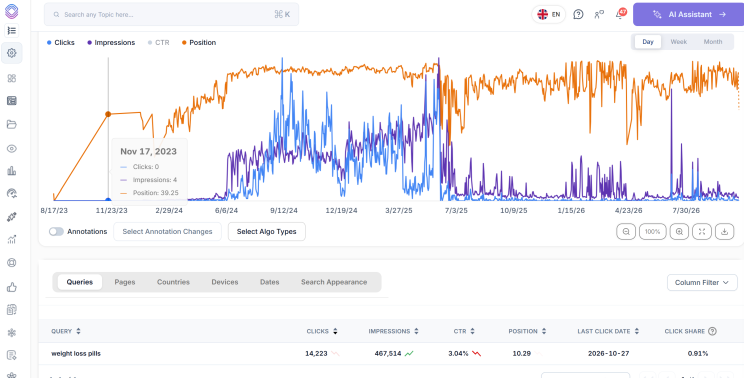

We're not constrained by ANY LIMITS.
Which is even better if you want to draw something useful out of your data such as analysing keywords!
So look at this, for the YEARS of extra GSC data that we have in SEO Stack, we can access A significant amount of data >
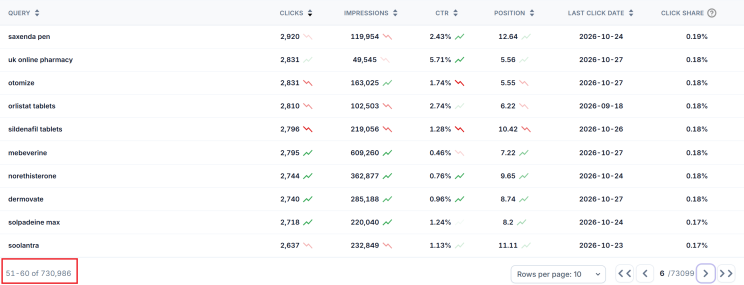

So in SEO stack we can access 730,986 keywords whilst in GSC we are stuck with a paltry 1000 rows as always >
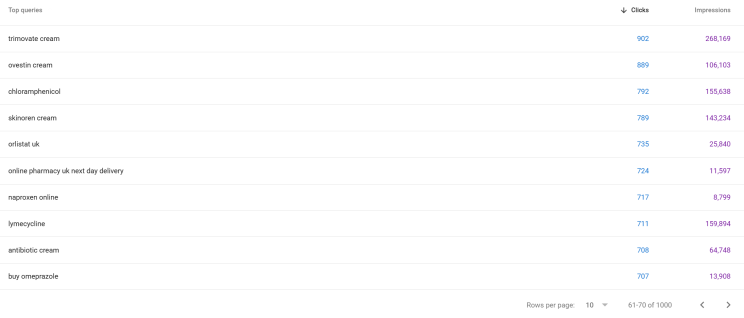

So, it's a no brainer - because 730,000+ keywords with data means it's an absolute goldmine, not just for SEO but for AI visibility tracking, even PPC or other paid campaigns - we want to know where demand is!
And that brings me to my next point:
Accessing Your Data at Scale
So Google Search Console has 2 really limiting constraints and that's 1000 row limits and filtering limits. Both make GSC more of a pain to work with, and whilst yes it is functional, it's also very limiting.


So your 1000 row limits, yes you can get around this using third party tools or connectors, but, then you are stepping out of the UI to do something you SHOULD be able to do within it.
So, let;s say I want to track what prompts our brand appears for, I may want to use Google search console query data because, lets face it, it's one of the BEST sources of data for search volumes.
So, in GSC I am naturally constrained to FILTER LIMITS and QUERY ROW LIMITS >
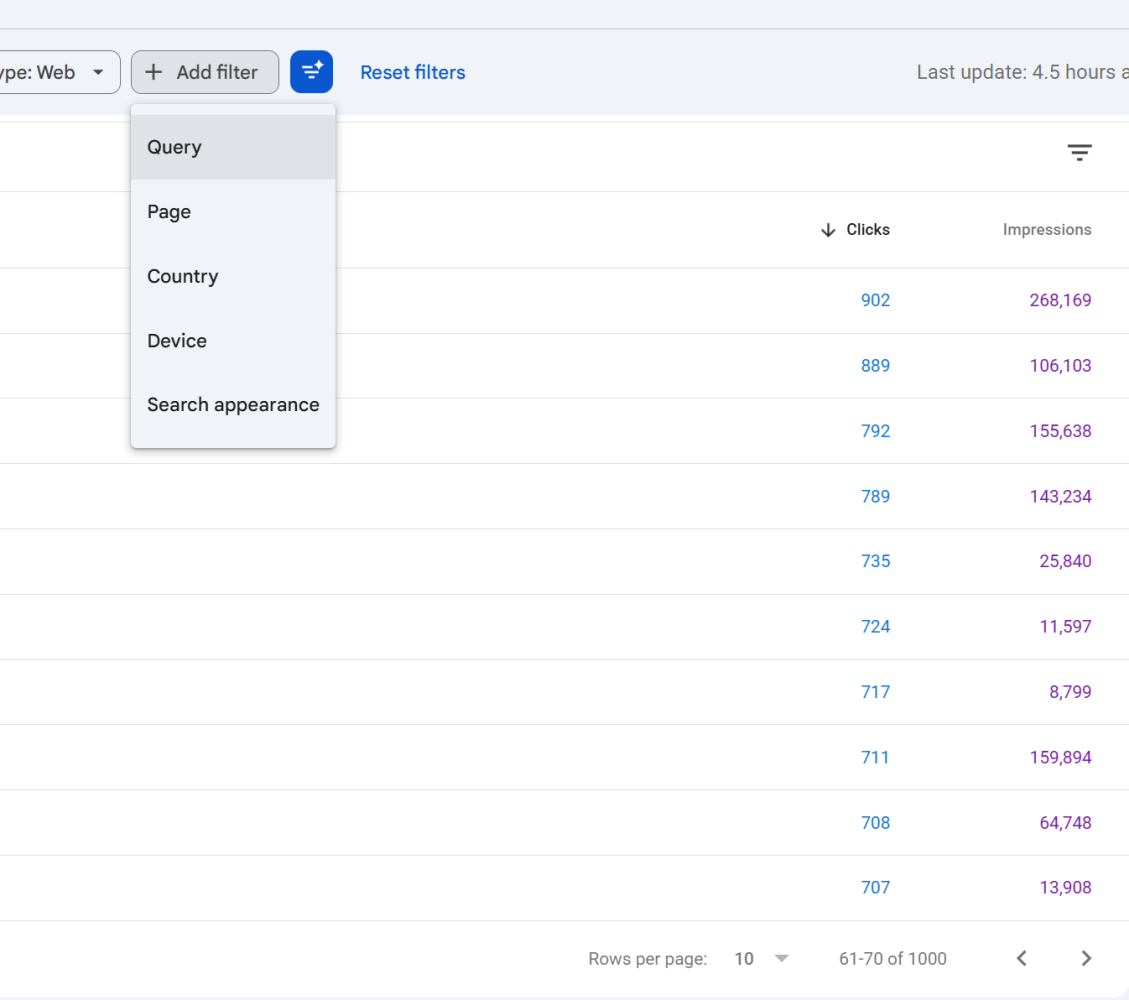

So let's say I want to get all of the HOW QUESTION queries, I apply a query filter for queries containing HOW.
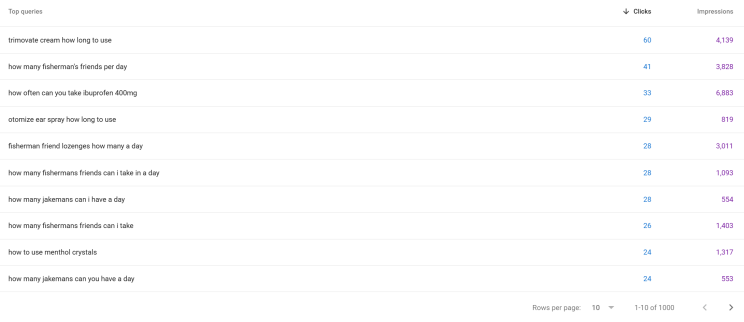

And, as expected we are NOT ONLY BOUND by the 1000 row limit, BUT we are constrained by 16 months of data, we're also constrained in that we cannot apply another filter on top to exclude other queries or refine our filtering further.
Whereas in SEO Stack we aren't limited by 16 month timeframes, by 1000 row limits or by filtering, so the same search in SEO stack for "how queries" yields >
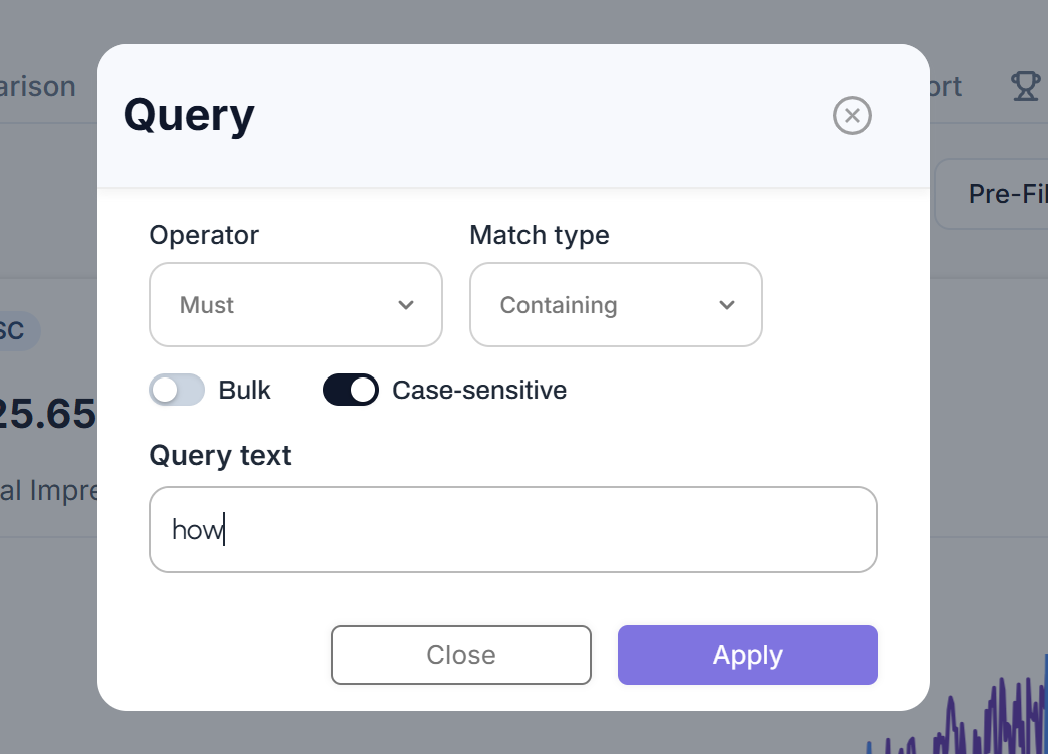

And the output is >
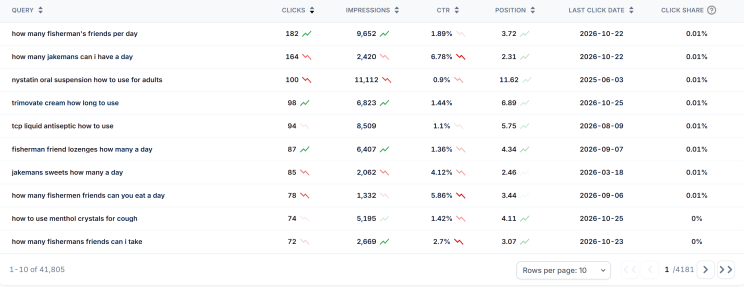

We have 41,805 questions.
So, you can imagine how much more we can do with this data, I would personally use what I could for AI Visibility tracking (which you can do in SEO stack too).
In GSC if I wanted to exclude queries by applying another query filter I can't because GSC does not support filter layering:
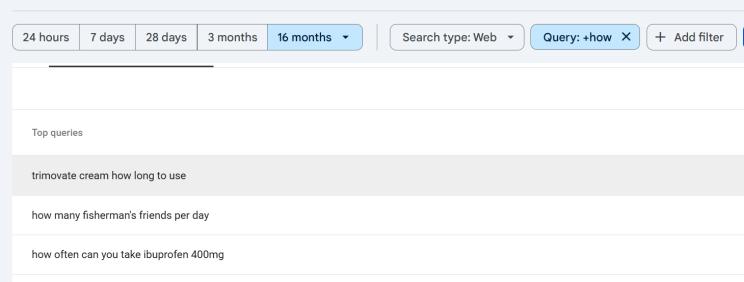

So, I am pretty much stuffed unless I export and then manually filter, but then I can't view the data within the UI, so it's pretty useless.
So where GSC will only allow 1 filter condition at a time, SEO stack allows unlimited filter conditions (and more of them)
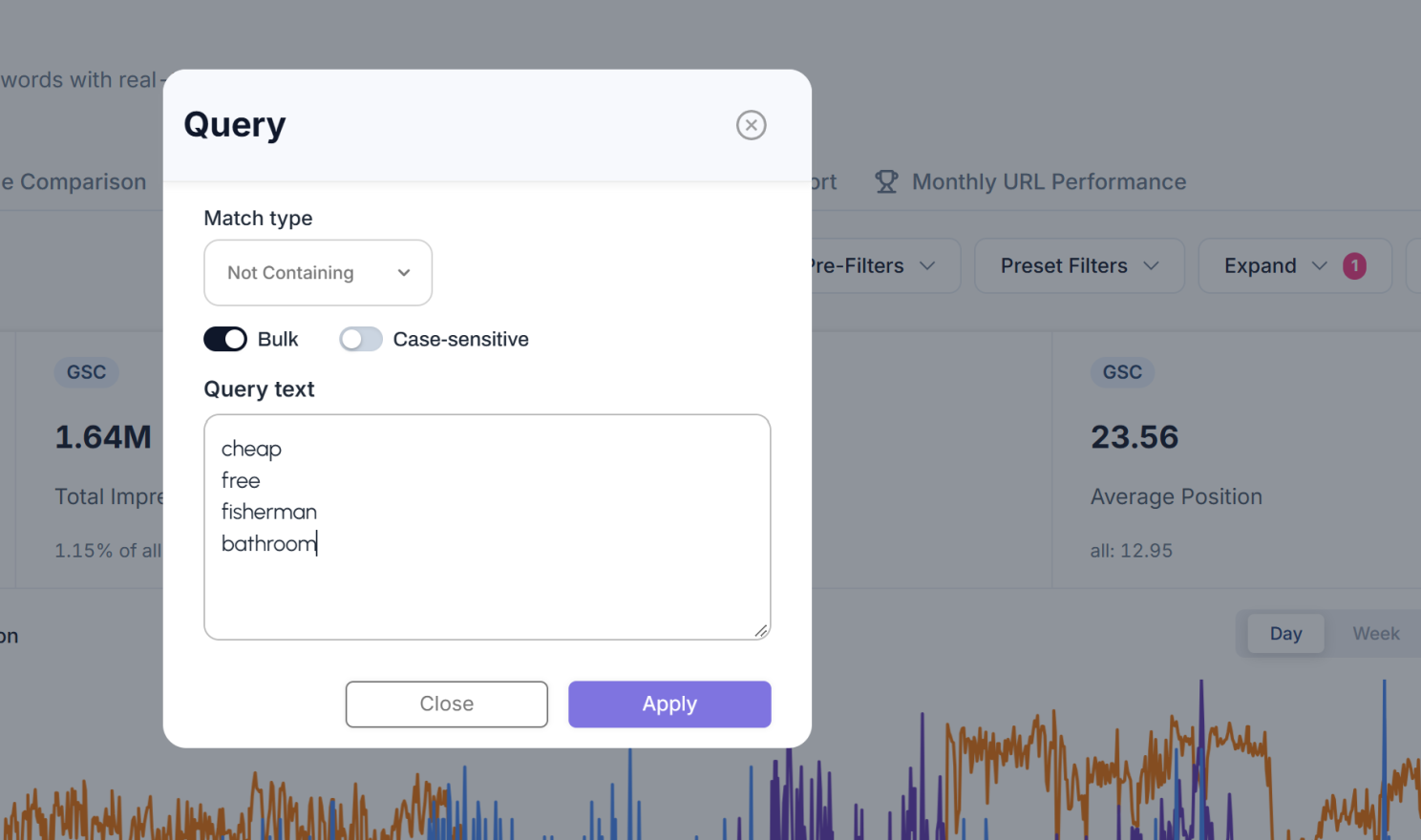

Leading to >
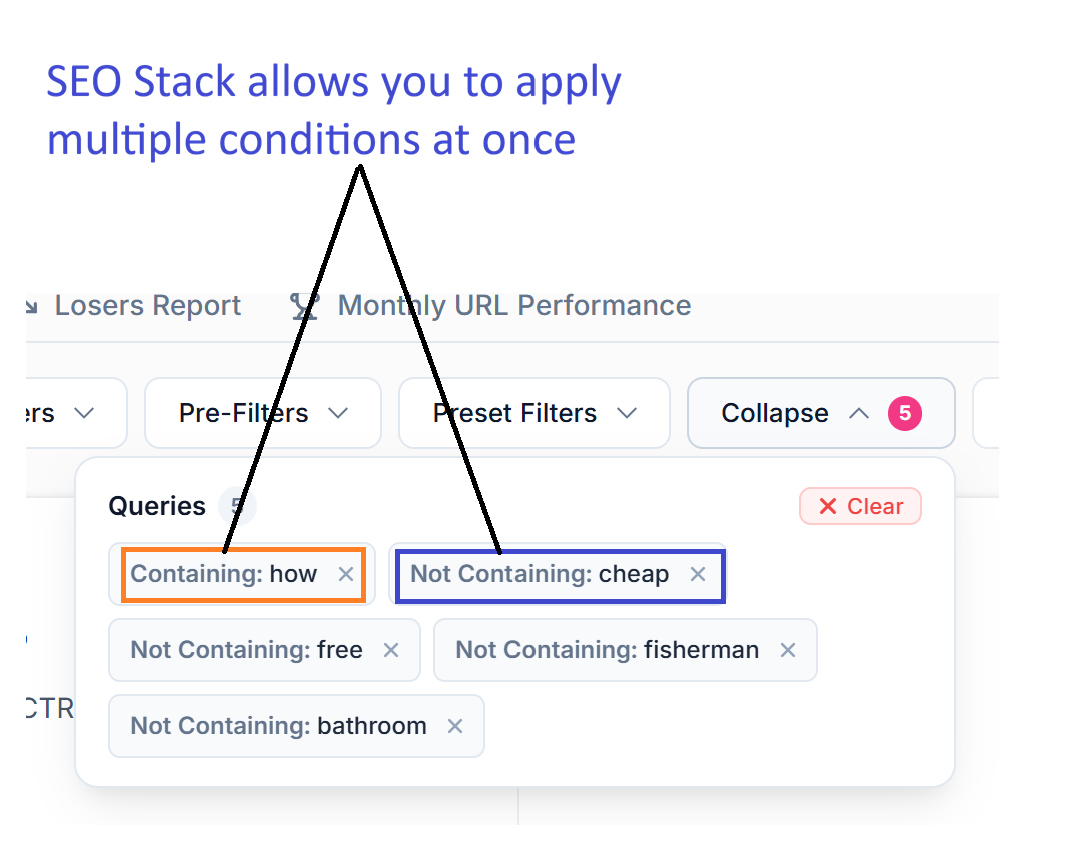

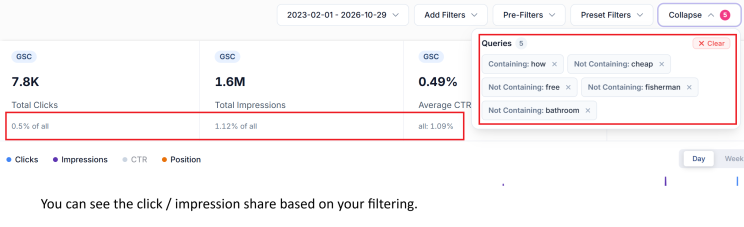
And if that wasn't enough, we've made it so you can see what click/impression share your applied filters lead to:

And, if you fancy you can SAVE your custom filter for 1 click access in the future, with your filter applied you can click PRESET FILTERS, save them in there or filter folders of your choice!
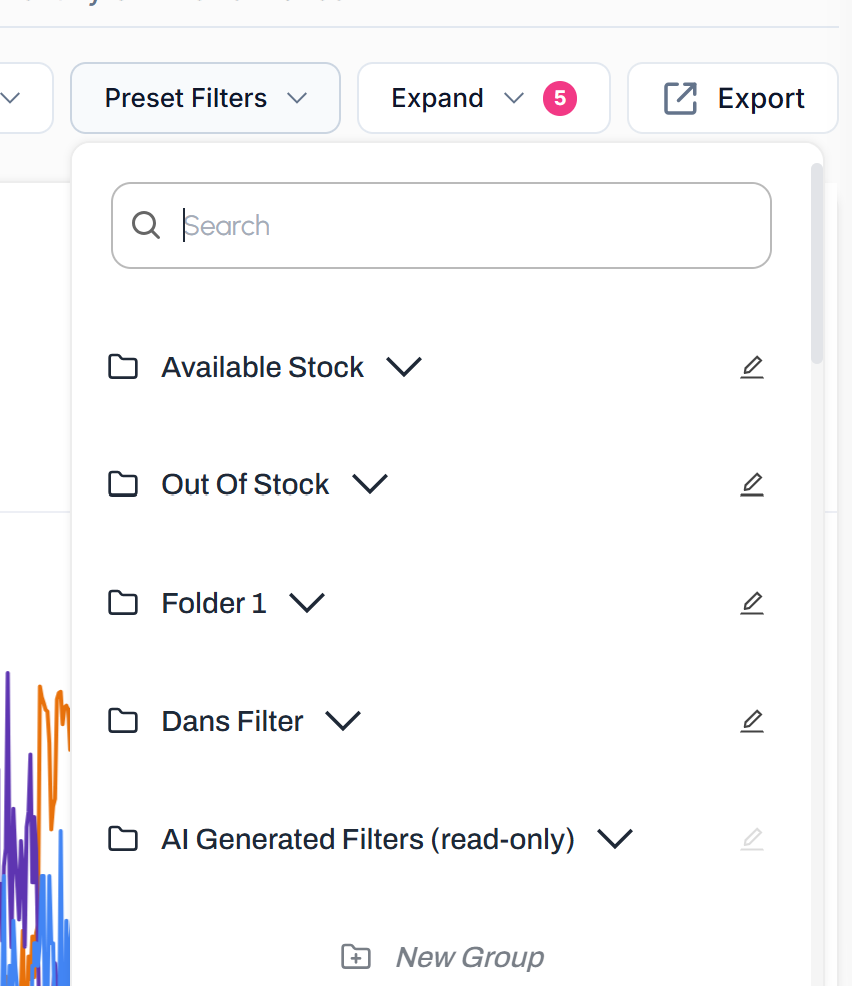

Making life MUCH easier when it comes to STORING, ACCESSING and FILTERING your data.
Using Google Search Console Data with AI > APIS
So another topic, one I wrote about just the other day also covers the issue of using Google Search Console's API to access your data, especially if you are trying to use Claude, chatGPT, Gemini or another LLM to perform an audit.
I wrote about it here: Claude & Google Search Console vs SEO Stack & Claude
And, to put it simply, if you are using Claude or chatGPT or another LLM to interact directly with Google Search Console's API you run the risk of getting bad analysis, insights, recommendations - because, GSC's API has request limits that LLMs may not deal with properly.
As we know, LLMs work with the data they have, but, they don't know if the data they have is complete, so, if you are asking Claude to find SEO opportunities, identify cannibalisation or to run an audit, if the LLM doesn;'t get all the data how is it supposed to give you an accurate depiction?
Now, there is something CRUCIAL for me to highlight here:
WEBSITES OFTEN HAVE HUGE AMOUNTS OF DATA
Think about it, every keyword "query" has data for every single day, for every single click, impression, position, CTR, device, country, search appearance.
Then pages, every page has associated queries, positions, impressions, clicks, CTR, device, country, search appearance.
So, imagine if there are thousands of pages and 10s of thousands of queries?
See where I am going with this?
Here is an "AVERAGE" size website in SEO Stack, around 1000 pages, look at how much TEXT DATA there is for 1 site, 854MB of text data!
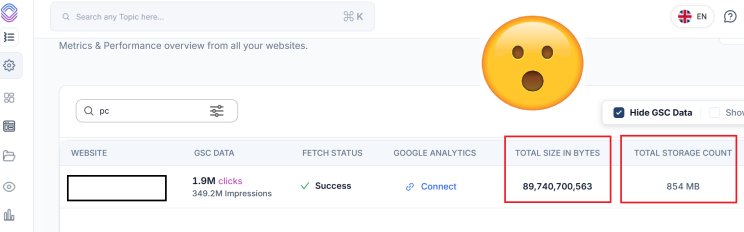

So, when you have MILLIONS of rows of data, hitting Google Search Console's API can mean requests time out or have to go through multiple paginated requests, in which time the LLM may time out or the context is lost/not maintained because of there being SO much data to process.
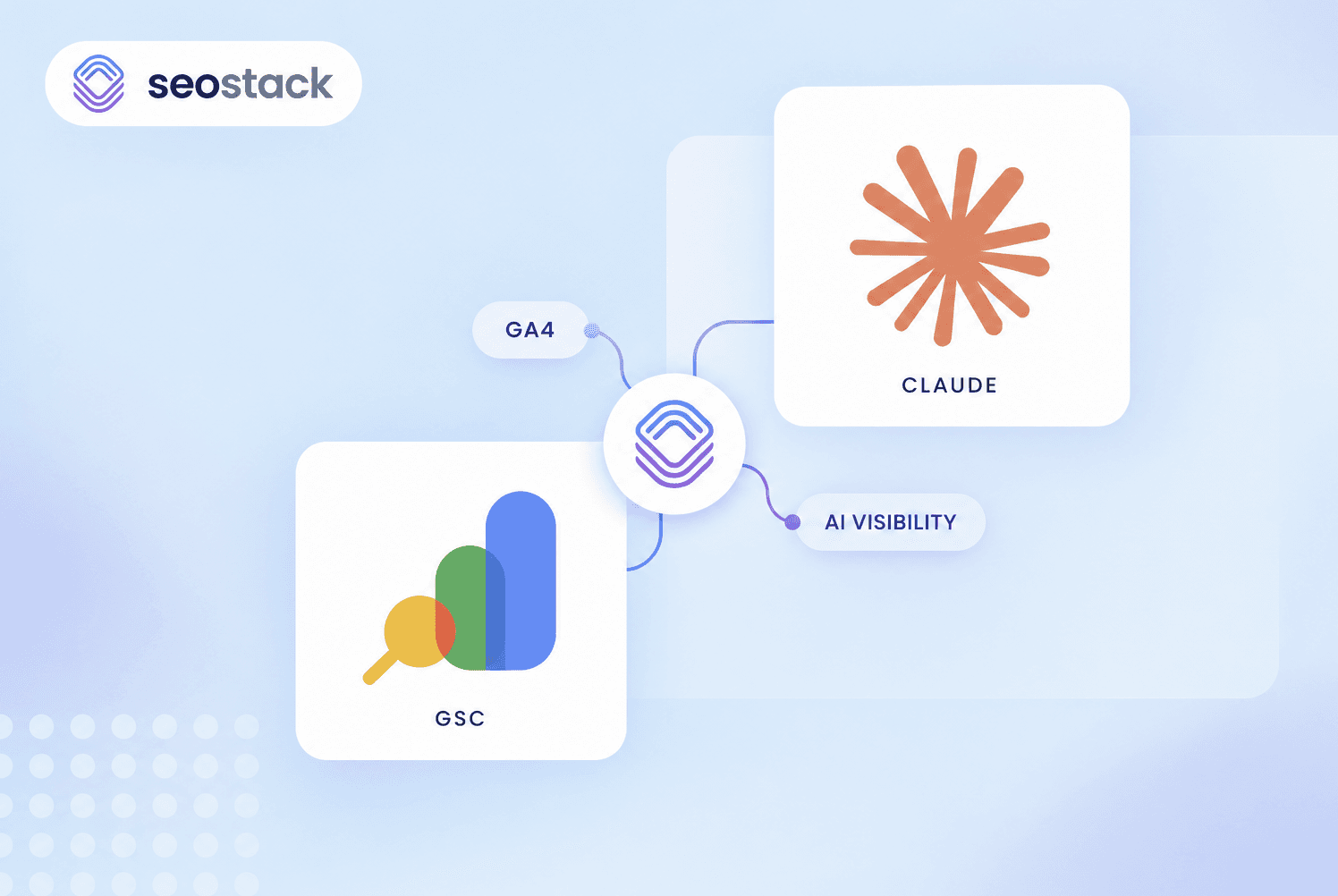
To try and put it into a visual for you >
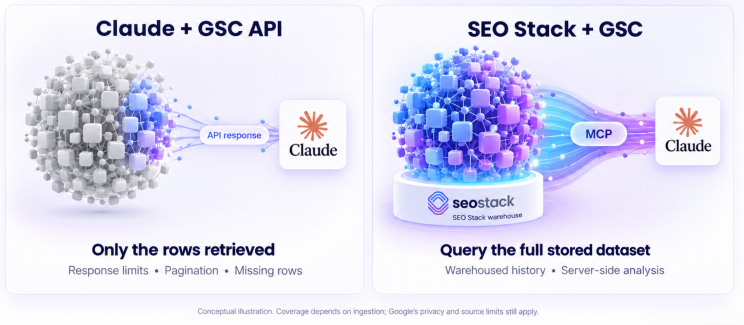

You can see that CLAUDE or another LLM of your choosing may only get part of the data and therefore the output may be wrong.
So imagine
You asked Claude to perform a cannibalisation audit
You asked chatGPT to find content gaps or decay
You asked Gemini to identify position decline trends
If the dataset ISN'T complete it could lead to:
Bad or wrong recommendations
Incomplete data
Recommendations that aren't needed
Hallucinations in data
If we look at what Google says the API request limits are we see >
And as for QPMs/QPDs we see >
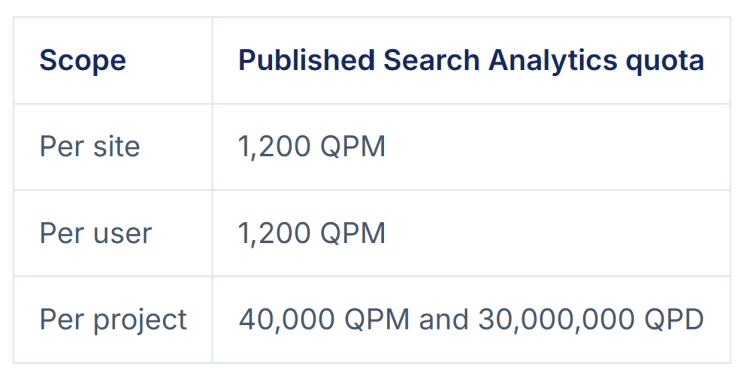

Now, whilst these volumes ARE quite generous, it wouldn't take long for a medium to large site to have so much data that it goes beyond the scope of daily limits.
So, this is why WAREHOUSING your data and then using AI to analyse it is a much better solution.
So what Data Warehousing Solutions are there? and are they hard to setup?
There are a few options, but the first thing to check is whether they actually STORE your Search Console data, or simply pull it from Google when you open a report (there's a lot of GSC tools out there that work with the API in realtime, they aren't warehouses generally).
This matters because a better looking GSC dashboard doesn’t necessarily give you any additional history, tools like SEO Gets + SEOTesting, for example, explicitly states that it isn’t a Search Console archiving tool. Most of its reports request data from the API when you use them.
The other consideration is what happens AFTER you’ve stored the data. Can you actually analyse it through a usable interface, or have you now got a database that needs SQL queries and custom dashboards?
Here are some of the main routes available.
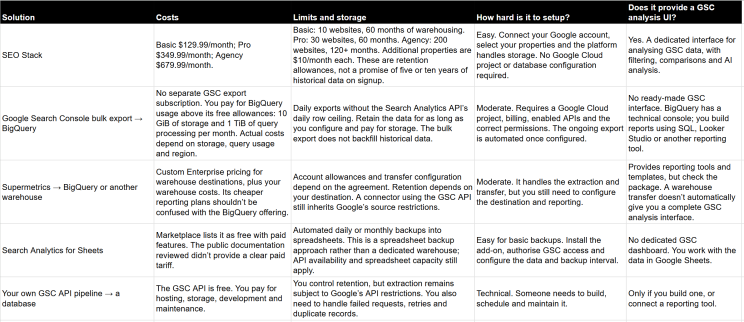

Prices below are in USD, based on the published pricing checked on 29 October 2026. Setup difficulty is my assessment of the work involved.
There’s also a data limit distinction that you need to understand.
Google documents a Search Analytics API limit of 50,000 rows per day, per property, per search type. Storing those results in a warehouse doesn’t remove that source restriction. Google’s native BigQuery bulk export avoids that daily row limit, although it still doesn’t reveal anonymised query text.
So when a provider says “unlimited data”, ask what that actually means. Unlimited storage? Unlimited rows in their interface? Or a collection method that avoids the standard API limits?
For most SEOs, the managed platform route is the easiest because storage and analysis are already connected. BigQuery makes sense when you want control over the underlying data and have the technical resource to work with it.
Is it better to use AI with warehoused GSC Data or GSC MCP?
So the answer to this really depends on your use case.
If you are auditing large sites or processing a LOT of data, you are far better off using AI with warehoused data than you are trying to use GSC API because of row limits.
However, SOME MCPs can give you the data at scale BUT you will still be deficient on timeframes for data unless you use GSC + BIGQUERY or SEO Stack.
MCP access and data warehousing are separate things, an MCP can let Claude query Search Console without storing any history/legacy data itself. What matters is what sits behind that connection: Google’s live API, or a database of previously collected data.
There are a variety of MCP connectors out there for Google Search Console, but before choosing I would be asking:
What does it query? Google’s API directly, stored data, or both?
How much does each tool return? And does it paginate or aggregate the results?
Does it retain history beyond 16 months?
Can it calculate across the full stored dataset, or does it just send a limited set of rows to the AI?
What are you paying for? Calls, returned rows, properties, storage or a combination?
Just remember - if you are using CLAUDE, ChatGPT, Gemini or another LLM to audit, you need to ABSOLUTELY get your ducks in a row when it comes to data collection, aggregation and querying.
For example, I tested Claude's connection to GSC and compared it to Claude's connection to SEO Stack, the same website, but different data outputs:
Asking Claude about query counts from SEO Stack MCP I got this response:
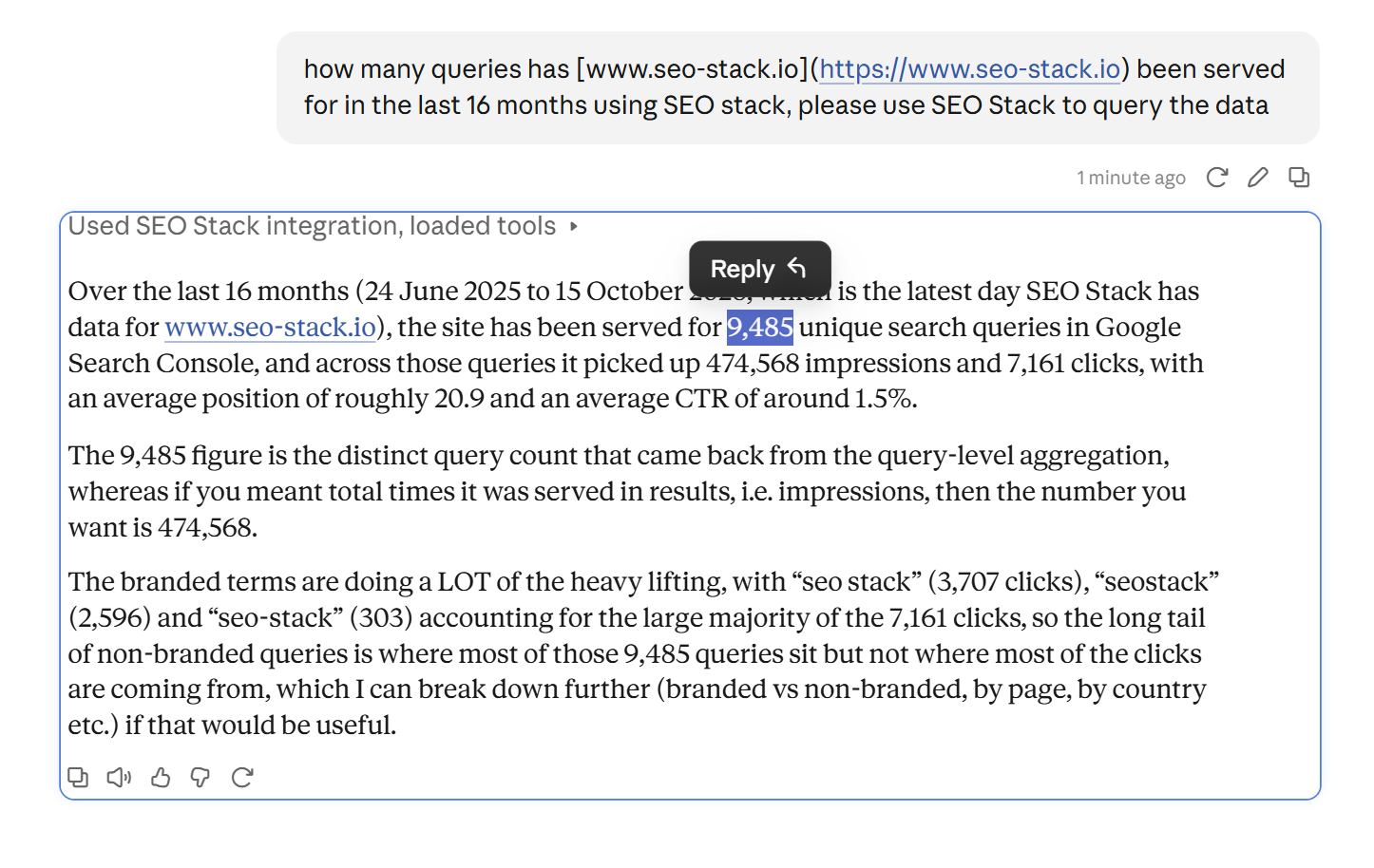

Then asking Claude with a direct connection to GSC I got >


So immediately, thousands of under-reported queries from the GSC connection and something id be particularly concerned about if I was running an audit for my own sites or a clients site.
OK so what MCP options are out there?
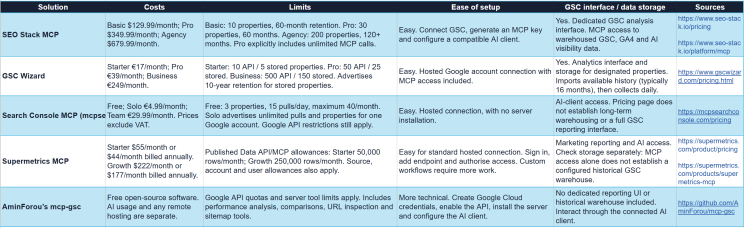

The image may be hard to read so here are the options below:
1. SEO Stack MCP
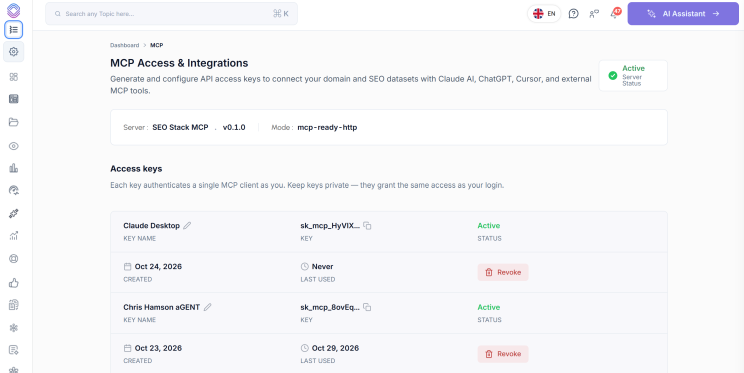

SEO Stack provides MCP access alongside its Search Console analysis platform and data warehousing. You can use the platform directly or connect a compatible AI client to its stored data.
Costs
Basic: $129.99 per month.
Pro: $349.99 per month.
Agency: $679.99 per month.
Additional website properties cost $10 per month each.
MCP access is included across the three plans.
Limits
Basic: 10 website properties and 60 months of warehousing.
Pro: 30 website properties and 60 months of warehousing.
Agency: 200 website properties and 120+ months of warehousing.
Pro explicitly advertises unlimited MCP calls for custom agents and automations.
The storage allowance doesn’t mean you receive five or ten years of historical data immediately. SEO Stack imports the history Google still makes available, then continues collecting it.
How hard is it to setup?
The documented process is straightforward: connect your Search Console properties, generate an MCP key and add the configuration to your compatible AI client. There’s no separate BigQuery project or database to configure.
Does it provide a GSC interface?
Yes. You get a dedicated analysis interface alongside MCP access to GSC, GA4 and AI visibility data. You can work through the platform or your connected AI assistant.
2. GSC Wizard
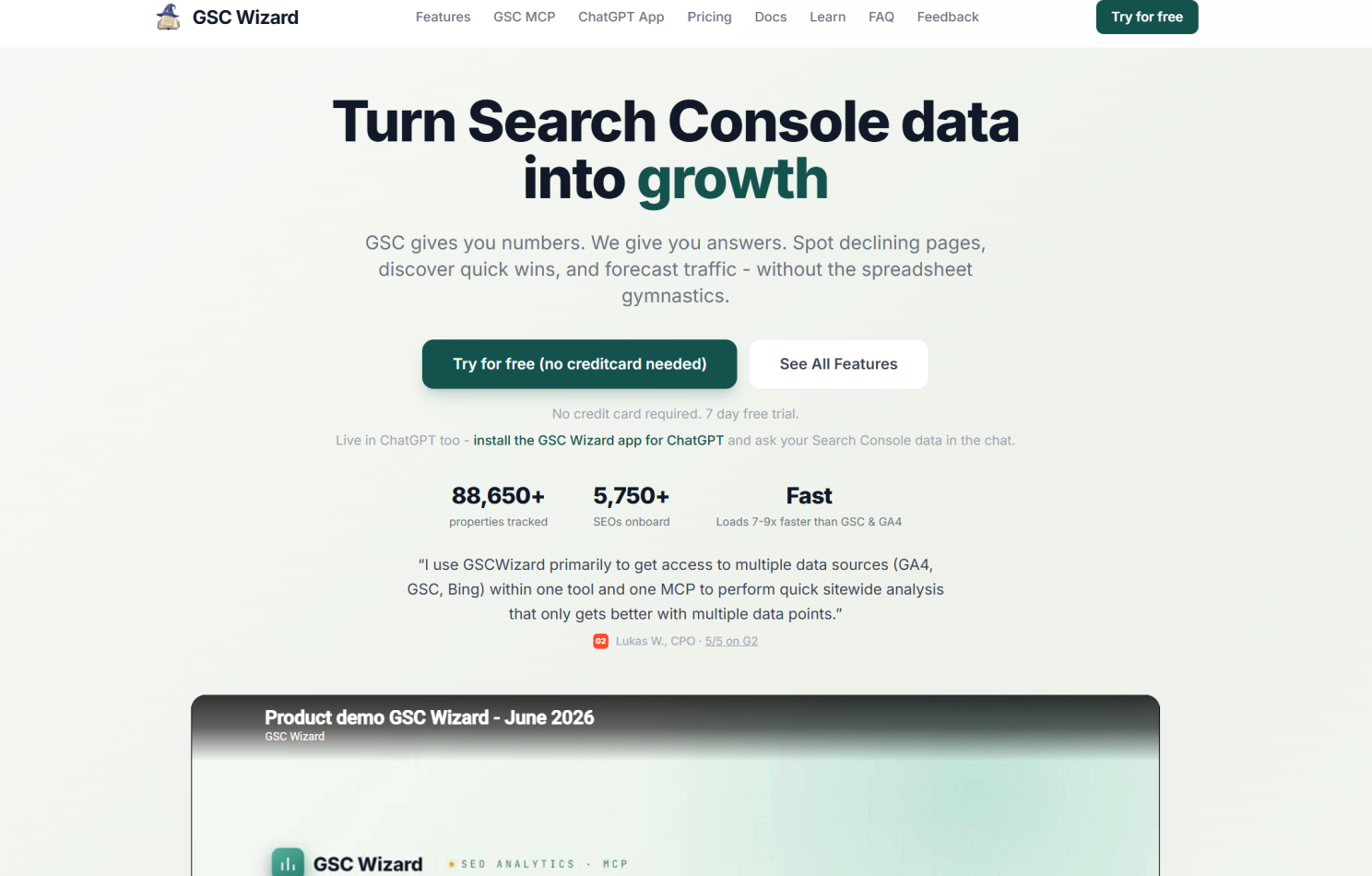

GSC Wizard combines a Search Console analysis interface with MCP access and long-term storage for selected properties. Its plans distinguish between properties accessed through the API and properties assigned full storage.
Costs
Starter: €17 per month.
Pro: €39 per month.
Business: €249 per month.
Custom plans start from €349 per month.
Limits
Starter: 10 API properties, including 5 with full storage.
Pro: 50 API properties, including 25 with full storage.
Business: 500 API properties, including 150 with full storage.
Stored properties have an advertised 10-year retention allowance.
Initial backfill covers available history, typically the last 16 months. The additional history accumulates as collection continues.
How hard is it to setup?
This is a hosted platform, so you don’t need to install and maintain your own MCP server. MCP and API access are included across the published plans.
Does it provide a GSC interface?
Yes. It includes an analytics interface, reports, exports and sharing features. Check which properties have full storage enabled, because the API property allowance is larger than the stored property allowance.
3. Search Console MCP — mcpsearchconsole.com
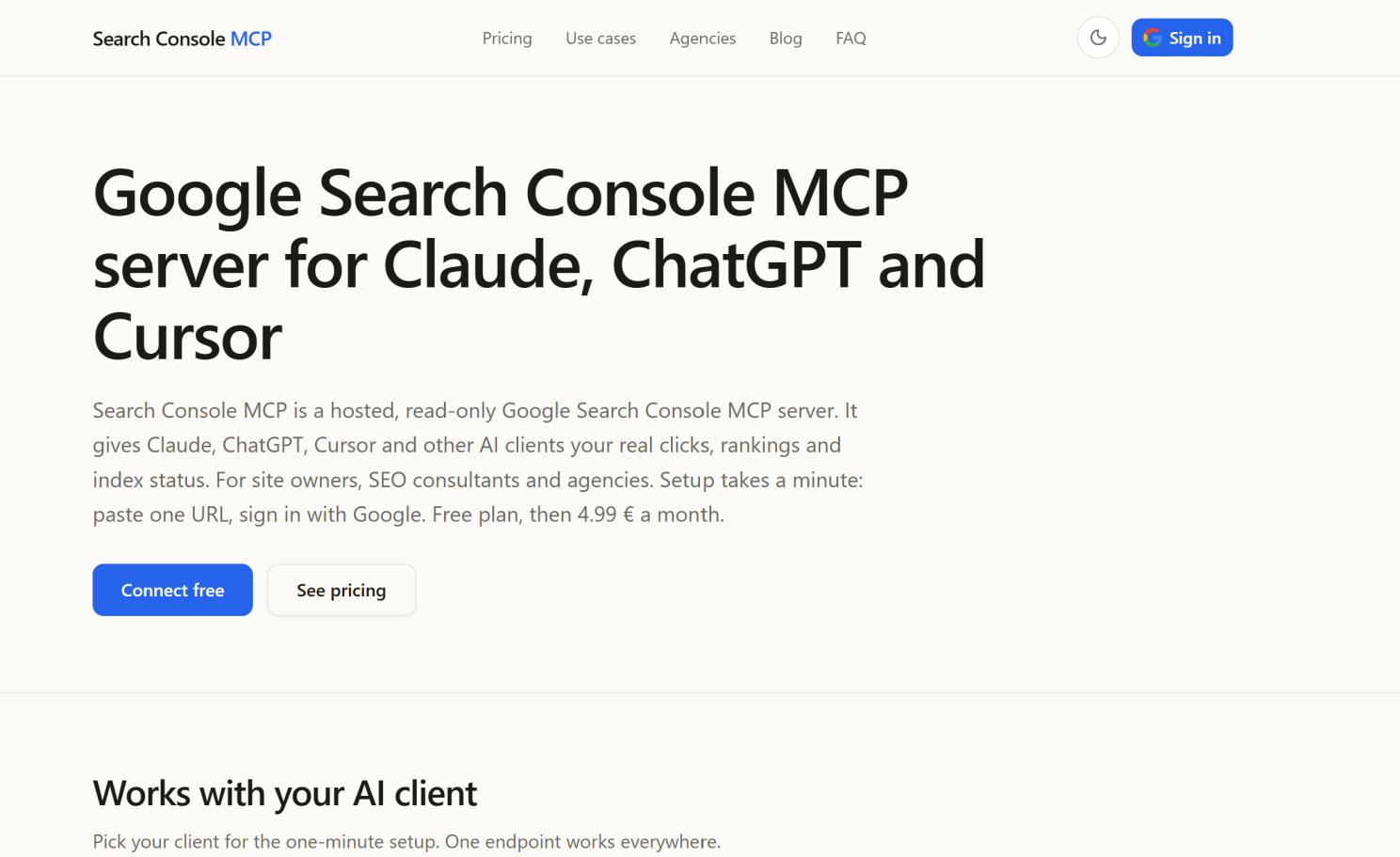

Search Console MCP offers a low-cost hosted connection for accessing Search Console through an AI client. Its pricing is based on free usage, an individual subscription or a company team subscription.
Costs
Free: €0.
Solo: €4.99 per month.
Team: €29.99 per month.
Prices exclude VAT.
Limits
The free plan includes 3 Search Console properties.
Free usage is limited to 15 data pulls per day, with a maximum of 40 per month.
Solo advertises unlimited data pulls and properties for one Google account.
Those are the provider’s allowances. Google’s underlying API restrictions still apply when data is retrieved through that API.
How hard is it to setup?
It’s a hosted connection, so there’s no local server to install. The provider offers a free connection to get started.
Does it provide a GSC interface?
The published offering focuses on making Search Console tools available through your AI client. The pricing page doesn’t establish that a full GSC reporting interface or long-term historical warehouse is included.
4. Supermetrics MCP
Supermetrics provides MCP access across multiple marketing data sources, including Google Search Console. It’s an option for workflows that need to combine search performance with other marketing data.
Costs
Starter: From $55 per month, or $44 per month billed annually.
Growth: From $222 per month, or $177 per month billed annually.
Enterprise: Custom pricing.
MCP is included in plans with Data API access.
Limits
Starter publishes a 50,000-row monthly Data API/MCP allowance.
Growth publishes a 250,000-row monthly allowance.
Plans also have allowances for data sources, accounts and users.
Warehouse destinations such as BigQuery sit within the Enterprise offering, so check the package carefully if historical storage is part of your requirement.
How hard is it to setup?
The standard connection involves signing in, adding the server endpoint to your MCP client and authorising access. Supermetrics says basic setup doesn’t require a developer. Custom integrations and workflows can require engineering support.
Does it provide a GSC interface?
Supermetrics provides reporting products and templates, with the exact features depending on the package. Its MCP can supply data to your AI client, but you need to confirm storage and reporting requirements separately.
5. AminForou’s mcp-gsc
AminForou’s mcp-gsc is an open-source server that connects Search Console to compatible AI clients. It includes tools for performance analysis, period comparisons, URL inspection and sitemap management.
Costs
The software is free and open source.
Your AI subscription or model usage is separate.
If you choose to deploy it remotely, any hosting costs are also separate.
Limits
It operates through Google’s APIs, so Google’s quotas and data restrictions apply.
Individual tools also have implementation limits. The documented batch URL inspection tool, for example, accepts up to 10 URLs at once.
It doesn’t include a historical Search Console warehouse.
How hard is it to setup?
This requires more configuration than a hosted service. You need to:
Create or select a Google Cloud project.
Enable the Search Console API.
Configure OAuth credentials or a service account.
Install the server and add its configuration to your AI client.
Authorise access and test the connection.
Does it provide a GSC interface?
No dedicated reporting dashboard is included. You interact through your connected AI client, which can use the available tools to retrieve data and produce analysis.
What Should You Check Before Choosing a GSC MCP?
The price of the connection is only one consideration. You also need to understand what data the AI can actually access.
Data source: Does it query Google directly, a stored database or both?
History: Does it retain data beyond Google’s standard reporting window?
Response limits: How many rows can each tool return, and does it support pagination?
Analysis: Can it calculate across the stored dataset before returning an answer, or does it send a limited set of rows to the AI?
Charges: Are you paying for calls, returned rows, connected properties, storage or a combination?
Google documents a Search Analytics API limit of 50,000 rows per day, per property, per search type. Adding MCP doesn’t automatically remove that restriction.

Founder, SEO Stack
Daniel is the founder of SEO Stack. He has spent over 2 decades working on technical SEO and search data, and built SEO Stack after hitting the same Search Console limits on client work one time too many.
Daniel has extensive SEO experience having built SEO agencies, audit businesses & a thriving consultancy, in his spare time Daniel likes to run SEO experiments & to share findings.
Published 29 October 2026