Claude & Google Search Console vs SEO Stack & Claude
So, naturally all over various social platforms I am seeing more and more SEOs who are connecting Claude to Google Search Console. And I get it, you are effectively pairing up your AI tool w
So, naturally all over various social platforms I am seeing more and more SEOs who are connecting Claude to Google Search Console. And I get it, you are effectively pairing up your AI tool with your SEO data from GSC to speed up analysis, identify opportunities etc. and that's great until you look a little deeper.
Some SEOs ask which pages lost clicks, compare performance before and after a migration, investigate a group of queries, what URLS have cannibalisation etc., and, fairly quickly you can get through work that would otherwise involve exports, spreadsheets and a fair amount of swearing.
What I would question is the assumption that connecting an LLM to GSC automatically gives it everything it needs to carry out a comprehensive SEO assessment - SPOILER, it doesn't. Why? because there are a few main reasons, namely:
SEOs need to know what to ask and how to interpret the responses from claude, chatGPT or gemini (whatever LLM they've hooked up to their GSC)
Then there is the matter of hallucinations in data and it happens a lot, I'll elaborate on it shortly - basically, I got chatGPT to do an audit, it audited URLS that didn't exist because there was legacy GSC data for them (no joke)
And then there is the matter of GSC API query / row limits, and, this is quite an issue if you are auditing data but not the full dataset - gaps or missing data can lead to bad or wrong data
Whilst Claude + GSC is free and easy to setup, it provides a model for analysing data but not a model for consistently understanding forward impact of SEO changes
AI needs to be prompted properly or the output can be dramatically wrong, i.e. like in the example below where because URLS were in the last 16 months of GSC data the LLM assumed the URLS were still active when the content had been removed from the site months ago and instead a HTTP 410 was returned
Here is an example of chatGPT's output when performing a content audit having used Claude + Google Search Console:
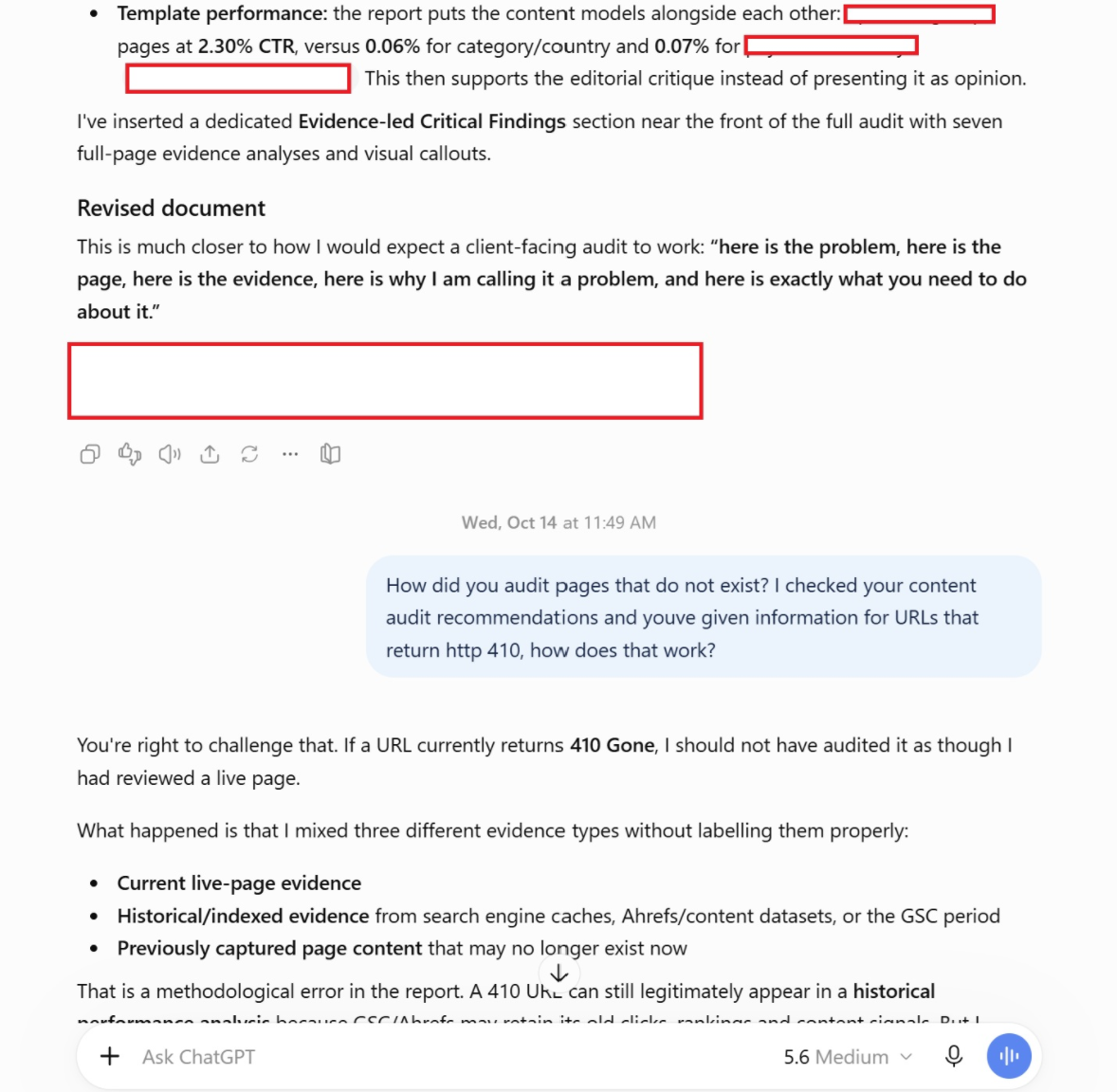
This is a prime example of where connecting an LLM to GSC can go wrong if:
The prompt detail doesn't explicitly set guardrails
If some of the dataset is missing from GSC row limits, the audit performed by the LLM won't be accurate
The LLM cannot distinguish between an active or legacy page
Imagine delivering your client a report, say an audit which contains recommendations for pages that do not exist? You'd look very unprofessional.
So, my point here is that using AI/LLMs to analyse GSC data is fine to a point, but, you need to provide sufficient context and ensure LLMS can access all the data! We'll get to GSC's API row limits shortly.
What happens when you connect Claude to GSC
A typical direct integration gives Claude tools that make authorised requests to Google's Search Analytics API to fetch GSC data. Any LLM connection might use a custom MCP server, a custom application or scripts, but somewhere underneath it still has to specify dates, dimensions, filters & the amount of data to retrieve.
What's important to understand is that LLMS are generally constrained to the limits imposed by an API, and, as we know GSC's API is self-limiting.
For an LLM, there are several practical consequences:
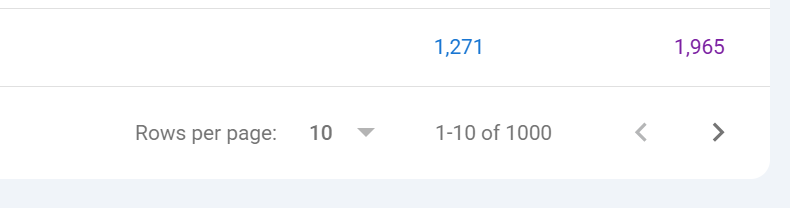
A basic connector could stop at 1,000 rows - The model then analyses that subset unless further requests are made, so it's important to understand IF all the data is being obtained and whether multiple queued requests are being made before analysis begins
A connector requesting 25,000 rows could still stop prematurely - if it does not paginate
Even a properly paginated connector cannot deliver every underlying query/page row - Google's own retrieval limits still apply
The connector might further truncate or summarise responses - before passing them to the model, that depends on its implementation/how its been setup
There are overarching limits that pagination doesn't overcome, one being
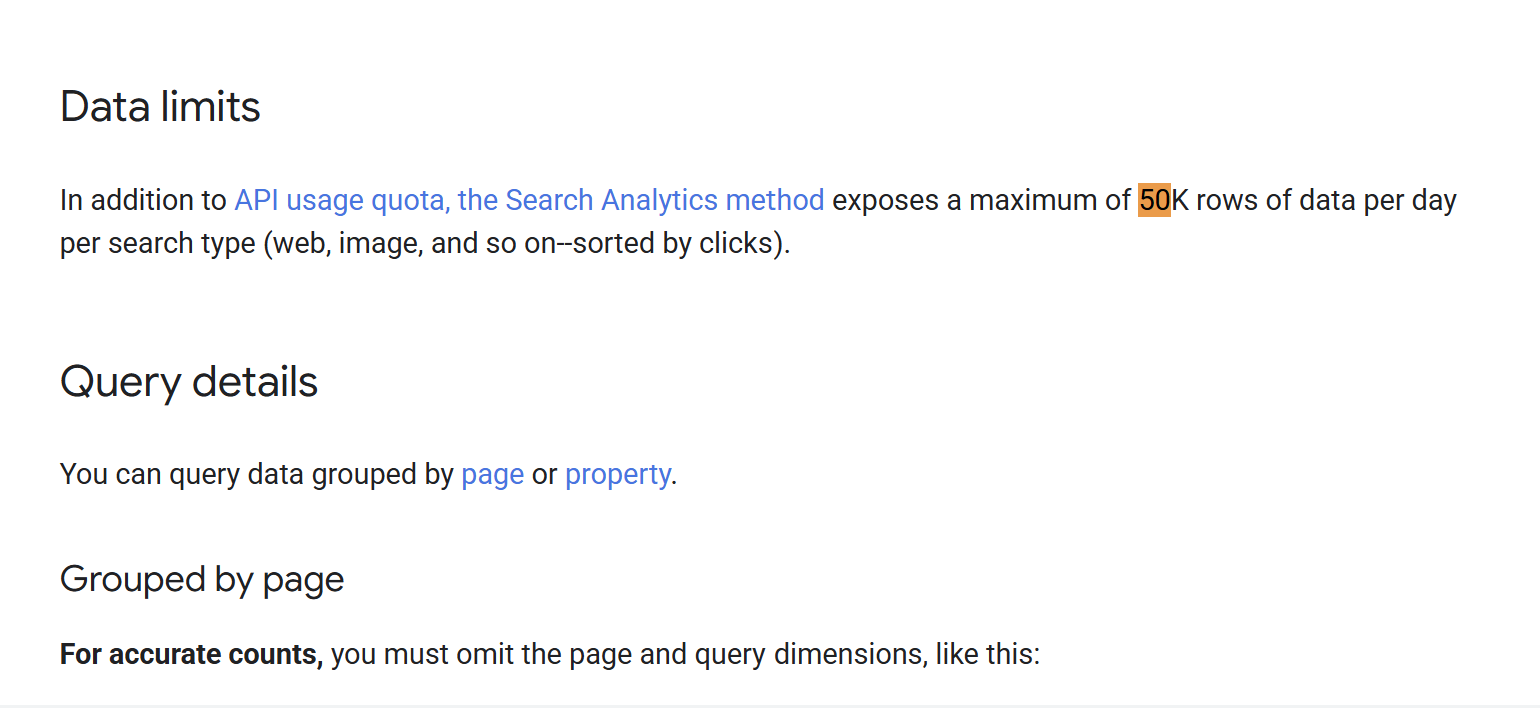
Pagination does not remove every restriction! Google documents a maximum of 50,000 rows per day, per search type for Search Analytics, sorted by clicks. Its recommended extraction approach is to request individual days and paginate the results. Grouping by page and/or query can also cause data to be dropped.
So, if you are using Claude/chatGPT/Gemini or another LLM to analyse data, just be aware that if you are auditing a medium to large site, the probability that you'll get all the data within the request limits is unlikely.
Anthropic supports custom connectors using remote MCP, which allow Claude to work with external tools and data sources. MCP is the connection standard, but should not be considered a fool-proof way of getting all underlying data (trust me, we know).
The same underlying issue applies when you use ChatGPT or Gemini through a connector or custom workflow, changing the model does not change what Google makes available through the endpoint being queried, the only difference is in how the model works with and interprets the data / as well as the output - as each model has different capabilities, so don't expect unified analysis when using different models.
Generally, for a focused task, using an LLM + GSC can work extremely well, if I want to compare mobile clicks in the UK across two periods, I do not necessarily need millions of query and URL combinations. So, in smaller test cases it can work well, however, if you are working with a larger site that may have millions of queries / pages based on 16 dimensions, the data limits can be hit over API pretty quickly.
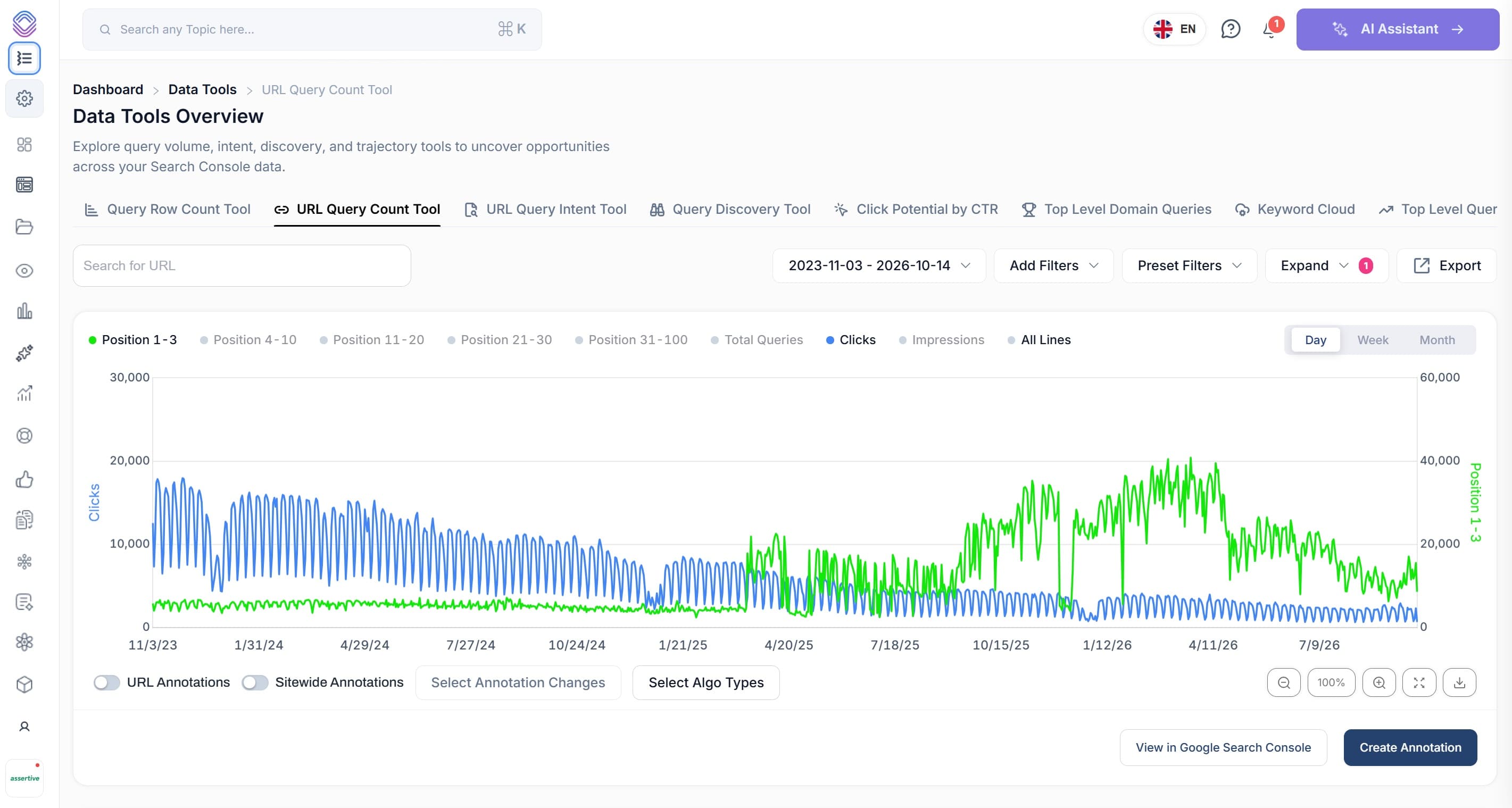
For example - 1 website can have an insidiuous amount of data, in this example, we see the site has 655,373 queries right - now, imagine for EACH one of those queries it has multiple data points (click, impression, ctr, position, page, country, device, search appearance etc) - this means the volume of requests needed to audit the FULL site would be in the MILLIONS, much greater than GSC's 50k row limit.
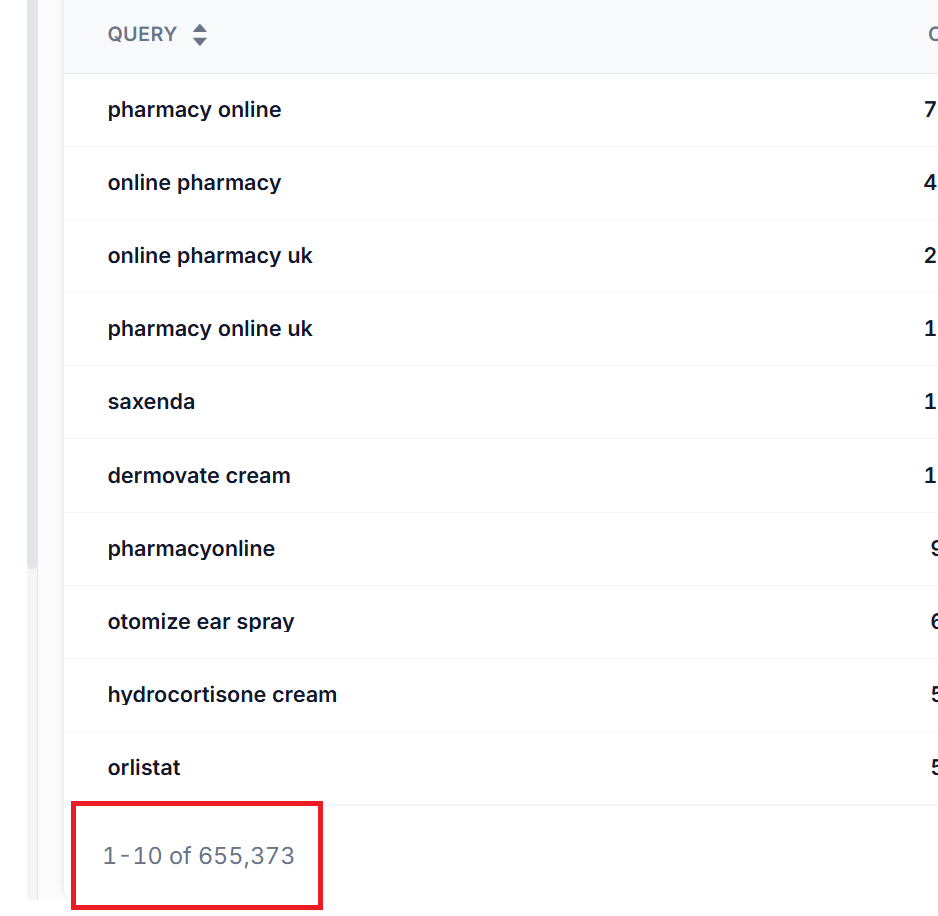
And that's just for queries, what about pages?
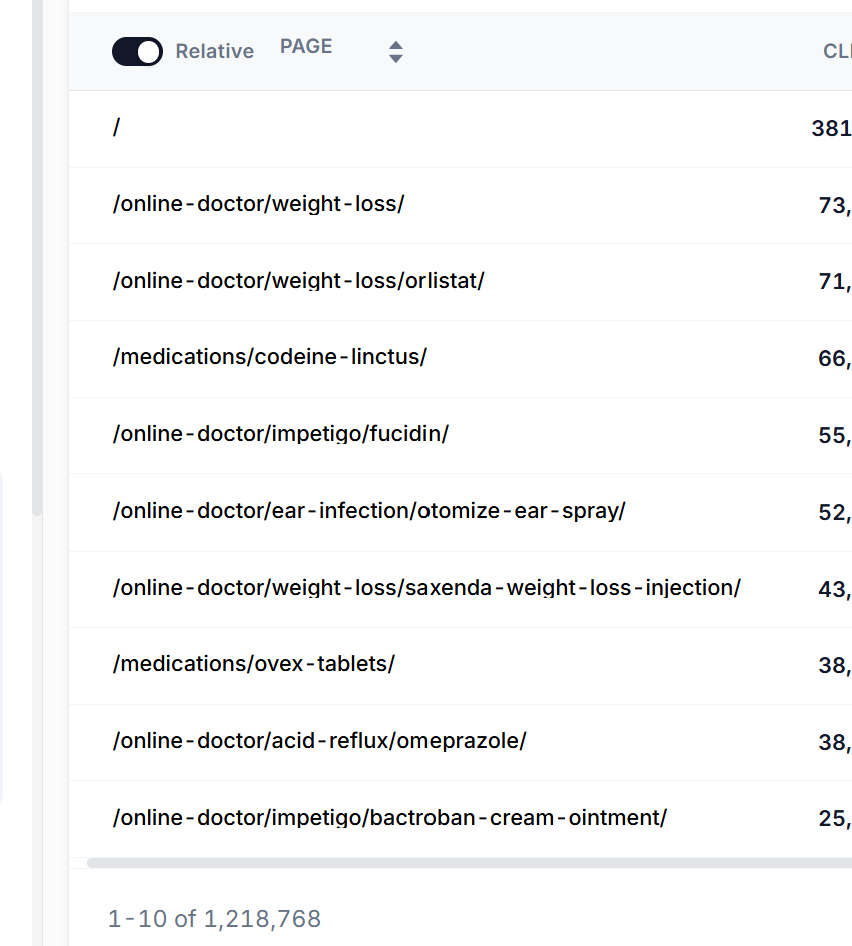
This site had over 1,218,768 URLS served!
So, hooking up GSC with Claude or chatGPT in instances like this is likely to lead to a huge gap in true data analysis.
This is why I am SUPER SKEPTICAL of anyone claiming to automate their SEO with AI without some form of repurcussions down the line, same with auditing, if you are using an LLM to audit and it can't get all the data, how could the audit possibly be accurate?
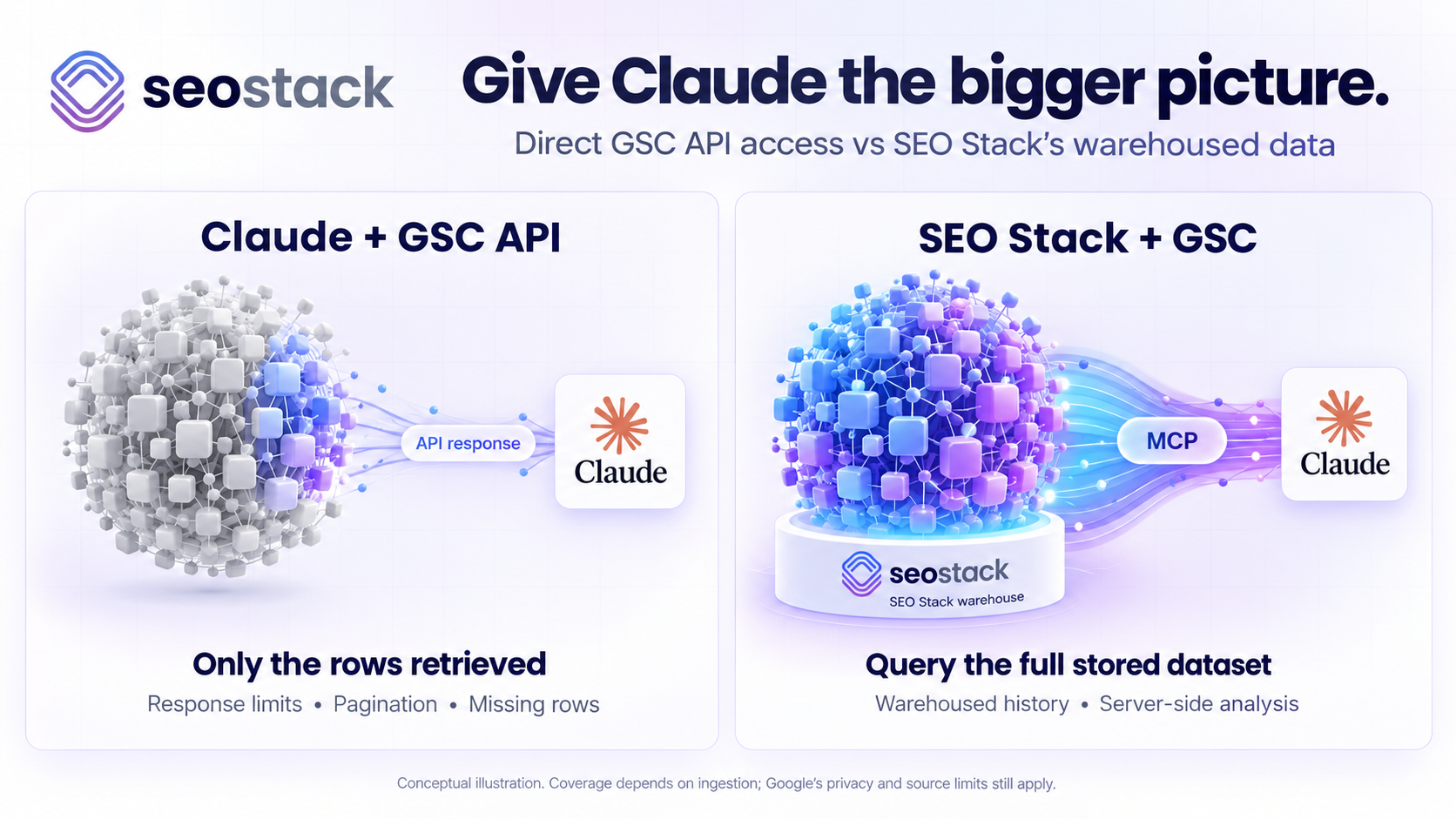
The image above should depict what I am saying in regards to data access and ensuring that the LLM can access everything and not just part of the data.
SEO Stack is a data warehouse, like Google BigQuery, it gives ALL of the data over MCP and means that LLMS are likely to have full context as opposed to a limited dataset before auditing or analysing.
The GSC API Limits Some People Confuse
There are several different restrictions here (see https://developers.google.com/webmaster-tools/v1/searchanalytics/query and https://developers.google.com/webmaster-tools/v1/how-tos/all-your-data), subsequently, mixing them together produces some fairly misleading comparisons. Just keep in mind that a request quota is not a hard row limit, and not either of them tells you how much historical data you have retained or accessed.
Request quotas and load limits
Google's published Search Analytics quotas are as follows, QPM means requests per minute, QPD means requests per day, these are the volume of API calls, and not the number of search queries your website appeared for (to be clear)
Scope | Published Search Analytics quota |
Per site | 1,200 QPM |
Per user | 1,200 QPM |
Per project | 40,000 QPM and 30,000,000 QPD |
Those are substantial allowances, it would be ridiculous to suggest that every SEO asking Claude a few questions is immediately going to run out of requests, that's not the case, for a lot of use cases, Claude & GSC together are perfectly capable.
Google also applies short-term load quotas over 10 minute periods and long-term load quotas over a day. Longer date ranges cost more load, and requests involving both page and query grouping or filtering are particularly expensive. Google does not publish a simple numerical load allowance on that page.
For repeated analysis across large sites or an agency portfolio, the work behind each request can therefore matter more than the headline daily allowance.
One other correction the often quoted 2,000 requests per site per day applies to URL Inspection, not Search Analytics performance reporting, in general these are separate resources with separate quotas.
Response limits and the available rows
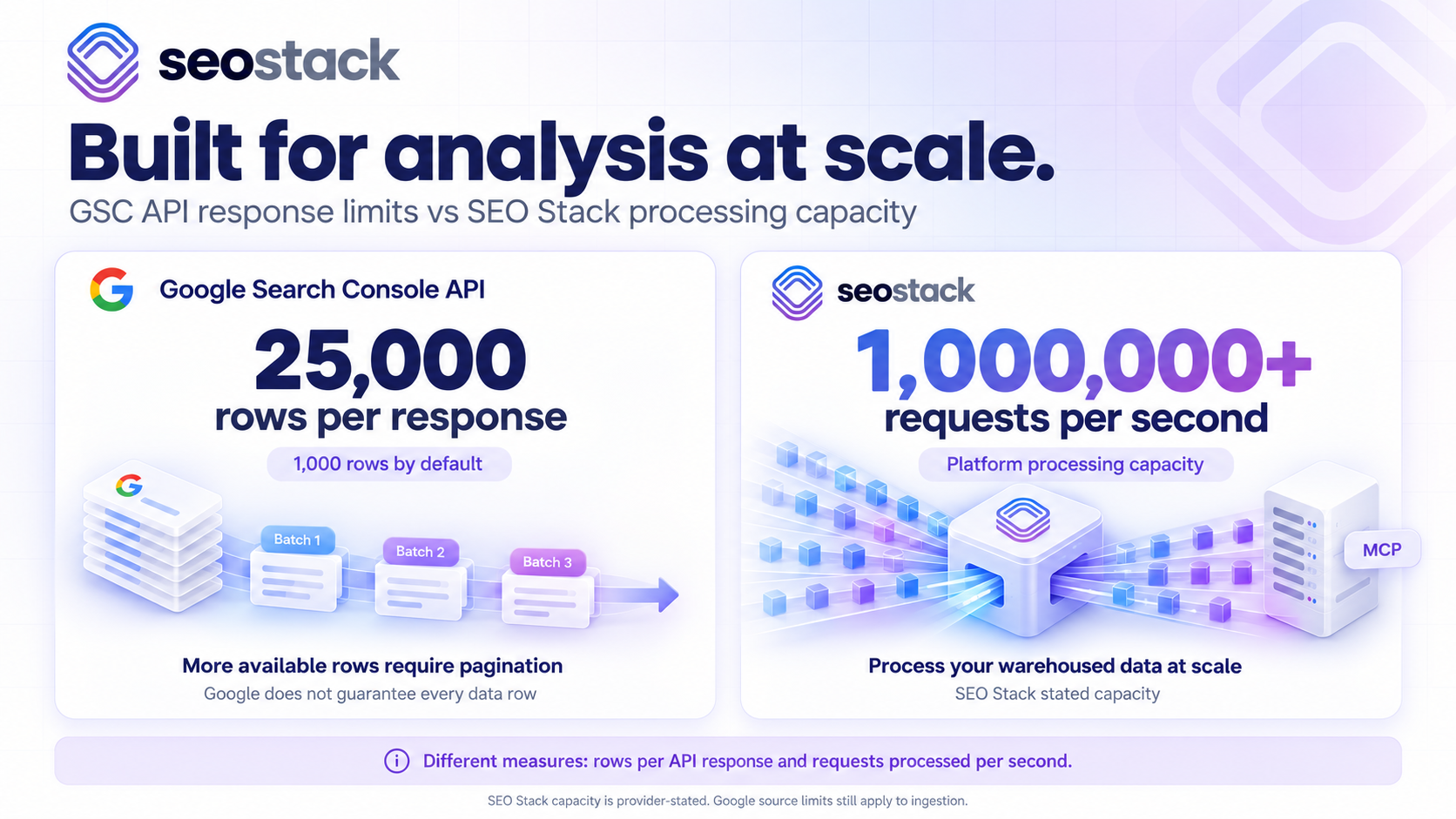
The Search Analytics API defaults to 1,000 rows per response and allows a maximum of 25,000 - so generous of Google. Further available rows require pagination using startRow, which needs to be factored in when making numerous requests. G's own documentation also explicitly warns that the API does not guarantee every row, it prioritises the top results, ordinarily sorted by clicks, for multi-dimensional requests this can quickly tot up (we know, when we built SEO stack's data warehouse architecture it was shocking how quickly the data sizes stacked up).
Separately, Google documents an export limit of up to 50,000 rows per day, per site, per search type, which may not be reached in every case. That is different from the 25,000-row response limit.
So, increasing rowLimit is useful, and pagination is necessary when there are more available results, but neither is evidence that you now possess every possible query and page combination.
Google recommends daily extraction and explains that including page or query dimensions can cause some data to be dropped. Choosing more detailed dimensions involves a trade-off that the person interpreting the output needs to understand. [5]
Does Claude get all your Search Console data
It depends what you mean by all, and that qualification applies to SEO Stack as well. So, I thought I would do a quick test here. So, I have Claude set up to use GSC API and to use SEO Stack MCP, I did a fair comparison asking for how many queries SEO Stack was served for in the last 16 months:
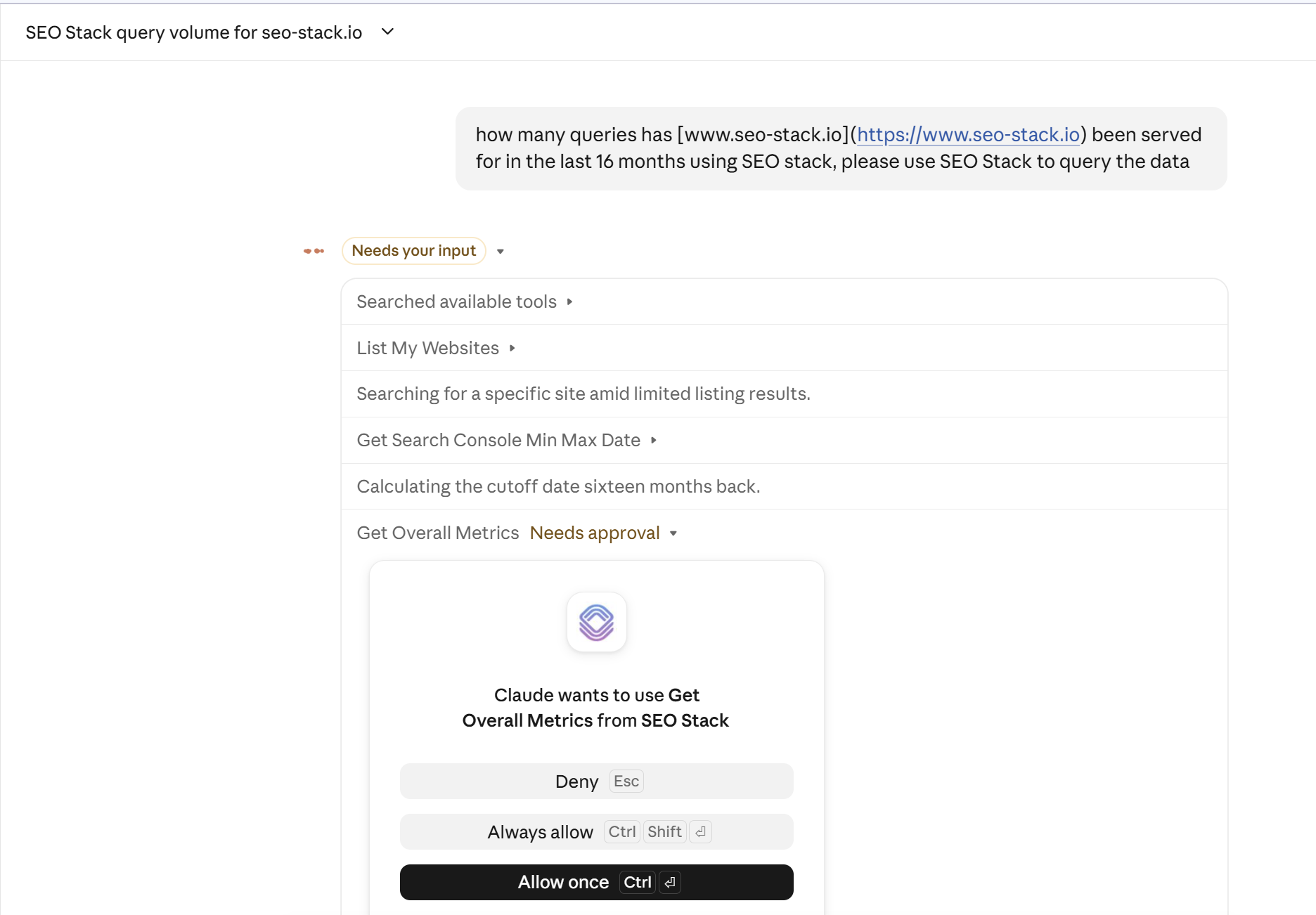
And here was the output:
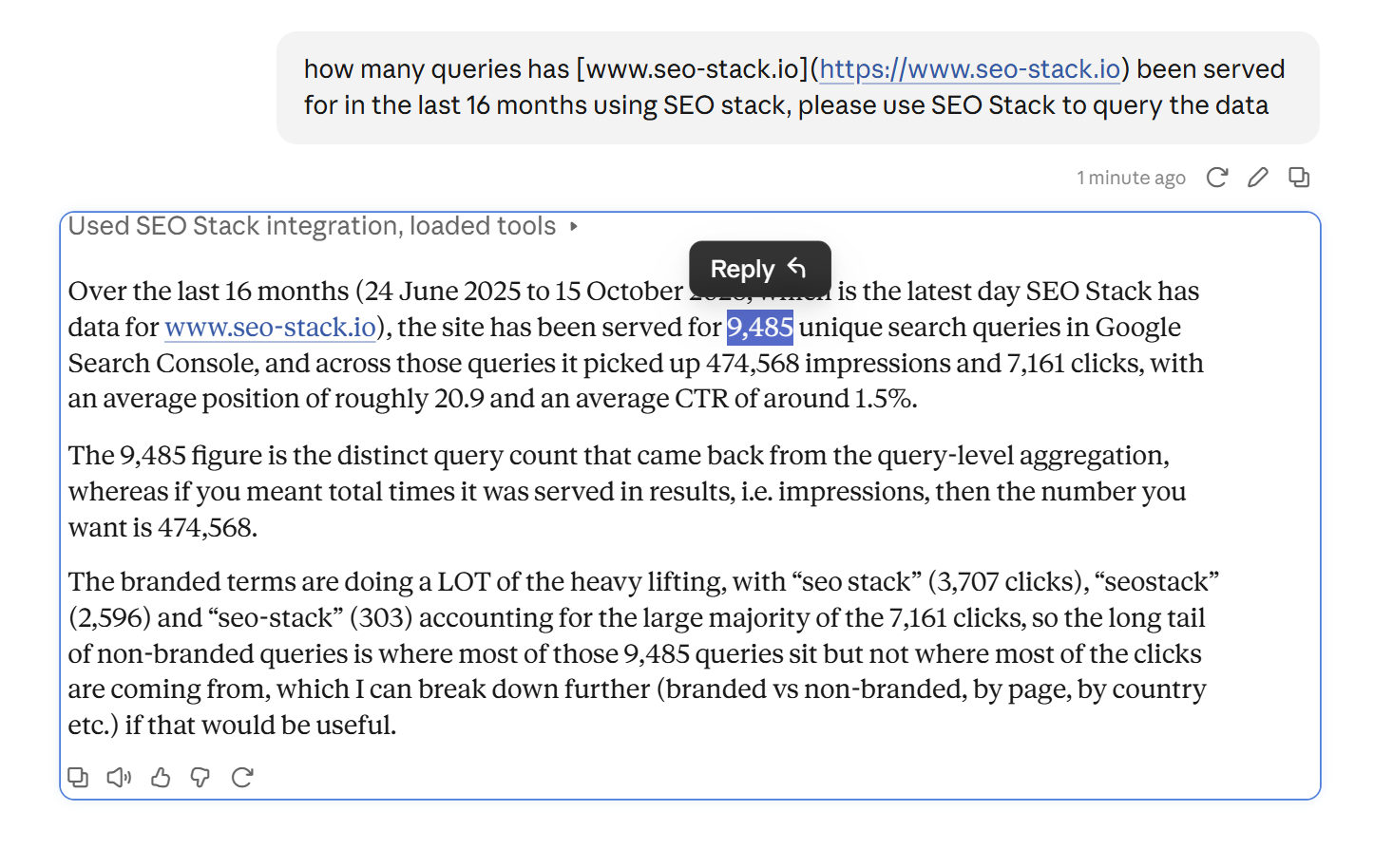
Then looking at the GSC >> API Integration I saw >

And the amount of queries returned?

So, yeah, there's immediately a query count discrepancy, some of that can also be attributed to the fact that SEO Stack has extended data because it's not limited to 16 months.
Moving on, there are three separate things worth checking:
First, did your connector retrieve all the rows available for its request? I would ensure that whatever connector or solution you are using, you need to ensure it is getting all the data and that nothing is being missed out.
Second, does the source expose all the detail your analysis requires? Completing pagination is not the same as removing Google's internal data restrictions when it comes to request volumes.
Third, are you asking for information that Google deliberately does not disclose? Anonymised click/query data is a typical example, Google excludes these from detailed query reporting to protect user privacy. Overall totals can include their activity even though the individual query text is absent.
So, the point above partly explains why adding up named queries may give you a different click total from an appropriately matched overall report (because of ommissions in data). It does not automatically mean the connector has an issue, but it can infer that not all data is available or exposed over the requests, leading to all sorts of issues when performing analysis or auditing!
I would also avoid calling every omission sampling, privacy filtering, a response limit, a daily export restriction and a connector returning only its first batch are different issues, with different implications, if we are going to criticise the quality of AI analysis, we should at least be precise about what is missing.
How incomplete extracts can distort SEO recommendations
The following are illustrative issues/potential risks that can happen (and do), they are not claims about every GSC connector or every answer Claude may respond with. A solid integration may check coverage, calculate outside the model and disclose uncertainty.
As I highlighted earlier on, incomplete data can mean audit recommendations or SEO analysis can lead to bad data, bad recommendations and insights that are wrong and I've tested this, it does happen a lot, moreso with hallucinations.
So, some of the issues you can expect:
Long-tail opportunities disappear from the assessment
Imagine an ecommerce site with a large catalogue and thousands of queries that generate impressions but very few clicks. If the analysis only receives the leading click-generating rows, it may concentrate on products that are already performing, while missing less established categories or commercially relevant searches that deserve attention. Generally sites will often have a large volume of ZSV (zero search volume) queries and a lot of these can be left out of requests.
The output or guidance may sound entirely reasonable, the list it was based on could still be a poor answer to the question, “Where are ALL our opportunities?” especially if a load of those queries are missing or omitted.
A selection that is useful for reporting your biggest traffic drivers is not necessarily suitable for finding overlooked demand, and as we know from long-tail data, this is often where higher intent opportunities lurk.
Missing rows become apparent ranking losses
Suppose a query appears in one period's extract but is absent from the next, an incautious workflow (or one without human oversight) might classify that as lost visibility, when the row could simply have fallen outside the returned selection - if row requests timeout or go beyond a limit, a load of data will be missing and if the LLM doesn't understand that, it could report it as losses.
So, for example, before recommending a content overhaul, I would want a targeted check for that query, consistent filters and a clear understanding of the extraction method. “Not in this response” is a very different observation from “Google no longer shows this website”.
LLMS like Claude or ChatGPT could make bad recommendations or infer you should create content you already have because they don't access all of the sites data and can't see beyond that (unless they have an explicit inventory of your websites index).
Cannibalisation assessments miss competing URLs
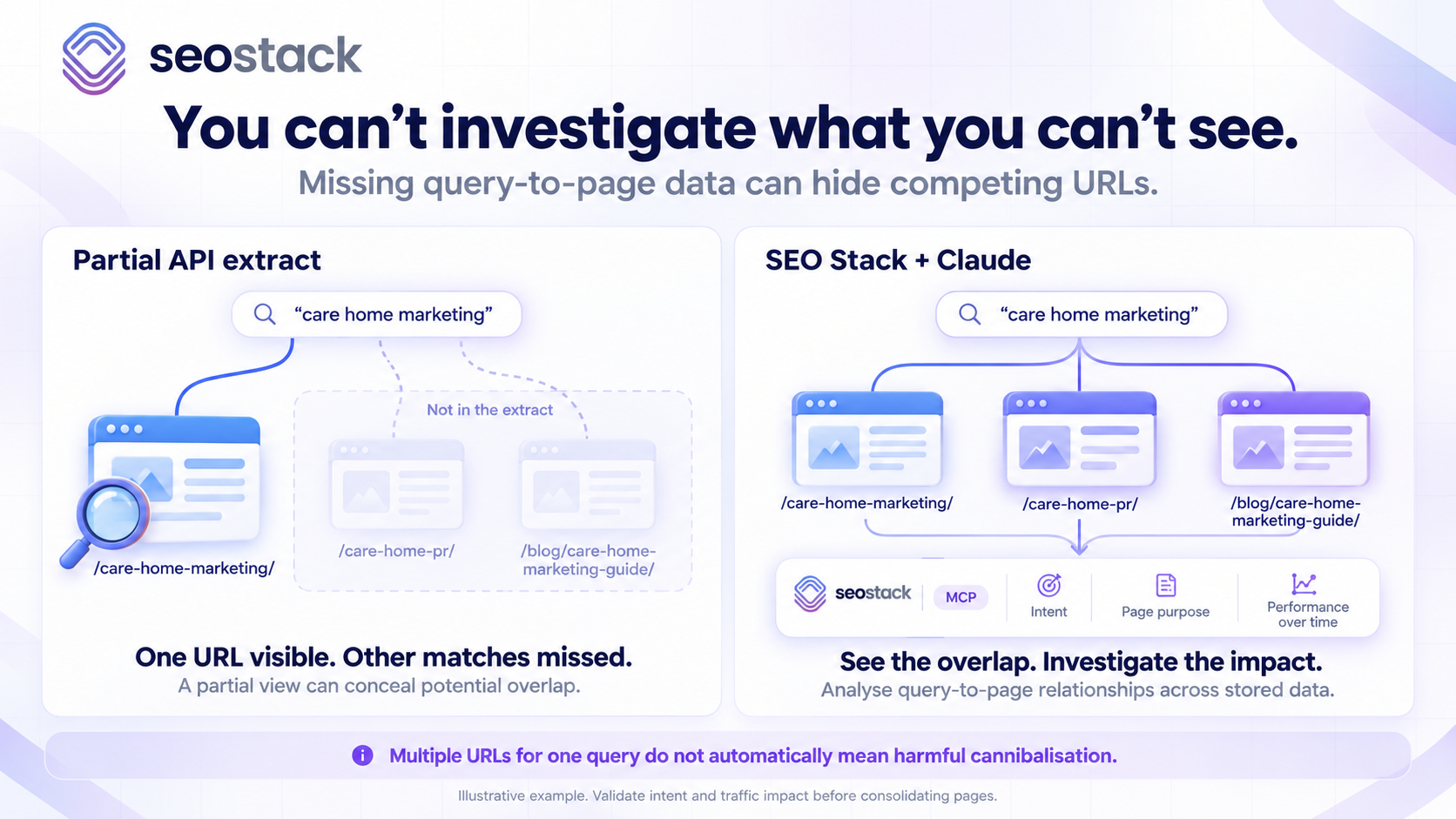
If your analysis only receives one of the URLs associated with a query, it cannot properly investigate whether another page is competing with it. Even where both URLs appear, their coexistence is a reason to investigate, it does not automatically establish cannibalisation.
For cannibalisation analysis, your LLM needs access to all of the data (all of it) because otherwise, cannibalising URLS/queries may not appear where some of the data is missing, again, this does happen.
On top of that, you still need to examine intent, page purpose, changes over time & whether the alleged competition is actually impacting or reducing useful traffic.
Brand classifications become misleading
Consider a hypothetical property with 10,000 clicks in a matched overall report, the retrieved named queries account for 7,000, including 2,000 classified as brand.
Brand represents 28.6% of the retrieved query clicks therefore it would be misleading to present that as the brand share of all 10,000 clicks, because the remaining 3,000 have not been classified. You can report 2,000 identifiable brand clicks as 20% of the total, but that still does not establish the true total brand share.
Your historical data matters as much as your row count
Search Console provides a rolling performance history of roughly 16 months, Google introduced that extended window to support longer-term and year-on-year comparisons, but it is still a finite reporting period.
Whereas SEO stack gives you 10 years, not 16 months, 10 YEARS!
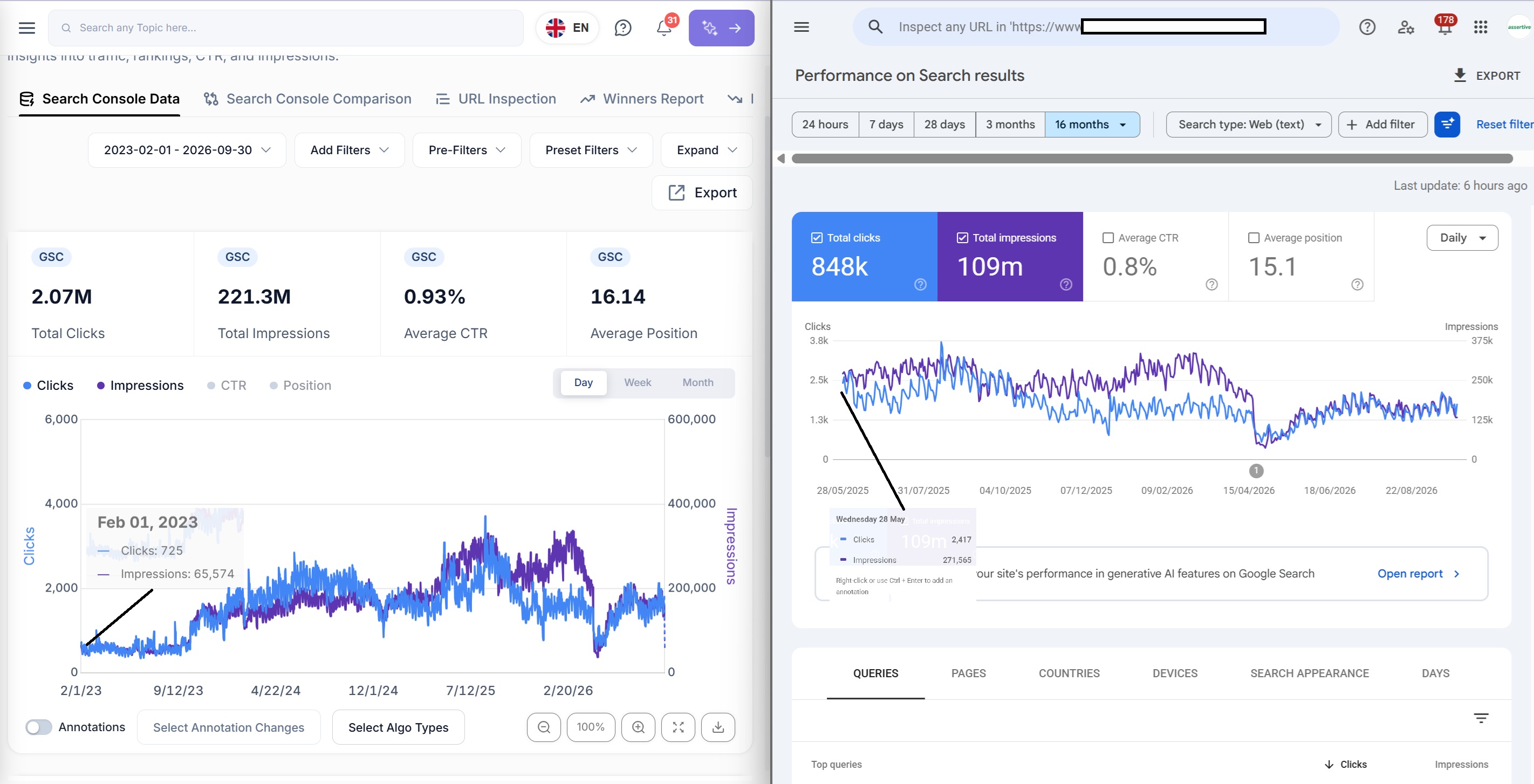
That may be enough to compare last month with the same month last year OR last 3 months year over year but, it is not enough to properly assess 5 years of seasonal performance, revisit an older migration or examine whether a decline began well before the latest Google update.
You cannot ask Claude to analyse GSC data that isn't there, beyond 16 months there is nothing, not unless you use Google BigQuery, which, some SEOs do, but many don't because whilst it's great for storing data from GSC, it doesn't have a traditional UI and doesn't allow users to interact with historic GSC Data in a GSC style interface, they typically need to understand SQL, Python or to integrate it with Google Data Studio.
So, my recommendation is straightforward, retain the data while you can still access it. An archive of your GSC becomes more valuable with time, imagine all the long-tail and keyword data? imagine being able to compare 12 months year over year.
BigQuery solves an important part of this
Google's native Search Console bulk export sends daily performance data to BigQuery without the API's daily row restriction. That makes it a serious option for larger websites, rather than simply another way of downloading the same limited API extract.
There is a detail here that deserves care, Google's overview describes anonymised queries as excluded, while its table reference documents anonymised records with the query text withheld. The useful distinction is that anonymised metrics can be represented, but the hidden search terms are not revealed - which can skew the numbers for analysis.
BigQuery can therefore address an important source of extraction loss and retain history. It can also support a sophisticated reporting system and an AI workflow, provided somebody builds and maintains those parts - but, a lot of SEOs haven't dealt with BigQuery or just haven't had the time to set it up.
I wouldn't dismiss that, for a business with an established data team, existing Google Cloud infrastructure and specific analytical requirements, it may be exactly the right choice - and whilst we advocate SEOs and businesses to use SEO Stack for data warehousing, we know some businesses want their own in-house solution (moreso since AI came along).
For an SEO who wants usable historical reporting without another technical project, the practicalities are rather less attractive.
The faff is everything around the warehouse
Google's setup requires a Cloud project with billing, enabled BigQuery services, permissions for the export service account, and an export destination configured in Search Console. There is a free usage level, with charges for storage and query usage beyond the relevant allowances. The native export starts collecting going forward, it does not automatically backfill the preceding 16 months.
You then need to turn the stored tables into something your team can use.
BigQuery has its own interface, and you can create a perfectly consistent reporting experience with Looker Studio, another BI product or a custom application. What you do not receive simply by enabling the export is a ready-made SEO application carrying your familiar filters, comparisons and investigation workflows across recent and historical data.
Someone has to decide how those reports work, maintain the definitions and deal with problems when a number does not match.
Google's query guidance also says exported rows are not necessarily consolidated, so metrics need appropriate aggregation. It provides calculations for CTR and position, including the position adjustment required for the export schema.
Claude can help write SQL, of course, but the query still needs checking. An incorrect calculation executed successfully against a complete warehouse is still an incorrect calculation.
Where SEO Stack and Claude become a stronger combination
SEO Stack combines managed warehousing with an SEO interface and an MCP connection to that stored data. Its published offering includes GSC, GA4 and AI visibility history, accessible through the application or programmatically, with retention depending on the plan and the history actually accumulated.
For the user, that brings recent and older reporting into the same working environment. You can ask Claude a question, then investigate the relevant segment in the application, rather than relying entirely on the narrative it has written.
That is a significant practical advantage. If I am making a commercial recommendation, I want to inspect the numbers, change the period and challenge the interpretation without having to rebuild the report elsewhere.
The product also makes a distinction that matters for AI workflows: it provides prepared analysis functions over the warehouse. The published MCP tools include period comparisons, query-and-page grouping and URL-segment analysis, with calculations performed server-side.
Instead of asking the model to assemble a folder comparison from numerous batches of raw data, the service can perform the supported comparison and return the result for Claude to explain.
There is less extraction work for the agent to coordinate, and fewer opportunities for an incomplete batch to quietly become the foundation of the final answer.
What getting your warehoused data in one request actually means
SEO Stack advertises access to current and warehoused GSC data in one MCP request, with large result retrieval and server-side aggregation. For a supported warehouse query, that can avoid the agent having to paginate through Google's live API itself.
The most useful interpretation is that one analysis request can operate over the relevant retained dataset, rather than the LLM having to read every underlying record individually.
For example, a folder comparison can calculate changes across a very large set of stored rows and return a compact table of folders, clicks and differences. Claude can work with the result, while the detailed records remain available for investigation.
That is a much more sensible objective than pushing ten million rows into a chat and hoping the model works through them accurately. Anthropic's own engineering guidance discusses processing and filtering MCP results outside the model's context to reduce the volume it needs to consume.
One analytical request also does not mean every investigation finishes in one tool call. Identifying the website, checking available dates, retrieving a comparison and examining a suspicious URL may legitimately involve several calls. The gain is avoiding unnecessary extraction and preparation work, not preventing useful follow-up questions.
There are two further qualifications I would insist on, whichever product you choose. Reading a warehouse does not remove restrictions that affected its original collection, and no provider can restore query strings Google never disclosed. Retention also needs to have happened before you can analyse older history, buying a ten-year retention allowance does not conjure up ten years of past performance.
Comparing the three approaches
Requirement | Claude with a live GSC API connector | Native BigQuery export with an AI workflow | SEO Stack with Claude |
Focused performance questions | Useful with correctly scoped requests | Possible through warehouse queries | Supported through prepared tools |
Collection restrictions | Subject to API limits and connector behaviour | Native bulk export avoids the API daily row restriction | Depends on the collection feeding the warehouse |
Longer historical analysis | Requires an archive beyond live GSC history | Retains collected exports under your settings | Retained history under the applicable plan |
Reusable analysis calculations | Depends on connector implementation | Build or adopt SQL and reporting logic | Prepared comparisons and grouping tools |
Consistent SEO interface | Connector dependent | Build or configure a reporting layer | Included application alongside MCP |
One request over stored history | Requires a separate archive service | Possible with a suitable query tool | Advertised for supported MCP queries |
Hidden query text | Not recoverable | Not disclosed by the export | Not recoverable from undisclosed source data |
This is a comparison of a live-only API integration, Google's native export and SEO Stack's published capabilities. A sophisticated custom connector can include caching, warehousing and server-side analysis too, but at that point you are comparing two complete systems, rather than a direct API connection with a managed platform.
The questions I would ask before trusting the answer
Whether you use SEO Stack, a custom MCP or a BigQuery workflow, I would want the analysis to establish a few things before producing recommendations:
Which property, search type, dates and filters did it use?
Is it analysing the complete retained dataset for that scope, or a limited extract?
What is the latest available date, and are there gaps in the stored history?
Does a missing query mean a verified absence, or merely absence from this extract?
Are totals being compared at the same aggregation level, with unknown query activity kept separate?
What evidence supports the recommendation, and what further checks would change it?
These are not academic details. They determine whether a recommendation deserves implementation, especially when it involves removing pages, restructuring a website or committing months of content budget.
I would rather have an answer that acknowledges a gap than a beautifully written explanation that quietly pretends the gap does not exist.
Why I would choose SEO Stack for this workflow
A basic GSC integration is a good starting point for quick, well-defined questions. If you have the skills and resources to build a warehouse and reporting system around BigQuery, that can be an excellent route too.
For teams who want retained search history, an interface they can actually use and Claude connected to prepared analytical tools, SEO Stack brings those requirements together. You are not left with a working AI connection and another list of jobs before the data becomes useful.
What appeals to me is being able to ask a question across the history already stored, get the supported calculation back and then inspect it in the application. That is a much stronger basis for SEO decisions than accepting a confident assessment without knowing what the model was allowed to see.
Connect Claude through SEO Stack's MCP, use the warehouse and the analysis functions behind it, and keep the ability to interrogate the answer yourself. The connection is useful, the data and the way you work with it are what make it worth having.
Sources
Research checked 23 October 2026. Google and Anthropic sources document platform behaviour. SEO Stack sources describe the product's published capabilities, rather than an independently benchmarked integration test.
1. Anthropic custom connectors using remote MCP
2. Google Search Console API usage limits
3. Google Search Analytics query reference
4. Google performance data filtering and limits
5. Google guide to retrieving performance data
6. Google introducing the new Search Console and 16 months of performance data
7. Google native bulk data export announcement
8. Google bulk export overview and export table reference
9. Google bulk data export setup
10. Google export query guidelines and calculations
11. SEO Stack data warehousing and comparison with BigQuery

Founder, SEO Stack
Daniel is the founder of SEO Stack. He has spent over 2 decades working on technical SEO and search data, and built SEO Stack after hitting the same Search Console limits on client work one time too many.
Daniel has extensive SEO experience having built SEO agencies, audit businesses & a thriving consultancy, in his spare time Daniel likes to run SEO experiments & to share findings.
Published 24 October 2026