Talk to Your
Google Search Console Data
With SEO Stack's built in AI Assistant you can talk to your google search console data. No MCP's, no complex setups, just add your website and off you go! Ask your search console data ANYTHING! Data analysis, data audits, content audits, ranking analysis, click forecasts and so much more!

Talk to Your Google Search Console Data
or use the Built in Prompt Library!
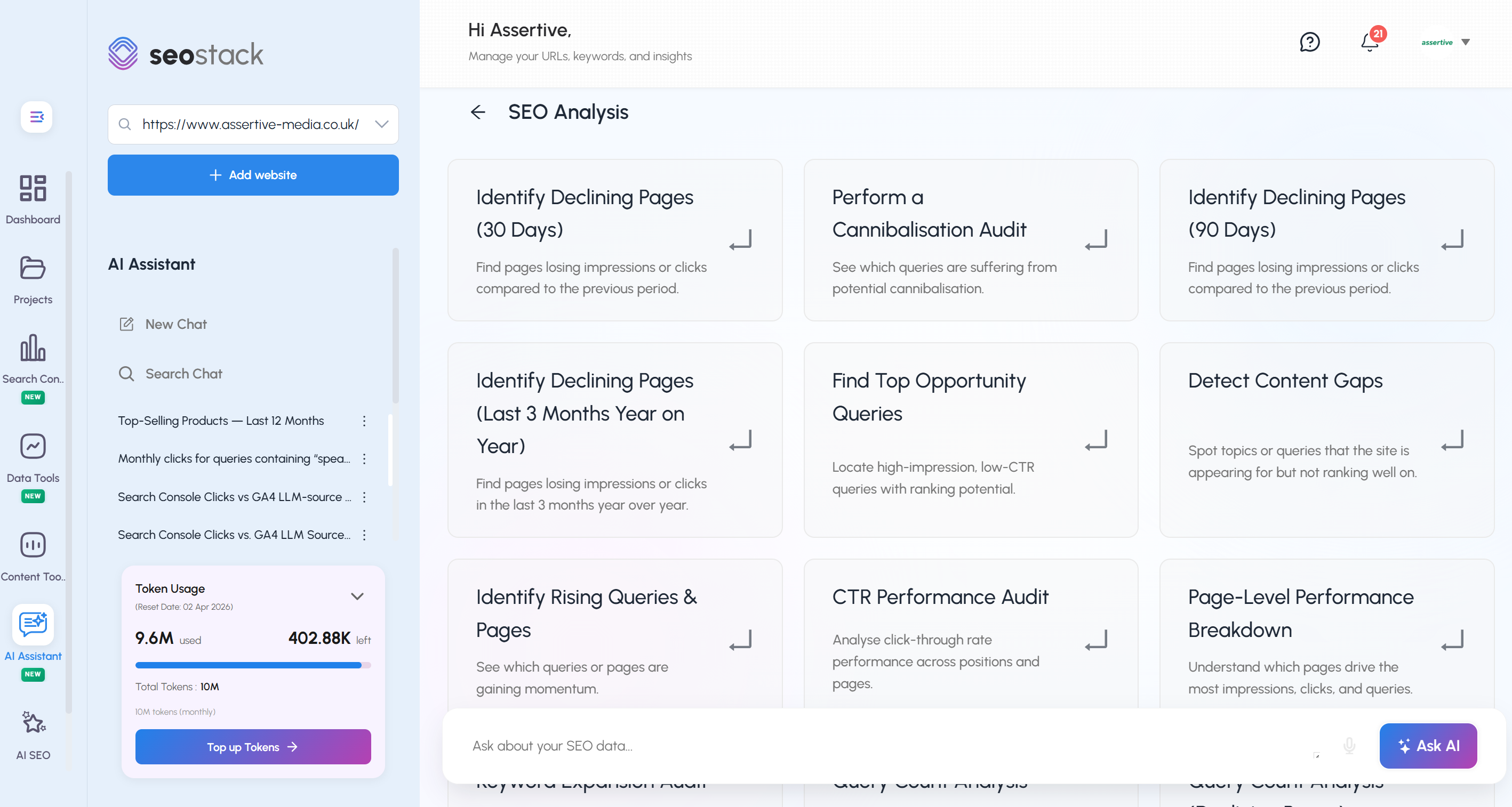
SEO Stack's AI Assistant allows you to query your google search console data quickly and easily. Ask your own questions or use the built in prompt library for lots of quick tasks. You can ask SEO Stack to analyse your google search console data - identify ranking declines, content gaps, cannibalisation, click gaps - ask it absolutely ANYTHING and it'll get you the data.
Three Data Sources.
Infinite Possibilities.
Ask anything across your entire marketing data stack individually or combined.

Google Search Console
Access both warehoused historical data and live GSC data. Ask about rankings, clicks, impressions, CTR, pages, querieswithout any of the limits Google imposes.
Google Analytics 4
Chat to your GA4 data asking for absolutely anythingany metric, any dimension. Engagement, conversions, revenue, bounce rates, user behavior and more.
Hybrid GSC + GA4
Combine both data sources in a single request. Cross-reference rankings with revenue, traffic with engagement, keywords with conversions.
Your Personal AI Assistant for
Google Search Console Data
SEO Stack's built in AI Assistant can look at your full Google Search Console data including warehoused data beyond 16 months. You can perform complex analysis, audits, report generation in minutes! You'll save time whilst getting actionable output.
Perform Ranking, Click & Loss Analysis in Minutes
Quickly and effortlessly find out where clicks were lost (pages and queries), get detailed insights, reports and guidance on recovering clicks.
Find Competing Pages, Queries & Overlap
In no time at all, SEO Stack can go through millions of queries and URLS to find cannibalisation, keyword overlap, thin content issues, query deficits and more.
Interactive Charts & Graphs
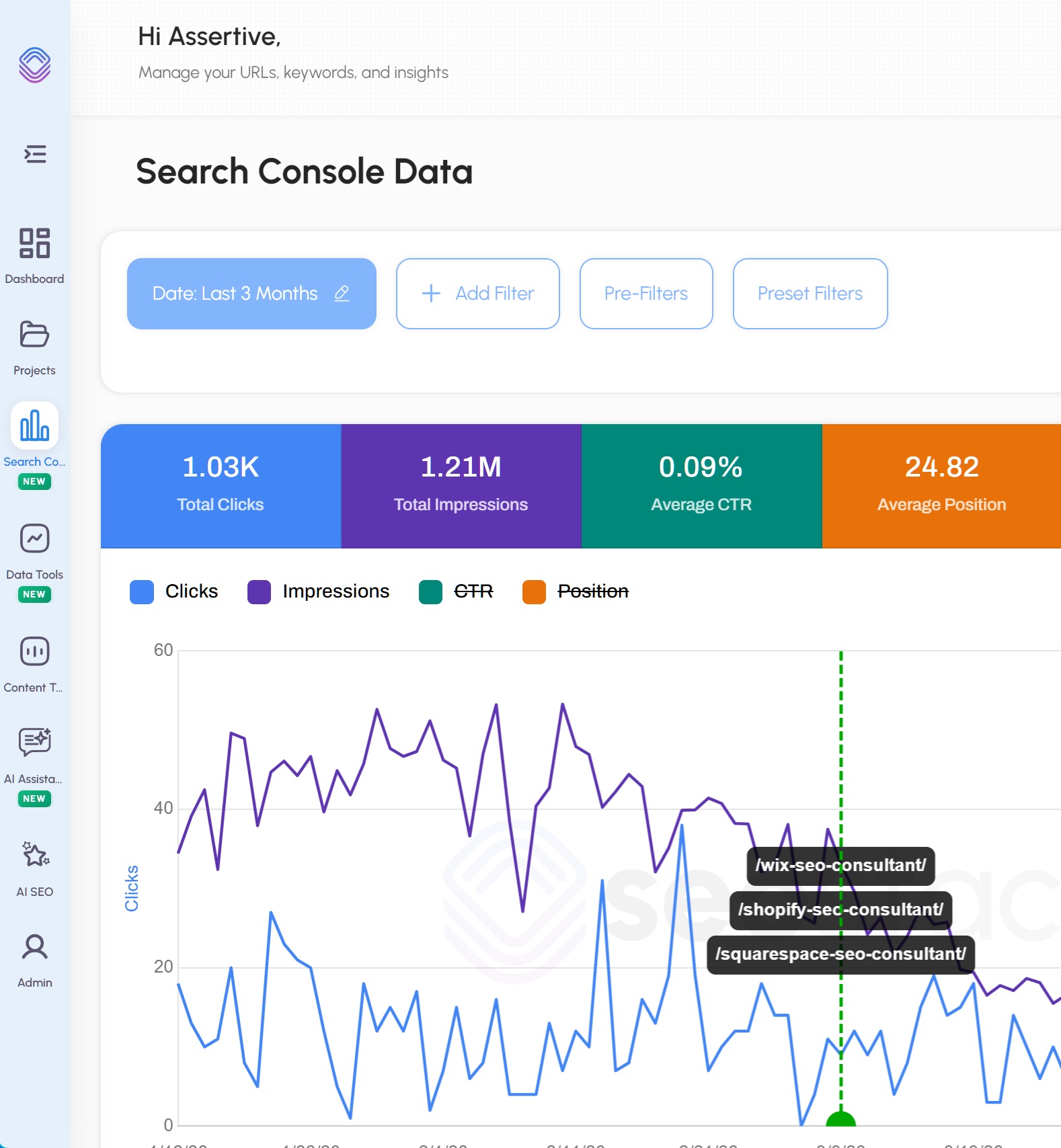
Generate click graphs, click charts for specific URLs or query groups, and visualise GSC data in ways Search Console simply can't.
Full Data Audits
Run comprehensive audits for decaying pages, pages lost from the index, indexing issues, and the impact of every algorithm update.
Combine GSC + GA4 Data
For Deeper Intelligence
Create hybrid requests that cross-reference Search Console with Analytics datauncovering insights that neither platform can deliver alone.
Helpful Content Reports
Find pages that decayed where GA4 engagement was poor or bounce rates were high. Build helpful vs unhelpful content reports automatically.
Revenue & Lead Impact
Discover which decayed pages were generating revenue, leads, or conversions. Track how keyword positions affect your bottom line over time.
Engagement & Abandonment
Analyse pages with high organic traffic but no conversions, high abandonment rates, or poor engagement. Find hidden opportunities.
Content & UX Audits
The AI reviews page content for E-E-A-T and YMYL issues, then cross-references with GA4 user behavior data to assess quality holistically.
Conversion & CRO Insights
Identify pages with conversion bleed, generate CRO and UXO experiments, and understand which landing pages drive revenue vs which need work.
Keywords & Revenue Tracking
Ask which keywords have contributed towards revenue and leads, and track their average positions over time to spot opportunities.
Everything the AI Assistant
Can Do For You
From data analysis to strategy generationthe possibilities are unlimited.
Analysis & Auditing
Audit any data set individually or in bulk
Perform advanced data analysis across all metrics
Content audits with E-E-A-T & YMYL analysis
Engagement & user behavior audits
UX and conversion audits
Evaluate work annotations to see what is and isn't working
Analyse SEO and marketing strategies (paid & organic)
Reports & Strategy
Build SEO reports: indexing, decay, core updates
Build PPC reports: landing page issues & performance
Build reports on social & LLM traffic including conversions
Generate SEO strategies & content briefs
Generate CRO / UXO experiments
Interactive charts for query & page groups
AI visibility insights & client report generation
Chat to Your GA4 Data
Ask Absolutely Anything
Ask SEO Stack which pages had poor engagement, high bounce rates, conversion bleed, or which pages are responsible for your revenue and leads. Query any GA4 metric, any dimensionwith zero limitations.
The AI Assistant can also analyse social traffic, LLM traffic including visits and conversions, PPC landing page performance, and build reports across every traffic channel.
The Possibilities Are
Truly Unlimited
Because SEO Stack is a data warehouse with access to Google Search Console and Google Analytics dataany data set that is available can be analysed, and insights, recommendations, and strategies can be provided instantly.
Ask Your Search Console Data Anything
SEO Stack's AI Assistant connects directly to your warehoused Google Search Console data, giving you a conversational interface to interrogate your site's performance without filters, exports, or spreadsheets. Ask a question in plain English, get an actionable answer instantly.
Here's everything you can use it for.
Diagnosing Declining Performance
Identify Declining Pages (30 Days)
Pinpoint pages that have lost impressions or clicks compared to the previous 30-day period. Understand whether the drop is query-driven, position-driven, or both.
Identify Declining Pages (90 Days)
Surface pages with sustained performance deterioration over a 90-day window. Useful for separating short-term fluctuations from structural ranking loss.
Identify Declining Pages (Last 3 Months YoY)
Compare the last three months against the same period in the prior year to strip out seasonality and identify genuine long-term decline.
Query Count Analysis (Declining Pages)
For URLs in decline, analyse how many queries they're appearing for. Determine whether a page is losing rankings across the board or being deindexed from specific query clusters.
Position Volatility Analysis
Find queries or pages with unstable average positions. Identify pages caught in ranking flux that may need content consolidation or technical stabilisation.
Top Query Movers
Reveal which keywords have moved up or down most significantly in rankings over a chosen period. Useful for tracking the impact of updates, optimisations, or algorithm changes.
Finding Growth Opportunities
Find Top Opportunity Queries
Locate high-impression, low-CTR queries where your pages are visible but failing to earn clicks. These represent quick wins where title tag and meta description optimisation can deliver measurable uplift without any ranking work.
Low-Click, High-Impression Pages
Surface entire pages, not just individual queries, where visibility is strong but engagement is weak. Often signals a mismatch between the SERP appearance and the searcher's expectation.
Detect Content Gaps
Identify topics and queries your site is appearing for but not ranking well enough to capitalise on. Use these signals to inform new content creation or to expand existing pages.
Keyword Expansion Audit
Discover where pages are already ranking for long-tail variations that could be developed further. Either through dedicated landing pages or by strengthening existing content to consolidate topical authority.
New vs. Lost Queries
Track how your site's keyword footprint is evolving. See which queries you've newly entered the index for and which you've dropped out of entirely. A critical signal for understanding content freshness and crawl health.
Identify Rising Queries & Pages
See which queries and pages are gaining momentum right now. Use this to double down on content that's trending upward before competitors take notice.
Technical & Structural Audits
Perform a Cannibalisation Audit
See which queries are being competed for by multiple pages across your site. Cannibalisation dilutes authority and confuses Google's understanding of your content. This analysis surfaces the conflicts that need resolving.
Directory or Folder Performance Review
Analyse how content sections or subdirectories are performing as a whole. Understand whether your /blog/, /services/, or /products/ folders are pulling their weight or dragging down overall performance.
CTR Performance Audit
Analyse click-through rates across all positions and pages. Benchmark your CTRs against expected rates by position and identify pages significantly underperforming against their ranking potential.
Intent Alignment Audit
Check whether your current rankings match the likely intent behind the queries driving them. Pages ranking for informational queries when the SERP is dominated by transactional results are at structural risk.
Page-Level Performance Breakdown
Understand which individual pages are driving the most impressions, clicks, and queries across your entire domain. Essential for prioritising your SEO effort and editorial calendar.
Query Count Analysis
Assess each page's overall visibility footprint by analysing the diversity of queries it ranks for. A page ranking for a single query is fragile; a page ranking for hundreds is an asset.
Audience & Traffic Intelligence
Branded vs Non-Branded Split
Understand the ratio between branded queries driving traffic and non-branded organic search demand. A site overly reliant on brand traffic has a fragile organic foundation. This analysis shows you where you stand.
Device Performance Breakdown
Compare desktop versus mobile visibility and CTR across your site. Identify pages where mobile performance lags significantly. Often a signal of Core Web Vitals issues, intrusive interstitials, or content rendering problems.
Geographical Insights
See exactly where in the world your organic traffic is coming from, broken down by country or region. Identify untapped markets and understand whether your content is resonating with the audiences you're targeting.
Seasonality Comparison
Detect recurring seasonal patterns in your click and impression data. Plan content calendars and campaign timing around the natural ebb and flow of demand for your key topics.
Click-Share Distribution
Understand how clicks are distributed across your top-performing pages. Identify whether your traffic is dangerously concentrated in a small number of URLs or healthily distributed across a broad portfolio.
Advanced Query Analysis
Search Query Intent Mapping
Ask the AI to group your ranking queries by intent (informational, navigational, commercial, transactional) and identify which intent categories are over or under-served in your current content.
Long-Tail Query Discovery
Ask specifically for queries with low individual volume but strong collective contribution to your total click share. These are often the most commercially valuable and least competitive terms on your site.
Question Query Analysis
Isolate queries phrased as questions that your site is appearing for. These are prime candidates for FAQ content, featured snippet optimisation, and People Also Ask targeting.
Zero-Click Query Exposure
Identify queries where your site earns high impressions but near-zero clicks. Often caused by featured snippets, knowledge panels, or SERP features absorbing demand before users reach your listing.
Competitor Gap Comparison
Ask the AI to identify query themes your site is absent from that would be expected given your existing content. A proxy for spotting the keyword territories your competitors are likely owning.
Reporting & Custom Analysis
Custom Date Range Performance Reports
Ask for performance summaries across any date range. Weekly, monthly, quarterly, or between any two specific dates. No manual filter setup, no CSV downloads.
Pre and Post-Update Analysis
Define the date of an algorithm update and ask the AI to compare performance before and after. Instantly understand whether a Google update helped, hurt, or had no impact on your visibility.
Page Migration Impact Assessment
After a URL migration or site restructure, ask the AI to compare the performance of old URL patterns against new ones and identify which redirects may be failing to pass equity correctly.
Content Refresh Prioritisation
Ask the AI to identify which existing pages have the highest potential return on investment for a content refresh. Combining declining trend data, query diversity, and current position to rank them by opportunity.
Executive Summary Reports
Ask for a plain-English summary of how your site performed last month, what moved, what declined, and what requires attention. Ready to paste into a client report or stakeholder update without any manual assembly.
Stop Guessing.
Start Asking Your Data.
Join thousands of SEO professionals who are using AI to make smarter, faster, data-driven decisions.
Free 30 day trial • Cancel anytime • No credit card required